
描述
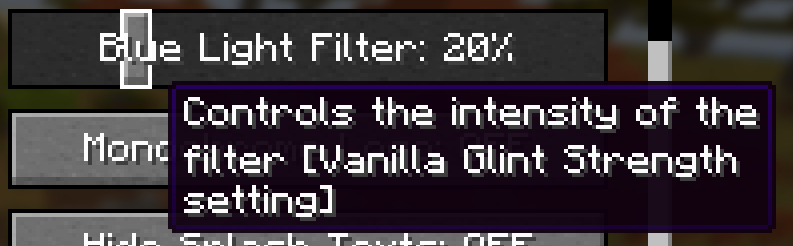
为游戏环境添加一个可自定义的橙色滤镜(不影响 GUI 或物品,仅作用于世界中的方块和生物等)。该设置可通过辅助功能设置中的滑块进行调整。
当图形设置为华丽!且滑块值高于 0% 时,滤镜才会生效。
此滑块替代了附魔光晕强度,并在启用或禁用资源包后保持其数值不变。在资源包处于活动状态期间,附魔光晕强度会被重置为其默认值(75%)。
版本
支持 Minecraft Java Edition 1.21.5、26.3。其他版本可能也能正常工作。
兼容性
与编辑透明度后处理效果光影(包括用于显示自定义光影)或其他特定光影以及某个自定义光影的资源包不兼容。也与在辅助功能设置中使用附魔光晕滑块的任何其他操作不兼容,包括修改 en_us 语言文件中的名称。
免责声明
根据一些研究,蓝光过滤器可能并不具有实际的正向效果。如果您想了解哪种方式最合适,建议自行研究。本项目主要旨在作为制作光影的实践练习。是否认为使用此资源包有益,由用户自行判断。
Patreon
加入 我的新 Patreon 以支持我的项目!

你是这个资源的作者?登录后可认领此资源。
相似资源
 光影

Emissive Twitch Cape
Bluebird
使 Twitch 披风上的紫色心形发光
核心着色器微调
5
 光影

SkyboxTemplate
Dragoncraft
用于 skybox 核心光影的资源包模板与示例
核心着色器环境
4
 光影

Custom Damage Overlay Color
SuperAnt_
将全部实体的受击颜色(色调)更改为任意颜色!
核心着色器实体
4
 光影

XP Coins
AlphaLeoli
经验球已经过时了。用金币替换经验点/经验球!
实体界面
3
 光影

Emissive Trims
Bluebird
让盔甲纹饰在黑暗中发光。无需模组!
核心着色器环境
3
 光影

ReShaded
DR7
无需模组或帧数损失的光影。兼容 26.1-1.20.5 原版、Sodium 及其他模组!
核心着色器写实
3
评论 0
登录后参与评分
还没有评论,来抢沙发吧