? English
? 简体中文(大陆)

? WireSight
? WireSight 是一款实验性的低开销 Minecraft Java 版光影包,它以实体建模视图的方式渲染世界:深绿色面与亮绿色方块边缘。
⚙️ 该光影包针对 Iris、Oculus 和 OptiFine 共用的 OptiFine 光影包格式。其核心路径使用 GLSL 1.20,单次地形渲染通道,法线深度写入,且无阴影或全屏后处理。
? 光影包使用 / ? Bug 报告 / ?? 开发讨论 — 加入我们的 QQ 群:259248174 ?(此群已失效)
? 光影包使用 / ? Bug 报告 / ?? 开发讨论 — 加入我们的 QQ 群:1085190201 ?
? 在群中 @我 可获得更快回复 ~ ✨
?️ 预览

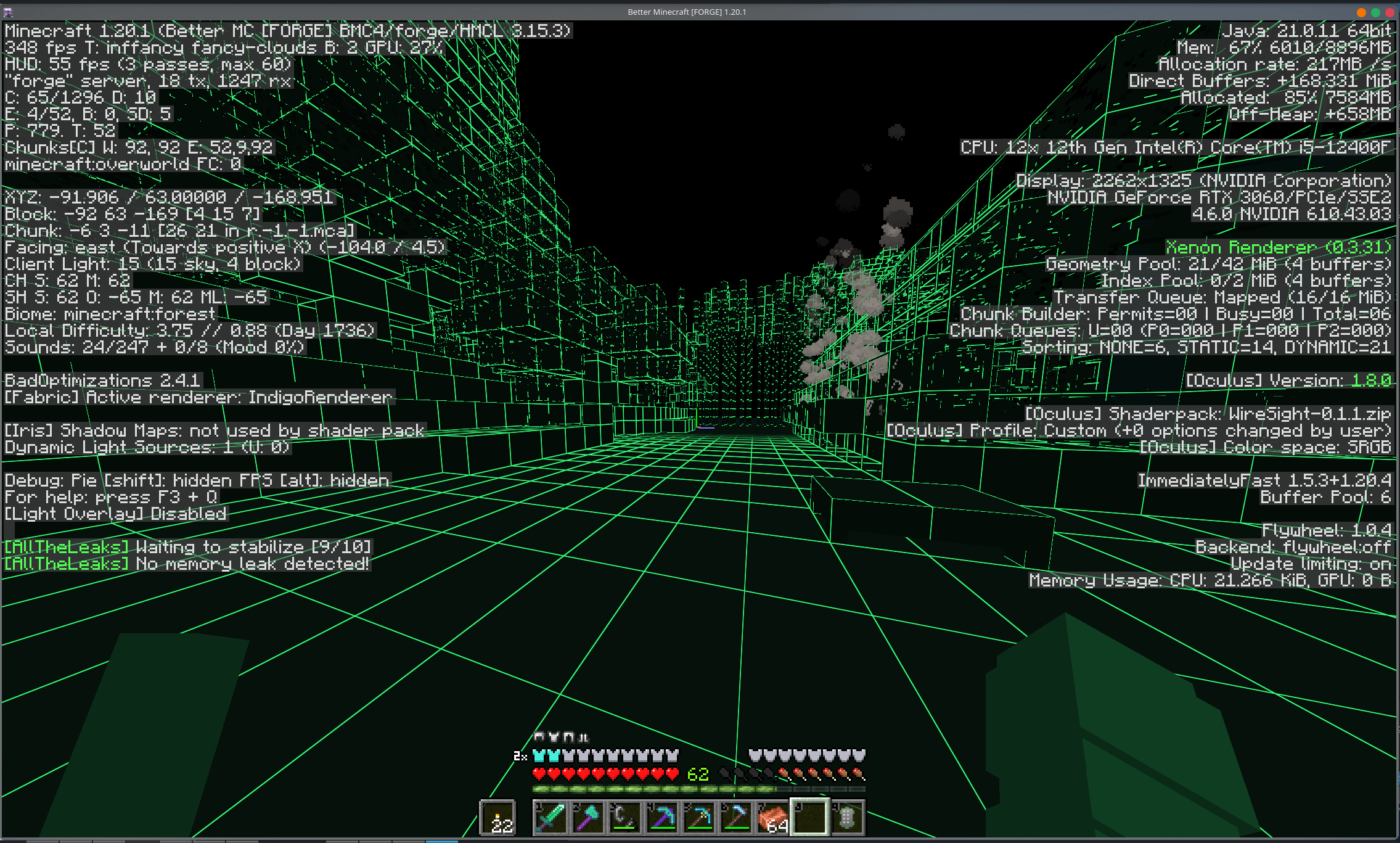
? 默认主题颜色
? WireSight 默认使用以下基础颜色(RGB 和 Hex 表示相同的颜色):
| ? 渲染目标 |
RGB |
Hex |
外观 |
| ? 普通方块面 |
RGB(6, 17, 11) |
#06110B |
深绿色 |
| ? 水和半透明地形 |
RGB(5, 21, 19) |
#051513 |
深青绿色 |
| ✨ 方块边缘 |
RGB(53, 255, 120) |
#35FF78 |
荧光绿 |
| ? 实体、手持物品、粒子及天气效果 |
RGB(14, 61, 34) |
#0E3D22 |
平面绿 |
| ? 天空、太阳、月亮和云朵 |
RGB(0, 0, 0) |
#000000 |
黑色 |
? 这些值为基础颜色;方向性面着色会进一步加深地形和实体侧面及底面的亮度。
?️ 光影设置
⚙️ WireSight 使用 Iris、Oculus 和 OptiFine 支持的通用 OptiFine ShaderPack 选项格式。加载器皮肤可能有所不同,但控件和顺序保持一致。
? 主屏幕
+--------------------------------+--------------------------------+
| Theme Preset: WireSight Green  | Custom Theme Colors...         |
| Directional Face Shading: On   | Edge Width: 1.5                |
| Edge Fade Start: 96 blocks     | Edge Fade Length: 64 blocks    |
+--------------------------------+--------------------------------+
- ?
Directional Face Shading(方向性面着色)使用顶部、侧面和底面的固定亮度级别;它不是动态光照。
- ?
Edge Width(边缘宽度)控制方块边缘在屏幕上的近似像素宽度。
- ?️
Edge Fade Start(边缘淡出起始距离)是边缘开始淡出的距离。
- ?
Edge Fade Length(边缘淡出长度)是用于完成该淡出的距离,因此默认值在 96 + 64 = 160 格处结束。
? 自定义主题颜色
+----------------------+----------------------+----------------------+
| Theme Preset: Custom                                               |
+----------------------+----------------------+----------------------+
| Block Face R: 6      | Block Face G: 17     | Block Face B: 11     |
| Water R: 5           | Water G: 21          | Water B: 19          |
| Block Edge R: 53     | Block Edge G: 255    | Block Edge B: 120    |
| Entity R: 14         | Entity G: 61         | Entity B: 34         |
| Sky R: 0             | Sky G: 0             | Sky B: 0             |
+----------------------+----------------------+----------------------+
⚠️ 重要提示: 仅当 Theme Preset(主题预设)设置为 Custom(自定义)时,自定义 RGB 值才会生效。
? 每个通道具有从 0 到 255 的完整整数精度。选择其他预设时,自定义值将保持保存状态,并在切换回 Custom 时保持不变。
? 内置预设
| ? 表面 |
WireSight Green |
Cyan |
Amber |
Monochrome |
| ? 方块面 |
#06110B |
#061116 |
#171006 |
#111111 |
| ? 水 |
#051513 |
#051522 |
#071417 |
#151515 |
| ✨ 方块边缘 |
#35FF78 |
#35E7FF |
#FFC247 |
#F2F2F2 |
| ? 实体 |
#0E3D22 |
#0E3540 |
#5E3D10 |
#3D3D3D |
| ? 天空和天体 |
#000000 |
#000000 |
#000000 |
#000000 |
? Amber(琥珀色)预设故意将水设为冷色调和深色,以将其与暖色调地形区分开来。更改选项可能会短暂重新编译光影。
? 当前范围
- ? 可见的地形和方块实体的 1x1 方块边界
- ? 三种平面面着色以增强空间可读性
- ✨ 像素稳定、抗锯齿的主题色边缘
- ?️ 自动远距离网格过滤以减少闪烁
- ? 保留剪影几何体(如树叶和植物)的透明度
- ? 平面颜色的实体、粒子、天气效果和手持物品
- ?️ 名称标签和世界空间文本的原始颜色和透明度
- ? 不透明风格化水和可配置的天空
⚠️ 仅可见几何体可以被描边。WireSight 不是 X 射线光影,不会渲染 Minecraft 从区块网格中移除的面。
? 兼容性目标
? 本光影包有意避免使用计算着色器(compute shaders)、几何着色器(geometry shaders)以及加载器专属扩展。
| ? 环境 |
Minecraft |
光影加载器 |
配套组件 |
| ? Oculus |
1.20.1 |
Oculus 1.8.0 |
Embeddium 0.3.31 |
| ? Iris |
1.21.8 |
Iris 1.9.1 |
Sodium 0.6.31 |
| ? OptiFine |
1.8.9 |
OptiFine HD U M5 |
Forge 11.15.1.2318 |
? OptiFine 构建版本支持从 1.8 到 1.21.x 的所有稳定 Minecraft 版本。未列出的组合依赖兼容接口,且未经单独测试。
? 安装
? 将发布的 zip 文件放入 Minecraft 实例的 shaderpacks 目录中,然后在光影包菜单中选择 WireSight。
? VS Code
? 安装 Shader languages support for VS Code 以启用 GLSL 语法高亮。跟踪的 .vscode/settings.json 将 .glsl、.fsh 和 .vsh 文件映射为 GLSL,而 .vscode/extensions.json 会自动推荐该扩展。
code --install-extension slevesque.shader
? 构建、发布与部署
? 使用 uv 和 Python 3.13 在本地进行构建:
uv venv
uv run python ./scripts/build_shaderpack.py
uv run python ./scripts/validate_publish.py
? 两个可复现的 ZIP 文件及其对应的 SHA-256 校验文件将写入 dist/ 目录。metadata.toml 是有关 WireSight 版本、变体支持范围、平台项目 ID 和加载器的唯一真实来源。
| ? 变体 |
产物 |
Modrinth 加载器 |
Minecraft 范围 |
| > |
? Iris / Oculus |
WireSight-X.Y.Z-iris-oculus.zip |
iris |
| > |
? OptiFine |
WireSight-X.Y.Z-optifine.zip |
optifine |
⚙️ GitHub Actions 会在推送时观察以下确切的提交主题后缀:
| ? 模式 |
提交主题后缀 |
Actions 产物 |
GitHub Release |
Modrinth / CurseForge |
| > |
?️ 构建 |
(build action) |
✅ |
❌ |
| > |
?️ 发布 |
(build release) |
✅ |
✅ |
| > |
? 部署 |
(build publish) |
✅ |
✅ |
? 仅检查主题行;提交正文中的匹配文本将被忽略。
? 拉取请求始终会触发构建。构建、发布和平台部署也可以手动启动;推送 v* 标签仅创建对应的 GitHub Release。
? 请参阅 构建、发布与部署指南,了解流水线图、平台项目设置、所需的 GitHub Secrets、发布元数据、支持的 Minecraft 版本以及发布说明格式。
# ?️ 构建并上传 Actions 产物,但不创建 Release。
git commit --allow-empty -m "ci: test WireSight package (build action)"

# ?️ 构建并发布 metadata.toml 中声明的版本。
git commit -m "release: vX.Y.Z summary (build release)"

# ? 构建、创建 GitHub Release,并部署到 Modrinth 和 CurseForge。
git commit -m "release: vX.Y.Z summary (build publish)"
? English
? 简体中文(大陆)
? WireSight
? WireSight is an experimental, low-overhead Minecraft Java shaderpack that renders the world like a solid modeling view: dark green faces with bright green block edges.
⚙️ The pack targets the OptiFine shaderpack format shared by Iris, Oculus, and OptiFine. Its core path uses GLSL 1.20, a single terrain pass, normal depth writes, and no shadows or full-screen post-processing.
? Shaderpack usage / ? Bug reports / ?? Development discussion — Join our QQ Group: 259248174 ? (This group is gone)
? Shaderpack usage / ? Bug reports / ?? Development discussion — Join our QQ Group: 1085190201 ?
? Mention me in the group for faster replies ~ ✨
?️ Preview
? Default theme colors
? WireSight uses the following base colors by default (RGB and hex denote the same color):
| ? Render target |
RGB |
Hex |
Appearance |
| ? Regular block faces |
RGB(6, 17, 11) |
#06110B |
Dark green |
| ? Water and translucent terrain |
RGB(5, 21, 19) |
#051513 |
Dark cyan-green |
| ✨ Block edges |
RGB(53, 255, 120) |
#35FF78 |
Fluorescent green |
| ? Entities, held items, particles, and weather |
RGB(14, 61, 34) |
#0E3D22 |
Flat green |
| ? Sky, sun, moon, and clouds |
RGB(0, 0, 0) |
#000000 |
Black |
? These values are base colors; directional face shading further darkens terrain and entity sides and undersides.
?️ Shader settings
⚙️ WireSight uses the common OptiFine ShaderPack option format supported by Iris, Oculus, and OptiFine. The loader skin may differ, but the controls and order remain the same.
? Main screen
+--------------------------------+--------------------------------+
| Theme Preset: WireSight Green  | Custom Theme Colors...         |
| Directional Face Shading: On   | Edge Width: 1.5                |
| Edge Fade Start: 96 blocks     | Edge Fade Length: 64 blocks    |
+--------------------------------+--------------------------------+
- ?
Directional Face Shading uses fixed brightness levels for top, side, and underside faces; it is not dynamic lighting.
- ?
Edge Width controls the approximate on-screen pixel width of block edges.
- ?️
Edge Fade Start is the distance where edges begin fading.
- ?
Edge Fade Length is the distance used to complete that fade, so the defaults end at 96 + 64 = 160 blocks.
? Custom theme colors
+----------------------+----------------------+----------------------+
| Theme Preset: Custom                                               |
+----------------------+----------------------+----------------------+
| Block Face R: 6      | Block Face G: 17     | Block Face B: 11     |
| Water R: 5           | Water G: 21          | Water B: 19          |
| Block Edge R: 53     | Block Edge G: 255    | Block Edge B: 120    |
| Entity R: 14         | Entity G: 61         | Entity B: 34         |
| Sky R: 0             | Sky G: 0             | Sky B: 0             |
+----------------------+----------------------+----------------------+
⚠️ Important: Custom RGB values are applied only when Theme Preset is set to Custom.
? Each channel has full integer precision from 0 to 255. Custom values remain saved when another preset is selected and return unchanged when switching back to Custom.
? Built-in presets
| ? Surface |
WireSight Green |
Cyan |
Amber |
Monochrome |
| ? Block faces |
#06110B |
#061116 |
#171006 |
#111111 |
| ? Water |
#051513 |
#051522 |
#071417 |
#151515 |
| ✨ Block edges |
#35FF78 |
#35E7FF |
#FFC247 |
#F2F2F2 |
| ? Entities |
#0E3D22 |
#0E3540 |
#5E3D10 |
#3D3D3D |
| ? Sky and celestials |
#000000 |
#000000 |
#000000 |
#000000 |
? The Amber preset intentionally keeps water cool and dark to distinguish it from warm terrain. Changing an option may briefly recompile the shader.
? Current scope
- ? Visible 1x1 block boundaries on terrain and block entities
- ? Three flat face shades for spatial readability
- ✨ Pixel-stable, antialiased theme-colored edges
- ?️ Automatic distant-grid filtering to reduce shimmer
- ? Alpha preservation for cutout geometry such as leaves and plants
- ? Flat-color entities, particles, weather, and held items
- ?️ Original colors and transparency for name tags and world-space text
- ? Opaque stylized water and a configurable sky
⚠️ Only visible geometry can be outlined. WireSight is not an X-ray shader and does not render faces that Minecraft removes from chunk meshes.
? Compatibility target
? This shaderpack intentionally avoids compute shaders, geometry shaders, and loader-specific extensions.
| ? Environment |
Minecraft |
Shader loader |
Companion component |
| ? Oculus |
1.20.1 |
Oculus 1.8.0 |
Embeddium 0.3.31 |
| ? Iris |
1.21.8 |
Iris 1.9.1 |
Sodium 0.6.31 |
| ? OptiFine |
1.8.9 |
OptiFine HD U M5 |
Forge 11.15.1.2318 |
? The OptiFine build targets every stable Minecraft release from 1.8 through 1.21.x. Unlisted combinations rely on compatible interfaces and have not been tested individually.
? Install
? Place the release zip in the Minecraft instance's shaderpacks directory, then select WireSight from the shader pack menu.
? VS Code
? Install Shader languages support for VS Code for GLSL syntax highlighting. The tracked .vscode/settings.json maps .glsl, .fsh, and .vsh files to GLSL, while .vscode/extensions.json recommends the extension automatically.
code --install-extension slevesque.shader
? Build, release, and publish
? Build locally with uv and Python 3.13:
uv venv
uv run python ./scripts/build_shaderpack.py
uv run python ./scripts/validate_publish.py
? Two reproducible ZIPs and their matching SHA-256 files are written to dist/. metadata.toml is the single source of truth for the WireSight version, variant support ranges, platform project IDs, and loaders.
| ? Variant |
Artifact |
Modrinth loader |
Minecraft range |
| ? Iris / Oculus |
WireSight-X.Y.Z-iris-oculus.zip |
iris |
1.20 through 1.21.x |
| ? OptiFine |
WireSight-X.Y.Z-optifine.zip |
optifine |
1.8 through 1.21.x |
⚙️ GitHub Actions observes these exact commit-subject suffixes on pushes:
| ? Mode |
Commit subject suffix |
Actions artifact |
GitHub Release |
Modrinth / CurseForge |
| ?️ Build |
(build action) |
✅ |
❌ |
❌ |
| ?️ Release |
(build release) |
✅ |
✅ |
❌ |
| ? Publish |
(build publish) |
✅ |
✅ |
✅ |
? Only the subject line is inspected; matching text in the commit body is ignored.
? Pull requests are always built. Builds, releases, and platform publishing can also be started manually; pushing a v* tag creates only the matching GitHub Release.
? See the build, release, and publish guide for the pipeline diagrams, platform project setup, required GitHub Secrets, release metadata, supported Minecraft versions, and release-note format.
# ?️ Build and upload an Actions artifact without creating a Release.
git commit --allow-empty -m "ci: test WireSight package (build action)"

# ?️ Build and publish the version declared in metadata.toml.
git commit -m "release: vX.Y.Z summary (build release)"

# ? Build, create a GitHub Release, and publish to Modrinth and CurseForge.
git commit -m "release: vX.Y.Z summary (build publish)"


 光影

 光影

 光影

 光影

 光影

 光影

评论 0
登录后参与评分
还没有评论,来抢沙发吧