
Bingo Game Data Pack [1.20.3-26.1]
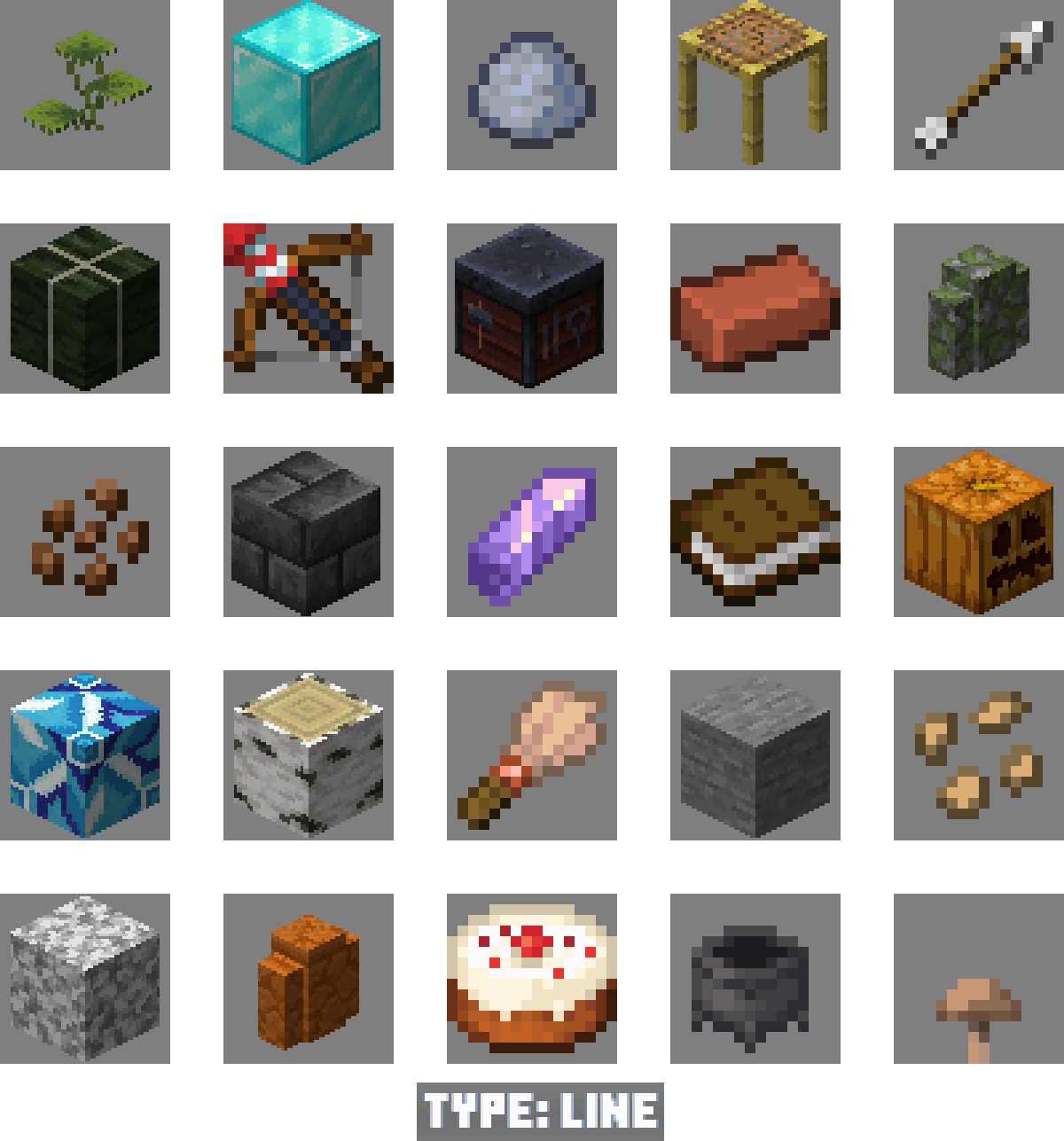 |
你的目标是尽可能快地收集特定物品并完成宾果卡。率先完成任务的队伍将获胜。 |
|---|
不同版本的 Bingo 专为 Vanilla Minecraft Java Edition 的特定版本设计。请确保你使用的是兼容的游戏版本。
| ⚠️ 重要提示:此数据包需要配合资源包才能正常运行。请务必安装资源包! |
|---|
数据包与资源包安装指南
选择并下载
决定你要游玩的游戏版本,然后下载对应版本的数据包(DP)和资源包(RP)。
下载步骤
- 在 Modrinth 上找到 Minecraft Bingo 页面(你当前正在浏览此页面)。
- 选择 “Versions”(版本)标签页。
- 点击你想下载的 版本号名称。
- 在 页面底部,你会找到所需的数据包文件和资源包文件。
- 下载这两个文件
数据包与资源包下载指南
数据包安装:
1. 在新世界中安装数据包:
- 打开 Minecraft,进入 单人游戏 > 创建新世界。
- 点击 更多 按钮,然后选择 数据包。
- 选择 打开数据包文件夹,并将下载的数据包文件移入该文件夹。
2. 向现有世界添加数据包:
- 打开 Minecraft,进入 单人游戏,选择你要修改的世界,然后点击 编辑。
- 打开 世界文件夹,然后进入 datapacks 文件夹。
- 将下载的数据包文件移动到这里。
- ⚠️ 警告:向现有世界添加数据包可能会影响当前的游戏体验。这包括可能的成就删除和库存修改等变化。请确保了解数据包的运作方式,以避免任何意外后果或进度丢失。
3. 必要时重载
如有需要,在游戏中使用 /reload 命令来激活数据包。
资源包安装:
- 打开 Minecraft,进入 选项 > 资源包 > 打开资源包文件夹。
- 将下载的资源包文件移动到这里。
- 返回 Minecraft,选中该资源包并启用它。
玩法说明
安装好所有必要内容后,你可以独自游玩,也可以召集玩家进行多人游戏——全凭你选择!
要开始游戏,请输入命令 /trigger .bingo.start。初始化后,每位玩家将有机会选择自己的队伍。
队伍选择:
你可以加入任意队伍,每支队伍的参赛人数没有限制。你可以单人游玩、与朋友组队,或者创建多个队伍——完全由你决定。配置讨论:
建议在开始前与其他参与者讨论游戏设置。规则非常灵活,允许你根据个人喜好自定义游戏,只要所有玩家同意即可。
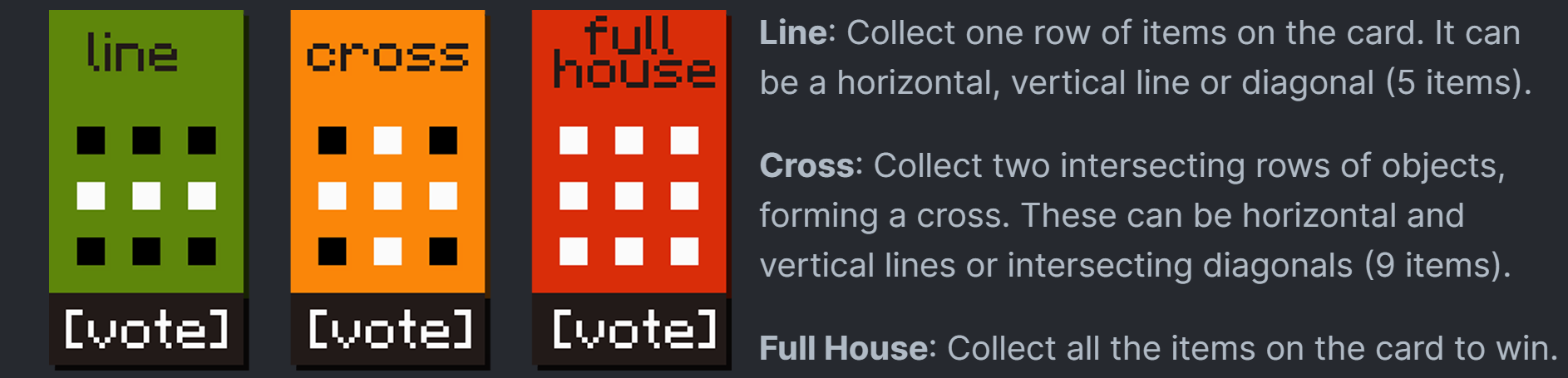
游戏模式:
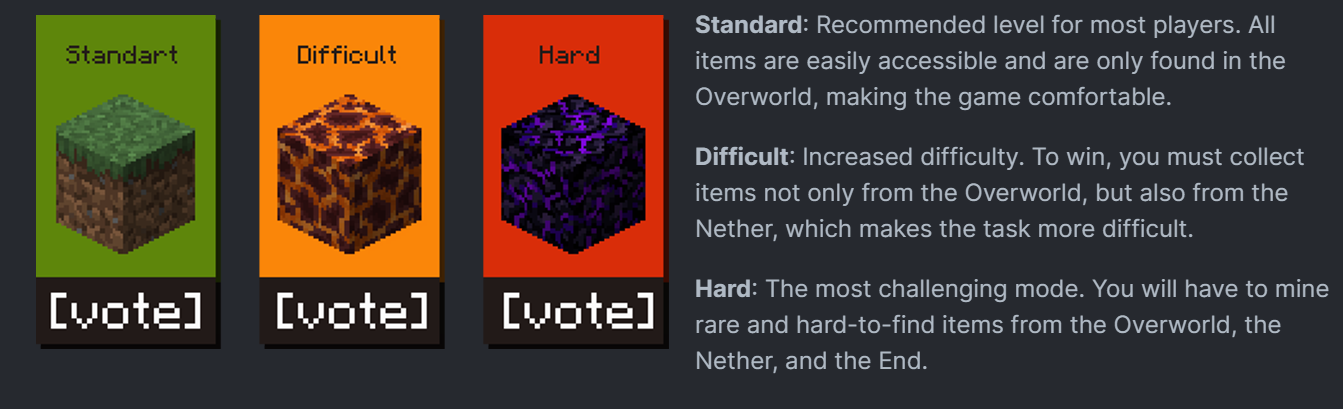
难度等级:
| 命令 | 描述 |
|---|---|
/trigger .bingo.start |
输入后,游戏将立即开始,你可以开始完成目标。 |
/trigger .bingo.leave.game |
如果你需要离开当前的宾果游戏,请使用此命令。 |
/trigger .bingo.settings |
建议使用此命令根据你的偏好自定义界面。 |
/trigger .bingo.rules |
此命令将向你展示游戏规则。如果你想快速熟悉规则,请使用它。 |
翻译支持
简体中文
English (UK)
English (USA)
法语
德语
意大利语
日语
波兰语
葡萄牙语(巴西)
俄语
西班牙语(墨西哥)
西班牙语(西班牙)
土耳其语
乌克兰语
鸣谢与资源
祝游戏愉快!
Bingo Game Data Pack [1.20.3-26.1]
|
Your goal is to collect certain items as quickly as possible and complete the Bingo card. The team that completes the task first will win. |
|---|
Different versions of Bingo are designed for specific versions of Vanilla Minecraft Java Edition. Make sure you are using the correct version of the game for compatibility.
| ⚠️ Important: This data pack requires an accompanying resource pack to function properly. Please make sure it is installed! |
|---|
Installation Guide for Data Pack & Resource Pack
Select and Download
Decide which version of the game you want to play, and then download the Data Pack (DP) and Resource Pack (RP) corresponding to your chosen version.
Download
- Find the Minecraft Bingo page on Modrinth (you are on it).
- Select the “Versions” tab.
- Click on the name of the version you want to download.
- At the bottom of the page, you will find the data package file and resource package file you need.
- Download both files
Downloading Guide for the Data Pack & Resource Pack
Data Pack Installation:
1. To install the Data Pack in a new world:
- Open Minecraft, go to Singleplayer > Create New World.
- Click on the More button, then Data Packs.
- Select Open Pack Folder and move the downloaded Data Pack file into this folder.
2. To add the Data Pack to an existing world:
- Open Minecraft, go to Singleplayer, select the world you want, and click on Edit.
- Open the World Folder, then go to the datapacks folder.
- Move the downloaded Data Pack file here.
- ⚠️ Warning: Adding the Data Pack to an existing world may impact your current gameplay. This includes potential changes such as the deletion of achievements and modifications to your inventory. Ensure you understand how the Data Pack works to avoid any unintended consequences or loss of progress.
3. Reload if Necessary
Use the /reload command in-game if needed to activate the Data Pack.
Resource Pack Installation:
- Open Minecraft and go to Options > Resource Packs > Open Pack Folder.
- Move the downloaded Resource Pack file here.
- Go back to Minecraft, select the Resource Pack, and activate it.
How to Play
Once you've installed everything you need, you can play alone or gather players for a group game - it's all up to you!
To start the game, enter the command /trigger .bingo.start. Once initiated, each player will have the opportunity to select their team.
Team Selection:
You can join any team, and there are no limits to the number of players in each team. You can play solo, team up with friends, or create multiple teams—it's all your choice.Discuss Configuration:
It's advisable to discuss the game setup with other participants before starting. The rules are flexible, allowing you to customize the game to your liking, as long as all players agree.
Game Modes:
Difficulty levels:
| Command | Description |
|---|---|
/trigger .bingo.start |
After entering it, the game will start immediately and you will be able to start completing the goals. |
/trigger .bingo.leave.game |
Use this command if you need to leave the current Bingo game. |
/trigger .bingo.settings |
It is recommended to use this command to customize the interface according to your preferences. |
/trigger .bingo.rules |
This command will show you the rules of the game. Use it if you want to quickly familiarize yourself with the rules. |
Translation
Chinese (Simplified)
English (UK)
English (USA)
French
German
Italian
Japanese
Polish
Portuguese (Brazil)
Russian
Spanish (Mexico)
Spanish (Spain)
Turkish
Ukrainian
Credits and Resources
- Original Idea by lorgon111
- Negative Space Font - GitHub Repository
- No Shadow - GitHub Repository
Enjoy the game!

下载 Minecraft Bingo
需要联机服务器吗?
稳定流畅、一键部署,几分钟即可和朋友联机开服
最低仅需 8 元/月 即可畅快联机
下载 Minecraft Bingo
需要联机服务器吗?
稳定流畅、一键部署,几分钟即可和朋友联机开服
最低仅需 8 元/月 即可畅快联机
下载 Minecraft Bingo
下载 Minecraft Bingo
需要联机服务器吗?
稳定流畅、一键部署,几分钟即可和朋友联机开服
最低仅需 8 元/月 即可畅快联机
下载 Minecraft Bingo
需要联机服务器吗?
稳定流畅、一键部署,几分钟即可和朋友联机开服
最低仅需 8 元/月 即可畅快联机
下载 Minecraft Bingo
需要联机服务器吗?
稳定流畅、一键部署,几分钟即可和朋友联机开服
最低仅需 8 元/月 即可畅快联机
下载 Minecraft Bingo
需要联机服务器吗?
稳定流畅、一键部署,几分钟即可和朋友联机开服
最低仅需 8 元/月 即可畅快联机
下载 Minecraft Bingo
需要联机服务器吗?
稳定流畅、一键部署,几分钟即可和朋友联机开服
最低仅需 8 元/月 即可畅快联机
下载 Minecraft Bingo
需要联机服务器吗?
稳定流畅、一键部署,几分钟即可和朋友联机开服
最低仅需 8 元/月 即可畅快联机
下载 Minecraft Bingo
需要联机服务器吗?
稳定流畅、一键部署,几分钟即可和朋友联机开服
最低仅需 8 元/月 即可畅快联机
? 新增内容与兼容性
| 标准 | |
|---|---|
 |
来自版本 [26.1] 的金黄蒲公英 |
? 新功能
- 宾果卡上的直线和十字图案现在添加了视觉动画,清晰展示需要收集的元素,以及哪些组合可以获胜。
- 每 10 分钟将在聊天栏中显示一次关于可用游戏设置的提示通知。使用该设置后,通知将自动隐藏。
? 修复问题
- 修复了玩家离线期间收集的物品在返回服务器时显示不正确的问题。现在信息会正确更新。
关于这个资源的讨论、问题反馈与使用心得
还没有讨论,来发第一帖吧
你是这个资源的作者?登录后可认领此资源。
相似资源
 数据包

此数据包添加了属于阿瓦里海盗的独特结构,将他们的独特风格带入你的 Minecraft 世界!兼容性:1.20 至 26.3
 数据包

此数据包添加了新的“祝福模式”难度。
 数据包

添加了基于官方概念图的蓝蛙和红眼树蛙变体。
 数据包

为模组生物群系添加原版回溯特性!
 数据包

使用原版/生存友好的方法更改青蛙的变种类型。支持原版(寒冷、温带、温暖)以及可选的“More Frogs 2”变种:深红、末影、地狱、毒镖、紫珀、幽匿、灵魂、诡异和木头。
 数据包

手持潜影盒时可直接打开,无需将其放置在地面上。只需按住 Shift 并右键点击即可访问你的潜影盒。
评论 0
登录后参与评分
还没有评论,来抢沙发吧