
通过在世界开始时设置世界边界,为你的 Minecraft 世界增加额外挑战。初始边界宽度为 4 格,随着你的进展,边界会逐渐扩大;但每前进 100 格,计时器就会变得更长。
数据包安装指南
将数据包放入你选择的地图或服务器中。
- 如果是在已经运行的当前世界中导入,请安装并输入
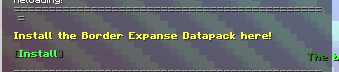
/reload命令,或者重启该世界。 - 版本 1.0.3v 及以上不需要此提示,但如果你使用的是 1.0.2 及更低版本,将会出现以下提示:
- 你需要获得 OP(管理员权限)以确保其正常工作。
指令
如果你想修改每 100 格增加的计时时间,请使用以下指令:
scoreboard players set #ticks_border.add main <Number>
插入你想要的刻度数(20 刻 = 1 秒)
默认值为 100。
如果你想查看当前的边界大小,请使用: /trigger bordersize
它将在你的操作栏中显示,并告诉你当前的边界大小。
合成 / 战利品表
泥土方块会掉落木棍和泥土。
以下是橡木木板的制作方式:
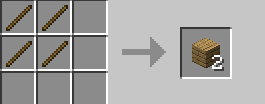
注意:正常的橡木合成依然有效!
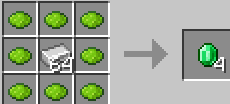
你还可以合成绿宝石,方法如下:
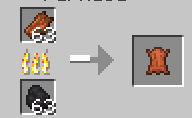
你可以烧制腐肉来获取皮革:
Add an extra challenge to your Minecraft World by putting a world border at the start, it starts off as 4 blocks wide as you progress the border gets bigger, but every 100 blocks, the timer becomes longer.
How To Setup The Datapack
Put the datapack into a world / server of your choice.
- If importing during a current world that's already been booted up, install and type
/reloador reboot the world. - 1.0.3v and above do NOT need this prompt, but if you are playing on 1.0.2 and below this prompt will show up:
- You need OP in order to make sure this works.
Commands
If you want to modify how much time is added to timer every 100 blocks, Use this command:
scoreboard players set #ticks_border.add main <Number>
Insert how long you want it to be in ticks (20 Ticks = 1 second)
Default is 100.
If you want to see the current border size, use this: /trigger bordersize
It will display in your actionbar and show you the current border size.
Crafting / Loot Tables
The Dirt block drops sticks along side with dirt.
Here is how you craft OAK PLANKS:
Note: Normal Oak crafting still works too!
You can also craft emeralds, this is how:
You can smelt Rotten Flesh for Leather:

下载 Border Expanse
下载 Border Expanse
下载 Border Expanse
下载 Border Expanse
下载 Border Expanse
下载 Border Expanse
下载 Border Expanse
下载 Border Expanse
适用于 26.2 版本的更新数据包。
下界的世界边界额外扩展了 8 个方块。
世界边界默认初始等待时间已缩短为 50 秒。
关于这个资源的讨论、问题反馈与使用心得
还没有讨论,来发第一帖吧
你是这个资源的作者?登录后可认领此资源。
相似资源
 数据包

此数据包添加了属于阿瓦里海盗的独特结构,将他们的独特风格带入你的 Minecraft 世界!兼容性:1.20 至 26.3
 数据包

此数据包添加了新的“祝福模式”难度。
 数据包

添加了基于官方概念图的蓝蛙和红眼树蛙变体。
 数据包

为模组生物群系添加原版回溯特性!
 数据包

使用原版/生存友好的方法更改青蛙的变种类型。支持原版(寒冷、温带、温暖)以及可选的“More Frogs 2”变种:深红、末影、地狱、毒镖、紫珀、幽匿、灵魂、诡异和木头。
 数据包

手持潜影盒时可直接打开,无需将其放置在地面上。只需按住 Shift 并右键点击即可访问你的潜影盒。
评论 0
登录后参与评分
还没有评论,来抢沙发吧