不喜欢发光鱿鱼完全无视光照等级的设定吗?觉得它们明明沐浴在光线中却从不真正发光的样子很愚蠢?
一个选择是下载诸如 Glow Squids Actually Glow 这样的模组或数据包,这确实会让它们的视觉效果好得多……但如果相反地,你希望彻底阻止它们“发光”呢?现在你可以做到了!
使用此数据包,你可以选择是否让发光鱿鱼“发光”,以及发光的程度。默认情况下,发光鱿鱼将不再发光,但可以通过命令更改此设置。
兼容性
要求:
无!
自定义模型与纹理:
此数据包与所有资源包完全兼容,包括那些使用如 EMF 等模组来更改发光鱿鱼所用模型的资源包。
此外,它实际上可以 改进 某些资源包,特别是那些利用……
自发光层(Emissive Layers):
在原版游戏中,发光鱿鱼几乎总是发光的,只有在受到伤害后的一小段时间内才会变暗。由于这种“发光”是通过使整个身体变为自发光来实现的,因此叠加在其上的任何自发光层都不会显得突出。通过降低发光强度或完全移除它,可以为资源包添加的新自发光纹理提供展现的机会!
要查看实际效果,可以尝试我的资源包:Slightly Squidier。
Glow Squids Actually Glow by o-Peepo:
技术上 兼容,但会完全抵消使用本数据包的效果。
然而,如果你稍微调整代码,使发光鱿鱼产生较低的光照等级——我建议使用等级 6——那么这两个模组将会非常互补!
安装方法
要将此数据包添加到现有世界……
- 选择该世界
- 点击“编辑”
- 然后点击“打开世界文件夹”
- 进入 “datapacks” 子文件夹
- 将数据包的 ZIP 文件放入其中
要将此数据包添加到新世界中……
- 选择“创建新世界”
- 点击“更多”
- 然后选择“数据包”
- 接着点击“打开包文件夹”
- 将数据包的 ZIP 文件放入其中 (此时数据包应出现在“可用”列表中)
- 悬停在数据包图标上并点击箭头以启用它
使用方法:
安装后,数据包应自动加载。为了确保其正常工作,请将一只发光鱿鱼放置在黑暗处,测试其是否发光。如果数据包正常工作,它将不会发光。如果是这种情况,请尝试使用命令 "/reload" 并检查你是否拥有正确的版本。
一旦数据包运行正常,你可以使用以下命令进行配置:
/function config_sg:glow/on 会将发光设置为最亮状态。
/function config_sg:glow/off 将完全禁用发光。
/function config_sg:glow/(1-5) 会将光照等级设置为中间状态。
不幸的是,将发光设置为 1-5 会导致闪烁。这在设置为 ON 或 OFF 时不会出现此问题。
为什么会出现这个问题?
在每个游戏刻(tick),会发生两件事:第一,游戏会尝试降低所有发光鱿鱼的 "DarkTicksRemaining" 值。第二,数据包会覆盖这些值。
由于值 0-5 对应不同的光照等级,尝试在每个刻将值设置为 1-5 会导致每个刻闪烁一次光照等级。在正常的刻速度下,这相当于每秒闪烁 20 次。
"On" 模式没有这个问题,因为 "DarkTicksRemaining" 值被设置为 0,无法再降低。
"Off" 模式也没有这个问题,因为值 6-15 都对应完全黑暗,且数据包将值设置为 15。从技术上讲,游戏 确实在 闪烁,但它是在完全黑暗和完全黑暗之间闪烁。
卸载方法:
只需从安装时放置数据包的文件夹中删除该数据包即可。所有发光鱿鱼将在 15 个游戏刻内恢复正常!
如果你想彻底清除世界中关于此数据包的所有痕迹,还需要使用命令 "/scoreboard objectives remove dark_ticks"。此步骤完全是可选的,如果不执行也不会导致任何问题。
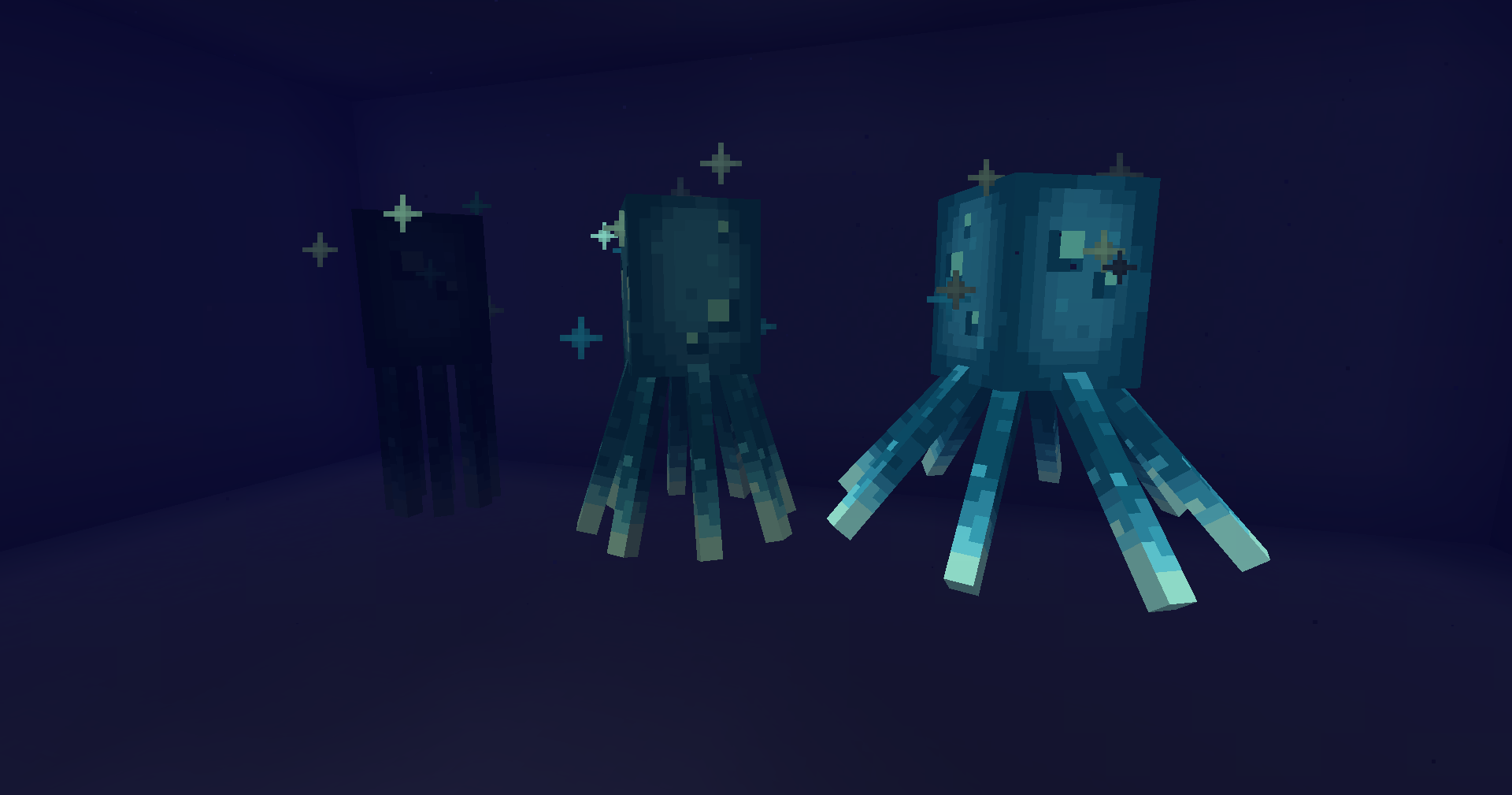
Not a fan of how glow squids completely ignore light levels? Think it looks silly how they're constantly bathed in light yet never actually emit any?
One option is to download a mod or datapack such as Glow Squids Actually Glow, and that would make them look way better... But what if instead you wanted to completely stop them from "glowing"? Well, now you can!
With this datapack, you're able to choose whether or not glow squids "glow", and if so, how much. By default, glow squids will no longer glow, however, this can be changed by using commands.
Compatability
Requirements:
None!
Custom Models & Textures:
This data pack is fully compatible with ALL resource packs, including those which use mods such as EMF to change the model used by glow squids.
Moreover, it can actually improve certain resource packs, specifically those which utilize...
Emissive Layers:
In vanilla, glow squids will almost always glow, only ever going dark for a brief time after taking damage. Since this "glowing" works by making their entire body emissive, any emissive layers added on top won't stand out. By reducing the intensity of the glow or fully removing it, any new emissive textures added by resource packs are given the chance to shine!
To see this in action, consider trying out my resource pack: Slightly Squidier.
Glow Squids Actually Glow by o-Peepo:
Technically compatible but completely nullifies using this pack.
However, if you adjust the code slightly so that glow squids will produce a lower light level — I'd suggest using level 6 — then the two mods will complement one another really well!
Installation
To add this pack to a pre-existing world...
- Select the world
- Click on "Edit"
- Then click "Open World Folder"
- Go into the "datapacks" sub-folder
- Place the datapack ZIP file inside
To add this pack to a new world...
- Select "Create New World"
- Click on "More"
- Then "Data Packs"
- And then "Open Pack Folder"
- Place the datapack ZIP file inside (the pack should then appear under "Available")
- Hover over the datapack icon and click the arrow to enable it
How To Use:
Upon installation, the datapack should load automatically. To make sure it's working, put a glow squid somewhere dark to test whether or not it's glowing. If the datapack is working, it won't be. If that's the case, try using the command "/reload" and check to make sure you have the right version.
Once you have the pack working, you can configure it using these commands:
/function config_sg:glow/on will set the glow to full brightness.
/function config_sg:glow/off will fully disable glowing.
/function config_sg:glow/(1-5) will set the light level to an in-between state.
Unfortunately, setting the glow to 1-5 will cause flickering. This is NOT an issue when setting it to ON or OFF.
Why does this issue occur?
On every game tick two things happen: One, the game will attempt to lower the "DarkTicksRemaining" value of all glow squids. And two, the datapack overwrites these values.
Since values 0-5 all correspond to different light levels, attempting to set the value to 1-5 on every tick will cause the light level to flicker once per tick. On normal tick speed, this results in 20 flickers per second.
"On" doesn't have this problem because the "DarkTicksRemaining" value is set to 0 and cannot be lowered.
"Off" doesn't have this issue because values 6-15 all correspond to complete darkness and the datapack sets the value to 15. Technically the game is flickering, but it's flickering between completely dark and completely dark.
Uninstallation:
Just remove the datapack from the datapack folder you put it in during installation. All glow squids will return to normal within 15 ticks!
If you want to wipe all traces of the datapack from your world, you'll also need to use the command "/scoreboard objectives remove dark_ticks". This step is completely optional and not doing so shouldn't cause any issues.


 数据包

 数据包

 数据包

 数据包

 数据包

 数据包

评论 0
登录后参与评分
还没有评论,来抢沙发吧