
一个 Minecraft 项目,为生存模式中通常无法制作的物品添加了合成配方,并提供了自定义进度表,以获得更丰富的游戏体验。
✨ 功能
- 新的合成配方:可以制作附魔金苹果、不死图腾、三叉戟、马铠、锁链护甲等物品。
- 自定义进度表:制作特殊物品可获得独特的奖励。
- 广泛兼容:支持从 1.13.x 版本到最新快照的 Minecraft Java 版。
? 进度表 & ? 配方
进度表
不够回收!

当你制作了所有回收类配方后,你将获得此进度表。
谁在那些日子里附魔盔甲?

当你制作或拥有附魔金苹果时,你将获得此进度表。
忘记死亡。

当你制作或拥有不死图腾时,你将获得此进度表。
水上武器。

当你制作或拥有三叉戟时,你将获得此进度表。
是时候骑上马了。

当你制作或拥有鞍时,你将获得此进度表。
哇哦!

当你制作或拥有经验瓶时,你将获得此进度表。
配方
钟

锁链护甲
锁链头盔

锁链胸甲

锁链护腿

锁链靴子

蛛网

哭泣黑曜石 (1.17 或更高版本)

鞘翅

附魔金苹果

经验瓶

火药


需要 30 秒才能给你 1 个火药。
(仅适用于熔炉)
马铠
钻石马铠

黄金马铠

铁马铠

铜马铠 (1.21.9 或更高版本)

皮革马铠

(仅适用于熔炉)
皮革

需要 10 秒才能给你 1 张皮革。
(仅适用于熔炉)
命名牌 (1.21.11 或更早版本)

鹦鹉螺甲壳盔甲 (1.21.11 或更新版本)
钻石鹦鹉螺甲壳盔甲

金鹦鹉螺甲壳盔甲

铁鹦鹉螺甲壳盔甲

铜鹦鹉螺甲壳盔甲

鹦鹉螺甲壳

回收合成表
回收紫水晶块 (1.17 或更新版本)

回收锁链靴子

回收锁链胸甲

回收锁链头盔

回收锁链护腿

回收蛛网

回收哭泣的黑曜石

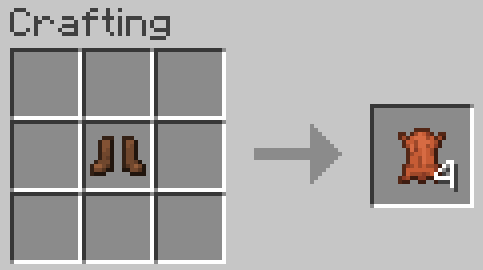
回收皮革靴子
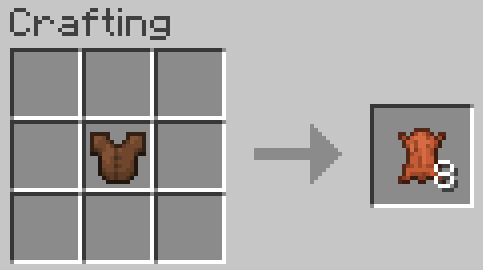
回收皮革胸甲
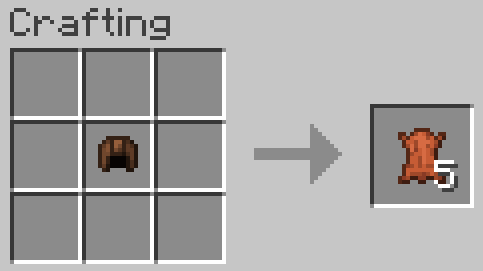
回收皮革头盔
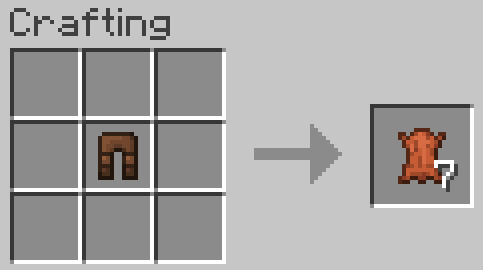
回收皮革护腿
回收浮冰

回收石英块

鞍 (1.21.5 或更早版本)

不死图腾
 ~~~~
三叉戟
三叉戟 (1.21 或更新版本)

三叉戟 (1.20.6 或更早版本)

?️ 新闻与更新
查看我项目的最新动态:
? 源代码与问题反馈
GitLab (源代码)
GitLab (问题反馈)
? 安装指南
Linux
数据包
对于已存在的存档:
- 前往此路径 "~/.minecraft/saves/"(请确保通过按 Left Ctrl + H 显示隐藏文件夹和文件)。
- 选择你要放入数据包的存档文件夹。
- 打开 datapacks 文件夹,然后将 data pack.zip 放入该文件夹中。
- 通过输入 /reload 命令退出世界并重新加入来重载世界。
新建世界:
- 打开 Minecraft,然后点击“单人游戏”。
- 点击“创建新世界”,然后点击“更多世界选项...”。
- 点击“数据包”按钮,然后将数据包文件拖入 Minecraft 窗口中。
- 点击“完成”并“创建新世界”。
MacOS
数据包
已存在的世界:
- 前往此路径 "~/Library/Application Support/minecraft/saves/"。
- 选择你要放入数据包的存档文件夹。
- 打开 datapacks 文件夹,然后将 data pack.zip 放入该文件夹中。
- 通过 /reload 命令或退出并重新加入世界来重载世界。
新创建的世界:
- 打开 Minecraft,然后点击“单人游戏”。
- 点击“创建新的世界”,然后点击“更多世界选项...”。
- 点击“数据包”按钮,然后将数据包文件拖入 Minecraft。
- 点击“完成”并“创建新的世界”。
Windows
数据包
已存在的世界:
- 按下 Win + R,然后输入 %appdata% 并按回车键。
- 打开 "Roaming" 文件夹,然后打开 ".minecraft" 文件夹,接着打开 "saves"(确保你已通过按左 Ctrl + 左 Shift + 句号显示隐藏文件夹和文件)。
- 选择你要放入数据包的存档文件夹。
- 打开 datapacks 文件夹,然后将 data pack.zip 放入该文件夹中。
- 通过 /reload 命令或退出并重新加入世界来重载世界。
新创建的世界:
- 打开 Minecraft,然后点击“单人游戏”。
- 点击“创建新的世界”,然后点击“更多世界选项...”。
- 点击“数据包”按钮,然后将数据包文件拖入 Minecraft。
- 点击“完成”并“创建新的世界”。
? 删除
Linux
数据包
- 前往此路径 "~/.minecraft/saves/"(确保你已通过按左 Ctrl + H 显示隐藏文件夹和文件)。
- 找到你放入数据包的存档文件夹。
- 打开 datapacks 文件夹,然后从该文件夹中移除 data pack.zip。
- 通过 /reload 命令或退出并重新加入世界来重载世界。
MacOS
数据包
- 前往此路径 "~/Library/Application Support/minecraft/saves/"。
- 找到你放入数据包的存档文件夹。
- 打开 datapacks 文件夹,然后从该文件夹中移除 data pack.zip。
- 通过 /reload 命令或退出并重新加入世界来重载世界。
Windows
数据包
- 按下 Win + R,然后输入 %appdata% 并按回车键。
- 打开 "Roaming" 文件夹,然后打开 ".minecraft" 文件夹,接着打开 "saves"(确保你已通过按左 Ctrl + 左 Shift + 句号显示隐藏文件夹和文件)。
- 找到你放入数据包的存档文件夹。
- 打开 datapacks 文件夹,然后从该文件夹中移除 data pack.zip。
- 通过 /reload 命令或退出并重新加入世界来重载世界。
Enjoy.
A Minecraft Project that adds crafting recipes for normally uncraftable items in Survival mode, along with custom advancements for a more rewarding experience.
✨ Features
- New Crafting Recipes: Craft items like the Enchanted Golden Apple, Totem of Undying, Trident, Horse Armors, Chainmail Armors, and more.
- Custom Advancements: Unique rewards for crafting special items.
- Wide Compatibility: Supports Minecraft Java Edition from version 1.13.x up to the latest snapshots.
🏆 Advancements & 📜 Recipes
Advancements
Not Enough Recycling!
You will get this Advancement when you craft all Recycling recipes.
Who Enchanting Armor Those Days?
You will get this Advancement when you craft or have an Enchanted Golden Apple.
Forget Die.
You will get this Advancement when you craft or have a Totem of Undying.
Water Weapon.
You will get this Advancement when you craft or have a Trident.
It's Time to Take a Horse.
You will get this Advancement when you craft or have a Saddle.
WoW!
You will get this Advancement when you craft or have an Experience Bottle.
Recipes
Bell
Chainmail Armors
Chainmail Helmet
Chainmail Chestplate
Chainmail Leggings
Chainmail Boots
Cobweb
Crying Obsidian (1.17 or newer)
Debug Stick

Recommended to use Tweaker Stick Data Pack to able to use it with full functionality or instead use Creative mode to able to use it until I add an update that fix this problem.
Elytra
Enchanted Golden Apple
Experience Bottle
Gunpowder
It will take 30 seconds to give you 1 Gunpowder.
(Only works on Furnace)
Horse Armors
Diamond Horse Armor
Golden Horse Armor
Iron Horse Armor
Copper Horse Armor (1.21.9 or newer)
Leather Horse Armor
(Only works on Furnace)
Leather
It will take 10 seconds to give you 1 Leather.
(Only works on Furnace)
Name Tag (1.21.11 or older)
Nautilus Armors (1.21.11 or newer)
Diamond Nautilus Armor
Golden Nautilus Armor
Iron Nautilus Armor
Copper Nautilus Armor
Nautilus Shell
Recycling Recipes
Recycling Amethyst Block (1.17 or newer)
Recycling Chainmail Boots
Recycling Chainmail Chestplate
Recycling Chainmail Helmet
Recycling Chainmail Leggings
Recycling Cobweb
Recycling Crying Obsidian
Recycling Leather Boots
Recycling Leather Chestplate
Recycling Leather Helmet
Recycling Leather Leggings
Recycling Packed Ice
Recycling Quartz Block
Saddle (1.21.5 or older)
Totem of Undying
~~~~
Trident
Trident (1.21 or newer)
Trident (1.20.6 or older)
🗒️ News & Updates
See the latest news about my projects:
📂 Source Code & Issues
GitLab (Source Code)
GitLab (Issues)
📥 Installation
Linux
Data Pack
World that already exists:
- Go to this location "~/.minecraft/saves/" (Make sure you are showing the hidden folders and files by pressing Left Ctrl + H).
- Choose the world folder you want to put the Data Pack into it.
- Open datapacks folder, then put the data pack.zip in the datapacks folder.
- Reload the world by /reload command or by Quit the world and rejoin it.
New World:
- Open Minecraft, then click on "Singleplayer".
- Click on "Create New World", then click "More World Options...".
- Click on "Data Packs" button, then drag the data pack file into Minecraft.
- Click "Done" and "Create New World".
MacOS
Data Pack
World that already exists:
- Go to this location "~/Library/Application Support/minecraft/saves/".
- Choose the world folder you want to put the Data Pack into it.
- Open datapacks folder, then put the data pack.zip in the datapacks folder.
- Reload the world by /reload command or by Quit the world and rejoin it.
New World:
- Open Minecraft, then click on "Singleplayer".
- Click on "Create New World", then click "More World Options...".
- Click on "Data Packs" button, then drag the data pack file into Minecraft.
- Click "Done" and "Create New World".
Windows
Data Pack
World that already exists:
- Press Win + R, then type %appdata%, then press Enter.
- Open "Roaming" folder, then ".minecraft" folder, then open "saves" (Make sure you are showing the hidden folders and files by pressing Left Ctrl + Left Shift + period).
- Choose the world folder you want to put the Data Pack into it.
- Open datapacks folder, then put the data pack.zip in the datapacks folder.
- Reload the world by /reload command or by Quit the world and rejoin it.
New World:
- Open Minecraft, then click on "Singleplayer".
- Click on "Create New World", then click "More World Options...".
- Click on "Data Packs" button, then drag the data pack file into Minecraft.
- Click "Done" and "Create New World".
🛑 Deletion
Linux
Data Pack
- Go to this location "~/.minecraft/saves/" (Make sure you are showing the hidden folders and files by pressing Left Ctrl + H).
- Find the world folder that you put the Data Pack into it.
- Open datapacks folder, then remove the data pack.zip in the datapacks folder.
- Reload the world by /reload command or by quit the world and rejoin it.
MacOS
Data Pack
- Go to this location "~/Library/Application Support/minecraft/saves/".
- Find the world folder that you put the Data Pack into it.
- Open datapacks folder, then remove the data pack.zip in the datapacks folder.
- Reload the world by /reload command or by quit the world and rejoin it.
Windows
Data Pack
- Press Win + R, then type %appdata%, then press Enter.
- Open "Roaming" folder, then ".minecraft" folder, then open "saves" (Make sure you are showing the hidden folders and files by pressing Left Ctrl + Left Shift + period).
- Find the world folder that you put the Data Pack into it.
- Open datapacks folder, then remove the data pack.zip in the datapacks folder.
- Reload the world by /reload command or by Quit the world and rejoin it.
Enjoy.

下载 Craftable Uncraftable Objects [CUO]
下载 Craftable Uncraftable Objects [CUO]
下载 Craftable Uncraftable Objects [CUO]
需要联机服务器吗?
稳定流畅、一键部署,几分钟即可和朋友联机开服
最低仅需 8 元/月 即可畅快联机
下载 Craftable Uncraftable Objects [CUO]
下载 Craftable Uncraftable Objects [CUO]
下载 Craftable Uncraftable Objects [CUO]
下载 Craftable Uncraftable Objects [CUO]
需要联机服务器吗?
稳定流畅、一键部署,几分钟即可和朋友联机开服
最低仅需 8 元/月 即可畅快联机
下载 Craftable Uncraftable Objects [CUO]
下载 Craftable Uncraftable Objects [CUO]
下载 Craftable Uncraftable Objects [CUO]
需要联机服务器吗?
稳定流畅、一键部署,几分钟即可和朋友联机开服
最低仅需 8 元/月 即可畅快联机
🛠️ 技术改动:
- 为 26.4 Snapshot 8 创建 CUO 数据包。
关于这个资源的讨论、问题反馈与使用心得
还没有讨论,来发第一帖吧
你是这个资源的作者?登录后可认领此资源。
相似资源
 数据包

此数据包添加了属于阿瓦里海盗的独特结构,将他们的独特风格带入你的 Minecraft 世界!兼容性:1.20 至 26.3
 数据包
一个 Minecraft 光线投射库,能够精确检测玩家正在查看的方块,包括像台阶和楼梯这样的特殊方块形状。
 数据包

此数据包添加了新的“祝福模式”难度。
 数据包
允许服务器管理员方便地禁用 Xaero's Map 系列模组中的实体雷达、小地图等功能,使竞技游戏更加公平。
 数据包

使用原版/生存友好的方法更改青蛙的变种类型。支持原版(寒冷、温带、温暖)以及可选的“More Frogs 2”变种:深红、末影、地狱、毒镖、紫珀、幽匿、灵魂、诡异和木头。
 数据包

手持潜影盒时可直接打开,无需将其放置在地面上。只需按住 Shift 并右键点击即可访问你的潜影盒。
评论 0
登录后参与评分
还没有评论,来抢沙发吧