
Creative Dimension
用于生存世界的超平坦创造维度数据包
此数据包为生存世界添加了一个超平坦的创造维度,可以安全地使用。
本说明针对数据包的最新版
如需查看旧版本,请访问 GitHub:
?简介
Creative Dimension 是什么?
Minecraft 生存玩家通常希望在生存世界中建造之前,先在创造模式下预先设计建筑或想法。如果你拥有一个生存服务器并想在此类项目上进行协作,则需要另一个服务器或使用 Multiverse 插件来提供两个不同的世界,且拥有独立的物品栏和特定的游戏模式。
Creative Dimension 数据包允许你在生存世界中创建传送门,将玩家传送到专用的创造维度。玩家的物品栏(包括末影箱)、经验值、生命值、游戏模式和效果都会被保存,当玩家返回主世界维度时,这些状态也会一并恢复。因此,你终于可以在原版服务器上测试创意并与他人一起进行生存模式游戏。
当然,你也可以在单人游戏中使用此数据包。
安装详情
⚠️ 免责声明:需要注意的是,此数据包使用了世界生成功能,而 Mojang 目前仍将其视为实验性功能。安装过程很简单,但卸载则较为复杂。更多信息请参见下方的“卸载”部分。
将数据包放入世界的 /datapacks 文件夹后,你需要完全重启服务器(或在单人游戏中完全重启世界)。由于涉及世界生成功能,仅使用 /reload 命令不足以正确安装。
如何进入 Creative Dimension?
安装数据包后,你将能够生成一种新的方块:Pot'al(即一个能生成传送门的罐子)。该方块的合成配方如下:
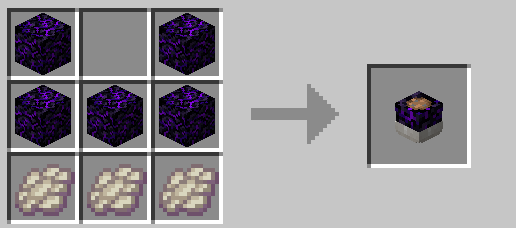
你可以在 Pot'al 中种植植物,它会生长成创造传送门。 Pot'al 接受多种类型的植物:橡木树苗、白桦树苗、深色橡树树苗、诡异菌和绯红菌。
每种植物都会长成对应版本的传送门。
查看所有传送门的外观
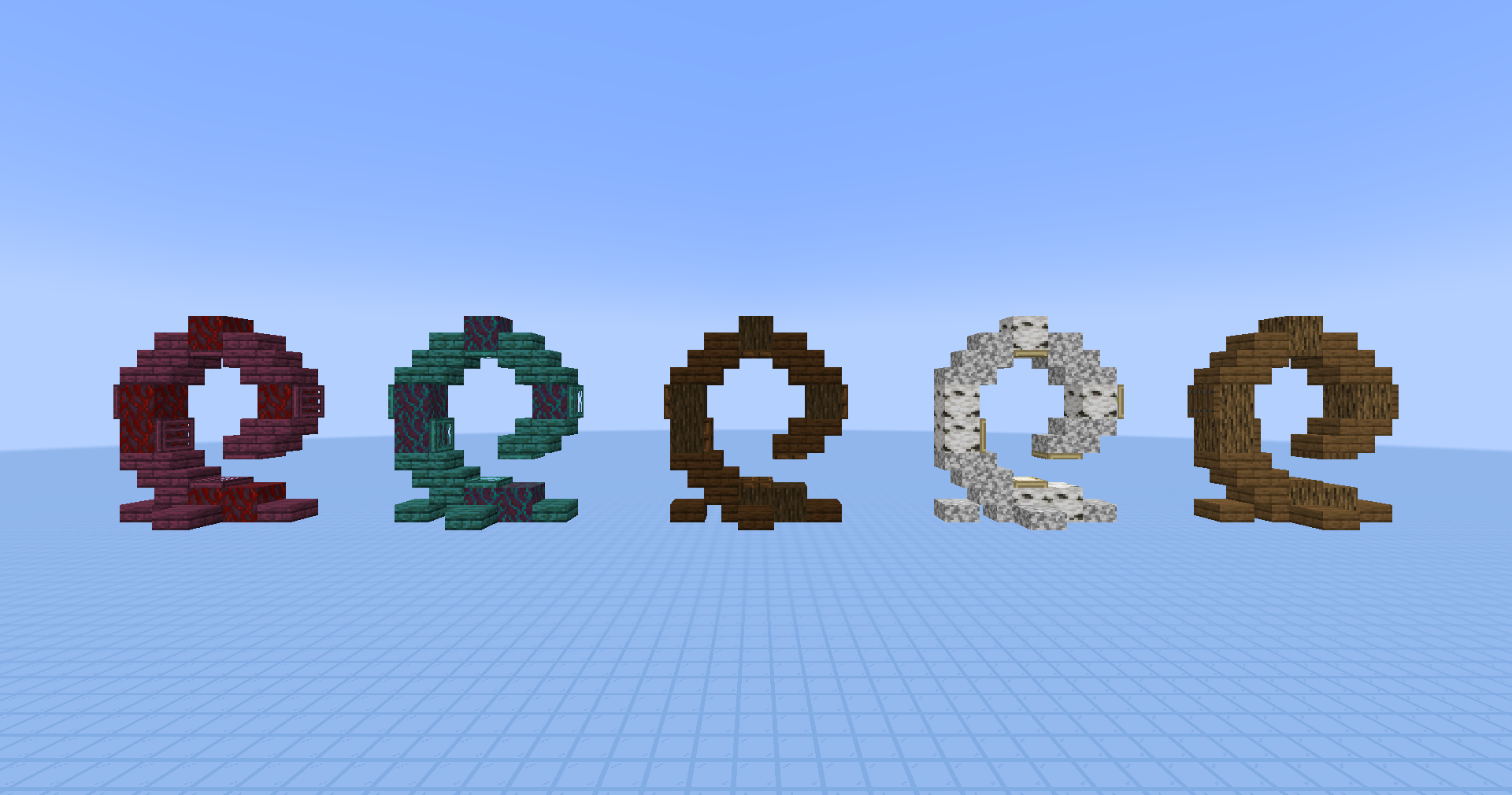
种植后会播放一段简短的动画,随后传送门即可使用。 只需站在传送门中间(发光方块所在的位置),传送门就会将你传送到创造维度。
如何退出创造维度?
为了返回现实世界,你需要饮用一瓶缓降药水。你也可以对自己泼洒药水。目的是获得该效果。
几秒钟后,你将被传送回主世界维度。
如何自定义或禁用传送门?
创造传送门实际上只有一个关键方块:位于中间的发光方块。如果你想自定义传送门的外观,可以修改其周围的所有方块,只要不触碰这个发光方块即可。 移除这个发光方块将禁用对应的传送门。随后可移除结构的其余部分,它就像从未存在过一样。
⚙️设置
禁用创造传送门的使用
如果启用,玩家将无法再使用创造传送门。如果你希望暂时限制对 Creative Dimension 的访问,这将非常有用。你可以使用以下命令分别启用、禁用或获取设置的当前状态:
/function pk_cr_di:settings/disable_portals_use/true
/function pk_cr_di:settings/disable_portals_use/false
/function pk_cr_di:settings/disable_portals_use/get
?卸载
由于 Creative Dimension 涉及世界生成,正确卸载它在技术上比较复杂。如果你对以下步骤不熟悉,可以加入 Discord 服务器 并在你的世界卸载问题上寻求支持。
你也可以观看官方视频中的专门部分以精确跟随步骤。
首先,确保目前没有玩家,也没有之前处于创造维度的玩家留在服务器上。
像我的其他数据包一样,Creative Dimension 提供了一个自动卸载流程来卸载其内容(不包括世界生成内容)。运行该流程将:
- 从每个维度中移除所有的 Pot'als
- 禁用每个维度中的所有创造传送门(不会移除结构本身)
- 移除与 Creative Dimension 数据包相关的所有计分板和存储数据
- 如果没有安装其他 KawaMood 数据包,还会移除所有通用的计分板和存储数据
启动卸载流程的命令如下:
/function pk_cr_di:cmd/uninstall
如果你在此步骤停止卸载流程,那么维度仍然存在,只是无法再进入。如果目的只是暂时移除数据包以更新世界到一个尚未支持该数据包的版本,那么此时停止即可,这已经足够了。
如果你希望从世界中彻底移除它,这里是最困难的部分:
首先,你需要从世界的 /datapacks 文件夹中移除数据包,但维度仍然会存在。为了移除它,你需要前往(从世界根目录开始)/dimensions 文件夹并删除 pk_cr_di 文件夹。
但 Minecraft 仍会在你世界的 level.dat 文件中保留维度引用。
因此,你需要使用 NBTExplorer 来移除 level.dat 文件中的每个 pk_cr_di:creative_superflat 记录。
我知道这相当技术性,但遗憾的是,世界生成(worldgen)目前仍被视为实验性功能,Mojang 尚未提供直接清除未使用维度的方法。
? 报告问题
如果你在使用此数据包时遇到问题,建议加入 Discord 服务器,并在专用的 #data-pack-issues 频道发帖描述你的问题。请别忘了提供所有必要信息,包括:
- 你正在使用的 Minecraft 版本。
- 你所使用的该数据包的版本。
- 你是否使用了任何修改版服务端或客户端,如 Forge、Paper 或 Spigot。
- 如果是,请列出可能影响数据包运行的插件或模组。
- 你正在使用的其他数据包列表(如果有)。
- 对你问题的清晰描述,以及重现该问题的方法。
- 如有必要,请附上游戏中出现该问题的视频或截图。
? 其他链接
感谢你使用 Creative Dimension!得知大家喜欢它让我感到非常开心。
如果你想支持它的开发以及其他数据包的开发,可以通过我的其他社交平台支持我:
- Planet Minecraft
- 或者如果你慷慨解囊,我接受通过 paypal 或 buy me a kawa(“kawa”是“咖啡”的俚语说法)进行的捐赠!
Creative Dimension
A superflat creative dimension for survival worlds
This data pack adds a superflat creative dimension, that can be safely used in survival worlds.
This presentation concerns the latest version of the data pack
For older ones, you can check them on Github:
?Introduction
What is Creative Dimension?
Minecraft survival players ofently want to pre-desing their buildings or ideas in creative mode before creating them in their survival world. If you own a survival server and want to collaborate on such project, it would require another server or a multiverse plugin to provide two different worlds, with splited inventories and a specific gamemode.
Creative Dimension data pack offers the ability to create portals on your survival world that can teleport players in a dedicated creative dimension. Their inventory (including ender chest one), xp, health, gamemode, and effects will be stored and they will retrieve them back when they join a vanilla dimension back. Thus, you can finally test your ideas together and play in survival mode on a vanilla server.
Of course, you can also use this data pack in single player.
Installing details
⚠️ Disclaimer: It is important to not that this data pack use worldgen features, that are still considered as experimental by Mojang. Installing it is easy, but removing it is harder. Check the "Uninstall" section further for more information.
After having placed the data pack in the /datapacks folder of your world, you would need to restart the server (or world in single player) completly. As it involves worldgen features, a single /reload won't be enough to install it correctly.
How to join the Creative Dimension?
After you installed the data pack, you will be able to create a new type of block : the Pot'al (which is a pot, that creates a portal). The recipe of this block is the following one:
In this pot'al, you can place a plant that will grow into a Creative Portal. The pot accepts different types of plants : oak sappling, birch sappling, dark oak sappling, warped fungus and crimson fungus.
Each plant would grow into their respective variant of portal.
See render of each portal
Planting them will run a short animation, after what the portal will be ready to use. You just need to stand in the middle of it (where the light block is), and the portal will teleport your to the creative dimension.
How to exit the creative dimension?
In order to return to reality, you will need to consume a slow falling potion. You can also splash one on yourself. The goal is just to get the effect.
After some seconds, you will be teleported back to the vanilla dimension.
How to customize or disable a portal?
Creative portals actually have a single block's that matters: the light block, in the middle of them. You can alter all blocks around it if you want to customize the design of the portal, till you don't touch to this block. Removing this light block will disable the relative portal. You can then remove the rest of the structure, and it will be like it has never existed.
⚙️Settings
Disable creative portals use
If enabled, players won't be able to use creative portals anymore. It is useful if you want to temporary restrict the access to the Creative Dimension. You can enable, disable or get the current state of the setting using these following commands respectively:
/function pk_cr_di:settings/disable_portals_use/true
/function pk_cr_di:settings/disable_portals_use/false
/function pk_cr_di:settings/disable_portals_use/get
? Uninstall
As Creative Dimension involves worldgen, it is quite technical to uninstall it properly. If you're not confident with the following process, you can join the Discord server and ask for support with uninstallation on your world.
You can also watch the dedicated part of the official video to follow steps precisely.
First, be sure that no player currently are or previously leaved the server while being in the creative dimension.
As my other data packs, Creative Dimension comes with an automatic uninstallation process to uninstall its content (excluding worldgen content). Running it will:
- Remove all pot'als from each dimension
- Disable all creative portals from each dimension (it won't remove the structure itself)
- Remove all scores and storage specific to the Creative Dimension data pack
- If there is no more KawaMood data packs installed, also remove all common scores and storages
The command to start the uninstalling process is the following one:
/function pk_cr_di:cmd/uninstall
If you stop the unsintalling process at this step, then the dimension would still exists, but couldn't be joined anymore. If the goal is just to temporary remove the data pack to update your world on a version that data pack doesn't handle yet, then you can stop at this step for the moment, it will be enough.
If you wish to remove it completely from your world, here is the difficult part:
You would first need to remove the data pack from the /datapacks folder of your world, but the dimension would still exists. In order to remove it, you need to go (from the root of your world) in the /dimensions folder and remove the folder pk_cr_di.
But Minecraft will still keeps the dimension references in the level.dat file of your world.
So you will need to use NBTExplorer to remove each pk_cr_di:creative_superflat occurences from the level.dat file.
I know this is quite technical, but sadly, worldgen is still considered as an experimental feature, and Mojang didn't provide a way to more directly get rid of unused dimensions yet.
? Report an issue
If you encountered an issue with this data pack, preferably join the Discord server, and open a post in the dedicated #data-pack-issues channel to describe your problem. Please, don't forget to provide all necessary informations including:
- The Minecraft version you're using.
- The version of the concerned data pack you're using.
- If you're using any modified version like Forge, Paper or Spigot.
- If you do, the plugins or mods you're using that may alter the functioning of data packs.
- The list of other data packs you're using, if you have others.
- A clear description of your issue, and a way to reproduce it.
- If necessary, a video or a screenshot of the issue in game.
? Other links
Thank you for using Creative Dimension! It makes me happy to know people are enjoying it. If you want to support its development and the development of other data packs, you can support me on my other social networks:
- Planet Minecraft
- Or if you're in a generous mood, I accept donation on paypal or buy me a kawa (slang term for "coffee")!

下载 Creative Dimension
下载 Creative Dimension
下载 Creative Dimension
下载 Creative Dimension
下载 Creative Dimension
下载 Creative Dimension
下载 Creative Dimension
下载 Creative Dimension
下载 Creative Dimension
下载 Creative Dimension
需要联机服务器吗?
稳定流畅、一键部署,几分钟即可和朋友联机开服
最低仅需 8 元/月 即可畅快联机
- 在非完整方块上放置 pot'als 会意外替换它们。现在,此行为仅限于属于
#minecraft:replaceable标签的方块。尝试在不可替换的方块上放置 pot'al 将会失败,并且物品会被退回。
关于这个资源的讨论、问题反馈与使用心得
还没有讨论,来发第一帖吧
你是这个资源的作者?登录后可认领此资源。
相似资源
 数据包

此数据包添加了属于阿瓦里海盗的独特结构,将他们的独特风格带入你的 Minecraft 世界!兼容性:1.20 至 26.3
 数据包

探索近100个新生物群系,包含写实与轻奇幻两种风格,且仅使用原版方块。此外还有若干沉浸式结构,与 overhauled 的地形相得益彰。
 数据包

此数据包添加了新的“祝福模式”难度。
 数据包

添加了基于官方概念图的蓝蛙和红眼树蛙变体。
 数据包

为模组生物群系添加原版回溯特性!
 数据包

使用原版/生存友好的方法更改青蛙的变种类型。支持原版(寒冷、温带、温暖)以及可选的“More Frogs 2”变种:深红、末影、地狱、毒镖、紫珀、幽匿、灵魂、诡异和木头。
评论 0
登录后参与评分
还没有评论,来抢沙发吧