Enhanced Crafting Vanilla
一个小型数据包,为原版物品添加了合成配方,让日常生活更轻松。
此数据包添加了我认为应该默认包含在游戏中的合成与熔炼配方。这些配方的设计合理、平衡,并保持每种资源获得的物品和经验总量不变。
注意:部分配方可能仅从特定版本开始可用。目前暂无计划将较新的配方向后移植到旧版数据包中。
合成配方
以下配方针对工作台进行了修改或新增。
发射器支持深板岩圆石和黑石
深板岩圆石和黑石与圆石非常相似。它们应当可以互换使用,并应用于更多合成配方中。此配方允许使用深板岩圆石和黑石制作发射器。

投掷器支持深板岩圆石和黑石
与发射器类似,深板岩圆石和黑石通常不被接受用于投掷器的合成配方。此配方解决了这一问题。

发射器转换为投掷器
投掷器的合成配方与发射器相同,只是额外加入了一把弓。此配方允许你后续添加弓来完成转换。

无需弓的合成投掷器
添加于数据包版本 15.3
合成投掷器最烦人的部分是,当你需要先合成不可堆叠的弓时,会占用大量背包空间。此配方解决了这个问题!只需在发射器周围合成弓即可。

原木转化为木棍
有时你需要大量木棍,而将原木转换为4块木板的多余步骤显得不必要。此配方允许你跳过该步骤,直接将2根原木转化为16根木棍。支持所有类型的原木,包括去皮原木。

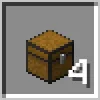
原木转化为箱子
在构建存储系统、合成漏斗或制作大量潜影盒时,你需要大量箱子。合成它们可能会很令人烦恼,因为木板会占用双倍背包空间,从而减少实际合成箱子的剩余空间。此配方解决了这一问题。在工作台中使用任意类型的原木以箱子图案排列,即可直接合成4个箱子,无需先合成木板。

熔炼配方
以下配方针对熔炉、烟熏炉和/或高炉进行了修改或新增。
原矿块直接熔炼为成品块
不知为何,原矿块无法在不拆解的情况下进行熔炼。此配方允许你将原铁块、原金块和原铜块直接熔炼为其对应的成品块变体。这可以在熔炉或高炉中完成,并获得与手动熔炼9个原矿相同的经验值。
注意:这比逐个熔炼原矿更节省燃料且速度更快。

安装方法
此数据包可添加到新创建或已存在的世界中,适用于多人服务器和单人游戏。在以下示例中,我将下载的文件指定为 custom_crafting_vanilla-vXX_XX.zip,但请注意,在你的情况下,XX.XX 部分将被替换为对应数据包版本的数字。例如,版本 15.1 应显示为 custom_crafting_vanilla-v15_1.zip。
在创建单人世界时:
- 下载适合你 Minecraft 版本的
custom_crafting_vanilla-vXX_XX.zip 文件。你无需解压它,但如果想查看内部内容也可以解压。
- 打开 Minecraft 单人模式,创建新世界并进入“更多”选项卡。
- 点击“数据包”,然后在下一个屏幕中点击“打开包文件夹”。这将打开正确位置的文件资源管理器。
- 将你的
custom_crafting_vanilla-vXX_XX.zip 粘贴到此文件夹中,然后返回 Minecraft。
- 在“可用”列中你应该能看到该数据包。点击箭头将其移至“已选择”列。
- 点击完成,像平常一样继续创建新世界。
在已有的单人世界中:
- 下载适合你 Minecraft 版本的
custom_crafting_vanilla-vXX_XX.zip 文件。
- 选择你要安装数据包的世界,点击“编辑”,然后点击“打开世界文件夹”。这将打开文件资源管理器至你的 Minecraft 世界所在目录。
- 打开名为
datapacks 的文件夹,并将 custom_crafting_vanilla-vXX_XX.zip 文件放入其中。
- 如果你在安装过程中身处世界中且启用了作弊,请在聊天栏输入
/reload 命令。如果未启用作弊,可按 F3 + T 重新加载,或退出世界后重新加入。
在多人服务器上:
- 根据你的 Minecraft 版本下载对应的
custom_crafting_vanilla-vXX_XX.zip 文件。
- 进入你的服务器文件夹,然后打开你希望安装该数据包的对应世界文件夹(默认为
world)。
- 打开
datapacks 文件夹,并将 custom_crafting_vanilla-vXX_XX.zip 文件放入其中。
- 如果你的服务器在安装过程中正在运行,请从控制台执行
reload 命令,或者以权限等级为 3 的操作员身份在游戏中输入 /reload。
恭喜!你的数据包现在应该已经安装成功。如果你已启用作弊或拥有操作员权限,可以通过输入 /datapack list 来验证,你应该能看到一个名为 [file/custom_crafting_vanilla-vXX_XX.zip (world)] 的条目。
致谢
此数据包由 IQBE 制作。
配方的图片以及部分 JSON 文件是使用 TheDestruc7i0n 提供的 Crafting 工具制作的。
源代码与许可证
本项目在 MIT 许可证下完全开源。这意味着你可以自由查看源代码、进行你自己的修改并重新分发你的修改成果,或者免费将其用作地图/更大数据包合集的一部分等。不过,如果在使用此数据包的地图或数据包合集中能提及我,我将不胜感激。
本项目的源代码可在 GitHub 仓库 中找到。
Enhanced Crafting Vanilla
A small data pack that adds crafting recipes for vanilla items to make every day life a bit easier.
This data pack adds crafting and smelting recipes that I believe, should be in the game by default. It does this in a way that makes sense, is balanced and maintains the overall amount of items and experience received per resource.
Note: some recipes might only be available from a certain version onward. Currently, there are no plans to backport newer recipes to an older version of the pack.
Crafting recipes
The following recipes are altered or added for the crafting table.
Dropper cobbled deepslate and blackstone support
Cobbled deepslate and blackstone are very similar to cobblestone. They should be interchangeable and be used in more crafting recipes. This recipe makes it possible to craft droppers using cobbled deepslate and blackstone.
Dispenser cobbled deepslate and blackstone support
Just like with the droppers, cobbled deepslate and blackstone are normally not accepted as part of the crafting recipe. This changes that.
Dropper to dispenser conversion
The crafting recipe for a dispenser is just the same as that of a dropper with an extra bow added to it. This recipe allows you to add the bow afterwards.
Dispenser without bow item
Added in version 15.3 of the pack
The most annoying part of dispenser crafting is the lack of inventory space when you need to craft unstackable bows first. This recipe fixes that! Just craft your bow around a dropper.
Logs to sticks
Sometimes you just need a lot of sticks, and the extra step of converting your logs to 4 planks seems unnecessary. This recipe allows you to skip that step and convert your 2 logs straight into 16 sticks. Any log type is supported, even stripped logs.
Logs to chests
When building a storage system, crafting hoppers or making a lot of shulkerboxes, you need a lot of chests. It can be very annoying to craft them as the planks take twice the amount of space in your inventory, and leave you with less room to actually craft the chests. This recipe changes that. By putting any log type in a chest like patern in the crafting table, you can create 4 chests without having to craft planks.
Smelting recipes
The following recipes are altered or added for the furnace, smoker and/or blast furnace.
Raw ore blocks to smelted blocks
For some reason, it's not possible to smelt raw ore blocks without decompressing them first. This recipe makes it possible to smelt raw iron blocks, raw gold blocks and raw copper blocks to their smelted variants. This can be done in a furnace or in a blast furnace and gives the same amount of xp as it would take to smelt the 9 raw ores manually.
Note: this does take less fuel and is quicker then smelting the raw ores one by one.
How to install
This data pack can be added to a new or an already existing world, both multiplayer and single player. In these examples I use specify the downloaded file as custom_crafting_vanilla-vXX_XX.zip, but please note that in your case the XX.XX part will be replaced with numbers corresponding to the version of the pack. For example version 15.1 should look like custom_crafting_vanilla-v15_1.zip.
At the creation of a single player world:
- Download the correct
custom_crafting_vanilla-vXX_XX.zip file for your Minecraft version. You don't have to unzip it, but you can if you want to take a look what's inside.
- Open Minecraft single player, create a new world and open the
More tab.
- Click on
Data Packs and in the following screen click on Open Pack Folder. This will open your file explorer in the correct location.
- Paste your
custom_crafting_vanilla-vXX_XX.zip in this folder and go back to Minecraft.
- In the
Available column you should see the data pack. Click the arrow to place it in the Selected column.
- Click done and continue creating a new world like normal.
In an existing single player world:
- Download the correct
custom_crafting_vanilla-vXX_XX.zip file for your Minecraft version.
- Select the world you want to install the data pack for, click
Edit, then Open world folder. This will open the file explorer to the location of you Minecraft world.
- Open the folder named
datapacks and put the custom_crafting_vanilla-vXX_XX.zip file into it.
- If you are in the world during installation and have cheats enabled, type the
/reload command in chat. If you don't have cheats enabled, either press F3 + T to reload, or leave the world and join again.
On a multiplayer server:
- Download the correct
custom_crafting_vanilla-vXX_XX.zip file for your Minecraft version.
- Navigate to your server folder, then open the folder of the world you wish to install the data pack in (default:
world).
- Open the
datapacks folder and place the custom_crafting_vanilla-vXX_XX.zip file into it.
- If your server is running during installation either run
reload from the console or in game do /reload as a level 3 operator.
Congrats! Your data pack should now be installed. If you have enabled cheats or operator status, you can verify by typing /datapack list and find an entry named [file/custom_crafting_vanilla-vXX_XX.zip (world)].
Credits
This data pack was created by IQBE.
Pictures of the recipes as well as some JSON files were created using the Crafting tool from TheDestruc7i0n.
Source code and licenses
This project is fully open source under the MIT license. This means that you are free to look at the source code, make your own changes and redistribute your changes or use this as a part of a map/bigger data pack collection/... for free. I would however really appreciate it if you mention me somewhere if your map/data pack collection/... uses this datapack.
The source code for this project can be found on the GitHub repository.

 数据包

 数据包
 数据包

 数据包
 数据包

 数据包

评论 0
登录后参与评分
还没有评论,来抢沙发吧