
中文
菜单
输入命令 /trigger ctm_menu 即可打开菜单。
加入
列出所有队伍。只需点击你想加入的队伍即可。
离开
是的,你会离开当前队伍。
挂机(AFK)
你可以加入挂机队伍。当你改变视角时,你会重新回到之前的队伍,或者留在挂机队伍中。
管理员菜单
添加
点击一种颜色以在聊天栏中获取建议的命令。 填写其余的 3 个参数。
/function ctm:manage/add/add_team {id:"", name:"", color:"color", trigger:""}
移除
选择一支队伍,系统将提示删除该队伍的命令。
编辑
你可以编辑以下参数:
- 名称(以及颜色)
- 后缀(以及颜色)
- 玩家颜色
- 触发器
你无法编辑 ID。如需修改 ID,必须删除并重新创建。
版本 1.0.0
菜单
该命令用于打开菜单。 你也可以通过点击相应的文本来执行此命令。
/trigger customteammanager_menu

加入

已创建的队伍会被列出,你可以再次点击相应队伍来加入它。
离开
你只能通过点击“离开当前队伍”来退出当前的队伍。
添加队伍
只有管理员可以创建队伍。
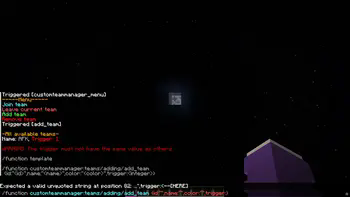
你可以点击模板,系统将提示 /function 命令,你只需在花括号内填入信息即可。
请勿使用相同的触发器值,否则可能导致“代码”混淆。
为此会创建一个后缀 -> [<name>],它将显示在名称之后。
移除队伍
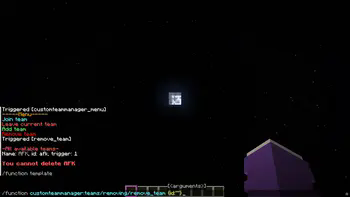
点击模板,然后输入你要删除的队伍的 ID。
未来计划
我仍计划添加一项功能,允许用户编辑队伍,这样他们就不必因为犯错而不得不删除队伍。
我还计划添加一项允许用户编辑后缀的功能。
English
Menu
With the command /trigger ctm_menu you can open the menu
Join
All teams are listed. Just click on the team you want to join
Leave
Uh yeah you leave the team
AFK
You join in the AFK team. When you change your rotation, you either join your team you was before or just the AFK team.
Menu for admins
Add
Click on a color for suggesting you the command in the chat. Fill the other 3 arguments.
/function ctm:manage/add/add_team {id:"", name:"", color:"color", trigger:""}
Remove
Select one team, you will get suggested a command for deleting it
Edit
You can edit following arguments:
- name (and the color)
- suffix (and the color)
- player color
- trigger
You cannot edit the id. For that you have to delete and recreate it.
Version 1.0.0
Menu
The command opens the menu. You can execute it by clicking on the respective text.
/trigger customteammanager_menu
Join
The teams that have been created are listed, and you can join the respective team by clicking on it again.
Leave
You can only leave your current team by clicking on “Leave current team.”
Add team
Only admins can create a team.
You can click on the template and the /function will be suggested, where you only need to insert the information in the curly brackets.
It is important not to use the same trigger value, as this could lead to confusion in the “code”.
A suffix is created for this purpose -> [<name>] This is displayed after the name.
Remove team
Click on the template and then enter the ID of the team you want to delete.
In the future
I still plan to add a feature that allows users to edit teams so that they don't have to delete them just because they made a mistake.
I also plan to add a feature that allows users to edit the suffix.

下载 Custom Team Manager
需要联机服务器吗?
稳定流畅、一键部署,几分钟即可和朋友联机开服
最低仅需 8 元/月 即可畅快联机
下载 Custom Team Manager
下载 Custom Team Manager
需要联机服务器吗?
稳定流畅、一键部署,几分钟即可和朋友联机开服
最低仅需 8 元/月 即可畅快联机
下载 Custom Team Manager
下载 Custom Team Manager
需要联机服务器吗?
稳定流畅、一键部署,几分钟即可和朋友联机开服
最低仅需 8 元/月 即可畅快联机
下载 Custom Team Manager
-
修复了显示团队成员的问题 当有多名玩家在线时,团队成员显示功能无法正常工作
-
现在空闲(AFK)玩家也会作为团队成员显示
关于这个资源的讨论、问题反馈与使用心得
还没有讨论,来发第一帖吧
你是这个资源的作者?登录后可认领此资源。
相似资源
 数据包

此数据包添加了属于阿瓦里海盗的独特结构,将他们的独特风格带入你的 Minecraft 世界!兼容性:1.20 至 26.3
 数据包

此数据包添加了新的“祝福模式”难度。
 数据包
允许服务器管理员方便地禁用 Xaero's Map 系列模组中的实体雷达、小地图等功能,使竞技游戏更加公平。
 数据包

使用原版/生存友好的方法更改青蛙的变种类型。支持原版(寒冷、温带、温暖)以及可选的“More Frogs 2”变种:深红、末影、地狱、毒镖、紫珀、幽匿、灵魂、诡异和木头。
 数据包

手持潜影盒时可直接打开,无需将其放置在地面上。只需按住 Shift 并右键点击即可访问你的潜影盒。
 数据包
所有我原创内容的合集。
评论 0
登录后参与评分
还没有评论,来抢沙发吧