搜索生存模式中的重要错误和漏洞,需要协助进行翻译(目前仅有俄语、英语、波兰语以及俄语前改革版本)。
⚙️ 安装
要使该数据包正常工作,你需要安装 MIDWUT(click) 核心数据包!
? 简介
使用此数据包,你可以将普通方块变成一部可运行的电梯!所有电梯组件均由你放置的方块构成。
功能特性:
- 克隆方块的移动以及电梯内/上方/下方实体的传送;
- 处理电梯创建和使用过程中可能出现的所有错误;
- 电梯速度可调;
- 支持按钮(告示牌)上的自定义文本。
? 方块与合成
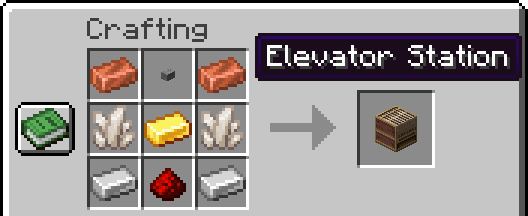
新方块 — 电梯基站
当玩家获得铜锭或红石时,将在配方书里收到该配方的提示。
- 配方截图见画廊:点击此处。
- 在 misode 生成器网站查看配方可视化效果:点击此处
这是一个容器方块,内部包含电梯配置的工具。
这里设有电梯速度设置以及当前速度的显示。从技术角度来看,速度是指移动之间的延迟(以刻为单位,1秒 = 20刻),因此在某些范围内无法设置精确的速度。将刻延迟转换为每秒方块数的公式为:20/(delay)
返回了旧版的磁石配方
现在合成时使用下界合金锭,这与 1.21.4 及更早版本的机制一致。
这是因为磁石被用作绞盘,我决定恢复这种成本更高的合成方式。
? 工具
通用使用说明
选择器用于设置选取区域的点。通过右键点击来放置这些点。第二个点的颜色较深。
按钮和停止设定器通过右键点击选择一个方块。按钮设定器和门设定器需要先按住疾跑键并右键点击已设定停止位置的方块,以复制楼层 ID。
按住潜行键并右键点击任意一个点,即可移除该点。
电梯选择器
放置两个全局绿色点,用于选定电梯轿厢。对点的高度有限制:不能触及基岩,也不能过于接近世界天花板。
绳索选择器
放置两个紫色点,用于选定电梯绳索。每根绳索在其整个长度上必须由单个方块组成。第一个点固定在电梯顶部,第二个点固定在绞盘(磁石)上。请注意,不支持实体方块。
楼层选择按钮
放置一个黄色点,仅能放置在电梯轿厢内部。它会修改告示牌,使其正面变为可点击状态。
停止设定器
放置蓝色点,每个 Y 坐标对应一个点。对于其他工具而言,需要从这些方块中复制楼层 ID。
呼叫按钮
放置金色点,需要复制楼层 ID。它会修改告示牌,使其正面变为可点击状态。
门选择器
它有两种门放置类型——分别用于电梯门和楼层门。
对于电梯门,需在轿厢内放置两个红色点以选定门。
对于楼层门,需要先复制楼层 ID,然后放置两个灰色点以选定门。
请注意,不支持实体方块。
?️ 电梯组件
电梯轿厢
轿厢通过移动方块来实现运动。
- 向上移动时,轿厢内及顶部的实体会被传送到上方;
- 向下移动时,轿厢内及下方的实体会被传送到下方。
如果在运动方向上检测到方块,电梯将会停止,并向电梯内的玩家发出提示。
绳索
当电梯移动时,系统会检查电梯顶部绳索方块的正确性是否与保存的方块一致。如果检测到不完整或错误的绳索方块,电梯将停止并报错。
门
在打开之前,任何门都会先检查是否不存在实体方块,确认无误后才会打开。在关闭时,会检查门前位置是否没有任何方块或生物。
电梯将在以下情况开门:
- 电梯到达指定楼层;
- 玩家按下了电梯呼叫按钮,且电梯已在该楼层且门处于关闭状态;
- 电梯内的玩家按下了开门按钮。
门会在 15 秒后尝试关闭,但如果无法关闭,则会在 3 秒后重试关闭操作。
按钮
电梯呼叫按钮会向非移动的电梯发送带有楼层 ID 和电梯 ID 的信号。该值使用以下公式编码:{(eID * 1000) + (height + 400)}0
如果你在告示牌的第一行指定了一个数字,它将被视为楼层号,随后你可以在其余三行编写任意文本。否则,告示牌的内容将被替换为显示楼层高度的文本。
楼层选择按钮仅存储电梯 ID。当玩家点击它时,系统将向玩家展示楼层列表以及开门按钮。只有在电梯未移动时才能开门。楼层按钮的值计算公式与呼叫按钮相同,但末尾数字为 1:{(eID * 1000) + (height + 400)}1。如果玩家在电梯轿厢外按下楼层按钮,电梯将不会接收信号。
? 附加组件与技术信息
实体
默认情况下,电梯只能移动原版生物实体,但此设置是可配置的。
- 向生物实体添加
ignore.customizable_elevators 标签,电梯将忽略该实体。
- 对于来自模组的生物实体,你需要将实体 ID 添加到
#customizable_elevators:living entity_type 标签中。
- 对于非生物实体,你需要将实体 ID 添加到
#customizable_elevators:not_living entity_type 标签中,并添加 notice.customizable_elevators mob 标签。
坐标点的最大高度限制
如果您的维度需要电梯支持,请在数据包中添加 #customizable_elevators:dimension_for_y_check 函数标签,并在其中包含用于处理您维度的自定义函数。
示例:
# 来自 dimension_for_y_check 标签的函数
execute if dimension <dimension_id> run return run function <custom_path>/dimension_for_elevator/<dimension>
<dimension> 函数
#y main_score 分数存储点的 Y 坐标
请勿修改这些函数,它们包含预置的错误信息。如果需要的话,请创建您自己的函数,别忘了使用 return fail 命令
execute if score #y main_score matches ..-60 run return run function customizable_elevators:zzz/block/elevator_station/selector/raycast/dimension/below
execute if score #y main_score matches 317.. run return run function customizable_elevators:zzz/block/elevator_station/selector/raycast/dimension/above
return 1
如果你需要更改原版维度的限制,你还需要将你的函数添加到 `#customizable_elevators:redefining_validation_for_vanilla_dimension` 函数标签中,并在其中使用以下命令:
`data modify storage midwut:main dimension append value {id:"<dimension_id>"}`
#
## ? 链接
你可以在 PMC 页面上留下评论!
[](https://www.planetminecraft.com/data-pack/customizable-elevators/)
俄罗斯数据打包者 Discord 服务器 / Русский дискорд сервер датапакеров
如果你是数据打包者,正在寻找合理的帮助、有用的资源以及分享项目的机会,请加入 [СвинСоюз: Датапаки](https://discord.gg/YNsUzsxyu5)!
这是从最初已废弃的 ZeroCaty “СвинСоюз” 服务器衍生出来的。我们现在与该服务器没有任何关系。
[](https://discord.gg/YNsUzsxyu5)
Search for important errors and bugs for survival, help with translations is required (currently only Russian, English, Polish and Russian Pre-Reform).
⚙️ Installation
For the datapack to WORK, you need to install the MIDWUT(click) core datapack!
? About
With this data pack, you can turn ordinary blocks into a working elevator! All elevator elements consist of your blocks.
Features:
- Clone movement of blocks and teleportation of entities in/above/below the elevator;
- Handling all possible errors during the creation and operation of the elevator;
- The elevator speed is adjustable;
- Support for your texts on buttons(signs);
? Blocks & Crafts
New block — Elevator Station
The player will receive a recipe in the recipe book if they receive a copper ingot or redstone.
- There is a screenshot of the recipe in the gallery.
- Recipe visualization on the misode generator website: Click
It's a container block with elevator configuration tools inside.
There is an elevator speed setting and a display of the current speed. On the technical side, speed is a delay in ticks between movements (1 sec = 20 ticks), so it is impossible to set the exact speed in some ranges. The formula for converting the delay in ticks to blocks per second: 20/(delay)
Old Lodestone recipe has been returned
Now a netherite ingot is used in crafting, as in version 1.21.4 and earlier.
This is due to the fact that the Lodestone is used as a winch, and I decided to return the more expensive craft.
? Tools
General Usage Information
Selectors set points that select areas. The points are placed by right-clicking. The color of the second point is darker.
The button and stop setter select one block by right-clicking. Button and Door setters requires the copied floor ID by holding down Sprint key and right-clicking on the block with the stop set.
Any point can be removed by holding down Sneak key and right-clicking on the block.
Elevator Selector
Places global two green points, selects elevator cabin. There is a height limit for points: not reaching the bedrock and not close to the world ceiling.
Rope Selector
Places two purple points, selects elevator rope(s). Each of the ropes must consist of one block along its entire length. The first point is fixed to the roof of the elevator, the second to the winch(Lodestone). I note that block entity are not supported.
Floor Selection Button
Places one yellow point, only inside the elevator cabin. Modifies the sign so that the front side becomes clickable.
Stop Setter
Places blue points, one for each Y coordinate. For other tools, the floor ID will need to be copied from these blocks.
Call Buttons
Places golden points, needs to copy the floor ID. Modifies the sign so that the front side becomes clickable.
Doors Selector
It has two types of door placement - for elevator and floor.
For the elevator door, two red points are placed inside the cabin, selects the door.
For the floor door, you need to copy the floor ID, then two gray dots are placed, selects the door.
I note that block entity are not supported.
?️ Elevator Elements
Elevator Cabin
The cabin moves by moving blocks.
- When moving up, entities inside the cabin and on the roof are teleported up;
- When moving down, entities inside the cabin and below the cabin are teleported down.
If a block is detected in the direction of movement, the elevator will stop and tell the players in the elevator about it.
Rope
When the elevator is moving, the correctness of the cable blocks on the roof of the elevator with the blocks saved is checked. The elevator will stop and tell you an error if an incompleteness or an incorrect cable block is detected.
Doors
Any doors are checked for the absence of an block entity before opening, and then they will open. When closing, the absence of any block or mob in place of the doors is checked.
The doors will open in the following situations:
- The elevator arrived on the floor;
- The player pressed the elevator call button if the elevator is already on the floor with the doors closed;
- The player inside the elevator pressed the door open button.
The doors will try to close after 15 seconds, but if the doors cannot close, the closing will be repeated after 3 seconds.
Buttons
The elevator call buttons send a signal to the non-moving elevator with the floor ID and the elevator ID. The value is encoded using the formula: {(eID * 1000) + (height + 400)}0
If you specify a number in the first line of the sign, it will be considered the floor number, then you can write any text in the other three lines. Otherwise, the contents of the sign will be replaced with the text with the height of the floor.
The floor selection button stores only the elevator ID. When player clicks on it, the player is shown a list of floors and a door opening button. The doors can only be opened when the elevator is not moving. The value of the floor buttons is calculated using the same formula as for call buttons, but at the end the number is 1: {(eID * 1000) + (height + 400)}1. The elevator will not receive a signal if the player presses the floor button outside the elevator cabin.
? Add-ons & Technical info
Entities
By default, the elevator can only move all vanilla living entities, but this is configurable.
- Add the
ignore.customizable_elevators tag to the living entity and the elevator will ignore it.
- For living entities from mods, you need to add the entity ID to the
#customizable_elevators:living entity_type tag.
- For non-living entities, you need to add the entity ID to the
#customizable_elevators:not_living entity_type tag and also add the notice.customizable_elevators mob tag.
Height limit for points
If you need elevator support in your dimension, you need to add the #customizable_elevators:dimension_for_y_check function tag with your function to handle your dimension in your datapack.
Example:
# function from dimension_for_y_check tag
execute if dimension <dimension_id> run return run function <custom_path>/dimension_for_elevator/<dimension>


# <dimension> function
## The #y main_score score stores the Y coordinate of point
## Do not change these functions, they contain a ready-made error message. If you need to, then create your own functions, don't forget about the `return fail` command

execute if score #y main_score matches ..-60 run return run function customizable_elevators:zzz/block/elevator_station/selector/raycast/dimension/below
execute if score #y main_score matches 317.. run return run function customizable_elevators:zzz/block/elevator_station/selector/raycast/dimension/above
return 1
If you need to change the limits for vanilla dimensions, then you also need to add the #customizable_elevators:redefining_validation_for_vanilla_dimension function tag with your function, use the command in it:
data modify storage midwut:main dimension append value {id:"<dimension_id>"}
? Links
You can leave a comment on the PMC page!

Russian discord server of datapackers / Русский дискорд сервер датапакеров
Если вы датапакер, ищите адекватной помощи, полезных ресурсов и возможности поделиться проектами, то вам на СвинСоюз: Датапаки!
Это сервер-ответвление от изначального заброшенного сервера ZeroCaty "СвинСоюз". Сейчас мы не имеем к нему никакого отношения.


 数据包

 数据包

 数据包

 数据包

 数据包

 数据包

评论 0
登录后参与评分
还没有评论,来抢沙发吧