
禁用维度
一种难以破坏、防 grief 的解决方案,用于阻止玩家进入下界、末地以及任何其他的自定义维度,并支持按维度设置条件。
通过拦截所有已知的维度进入方式并将玩家立即传送回来,从而禁用维度。每个维度都可以单独设置为 启用 或 禁用,并可添加可选的条件来覆盖该状态。
非常适合原版和模组多人服务器,如果您希望禁用额外维度以防止玩家进度过快,这是一个完美的选择。
为什么要使用这个数据包/模组?
- 唯一的完整解决方案: 目前没有其他数据包能在当前 Minecraft 版本中同时禁用下界、末地和额外的自定义维度,并提供按维度的可选条件。 所有旧版方案都已过时、失效,或者功能不如本方案丰富。
- 全面的覆盖范围: 适用于各种情况。涵盖所有游戏模式、传送指令、末影珍珠、矿车等。 玩家可以尝试进入传送门或进行传送,但会瞬间被传送回原处。从下界返回时,会回到入口点(若失败则 fallback 到世界出生点);从末地返回时,会回到重生点或世界出生点。请参阅 边缘案例 了解少数需要手动清理的场景。
- 保留原版奖励: 尝试切换维度的玩家仍会获得原版的“进入维度”进度(针对下界或末地)。 这是有意为之,作为对他们尝试行为的小奖励。您可以通过查看他们的成就知道是谁尝试过。不用担心,他们会安全地被传送回来!
- 沉浸式反馈: 在被传送回来时,玩家会看到简短的动作栏提示消息,听到细微的声音提示,并获得缓慢效果,使体验清晰且响应迅速,而不会显得突兀。
- 灵活且兼容: 既可以作为全局模组运行,也可以作为特定世界的数据包运行;内置语言支持,开箱即用,完全兼容原版、模组化及自定义维度设置。
- 适合服务器部署: 旨在可靠、防 grief 且完全被动运行,不通过基于刻的检查增加额外开销。非常适合公共或半公开的多人服务器。
- 动态配置: 可以通过游戏内配置面板实时调整,无需重新加载或重启。
TL;DR:一种稳定且轻量级的阻止非预期维度旅行的方法,旨在即插即用。
安装
将数据包/模组添加到您的世界或服务器后,您应该能够打开关于面板,该面板完全支持鼠标控制:
/function disable_dimensions:about

语言支持
支持的语言包含翻译文本。这主要是面向服务器管理员的,因为向玩家显示的 configurable 消息本身就可以自定义。
- 单人游戏中的模组:自动包含,开箱即用。
- 数据包或服务器设置:翻译是客户端侧的。对于仅使用数据包的专用服务器,管理员需要在客户端安装此模组或使用单独的 资源包 才能看到翻译后的 UI 文本。
如需添加新的翻译,请参考 此 README。
配置
通过以下命令打开配置面板:
/function disable_dimensions:config

在此处,您可以:
- 切换每个维度的
启用/禁用状态 - 编辑返回消息及其颜色
- 添加和移除条件,更多信息请参阅 条件
- 添加自定义维度条目,请参阅 自定义维度 获取指南
- 移除维度条目
- 将维度条目重置为默认值
- 设置世界出生点,支持任意维度
存在默认的世界出生点,但在正式投入使用前,您应该站在您希望的位置并按下
Replace将其设置为您想要的位置。
条件
如果条件为真,它们可以覆盖当前设置的状态。借助条件,您可以在特定时间后、针对特定游戏模式等情况下部分启用/禁用维度旅行。
每个条件需要包含:
name: 条件的唯一名称。type: 确定值将与什么进行比较。advancement: 检查玩家的进度。值为进度 ID。day: 检查游戏内的天数计数。值为确切的天数。gamemode: 检查玩家当前的游戏模式。值可以是survival(生存)、creative(创造)、adventure(冒险)或spectator(旁观者)。gametime: 检查世界已运行的时长。值以刻为单位给出,因此请使用类似day_count * 24 * 60 * 60 * 20的公式来计算天数。此时间仅在 world 运行时推进,因此服务器停机时间会影响准确性。item: 检查玩家物品栏中的物品。值为物品 ID 加上可选的物品组件过滤器,例如minecraft:diamond[count=64]。score: 检查玩家的计分板分数。值的格式为objective_name=score_value,例如nether_entries=5。tag: 检查玩家的标签。您可以给予玩家自定义标签,如enter_nether。team: 检查玩家的队伍。值为队伍名称,例如red_team。
value: 要检查的具体值。其格式取决于所选的类型。disabled: 当条件适用时,用于覆盖当前状态的禁用值。
如果您有多个条件,只要其中任意一个为真,即可覆盖当前状态。
避免使用可能相互抵消的条件,例如两个都作用于当前玩家的条件,其中一个允许传送而另一个禁止传送。这可能导致意外行为。
以下是针对 minecraft:the_nether 的三个条件示例:
三天后启用
/function disable_dimensions:config/dimension/condition/add {id:"minecraft:the_nether",name:"3d Enable",type:"gametime",value:"5184000", disabled:"false"}
创造模式下启用
/function disable_dimensions:config/dimension/condition/add {id:"minecraft:the_nether",name:"Allow Creative",type:"gamemode",value:"creative", disabled:"false"}
7 个游戏日后禁用
/function disable_dimensions:config/dimension/condition/add {id:"minecraft:the_nether",name:"7d Disable",type:"day",value:"7", disabled:"true"}
自定义维度
若要阻止访问某个自定义维度,请通过配置面板添加一个新条目。
每个条目需要包含以下内容:
name: 条目的显示名称。用于在配置面板中显示,且不能为空。id: 游戏内的维度标识符,需与自定义维度的标识符匹配。type: 决定将玩家传送到何处以及方式。nether_entered_pos: 将玩家传送至其上次进入下界的位置。仅适用于下界(The Nether)。respawn: 将玩家传送至其重生点,若未设置则传送至世界出生点。适用于末地(The End)和其他自定义维度。
message_color: 返回时向玩家显示消息的颜色,请使用有效的文本组件颜色代码。message_text: 返回时向玩家显示的消息文本。
以下是添加自定义维度的两个示例:
天境(The Aether)
/function disable_dimensions:config/dimension/add {name: "The Aether", id: "aether:the_aether", type: "respawn", message_color: "aqua", message_text:"A radiant force from the heavens bars your ascent..."}
ATM10 - The Other
/function disable_dimensions:config/dimension/add {name: "The Other", id: "allthemodium:the_other", type: "respawn", message_color: "dark_purple", message_text:"A mysterious force from The Other prevents your entry..."}
仅限服务器
配置面板仅在您物理连接到服务器且具有 op(管理员权限)时才可用。
要配置该数据包/模组,您可以直接在服务器终端中使用配置面板所使用的配置命令,如下所示:
- 维度(Dimensions)
- 添加条目:
function disable_dimensions:config/dimension/add {name: "", id: "", type: "", message_color: "", message_text:""} - 启用:
function disable_dimensions:config/dimension/enable {id: ""} - 禁用:
function disable_dimensions:config/dimension/disable {id: ""} - 编辑消息:
function disable_dimensions:config/dimension/message {id: "", message_color: "", message_text:""} - 删除条目:
function disable_dimensions:config/dimension/remove {id: ""} - 重置条目:
function disable_dimensions:config/dimension/reset
- 添加条目:
- 条件(Conditions)
- 添加:
function disable_dimensions:config/dimension/condition/add {id:"",name:"",type:"",value:"", disabled:"false"} - 启用:
function disable_dimensions:config/dimension/condition/enable {id:"", name:""} - 禁用:
function disable_dimensions:config/dimension/condition/disable {id:"", name:""} - 编辑:
function disable_dimensions:config/dimension/condition/edit {id:"", name:"", type:"", value:""}" - 删除:
function disable_dimensions:config/dimension/condition/remove {id:"", name:""}
- 添加:
- 世界出生点(World Spawn):
- 设置:不可行,因为需要在目标位置进行物理操作
id将是来自游戏的维度标识符。 对于下界,它是{id: "minecraft:the_nether"};对于末地,它是{id: "minecraft:the_end"}。
边缘情况
此数据包/模组有意设计为事件驱动型,少数几种罕见转换情况需要手动清理或导致与预期不同的行为:
- 在禁用的维度中重生:
如果通过重生锚或
/spawnpoint命令在某个维度内设置了重生点,随后该维度被禁用,玩家将继续在该处重生,直到清除或重置重生点。 - 禁用时已身处其中: 当维度被禁用时,如果玩家已经处于下界、末地或某个自定义维度中,他们将留在那里,直到更换维度。如有必要,请将他们传送出去。
- 自定义维度重生的限制: 像天境(The Aether)这样的自定义维度可能会添加新的重生机制,但这些会被拒绝,因为它们依赖于自定义维度或方块。
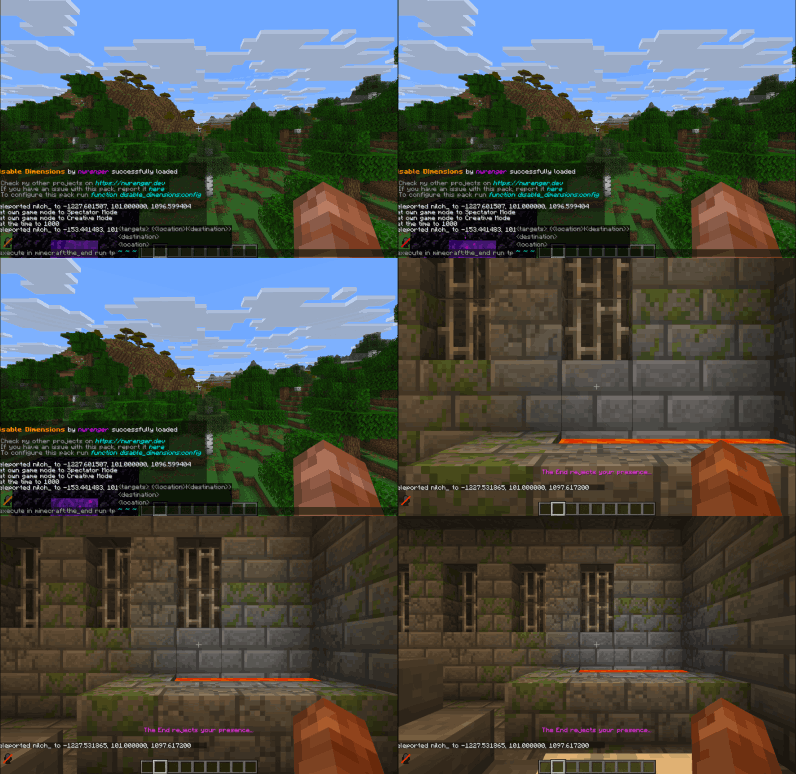
展示
'穿过'下界传送门

向下界传送门投掷末影珍珠
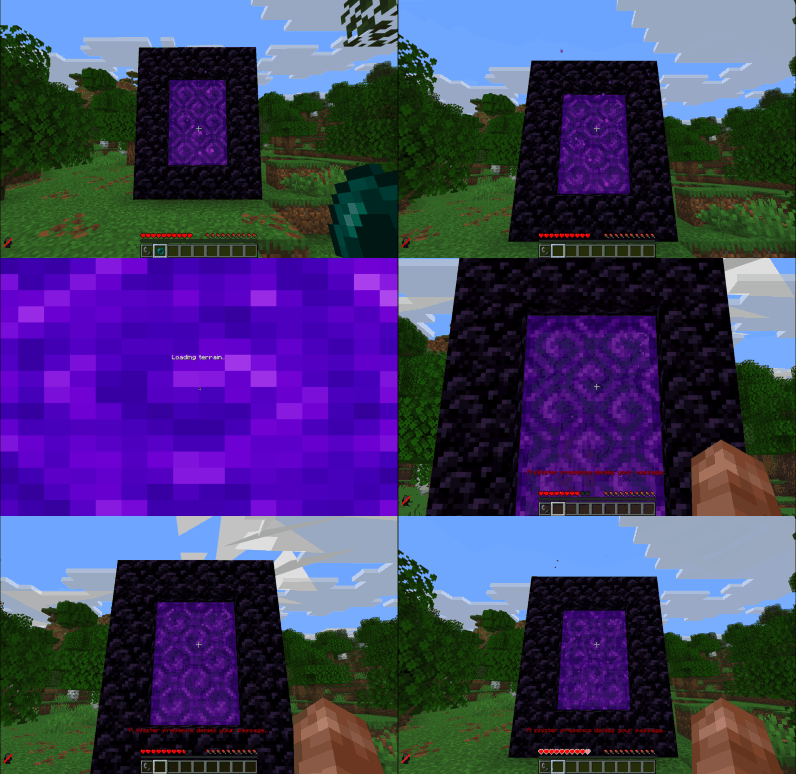
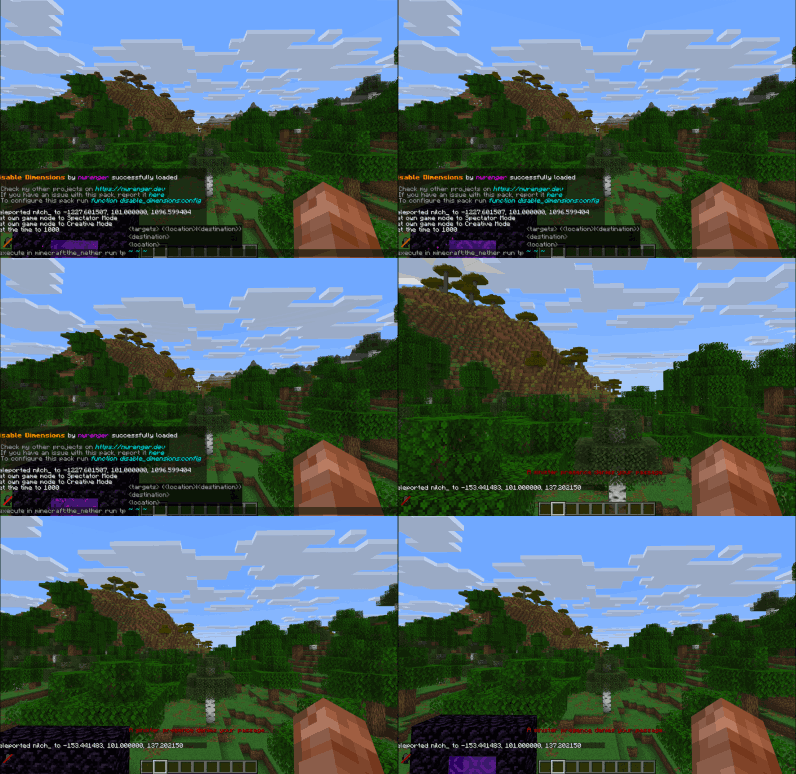
传送至下界
'穿过'末地传送门
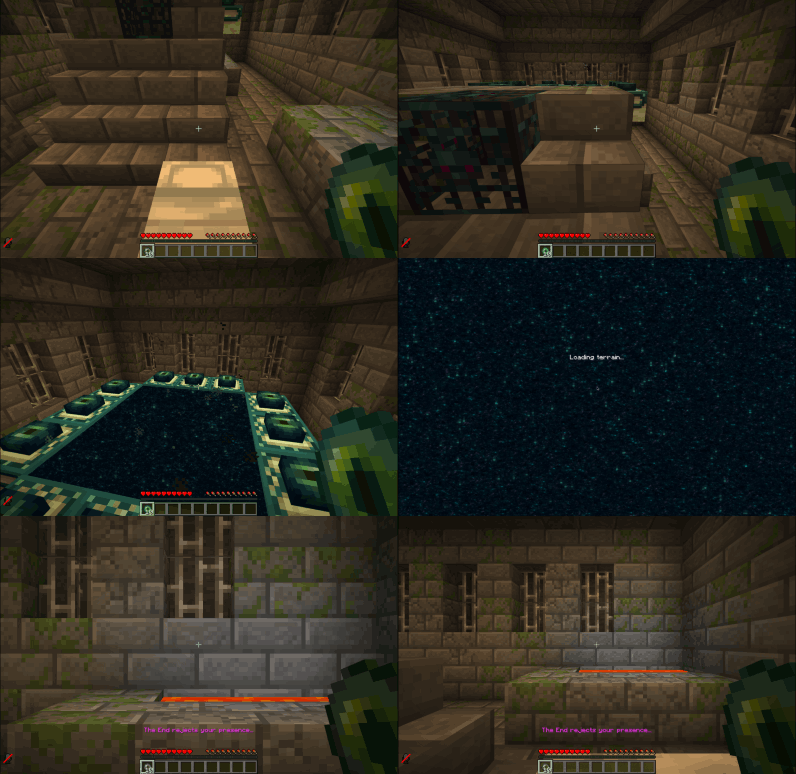
向末地传送门投掷末影珍珠
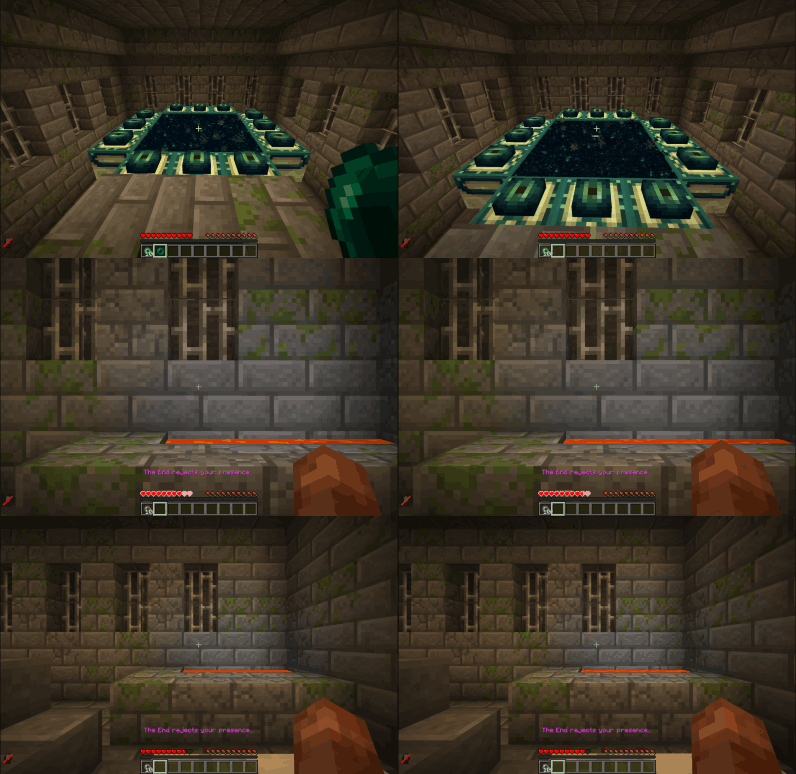
传送至末地
贡献与问题
我热烈欢迎以下内容:
- 错误报告
- 功能请求
- 拉取请求(Pull Requests)
请在 GitHub 上提交 Issue 或 PR。
许可证
本项目遵循 LGPLv3 许可证。详情请参阅 LICENSE。
Disable Dimensions
A hard-to-break, grief-resistant solution for preventing players from entering The Nether, The End, and any further custom dimensions, with optional per-dimension conditions.
Allows you to disable dimensions by intercepting all known dimension-entry methods and returning players immediately. Each dimension can be separately enabled or disabled, with optional conditions which override that status.
Perfect for vanilla and modded multiplayer servers where you want to disable further dimensions to prevent players from progressing too fast.
Why use this data pack/mod?
- Only Complete Solution: No other data pack currently disables The Nether, The End, and further custom dimensions, with optional per-dimension conditions, for the current Minecraft versions. All older ones are outdated, broken, or not as feature rich.
- Comprehensive Coverage: Works in every situation. For players in all game modes, teleportation commands, ender pearls, minecarts, and more. Players can enter portals or teleport, but are instantly teleported back. From the Nether to their entry point with a fallback to world spawn, and from the End to their respawn point or world spawn. See Edge Cases for the handful of scenarios that require manual cleanup.
- Intended Vanilla Reward: Players who try to swap dimensions will still receive the vanilla “entered dimension” advancement (for the Nether or the End). This is intentional and serves as a small reward for their attempt. And you know who tried by checking their achievements. Don’t worry, they’ll get teleported back safely!
- Immersive Feedback: On teleport back, players see a short action bar message, hear a subtle sound cue and get a slowness effect applied, making the experience clear and responsive without being intrusive.
- Flexible and Compatible: Works as either a global mod or a world-specific data pack, includes built-in language support, and is fully compatible with vanilla, modded, and custom dimensions setups right out of the box.
- Server-Ready: Built to be reliable, grief-resistant, and completely passive, with no extra overhead through tick-based checks. Perfect for public or semi-public multiplayer servers.
- Dynamic Configuration: Can be adjusted in real time through the in-game config panel, no reloads or restarts required.
TL;DR: A stable and lightweight way to stop unwanted dimension travel, made to just work.
Installation
After adding the data pack/mod to your world or server, you should be able to open the about panel, which is fully controllable with the mouse:
/function disable_dimensions:about
Language Support
Translated text is available for supported languages. This is mainly intended for server admins, since the configurable messages shown to players can be customized anyway.
- Mod in Single Player: Included automatically and works out of the box.
- Data Pack or Server Setup: Translations are client-side. For a dedicated server that only uses the data pack, the admin needs either the mod on their client or the separate resource pack to see translated UI text.
To add new translations, please refer to this README.
Configuration
Open the configuration panel by the following command:
/function disable_dimensions:config
From here, you can:
- Toggle each dimension
enabled/disabled - Edit the return message and color
- Add and remove conditions, see Conditions for further information
- Add custom dimension entries, see Custom Dimensions for a guide
- Remove dimension entries
- Reset dimension entries to defaults
- Set the World Spawn, supports any dimension
A default World Spawn exists, but you should set it to your desired location once before production use by standing there and pressing
Replace.
Conditions
Conditions can overwrite the current set status if they're true. With them you can partially enable/disable dimension travel after a specific time, for a specific gamemode and so on.
Each condition requires:
name: A unique name for the condition.type: Determines what the value gets checked against.advancement: Checks the player's advancements. The value is the advancement ID.day: Checks the in-game day count. The value is the exact day number.gamemode: Checks the player's current gamemode. The value can besurvival,creative,adventure, orspectator.gametime: Checks how long the world has been running. The value is given in ticks, so use a formula likeday_count * 24 * 60 * 60 * 20for days. This time only advances while the world is running, so server downtime affects accuracy.item: Checks the items inside the player's inventory. The value is an item ID with an optional item component filter, for exampleminecraft:diamond[count=64].score: Checks the player's scoreboard scores. The value uses the formatobjective_name=score_value, for examplenether_entries=5.tag: Checks the player's tags. You can give players custom tags, likeenter_nether.team: Checks the player's team. The value is the team name, for examplered_team.
value: The specific value to check. Its format depends on the selected type.disabled: The disabled value which overwrites the current status if the condition applies.
If you have multiple conditions, only one of them needs to be true to overwrite the current status.
Avoid conditions that can cancel each other out, such as two conditions that both apply to the current player while one enables travel and the other disables it. This can result in unexpected behavior.
Here are three examples of conditions for minecraft:the_nether:
Enable after three days
/function disable_dimensions:config/dimension/condition/add {id:"minecraft:the_nether",name:"3d Enable",type:"gametime",value:"5184000", disabled:"false"}
Enable for creative mode
/function disable_dimensions:config/dimension/condition/add {id:"minecraft:the_nether",name:"Allow Creative",type:"gamemode",value:"creative", disabled:"false"}
Disable after 7 in-game days
/function disable_dimensions:config/dimension/condition/add {id:"minecraft:the_nether",name:"7d Disable",type:"day",value:"7", disabled:"true"}
Custom Dimensions
To block a custom dimension, add a new entry via the config panel.
Each entry requires:
name: The display name of the entry. Used for display in the config panel and shouldn't be empty.id: The in-game dimension identifier, needs to match the one of the custom dimension.type: Determines how and where the player will be sent back.nether_entered_pos: Sends the player to their last Nether entry position. Only valid for The Nether.respawn: Sends the player to their respawn point, or to the World Spawn if none is set. Used for The End and other custom dimensions.
message_color: The color of the message shown to the player on return, use valid text component colors.message_text: The text of the message shown to the player on return.
Here are two examples of adding a custom dimension:
The Aether
/function disable_dimensions:config/dimension/add {name: "The Aether", id: "aether:the_aether", type: "respawn", message_color: "aqua", message_text:"A radiant force from the heavens bars your ascent..."}
ATM10 - The Other
/function disable_dimensions:config/dimension/add {name: "The Other", id: "allthemodium:the_other", type: "respawn", message_color: "dark_purple", message_text:"A mysterious force from The Other prevents your entry..."}
Server Only
The config panel will only be usable when you're physically logged in to the server and have op.
To configure the data pack/mod, you can use the config commands used by the config panel directly inside the server terminal as follows:
- Dimensions
- Add Entry:
function disable_dimensions:config/dimension/add {name: "", id: "", type: "", message_color: "", message_text:""} - Enable:
function disable_dimensions:config/dimension/enable {id: ""} - Disable:
function disable_dimensions:config/dimension/disable {id: ""} - Edit Message:
function disable_dimensions:config/dimension/message {id: "", message_color: "", message_text:""} - Remove Entry:
function disable_dimensions:config/dimension/remove {id: ""} - Reset Entries:
function disable_dimensions:config/dimension/reset
- Add Entry:
- Conditions
- Add:
function disable_dimensions:config/dimension/condition/add {id:"",name:"",type:"",value:"", disabled:"false"} - Enable:
function disable_dimensions:config/dimension/condition/enable {id:"", name:""} - Disable:
function disable_dimensions:config/dimension/condition/disable {id:"", name:""} - Edit:
function disable_dimensions:config/dimension/condition/edit {id:"", name:"", type:"", value:""}" - Remove:
function disable_dimensions:config/dimension/condition/remove {id:"", name:""}
- Add:
- World Spawn:
- Set: Not possible due to requiring physical presence at the desired location
The
idwill be the dimension identifier from the game. For The Nether it's{id: "minecraft:the_nether"}and for The End it's{id: "minecraft:the_end"}.
Edge Cases
This data pack/mod is intentionally event-driven, with a few rare transitions requiring manual cleanup or resulting in different from expected behavior:
- Respawn in disabled dimension:
If a respawn point via a respawn anchor or the
spawnpointcommand is set inside a dimension that later gets disabled, the player will continue to respawn there until the respawn point is cleared or reset. - Already inside on disable: Players who are already in The Nether, The End, or a custom dimension when it gets disabled will remain there until they change dimensions. Teleport them out if needed.
- Custom dimension respawn limitations: Custom dimensions like The Aether can add new respawn mechanics, but these are rejected since they rely on custom dimensions or blocks.
Showcase
'Going Through' Nether Portal
Throwing Ender Pearl at Nether Portal
Teleporting to The Nether
'Going Through' End Portal
Throwing Ender Pearl at End Portal
Teleporting to The End
Contributing & Issues
I warmly welcome:
- Bug reports
- Feature requests
- Pull requests
Please open issues or PRs on GitHub.
License
This project is licensed under the LGPLv3 License. See LICENSE for details.

下载 Disable Dimensions
需要联机服务器吗?
稳定流畅、一键部署,几分钟即可和朋友联机开服
最低仅需 8 元/月 即可畅快联机
下载 Disable Dimensions
需要联机服务器吗?
稳定流畅、一键部署,几分钟即可和朋友联机开服
最低仅需 8 元/月 即可畅快联机
下载 Disable Dimensions
需要联机服务器吗?
稳定流畅、一键部署,几分钟即可和朋友联机开服
最低仅需 8 元/月 即可畅快联机
下载 Disable Dimensions
需要联机服务器吗?
稳定流畅、一键部署,几分钟即可和朋友联机开服
最低仅需 8 元/月 即可畅快联机
下载 Disable Dimensions
需要联机服务器吗?
稳定流畅、一键部署,几分钟即可和朋友联机开服
最低仅需 8 元/月 即可畅快联机
下载 Disable Dimensions
需要联机服务器吗?
稳定流畅、一键部署,几分钟即可和朋友联机开服
最低仅需 8 元/月 即可畅快联机
下载 Disable Dimensions
需要联机服务器吗?
稳定流畅、一键部署,几分钟即可和朋友联机开服
最低仅需 8 元/月 即可畅快联机
下载 Disable Dimensions
需要联机服务器吗?
稳定流畅、一键部署,几分钟即可和朋友联机开服
最低仅需 8 元/月 即可畅快联机
下载 Disable Dimensions
需要联机服务器吗?
稳定流畅、一键部署,几分钟即可和朋友联机开服
最低仅需 8 元/月 即可畅快联机
下载 Disable Dimensions
需要联机服务器吗?
稳定流畅、一键部署,几分钟即可和朋友联机开服
最低仅需 8 元/月 即可畅快联机
✨ 重大改进:新增了对 Minecraft 版本 26.3 的支持。
关于这个资源的讨论、问题反馈与使用心得
还没有讨论,来发第一帖吧
你是这个资源的作者?登录后可认领此资源。
相似资源
 数据包

此数据包添加了属于阿瓦里海盗的独特结构,将他们的独特风格带入你的 Minecraft 世界!兼容性:1.20 至 26.3
 数据包
一个 Minecraft 光线投射库,能够精确检测玩家正在查看的方块,包括像台阶和楼梯这样的特殊方块形状。
 数据包

此数据包添加了新的“祝福模式”难度。
 数据包
允许服务器管理员方便地禁用 Xaero's Map 系列模组中的实体雷达、小地图等功能,使竞技游戏更加公平。
 数据包

使用原版/生存友好的方法更改青蛙的变种类型。支持原版(寒冷、温带、温暖)以及可选的“More Frogs 2”变种:深红、末影、地狱、毒镖、紫珀、幽匿、灵魂、诡异和木头。
 数据包

手持潜影盒时可直接打开,无需将其放置在地面上。只需按住 Shift 并右键点击即可访问你的潜影盒。
评论 0
登录后参与评分
还没有评论,来抢沙发吧