
⚠️ 重要:使用指南 如果您计划在服务器或整合包中使用此资源, 请参阅:

?视频概览
观看视频以获取完整的演示,涵盖使用 Echo Redstone 组件进行设置、链接和无线红石功能的过程。
?使用方法
1. 合成与频率
- 唯一频率 ID:
- 每个合成的回声号角都会获得一个唯一的频率 ID。
- 只有共享相同 ID 的组件才会相互作用。
- 检查频率:
- 按住 Shift 并使用回声号角,或者按住 Shift 右键点击发射器/接收器。
2. 组件设置
- 需要中继器:
- 将接收器和发射器放置在中继器上。
3. 链接与激活
- 链接接收器:
- 将接收器放置在中继器上,并用回声号角右键点击它。
- 使用发射器:
- 将发射器放置在中继器上,并用回声号角右键点击。
- 发射器需要经验球才能广播信号。
- 更长的中继器延迟会增加激活之间的冷却时间。
- 接收器更新:
- 触发方块更新(例如,在前方放置红石粉)以确保正常运行。
4. 创建模仿者 (V1.2+)
- 模仿者回声号角:
- 当发射器设置为所需频率且您的物品栏中有回声碎片时,使用不同的回声号角按住 Shift 右键点击该发射器。
- 这将产生一个分享相同频率 ID 但显示“mimic”而非原始生物名称的模仿者回声号角。
?️合成配方
回声号角配方:
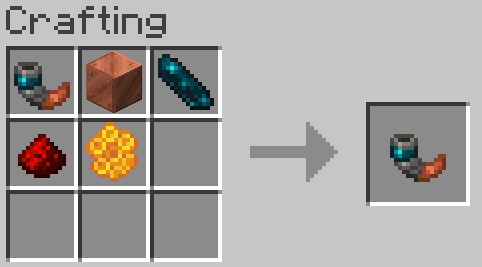
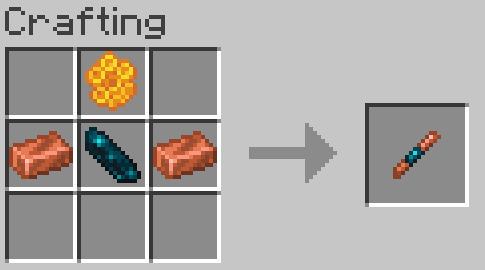
- 使用任何铜块(氧化或未涂蜡)来合成回声号角。如果使用未涂蜡的铜块合成,可以省略蜂蜜块。
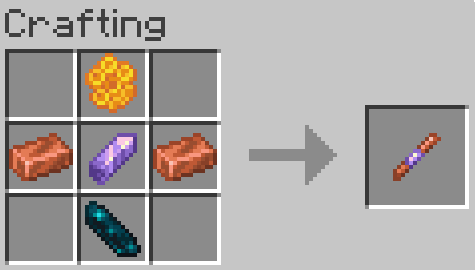
红石回声接收器:
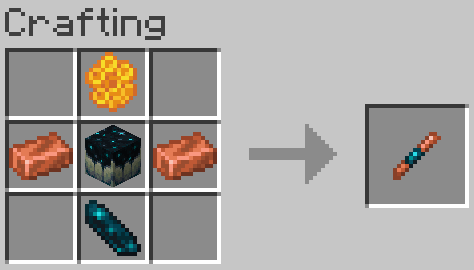
红石回声发射器:
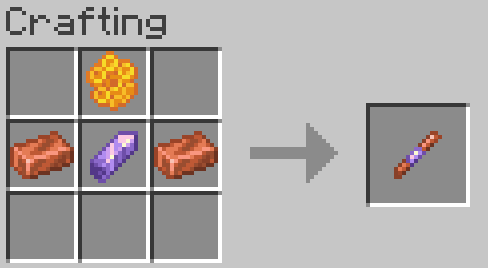
旧版配方(已过时):
❓常见问题
出现问题/没有任何反应
由于此数据包的复杂性,如果某些功能无法正常工作,请加入 Discord 寻求帮助。此数据包是否支持多人游戏?
*是的,有超过 20 亿个可能的频率 ID 槽位,即使在多人服务器上,也几乎不可能遇到 ID 冲突。*这仅适用于 V1.1 版本,因为 V1.0 版本存在一个 Bug,将其限制为大约 128 个频道。如果您使用的是 V1.0,请更新到 V1.0 FIXED 版本。
此数据包对性能有何影响?
此数据包不包含任何不必要的物品 ticking 函数。然而,由于红石数据包需要进行方块检测,因此会有轻微的性能影响。在超过 1,500 个接收器/发射器之前,未观察到明显的 TPS 下降。我如何报告 Bug?
加入 Discord,要么私信我,要么在 reports 频道发帖。我如何从此数据包的旧版本进行更新?
只需运行命令 "/function dash.wsred:update"(如果有接收器和发射器位于未加载的区域,您可能需要多次运行它)。我如何卸载此数据包?
只需运行命令 "/function dash.wsred:uninstall"(如果有接收器和发射器位于未加载的区域,您可能需要多次运行它)。⚠️ IMPORTANT: USAGE GUIDELINES If you're planning to use this on a server or modpack, please refer to:
?Video Overview
Watch the video for a full demo covering setup, linking, and wireless redstone functionality using Echo Redstone components.
?How to Use
1. Crafting & Frequency
- Unique Frequency ID:
- Each crafted echo horn gets a unique frequency ID.
- Only components sharing the same ID will interact.
- Check Frequency:
- Hold shift and use the echo horn, or shift right-click an emitter/receiver.
2. Component Setup
- Repeaters Required:
- Place receivers and emitters on repeaters.
3. Linking & Activation
- Linking a Receiver:
- Place the receiver on a repeater and right-click it with the echo horn.
- Using an Emitter:
- Place the emitter on a repeater and right-click with the echo horn.
- Emitters need experience orbs to broadcast.
- Longer repeater delays increase the cooldown between activations.
- Receiver Update:
- Trigger a block update (e.g., place redstone dust in front) to ensure proper function.
4. Creating a Mimic (V1.2+)
- Mimic Echo Horn:
- With an emitter set to the desired frequency and an echo shard in your inventory, shift right-click the emitter using a different echo horn.
- This produces a mimic echo horn that shares the frequency ID but displays "mimic" instead of the original mob name.
?️Crafting Recipes
Echo Horn Recipe:
- Use any copper block (oxidized or waxed) to craft the echo horn. If crafting with a waxed copper block honeycomb can be omitted.
Redstone Echo Receiver:
Redstone Echo Emitter:
Legacy Recipes (Outdated):
❓FAQ
Something is wrong/Nothing is happening
Due to the complexity of this datapack, if something isn’t working correctly, join the Discord to ask for help.Is this datapack Multiplayer friendly?
*Yes, there are over 2 billion possible frequency ID slots, making it virtually impossible to encounter ID conflicts, even on a multiplayer server.*This is only the case in version V1.1, as version V1.0 has a bug that limits it to roughly 128 channels if you are on V1.0 update to the V1.0 FIXED version.
How does this datapack impact performance?
This datapack does not include any unnecessary ticking functions for items. However, since redstone datapacks require block checks, there is a slight performance impact. No noticeable TPS drops were observed until after 1,500 receivers/emitters.How do I report a bug?
Join the Discord and either DM me or post a message in the reports channel.How do I update this datapack from an older version
Just run the command "/function dash.wsred:update" (if there are receivers and emitters in unloaded areas, you might need to run it more than once).How do I uninstall this datapack?
Just run the command "/function dash.wsred:uninstall" (if there are receivers and emitters in unloaded areas, you might need to run it more than once).
下载 Echo Wireless Redstone
需要联机服务器吗?
稳定流畅、一键部署,几分钟即可和朋友联机开服
最低仅需 8 元/月 即可畅快联机
下载 Echo Wireless Redstone
需要联机服务器吗?
稳定流畅、一键部署,几分钟即可和朋友联机开服
最低仅需 8 元/月 即可畅快联机
下载 Echo Wireless Redstone
需要联机服务器吗?
稳定流畅、一键部署,几分钟即可和朋友联机开服
最低仅需 8 元/月 即可畅快联机
下载 Echo Wireless Redstone
需要联机服务器吗?
稳定流畅、一键部署,几分钟即可和朋友联机开服
最低仅需 8 元/月 即可畅快联机
下载 Echo Wireless Redstone
需要联机服务器吗?
稳定流畅、一键部署,几分钟即可和朋友联机开服
最低仅需 8 元/月 即可畅快联机
下载 Echo Wireless Redstone
需要联机服务器吗?
稳定流畅、一键部署,几分钟即可和朋友联机开服
最低仅需 8 元/月 即可畅快联机
下载 Echo Wireless Redstone
需要联机服务器吗?
稳定流畅、一键部署,几分钟即可和朋友联机开服
最低仅需 8 元/月 即可畅快联机
下载 Echo Wireless Redstone
下载 Echo Wireless Redstone
需要联机服务器吗?
稳定流畅、一键部署,几分钟即可和朋友联机开服
最低仅需 8 元/月 即可畅快联机
下载 Echo Wireless Redstone
需要联机服务器吗?
稳定流畅、一键部署,几分钟即可和朋友联机开服
最低仅需 8 元/月 即可畅快联机
- 更新至 26.1
- 修复了在放置红石元件时删除副手物品的错误。
关于这个资源的讨论、问题反馈与使用心得
还没有讨论,来发第一帖吧
你是这个资源的作者?登录后可认领此资源。
相似资源
 数据包

此数据包添加了属于阿瓦里海盗的独特结构,将他们的独特风格带入你的 Minecraft 世界!兼容性:1.20 至 26.3
 数据包
一个 Minecraft 光线投射库,能够精确检测玩家正在查看的方块,包括像台阶和楼梯这样的特殊方块形状。
 数据包

此数据包添加了新的“祝福模式”难度。
 数据包
允许服务器管理员方便地禁用 Xaero's Map 系列模组中的实体雷达、小地图等功能,使竞技游戏更加公平。
 数据包

使用原版/生存友好的方法更改青蛙的变种类型。支持原版(寒冷、温带、温暖)以及可选的“More Frogs 2”变种:深红、末影、地狱、毒镖、紫珀、幽匿、灵魂、诡异和木头。
 数据包

手持潜影盒时可直接打开,无需将其放置在地面上。只需按住 Shift 并右键点击即可访问你的潜影盒。
评论 0
登录后参与评分
还没有评论,来抢沙发吧