
 ExpressCart
比鞘翅飞得更快且永远不会脱轨的高速矿车。你可以将它们连接成列车,并能瞬间停车。
ExpressCart 是一个纯 数据包:无需模组、插件或资源包。制作一个 快速矿车,将其放置在铁轨上即可乘坐。玩家和原版矿车的行为完全不变。只有快速矿车获得了升级。
适用于 Minecraft Java 版 1.21.11 和 26.1 – 26.3(单人游戏、纯净服、基于 Paper 的服务器以及 Fabric 服务器)
提供  英语(默认)和
 德语:请下载与你的语言匹配的文件。
 特性
|
|
 比鞘翅更快 |
默认速度为每秒 60 格(配备火箭的鞘翅约为每秒 33 格,原版矿车为每秒 8 格)。管理员可将速度上限设置在 1 到 500 之间的任意值。 |
 永不脱轨,永不卡住 |
矿车每一刻都遵循真实的铁轨几何形状行驶,无论是弯道、斜坡还是落差。生物和方块都无法阻挡它。到达轨道尽头时,它会自然停止。 |
 将矿车连接成列车 |
使用 连接器 连接矿车。连接后的矿车会以固定的间距作为一列列车行驶,即使在弯道上也是如此。 |
 自定义速度 |
W/S 提高或降低目标速度。动力铁轨会尽可能快地将你加速至该速度。 |
 瞬间停车 |
Space 是紧急制动,可立即停车。未充能的动力铁轨 可作为由红石控制的停车信号,从而构建车站。 |
 生物可以搭乘 |
空的快速矿车会像原版矿车一样拾取它们经过的生物。 |
 OP 快速矿车 |
仅限管理员:它在任何地方都能加速,不需要动力铁轨,并且在生存模式下无法被破坏。 |
 游戏内管理菜单 |
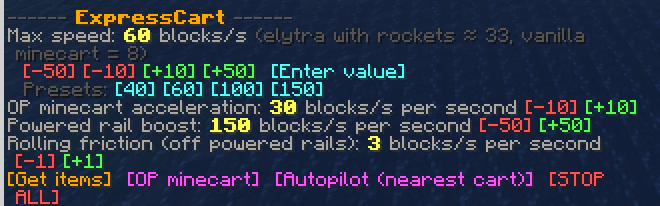
一个可点击的聊天菜单,用于设置最大速度、动力铁轨助推、摩擦力、自动驾驶以及一个全服 STOP ALL(全部停止)按钮。 |
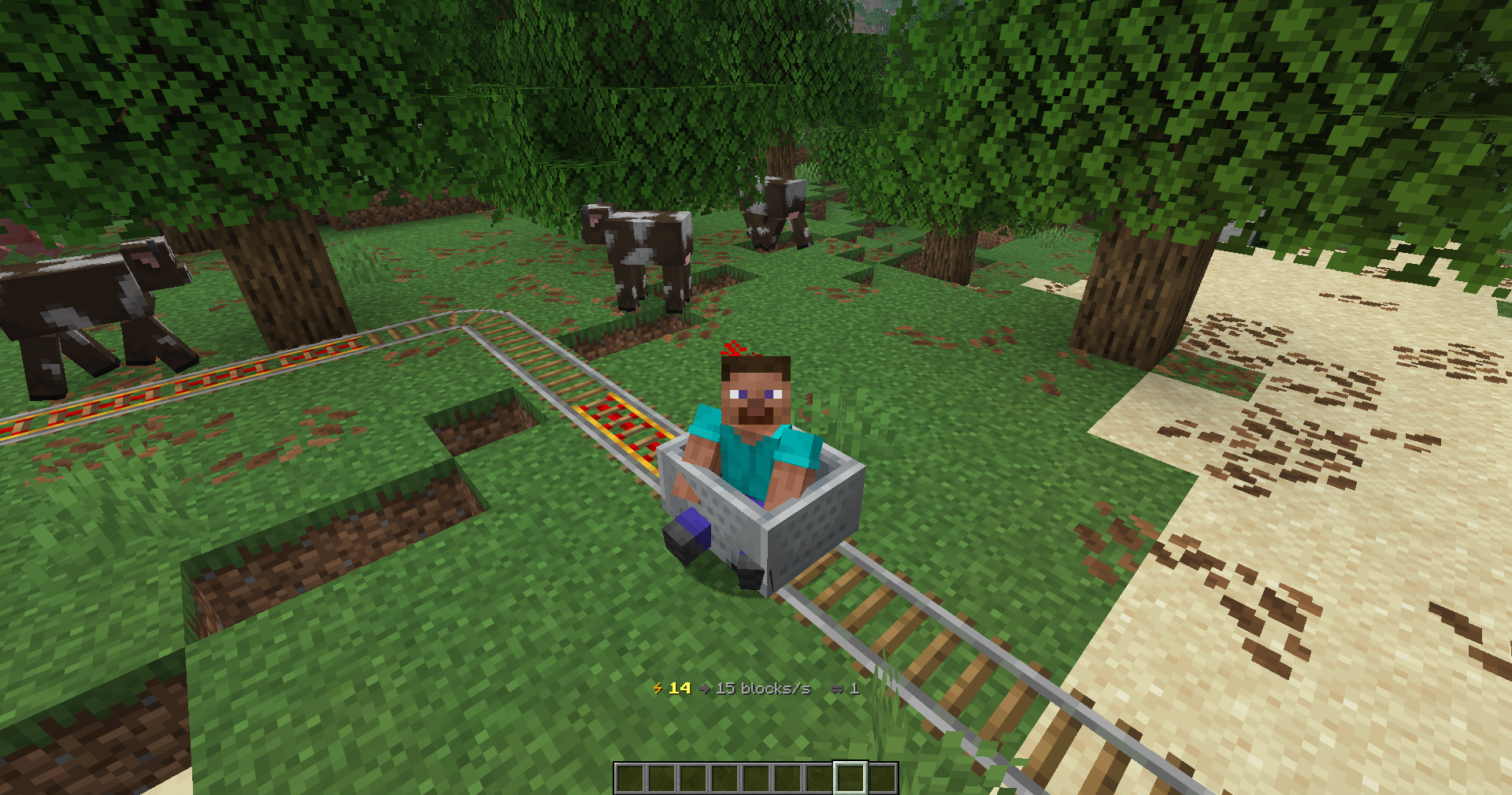
 如何乘坐
| 按键 |
操作 |
| W(面朝前方) |
提高目标速度 |
| S |
降低目标速度 / 刹车 |
| W(面朝后方,且在静止时) |
掉头 |
| Space |
紧急制动:立即停止 |
| Shift |
下车(原版操作) |
动作栏显示你的 当前速度 → 目标速度 以及列车包含的矿车数量。
动力铁轨的作用: 普通快速矿车仅在 充能 的动力铁轨上加速。离开动力铁轨后,它会逐渐减速直至停止。当你静止不动时,W 会以步行速度(每秒 8 格)推动你前进,以便你能到达下一个动力铁轨。在路线起点铺设几条动力铁轨,并偶尔铺设一条以维持速度。
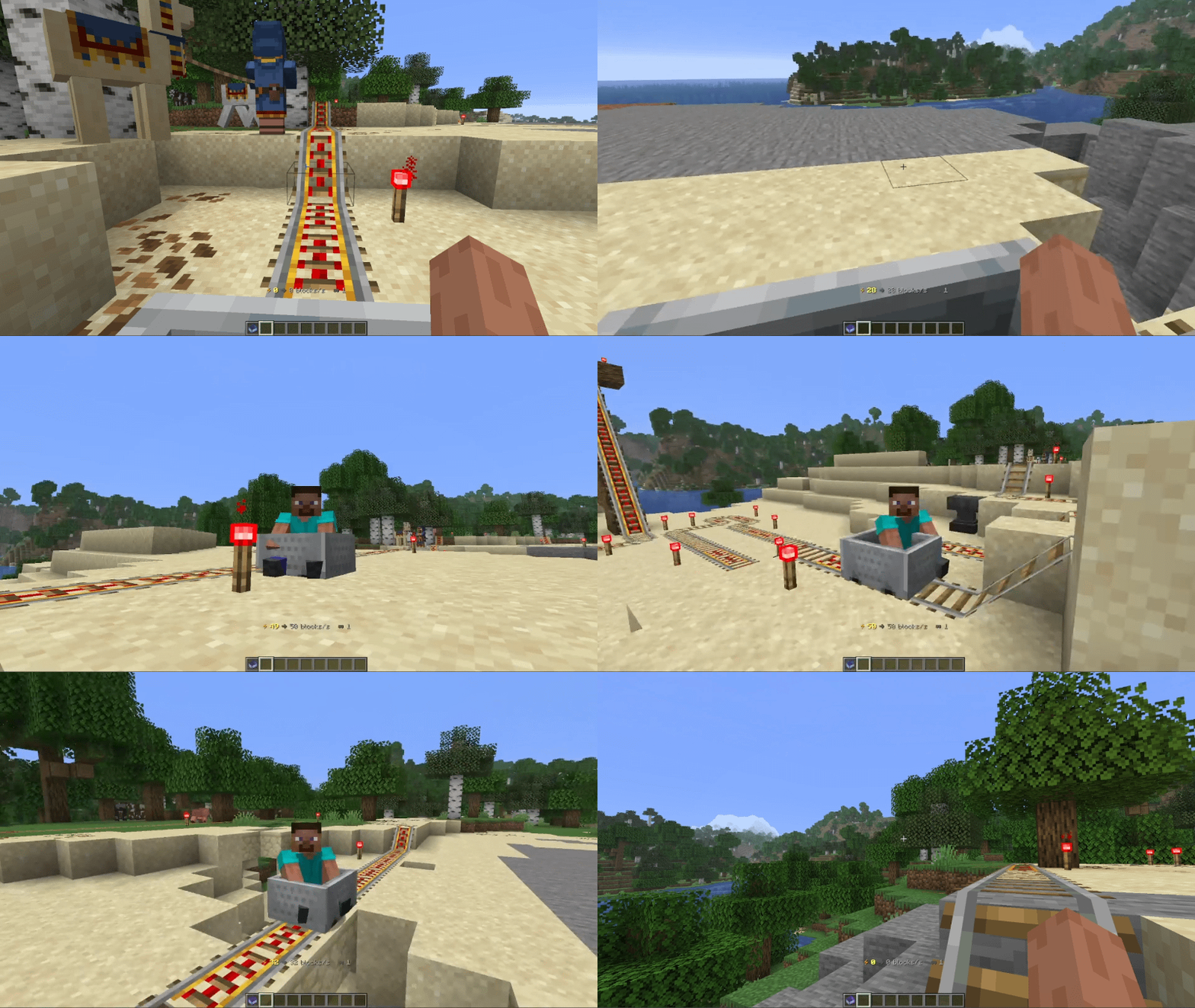
连接列车
- 手持 连接器 并右键点击第一个快速矿车。它会开始发光。
- 右键点击第二个矿车。它必须位于 同一条轨道 上,沿铁轨距离不超过 8 格。
- 完成!两个矿车现在会朝同一方向作为一列列车行驶。
双击同一辆矿车可将其解绑。在连接它们时,两列列车都必须处于停止状态。
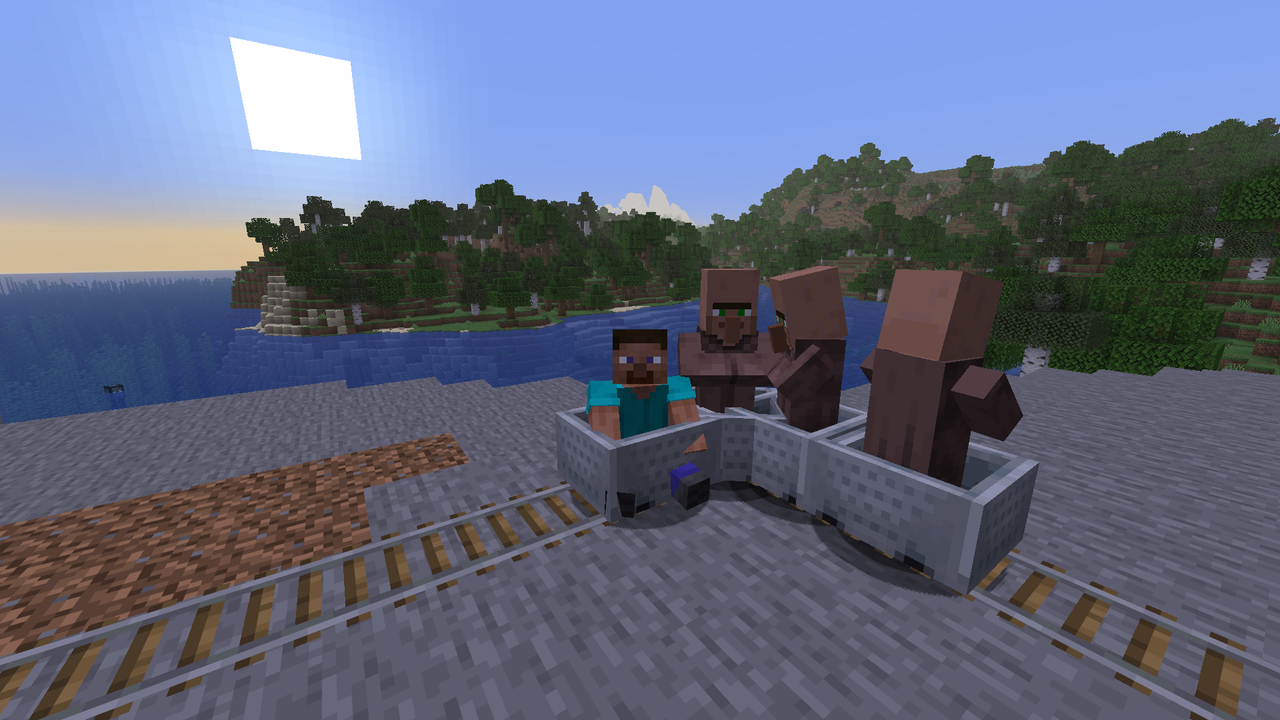
车站与信号
一根未通电的激活铁轨会在其正前方停下所有快速列车,无论速度多快。使用拉杆、按钮或红石时钟为其通电,列车即可继续行驶。这就是构建车站、交叉口和定时发车所需的全部内容。
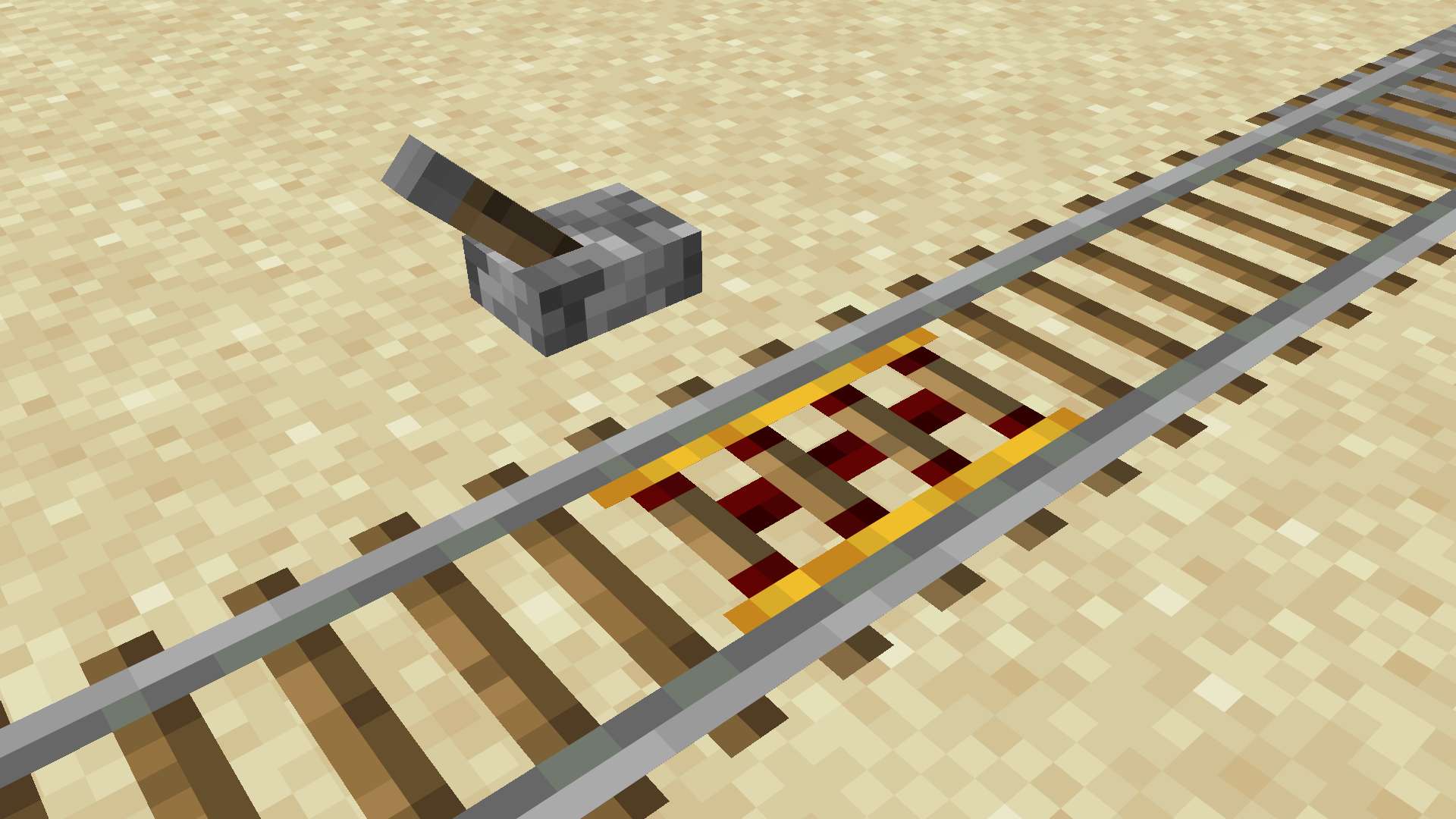
 合成
Express Minecart:由金锭、红石粉和钻石围绕矿车合成的物品。

Coupler:无需特定形状,需 1 个绊线钩 + 2 个铁锭。

OP Express Minecart 无法通过合成获得。管理员可从菜单中获取。
管理员命令
所有管理员功能都集成在一个可点击的菜单中:
/function expresscart:menu
所有命令
| 命令 |
功能说明 |
/function expresscart:menu |
打开管理员菜单 |
/function expresscart:admin/speed {bps:80} |
设置最大速度(1 – 500 格/秒) |
/function expresscart:admin/boost {value:150} |
设置激活铁轨的加速强度 |
/function expresscart:admin/fric {value:3} |
设置在激活铁轨上的滚动摩擦系数(0 = 无摩擦) |
/function expresscart:admin/accel {value:30} |
设置 OP 矿车的加速度 |
/function expresscart:admin/stopall |
立即停止服务器上的所有列车 |
/function expresscart:admin/autopilot |
切换最近一辆矿车的自动驾驶模式(它将在轨道两端间往返穿梭) |
/function expresscart:give |
给予玩家一个 Express Minecart 和一个 Coupler |
/function expresscart:admin/give_op |
给予玩家一个 OP Express Minecart |
/function expresscart:admin/uninstall |
在移除数据包前清理所有相关数据 |
 安装指南
- 下载对应语言的压缩包:
ExpressCart-x.x.x-en.zip 或 ExpressCart-x.x.x-de.zip。
- 将 zip 文件放入世界文件夹下的
datapacks 目录中:
- 单人游戏:
.minecraft/saves/<world>/datapacks/
- 服务器:
<server>/world/datapacks/
- 运行
/reload 命令或重启世界/服务器。
请同时仅安装一种语言版本。
常见问题解答 (FAQ)
玩家需要安装任何内容吗?
不需要。所有内容均在服务器端运行,原版客户端即可加入。
它会改变普通矿车吗?
不会。仅影响 Express Minecart(以及 OP Express Minecart)。
区块加载有速度限制吗?
当速度超过约 150 格/秒时,区块通常无法及时加载。此时列车会短暂等待,而不是脱轨。
我可以在 Paper/Spigot 上使用吗?
可以。它在基于 Paper 的服务器上像任何原版数据包一样工作。
如何卸载它?
运行 /function expresscart:admin/uninstall,从 datapacks 文件夹中删除 zip 文件,然后执行 /reload。
 发现 Bug 或有想法? 请在我的 Discord 中告知我:。享受这段旅程吧!
ExpressCart
High-speed minecarts that outrun an elytra and never derail. You can link them into trains and stop them in an instant.
ExpressCart is a pure data pack: no mods, no plugins, and no resource pack needed. Craft an Express Minecart, put it on your rails and ride. Players and vanilla minecarts work exactly as before. Only Express Minecarts get the upgrade.
Works on Minecraft Java 1.21.11 and 26.1 – 26.3 (singleplayer, vanilla, Paper-based and Fabric servers)
Available in English (default) and German: download the file that matches your language.
Features
|
|
| Faster than an elytra |
60 blocks/s by default (an elytra with rockets reaches about 33, a vanilla minecart 8). Admins can set the limit anywhere from 1 to 500. |
| Never derails, never gets stuck |
The cart follows the real rail geometry every tick, through curves, slopes and drops. Mobs and blocks can't stop it. At the end of the track it simply halts. |
| Link carts into trains |
Use the Coupler to link carts. Linked carts drive as one train with fixed spacing, even through curves. |
| Set your own speed |
W/S raise or lower your target speed. Powered rails then push you up to that speed as fast as they can. |
| Instant stops |
Space is an emergency brake. An unpowered powered rail works as a stop signal you can control with redstone, so you can build stations. |
| Mobs can ride along |
Empty Express Minecarts pick up mobs they drive past, just like vanilla carts. |
| OP Express Minecart |
Admins only: it accelerates anywhere, needs no powered rails and can't be broken in survival. |
| In-game admin menu |
One clickable chat menu for max speed, powered rail boost, friction, autopilot and a server-wide STOP ALL button. |
How to ride
| Key |
Action |
| W (looking forward) |
Raise the target speed |
| S |
Lower the target speed / brake |
| W (looking backward, while stopped) |
Turn the train around |
| Space |
Emergency brake: stop instantly |
| Shift |
Get out (vanilla) |
The action bar shows your current speed → target speed and how many carts your train has.
Powered rails matter: a normal Express Minecart only speeds up on powered powered rails. Away from them it slowly rolls to a stop. When you're standing still, W pushes you at walking speed (8 blocks/s) so you can reach the next powered rail. Lay a few powered rails at the start of a line and a single one now and then to hold your speed.
Linking trains
- Hold the Coupler and right-click the first Express Minecart. It starts glowing.
- Right-click the second cart. It has to be on the same track, at most 8 blocks away along the rail.
- Done! Both carts now drive as one train in the same direction.
Click the same cart twice to unlink it. Both trains have to be stopped while you link them.
Stations and signals
An unpowered powered rail stops every Express train right in front of it, at any speed. Power it with a lever, button or redstone clock and the train drives on. That's all you need for stations, crossings and timed departures.
Crafting
Express Minecart: a minecart surrounded by gold, redstone and a diamond.
Coupler: shapeless, 1 tripwire hook + 2 iron ingots.
The OP Express Minecart can't be crafted. Admins get it from the menu.
Admin commands
All admin features are in one clickable menu:
/function expresscart:menu
All commands
| Command |
What it does |
/function expresscart:menu |
Opens the admin menu |
/function expresscart:admin/speed {bps:80} |
Sets the max speed (1 – 500 blocks/s) |
/function expresscart:admin/boost {value:150} |
Sets how strongly powered rails accelerate |
/function expresscart:admin/fric {value:3} |
Sets rolling friction off powered rails (0 = none) |
/function expresscart:admin/accel {value:30} |
Sets the acceleration of the OP minecart |
/function expresscart:admin/stopall |
Instantly stops every train on the server |
/function expresscart:admin/autopilot |
Toggles autopilot on the nearest cart (it shuttles between track ends) |
/function expresscart:give |
Gives an Express Minecart and a Coupler |
/function expresscart:admin/give_op |
Gives an OP Express Minecart |
/function expresscart:admin/uninstall |
Cleans everything up before you remove the pack |
Installation
- Download the file for your language:
ExpressCart-x.x.x-en.zip or ExpressCart-x.x.x-de.zip.
- Put the zip into your world's
datapacks folder:
- Singleplayer:
.minecraft/saves/<world>/datapacks/
- Server:
<server>/world/datapacks/
- Run
/reload or restart the world/server.
Only install one language version at a time.
FAQ
Do players need to install anything?
No. Everything runs on the server, and vanilla clients can join.
Does it change normal minecarts?
No. Only Express Minecarts (and OP Express Minecarts) are affected.
Is there a speed limit for chunk loading?
Above roughly 150 blocks/s, chunks often can't load fast enough. The train then waits for a moment instead of derailing.
Can I use it on Paper/Spigot?
Yes, it works like any vanilla data pack on Paper-based servers.
How do I remove it?
Run /function expresscart:admin/uninstall, delete the zip from the datapacks folder and /reload.
Found a bug or have an idea? Let me know in my Discord: Enjoy the ride!


 数据包

 数据包
 数据包

 数据包
 数据包

 数据包

评论 0
登录后参与评分
还没有评论,来抢沙发吧