Finnick4 的冰上赛艇竞速
此数据包允许服务器管理员为他们的 SMP(或其他服务器)创建冰上赛艇竞速活动,支持检查点、最高分记录、赛季排行榜等功能!不过,必须由拥有 OP 权限的人进行设置。
功能
- 轻松设置此数据包的赛道
- 不影响原版游戏体验
- 确保玩家按照正确的路线行驶
- 防止玩家离开赛艇
- 使用内置计时器,自动精确到小数点后两位
- 追踪每个人的最高分记录
- 防止玩家被困在水中
- 在面板中查看所有人的最高分记录
- 低延迟的高效设计
- 赛季排行榜
- 内置进度成就(不影响原版行为)
如何使用此数据包
首先,任何拥有 OP 权限的人都必须设置此数据包。请参阅“设置”部分!
比赛玩法
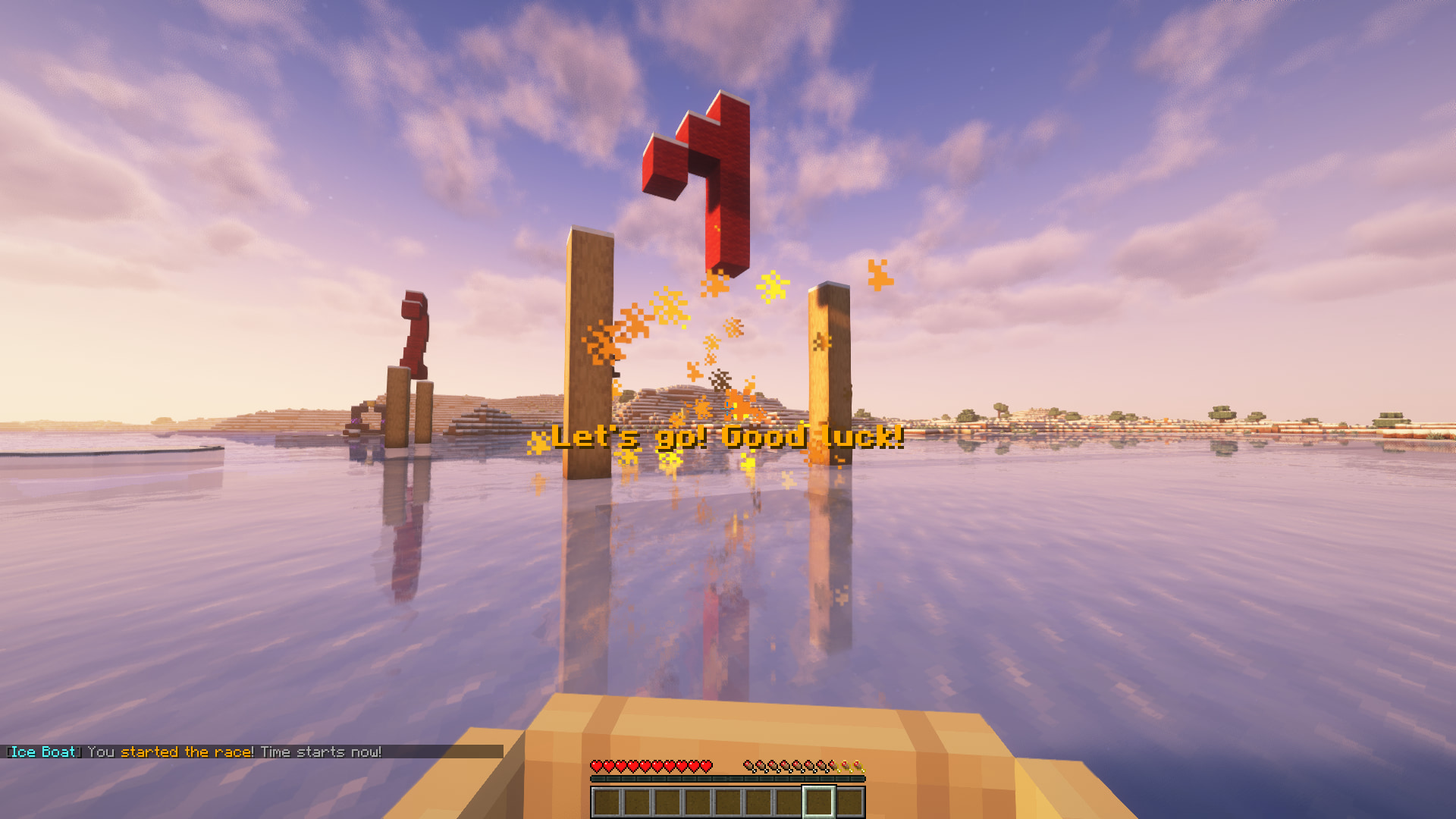
要开始比赛,请前往起点,坐进赛艇并点击起始检查点的文字。划船越过起点线,计时开始。通过获取检查点来跟随赛道 (小技巧:下一个检查点会用金色粒子高亮显示)。一旦获得新的检查点,你会收到当前时间的通知,并且该检查点会被保存。
如果你完成了比赛(到达最终检查点),你的时间将被保存。如果你创造了新的个人最好成绩,你也会收到相应的通知。系统会直接计算并告知你与之前记录的差距。
特殊情况处理
如果……
- 你激活了一个你已经拥有或不是按顺序的下一个检查点,你将被送回上一个有效的检查点。
- 你被困在水中,你也会被送回上一个检查点。
- 无论出于何种原因在任何时候离开赛艇,比赛对你来说即告取消。你必须回到起点重新开始。
玩家面板
玩家面板
要与数据包交互,每位玩家都可以通过 /trigger iceboat 访问其专属面板。在这里他们可以……
- 查看 (自己的) 统计数据:查看你开始了多少场比赛、完成了多少场、个人历史最好成绩和赛季最好成绩是多少,以及关于你冰上赛艇生涯的许多其他信息。
- 显示 PB(个人最好成绩):查看所有在线玩家的个人最好成绩。排行榜最多只显示前 5 名。也许你想了解某个特定在线玩家的成绩。
- 显示排行榜:查看排行榜。获取历史总榜前 5 名的成绩及其创造者。每位玩家只能有一个条目,这里仅显示最佳成绩!
- 显示赛季排行榜:此数据包的一个特色功能是支持赛季制,你可以拥有一个独立于历史总榜的赛季排行榜。例如,你在第 1 赛季取得了 45 秒的成绩,这将成为你的 PB,但要在第 2 赛季的赛季排行榜上显示这一成绩,你必须再次取得相同的成绩。如果你只能做到 50 秒,那么这将是你的赛季成绩。
- 开始比赛:如果你不想每次都去点击起点,可以使用此选项。如果你只想输入一个命令,请使用
/trigger iceboat set 105!
- 查看致谢:让所有人查看致谢信息以及谁制作了此数据包。包含指向该项目官方 Modrinth 页面 和 GitHub 仓库 的链接!
管理员面板
管理员面板
为了便于设置和管理此数据包,存在一个管理员面板。要访问它,请输入 /function finnick4:f4boats/admin-panel。以下是其中所有选项的用途:
- 启动新赛季:立即结束当前赛季并开始新赛季。这意味着重置所有人的赛季记录和赛季排行榜。这也适用于离线玩家。
- 查看全局统计:查看服务器的全局统计数据。将每个玩家菜单中的所有信息(除时间外)汇总在一起。即使有些人离线也能正常工作。
- 设置最高分:如果需要覆盖某人的最高分,请使用随后给出的给定命令。将
execute as PLAYERNAME 中的玩家名称更改为你想要修改的玩家,并在 {d:NEWLENGTH} 中设置新 PB 的持续时间。这个长度以刻(ticks)为单位。要将秒转换为刻,请将秒数乘以 20。
- 创建新检查点:用于赛道的设置过程。请参阅“设置”部分。
- 寻求帮助:当需要帮助时,使用此命令获取指向官方 Modrinth 页面、GitHub 仓库 和官方 Discord 服务器的链接以寻求帮助。
- 移除所有检查点:使用此命令可销毁所有已加载的检查点实体。若要彻底卸载,请使用此命令。详见“卸载”部分。这在生成检查点出错时也非常有用。你必须手动加载包含检查点实体的每个区块才能将其移除!
- 数据包卸载:移除所有存储的数据和计分板。详见“卸载”部分。
如何在活动中使用
如果你想在你的 SMP 或服务器上举办冰上赛艇竞速活动,你有多种选择。当然,最常见的方式是规定用时最短者获胜,但你也可以利用赛季机制。在活动开始时,在管理员面板中创建一个新季节,然后查看赛季排行榜以确定获胜者,或者找出自赛季(-> 自活动开始)以来最快的人。
还有一种可能性是一起游玩赛道,进行锦标赛,然后在轮次开始前开启新季节以获得最快的时间。但这需要你自己组织安排。
设置说明
设置
要开始使用此数据包,请从官方 Modrinth 页面 下载它,将其放入世界或服务器的 datapack 文件夹中,然后执行 /reload。
为了检测玩家是否处于检查点,数据包会检查参与者当前是否位于基岩上方两个方块处。因此,你需要在每个预期的检查点下方放置基岩。建议使用 4 个方块的宽度,以免在未经触发检查点的情况下滑过。
或者,你也可以通过编辑 f4boats/data/finnick4/function/f4boats/on-racers.mcfunction 中的第 4 行来修改此方块,将其更改为 execute on vehicle at @s if block ~ ~-2 ~ <block id> on passengers (...)。
通过在执行控制台的管理面板下 create new checkpoint(创建新检查点)提供的命令生成实体来初始化所有检查点。为此,站在冰面上,面向下一段赛道的方向并执行该命令。你在生成检查点时所面对的方向,就是玩家被返回到检查点时的旋转方向。
重要提示:根据设计,一旦玩家在游玩数据包时越过检查点,数据包会寻找 40 个方块范围内的最近检查点。这意味着如果你有两个相邻的检查点,请确保边缘不会与另一个检查点发生碰撞。否则,它可能会被计为无效检查点并将你送回,尽管你原本是在赛道上。
如果你搞砸了并且想重新开始生成实体,请使用管理面板中的“移除所有检查点”功能。再次提醒,你必须加载包含检查点实体的每个区块以杀死该实体。
确保也在起点和终点线放置一个检查点。这些会被自动检测为起点和终点。完成此处提到的所有内容后,赛道就准备就绪了!
卸载说明
卸载
如果你(出于任何原因)想要从此世界中卸载此数据包,请按照以下步骤操作:
I. 移除检查点实体
对于检查点系统,游戏会生成一些实体。要移除它们,请使用管理面板中的“移除所有检查点”选项。提醒:为了彻底卸载,你 必须 加载存在检查点实体的每一个区块。否则它将不会被移除。
(II. 移除基岩)
同时,你也可以移除用于检查点所需的、位于检查点下方冰块底部的基岩。没有函数可以帮助你做到这一点。
III. 使用卸载功能
使用管理面板提供的卸载功能。这将删除数据存储中的所有数据和所有计分板。如果重新加载且数据包仍处于安装状态,这些计分板数据将重新出现。
IV. 最后一步
从你的 datapacks 文件夹中移除数据包。如果你想的话,可以加入 Discord 服务器并告诉我你为何弃用此数据包,以便在未来改进它。
Finnick4's Ice Boat Racing
This datapack enables server administrators to create an ice boat racing event for their SMP (or other server), allowing checkpoints, highscores, seasonal leaderboards and more! It must however be set up by someone with op.
Features
- Easily setup your track for this datapack
- Unaffected vanilla gameplay
- Ensure players follow the correct path on your track
- Prevention of players leaving the boat
- Use the built in timer with 2 decimal point accuracy automaticly
- Keep track of everyones highscore
- Prevent players getting stuck in water
- View everyone's highscore in a panel
- Lag efficient design
- Seasonal leaderboard
- Built in advancements (that don't affect vanilla behaviour)
How to use the datapack
First anyone with OP has to set this datapack up. See heading setup for this!
Playing the race
To start a race, head towards the start of the race, seat yourself in a boat and hit the text of the starting checkpoint. Row over the start line and the timer begins. Follow the track by getting checkpoints (pro tip: the next checkpoint is highlighted with golden particles). Once you get a new checkpoint, you will be notified about your current time and the checkpoint is saved.
If you finish the race (get the final checkpoint) your time is saved. If you achieved a new personal best, you will also be notified about that. The difference is directly calculated and told to you.
Edgecases
If you...
- activate a checkpoint that you already have or isn't chronologically next, you will be returned to your last valid checkpoint.
- get stuck in water you will get returned to your last checkpoint as well
- leave the boat at any time for whatever reason, the race is canceled for you. You have to go back to the start and begin anew.
Player panel
Player panel
To interact with the datapack, every player has a panel under /trigger iceboat. Here they can...
- View (their) stats: See how many races you have started, finished, what your personal all-time and seasonal record is and many more pieces of information in regards to their ice boating career.
- Show PBs: See the personal bests of everyone online. The leaderboard only allows for 5 people to be mentioned. Maybe you want to know the time of someone specific that is online.
- Show leaderboard: See the leaderboard. Get the top 5 all-time times with whoever got them. Each player can only have one entry and only the best time is displayed here!
- Show seasonal leaderboard: A feature of this datapack are the possibility for seasons, in which you have a new leaderboard independent of the all-time leaderboard. You may have achieved a time of 45 seconds in season 1, making this your PB, however to have this time displayed on the seasonal leaderboard of season 2, you have to achieve it again. If you can only manage 50 seconds, this will be your seasonal time.
- Start race: If you do not want to hit the start every time, you can use this option. If you only want to type in one command, use
/trigger iceboat set 105!
- View credits: Lets everyone view the credits and who made the datapack. Includes a link to the official Modrinth page and GitHub repo of this project!
Admin panel
Admin panel
To ease with setting the datapack up and managing it, there exists an admin panel. To access it, type /function finnick4:f4boats/admin-panel Here are the uses for all options mentioned there:
- Initiate new season: Immediately end the current season and start a new season. This means the seasonal record of everyone and the seasonal leaderboard is reset. Also applies to offline players.
- View global statistics: View the global stats of the server. Adds everything except times from the player menu from each player. Also works when some people are offline.
- Set highscore: If you need to overwrite a highscore, use the given command that is then given to you. Change the name of the player in
execute as PLAYERNAME and set the duration of the new PB in {d:NEWLENGTH}. This length is in ticks. To convert seconds to ticks, multiply the number of seconds by 20.
- Create new checkpoint: Used for the setup process of a track. View the section for setup for this.
- Find help: When in need for help, use this command to get a link to the official Modrinth page, GitHub repo and official Discord server to ask for help.
- Remove all checkpoints: Using this kills every loaded checkpoint entity. To complete a clean uninstall, use this. See section uninstalling for more. Also useful for when you messed up whilest spawning checkpoints. You have to manually load every chunk that contains an checkpoint entity to remove them!
- Datapack Uninstall: Removes every stored data and scoreboard. See section uninstalling.
How to use this for events
If you want to host an ice boat racing event on your SMP or server, you have multiple options. There obviously is the common way of saying whoever has the best time wins, but you can also do this with seasons. At the beginning of the event, create a new season in the admin panel and then view the seasonal leaderboard to define the winner or to get whoever was the fastest since the beginning of the season (-> since the beginning of the event).
There is also the possibility of playing the track together, having a tournament and then getting the fastest time by starting a new season before the start of the round. This however you will have to organise yourself.
Setup Instructions
Setup
To start using this datapack, download it from the official Modrinth page, place it in the datapack folder of your world / server and /reload.
To detect if a player is at a checkpoint, the datapack checks if a participant is currently two blocks over bedrock. Thus you need to place bedrock under each intended checkpoint. A width of 4 blocks is recommended as to not slide over the checkpoint without triggering it.
Alternatively you can also edit this block in f4boats/data/finnick4/function/f4boats/on-racers.mcfunctionby editing line 4 to execute on vehicle at @s if block ~ ~-2 ~ <block id> on passengers (...).
Initialise all checkpoints by spawning the entities with the command provided in the admin panel under create new checkpoint. To do this, stand on the ice, look into the direction of the following track and execute the command. The direction you face when spawning the checkpoints the direction in which players are rotated when returned to a checkpoint.
IMPORTANT: By design, once a player crosses a checkpoint whilest playing the datapack looks for the nearest checkpoint within 40 blocks. Meaning if you have two checkpoints next to another, make sure that there is no possibilities of the edges checking with the other checkpoint. Otherwise it may count it as an invalid checkpoint and return you although you were on track.
If you messed up and want to restart with spawning entities, utilise the remove all checkpoints function from the admin panel. Here again the reminder that you have to load each chunk in which there is a checkpoint entity to kill said entity.
Make sure to also place a checkpoint on the start and finish line. These are automatically detected as start and finish. Once you have done everything mentioned here, the track is ready to go!
Uninstalling Instructions
Uninstalling
If you (for whatever reason) want to uninstall this datapack from the world, follow these steps:
I. Remove checkpoint entities
For the checkpoint system, the game spawns a few entities. To remove them, use the remove all checkpoints option from the admin panel. Reminder: For a clean uninstall you have to load every chunk a checkpoint entity is present in. Otherwise it will not get removed.
(II. Remove bedrock)
In the meantime, you could also remove the for checkpoints necessary bedrock underneath the ice below checkpoints. There is no function to help you there.
III. Use uninstall function
Use the uninstall function given to you from the admin panel. This removes all data in data storage and all scoreboards. These scoreboards data will reappear once reloaded with the datapack still installed.
IV. Final step
Remove the datapack from your datapacks folder. If you want to you can join the Discord server and tell me why you got rid of the datapack to maybe improve it in the future.


 数据包

 数据包

 数据包

 数据包

 数据包
 数据包

评论 0
登录后参与评分
还没有评论,来抢沙发吧