这是一个数据包框架,允许你像使用触摸屏一样使用告示牌。换句话说,它让你的数据包能够识别玩家点击了墙上告示牌的哪个部分。
如何使用此框架:
步骤 1. 下载此数据包框架并将其 放入地图的数据包文件夹中。请检查你的 Minecraft 版本,并从本页面的链接之一下载对应的数据包。
步骤 2. 创建你自己的数据包 并将其放入同一个数据包文件夹中。
在你的数据包中,必须有一个 mcfunction 文件来调用 FTMC TouchSign 框架,这样你就能获得关于点击位置的一些信息。
例如,我们创建一个名为 onclick.mcfunction 的文件并放入你的数据包中:
function ftmc:touchsign/click_handler
execute if score @s fttsign_touchx matches <X1>..<X2> if score @s fttsign_touchy matches <Y1>..<Y2> run <YourAction1>
execute if score @s fttsign_touchx matches <X3>..<X4> if score @s fttsign_touchy matches <Y3>..<Y4> run <YourAction2>
# 请将上面示例中的 X1 ~ X4 和 Y1 ~ Y4 替换为精确的坐标值。
在此函数中,fttsign_touchx 和 fttsign_touchy 指的是玩家点击告示牌的坐标。
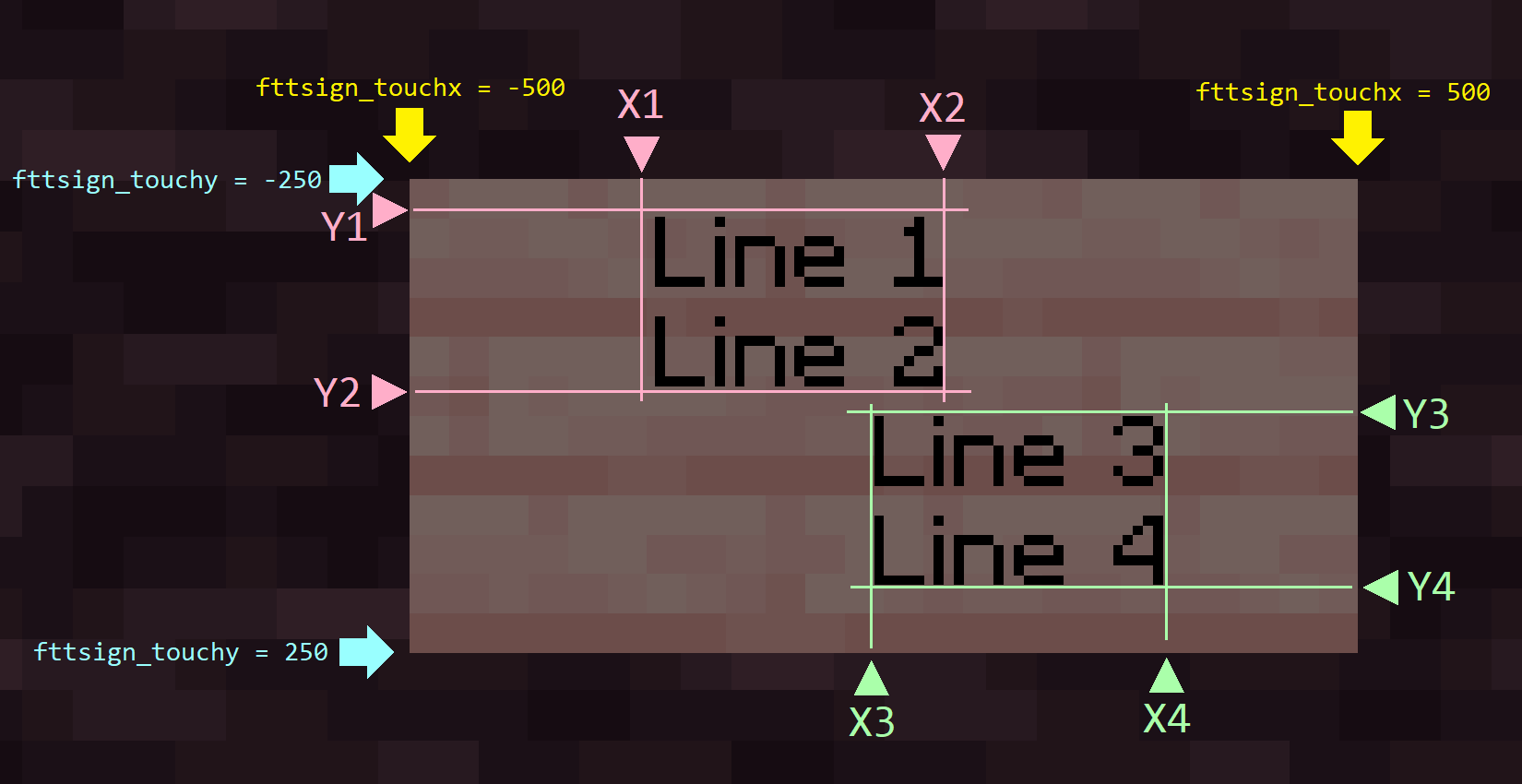
fttsign_touchx 的范围是从 -500(最左侧)到 500(最右侧)fttsign_touchy 的范围是从 -250(顶部)到 250(底部)
上面的示例将使你的告示牌在点击下图中 粉色 区域时运行 <YourAction1>,并在点击下方 绿色 区域时运行 <YourAction2>:
步骤 3. 制作一个可点击的告示牌,并通过 /give 命令获取该告示牌。一些示例可以在本项目的演示文件夹中看到。
点击以下链接查看每个对应 Minecraft 版本的示例:
在我的项目中何时使用此框架
此框架提供了以下几个演示示例:
- 一个 调试告示牌
- 你可以在这里检查告示牌上的点击位置如何影响计分板数值。
- 一个 电脑键盘(提供两种变体,取决于是否启用了 强制 Unicode 字体选项)
- 这模拟了真实电脑键盘的行为。通过点击字母的位置,聊天栏中将显示包含该字母的调试消息。
- 一个 钢琴键盘
- 演奏范围:C3 - C5(共 25 个键)
- 通过点击钢琴告示牌上不同的琴键,它会以不同的频率播放声音,类似于实际钢琴的效果。
所有这些示例都可以在源代码中找到,并且你可以通过运行类似 /function ftmc:touchsign/demo/give_xxxxx_sign 的命令来获取告示牌物品(其中 xxxxx 应被替换)。
这些用法仅仅是几个示例。 你可能还会发现许多其他有趣且实用的用途。只要你遵循下面写的“使用条款”部分,随时可以发布你自己使用该框架的数据包。祝你玩得开心!?
常见问题解答 (FAQs)
-
我正在创建新地图并尝试导入 FTMC TouchSign 数据包,但它提示“不兼容!”
- 请首先确保你下载的数据包对应正确的 Minecraft 版本。
- 如果版本正确,请忽略“不兼容”警告,强行将其导入你的世界。它应该仍然能正常工作。
- 如果你在游戏过程中发现任何问题,请在 GitHub Issues 页面 报告为 bug。
-
当我远离出生点时,数据包无法正确检测点击位置。
- 由于计分板数据类型(32 位有符号整数)结合某些乘法运算的限制,我们仅期望它在 X 和 Z 坐标距离出生点约 ±2,147,000 格范围内正常工作时有效。如果你超出此范围,可能会出现此问题。
源代码
请参阅 我的 GitHub 仓库。
使用条款
本项目采用 Creative Commons BY-SA 4.0 License 许可。
您可以自由使用并分享此数据包,用于任何公开或私人用途,但需遵守以下条件:
- 在使用此数据包的公开项目(例如您的 Minecraft 地图或任何将 FTMC TouchSign 数据包作为依赖项的衍生数据包)中,请务必注明原作者:
flashteens 或 FTMC。
- 对于成功修改 FTMC TouchSign 数据包本身的用户,建议仅将其用于私人用途。请勿向公众重新分发,除非符合以下情况:
- 当您发布另一个非数据包项目(例如世界存档),其中包含您对 FTMC TouchSign 数据包的修改版本时。
- 当您发布另一个数据包项目_(称为 A),其中包含您对 FTMC TouchSign 数据包的修改版本(称为 B)_时。
- 在这种情况下,您可以在帖子中提供 A 和 B 的下载链接,但描述应侧重于您的数据包 A。
- 数据包 A 本身不应是 FTMC TouchSign 数据包的修改版本。
- 同时,请在帖子中明确数据包 B 的原作者。
- 将 FTMC TouchSign 数据包的源代码分支/克隆到您的 GitHub 或其他代码仓库,以用于备份目的。
- 免责声明: 请勿与 另一个名为 "Touchsigns" 的 Bukkit 插件 混淆,该插件具有类似功能,但仅适用于基于 Bukkit 的服务器。此数据包与该插件没有任何关系或源代码引用。 :)
This is a datapack framework that lets you use a sign like a touchscreen. In other words, it gives your datapack the ability to tell which part of a wall sign that a player clicked on.
How to use this framework:
Step1. Download this datapack framework & put it into the datapack folder in your map. Please check your Minecraft version and download the corresponding datapack from one of the links on this page.
Step2. Make your own datapack and put it into the same datapack folder.
In your datapack, there must be an mcfunction file that invocates the FTMC TouchSign framework, so you will get some information about the clicking position.
For an example, we create a file called onclick.mcfunction and put it in your datapack:
function ftmc:touchsign/click_handler
execute if score @s fttsign_touchx matches <X1>..<X2> if score @s fttsign_touchy matches <Y1>..<Y2> run <YourAction1>
execute if score @s fttsign_touchx matches <X3>..<X4> if score @s fttsign_touchy matches <Y3>..<Y4> run <YourAction2>
# Please replace X1 ~ X4 and Y1 ~ Y4 above with the exact coordinate values.
In this function, fttsign_touchx and fttsign_touchy refers to the coordinates that the player clicks onto the sign.
fttsign_touchx ranges from -500 (leftmost) to 500 (rightmost)fttsign_touchy ranges from -250 (top) to 250 (bottom)
The example above will make your sign run <YourAction1> when clicking on the pink zone of the following screenshot & and run <YourAction2> when clicking on the green zone below:
Step3. Make a clickable sign and obtain the sign with a /give command. Some examples can be seen on the demo folders of this project.
Click on the links below for the example in each corresponding Minecraft version:
When to use this framework in my project
This framework provides several demo examples as follows:
- A debug sign
- This is where you may check how the clicking positions on the sign may affect scoreboard values.
- A computer keyboard (with two variants available for whether or not the Force Unicode Font option is enabled)
- This simulates how a real computer keyboard behaves. By clicking onto the position of a letter, a debug message containing the letter will show on the chat.
- A piano keyboard
- Playing range: C3 - C5 (25 keys)
- By clicking onto different keys on the piano sign, it plays the sound in different frequencies, resembling how it acts on an actual piano.
All these examples can be found in the source code & you may obtain the sign items by running any of the commands like /function ftmc:touchsign/demo/give_xxxxx_sign (where xxxxx should be replaced.)
These usages are just a few examples. You might still discover quite some other interesting and practical usages. Feel free to publish your own datapack that uses this framework as long as you follow the "Usage Terms" section written below. Hope you enjoy! ?
FAQs
-
I'm creating a new map and trying to import the FTMC TouchSign datapack, but it tells me "Incompatible!"
- Please first ensure that the datapack you downloaded corresponds to the correct Minecraft version.
- If correct, please ignore the "Incompatible" warning and import it into your world anyway. It should be still working.
- If you found any issues in the gameplay, please report it as a bug in the GitHub issues page.
-
The datapack doesn't correctly detect the clicking position when I'm going far away from the spawn point.
- Due to the limitations of scoreboard data types (32-bit signed integers) combining with some multiplication operations, we only expect it work properly when X and Z coordinates range within about ±2,147,000 blocks from the spawn point. This issue might happen if you go outside from this range.
Source Code
See on my GitHub repository.
Usage Terms
This project is licensed under a Creative Commons BY-SA 4.0 License.
Feel free to use and share this datapack for any public or private usages as long as:
- You ensure to credit the author of this datapack:
flashteens or FTMC when using this datapack in your public projects (ex: your Minecraft map or any derivative datapacks that use the FTMC TouchSign Datapack as a dependency.)
- For those who manages to modify the FTMC TouchSign Datapack itself, it is suggested that you use it for private usages only. Do NOT re-distribute it to public except for the following scenarios:
- The case when you are publishing another non-datapack project (ex: a world save) that contains your modified version from the FTMC TouchSign Datapack.
- For this case, please still clarify the original author in the credit sections of your post.
- The case when you are publishing another datapack project (referred to as A) that contains your modified version from the FTMC TouchSign Datapack (referred to as B).
- For this case, your may provide the download links of both A and B in your post, but please focus on your datapack A in the description.
- Datapack A itself should NOT be a modified version from on the FTMC TouchSign Datapack.
- Also please clarify the original author of datapack B in your post.
- Forking/cloning the source code of FTMC TouchSign Datapack to your GitHub or other source code repositories for backup purposes.
- If it is a public repository, please also clarify the original author in your descriptions.
- DISCLAIMER: NOT to be confused with another Bukkit plugin named "Touchsigns", which also has similar features but is for Bukkit-based servers only. This datapack has no relation or source code references with that plugin. :)


 数据包

 数据包
 数据包

 数据包
 数据包

 数据包

评论 0
登录后参与评分
还没有评论,来抢沙发吧