它终于来了!
完全基于原版制作的数据包,为游戏增添了会萦绕在你世界中的幽灵!装备上从《捉鬼敢死队》世界中复刻的科幻驱鬼设备,去追捕它们吧!说真的,这个数据包是我个人写给《捉鬼敢死队》系列的爱的告白。我尽力还原了像《捉鬼敢死队》在其众多电影和游戏中所展现的猎鬼魔法,同时没有过多破坏 Minecraft 的核心玩法。整体而言,这个数据包的内容并不算庞大,但它是由粉丝为其他粉丝制作的。希望你能喜欢!
功能特性
- 幽灵会在你的世界中偶尔生成
- 可制作 5 种以上的独特科幻小工具
- 专为地图制作提供的专属创造模式物品和命令
- 10 个可获得的进度
- 支持多人联机
- 一辆超酷的车!!(哔哔)
- 以及更多!
安装/卸载方法
下载 “Ghostbusters (datapack)” 并将 .zip 文件放入你想游玩的世界的 datapacks 文件夹中。下载 “Ghostbusters (resourcepack)” 并将 .zip 文件放入你的 resourcepacks 文件夹。别忘了在设置中启用该资源包,即可开始游玩!若要卸载,请输入命令 /function ghostbusting:uninstall 并从 datapacks 文件夹或你的世界中移除该数据包。
入门指南
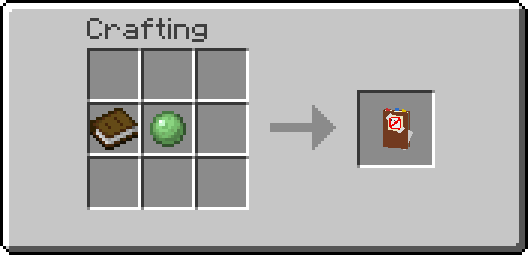
你可以通过制作“捉鬼敢死队笔记本”来解锁数据包进度树中的第一个进度。右键点击该书本还将为你展示数据包中所有物品的合成配方。此外,上方提供的视频包含一份详尽指南,涵盖了数据包的每一项功能!
常见问题
问:资源包在哪里?我看不到模型和纹理。
答:资源包位于 Modrinth 上的此处。它是与数据包下载并列的单独下载项。点击“Versions”,然后选择所需版本,再点击“Required resourcepack”。
问:我可以在我的整合包或冒险地图中使用此数据包吗?
答:当然可以!只需确保给予适当的署名即可 :)
问:你能把数据包降级到另一个版本吗?
答:抱歉,不能 :(
问:此数据包能在服务器上运行吗?
答:可以
关于数据包冲突的免责声明
对于你安装的其他数据包与此产生的任何冲突,我不承担任何责任。为避免出现问题,或者如果你不确定自己在做什么,最好单独使用此数据包。
许可证
本项目采用知识共享署名-非商业性使用-相同方式共享 4.0 国际许可协议 (CC BY-NC-SA 4.0) 授权。你可以自由使用和修改此数据包,只要给予原作者适当署名、不用于商业用途,并以相同许可证分享任何修改内容即可。
It's finally here!
Entirely made in vanilla, this datapack adds ghosts that will haunt your world to the game! Equip yourself with sci-fi ghostbusting equipment replicated from the world of Ghostbusters and chase them down! In all seriousness, this pack is my personnal love letter to the Ghostbusters franchise. I tried my very best to bring the magic of hunting ghosts, just like Ghostbusters did in it's many movies and games, without breaking the core gameplay of Minecraft too much. This pack as a whole isn't much, but it's made by a fan for other fans. I hope you enjoy!
Features
- Ghosts that occasionally spawn around your world
- 5+ unique sci-fi gadgets to craft
- Exclusive creative items and commands for map making
- 10 advancements to obtain
- Multiplayer compatible
- A car cool car!! (beep beep)
- And more!
How to install/uninstall
Download "Ghostbusters (datapack)" and put the .zip file in the datapacks folder of the world you want to play in. Download "Ghostbusters (resourcepack)" and put the .zip file in your resourcepacks folder. Do not forget to enable the resourcepack in the settings and you'll be ready to go! To uninstall, enter the command "/function ghostbusting:uninstall" and remove the datapack from the datapacks folder or your world.
Getting started
You can unlock the first advancement in the advancement tree of the pack by crafting the ghostbusters notebook. Right clicking with the book will also grant you the recipe for every item in the pack. Otherwise, the video provided above contains an extensive guide that goes over every single feature of the datapack!
FAQ
Q: Where is the resourcepack? I can't see the models and textures.
A: The resourcepack is located here on modrinth. It's a seperate download next to the download for the datapack. Click on "Versions" then click on the desired version and then click on "Required resourcepack".
Q: Can I use this datapack in my modpack or adventure map?
A: Of course you can! Just make sure to give proper credit :)
Q: Could you downgrade the datapack to another version?
A: No, sorry :(
Q: Does this datapack work on servers?
A: Yos
Disclaimer regarding datapack conflicts
I am not held accountable for any conflicts with other datapacks you have installed. It may be better to use this datapack standalone to avoid any problems or if you aren't sure of what you are doing.
License
This project is licensed under the Attribution-NonCommercial-ShareAlike 4.0 International (CC BY-NC-SA 4.0) license. You may use and modify the datapack as you please, as long as proper credit is given to the original author, do not use it for commercial purposes, and share any modifications under the same license.


 数据包

 数据包

 数据包

 数据包

 数据包

 数据包

评论 0
登录后参与评分
还没有评论,来抢沙发吧