
资源包信息
本数据包需要附带使用的资源包才能正常运行!资源包已作为 GlamourRP.zip 包含在数据包的根目录中。你也可以在此 Modrinth 页面上单独下载特定版本的资源包。无论通过何种方式下载,请确保将其添加到你的 Minecraft resources(资源)目录并在游戏中启用!
简介
本数据包为 Minecraft 添加了两个新的实用方块——画板桌(Painting Table)和华彩桌(Glamour Table)。 画板桌可用于制作可挂在物品展示框中的 1x1 自定义画作。 华彩桌可用于更改工具的外观。 这两个桌子都使用画笔在游戏中完全编辑纹理。
合成配方
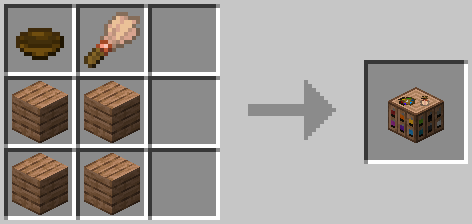
画板桌可以使用木板、碗和画笔合成:
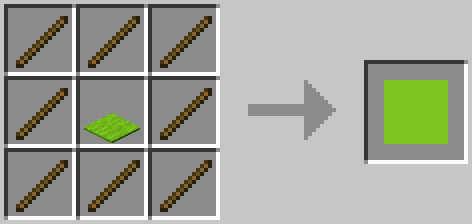
要使用画板桌,你需要用木棍和地毯制作画布。所用地毯的颜色将决定画布的底色:
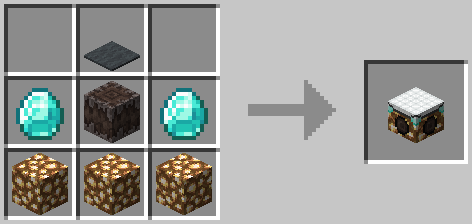
华彩桌可以使用下界合金块、颤心、钻石和任意地毯合成:
要使用华彩桌,你需要在锻造台中准备你的工具。加入一个末影之眼和一块下界合金块,工具的纹理将被更新为轮廓样式。

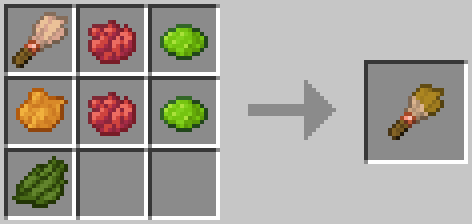
要制作画笔,在工作台中将染料加入画笔中。画笔的最终颜色由与染色盔甲相同的公式决定:
编辑纹理
右键点击你想要编辑的物品以将其放置在华彩桌或画板桌上。画板桌只能编辑画布,而华彩桌只能编辑物品。
要编辑物品的纹理,你可以直接使用染料,或者使用画笔。只需右键点击你想编辑的像素即可!你也可以右键点击 slime ball(粘液球)来移除像素。
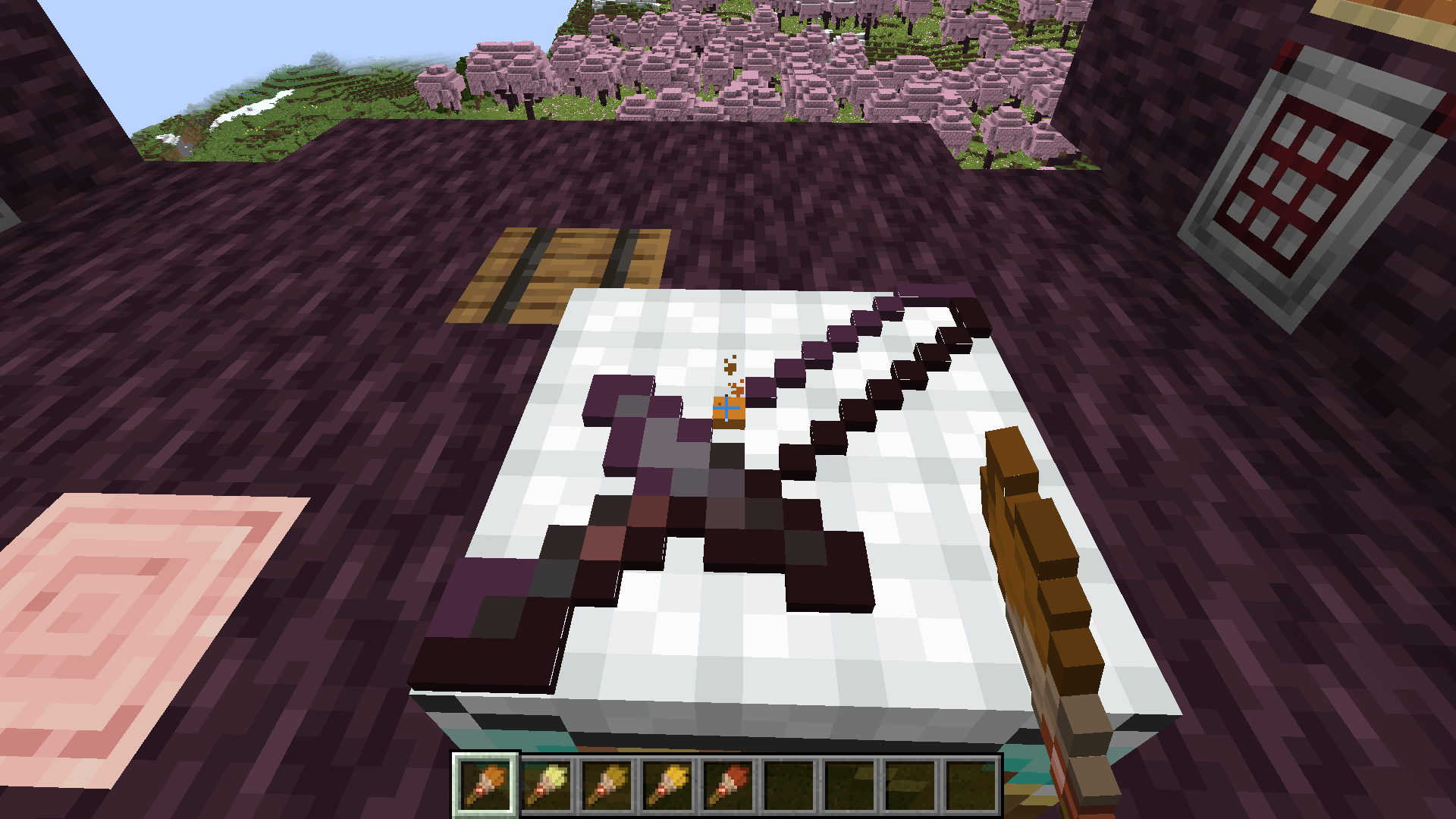
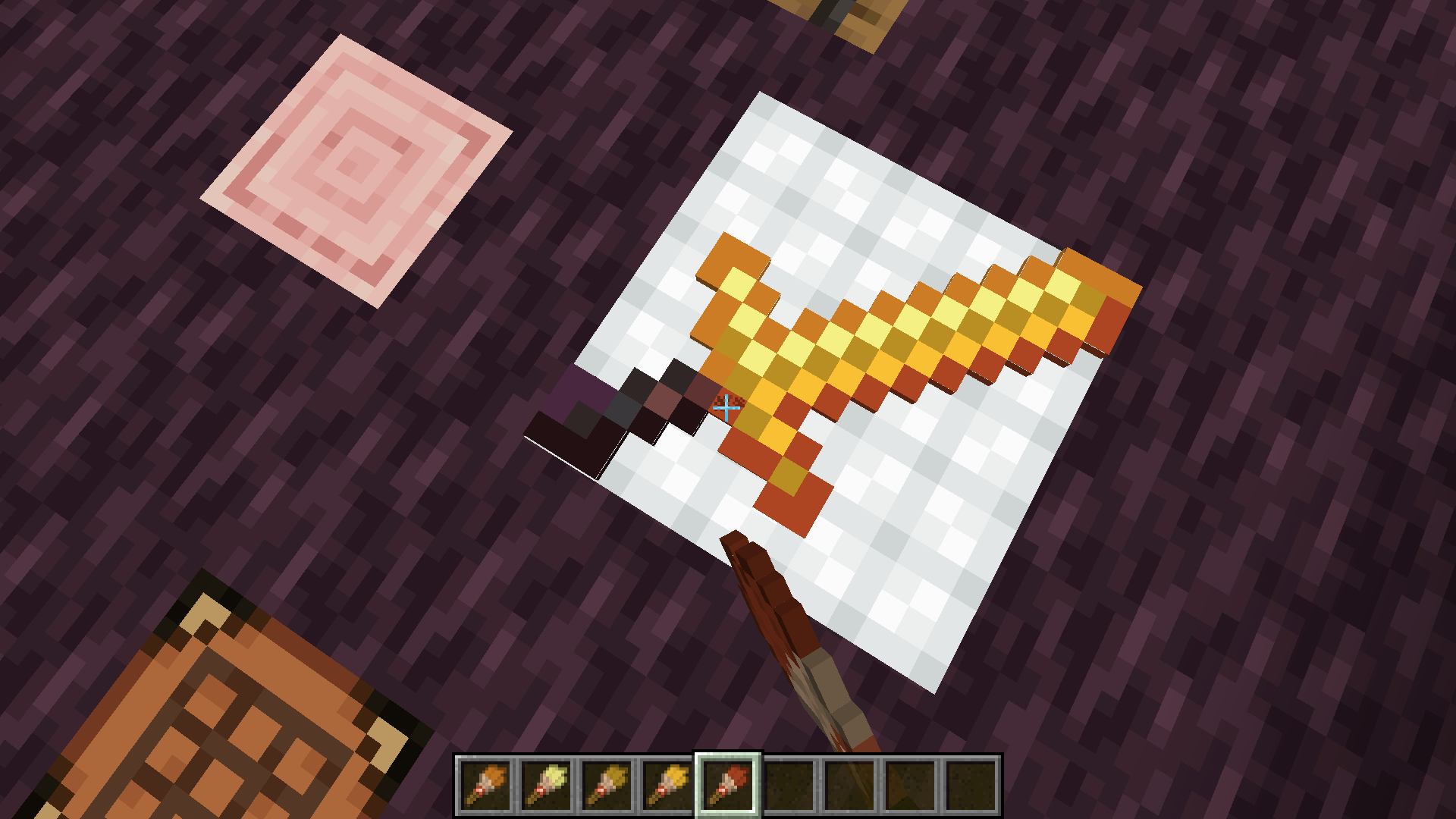
一旦你对更新的纹理感到满意,只需空手右键点击即可取回你的工具!
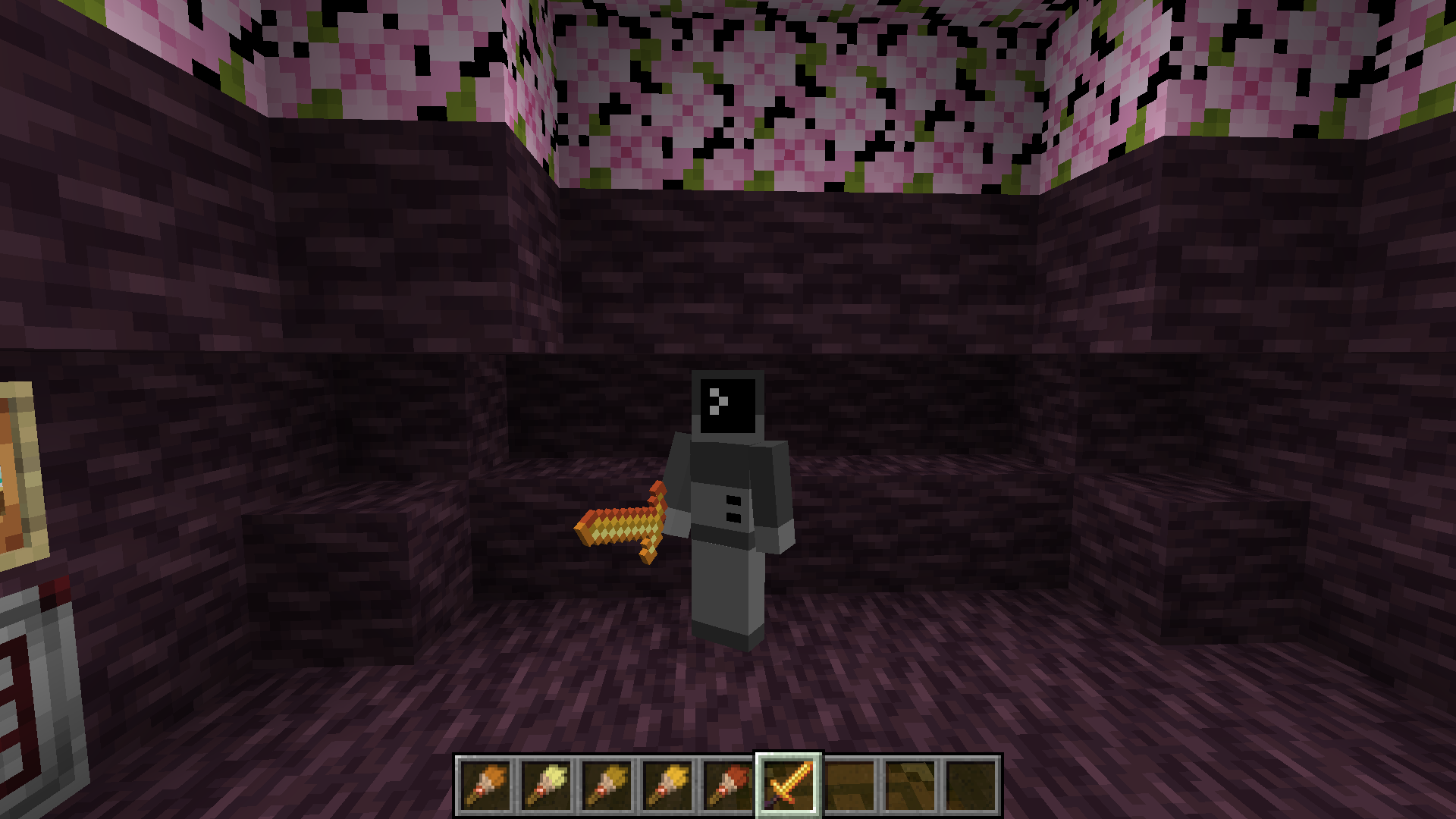
如果你想移除工具上的纹理,将其放在华彩桌上并用湿海绵右键点击。自定义纹理将从你的物品上移除。
可以应用华彩效果的物品包括:
- 所有镐、斧、铲、锄和剑。
- 巨锤(Maces)
纹理辅助工具
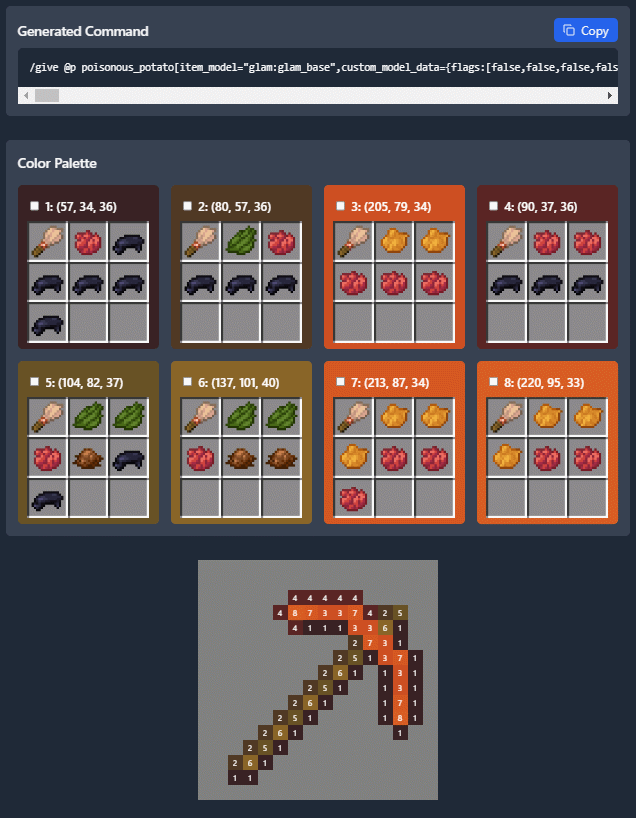
在 Arubik 的帮助下,我编写了一个 Web 应用程序,以帮助创建与此资源包兼容的物品。该工具可以为每个像素生成带有精确 RGB 值的物品的 /give 命令,或者将纹理中的颜色减少为可通过染料获得的颜色,并生成按数字绘制的模板以在生存模式下创建纹理。
可以通过以下链接访问该工具:
Resource Pack Info
This datapack requires the included resource pack to function! The resource pack is included as GlamourRP.zip in the root directory of the datapack. You can also download the resource pack on its own from the page for the specific version here on Modrinth. Regardless of how you download it, make sure it's added to your Minecraft resources directory and enabled in game!
Introduction
This datapack adds a two new utility blocks to Minecraft - the Painting Table and the Glamour Table. The painting table can be used to create 1x1 custom paintings that can be hung in item frames. The glamour table can be used to change the appearance of tools. Both tables use paintbrushes to edit textures entirely in game.
Recipes
The painting table can be crafted using planks, a bowl, and a brush:
To use a painting table, you'll need to create canvases using sticks and a carpet. The color of carpet used will determine the base color of the canvas:
The glamour table can be crafted using glowstone, a creaking heart, diamonds, and any carpet:
To use the glamour table, you'll need to prepare your tools in a smithing table. Add an eye of ender and a piece of glowstone, and your tool's texture will be updated to an outline.
To create paint brushes, add dye to brushes in a crafting table. The final color of the paint brush is determined using the same formula as dyed armor:
Editing Textures
Right click the glamour or paint table with the item you'd like to edit to place it. Paint tables can only edit canvases, and glamour tables can only edit items.
To edit the item's texture, you can either use dyes directly, or use a paintbrush. Just right click the pixel you want to edit with the dye or brush! You can also right click with a slime ball to remove a pixel.
Once you're satisfied with the updated texture, just right click with an empty hand to retrieve your tool!
If you want to remove the texture from a tool, place it on the glamour table and right click with a wet sponge. The custom texture will be removed from your item.
Items that can have glamours applied include:
- All pickaxes, axes, shovels, hoes, and swords.
- Maces
Texture Helper Tool
With some help from Arubik, I've put together a webapp to help create items compatible with this resource pack. This tool can either generate a give command for an item with exact RGB values for each pixel, or reduce the colors in the texture to those obtainable by dyes and generate a paint-by-number template to create the texture in survival.
The tool can be accessed here:

下载 Glamour Table
需要联机服务器吗?
稳定流畅、一键部署,几分钟即可和朋友联机开服
最低仅需 8 元/月 即可畅快联机
下载 Glamour Table
需要联机服务器吗?
稳定流畅、一键部署,几分钟即可和朋友联机开服
最低仅需 8 元/月 即可畅快联机
下载 Glamour Table
需要联机服务器吗?
稳定流畅、一键部署,几分钟即可和朋友联机开服
最低仅需 8 元/月 即可畅快联机
下载 Glamour Table
需要联机服务器吗?
稳定流畅、一键部署,几分钟即可和朋友联机开服
最低仅需 8 元/月 即可畅快联机
下载 Glamour Table
需要联机服务器吗?
稳定流畅、一键部署,几分钟即可和朋友联机开服
最低仅需 8 元/月 即可畅快联机
下载 Glamour Table
需要联机服务器吗?
稳定流畅、一键部署,几分钟即可和朋友联机开服
最低仅需 8 元/月 即可畅快联机
下载 Glamour Table
需要联机服务器吗?
稳定流畅、一键部署,几分钟即可和朋友联机开服
最低仅需 8 元/月 即可畅快联机
下载 Glamour Table
需要联机服务器吗?
稳定流畅、一键部署,几分钟即可和朋友联机开服
最低仅需 8 元/月 即可畅快联机
下载 Glamour Table
需要联机服务器吗?
稳定流畅、一键部署,几分钟即可和朋友联机开服
最低仅需 8 元/月 即可畅快联机
下载 Glamour Table
需要联机服务器吗?
稳定流畅、一键部署,几分钟即可和朋友联机开服
最低仅需 8 元/月 即可畅快联机
暂无更新日志
关于这个资源的讨论、问题反馈与使用心得
还没有讨论,来发第一帖吧
你是这个资源的作者?登录后可认领此资源。
相似资源
 数据包

此数据包添加了属于阿瓦里海盗的独特结构,将他们的独特风格带入你的 Minecraft 世界!兼容性:1.20 至 26.3
 数据包

此数据包添加了新的“祝福模式”难度。
 数据包

使用原版/生存友好的方法更改青蛙的变种类型。支持原版(寒冷、温带、温暖)以及可选的“More Frogs 2”变种:深红、末影、地狱、毒镖、紫珀、幽匿、灵魂、诡异和木头。
 数据包

手持潜影盒时可直接打开,无需将其放置在地面上。只需按住 Shift 并右键点击即可访问你的潜影盒。
 数据包
所有我原创内容的合集。
 数据包

粉色方块中的千种可能!
评论 0
登录后参与评分
还没有评论,来抢沙发吧