头颅定位器
使用由玩家头颅制成的原版风格定位栏,一眼就能找到你的好友。
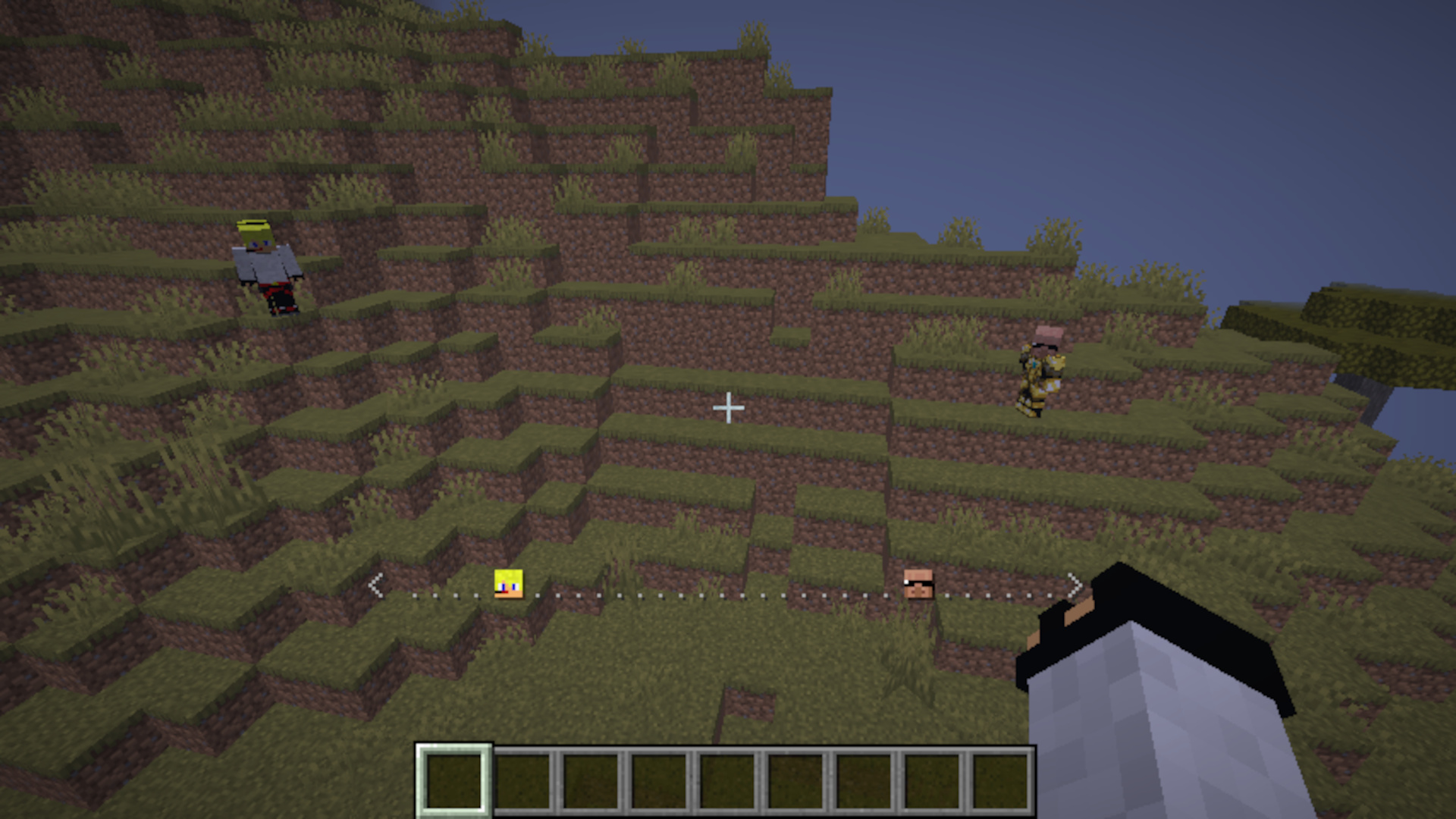
头颅定位器将 Minecraft 原版定位栏中的圆点替换为附近玩家的真实头颅。环顾四周,定位栏会实时更新,显示谁在你前方以及他们的方向,无需资源包或客户端模组。
功能特性
- 使用每位玩家自己的皮肤和头颅进行显示
- 追踪 120° 视野范围内的玩家
- 随距离增加,头颅图标逐渐变暗,类似于原版定位栏
- 当多个玩家占据定位栏的同一位置时,显示最近的一位
- 对世界中的每位玩家自动生效
- 忽略观察者作为定位目标
- 无需 任何资源包或模组
工作原理
定位器显示在屏幕底部的操作栏中。当你转动视角时,同一维度内的其他玩家会在定位栏上移动,以反映他们相对于你的方向。随着距离变远,他们的头颅会逐渐变暗,使得方向和大致距离一目了然,无需打开地图或使用坐标。
安装后,头颅定位器会禁用原版定位栏,以避免两个显示重叠。
兼容性
头颅定位器是一个面向 Minecraft Java Edition 1.21.11 及更高版本 的服务端数据包。玩家可以以未修改的客户端加入游戏,且无需自行安装任何东西。
请始终从 Versions(版本) 标签页下载与你的 Minecraft 版本相匹配的版本。
安装方法
- 下载正确版本的 Head Locator。
- 打开你的世界文件夹,然后进入
datapacks 文件夹。
- 将下载的
.zip 文件放入其中。
- 加入该世界,或者如果世界已经打开,运行
/reload。
数据包加载成功时,聊天栏会显示一条确认消息。
对于新的单人世界,你也可以在世界创建过程中选择 More → Data Packs(更多 → 数据包) 并将下载的文件添加进去。
卸载方法
在移除数据包之前,请先运行:
/function headlocator:uninstall
这将移除头颅定位器的目标、存储、标记和操作栏显示。之后你可以从世界的 datapacks 文件夹中删除该数据包。如果需要,之后可以通过 /gamerule locator_bar true 恢复原版定位栏。
致谢
- 开发: EclairDeFeu360
- 原始创意: Goldawn [YouTube] [Twitch]
- 方向计算: super_sword(来自 Minecraft Commands 社区)
支持创作者
- EclairDeFeu360: Buy Me a Coffee
- Goldawn: 在 YouTube 上关注或 订阅 Twitch
Head Locator
Find your friends at a glance with a vanilla-style locator bar made from player heads.
Head Locator replaces the dots of Minecraft's locator bar with the actual heads of nearby players. Look around and the bar updates in real time, showing who is in front of you and in which direction, without requiring a resource pack or client-side mod.
Features
- Displays each player using their own skin and head
- Tracks players across a 120° field of view
- Fades head icons with distance, similar to the vanilla locator bar
- Shows the nearest player when multiple players occupy the same slot on the bar
- Works automatically for every player in the world
- Ignores spectators as locator targets
- Requires no resource pack and no mods
How it works
The locator appears in the action bar at the bottom of the screen. As you turn, other players in the same dimension move across the bar to reflect their direction relative to you. Their heads become darker as they get farther away, making direction and approximate distance easy to read without opening a map or using coordinates.
Head Locator disables the vanilla locator bar while installed so the two displays do not overlap.
Compatibility
Head Locator is a server-side data pack for Minecraft Java Edition 1.21.11 and newer. Players can join with an unmodified client and do not need to install anything themselves.
Always download the release that matches your Minecraft version from the Versions tab.
Installation
- Download the correct version of Head Locator.
- Open your world's folder, then open the
datapacks folder.
- Place the downloaded
.zip file inside.
- Join the world or run
/reload if it is already open.
A confirmation message will appear in chat when the data pack loads successfully.
For a new single-player world, you can also select More → Data Packs during world creation and add the downloaded file there.
Uninstallation
Before removing the data pack, run:
/function headlocator:uninstall
This removes Head Locator's objectives, storage, marker, and action-bar display. You can then delete the data pack from the world's datapacks folder. If desired, restore the vanilla locator bar afterward with /gamerule locator_bar true.
Credits
- Development: EclairDeFeu360
- Original idea: Goldawn [YouTube] [Twitch]
- Direction calculation: super_sword from the Minecraft Commands community
Support the creators


 数据包

 数据包
 数据包

 数据包
 数据包

 数据包

评论 0
登录后参与评分
还没有评论,来抢沙发吧