
HyperGrave 是一款高品质的墓碑数据包/模组。 它高度可定制,拥有众多酷炫功能,支持多人游戏,同时使用简单。
资源包
你不需要资源包即可使用 HyperGrave。然而,建议使用可选的资源包以启用额外功能或显示自定义纹理。
(如果你安装的是 HyperGrave 的模组版本,则无需使用资源包。)
重要说明
-
仅适用于 NeoForge 用户:(仅限 Minecraft 26.1.x 和 26.2.x):
NeoForge 曾存在一个 Bug,导致 HyperGrave 完全无法加载。该 Bug 已在较新的 NeoForge 版本中修复(确切地说是 26.1.2.105 和 26.2.0.77),因此请务必使用最新版本的 NeoForge。
-
请确保以下游戏规则设置为以下值:
- Keep Inventory(保留物品栏): true
- Immediate Respawn(立即重生): false
- HyperGrave 会自动将这些游戏规则设置为上述值,因此你通常无需手动设置。但请检查每个维度中的游戏规则是否已正确设置。
快速教程
如果你只想快速了解 HyperGrave 并获取 TL;DR(太长不看版摘要),如下所示:
快速教程
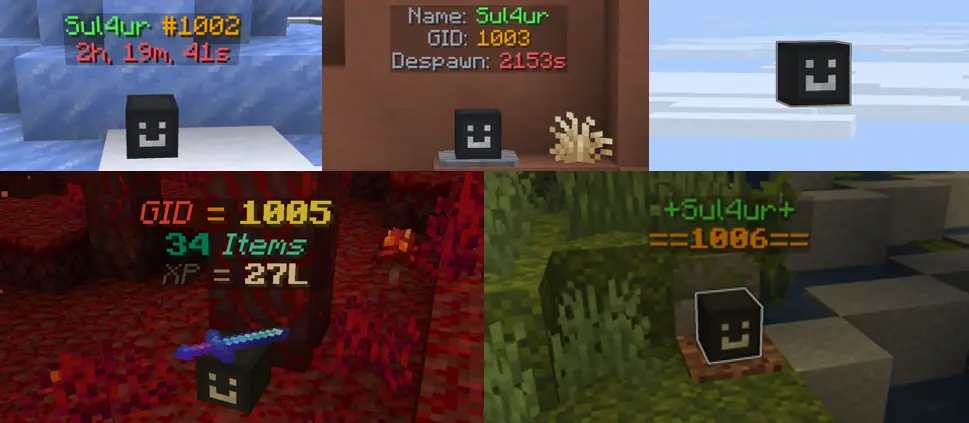
当玩家死亡时,HyperGrave 会为该玩家生成一座墓碑。墓碑会收集玩家的物品和经验值并进行存储。墓碑的样子如下:
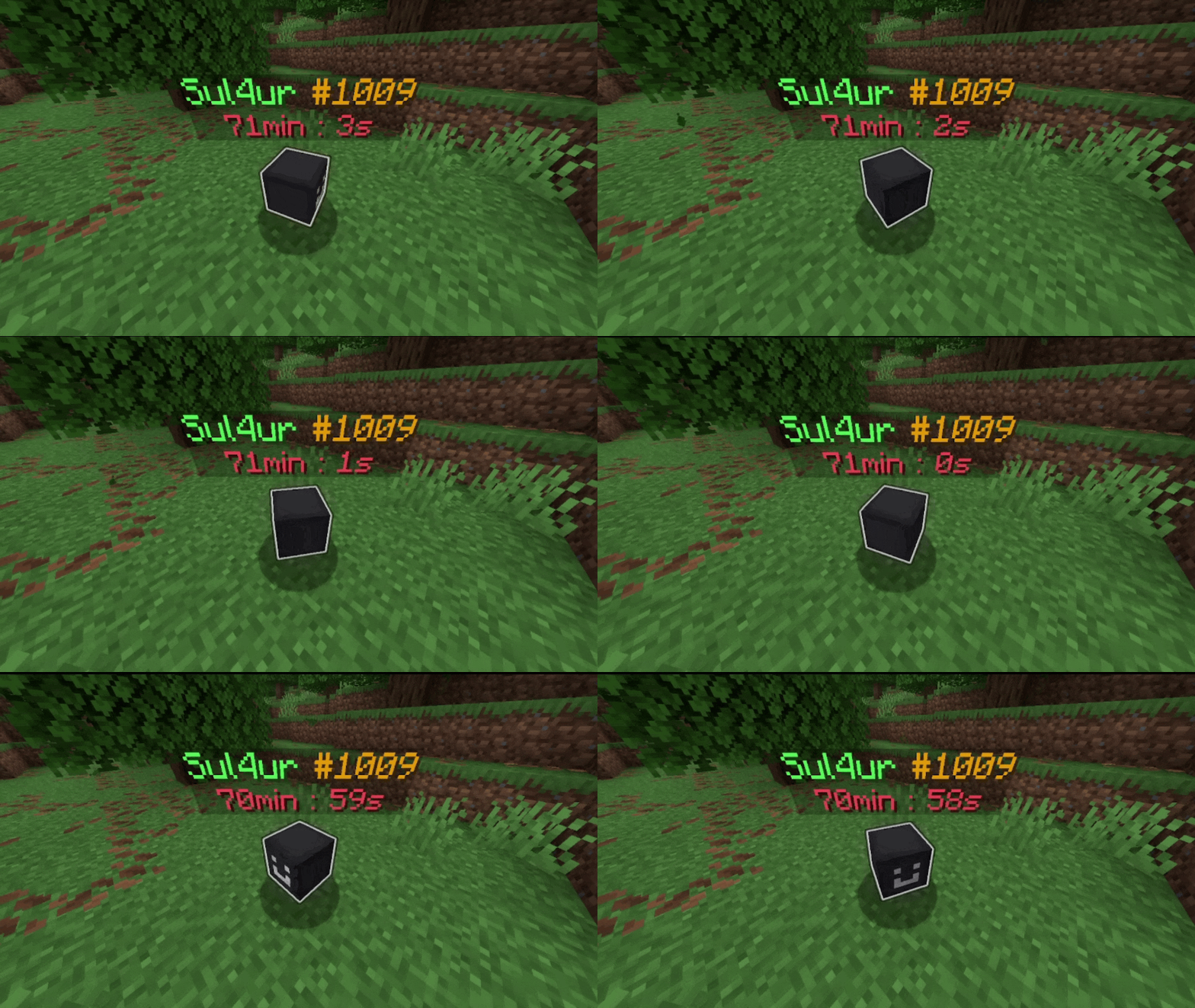
'#' 后面的数字代表墓碑的 GID(墓碑 ID),在所有墓碑中是唯一的。你需要这个 GID 才能对该墓碑执行命令。
右键点击墓碑以在相应槽位中取回物品和经验值:
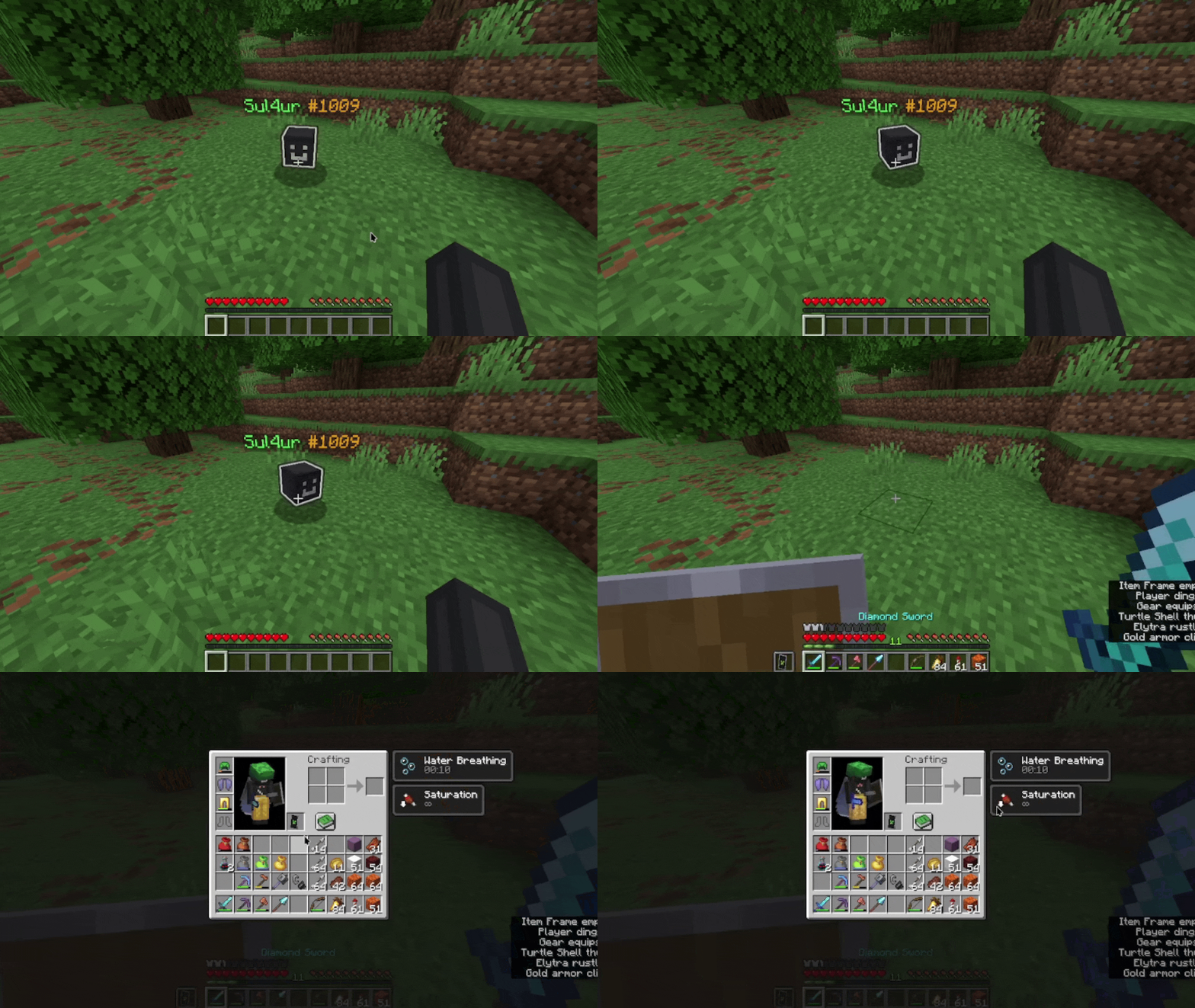
或者左键点击墓碑以掉落所有物品和经验值:
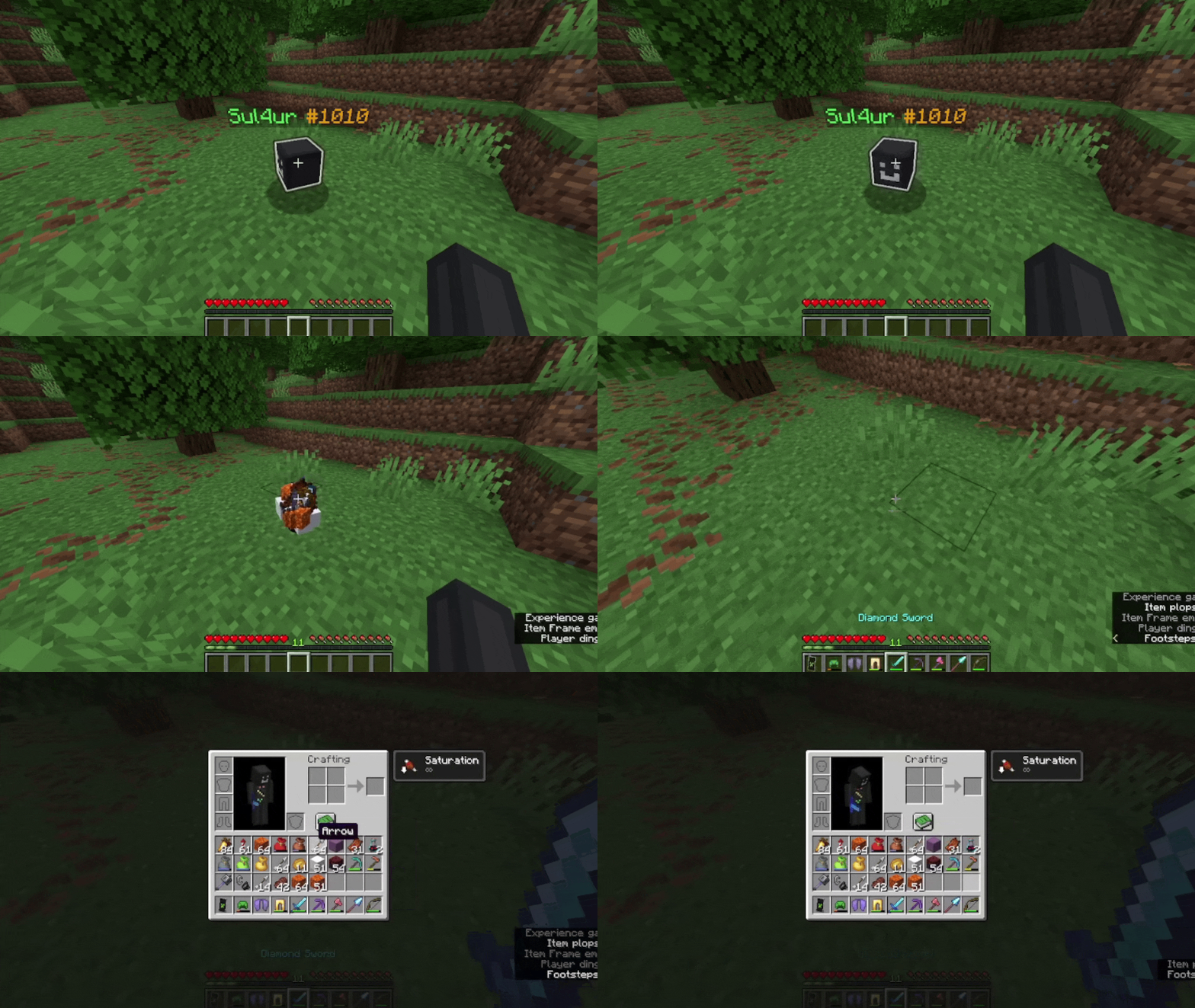
默认情况下,墓碑会在 90 分钟后消失。
以下是制作一种实用物品的配方(如果你想了解这是什么物品,请继续阅读):

这就是你需要知道的全部内容!若要了解 HyperGrave 的一些有用命令(你也必须知道这些),请使用此命令:
/trigger hygrave.help
无论发生什么,切勿执行以 /function hygrave:internal/ 开头的命令!
功能
高度可定制!
HyperGrave 极其可定制!事实上,这张图片仅展示了 HyperGrave 约 15% 的可定制内容!
你还会看到 HyperGrave 的其他许多酷炫功能。如果你不喜欢任何这些功能或其工作方式,别担心!你很可能可以更改它们!
墓碑信息显示!
你可以查看任何墓碑的信息(即使是已被破坏的墓碑)。你可以看到存储在墓碑中的物品和经验值数量、墓碑生成的时间、墓碑所有者、墓碑状态等。
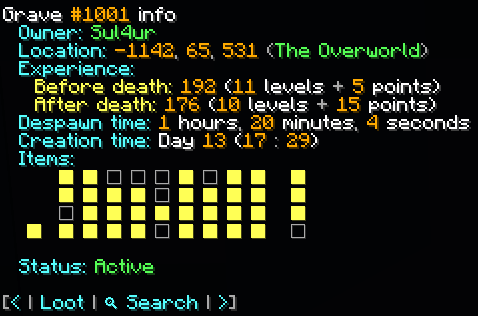
在“物品”字段中,你可以悬停在任意方块上以获取其信息:
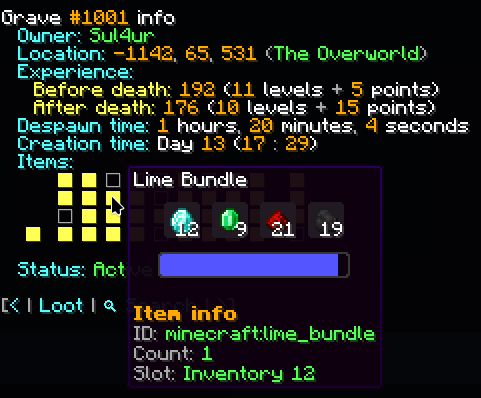
相当酷炫,对吧?等等,你还没看到最精彩的……
ICD(物品循环显示)!
ICD(Item Cycle Display,物品循环显示)是一个非常酷的功能。其工作原理如下:
当你潜行靠近墓碑时,墓碑的 ICD 会被“激活”;换句话说,玩家头颅会变化以显示存储在墓碑中的物品,文本显示也会变化以显示该物品的信息。它会每秒逐个循环展示物品,非常类似于试炼密室保险库中物品的循环方式。

当显示某个物品时,你甚至可以从墓碑中取出该单个物品。
ICD 对于快速瞥视墓碑中的物品并从墓碑中取出单个物品非常有用。
墓碑定位器!(NEW)
墓碑定位器是一种手持物品,它会指向选定的墓碑,原理类似于指南针。
你可以通过右键点击任意位置来选择墓碑(当然需手持墓碑定位器),这将弹出一个便捷菜单,允许你选择要定位的墓碑。
你可以按以下方式合成墓碑定位器:
远程拾取坟墓物品!
厌倦了为了拿回自己的物品而走到坟墓所在地的路吗?别担心,因为 HyperGrave 还允许*你从任何地方拾取坟墓里的物品。
关于那张显示坟墓信息的图片,请看图片底部。看到一个写着“loot”(拾取)的按钮了吗?你可以使用这个按钮在世界中的任何位置拾取并破坏坟墓!
注意: 别太激动!此功能默认是禁用的,是否启用此功能由管理员自行决定。
物品备份!
为你的物品提供第二层保护!除了生成坟墓外,当你死亡时还会生成一个物品备份(在游戏中简称为“backup”)。无论发生什么,都会保证生成备份(唯一的例外是你没有任何物品时)。
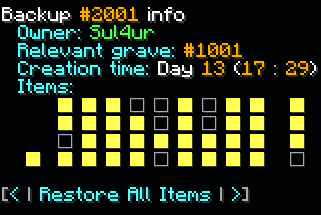
就像坟墓一样,每个备份都有一个唯一的 BID(Backup ID,备份 ID),可用于获取备份信息并检索备份中的单个或所有物品。
请注意,只有管理员才能查看备份的信息并提取其物品。
警告:
即使有内置的物品备份功能,如果你不想丢失物品,仍然强烈建议对物品/世界进行备份。这种情况很少见,但即使有 HyperGrave 提供的物品备份,你也可能会丢失物品。
请记住各位;本模组导致的数据丢失责任自负。你有义务对你的世界进行备份。
支持多人游戏!
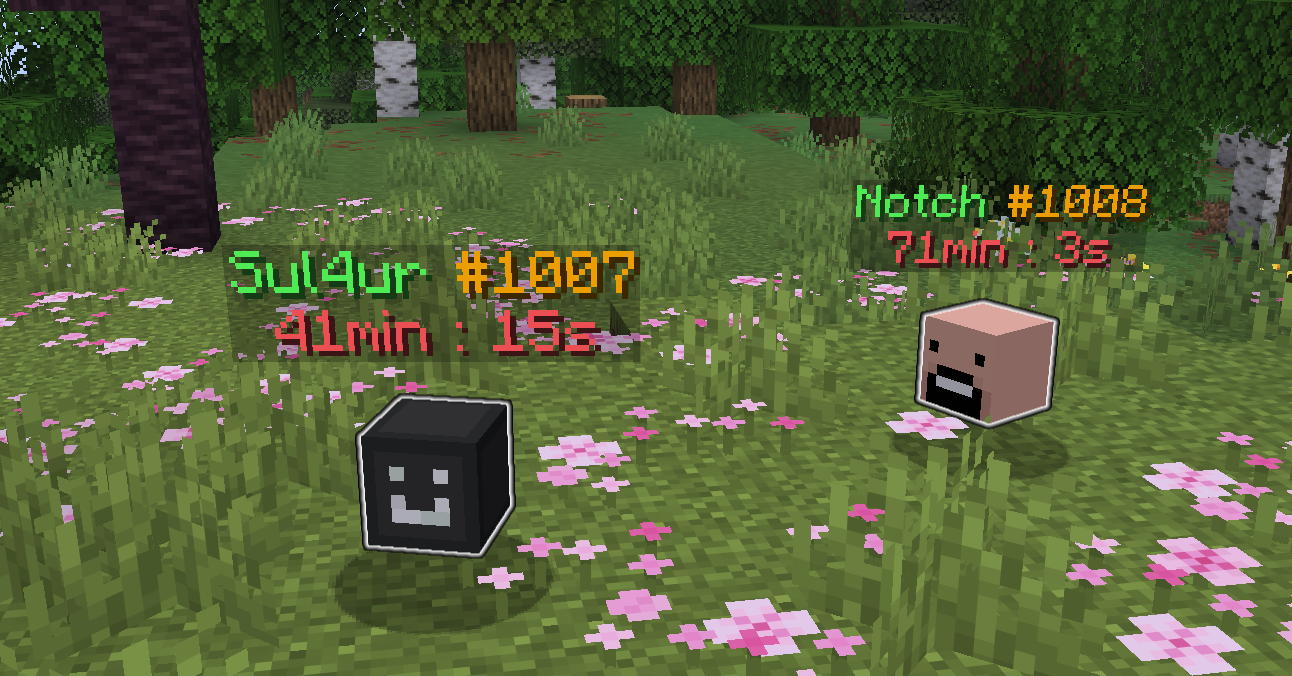
HyperGrave 支持且专为兼容多人游戏而设计。它的所有配置和整体实现都旨在让服务器上的多名玩家良好协作。是的,它已经在多人游戏中经过测试。
(此处仅以 Notch 为例,请勿过度解读!)
免费且开源!(技术层面)
给那些计算机极客们:
HyperGrave 是 FOSS(自由及开放源代码软件)。源代码可在 Github 上找到。HyperGrave 拥有非常棒的文档,在 .mcfunction 文件中以注释形式详细解释了所有内容。
绝对没有以任何方式使用 AI 来开发 HyperGrave。它是无 AI 的!
可升级!
HyperGrave 支持从一个版本升级到另一个版本。
如果你想从某个版本升级,只需将旧的数据包或模组文件替换为新版本的文件即可。HyperGrave 会自动完成所有必要操作,并在需要手动执行其他操作时通知你。
命令
触发命令
这些命令以 /trigger hygrave. 开头。任何玩家(管理员和非管理员)都可以执行。以下是触发命令列表及其功能说明:(还有一些其他的触发命令,但你无需了解它们)
/trigger hygrave.info
显示信息菜单,类似于你在其他平台上看到的“关于”部分。它显示 HyperGrave 的名称、版本、作者、一些指向项目主页和文档的链接等,以及一些可在游戏中执行操作的按钮。
/trigger hygrave.help
如果你对 HyperGrave 有任何疑问,请使用此命令。它会告诉你需要做什么以及一些常见问题解答(FAQs)。
/trigger hygrave.show_grave_info set 1021
显示 #1021 号坟墓的信息(GID 为 1021 的坟墓)。
/trigger hygrave.show_grave_info
显示最后生成的坟墓的信息。
函数命令
这些命令以 /function hygrave:run/ 开头。任何玩家(管理员和非管理员)都可以执行。
重要提示: 不要执行以 /function hygrave:internal/ 开头的命令。这些命令由 HyperGrave 内部使用,如果由玩家运行,可能会导致 HyperGrave 损坏。
以下是函数命令列表及其功能说明:(还有一些其他的函数命令,但你无需了解它们)
/function hygrave:run/config
打开配置菜单。
/function hygrave:run/grave/generate
为你生成一个坟墓,仿佛你死在那里一样。
提示: 你可能想将此命令与 /execute as ... at @s run 命令结合使用,例如:/execute as Sul4ur at @s run function hygrave:run/grave/generate(为 Sul4ur 生成一个坟墓)
注意: 还有一个命令:/function hygrave:run/grave/admin/generate,它可以强制生成一个坟墓,绕过配置中设置的限制。
/function hygrave:run/grave/admin/show_grave_info {gid: 1034}
类似于 /trigger hygrave.show_grave_info set 1034,但会绕过配置中设置的所有限制。
/function hygrave:run/grave/admin/show_backup_info {bid: 2041}
显示 #2041 号备份的信息(BID 为 2041 的备份)。
同时允许你从备份中提取单个物品或所有物品。
/function hygrave:run/grave/admin/show_last_backup_info
显示最后生成的备份的信息。
同时允许你从备份中提取单个物品或所有物品。
/function hygrave:run/uninstall 和 /function hygrave:run/reinstall
卸载或重新安装 Hypergrave。
已知问题
坟墓信息显示中的“创建时间”字段可能无法正常工作。已修复HyperGrave 肯定需要进行一些性能改进已修复
许可证
Copyright © 2026 Sul4ur
This program is free software: you can redistribute it and/or modify it under the terms of the GNU General Public License as published by the Free Software Foundation, either version 3 of the License, or (at your option) any later version.
本程序在希望其有用的前提下进行分发,但不提供任何担保,甚至不包括对适销性或特定用途适用性的默示担保。有关更多详细信息,请参阅 GNU 通用公共许可证。
您应该已随本程序收到 GNU 通用公共许可证的副本。如果没有,请访问 查看。
HyperGrave is a very high-quality grave data pack / mod. It is super customizable, has a lot of cool features, supports multiplayer and yet it's simple to use.
Resource pack
You don't need a resource pack to use HyperGrave. However, it's recommended to use the optional resource pack in order to enable additional features or show custom textures.
(You won't need to use the resource pack if you're installing the mod version of HyperGrave.)
IMPORTANT NOTES
-
For Neoforge users only: (Minecraft 26.1.x and 26.2.x only):
A NeoForge bug used to prevent HyperGrave from loading entirely. This bug was fixed in newer versions of NeoForge (26.1.2.105 and 26.2.0.77 to be exact), so make sure to use the newest NeoForge version.
-
Make sure that the following game rules are set to the following values:
- Keep Inventory: true
- Immediate Respawn: false
- HyperGrave does automatically set those game rules to those values, so you won't really need to do it yourself. But please check if the game rules are set to the correct values in each dimension.
Quick Tutorial
If you just want a quick tutorial and a TL;DR of HyperGrave, here it is:
Quick Tutorial
When a player dies, HyperGrave generates a grave for that player. The grave takes the player's items and XP and stores it. This is what a grave looks like:
The number after '#' represents the GID (grave ID) of the grave, which is unique amongst all other graves. You need this GID to be able to run commands on this grave.
Right-click on the grave to retrieve the items and XP in the appropriate slots:
or left-click on the grave to drop all of the items and XP:
By default, graves despawn in 90 minutes.
And here is the crafting recipe for a useful item (keep reading if you want to find out what this item is):
That's all you need to know! To learn about some of HyperGrave's useful commands (you will need to know those too), use this command:
/trigger hygrave.help
And whatever you do, don't execute commands that begin with /function hygrave:internal/!
Features
Customizable!
HyperGrave is super customizable! In fact, that image just shows like 15% of HyperGrave's customizabiliy!
You will also see a bunch of other cool features of HyperGrave. If you didn't like any of these features or the way they work, don't worry! You can most likely change that!
Grave Info Display!
You can view the information of any grave (even the ones that were already broken). You can see the items and amount of XP stored in the grave, when the grave was generated, the owner of the grave, the status of the grave, etc.
In the Items field, you can hover over any square and get its info:
Pretty cool, right? Hold on, you haven't seen anything yet...
ICD!
ICD (Item Cycle Display) is a really cool feature. Here is how it works:
When you sneak near a grave, the grave's ICD "activates"; in other words, the player head changes to show the items stored in the grave and the text display changes to show the info of the item. It cycles through the items one by one each second, a lot like how items are cycled in a trials chamber vault.
While an item is being displayed, you can even take that single item out of the grave.
ICD is really useful to take a quick peek at the items in the grave and to take a single item out of grave.
Grave locators! (NEW)
The grave locator is an item that when held, points to the selected grave, a lot like how compasses work.
You can select the grave by right clicking anywhere (while holding the grave locator of course), which will bring up a convenient menu that allows you to select which grave to locate.
You can craft a grave locator like this:
Remotely looting graves!
Tired of walking all the way to the destination of your grave just to get your items back? Don't worry, because HyperGrave also allows* you to loot a grave from anywhere.
About that image of grave info display, look at the bottom part of the image. Do you see a button that says 'loot'? You can use the button to loot and break the grave from anywhere in the world!
NOTE: Don't get too excited! This feature is disabled by default and it's up to the admin to enable this feature if they want to.
Item backups!
A second layer of protection to your items! Along with a grave, an item backup (simply called 'backup' in-game) is also generated when you die. A backup is always guaranteed to generate no matter what (the one and only exception is when you don't have items).
Just like graves, each backup has a unique BID (Backup ID) that can be used to get the information of the backup and retrieve an item or the items of the backup.
Note that only admins can see the information of a backup and retrieve its items.
WARNING:
Even with the built-in item backups, you should still definitely backup your items/world if you don't want to lose them. It's rare, but you could lose your items even with the item backups that HyperGrave provides.
Remember folks; i will not be responsible for any data loss that this mod causes. It's your duty to make backups of your world.
Multiplayer support!
HyperGrave supports and is designed to be compatible with multiplayer. All of its configs and the whole implementation is designed to work well with more than 1 player on the server. And yes, it has been tested on multiplayer.
(Notch is just used as an example here. Don't take anything too seriously!)
Free and open-source! (Technical)
For those computer nerds out there:
HyperGrave is FOSS (Free and Open-Source Software). The source code is available at Github. HyperGrave has really awesome documentation that nicely explains everything in detail as comments in the .mcfunction files.
Absolutely no AI has been used in HyperGrave's development in any way. It's AI-free!
Upgradable!
HyperGrave supports upgrading from one version to another.
If you want to upgrade from a version, simply replace the old data pack or mod file with the newer version file. HyperGrave will automatically do all nessecary things and tell you if you need to do anything else manually.
Commands
Trigger commands
These commands begin with /trigger hygrave.. They can be executed by any player (admins and non-admins). Here is a list of the trigger commands and what they do: (There are some other trigger commands, but you don't need to know those)
/trigger hygrave.info
Shows the info menu, a lot like the 'about' section you see in other platforms. It shows the name of HyperGrave, the version, the author(s), some links to the projects homepage and doc and etc and some buttons that do in-game action.
/trigger hygrave.help
Use this if you have any questions about HyperGrave. It will tell you what you need to do and some FAQs.
/trigger hygrave.show_grave_info set 1021
Shows information about grave #1021 (grave with GID of 1021).
/trigger hygrave.show_grave_info
Shows information about the last grave generated.
Function commands
These commands begin with /function hygrave:run/. They can be executed by any player (admins and non-admins).
IMPORTANT: Do NOT execute commands that begin with /function hygrave:internal/. These commands are used by HyperGrave and if ran by a player, it could break HyperGrave.
Here is a list of the function commands and what they do: (There are some other function commands, but you don't need to know those)
/function hygrave:run/config
Opens the config menu.
/function hygrave:run/grave/generate
Generates a grave for you, as if you have died there.
TIP: You might want to combine this with the /execute as ... at @s run command, like this: /execute as Sul4ur at @s run function hygrave:run/grave/generate (Generates a grave for Sul4ur)
NOTE: There is also this command: /function hygrave:run/grave/admin/generate, which forcefully generates a grave, bypassing the requirements set in the configs
/function hygrave:run/grave/admin/show_grave_info {gid: 1034}
Like /trigger hygrave.show_grave_info set 1034, but bypasses all restrictions set in the configs.
/function hygrave:run/grave/admin/show_backup_info {bid: 2041}
Shows information about backup #2041 (backup with BID of 2041).
Also allows you to retrieve a single item or all items from the backup.
/function hygrave:run/grave/admin/show_last_backup_info
Shows information about the last backup generated.
Also allows you to retrieve a single item or all items from the backup.
/function hygrave:run/uninstall and /function hygrave:run/reinstall
Uninstalls or reinstalls Hypergrave.
Known issues
Creation Time field of Grave Info Display might not work properly.FIXEDHyperGrave definitely needs some performance improvementsFIXED
License
Copyright © 2026 Sul4ur
This program is free software: you can redistribute it and/or modify it under the terms of the GNU General Public License as published by the Free Software Foundation, either version 3 of the License, or (at your option) any later version.
This program is distributed in the hope that it will be useful, but WITHOUT ANY WARRANTY; without even the implied warranty of MERCHANTABILITY or FITNESS FOR A PARTICULAR PURPOSE. See the GNU General Public License for more details.
You should have received a copy of the GNU General Public License along with this program. If not, see

下载 HyperGrave
需要联机服务器吗?
稳定流畅、一键部署,几分钟即可和朋友联机开服
最低仅需 8 元/月 即可畅快联机
下载 HyperGrave
需要联机服务器吗?
稳定流畅、一键部署,几分钟即可和朋友联机开服
最低仅需 8 元/月 即可畅快联机
下载 HyperGrave
需要联机服务器吗?
稳定流畅、一键部署,几分钟即可和朋友联机开服
最低仅需 8 元/月 即可畅快联机
下载 HyperGrave
需要联机服务器吗?
稳定流畅、一键部署,几分钟即可和朋友联机开服
最低仅需 8 元/月 即可畅快联机
下载 HyperGrave
下载 HyperGrave
下载 HyperGrave
需要联机服务器吗?
稳定流畅、一键部署,几分钟即可和朋友联机开服
最低仅需 8 元/月 即可畅快联机
下载 HyperGrave
需要联机服务器吗?
稳定流畅、一键部署,几分钟即可和朋友联机开服
最低仅需 8 元/月 即可畅快联机
下载 HyperGrave
需要联机服务器吗?
稳定流畅、一键部署,几分钟即可和朋友联机开服
最低仅需 8 元/月 即可畅快联机
下载 HyperGrave
需要联机服务器吗?
稳定流畅、一键部署,几分钟即可和朋友联机开服
最低仅需 8 元/月 即可畅快联机
仅修复了一个关键错误,无其他重大更新。
更改
- 改进了升级/降级机制。
- 改进了墓穴信息显示中的状态字段。
- 不再支持 1.21.5。
- 注意:上一版本 2.3.0 在 1.21.5 中存在故障。
修复
- (#31) 游戏规则仅在主世界自动更新。
关于这个资源的讨论、问题反馈与使用心得
还没有讨论,来发第一帖吧
你是这个资源的作者?登录后可认领此资源。
相似资源
 数据包

此数据包添加了属于阿瓦里海盗的独特结构,将他们的独特风格带入你的 Minecraft 世界!兼容性:1.20 至 26.3
 数据包
一个 Minecraft 光线投射库,能够精确检测玩家正在查看的方块,包括像台阶和楼梯这样的特殊方块形状。
 数据包

此数据包添加了新的“祝福模式”难度。
 数据包

为模组生物群系添加原版回溯特性!
 数据包
允许服务器管理员方便地禁用 Xaero's Map 系列模组中的实体雷达、小地图等功能,使竞技游戏更加公平。
 数据包

使用原版/生存友好的方法更改青蛙的变种类型。支持原版(寒冷、温带、温暖)以及可选的“More Frogs 2”变种:深红、末影、地狱、毒镖、紫珀、幽匿、灵魂、诡异和木头。
评论 0
登录后参与评分
还没有评论,来抢沙发吧