
Improved Pillager Outpost 模组/数据包
概述
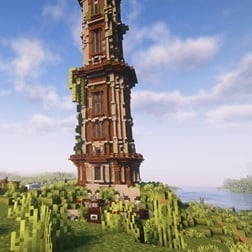
Improved Pillager Outpost Mod/Datapack 将标准的 Minecraft 掠夺者前哨站彻底改造为一座坚固且完全成型的塔楼。旨在提升你的游戏体验,该模组/数据包引入了一个更具沉浸感和细节的结构,为你的冒险增添了深度。
特性
- 结构重做:传统的掠夺者前哨站被一座完整建造的塔楼取代,拥有多层楼面、精细的建筑结构和战略性的布局。
- 四种塔楼变体:
- 普通 (Normal):一座标准且维护良好的塔楼。
- 荒芜 (Overgrown):被自然收复的塔楼,外墙覆盖着藤蔓和植被。
- 破损 (Damaged):历经战斗的塔楼,显示出过去冲突的痕迹。
- 荒芜破损 (Overgrown Damaged):结合了荒芜和破损元素,使塔楼呈现出独特而粗糙的外观。
- 两种顶部塔楼变化:
- 活跃 (Active):塔顶设有点燃的信号火,表明前哨站处于警戒状态并准备战斗。
- 不活跃 (Inactive):信号火已熄灭,暗示前哨站的警惕性较低。
- 原版战利品表:虽然塔楼包含的战利品箱比标准前哨站多,但战利品与原版游戏保持一致。未添加任何额外物品。
- 未更改的敌人:塔楼内的敌人与原版游戏中的相同。尚未对敌人的难度或行为进行任何更改。
安装
模组安装
- 下载模组:CurseForge | Modrinth
- 使用你偏好的加载器安装:
- Forge/NeoForge:将模组文件拖入
.minecraft目录中的mods文件夹。 - Fabric/Quilt:确保安装了 Fabric API 以及相应的模组加载器。将模组文件放入
mods文件夹。
- Forge/NeoForge:将模组文件拖入
数据包安装
- 下载数据包:CurseForge | Modrinth
- 找到你的 Minecraft 存档文件夹:
- Windows:
%appdata%\.minecraft\saves - Mac:
~/Library/Application Support/minecraft/saves - Linux:
~/.minecraft/saves
- Windows:
- 添加数据包:
- 打开你要添加数据包的存档世界文件夹。
- 将下载的
.zip文件拖入datapacks文件夹。
- 加载数据包:
- 启动 Minecraft 并进入你的世界。
- 如有必要,使用
/reload命令。 - 享受焕然一新的掠夺者前哨站!
兼容性
- Minecraft 版本:此模组/数据包兼容 Minecraft 1.16.5 及以上版本。
- 要作为数据包使用最新版本,只需将文件扩展名从 .jar 重命名为 .zip 即可。
- 模组加载器:支持 Forge、NeoForge、Fabric(需 Fabric API)和 Quilt(需 Fabric API)。
- 多人游戏支持:完全兼容多人游戏服务器。
用法
- 袭击塔楼:探索新的掠夺者塔楼,其布局更为复杂,包含多个可发现的宝箱。准备好面对相同的原版敌人,但在更具挑战性的环境中。
- 战利品与奖励:虽然战利品表未作更改,但增加的数量更多的宝箱提供了更多收集资源的机会。
反馈与支持
如果你遇到任何问题或有改进建议,请通过 Discord 联系我们。
许可证
本模组/数据包在 CC0-1.0 许可下发布。你可以随意修改和分享它,但请注明原作者为 sashiro。
致谢
- 创作者:sashiro
- 特别感谢:1.16.5 版本整合包的原始创作者
链接
- 下载模组/数据包:CurseForge MOD | CurseForge DATAPACK | Modrinth
- 加入我们的社区:Discord
- 支持创作者:PayPal
感谢你使用 Improved Pillager Outpost 模组/数据包!享受更加刺激和细致的 Minecraft 体验。
Improved Pillager Outpost Mod/Datapack
Overview
The Improved Pillager Outpost Mod/Datapack completely transforms the standard Minecraft Pillager Outpost into a formidable, fully-realized tower. Designed to enhance your gameplay experience, this mod/datapack introduces a more immersive and detailed structure that adds depth to your adventures.
Features
-
Overhauled Structure: The traditional Pillager Outpost is replaced with a fully-constructed tower, featuring multiple floors, detailed architecture, and strategic layouts.
-
Four Tower Variants:
- Normal: A standard, well-maintained tower.
- Overgrown: A tower reclaimed by nature, with vines and foliage covering its exterior.
- Damaged: A battle-worn tower showing signs of past skirmishes.
- Overgrown Damaged: A combination of both overgrown and damaged elements, giving the tower a unique, rugged appearance.
-
Two Top Tower Variations:
- Active: The top of the tower features a lit signal fire, indicating that the outpost is alert and ready for battle.
- Inactive: The signal fire is extinguished, suggesting that the outpost is less vigilant.
-
Vanilla Loot Tables: While the tower includes more chests than a standard outpost, the loot remains consistent with the vanilla game. No additional items have been added.
-
Unaltered Enemies: The enemies within the tower are the same as in the vanilla game. No changes to enemy difficulty or behavior have been made—yet.
Installation
For Mod Installation
- Download the Mod: CurseForge | Modrinth
- Install with Your Preferred Mod Loader:
- Forge/NeoForge: Drag the mod file into the
modsfolder located in your.minecraftdirectory. - Fabric/Quilt: Ensure you have the Fabric API installed alongside the corresponding mod loader. Place the mod file into the
modsfolder.
- Forge/NeoForge: Drag the mod file into the
For Datapack Installation
- Download the Datapack: CurseForge | Modrinth
- Locate Your Minecraft Saves Folder:
- Windows:
%appdata%\.minecraft\saves - Mac:
~/Library/Application Support/minecraft/saves - Linux:
~/.minecraft/saves
- Windows:
- Add the Datapack:
- Open the folder of the world you want to add the datapack to.
- Drag and drop the downloaded
.zipfile into thedatapacksfolder.
- Load the Datapack:
- Start Minecraft and enter your world.
- Use the
/reloadcommand if necessary. - Enjoy the newly transformed Pillager Outposts!
Compatibility
- Minecraft Version: This mod/datapack is compatible with Minecraft version 1.16.5+.
- To use the latest version as a Datapack, simply rename the file extension from .jar to .zip
- Mod Loaders: Supports Forge, NeoForge, Fabric (with Fabric API), and Quilt (with Fabric API).
- Multiplayer Support: Fully compatible with multiplayer servers.
Usage
- Raiding the Tower: Explore the new Pillager Tower, which offers a more complex layout with multiple chests to discover. Be prepared for the same vanilla enemies, but in a more challenging environment.
- Loot and Rewards: Although the loot tables are unchanged, the increased number of chests provides more opportunities to gather resources.
Feedback and Support
If you encounter any issues or have suggestions for improvements, please contact us via Discord.
License
This mod/datapack is released under the CC0-1.0. Feel free to modify and share it, but please credit the original author, sashiro.
Credits
- Creator: sashiro
- Special Thanks: Original creator of the pack for 1.16.5
Links
- Download the Mod/Datapack: CurseForge MOD | CurseForge DATAPACK | Modrinth
- Join our Community: Discord
- Support the Creator: PayPal
Thank you for using the Improved Pillager Outpost Mod/Datapack! Enjoy a more exciting and detailed Minecraft experience.
下载 Improved Pillager Outpost
需要联机服务器吗?
稳定流畅、一键部署,几分钟即可和朋友联机开服
最低仅需 8 元/月 即可畅快联机
下载 Improved Pillager Outpost
下载 Improved Pillager Outpost
需要联机服务器吗?
稳定流畅、一键部署,几分钟即可和朋友联机开服
最低仅需 8 元/月 即可畅快联机
下载 Improved Pillager Outpost
下载 Improved Pillager Outpost
需要联机服务器吗?
稳定流畅、一键部署,几分钟即可和朋友联机开服
最低仅需 8 元/月 即可畅快联机
下载 Improved Pillager Outpost
下载 Improved Pillager Outpost
需要联机服务器吗?
稳定流畅、一键部署,几分钟即可和朋友联机开服
最低仅需 8 元/月 即可畅快联机
下载 Improved Pillager Outpost
下载 Improved Pillager Outpost
需要联机服务器吗?
稳定流畅、一键部署,几分钟即可和朋友联机开服
最低仅需 8 元/月 即可畅快联机
下载 Improved Pillager Outpost
更新至 26.1 - 26.3
要将其作为数据包使用,只需将文件重命名为 .zip
关于这个资源的讨论、问题反馈与使用心得
还没有讨论,来发第一帖吧
你是这个资源的作者?登录后可认领此资源。
相似资源
 数据包

此数据包添加了属于阿瓦里海盗的独特结构,将他们的独特风格带入你的 Minecraft 世界!兼容性:1.20 至 26.3
 数据包

探索近100个新生物群系,包含写实与轻奇幻两种风格,且仅使用原版方块。此外还有若干沉浸式结构,与 overhauled 的地形相得益彰。
 数据包

此数据包添加了新的“祝福模式”难度。
 数据包

添加了基于官方概念图的蓝蛙和红眼树蛙变体。
 数据包

使用原版/生存友好的方法更改青蛙的变种类型。支持原版(寒冷、温带、温暖)以及可选的“More Frogs 2”变种:深红、末影、地狱、毒镖、紫珀、幽匿、灵魂、诡异和木头。
 数据包

手持潜影盒时可直接打开,无需将其放置在地面上。只需按住 Shift 并右键点击即可访问你的潜影盒。
评论 0
登录后参与评分
还没有评论,来抢沙发吧