物品过滤器
设置简单且自动的分类系统。
不再需要那些卡顿且笨重的红石装置。
物品过滤器为您提供了一种更好的替代方案,可以自动整理您的储物间!
?简介
什么是物品过滤器?
物品过滤器允许您将放置在它上方的容器中的多种类型的物品过滤到下方放置的另一个容器中。您可以通过在相邻的参考容器中预设物品来选择让哪些物品通过过滤器。
如果物品过滤器下方有流体方块(空气、水或岩浆),它还可以直接将分类后的物品掉落出来。
如果您之前使用过 V.2 版本,您可能已经注意到数据包更改了其名称。这是因为它不再严格依赖漏斗:您可以直接将物品从箱子或潜影盒传递到另一个箱子或潜影盒中。
如何制作和使用物品过滤器?
物品过滤器可以使用以下材料合成:
- 6x 深板岩圆石
- 1x 漏斗
- 1x 侦测器
- 1x 发射器
合成配方如下:
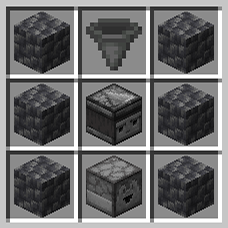
当您放置一个物品过滤器时,面向玩家的一面会显示一个微小的灰色按钮。这是您可以右键单击以切换模式的按钮,我们将在后面解释该模式。
相反的一面显示一个微小的侦测器图标。您需要在此处放置一个兼容的容器(所有具有直接 Items 条目的容器,如箱子、漏斗、桶、潜影盒、发射器、发射器等)。这个容器必须包含所有参考物品,即您希望让其通过相对过滤器的物品。不匹配这些物品的其他物品将保留在上方的容器中,或者继续它们的路径进入您的系统(如果它是连接到另一个系统的漏斗)。
为了使其工作,物品过滤器需要满足以下条件:
- 在其上方放置一个兼容的容器。
- 在其微小的侦测器图标上放置一个兼容的容器,并包含要过滤的物品。
- 在其下方放置一个兼容的容器以接收过滤后的物品,或者放置一个流体方块(空气/岩浆/水)以直接掉落它们。
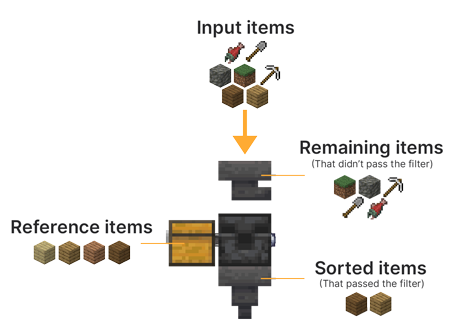
我建议您观看教程视频以获取更好的解释和示例。
?模式
物品过滤器有两种模式:宽松模式和严格模式。默认情况下是宽松模式。可以通过右键单击其一面上的小灰色按钮来切换模式。
宽松模式
宽松模式由按钮的灰色表示。
当物品过滤器设置为宽松模式时,它只会考虑物品的 id 来进行过滤,并忽略所有潜在的 NBT。例如,在宽松模式下,如果您在参考容器中设置了一把附魔钻石剑,那么所有钻石剑,无论它们的附魔、耐久度或其他标签如何,都会通过过滤器,因为它们仍然共享相同的 id (minecraft:diamond_sword)。
严格模式
严格模式由按钮的黄色表示。
当物品过滤器设置为严格模式时,它将考虑 id 以及**所有(未忽略的)标签(MC 1.20.5 之前)或组件(MC 1.20.5 之后)**的物品。在这种情况下,以之前的例子为例,只有共享完全相同数据(附魔、耐久度等)的钻石剑才会通过过滤器。这对于想要过滤像附魔书、自定义玩家头颅或其他数据包中的自定义物品很有用。
严格模式还具有根据需要忽略某些标签或组件的能力。请参见下面的设置部分以获取解释。
⚙️设置
严格模式忽略的组件(自 V.3.1.0 起)
严格模式可以在过滤器的检查过程中忽略某些组件。
默认情况下,没有设置忽略的组件。
您可以分别使用以下命令添加、删除或获取当前忽略的组件列表:
/function pk_it_fi:settings/mode/strict/ignored_components/add {id:"<id>"}
/function pk_it_fi:settings/mode/strict/ignored_components/remove {id:""<id>"}
/function pk_it_fi:settings/mode/strict/ignored_components/list
示例 - 忽略 "minecraft:repair_cost" 组件:
/function pk_it_fi:settings/mode/strict/ignored_components/add {id:"minecraft:repair_cost"}
还有一个预制的样本,包含我们通常想要忽略的大多数常见组件:"minecraft:custom_name"、"minecraft:lore"、"minecraft:enchantments"、"minecraft:damage" 和 "minecraft:repair_cost"。您可以使用以下命令激活它:
/function pk_it_fi:settings/mode/strict/ignored_components/add_default_sample
严格模式忽略的标签(直到 V.3.0.1)
严格模式可以在过滤器的检查过程中忽略某些标签。
默认情况下,没有设置忽略的标签。
您可以分别使用以下命令添加、删除或获取当前忽略的标签列表:
/function pk_it_fi:settings/mode/strict/ignored_tags/add {property:"<property>"}
/function pk_it_fi:settings/mode/strict/ignored_tags/remove {property:""<property>"}
/function pk_it_fi:settings/mode/strict/ignored_tags/list
示例 - 忽略 repairCost 标签:
/function pk_it_fi:settings/mode/strict/ignored_tags/add {property:"repairCost"}
还有一个预制的样本,包含我们通常想要忽略的大多数常见标签:display、Enchantments、Damage 和 repairCost。您可以使用以下命令激活它:
/function pk_it_fi:settings/mode/strict/ignored_tags/add_default_sample
忽略潜影盒和包裹的颜色(自 V.3.2.4 起)
允许任意收纳盒或潜影盒通过宽松模式下的物品过滤器设置,无论其颜色如何,只要参考箱中设置了其中之一即可。
您可以分别使用以下命令来启用、禁用或获取此设置的当前状态:
function pk_it_fi:settings/mode/lax/ignore_container_color/true
function pk_it_fi:settings/mode/lax/ignore_container_color/false
function pk_it_fi:settings/mode/lax/ignore_container_color/get
更改物品过滤器的传输冷却时间
默认情况下,物品过滤器的传输冷却时间为 4 刻,使其比默认漏斗快两倍地传输物品。建议保持此速率以适当从漏斗中传输物品。但是,如果您想调整此值,可以使用以下命令设置其他值或获取当前值:
/function pk_it_fi:settings/transfer_cooldown/get
/function pk_it_fi:settings/transfer_cooldown/set {value:<value>}
示例 - 将物品过滤器的传输冷却时间设置为 1 刻:
/function pk_it_fi:settings/transfer_cooldown/set {value:1}
请注意,传输冷却时间不能设置为低于 1 刻。
允许双箱用作参考
您可以使物品过滤器从双箱中搜索参考物品。
默认情况下,此功能处于禁用状态,因为它并非必需,且每次检查消耗的性能几乎翻倍。
您可以分别使用以下命令来启用、禁用或获取此设置的当前状态:
/function pk_it_fi:settings/reference/allow_double_chest/true
/function pk_it_fi:settings/reference/allow_double_chest/false
/function pk_it_fi:settings/reference/allow_double_chest/get
? 其他命令
给自己一个物品过滤器
如果您是服务器的操作员,或者在单人世界中启用了作弊功能,您可以使用以下命令给自己一个物品过滤器:
(V.3.1.0 之后):
/function pk_it_fi:cmd/give/items_filter
(V.3.1.0 之前):
/function pk_it_fi:items/items_filter/give
故障排除
从数据库重建所有物品过滤器
如果物品过滤器意外损坏(例如使用了 kill @e 命令),您可以运行以下命令从数据库重建所有物品过滤器:
/function pk_it_fi:cmd/debug/recreate_all_items_filters
该过程将自动移除所有剩余的损坏物品过滤器的实体和方块,然后放置新的。所有数据(ID、所有者、过滤模式等)都将保留。
完成可能需要一些时间,因此请确保在交互或放置物品过滤器之前收到表示过程成功结束的消息。
? 从 V.2 更新
您可以将所有现有的 Hopper Sorters(来自 V.2)转换为 Items Filters。为此,不要通过卸载流程卸载 V.2 上游版本,因为您应该保留其数据库。
只需从世界的数据包文件夹中移除 V.2 数据包,如果需要则将您的世界更新到较新版本的 Minecraft,并同时安装 Items Filters V.3。然后使用以下命令开始自动更新过程:
(V.3.1.1 之后):
/function pk_it_fi:cmd/database/update_from_v2
(V.3.1.1 之前):
/function pk_it_fi:base/update/from_v2/start
并等待更新过程结束。
请注意,此过程 unfortunately 不会保留漏斗分拣器的过滤模式(宽松或严格),因为之前未将其存储在数据库中。但是,它们将保留所有其他数据(其 ID、所有者和位置)。
? 卸载
物品过滤器附带自动卸载过程。运行它将:
- 移除世界中放置的所有物品过滤器,包括各个维度
- 移除与物品过滤器数据包相关的特定分数和存储
- 如果没有安装其他 KawaMood 数据包,还将移除所有通用分数和存储
卸载过程可能需要几秒钟才能完成。请务必等待告知您可以安全地从世界文件夹中移除数据包的消息后再进行操作。
启动卸载过程的命令如下:
/function pk_it_fi:base/uninstall/start
❓ 常见问题解答
我需要安装资源包吗?
不需要,此数据包不需要资源包。它使用显示实体来渲染自定义纹理。
方块的纹理显示常规玩家头颅,我该如何修复?
首次使用新类型的 Waystone 时,您需要连接互联网。用于创建其外观的玩家头颅纹理确实是从存储在 Mojang 服务器上的(旧或当前)玩家皮肤加载并缓存在客户端的。
如果您不小心使用了首次使用时需要联网的内容,而现在看到的是常规玩家头颅而不是预期的纹理,您仍然可以进入 ".minecraft/assets/skins/" 文件夹,然后按日期对子文件夹进行排序,并删除一些最近的文件夹。完成后,如果您的游戏已经启动,则需要重新启动它以更新缓存内容。
⚠️ 1.20.2 上的特殊情况:玩家头颅有时可能显示默认玩家皮肤(Steve 等),而不是其实际纹理,尽管整个缓存文件夹都已清除。这实际上是游戏本身的一个已知问题,取决于签名值加载纹理存在问题。此问题已在 1.20.3 中得到修复。
? 报告问题
如果您在使用此数据包时遇到问题,建议加入 Discord 服务器,并在专门的 #data-pack-issues 频道发帖以描述您的问题。请务必提供所有必要信息,包括:
- 您正在使用的 Minecraft 版本。
- 您正在使用的该数据包的版本。
- 是否使用了任何修改版客户端,如 Forge、Paper 或 Spigot。
- 如果是,请列出您正在使用的可能会影响数据包运行的插件或模组。
- 您正在使用的其他数据包列表(如果有)。
- 对您问题的清晰描述及复现方法。
- 如有必要,请提供游戏内问题的视频或截图。
在执行上述操作之前,请先阅读上方的常见问题解答(F.A.Q.)部分。您遇到的问题可能是常见问题之一,修复方法可能已在其中提供。
? 其他链接
感谢您使用 Items Filter!得知大家喜欢它让我感到很开心。
如果您想支持其开发以及其他数据包的开发,您可以通过我的其他社交网络支持我:
Items Filter
Set up easy and automatic sorting systems.
No longer need for laggy and bulky redstone contraptions.
The Items Filter provides a better alternative to automatically sort your storage room!
?Introduction
What is Items Filter?
Items Filters allow you to you to filter several types of items from a container placed above it to another container placed below it. You can choose what items the filter let pass by presetting them in an adjacent reference container.
Items Filters can also directly drop their sorted items if you there is a fluid block below them (air, water or lava).
If you used to use V.2, you may have noticed that the data pack changed its name. This is due to the fact it doesn't strictly rely on hoppers anymore: you can directly pass an item from a chest or a shulker box to another one if you want to.
How to craft and use an Item Filter?
Items Filters can be crafted using:
- 6x Cobbled Deeplsate
- 1x Hopper
- 1x Observer
- 1x Dropper
The recipe is the following:
When you place an items filter, the side facing your player will show a tiny grey button. This is the one you can right-click to toggle mode, that we will explain later.
The opposite face shows a tiny observer icon. This is where you need to place a compatible containers (all containers having a direct Items entry like chests, hoppers, barrels, shulker boxes, dropper, dispenser, etc.). This one need to contain all reference items, meaning the one you want to let pass through the relative filter. Other items that don't match those ones will remain in the container above, or continue their path to your system if it is an hopper connected to another.
In order to make it work, Items Filters then needs to have :
- A compatible container placed above them.
- A compatible container placed on their tiny observer icon, and containing items to filter.
- A compatible container placed below them to receive the filtered items, or a fluid block (air/lava/water) to directly drop them.
I recommend you to see the tutorial video for better explanations and examples.
? Modes
Item Filters have two modes: the Lax mode that is the one by default, and the Strict mode. Modes are toggleable by right-clicking the little grey button on one of its face.
Lax mode
The Lax mode is represented by the grey color of the button.
When an Items Filter is set on Lax mode, it will only take items' id into account to filter them, and ignore all their potential NBT. Meaning for example, in Lax mode, if you set an enchanted Diamond Sword in the reference container, all Diamond Swords, no matter their enchantments, their damage or any other tag will pass the filter, because they still share the same id (minecraft:diamond_sword).
Strict mode
The Strict mode is represented by the yellow color of the button.
When an Items Filter is set on Strict mode, it will consider the id but also all (non-ignored) tags (before MC 1.20.5) or components (after MC 1.20.5) of items. In this case, to take back the example above, only Diamond Swords which share the exact same data (enchantments, damage, etc.) will pass the filter. It is useful if you want to items like Enchanted Books, custom Player Heads, or custom items from other data packs.
The Strict mode also has the ability of ignoring some tags or components if needed. See the Settings section below for explanations.
⚙️Settings
Ignored components for Strict Mode (Since V.3.1.0)
The Strict mode has the ability of ignoring some components during the filter's checks.
By default, no ignored components are set.
You can add, remove or get the list of currently ignored components using the following commands respectively:
/function pk_it_fi:settings/mode/strict/ignored_components/add {id:"<id>"}
/function pk_it_fi:settings/mode/strict/ignored_components/remove {id:""<id>"}
/function pk_it_fi:settings/mode/strict/ignored_components/list
Example - Ignoring the "minecraft:repair_cost" component:
/function pk_it_fi:settings/mode/strict/ignored_components/add {id:"minecraft:repair_cost"}
There is also a premade sample containing most common components we usually want to ignore: "minecraft:custom_name", "minecraft:lore", "minecraft:enchantments", "minecraft:damage" and "minecraft:repair_cost". You can activate it using the following command:
/function pk_it_fi:settings/mode/strict/ignored_components/add_default_sample
Ignored tags for Strict Mode (Until V.3.0.1)
The Strict mode has the ability of ignoring some tags during the filter's checks.
By default, no ignored tags are set.
You can add, remove or get the list of currently ignored tags using the following commands respectively:
/function pk_it_fi:settings/mode/strict/ignored_tags/add {property:"<property>"}
/function pk_it_fi:settings/mode/strict/ignored_tags/remove {property:""<property>"}
/function pk_it_fi:settings/mode/strict/ignored_tags/list
Example - Ignoring the repairCost tag:
/function pk_it_fi:settings/mode/strict/ignored_tags/add {property:"repairCost"}
There is also a premade sample containing most common tags we usually want to ignore: display, Enchantments, Damage and repairCost. You can activate it using the following command:
/function pk_it_fi:settings/mode/strict/ignored_tags/add_default_sample
Ignore color of shulker boxes and bundles (Since V.3.2.4)
Allow any bundle or shulker box to pass item filters set on lax mode no matter their color as soon as one of them is set within the reference chest.
You can enable, disable or get the current state of this setting using the following commands respectively:
function pk_it_fi:settings/mode/lax/ignore_container_color/true
function pk_it_fi:settings/mode/lax/ignore_container_color/false
function pk_it_fi:settings/mode/lax/ignore_container_color/get
Change the transfer cooldown of items filters
By default, items filters have a transfer cooldown of 4 ticks, making it transfer items twice faster than the default hoppers. It is recommended to keep it at this rate to make it adequatly transfer items from hoppers. However, if you want to adapt this value, you can set another value or get the current one using the following commands respectively:
/function pk_it_fi:settings/transfer_cooldown/get
/function pk_it_fi:settings/transfer_cooldown/set {value:<value>}
Example - Setting the transfer cooldown of items filters to 1 tick:
/function pk_it_fi:settings/transfer_cooldown/set {value:1}
Note that the transfer cooldown can't be set lower than 1 tick.
Allow double chests use as reference
You can make item filters search reference items from a double-chests.
By default, this feature is disabled, as it is not necessary needed and consume almost twice more performances per check.
You can enable, disable or get the current state of this setting using the following commands respectively:
/function pk_it_fi:settings/reference/allow_double_chest/true
/function pk_it_fi:settings/reference/allow_double_chest/false
/function pk_it_fi:settings/reference/allow_double_chest/get
? Other Commands
Give yourself an items filter
If you are an operator of your server or if cheats are enabled in your single-player world, you can give yourself an items filter using these following command:
(after V.3.1.0):
/function pk_it_fi:cmd/give/items_filter
(before V.3.1.0):
/function pk_it_fi:items/items_filter/give
Troubleshooting
Recreate all items filters from the database
If ever items filters have been broken accidentally (using a kill @e command for example) you can run the following command to recreate all items filters from the database
/function pk_it_fi:cmd/debug/recreate_all_items_filters
The process will automatically remove all remaining entities and blocks of broken items filters before placing fresh ones. All data (id, owner, filterring mode...) will be preserved.
It may take some time for it to complete, so be sure to get the message telling the process ended successfully before interacting with or placing an items filter.
? Update from V.2
You can transform all existring Hopper Sorters (from V.2) to Items Filters. In order to do so, don't uninstall V.2 upstream with the uninstalling process, as you should keep its database.
Just remove the V.2 data pack from the datapacks folder of your world, update your world to the newer version of Minecraft if desired and install Items Filters V.3 at the same time. Then use the following command to start the automatic updating process:
(after V.3.1.1):
/function pk_it_fi:cmd/database/update_from_v2
(before V.3.1.1):
/function pk_it_fi:base/update/from_v2/start
And wait for the updating process to end.
Note that this process won't unfortunately keep the filterring mode (lax or strict) of hopper sorters, as it wasn't previously stored in the database. However, they will keep all other data (their id, owner and location).
? Uninstall
Items filters comes with an automatic uninstallation process. Running it will:
- Remove all items filters that have been placed in your world, in every dimensions
- Remove all scores and storage specific to the Items Filter data pack
- If there is no more KawaMood data packs installed, also remove all common scores and storages
The uninstalling process may take some seconds to complete. Be sure to wait for the message telling you that you can safely remove the data pack from your world's folder before doing it.
The command to start the uninstalling process is the following one:
/function pk_it_fi:base/uninstall/start
❓ F.A.Q
Do I need to install a resources pack?
No, this data pack doesn't require a resources pack. It uses display entities to render custom textures.
The texture of the block shows regular player heads, how can I fix that?
You need to be connected to the internet the first time you use a new type of waystone. The textures of the player heads that are used to create their looks are indeed loaded and cached on the client-side, from (old or current) players skins that are stored on a Mojang server.
If you accidentally used a content that required to be online the first time you use it, and now see regular players heads instead of the expected texture, you can still go in the ".minecraft/assets/skins/" folder, then sort the sub-folders by date, and delete some recent folders. Once that is done, if your game was already started, you will need to restart it to update the cached content.
⚠️ Exceptional issue on 1.20.2: Players heads can sometimes show default player skins (Steve & co.) rather than its actual texture although the whole cache folder are cleared. This is actually an known issue from the game itself that struggle to load a texture depending on the signature's value. This issue has been fixed on 1.20.3.
? Report an issue
If you encountered an issue with this data pack, preferably join the Discord server, and open a post in the dedicated #data-pack-issues channel to describe your problem. Please, don't forget to provide all necessary informations including:
- The Minecraft version you're using.
- The version of the concerned data pack you're using.
- If you're using any modified version like Forge, Paper or Spigot.
- If you do, the plugins or mods you're using that may alter the functioning of data packs.
- The list of other data packs you're using, if you have others.
- A clear description of your issue, and a way to reproduce it.
- If necessary, a video or a screenshot of the issue in game.
Before doing that, please read the F.A.Q. section just above. The issue you're facing may be a common one, and a way to fix it may already have been provided in it.
? Other links
Thank you for using Items Filter! It makes me happy to know people are enjoying it.
If you want to support its development and the development of other data packs, you can support me on my other social networks:
- Planet Minecraft
- Or if you're in a generous mood, I accept donation on paypal or buy me a kawa (slang term for "coffee")!


 数据包

 数据包
 数据包

 数据包
 数据包

 数据包

评论 0
登录后参与评分
还没有评论,来抢沙发吧