等级 = 属性
此数据包将每位玩家的属性与其当前经验等级绑定。每当你的经验等级提升或降低时,你角色的属性值也会相应增加或减少一定数值。此数据包同样适用于多人服务器!
属性
属性是决定生物(特别是本数据包中的玩家)某些特性的数值。 本数据包共使用以下 18 种属性:
scale(缩放)max_health(最大生命值)max_absorption(最大吸收量)knockback_resistance(击退抗性)movement_speed(移动速度)attack_damage(攻击伤害)armor(护甲)armor_toughness(护甲韧性)step_height(步高)attack_speed(攻击速度)luck(幸运)block_interaction_range(方块交互范围)entity_interaction_range(实体交互范围)gravity(重力)safe_fall_distance(安全坠落距离)fall_damage_multiplier(坠落伤害倍率)block_break_speed(方块破坏速度)jump_strength(跳跃力度)
你可以在此处了解每种属性的详细信息 here。
配置
要访问配置记分板,请运行命令 /scoreboard objectives setdisplay sidebar level_attributes_config。你可以在这里配置想要启用/禁用的属性,并设置自定义的最大等级。请注意,由于属性数量过多,并非所有属性都会同时显示在记分板上。
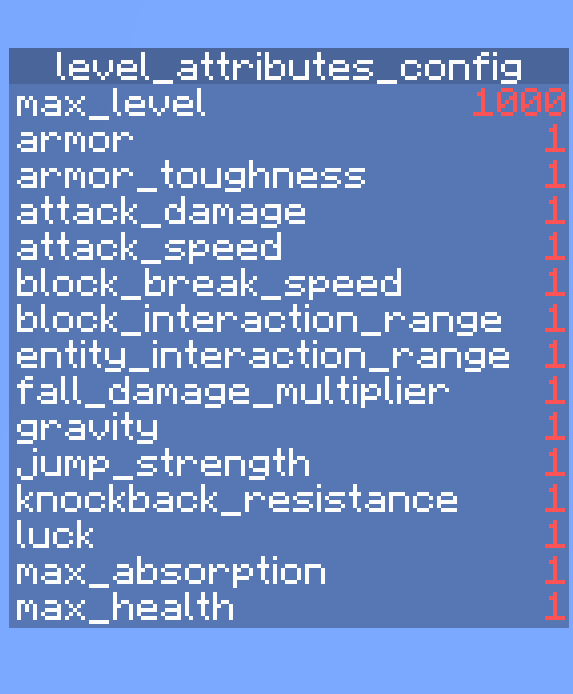
启用/禁用属性
启用某个属性会将其与当前的经验等级关联,禁用则会解除关联。默认情况下,所有属性均已启用。
启用:/scoreboard players set <attribute_name> level_attributes_config 1
禁用:/scoreboard players set <attribute_name> level_attributes_config 0
设置自定义最大等级
max_level 指的是每个已启用属性所对应的最大经验等级。这意味着 max_level 越高,每获得一级经验时,各属性向其最大值增长的幅度就越慢。默认的 max_level 设置为 1000。若要自定义该值,请运行 /scoreboard players set max_level level_attributes_config <level>。有效值为 10 到 1,000,000 之间的整数。设置超出此范围的数值可能会导致数据包损坏!
其他注意事项...
- 运行命令
/trigger level_attributes_list可查看你角色所有属性的当前数值。 - 如果你想移除此数据包,请运行命令
/function level_attributes:uninstall,然后禁用或删除该数据包
此数据包的灵感最初来源于 Level = Border,以及 Minecraft 快照 23w51a 中新增的属性。
Level = Attributes
This datapack links each player's attributes to their current experience level. Each time you gain or lose an experience level, your player's attributes will increase or decrease by a certain amount. This datapack also works on multiplayer servers!
Attributes
Attributes are values which dictate certain properties of mobs, specifically players for this datapack. 18 attributes are utilised in this datapack:
scalemax_healthmax_absorptionknockback_resistancemovement_speedattack_damagearmorarmor_toughnessstep_heightattack_speedluckblock_interaction_rangeentity_interaction_rangegravitysafe_fall_distancefall_damage_multiplierblock_break_speedjump_strength
You can learn more about each attribute here.
Configuration
To access the configuration scoreboard, run the command /scoreboard objectives setdisplay sidebar level_attributes_config. Here you can configure which attributes you want to enable/disable and set a custom max level. Do note that not all attributes are displayed on the scoreboard at once as there are too many attributes.

Enabling/disabling Attributes
Enabling an attribute links it to your current xp level while disabling unlinks it. All attributes are enabled by default.
Enabling: /scoreboard players set <attribute_name> level_attributes_config 1
Disabling: /scoreboard players set <attribute_name> level_attributes_config 0
Setting Custom Max Level
max_level refers to the maximum xp level that each enabled attribute will scale towards. This means the higher the max_level, the slower each attribute increases towards its max value with each xp level gained. The default max_level is set to 1000. To customise it, run /scoreboard players set max_level level_attributes_config <level>. Valid values are integers between 10 and 1,000,000. Setting a value outside this range may break the datapack!
Other Things To Note...
- Run the command
/trigger level_attributes_listto see the current values of all your player's attributes. - If you want to remove the datapack, run the command
/function level_attributes:uninstalland then disable/delete the datapack
This datapack was originally inspired by Level = Border and the newly added attributes in Minecraft Snapshot 23w51a.
下载 Level = Attributes
已更新至 1.21.2
关于这个资源的讨论、问题反馈与使用心得
还没有讨论,来发第一帖吧
你是这个资源的作者?登录后可认领此资源。
相似资源
数据包
此数据包添加了属于阿瓦里海盗的独特结构,将他们的独特风格带入你的 Minecraft 世界!兼容性:1.20 至 26.3
数据包
此数据包添加了新的“祝福模式”难度。
数据包
使用原版/生存友好的方法更改青蛙的变种类型。支持原版(寒冷、温带、温暖)以及可选的“More Frogs 2”变种:深红、末影、地狱、毒镖、紫珀、幽匿、灵魂、诡异和木头。
数据包
手持潜影盒时可直接打开,无需将其放置在地面上。只需按住 Shift 并右键点击即可访问你的潜影盒。
数据包
粉色方块中的千种可能!
数据包
为你的 Minecraft 世界添加了超过 900 个新的进度
评论 0
登录后参与评分
还没有评论,来抢沙发吧