Material Counter
Material Counter 是一个数据包,可让你快速计算在 Minecraft 中重建选定结构所需的材料及其数量。
只需使用专用的 Material Counter Position Selector(材质计数器位置选择器)选择一个区域,该数据包就会自动分析每个方块并生成所需材料的完整列表。
功能
- 统计选定区域内的所有方块。
- 显示所需材料的完整列表。
- 显示每种方块的确切数量。
- 专用的位置选择工具。
- 内置游戏用户指南。
- 支持聊天模式和书本模式以显示结果。
- 可切换的位置轮廓粒子效果。
- 提供位置选择器和用户指南的合成配方。
使用方法
1. 获取位置选择器
你可以通过两种方式获得该工具。
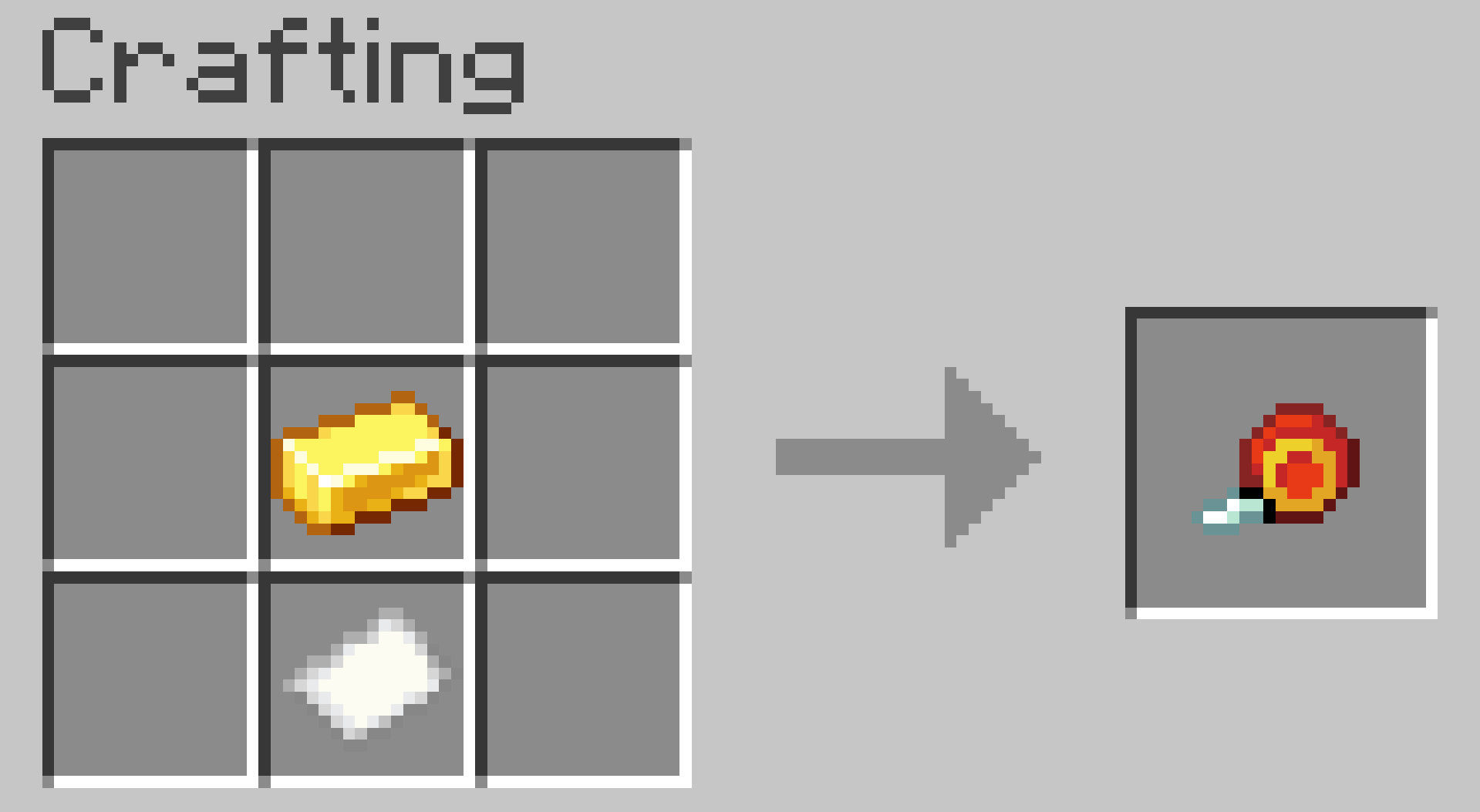
a) 使用以下配方合成:
b) 通过运行命令即时获得:
/trigger give
2. 选择位置 1
前往你建筑的一角,右键点击一个空白的方块面。
位置选择器的外观会发生变化,提示下一步是选择位置 2。
3. 选择位置 2
前往建筑的相对角落,再次右键点击。
4. 等待计算完成
数据包将分析选定区域内的每个方块。
大型选择可能需要更长时间,具体取决于建筑的大小和你电脑的性能。
5. 查看结果
默认情况下,材料列表会显示在聊天栏中。
如果你愿意,可以切换到 书本模式,这将生成一本包含完整材料列表的书。
设置
该数据包包含两个可选设置。
/trigger list
在以下模式之间切换:
/trigger position_outlines
启用或禁用标记位置 1 和位置 2 的粒子效果。
默认启用。
用户指南
首次加入安装了该数据包的存档时,你将自动收到一份内置的 用户指南,其中解释了所有功能。
如果丢失了指南,你可以使用其合成配方制作另一份副本。
兼容性
无需额外模组或库文件。
将该数据包放入世界的 datapacks 文件夹中即可。
若要启用位置选择器的自定义纹理,请将同一个 ZIP 文件也放入 resourcepacks 文件夹中。
警告
选择过大的区域可能导致 Minecraft 冻结或崩溃。
你的世界应保持安全,因为如果在执行数据包期间发生崩溃,Minecraft Java 版可以恢复备份。
鸣谢
创作者: MrKazanek
特别感谢: Bluezers
感谢所有支持本项目的人!❤️
Material Counter
Material Counter is a datapack that lets you quickly calculate which materials and how many of each are required to recreate a selected structure in Minecraft.
Simply select an area using the dedicated Material Counter Position Selector, and the datapack will automatically analyze every block and generate a complete list of the required materials.
Features
- Counts every block within the selected area.
- Displays a complete list of the required materials.
- Shows the exact quantity of every block needed.
- Dedicated Position Selector tool.
- Automatic in-game User Guide.
- Chat Mode and Book Mode for displaying results.
- Toggleable position outline particles.
- Crafting recipes for both the Position Selector and the User Guide.
Usage
1. Obtain the Position Selector
You can get the tool in two ways.
a) Craft it using the following recipe:
b) Obtain it instantly by running:
/trigger give
2. Select Position 1
Go to one corner of your build and right-click an empty block face.
The Position Selector will change its appearance, indicating that the next step is selecting Position 2.
3. Select Position 2
Go to the opposite corner of the build and right-click again.
4. Wait for the calculation
The datapack will analyze every block inside the selected area.
Large selections may take longer depending on the size of the build and your computer's performance.
5. View the results
By default, the material list appears in chat.
If you prefer, you can switch to Book Mode, which generates a book containing the complete material list.
Settings
The datapack includes two optional settings.
/trigger list
Switches between:
- Chat Mode (default)
- Book Mode
- Dialog Mode
/trigger position_outlines
Enables or disables the particles that mark Position 1 and Position 2.
Enabled by default.
User Guide
The first time you join a world with the datapack installed, you'll automatically receive an in-game User Guide explaining every feature.
If you lose it, you can craft another copy using its crafting recipe.
Compatibility
No additional mods or libraries are required.
Place the datapack in your world's datapacks folder.
To enable the custom textures for the Position Selector, place the same ZIP file in the resourcepacks folder as well.
Warning
Selecting extremely large areas may cause Minecraft to freeze or crash.
Your world should remain safe, as Minecraft Java Edition can restore backups if a crash occurs during datapack execution.
Credits
Creator: MrKazanek
Special thanks: Bluezers
Thank you to everyone who supported this project! ❤️


 数据包

 数据包
 数据包

 数据包
 数据包

 数据包

评论 0
登录后参与评分
还没有评论,来抢沙发吧