
每过 60 秒,你就会获得一个随机的混乱效果!效果可能包括生成怪物、获取特殊物品、生成结构……或者更疯狂的效果,比如让所有怪物旋转、铁砧末日,或炸毁所有怪物!
这个数据包有很多设置可以自定义你的体验,让你以喜欢的方式尽情玩耍——所有详细信息见下文。
捐赠
如果你喜欢这个数据包以及我所做的事情,你可以考虑捐赠,这样在你的支持下,我未来能更轻松地进行更新,因为最近我的经济状况不太好。请仅在你负担得起的情况下进行捐赠,任何支持都值得感激!
请注意,有人正在帮我管理这个 PayPal 账户,因此名字如此。

使用方法
在 1.4 及以上版本(Minecraft 1.21.6+)
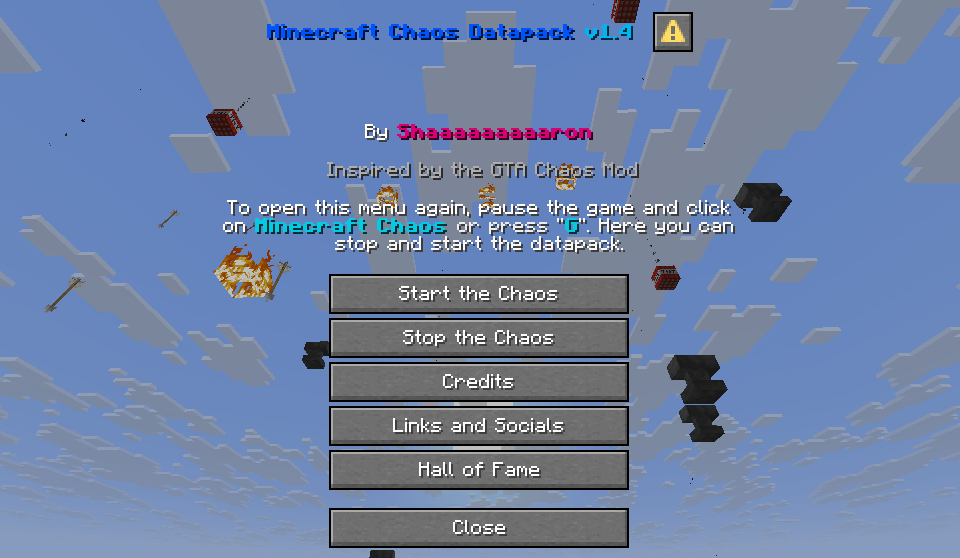
只需按下快速操作键绑(默认为 'G')或在游戏暂停时选择 Minecraft Chaos 即可打开主菜单。
在此菜单中,你可以通过选择设置来开始混乱模式,停止混乱,查看制作人员名单,浏览我的社交媒体,并查看名人堂!
在 1.4 以下版本(Minecraft 1.21.4 及以下)
使用 /trigger chaos.info 在聊天中打开设置菜单。使用鼠标点击并选择聊天中的所有选项以开始混乱模式。
模式
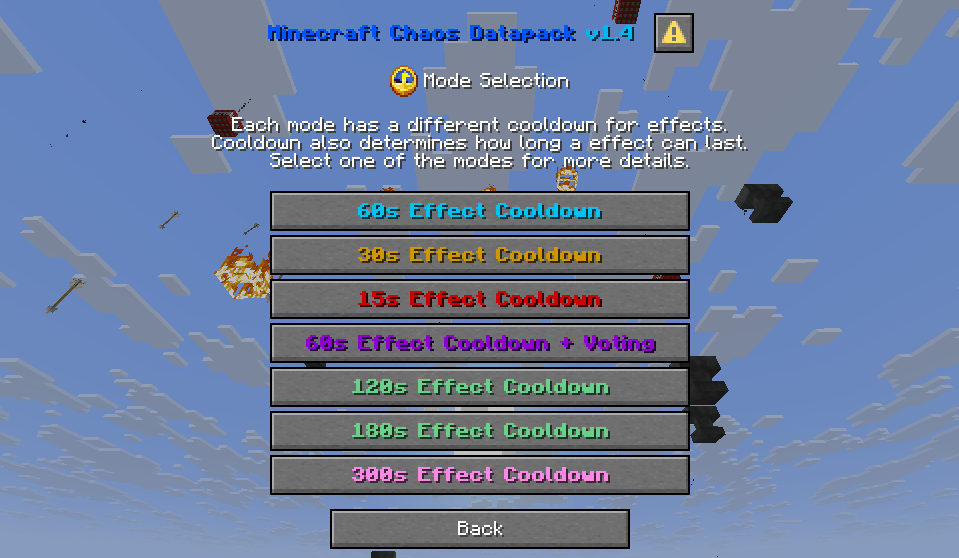
- 60 秒冷却模式:每分钟你会获得一个随机效果,持续时间通常为 3 分钟。有些效果持续 60、30 或 10 秒。
- 30 秒冷却模式:每 30 秒你会获得一个随机效果,持续时间通常为 1 分 30 秒。有些效果持续 45、15 或 10 秒。
- 15 秒冷却模式:每 15 秒你会获得一个随机效果,持续时间与 30 秒冷却模式相同。
- 60 秒冷却 + 投票模式:每 30 秒,处于旁观者模式的玩家会收到一个投票选项,并有另外 30 秒的时间为执行者选择一个效果。如果出现平局,将从投票中随机选择一个效果。此模式旨在多人游戏中游玩。
- 120 秒、180 秒和 300 秒冷却模式:效果持续时间与 60 秒冷却模式相同,但效果之间的冷却时间更长。
修饰符
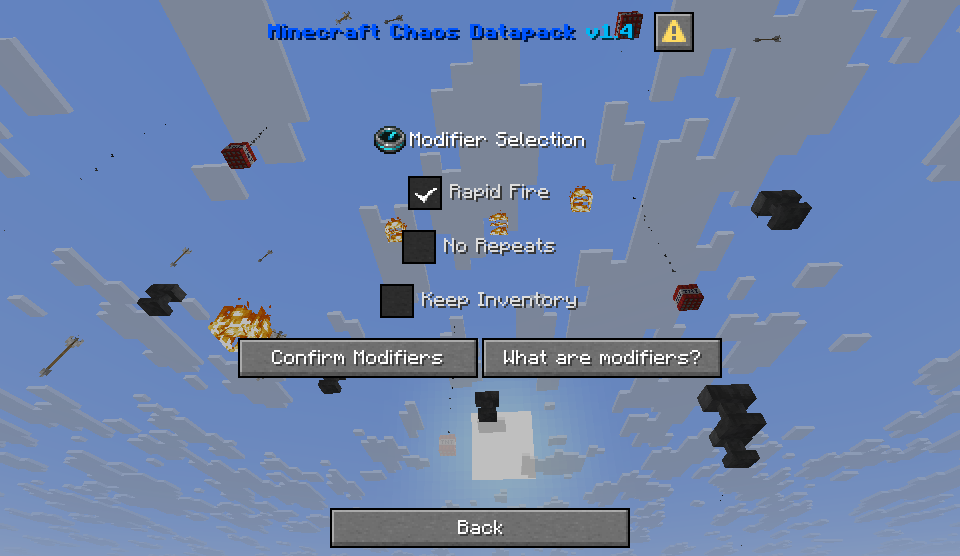
修饰符是可以启用或禁用的额外选项,用于你玩的游戏过程中
- 连发模式:每隔一段时间,会出现连发即将到来的警告。当连发发生时,大量持续时间极短的效果会接连激活。可能会非常、非常混乱,但也很有趣。在禁用之前不妨试试!
- 无重复:如果启用,在本次游戏过程中已应用过的效果不能再被选中。在所有效果都被应用后,所有效果将再次变为可选状态。
- 保留物品栏:如果启用,本次游戏期间会将游戏规则“Keep Inventory”设置为 true。重要提示:你需要通过这种方式启用它,而不是手动使用 /gamerule 命令,因为某个效果在结束后可能会将其禁用!不过不用担心,有了这个设置,它不仅会在整个游戏过程中保持开启,而且那个可能禁用它的效果也不会被选中。
鸣谢
- xnightcor3 - 缩略图艺术家
- Misode Data Pack Generators - 数据包生成器和标签库
- MC Stacker - 命令助手及旧版 NBT 标签更新工具
Every 60 seconds, you'll get a random chaotic effect applied! It can be effects such as spawning mobs, getting special items, generating structures... or more crazy effects, like making all mobs spin, an anvil apocalypse, or explode all mobs!
This datapack has quite a bunch of settings to customize your experience and have fun the way you would like to - all the details are found below.
Donate
If you like this datapack and what I do, you can consider donating so I can keep this updated with a bit more ease in the future with your support, as my finantial situation hasn't been the best recently. Only do so if you can aford it, anything is appreciated!
Please note that I'm being helped by someone to run this PayPal account, hence the name.
How to use
In version 1.4 and above (Minecraft 1.21.6+)
Simply press the Quick Actions keybind (which is 'G' by default) or pause the game and select Minecraft Chaos in order to open the main menu.
In this menu, you'll be able start the chaos by selecting your settings, stop the chaos, read the credits, check my socials, and take a look at the Hall of Fame!
In versions prior to 1.4 (Minecraft 1.21.4 and below)
Use /trigger chaos.info in order to open the settings menu in the chat. Use your mouse to click and select everything in the chat in order to start the chaos.
Modes
- 60s Cooldown Mode: Every minute you will get a random effect with a duration of 3 minutes in most cases. Some can last 60, 30, or 10 seconds.
- 30s Cooldown Mode: Every 30 seconds you will get a random effect with a duration of 1:30 in most cases. Some can last 45, 15, or 10 seconds.
- 15s Cooldown Mode: Every 15 seconds you will get a random effect with the same duration times as 30s Cooldown Mode.
- 60s Cooldown + Voting Mode: Every 30 seconds players in spectator mode will get a poll and have other 30 seconds to vote for an effect the runner will get. If there is a tie, a random effect from the poll will be selected. This mode is meant to be played in multiplayer.
- 120s, 180s, and 300s Cooldown Modes: Same effect duration times as 60s Cooldown Mode, but with a longer cooldown between effects.
Modifiers
Modifiers are extra options you can enable and disable to the runs that you play
- Rapid Fire: Every so often, a warning of the incoming rapid fire will appear. When the rapid fire happens, a large amount of effects with really short duration will activate in quick succession. Can be very, very chaotic. Yet fun, though. Give it a try before disabling it!
- No Repeats: If enabled, effects cannot be selected again after being applied during the run. After all effects have been applied, everything will be able to be available to be selected again.
- Keep Inventory: If enabled, the gamerule Keep Inventory will be set to true for the run. It's important you enable it this way instead of manually using the /gamerule command since an effect can disable it after it runs out! But don't worry, with this setting, not only it will remain on for the run, but the effect that can disable it cannot be selected either.
Credits
- xnightcor3 - Thumbnail Artist
- Misode Data Pack Generators - Data Pack Generators and Tags Libraries
- MC Stacker - Command helper and updating old NBT tags

下载 MC Chaos Datapack
下载 MC Chaos Datapack
下载 MC Chaos Datapack
下载 MC Chaos Datapack
下载 MC Chaos Datapack
下载 MC Chaos Datapack
下载 MC Chaos Datapack
下载 MC Chaos Datapack
下载 MC Chaos Datapack
下载 MC Chaos Datapack
效果变更与修复
- 远古守卫者诅咒:挖掘疲劳持续时间减半
- 蛋糕日:清除所有负面药水效果
- 修复了“保护光环”在多人世界中因多个玩家存在而自我叠加为单个光环的问题,从而解决了随着玩家数量增加导致的性能问题
- 修复了“保护光环”在击杀生物或弹开箭矢时未更新颜色的问题
- 修复了“juan”未提供抗性效果的问题
- 修复了部分生物效果的不正确生成位置
- 修复并统一了正/负效果等效果修饰符的一些不一致之处
- 修复并更新了预设
除非发现重大错误,否则这可能是 v1.6 版本的最后一个补丁。 计划在 Minecraft 26.4 发布后推出更新!
关于这个资源的讨论、问题反馈与使用心得
还没有讨论,来发第一帖吧
你是这个资源的作者?登录后可认领此资源。
相似资源
 数据包

此数据包添加了属于阿瓦里海盗的独特结构,将他们的独特风格带入你的 Minecraft 世界!兼容性:1.20 至 26.3
 数据包

此数据包添加了新的“祝福模式”难度。
 数据包

添加了基于官方概念图的蓝蛙和红眼树蛙变体。
 数据包

为模组生物群系添加原版回溯特性!
 数据包

使用原版/生存友好的方法更改青蛙的变种类型。支持原版(寒冷、温带、温暖)以及可选的“More Frogs 2”变种:深红、末影、地狱、毒镖、紫珀、幽匿、灵魂、诡异和木头。
 数据包

手持潜影盒时可直接打开,无需将其放置在地面上。只需按住 Shift 并右键点击即可访问你的潜影盒。
评论 0
登录后参与评分
还没有评论,来抢沙发吧