Painting Table
制作自定义玩家头颅!
一个允许你制作自定义玩家头颅的合成站。
一种生存友好的方式来用小型方块装饰你的世界!
?简介
什么是 Painting Table?
Painting Table 引入了一种适合生存和多玩家的自定义玩家头颅制作方式,支持任意纹理。玩家头颅被用于模仿自定义的小型方块,如小原木、小石头、食物、动物、箱子、书堆、袋子等。
如何制作和使用 Painting Table?
Painting Tables 可以通过以下材料合成:
- 2 个 画笔 (brushes)
- 2 块 木板 (Planks),任何木材均可(橡木、深色橡木、云杉木、竹、樱桃木、诡异木等)
合成配方如下:
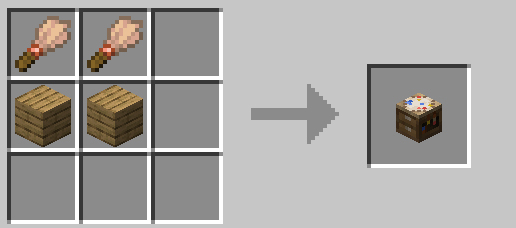
制作完成后,你可以放置你的 Painting Table。
该方块拥有自己的用户界面,显示其所需材料。
为了制作自定义的 玩家头颅,Painting Table 需要 蓝色染料、红色染料 和 黄色染料,以及 石英块。当你取出成品时,这些物品会被消耗掉。
最后放入的物品是一本书(可以是可书写之书或已书写之书),它不会被消耗。
在这本书中,你需要粘贴目标玩家头颅纹理的值。
在下面的例子中,我在可书写之书中设置了一个 蛋糕玩家头颅纹理。
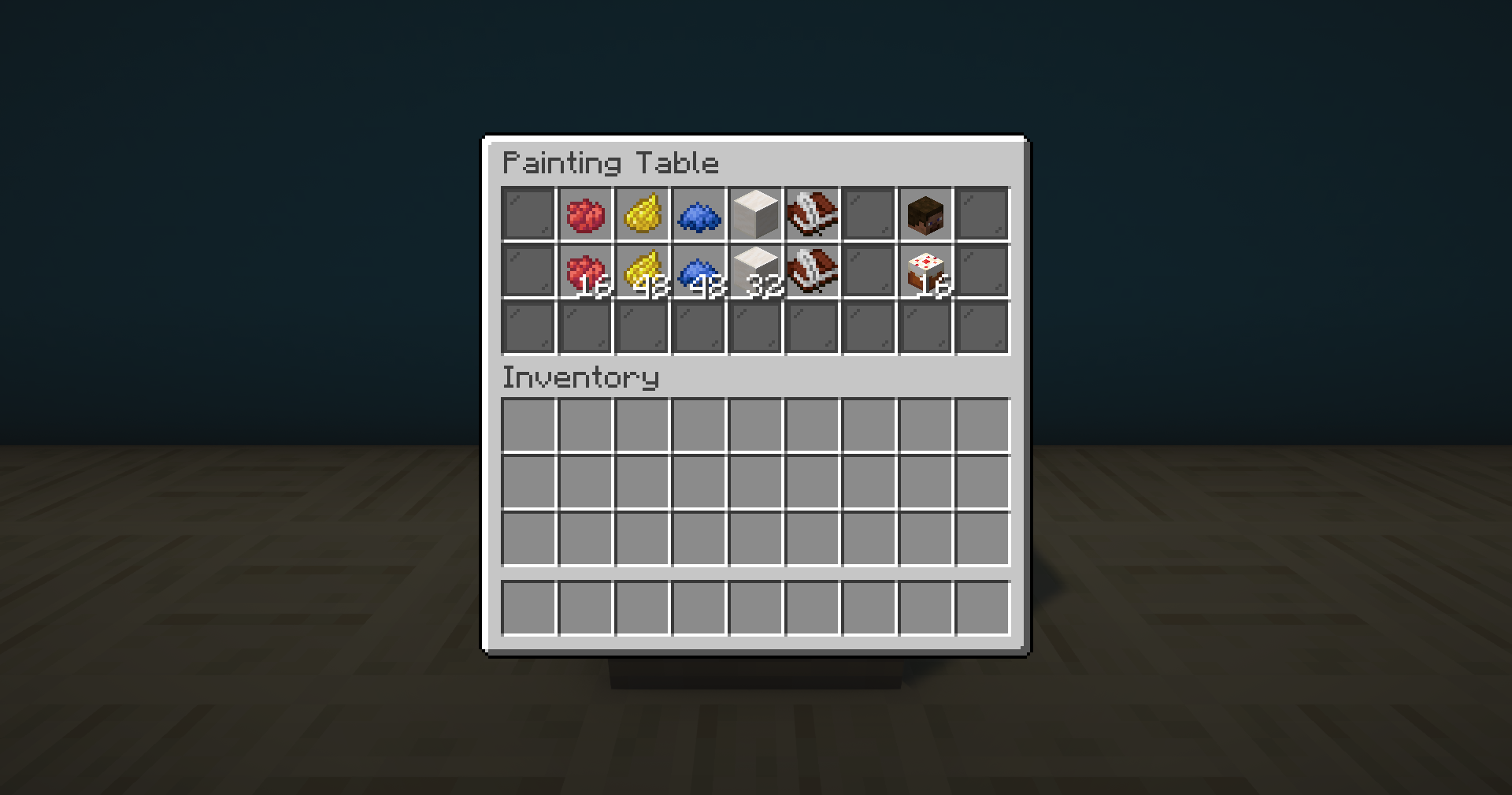
你可以在 minecraft-heads.com 网站上找到许多玩家头颅纹理。在“Custom Heads”部分,搜索你喜欢的头颅,点击它以打开其完整页面。然后,滚动到 For developers > Value 字段,并点击 Copy 按钮。将结果粘贴到你游戏中的可书写之书中。
如果你使用的是 Fabric,你可能也会对由 TheVoidBlock 创建的客户端模组 Head Browser 感兴趣,以便获取玩家头颅的值。
我建议你观看教程以获取更直接的解释和示例。[即将推出]
关于 Painting Tables 的其他信息
- Painting Tables 可以根据玩家面对的方向进行定向。由于该方块使用展示实体,我不建议大量放置它们。但如果你愿意,可以使用几个作为装饰。
- 与其他合成站一样,当关闭界面时,Painting Tables 会返回玩家放入其中的输入物品。
- 出于技术原因,你不能在 Painting Table 旁边放置漏斗、发射器或合成器,也不能在其下方放置漏斗矿车。这些方块也会自动旋转以避免面向 Painting Table。
⚙️设置
Tick GUI items clear (非原版服务器的安全措施)
Paper 等外部版本有时会导致容器出现奇怪的行为。
为了避免与它们相关的潜在物品复制问题,你可以启用此设置来清除玩家可能从 Painting Table 的用户界面中掉落的项目实体。
你可以分别使用以下命令来 启用、禁用 或 获取 此设置的当前状态:
/function pk_pa_ta:settings/tick_clear_gui_items/true
/function pk_pa_ta:settings/tick_clear_gui_items/false
/function pk_pa_ta:settings/tick_clear_gui_items/get
Open Container Delay (Paper 兼容性)
此设置允许你调整 Waystone 触发“打开”事件前的最小延迟。这是为了绕过 Paper 自 26.1.2 build #17 版本以来的 issue #13839。
如果检测到 Paper 服务器,默认值设置为 2 ticks。
你可以使用以下命令 设置 延迟(以 ticks 为单位):
/function pk_pa_ta:settings/open_container_delay/set {value:<value>}
示例 - 设置 2 ticks 的延迟:
/function pk_pa_ta:settings/open_container_delay/set {value:2}
或者使用以下命令 获取 当前的延迟:
/function pk_pa_ta:settings/open_container_delay/get
?其他命令
给自己一个 Painting Table
如果你是服务器的管理员,或者在你的单人世界中启用了作弊,你可以使用以下命令给自己一个 Painting Table:
/function pk_pa_ta:cmd/give/painting_table
故障排除:从数据库重建所有 Painting Tables
如果 Painting Tables 意外损坏(例如使用 kill @e 命令),你可以运行以下命令从数据库重建所有 Painting Tables:
/function pk_pa_ta:cmd/recreate {feature:"painting_table"}
该过程将自动移除所有剩余的损坏 Painting Tables 的实体和方块,然后放置新的。所有数据(id、所有者、类型、物品、变体...)都将保留。
完成可能需要一些时间,因此请确保在交互或放置 Painting Table 之前收到表示过程成功结束的消息。
?从 V.2 更新
数据包提供了一个将 V.2 中的所有现有架子转换为 V.3 的过程。
为此,请按照以下步骤操作。我还建议你使用 V.2 创建世界的备份,以防另一个数据包/插件/模组意外破坏更新过程。
- 从世界文件夹的
/datapacks/ 中移除 Painting Table V.2 数据包,不要使用卸载功能来卸载 V.2 主程序,因为你需要保留其数据库。
- 如果需要,将你的世界升级到目标 Minecraft 版本(如果尚未完成)。
- 通过将 Painting Table V.3 放置到
/datapacks/ 文件夹中,然后在游戏内使用 /reload 命令来安装它。
- 使用以下命令:
/function pk_pa_ta:cmd/upgrade/from_v2 并等待更新过程结束。如果成功,你应该会收到一条消息:“Updated all painting tables from KawaMood's Painting Table (V.2) successfully”(KawaMood 的绘画桌 (V.2) 的所有绘画桌已成功更新)。
注意: 当你将 V.2 的旧绘画桌物品放入背包时,它们会自动替换为对应的 V.3 版本。专家石匠也会在你尝试与他们互动时失去相关的交易。第一次尝试时,该交易可能仍会显示在可用交易中,但这只是游戏的显示问题,你无法购买它。
? 卸载
Painting Table 附带自动卸载过程。运行它将:
- 移除世界中所有已放置的绘画桌,包括所有维度
- 移除与 Painting Table 数据包相关的所有计分板和存储数据
- 如果没有其他 KawaMood 的数据包已安装,还将移除所有通用的计分板和存储数据
卸载过程可能需要几秒钟才能完成。请确保等待提示你可以安全地从世界文件夹中移除数据包的提示出现后再进行操作。
启动卸载过程的命令如下:
/function pk_pa_ta:cmd/uninstall
❓ F.A.Q
我需要安装资源包吗?
不需要,此数据包不涉及任何资源包。
物品的纹理显示为普通玩家头颅,我该如何修复?
首次合成和放置绘画桌时,你需要连接互联网。用于创建玩家头颅外观的纹理确实是从存储在 Mojang 服务器上的(旧版或当前)玩家皮肤加载并缓存在客户端侧的。
如果你不小心使用了首次使用时需要联网的内容,而现在看到的是普通玩家头颅而不是预期的纹理,你仍然可以进入 .minecraft/assets/skins/ 文件夹,然后按日期对子文件夹进行排序,并删除一些最近的文件夹。完成后,如果你的游戏已经启动,你需要重启它以更新缓存内容。
? 报告问题
如果你在使用此数据包时遇到问题,建议加入 Discord 服务器,并在专用的 #data-pack-issues 频道发帖描述你的问题。请务必提供所有必要信息,包括:
- 你正在使用的 Minecraft 版本。
- 你正在使用的特定数据包的版本。
- 你是否使用了任何修改版,如 Forge、Paper 或 Spigot。
- 如果是,你正在使用的可能会影响数据包运行的插件或模组。
- 如果你还有其他数据包,请列出你正在使用的其他数据包列表。
- 对你问题的清晰描述以及复现方法。
- 如有必要,提供游戏中问题的视频或截图。
在此之前,请先阅读上面的 F.A.Q. 部分。你遇到的问题可能是常见问题,其中可能已经提供了修复方法。
? 其他链接
感谢使用 Painting Table!知道人们喜欢它让我很高兴。
如果你想支持其开发以及其他数据包的开发,你可以在我的其他社交网络上支持我:
Painting Table
Craft custom Players Heads!
A crafting station that allows you to craft custom player heads.
A survival-friendly way to decorate your world with little blocks!
?Introduction
What is Painting Table ?
Painting Table introduces a survival and multiplayer-friendly way to craft custom player heads, with any kind of textures. Players heads are appreciated to mimic custom small blocks, like small logs, small stones, food, animals, chests, pile of books, bags, etc.
How to craft and use a painting table?
Painting tables can be crafted using:
- 2 brushes
- 2 Planks of any wood (oak, dark oak, spruce, bamboo, cherry, warped, etc.)
The recipe is the following:
After you crafted it, you can simply place down your painting table.
The block has its own UI that shows its requirements.
In order to craft custom players heads, the painting table except blue, red and yellow dyes, along with blocks of quartz that will be consumed as soon as you take the output items.
The last item to put is a book (either a writable or a written one), that won't be consumed.
In this same book, you need to paste the value of the desired player heads textures.
In this example below, I set a a cake player head texture in the writable book.
You can find many players heads textures on the minecraft-heads.com website. In the "Custom Heads" section, search for a head you like, and click on it to open its relative full page. Then, scroll to the For developers > Value field, and click the Copy button. Paste the result in your writable book in the game.
If you're using Fabric, you may also be interested in the client-side Head Browser mod created by TheVoidBlock in order to get player heads value.
I recommend you to watch the tutorial for more direct explanation and examples. [Incoming]
Misc. information about painting tables
- Painting tables can be oriented depending on the player's facing direction. As the block uses display entities, I don't recommend to spam it so much. But you can use a few of them as decoration if you wish.
- Like for other crafting station, painting tables return input items the player set in it when it closes it.
- For technical reasons, you can't put a hopper, dropper, crafter adjenctly to a painting table, or a hopper minecart below it. These blocks will also be rotated automatically to not face it.
⚙️Settings
Tick GUI items clear (security for non-vanilla servers)
External versions such as Paper sometimes involve weird behavior with containers.
In order to avoid potential items dupe issues with them, you can tick the system that kill items entities players may have managed to drop from a painting table's GUI using this setting.
You can enable, disable or get the current state of this setting using these following commands respectively:
/function pk_pa_ta:settings/tick_clear_gui_items/true
/function pk_pa_ta:settings/tick_clear_gui_items/false
/function pk_pa_ta:settings/tick_clear_gui_items/get
Open Container Delay (compatibility for Paper)
This setting allows you to adjust the minimal delay before a waystone trigger its "open" event when opened. This has been introduced to bypass issue #13839 on Paper since its 26.1.2 build #17 version.
By default, a value of 2 ticks is set if it detects a Paper server.
You can set a delay (in ticks) with the following command:
/function pk_pa_ta:settings/open_container_delay/set {value:<value>}
Example - Set a delay of 2 ticks:
/function pk_pa_ta:settings/open_container_delay/set {value:2}
Or get the current delay using the following command:
/function pk_pa_ta:settings/open_container_delay/get
? Other Commands
Give yourself a painting table
If you are an operator of your server or if cheats are enabled in your single-player world, you can give yourself a painting table using these following commands:
/function pk_pa_ta:cmd/give/painting_table
Troubleshooting: Recreate all painting tables from the database
If ever painting tables have been broken accidentally (using a kill @e command for example) you can run the following command to recreate all painting tables from the database:
/function pk_pa_ta:cmd/recreate {feature:"painting_table"}
The process will automatically remove all remaining entities and blocks of broken painting tables before placing fresh ones. All data (id, owner, type, items, variant...) will be preserved.
It may take some time for it to complete, so be sure to get the message telling the process ended successfully before interacting with or placing a painting table.
? Update from V.2
The data pack provides a process to convert all existing racks from V.2 to V.3.
In order to do so, follow the steps written below. I would also advice you to create a backup of your world using V.2, in case another data pack / plugin / mod accidentally breaks the updating process.
- Remove the Painting Table V.2 data pack from the
/datapacks/ folder of your world, don't uninstall V.2 upstream with the uninstall function, as you should keep its database.
- Upgrade your world to the desired version of Minecraft if needed, if it isn't already done.
- Install Painting Table V.3 by placing it in the
/datapacks/ forlder, then using /reload in game.
- Use this following command:
/function pk_pa_ta:cmd/upgrade/from_v2 and wait for the updating process to end. If it managed to do so, you should get a message "Updated all painting tables from KawaMood's Painting Table (V.2) successfully".
Note: Old painting tables items from V.2 will automatically be replaced by their V.3 equivalent when you get them in your inventory. Expert mason will also lose their relative offer once you try to interact with them. The offer may still display in the available offers the first time you do it, but it is just a display issue from the game, you can't buy it.
? Uninstall
Painting Table comes with an automatic uninstallation process. Running it will:
- Remove all painting tables that have been placed in your world, in every dimensions
- Remove all scores and storage specific to the Painting Table data pack
- If there is no more KawaMood data packs installed, also remove all common scores and storages
The uninstalling process may take some seconds to complete. Be sure to wait for the message telling you that you can safely remove the data pack from your world's folder before doing it.
The command to start the uninstalling process is the following one:
/function pk_pa_ta:cmd/uninstall
❓ F.A.Q
Do I need to install a resources pack?
No, this data pack doesn't involve any resources pack.
The texture of the item shows regular player heads, how can I fix that?
You need to be connected to the internet the first time you craft and place a painting table. The textures of the player heads that are used to create their looks are indeed loaded and cached on the client-side, from (old or current) players skins that are stored on a Mojang server.
If you accidentally used a content that required to be online the first time you use it, and now see regular players heads instead of the expected texture, you can still go in the ".minecraft/assets/skins/" folder, then sort the sub-folders by date, and delete some recent folders. Once that is done, if your game was already started, you will need to restart it to update the cached content.
? Report an issue
If you encountered an issue with this data pack, preferably join the Discord server, and open a post in the dedicated #data-pack-issues channel to describe your problem. Please, don't forget to provide all necessary informations including:
- The Minecraft version you're using.
- The version of the concerned data pack you're using.
- If you're using any modified version like Forge, Paper or Spigot.
- If you do, the plugins or mods you're using that may alter the functioning of data packs.
- The list of other data packs you're using, if you have others.
- A clear description of your issue, and a way to reproduce it.
- If necessary, a video or a screenshot of the issue in game.
Before doing that, please read the F.A.Q. section just above. The issue you're facing may be a common one, and a way to fix it may already have been provided in it.
? Other links
Thank you for using Painting Table! It makes me happy to know people are enjoying it.
If you want to support its development and the development of other data packs, you can support me on my other social networks:
- Planet Minecraft
- Or if you're in a generous mood, I accept donation on paypal or buy me a kawa (slang term for "coffee")!


 数据包

 数据包

 数据包

 数据包

 数据包

 数据包
评论 0
登录后参与评分
还没有评论,来抢沙发吧