

解决物品栏问题的终极方案
重要提示
在安装之前,请务必阅读卸载部分,因为该过程并不简单。
在使用数据包版本时,请确保同时安装所需的资源包。
关于 Minecraft 1.20.1 的向后移植版本:
- 此版本将不再积极开发新功能。
- 仅会修复关键错误。
- 由于技术限制,此版本仅支持 原版 Minecraft 维度。
概述
此数据包添加了一个对多人游戏友好的口袋维度(Pocket Dimension)
访问您的口袋维度
要进入 口袋维度,您需要一件名为 维度立方体(Dimensional Tesseract) 的古代神器。您可以使用以下配方之一进行制作:
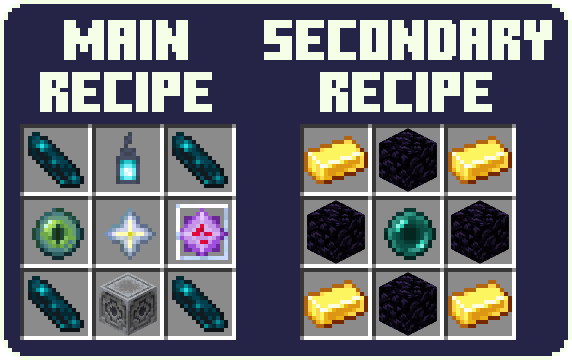
次要配方可以在配置中禁用
激活传送门
手持 维度立方体 并 右键点击 以打开传送门。传送门将持续开放 20 秒。在此时间过后,您可以再次使用维度立方体。
默认情况下,传送门将显示其所有者的名称。您可以在配置中更改此设置。
进入维度
在 潜行 状态下站在传送门中 1 秒钟,您将被传送到您的口袋维度。请注意脚下,因为初始状态下,这里只有一块漂浮在虚空之上的 3x3 基岩平台 和一个 出口传送门,可带您返回进入该特定口袋维度的最后位置。
传送后,您将拥有 1 秒钟 的冷却时间,之后才能再次传送。
请注意,默认情况下,任何玩家 都可以使用您创建的传送门进入您的口袋维度。您可以通过 /trigger PDConfig 命令在配置中更改此设置。
建造自由
在口袋维度内,您可以完全自由地建造任何您想要的内容。您的建筑作品会在多次访问中保留。
但是,在口袋维度内使用 床 或 重生锚 会引发爆炸。
进度
在口袋维度中探索一系列 自定义进度,提供挑战和 奖励。
配置
要打开 配置菜单,请使用 /trigger PDConfig 命令。
当前配置选项:
-
口袋维度隐私:
是否允许其他玩家进入您的口袋维度。
默认值:PUBLIC -
传送门稳定化:
传送门将在指定次数使用后立即关闭。
默认值:INFINITE -
传送门名称显示:
-
显示名称:
显示传送门所有者的名称。
默认值:SHOW -
[仅限全局] 显示位置:
在哪里显示名称。
默认值:IN FRONT
-
-
合成:
允许您禁用次要合成配方。
默认值:ENABLED
附加信息
- 光影可能会以意想不到的方式影响口袋维度中的天空。
- 入口传送门会保持其所在区块加载。
安装
将下载的数据包 (.zip) 文件放入 .minecraft/saves/<world>/datapacks 中。
(<world> 是您想要添加数据包的存档世界)
像往常一样应用所需的资源包。
安装后需要重启世界。
卸载
首先,
您可以安全地使用 /function pocket_dimension:commands/disable 命令禁用数据包。请确保保留数据包本身处于启用状态!
稍后,您可以使用 /function pocket_dimension:commands/enable 命令重新启用数据包。
关于完全卸载
简单地删除数据包文件或使用 /datapack disable... 命令会导致世界无法加载。Minecraft 很可能会提示世界已损坏。这是因为 level.dat 引用了一个自定义维度,如果没有此数据包则无法生成该维度,从而阻止了世界的加载。您可以按照以下步骤轻松解决此问题:
- 使用
/function pocket_dimension:commands/uninstall命令来禁用数据包。 - 关闭世界
- 找到位于世界文件夹中的名为
level.dat的存档文件,为了安全起见,请先对其进行备份。 - 从
<world>/datapacks/中移除数据包 - 打开存档文件进行编辑。建议使用 。
- 在文件中,导航到
Data/WorldGenSettings/dimensions并删除pocket_dimension:pocket_dimension。 - 保存编辑后的文件并将其放回世界文件夹。
- 检查一切是否正常运作,然后您就可以正常使用了。
还有一件事:当数据包被移除时,如果玩家正处于口袋维度内,他们将出现在主世界中,但会保留来自口袋维度的坐标。
技术细节(供感兴趣者参考)
- 此数据包仅创建一个维度,但每个玩家会被放置在该维度的不同位置。
- 每位玩家的“口袋”位置是根据其 UUID 确定的。
致谢
- Dimensional Tesseract 和 Portal 贴图由 Geastre 制作
The ultimate solution to inventory problems
Important
Before you install, make sure to read the uninstallation section, as it isn't exactly straightforward.
When using data pack version make sure to also install the required resource pack.
About backport to Minecraft 1.20.1:
- New features will not be actively developed for this version.
- Only critical bugs will be addressed.
- Due to technical constraints, this version only supports vanilla Minecraft dimensions.
Overview
This data pack adds a multiplayer-friendly Pocket Dimension
Accessing Your Pocket Dimension
To access your Pocket Dimension you need an ancient artifact known as the Dimensional Tesseract. You can craft it using one of the following recipes:
The secondary recipe can be disabled in the config
Activating the portal
To open the portal, hold the Dimensional Tesseract in hand and right-click. The portal remains open for 20 seconds. After this time, you can use the Dimensional Tesseract again.
By default, the portal will display the name of its owner. You can change it in config.
Entering the Dimension
Stand in the portal while sneaking for 1 second and you'll be teleported to your Pocket Dimension. Make sure to watch your step, as initially it only contains a 3x3 bedrock platform floating over the void and an exit portal that leads back to the last point of entry of this specific Pocket Dimension.
After teleportation, there's a 1 second cooldown before you're able to teleport again.
Note that by default, any player can use the portal you created to enter your Pocket Dimension. You can change that in config with the /trigger PDConfig command.
Building Freedom
Inside the Pocket Dimension, you have complete freedom to build whatever you want. Your creations persist across visits.
However, using a Bed or a Respawn Anchor inside triggers an explosion.
Advancements
Explore a range of custom advancements within the Pocket Dimension, offering challenges and rewards.
Configuration
To open the configuration menu use the /trigger PDConfig command.
Current configuration options:
-
Pocket Dimension Privacy:
Whether to allow other players to enter your pocket dimension.
Default: PUBLIC -
Portal Stabilization:
The portal will close immediately after a set number of uses.
Default: INFINITE -
Portal Name Display:
-
Show Name:
Display the name of the portal's owner.
Default: SHOW -
[GLOBAL ONLY] Display Position:
Where to display the name.
Default: IN FRONT
-
-
Crafting:
Allows you to disable the secondary crafting recipe.
Default: ENABLED
Additional Information
- Shaders may affect the sky in Pocket Dimension in unexpected ways.
- The entrance portal keeps the chunk it's located in loaded.
Installation
Place the downloaded data pack (.zip) file into .minecraft/saves/<world>/datapacks.
(<world> is the world to which you want to add the datapack)
Apply the required resource pack like you normally would.
The world needs to be restarted after the instalation.
Uninstallation
First of all,
You can safely disable the data pack by using the /function pocket_dimension:commands/disable command. Make sure to keep the data pack itself enabled!
Later, you can enable the data pack by using the /function pocket_dimension:commands/enable command.
As to full uninstallation
Simply removing the data pack file or using the /datapack disable... command, will result in the world not being able to be loaded. Minecraft most likely will say that the world has been corrupted. This is because level.dat references a custom dimension that cannot be generated without this data pack, thus preventing the loading of the world. You can easily resolved this issue by following the uninstallation steps listed below:
- Use the
/function pocket_dimension:commands/uninstallcommand to disable the datapack. - Close the world
- Find the save file called
level.datlocated in the world folder and, just to be safe, make a backup of it. - Remove the data pack from
<world>/datapacks/ - Open the save file to edit it. I suggest using .
- In the file, navigate to
Data/WorldGenSettings/dimensionsand deletepocket_dimension:pocket_dimension. - Save the edited file and put it back into the world folder.
- Check whether everything is working properly, and you're good to go.
One more thing: players that were inside the Pocket Dimension when the datapack was removed, will appear in The Overworld but will retain the coordinates from the Pocket Dimension.
Technical details for those interested
- This data pack only creates a single dimension, but every player is placed in a different location inside of it.
- The location of each player's 'pocket' is determined on their UUID.
Credits
- Dimensional Tesseract and Portal textures made by Geastre
下载 Pocket Dimension
需要联机服务器吗?
稳定流畅、一键部署,几分钟即可和朋友联机开服
最低仅需 8 元/月 即可畅快联机
下载 Pocket Dimension
下载 Pocket Dimension
需要联机服务器吗?
稳定流畅、一键部署,几分钟即可和朋友联机开服
最低仅需 8 元/月 即可畅快联机
下载 Pocket Dimension
下载 Pocket Dimension
需要联机服务器吗?
稳定流畅、一键部署,几分钟即可和朋友联机开服
最低仅需 8 元/月 即可畅快联机
下载 Pocket Dimension
下载 Pocket Dimension
需要联机服务器吗?
稳定流畅、一键部署,几分钟即可和朋友联机开服
最低仅需 8 元/月 即可畅快联机
下载 Pocket Dimension
下载 Pocket Dimension
需要联机服务器吗?
稳定流畅、一键部署,几分钟即可和朋友联机开服
最低仅需 8 元/月 即可畅快联机
下载 Pocket Dimension
将项目更新为 Minecraft 1.20.5 - 1.20.6
更改内容
- 现在,加入服务器的玩家会看到数据包加载消息
- 配方结果现在显示为维度四角柱(Dimensional Tesseract),而非知识之书
修复内容
- 正确对齐了传送门的玩家检测区域
- 修复了个人传送门稳定配置自动验证的问题
关于这个资源的讨论、问题反馈与使用心得
还没有讨论,来发第一帖吧
你是这个资源的作者?登录后可认领此资源。
相似资源
 数据包

此数据包添加了属于阿瓦里海盗的独特结构,将他们的独特风格带入你的 Minecraft 世界!兼容性:1.20 至 26.3
 数据包
一个 Minecraft 光线投射库,能够精确检测玩家正在查看的方块,包括像台阶和楼梯这样的特殊方块形状。
 数据包

此数据包添加了新的“祝福模式”难度。
 数据包
允许服务器管理员方便地禁用 Xaero's Map 系列模组中的实体雷达、小地图等功能,使竞技游戏更加公平。
 数据包

使用原版/生存友好的方法更改青蛙的变种类型。支持原版(寒冷、温带、温暖)以及可选的“More Frogs 2”变种:深红、末影、地狱、毒镖、紫珀、幽匿、灵魂、诡异和木头。
 数据包

手持潜影盒时可直接打开,无需将其放置在地面上。只需按住 Shift 并右键点击即可访问你的潜影盒。
评论 0
登录后参与评分
还没有评论,来抢沙发吧