这只是一个数据包——你需要 资源包 才能使其正常工作!
Quinn's Better Noteblocks
一个与原版兼容的数据包/资源包,为 Minecraft 原版中的音符盒增加了更好的功能,例如音符盒编辑工具、更多的八度音程等。
如果你曾经尝试使用音符盒创作一段旋律或歌曲,却因为 Minecraft 的音符盒无法达到足够高或低的音高而放弃,那么这个项目就是为你准备的!虽然原版 Minecraft 仅支持 2 个八度音程,但 Quinn's Better Noteblocks 增加了对 9 个八度音程的支持,足以创作任何歌曲!此整合包完全兼容原版,仅需安装一个资源包和一个数据包即可。
演示
特性
- 更改音符盒的八度音程
- 自定义纹理
- 自定义调音扳手物品
- 按住 Shift + 右键点击非音符盒方块会切换模式
- 按住 Shift + 右键点击音符盒会升级该音符盒
- 调音模式
- 左键点击降低音符
- 右键点击升高音符
- 按住 Shift + 左键点击降低八度
- 按住 Shift + 右键点击升高八度
- 剪贴板模式
- 左键点击播放音符
- 按住 Shift + 左键点击粘贴随机音符
- 右键点击将音符粘贴到音符盒中
- 按住 Shift + 右键点击复制音符盒中的音符
- 从副手放置音符盒会自动将其粘贴进去
高级音符盒
这是一个升级后的音符盒!它关联了一个八度音程,并提供了大量有用信息。 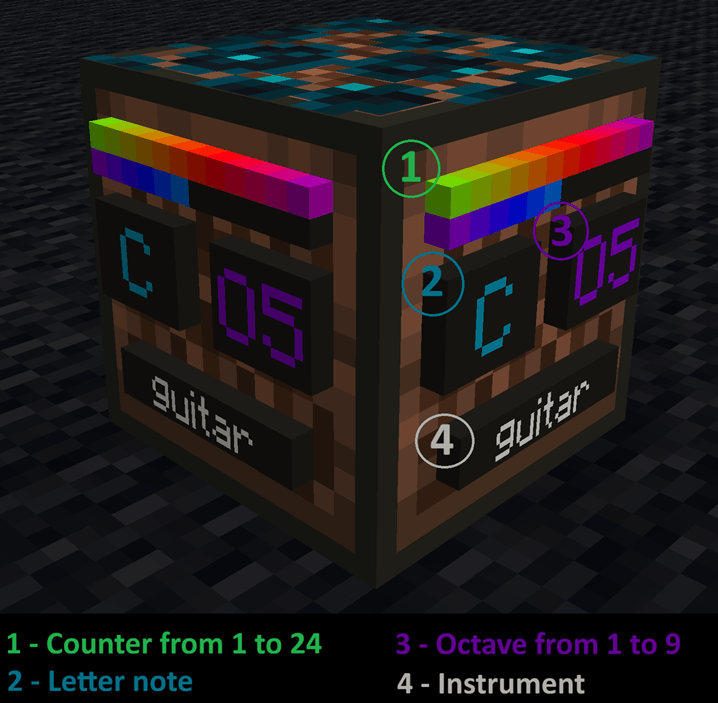
音符盒扳手
使用此物品来解锁高级音符盒的潜力!按住 Shift + 右键点击可将任何普通音符盒转换为升级版。
合成配方
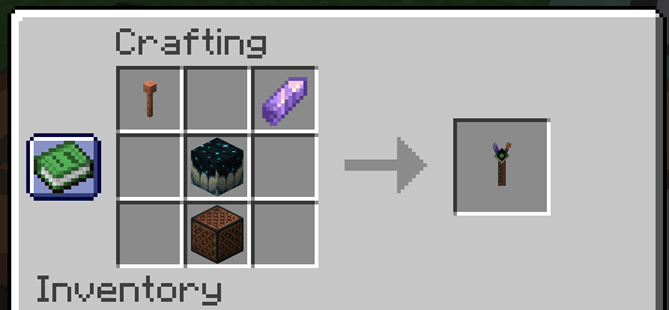
调音模式
按住 Shift+右键点击地面以切换模式! 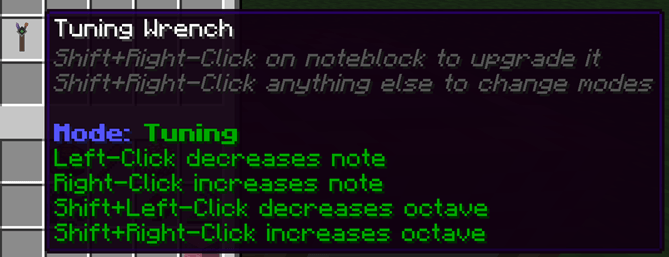
剪贴板模式
按住 Shift+右键点击地面以切换模式! 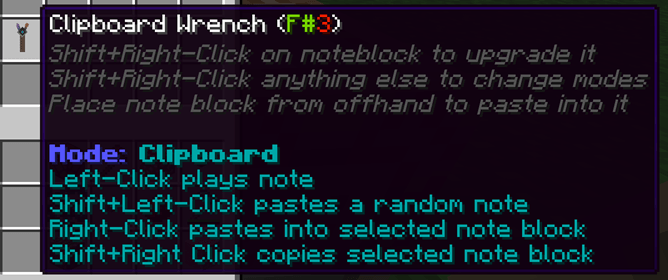
计划中的特性
- 扳手的“高级设置”,用于调整调音键、粘贴一系列音符等功能
- 提供信息性音符盒海报(如和弦、音符等)的自定义画作
- 新乐器
- 作曲家模式
安装
单人游戏
- 从 Releases 或你选择的平台下载最新版本
- 进入你的 .minecraft 文件夹
- 将
QuinnsBetterNoteblocks_resourcepack 放入 resourcepacks 文件夹
- 打开
saves 文件夹
- 打开你想要添加该模组的世界
- 将
QuinnsbetterNoteblocks_datapack 放入 datapacks 文件夹
- 确保已装备该资源包
多人游戏
如果你是服务器管理员并希望将 QuinnsBetterNoteblocks 添加到服务器中,以便任何玩家都能使用,请使用以下说明。
- 从 Releases 或你选择的平台下载最新版本
- 在你的服务器中,打开
world 文件夹
- 将
QuinnsbetterNoteblocks_datapack 移动到 datapacks 文件夹
- 将
QuinnsBetterNoteblocks_resourcepack 上传到资源包托管网站,例如
- 打开你的
server.properties 文件,在 resource-pack= 字段中填入下载链接,并在 resource-pack-sha1= 字段中填入 SHA-1 哈希值。(如果你使用 ,这些字段会自动生成)
常见问题解答
- 问:为什么既需要数据包又需要资源包?
- 答:资源包包含声音文件,而数据包处理逻辑,两者都是必需的。
- 问:这会导致性能问题吗?
- 答:每个升级后的音符盒都会生成 1 个实体。此外,还有命令在每个刻(tick)运行以检查该实体。你可以预期每个音符盒至少会带来一些额外的性能影响。目前尚未对该性能影响进行压力测试,但只要不是制作非常大的音符盒装置,整体影响似乎很低。话说回来,在我的测试世界中,它对帧率或 TPS 似乎没有任何影响。我也在尽力保持尽可能高的优化水平,同时提供最佳功能。
- 问:为什么我的音符盒上方有潜匿静脉?
- 答:当你使用扳手升级音符盒时,需要禁用原版音符盒的声音,以便播放新的 BetterNoteblocks 声音。实现这一点的唯一方法是在上方放置一个方块——即潜匿静脉。
- 问:这在多人游戏中能用吗?
免责声明
- 本资源包通过在持有额外信息的升级音符块上生成实体来运作。如果执行了清除所有实体的命令,这些音符块将停止工作。
- 由于每个音符块都是一个实体,这可能会对性能产生影响。
- 必须安装此资源包才能听到音符。如果服务器上的玩家没有安装该资源包,他们将无法听到音符块的声响。
- 幽匿脉络在被音符块夹在中间时破坏不会掉落任何物品。这是为了防止玩家通过升级音符块来“作弊”获取幽匿脉络。
- 代码的某些部分使用了 setblock 命令。它们应该是无害的——但我尚未进行压力测试以尝试破坏或利用此机制。玩家有可能滥用这一特性。
- 由于手持扳手会导致交互实体环绕音符块,因此在附近手持扳手时无法破坏音符块。这可能会被玩家用来困住或破坏游戏内容。
已知问题
- Better Noteblocks 存在额外的 1 刻延迟
- 据我所知,由于数据包命令的执行方式,无法避免这一问题
- 有时使用剪贴板扳手从副手粘贴不起作用(可能是延迟问题)
- Better Noteblocks 的物品显示实体具有固定的亮度(在黑暗区域中会显得“发光”)
- 某些乐器的音高可能与默认应有的音高相差一个或两个八度
THIS IS ONLY THE DATAPACK- you need the resourcepack for anything to work!
Quinn's Better Noteblocks
A vanilla friendly datapack/resourcepack that adds better functionality to noteblocks in Vanilla minecraft, such as noteblock editing tools, more octaves, etc.
If you've ever tried to make a jingle or a song using noteblocks but gave up because Minecraft's noteblocks can't pitch high or low enough, this project is for you! While vanilla Minecraft only supports 2 octaves, Quinn's Better Noteblocks adds support for 9 octaves, which is more than enough to create any song! This pack is fully vanilla-friendly and only requires the installation of a resourcepack and a datapack.
Demo
Features
- Change the octave of noteblocks
- Custom texture
- Custom tuning wrench item
- Shift + Right Clicking on non-note block changes mode
- Shift + Right Clicking on note block upgrades noteblock
- Tuning Mode
- Left Click decreases note
- Right Click increases note
- Shift + Left Click decreases octave
- Shift + Right Click increases octave
- Clipboard Mode
- Left Click plays note
- Shift + Left Click pastes a random note
- Right Click pastes into note block
- Shift + Right Click copies note block
- Placing noteblock from offhand pastes into it
Better Note Block
This is an upgraded noteblock! It has an octave associated with it and plenty of useful information.
Note Block Wrench
Use this to unlock the potential of Better Noteblocks! Shift + Right Click converts any regular note block into an upgraded one.
Recipe
Tuning Mode
Shift+Right Click the ground to change modes!
Clipboard Mode
Shift+Right Click the ground to change modes!
Planned Features
- 'Advanced Settings' for wrench for things like tuning key, pasting a series of notes, etc
- Custom paintings that provide informational note block posters (like chords, notes, etc)
- New instruments
- Songmaker mode
Installation
Singleplayer
- Download the latest release from Releases or your platform of choice
- Navigate to your .minecraft folder
- Drop
QuinnsBetterNoteblocks_resourcepack into the resourcepacks folder
- Open
saves
- Open the world you want to add it to
- Drop
QuinnsbetterNoteblocks_datapack into the datapacks folder
- Make sure you equip the resourcepack
Multiplayer
Use these instructions if you are a server owner and would like to add QuinnsBetterNoteblocks to your server so any player can use it.
- Download the latest release from Releases or your platform of choice
- In your server, open the
world folder
- Move
QuinnsbetterNoteblocks_datapack into the datapacks folder
- Upload
QuinnsBetterNoteblocks_resourcepack to a resource pack hosting website like
- Open your
server.properties file and fill in the resource-pack= field with the download link and the resource-pack-sha1= field with the SHA-1 Hash. (if you use these fields are auto-generated for you)
FAQ
- Q: Why both a datapack and a resourcepack?
- A: The resourcepack holds the sound files and the datapack handles the logic, both are needed.
- Q: Will this cause performance issues?
- A: Any noteblock that is upgraded will spawn in 1 entity. There are also commands running every tick to check this entity. You can expect at least some extra impact on performance per note block. The performance impact of this has yet to be stress tested, but it seems like the overall impact is low unless you are making a very large note block contraption. That being said, it seems to have no impact on my frames or TPS in my testing world. I am also trying my best to keep this as optimized as possible while still providing the best features.
- Q: Why is there a sculk vein above my note block?
- A: When you upgrade a noteblock using the wrench, the vanilla note block noises need to be disabled to allow for the new BetterNoteblocks noises to play. The only way to achieve this is putting a block on top- the sculk vein.
- Q: Will this work in multiplayer?
- A: Yes! Just make sure other players have the resourcepack too.
Disclaimers
- This pack works by spawning entities at upgraded noteblocks that hold extra information. If a command is run that kills all entities, the noteblocks will cease to function.
- Since every note block is an entity, it could possibly have an impact on performance.
- The resourcepack is necessary to hear the notes. If a player on the server doesn't have the resourcepack, they won't be able to hear the note blocks
- Sculk veins have been modified to not drop anything if they are broken with a note block between them. This is so you can't 'cheat in' sculk veins by upgrading note blocks.
- Setblock commands are used in some parts of the code. They should be harmless- but I haven't stress tested trying to break or abuse this yet. It's possible players could abuse this.
- Since holding a wrench causes an interaction entity to surround the note block, the noteblocks can't be broken while a wrench is held near them. This could be abused by players to trap or grief.
Known Bugs
- Better Noteblocks have an extra 1 tick delay
- As far as I know, there is no way around this due to how the datapack commands execute
- Sometimes pasting from offhand using the clipboard wrench doesn't work (likely a latency issue)
- Item display entity for the better noteblock has a set brightness (will appear to 'glow' in dark areas)
- Some instruments may be tuned an octave or two off from where their default -should- be


 数据包

 数据包
 数据包

 数据包
 数据包

 数据包

评论 0
登录后参与评分
还没有评论,来抢沙发吧