
可重复使用的锻造模板
一个 Minecraft: Java Edition 数据包,使锻造模板可重复使用,并让下界合金升级更容易制作。
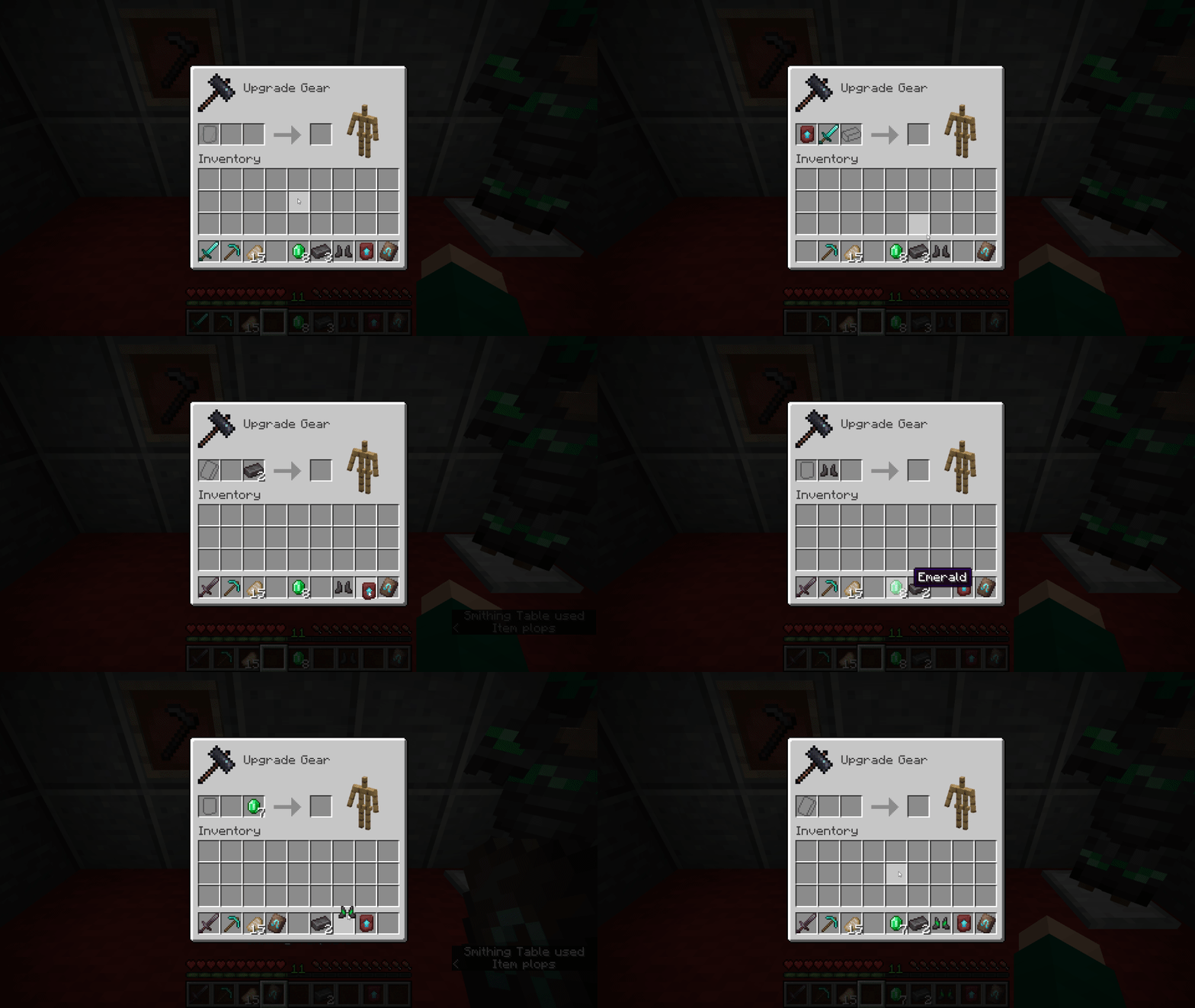
锻造模板 是可以从结构中找到的一种物品,用于在 锻造台 上改变武器、工具和护甲的外观。我个人不太喜欢锻造模板在使用时被消耗掉。这限制了护甲纹饰的创意发挥,也使得获取下界合金物品变得比实际需要更困难。这个数据包通过在锻造台上使用后将锻造模板返还给玩家来解决这个问题。
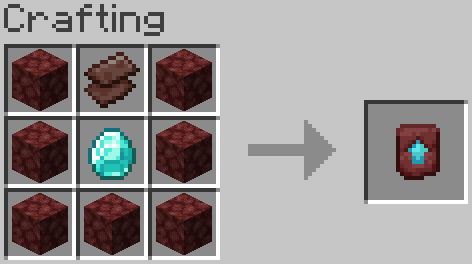
此外,它还添加了一个 下界合金升级锻造模板 的合成配方,该配方资源消耗更少,且不需要你在生成的结构中寻找它。
此数据包不会影响在生成结构中找到锻造模板的概率。现有的锻造模板复制配方也不受影响。
支持的 Minecraft: Java Edition 版本:
安装方法
单人游戏
在新世界中
- 获取最新版本
- 打开 Minecraft,进入单人游戏 -> 创建新世界 -> 更多选项卡 -> 数据包 -> 打开数据包文件夹
- 将
zip文件拖入或复制粘贴到出现的窗口中 - 点击
reusable-smithing-templates图标右侧的 ▶️ 箭头,然后点击完成。 - 创建世界
在已有世界中
- 获取最新版本
- 打开 Minecraft,进入单人游戏并选择你要添加数据包的存档
- 进入编辑 -> 打开世界文件夹
- 打开名为
datapacks的文件夹,将zip文件拖入或复制粘贴到该文件夹中 - 打开世界
- 如果在添加数据包时世界处于开启状态并且启用了命令,请运行
/reload命令或按下 F3 + T
多人游戏
如果你使用的是第三方服务器主机,这些说明可能会有所不同。如果需要帮助,请参考你主机的支持网站或知识库,或联系他们的支持团队。
- 获取最新版本
- 在你的服务器目录中,找到你的世界文件夹(默认:
world) - 打开名为
datapacks的文件夹,将zip文件拖入或复制粘贴到该文件夹中 - 如果在添加数据包时服务器正在运行,请在服务器控制台中运行命令
reload,或在游戏中以等级 3 操作员身份运行/reload
许可证
此数据包根据 MIT 许可证授权。许可证可在 此处 找到。
致谢
- 感谢 Misode 的 数据包生成器网站。部分文件是使用该网站制作的。
- 特别感谢 Minecraft Wiki 团队维护高质量的所有关于 Minecraft 的资源,包括详尽的数据包文档。
- Minecraft © 2024 Mojang AB, TM & © Microsoft Corporation.
联系方式
- Twitter: @dlljs
- Discord: dlljs
- Email: contact@dlljs.uk
非官方 Minecraft 产品。未经 Mojang 或 Microsoft 批准或关联。
Reusable Smithing Templates
A Minecraft: Java Edition data pack that makes smithing templates reusable and netherite upgrades easily craftable.
Smithing templates are items that can be found at structures and are used to alter weapons, tools and armor on a smithing table. Personally, I didn't like how smithing templates would be consumed when used. It limits creativity with armor trims and makes obtaining netherite items more difficult than it needs to be. This data pack fixes this issue by returning the smithing template back to the player when it's used on a smithing table.
Additionally, it adds a crafting recipe for the Netherite Upgrade Smithing Template that's much less resource intensive and doesn't require you to hunt it down in a generated structure.
This data pack does not affect the odds of finding smithing templates in generated structures. The existing duplication recipes for smithing templates are also not affected.
Supported Minecraft: Java Edition versions:
- For 1.21 or later, use the latest version.
- For 1.20.3 - 1.20.6, use v1.0.0.
How to Install
Singleplayer
In a New World
- Get the latest release
- Open Minecraft and go to Singleplayer -> Create New World -> More tab -> Data Packs -> Open Data Pack Folder
- Drag or copy & paste the
zipfile into the window that appears - Click on the ▶️ right arrow on the
reusable-smithing-templatesicon, then click Done. - Create the world
In an Existing World
- Get the latest release
- Open Minecraft, go to Singleplayer and select the world you want to add the data pack to
- Go to Edit -> Open World Folder
- Open the folder named
datapacks, and drag or copy & paste thezipfile into the folder - Open the world
- If the world was open while you added the pack and have commands enabled, run the
/reloadcommand or press F3 + T
Multiplayer
These instructions may be different if you're using a third party server host. If you need help, refer to your host's support website or knowledgebase, or contact their support team.
- Get the latest release
- In your server directory, find your world folder (default:
world) - Open the folder named
datapacks, and drag or copy & paste thezipfile into the folder - If the server was running while you added the pack, run the command
reloadin the server console, or/reloadin-game as a level 3 operator
License
This data pack is licensed under the MIT License. The license can be found here.
Credits
- Thanks to Misode for his Data Pack Generators Website. Some files were made using this website.
- Special thanks to the Minecraft Wiki team for maintaining a high quality resource on all things Minecraft, including exhaustive documentation on data packs.
- Minecraft © 2024 Mojang AB, TM & © Microsoft Corporation.
Contact
- Twitter: @dlljs
- Discord: dlljs
- Email: contact@dlljs.uk
NOT AN OFFICIAL MINECRAFT PRODUCT. NOT APPROVED BY OR ASSOCIATED WITH MOJANG OR MICROSOFT.
下载 Reusable Smithing Templates
下载 Reusable Smithing Templates
下载 Reusable Smithing Templates
下载 Reusable Smithing Templates
下载 Reusable Smithing Templates
下载 Reusable Smithing Templates
需要联机服务器吗?
稳定流畅、一键部署,几分钟即可和朋友联机开服
最低仅需 8 元/月 即可畅快联机
下载 Reusable Smithing Templates
下载 Reusable Smithing Templates
- 新增对 Minecraft 1.21.6 - 26.1.1 的支持。
兼容的 Minecraft 版本:1.21, 1.21.1, 1.21.2, 1.21.3, 1.21.4, 1.21.5, 1.21.6, 1.21.7, 1.21.8, 1.21.9, 1.21.10, 1.21.11, 26.1, 26.1.1
关于这个资源的讨论、问题反馈与使用心得
还没有讨论,来发第一帖吧
你是这个资源的作者?登录后可认领此资源。
相似资源
 数据包

此数据包添加了属于阿瓦里海盗的独特结构,将他们的独特风格带入你的 Minecraft 世界!兼容性:1.20 至 26.3
 数据包

此数据包添加了新的“祝福模式”难度。
 数据包

添加了基于官方概念图的蓝蛙和红眼树蛙变体。
 数据包

为模组生物群系添加原版回溯特性!
 数据包

使用原版/生存友好的方法更改青蛙的变种类型。支持原版(寒冷、温带、温暖)以及可选的“More Frogs 2”变种:深红、末影、地狱、毒镖、紫珀、幽匿、灵魂、诡异和木头。
 数据包

手持潜影盒时可直接打开,无需将其放置在地面上。只需按住 Shift 并右键点击即可访问你的潜影盒。
评论 0
登录后参与评分
还没有评论,来抢沙发吧