

ScreenEffects by Trplnr
一个小型灵活的库,用于向用户展示动画屏幕覆盖层。
演示
用法
使用构建器 Deno 文件制作屏幕特效:
屏幕特效由多个字体帧组成,数据包利用这些帧来显示动画。
资源包内的 screen_effects 文件夹中提供了一个实用的 Deno JS 文件,以简化此过程。
1. 制作动画
注意:
- 您可以使用任何图像编辑软件,只要它能**将动画导出为精灵图(spritesheet)**即可。Aseprite 具备此功能。
- 建议制作 256x256 的 .png 文件以获得最佳效果。
- 首先创建动画。
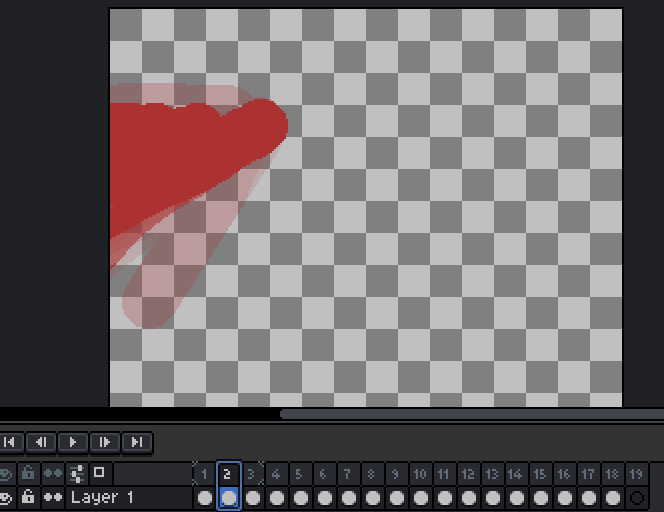
- 将动画导出为位于
screen_effects文件夹内的垂直排列的精灵图。

- 如果您希望拥有更多的屏幕特效,可以在
screen_effects文件夹中添加更多的精灵图。
2. 构建动画
- 为了准备构建动画,请进入
buildScreenEffects.js文件夹并调整以下配置。
// -------------CONFIGS---------------
// 替换为您使用的命名空间!
const NAMESPACE = "trplnr";

// 如果您希望字体 JSON 文件格式化输出,请将此布尔值设为 true。
const prettyPrintFontFiles = false;

// 如果您希望查看 ffmpeg 日志,请将此布尔值设为 true。
const showFFMPEGLogs = false;
// -----------------------------------
- 为了让您的精彩动画能被数据包使用,您可以在终端中运行命令,将精灵图转换为帧!
- 打开您喜欢的终端,并确保您位于
screen_effects文件夹内。 - 之后,运行此命令:
deno run --allow-all .\buildScreenEffects.js

- 运行后,如果一切顺利,结果应如下所示:
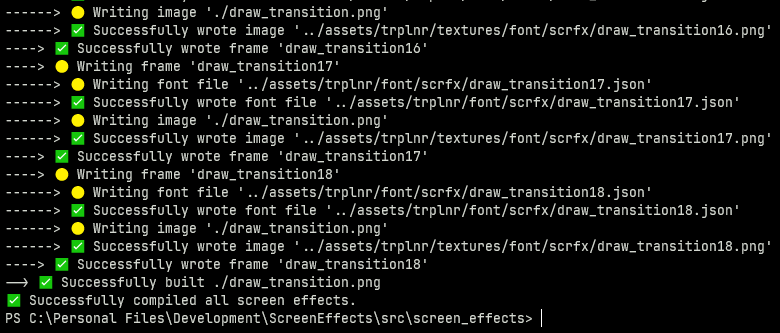
-
恭喜!您已成功将精彩的动画转换为帧! :tada:
-
如果您只想编译单个精灵图,只需运行:
deno run --allow-all .\buildScreenEffects.js filename.png
注册屏幕特效
数据包需要数据来了解什么是屏幕特效,因此您必须对其进行注册。
以下是如何注册一个特效的示例。
ScreenEffect 模式见本节下方。
# 要将您自己的屏幕特效添加到全局注册表,
# 只需复制此处显示的内容。

data modify storage example:scrfx_data screen_effects set value { \
   "examples:toast": { \
        tps: 1, \
        frame_count: 31, \
        path: "example:scrfx/exampletoast" \
    }, \
   "examples:transition": { \
        tps: 1, \
        frame_count: 69, \
        path: "example:scrfx/exampletransition", \
        callbacks: { \
            "26": "say This frame covers the whole screen" \
        } \
    }, \
}

function scrfx:add_screen_effects {storage: "example:scrfx_data", path: "screen_effects"}
ScreenEffect 模式
这是 ScreenEffect 的定义。
{
    /**
     * 屏幕特效的名称,
     * 最好带有命名空间。
     */
    "ns:identifier": {
        /**
         * 每帧显示的频率,
         * 以刻(ticks)为单位测量。
         *
         * 类似于 fps,但是以刻为单位。
         *
         * 必须大于零。
         */
        tps: <int>,

        /**
         * 动画中包含的帧数。
         */
        frame_count: <int>,

        /**
         * 动画的字体资源位置,
         * 需去掉末尾的数字部分。
         */
        path: <resource_location>,
        /**
         * 定义在特定帧中运行的命令。
         *
         * 可选。
         */
        callback?: {
            "<frame_number>": "<command>",
            ...
        }
    }
}
运行屏幕特效
- 在
scrfx:in id存储中声明要播放的动画。 - 然后作为玩家执行并运行
scrfx:play!
示例:
data modify storage scrfx:in id set value "ns:identifier"
execute as Trplnr run function scrfx:play
- 您已成功播放了一个屏幕特效! ?
ScreenEffects by Trplnr
A small flexible library for showing animated screen overlays to the user.
Demo
Usage
Making Screen Effects using the builder Deno file:
IMPORTANT: Using this method requires the following to be installed in your system: Deno, ffmpeg. After getting those, restart your computer.
A screen effect is composed of multiple font frames that the datapack uses to show the animation.
A utility Deno JS file is provided with the resource pack inside the screen_effects folder to make this process easier.
1. Making the animation
NOTE:
- You can use any image editing software you like as long as it can export your animation into a spritesheet. Aseprite has this functionality.
- It is recommended to make a 256x256 .png file for the best results.
- Start by creating an animation.
- Export your animation into a vertical spritesheet inside the
screen_effectsfolder.
- You can add more spritesheets inside the
screen_effectsfolder if you want more screen effects.
2. Building the animations
- To prepare for building the animations, go inside the
buildScreenEffects.jsfolder and adjust these configs.
// -------------CONFIGS---------------
// Replace with the namespace you use!
const NAMESPACE = "trplnr";

// If you want the font JSON files to be formatted, make this boolean true.
const prettyPrintFontFiles = false;

// If you want to see the ffmpeg logs, make this boolean true.
const showFFMPEGLogs = false;
// -----------------------------------
- To make your amazing animations usable by the datapack, You can run a command in your terminal to convert your spritesheets into frames!
- Open your preferred terminal and make sure you are inside the
screen_effectsfolder. - After that, run this command
deno run --allow-all .\buildScreenEffects.js
- After running that, if everything is successful, it should look like this:
-
Congrats! You've successfully turned your wonderful animations into frames! :tada:
-
If you only want to to compile 1 spritesheet, simply run
deno run --allow-all .\buildScreenEffects.js filename.png
Registering the Screen Effects
The datapack needs to have data to know what a screen effect is so you have to register it.
Here is an example on how you can register one.
ScreenEffect schema shown below this section.
# To add your own screen effects to the global registry,
# simply copy what is shown here.

data modify storage example:scrfx_data screen_effects set value { \
   "examples:toast": { \
        tps: 1, \
        frame_count: 31, \
        path: "example:scrfx/exampletoast" \
    }, \
   "examples:transition": { \
        tps: 1, \
        frame_count: 69, \
        path: "example:scrfx/exampletransition", \
        callbacks: { \
            "26": "say This frame covers the whole screen" \
        } \
    }, \
}

function scrfx:add_screen_effects {storage: "example:scrfx_data", path: "screen_effects"}
The ScreenEffect Schema
This is the definition of a ScreenEffect.
{
    /**
     * The name of the screen effect,
     * preferrably namespaced.
     */
    "ns:identifier": {
        /**
         * How fast each frame
         * shows up measured in ticks.
         *
         * Just like fps but well in ticks.
         *
         * Must be above zero.
         */
        tps: <int>,

        /**
         * How many frames are in the animation.
         */
        frame_count: <int>,

        /**
         * The font resource location
         * of the animation with the
         * number at the end removed.
         */
        path: <resource_location>,
        /**
         * Defines what commands run in a certain frame.
         *
         * Optional.
         */
        callback?: {
            "<frame_number>": "<command>",
            ...
        }
    }
}
Running the Screen Effects
- Declare the animation to be played inside the
scrfx:in idstorage. - Then execute as a player and run
scrfx:play!
Example:
data modify storage scrfx:in id set value "ns:identifier"
execute as Trplnr run function scrfx:play
- You have successfully played a screen effect! ?

下载 ScreenEffects
需要联机服务器吗?
稳定流畅、一键部署,几分钟即可和朋友联机开服
最低仅需 8 元/月 即可畅快联机
下载 ScreenEffects
需要联机服务器吗?
稳定流畅、一键部署,几分钟即可和朋友联机开服
最低仅需 8 元/月 即可畅快联机
下载 ScreenEffects
下载 ScreenEffects
下载 ScreenEffects
需要联机服务器吗?
稳定流畅、一键部署,几分钟即可和朋友联机开服
最低仅需 8 元/月 即可畅快联机
下载 ScreenEffects
需要联机服务器吗?
稳定流畅、一键部署,几分钟即可和朋友联机开服
最低仅需 8 元/月 即可畅快联机
下载 ScreenEffects
需要联机服务器吗?
稳定流畅、一键部署,几分钟即可和朋友联机开服
最低仅需 8 元/月 即可畅快联机
下载 ScreenEffects
下载 ScreenEffects
下载 ScreenEffects
- 修复了注册屏幕特效组时成功消息忽略
.disable_reload_message标志的问题。
关于这个资源的讨论、问题反馈与使用心得
还没有讨论,来发第一帖吧
你是这个资源的作者?登录后可认领此资源。
相似资源
 数据包

此数据包添加了属于阿瓦里海盗的独特结构,将他们的独特风格带入你的 Minecraft 世界!兼容性:1.20 至 26.3
 数据包
一个 Minecraft 光线投射库,能够精确检测玩家正在查看的方块,包括像台阶和楼梯这样的特殊方块形状。
 数据包

此数据包添加了新的“祝福模式”难度。
 数据包
允许服务器管理员方便地禁用 Xaero's Map 系列模组中的实体雷达、小地图等功能,使竞技游戏更加公平。
 数据包

使用原版/生存友好的方法更改青蛙的变种类型。支持原版(寒冷、温带、温暖)以及可选的“More Frogs 2”变种:深红、末影、地狱、毒镖、紫珀、幽匿、灵魂、诡异和木头。
 数据包

粉色方块中的千种可能!
评论 0
登录后参与评分
还没有评论,来抢沙发吧