
Vanilla Replays - Youly

版本 1.1.0 概述
? 简介
Vanilla Replays 是一个数据包,允许记录并重放玩家的动作,例如位置、装备的物品、使用的物品等。
每个角色可以是可自定义(包括配置档案、名称、皮肤定制、数据值等)的人偶实体或生物,并属于某个场景。 同一场景中的所有角色可以一起播放他们的录制内容(使用“场景管理器”界面)。
⚒️ 工具
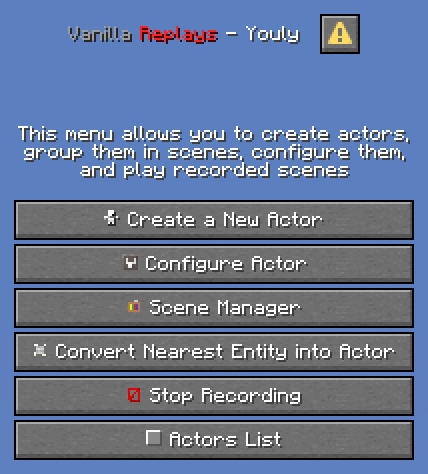
- 按下 “快捷操作” 键(默认为 “G”),或在暂停菜单中点击 “Vanilla Replays” 按钮,以打开主菜单。
- 潜行 + 右键点击 你正在注视的角色,以打开其配置菜单。
- 站在 角色旁边,可以在动作栏上方查看其名称、ID 和所属场景。
? 说明
- 点击 “创建新角色” 以召唤一个新角色,指定实体类型、名称、配置数据(可以是玩家名称或配置组件)以及所属场景。 如果名称/配置是玩家名称且包含数字或空格,请将其用引号括起来(例如 "name 123" 而不是 : name 123)。配置功能仅适用于“人偶”实体。
- 点击 “配置角色” 并指定角色 ID 来配置角色:回放、录制、移除、自定义 和 传送至。
- 点击 “将最近的实体转换为角色” 以将半径 50 格内的最近实体转换为角色,某些实体类型无法转换(如标记实体、矿车与船只等)。
- 点击 “场景管理器” 并指定场景名称,以 回放 指定的场景名称、更改 其名称以及 暂停/恢复 它。
- 点击 “停止录制” 或在聊天栏输入 “trigger vanilla_replays.trigger.stop_recording” 以停止当前录制的角色。
- 点击 “角色列表” 以查看从近到远加载的所有角色。点击任意角色即可打开其配置界面。
⚠️ 限制
- 目前,对世界所做的所有修改(放置/破坏方块、与实体/方块交互)均未被记录。
- 如果多个玩家同时开始录制各自的角色,可以记录角色之间的互动,但独自完成所有操作会更加困难。
- 人偶实体与生物没有持有物品的全部动画(如拉弓/三叉戟瞄准、弩装填等)。
- 人偶实体与生物没有攻击、破坏/击打的动画。
- 骑乘姿势会被记录,但载具的位置和旋转角度不会被记录。
? 已知问题
- ✅ 已修复:包含空格的场景名称无法通过“场景管理器”界面进行暂停/恢复。
Vanilla Replays - Youly
Version 1.1.0 Overview
? PRESENTATION
Vanilla Replays is a datapack giving the ability to record and playback player actions, such as position, equipped items, used items and more.
Each actor can be a mannequin entity or a mob wich can be customized (profile, name, skin customization, data values etc), and belongs to a scene. Every actor in the same scene can play their record together (using "Scene Manager" screen)
⚒️ UTILS
- Press "quick actions" key (default to "G"), or click on "Vanilla Replays" button in pause menu, to open Main Menu.
- Sneak + Right Click on the actor you are looking at to open his Configuration Menu
- Be next to an actor to view his name, ID and scene, above actionbar.
? INSTRUCTIONS
- Click on "Create a New Actor" to summon a new actor, by specifying entity type, his name, profile data (it can be player's name, or a profile component), and the scene he belongs to. If the name/profile is a player name and contains digits or spaces, put it in quotes ("name 123" instead of : name 123). Profile works only for "mannequin" entities
- Click on "Configure Actor" and specify Actor'ID to configure actor : playback, record, remove, customize and teleport to.
- Click on "Convert Nearest Entity into Actor" to convert the nearest entity within a radius of 50 blocks, some entity types can't be converted (marker, minecarts & boats, etc)
- Click on "Scene Manager" and specify Scene Name to playback the specified scene name, change its name and pause/resume it.
- Click on "Stop Recording" or Type "trigger vanilla_replays.trigger.stop_recording" in chat to stop the actor you are currently recording.
- Click on "Actors List" to view all loaded actors from nearest to furthest. Click on any actor to open his configuration screen.
⚠️ LIMITATIONS
- For now, all modifications applied to the world (placing/destroying blocks, interacting with entities/blocks) are not recorded.
- You can record interactions between actors if several players each start a recording of an actor at the same time, but doing everything alone is more difficult.
- Mannequin entities & Mobs don't have all animations of held items (aiming with bow/trident, reloading crossbow, etc).
- Mannequin entities & Mobs don't have attack destroy/punch animations.
- Riding pose is recorded but the position and rotation of the vehicle are not.
? KNOWN ISSUES
- ✅ FIXED: Scene names containing spaces cannot be paused/resumed using the "Scene Manager" screen.

下载 Vanilla Replays
需要联机服务器吗?
稳定流畅、一键部署,几分钟即可和朋友联机开服
最低仅需 8 元/月 即可畅快联机
下载 Vanilla Replays
需要联机服务器吗?
稳定流畅、一键部署,几分钟即可和朋友联机开服
最低仅需 8 元/月 即可畅快联机
下载 Vanilla Replays
需要联机服务器吗?
稳定流畅、一键部署,几分钟即可和朋友联机开服
最低仅需 8 元/月 即可畅快联机
下载 Vanilla Replays
需要联机服务器吗?
稳定流畅、一键部署,几分钟即可和朋友联机开服
最低仅需 8 元/月 即可畅快联机
下载 Vanilla Replays
需要联机服务器吗?
稳定流畅、一键部署,几分钟即可和朋友联机开服
最低仅需 8 元/月 即可畅快联机
下载 Vanilla Replays
需要联机服务器吗?
稳定流畅、一键部署,几分钟即可和朋友联机开服
最低仅需 8 元/月 即可畅快联机
Vanilla Replays - by Youly
修复内容:
- 包含空格的名称场景无法暂停/恢复。
新功能:
- 角色新增了自定义设置:“隐藏目标信息”(开启/关闭),在选择或距离玩家最近时,隐藏角色的信息和高亮显示。
关于这个资源的讨论、问题反馈与使用心得
还没有讨论,来发第一帖吧
你是这个资源的作者?登录后可认领此资源。
相似资源
 数据包

此数据包添加了属于阿瓦里海盗的独特结构,将他们的独特风格带入你的 Minecraft 世界!兼容性:1.20 至 26.3
 数据包
一个 Minecraft 光线投射库,能够精确检测玩家正在查看的方块,包括像台阶和楼梯这样的特殊方块形状。
 数据包

此数据包添加了新的“祝福模式”难度。
 数据包
允许服务器管理员方便地禁用 Xaero's Map 系列模组中的实体雷达、小地图等功能,使竞技游戏更加公平。
 数据包

使用原版/生存友好的方法更改青蛙的变种类型。支持原版(寒冷、温带、温暖)以及可选的“More Frogs 2”变种:深红、末影、地狱、毒镖、紫珀、幽匿、灵魂、诡异和木头。
 数据包

手持潜影盒时可直接打开,无需将其放置在地面上。只需按住 Shift 并右键点击即可访问你的潜影盒。
评论 0
登录后参与评分
还没有评论,来抢沙发吧