
# 关于我
Vanilla Viewmodels 是一个数据包库,它为游戏中使用 OBJMC 渲染的视角模型添加了“动画控制器”。要使用该数据包,你需要具备:
- 一个动画(在 Blockbench 中为通用类型)模型。
- 本地安装了 [objmc](https://github.com/Godlander/objmc)。
- 对资源包和数据包的工作原理有基本了解。
使用 Viewmodel?
优点
- 无缝的物品动画,可以按函数运行。
- 得益于 OBJMC,模型可以达到极高的分辨率。
缺点
- OBJMC 光影与 Iris 光影无法同时启用。
- 由于 objmc 导出的高分辨率纹理,资源包体积可能会膨胀。
实用指南:
-
工作原理
由于 objmc 仅导出模型+纹理,需要注意该数据包采用了一些约定以确保其按预期工作。OBJMC 默认不会像 AnimatedJava 等插件那样“为你准备好数据包/资源包”。因此,创建一个正确遵循此数据包约定的资源包至关重要。
资源包中的模型
“play-animation”工具命令接受的可选 'id' 参数需要有效的 item_model 组件值。由于每个 objmc 动画都导出为独立的模型+纹理,你必须:
- 创建一个与模型相似的物品模型 JSON。
例如:'first_person:weapons/glock' 位于 assets/first_person/items/weapons/glock.json - 模型的动画必须包含在此 item_model 文件夹中,其中“带动画的模型”是在 字符串自定义模型数据值 === 动画名称 时切换的模型。
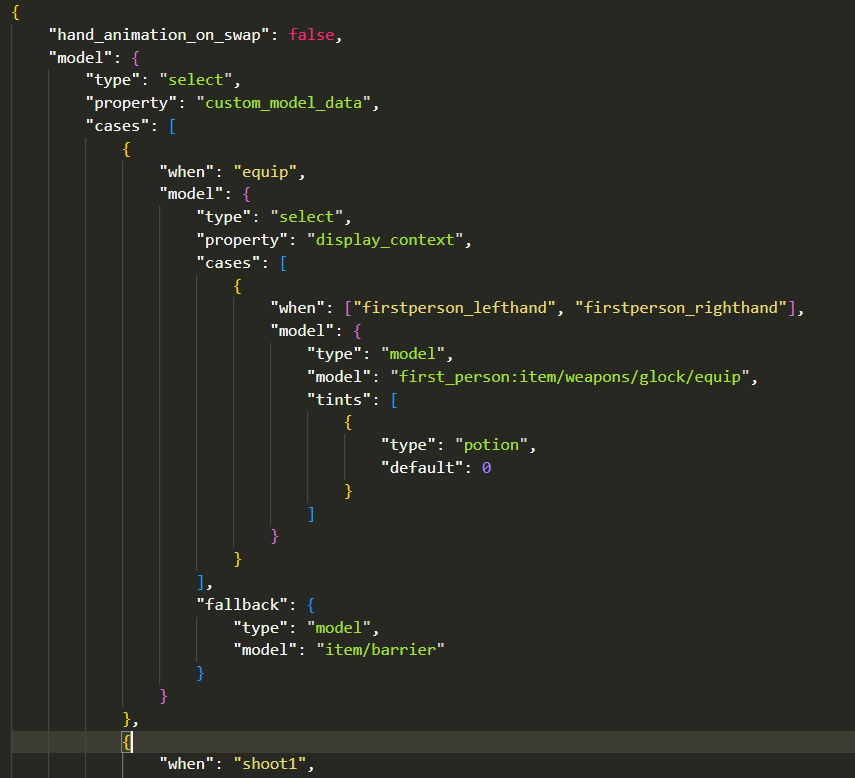 因此,每个动画都是 item_model JSON 文件中的一个 CustomModelData 字符串。显然,这意味着添加多个动画意味着你必须将每个动画导出为 OBJ 序列 => 通过 OBJMC.py 处理 => 获取压缩后的模型并在 item_model 组件中提及它。
在数据包中注册模型
要在数据包中注册 OBJMC 动画模型,请打开函数文件 vm:global/load 并在数据修改行中添加注册表!

以下是注册表条目的结构示例:
{
  id: "first_person:weapons/glock", // item_model 组件
  animations: [
      {
          "name":"equip",
          "start": 0,
          "end": 27,                                      // 动画的总刻数
          "duration": 30,                                 // 包含空白时间的动画刻数
          keyframe_functions: [
            { at: 0, function_file: 'test:equip' },       // 在第 0 个关键帧运行函数文件。
            { at: 30, function_file: 'test:end_animation' },
            { at: 25, function_file: 'test:gun_sfx' }
          ]
      },
      {
          "name": "shoot1",
          "start": 0,
          "end": 8,
          "duration": 6,
          "keyframe_functions": [
              { at: 0, function_file: 'gun:shoot' }
          ]
      }
  ]
}
若要注册无限循环的动画,请将 "end" 值设置为 -1
-
播放动画
要播放动画,请运行命令:
function vm:animations/play {args:{}}
args:{} 字段用于调整参数,包括:
id: 存储/应用 *item_model* 组件值
animation: 存储动画的名称。
frame: 动画应开始的帧。
示例命令:
function vm:animations/play {args:{id:"first_person:weapons/glock", animation: "equip", frame: 10}}
此命令将,
- 将药水物品的模型更改为 first_person_weapons/glock
- 设置待播放的动画为 "equip"(这是通过将动画名称设置为等于更改模型的不同动画纹理数据的 custom_model_data 字符串来处理的)
- 将起始帧设置为 0(药水颜色设置为 8388608+10)
-
停止动画
要停止动画,只需运行命令:
function vm:animations/stop
鸣谢
- Godlander [& objmc GitHub 仓库上的贡献者] —— 让在 Minecraft 中使用 OBJMC(从而使用 viewmodels)成为可能!
- GhostScoutW (@ghostscout on discord) —— 制作了如何设置使用 OBJMC 的工作视角模型项目的指南!
- pinkiuses (ATMOS: Minecraft Edition 的创作者) —— 提出了使用 OBJMC 作为视角模型的想法!
- 以及你!

你是这个资源的作者?登录后可认领此资源。
相似资源
 数据包

Avarii Fortress
SkyArchitec
此数据包添加了属于阿瓦里海盗的独特结构,将他们的独特风格带入你的 Minecraft 世界!兼容性:1.20 至 26.3
冒险装饰
37
 数据包
Retina
Nico314159
一个 Minecraft 光线投射库,能够精确检测玩家正在查看的方块,包括像台阶和楼梯这样的特殊方块形状。
前置实用
28
 数据包

Blessed Mode [difficulty]
kategirl1937sk
此数据包添加了新的“祝福模式”难度。
玩法机制实用
19
 数据包
Xaero's Map Server Utils
xxtg666
允许服务器管理员方便地禁用 Xaero's Map 系列模组中的实体雷达、小地图等功能,使竞技游戏更加公平。
管理实用
12
 数据包

SpaceFrog's Frog Variant Changer
spacefrog1984
使用原版/生存友好的方法更改青蛙的变种类型。支持原版(寒冷、温带、温暖)以及可选的“More Frogs 2”变种:深红、末影、地狱、毒镖、紫珀、幽匿、灵魂、诡异和木头。
冒险玩法机制
11
 数据包

Lucky Block Pink
KristenStuffs
粉色方块中的千种可能!
装备小游戏
10
评论 0
登录后参与评分
还没有评论,来抢沙发吧