KawaMood's Waystones
避免不必要的长途跋涉!
制作并在你的兴趣点放置传送石。
一种对生存模式和多玩家服务器友好的快速旅行方式!
?简介
什么是传送石?
KawaMood's Waystones 是一个受 BlayTheNinth 的著名模组 Waystones 启发的数据包。
传送石允许你在世界中的任何两点之间快速旅行,并且可以在任何维度(包括自定义维度)中进行。与模组不同,传送石不会在世界中自然生成,它们需要被制作出来。
如何制作和使用传送石?
传送石可以使用以下材料制作:
- 1x 锚块 (Lodestone)
- 2x 紫水晶碎片 (Amethyst Shards)
- 1x 末影之眼 (Eye of Ender)
- 以及 3x 基础方块
使用的基础方块取决于你想要获得的传送石变体:
- 安山岩 (Andesite) 用于安山岩传送石
- 砂岩 (Sandstone) 用于沙地传送石
- 下界砖块 (Nether Bricks) 用于下界传送石
- 苔石砖 (Mossy Stone Bricks) 用于苔石传送石
- 深板岩石砾 (Cobbled Deepslate) 用于深板岩传送石
- 铜块 (Copper Block) 用于铜传送石
- 海晶砖 (Prismarine Bricks) 用于海晶石传送石
- 凝灰岩 (Tuff) 用于凝灰岩传送石
- 红砂岩 (Red Sandstone) 用于红沙传送石
- 石英块 (Quartz Block) 用于石英传送石

在放置传送石之前,建议在铁砧 (Anvil) 中重命名它。这将使你在传送石列表中更容易找到对应的坐标点。
列表中的传送石图标取决于它们所放置的方块,因此你也可以选择具有辨识度的方块。这些图标也支持 NBT 数据(意味着你可以将传送石放置在自定义的玩家头颅上以拥有自定义图标)。
右键点击传送石的上半部分即可打开它。图形用户界面 (GUI) 的前两行显示对你可见的其他传送石列表,底部一行则是一个工具栏,用于编辑传送石的属性或在页面间导航。
通过左键单击列表中的传送石,你将瞬间移动到该位置。请注意,你还会随身携带载具(马、船等)以及当前拴绳上的生物。因此,传送石还能让你更快地在不同地点之间运输生物。
建议你观看特色视频以获得更好的解释和示例。
?属性
在传送石 GUI 的工具栏中间可以看到三个按钮。如果你是传送石管理员或当前传送石的所有者,这些按钮将允许你编辑它们的属性。其他玩家当然无法编辑其属性。
如果你在世界中放置了许多传送石,左下角和右下角可能会出现分页按钮。
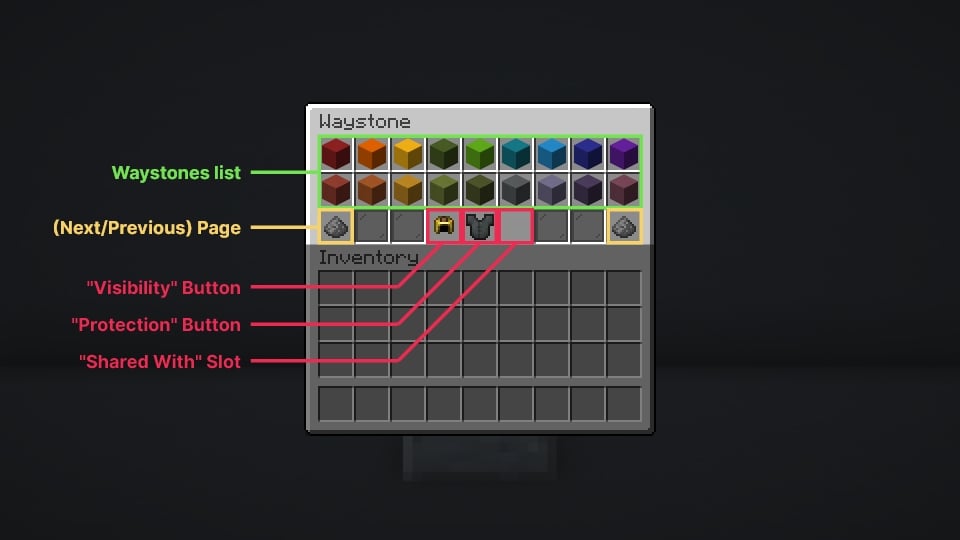
你可以在下面发现每个属性的影响。
可见性
第一个按钮涉及传送石的可见性。有三个可用值:
- 如果设置为 可发现 (discoverable),其他玩家在至少与之交互一次之前看不到它,这意味着他们需要首先发现传送石的位置。
- 如果设置为 私有 (private),其他玩家将无法从列表中看到此传送石。只有你(所有者)、传送石管理员以及你与其共享此传送石的玩家(见下方的“共享给”)才能看到它。
- 如果设置为 公开 (public),所有玩家都能从列表中看到它。
保护
第二个按钮涉及传送石的保护。有两个可用值:
- 默认情况下,保护 (protection) 处于 禁用 (disabled) 状态。在此模式下,任何人都可以摧毁传送石,包括自然灾害,如苦力怕或 TNT 引起的爆炸。
- 如果 启用 (enabled),只有传送石的所有者和传送石管理员才能移除它。
共享给
最后,第三个按钮涉及传送石的 “共享给 (Shared With)” 列表。
如果其可见性设置为 私有 (private),它允许你设置一个与其共享此传送石的玩家列表。
为此,你需要在一个可写书 (Writable Book) 的槽位中放入包含你朋友昵称的书。不幸的是,由于游戏的技术限制,你需要在书的每一页只写一个昵称。但你可以添加任意数量的玩家。
注意大小写。例如,“kawamood” 不等于 “KawaMood”。还要确保不要在页面的末尾或开头意外添加多余的空格或换行符。
一旦你完成了列表,你可以将其放入槽位,传送石就会保存它。
你可以随时通过单击它来删除或编辑列表!
? 管理员角色
管理员 (manager) 角色允许你绕过由传送石机制或设置引入的大多数限制规则。
它还允许你查看和编辑每一个传送石,即使是你不拥有的私有传送石。
可以通过以下命令分别 授予 或 移除 任何玩家的管理员角色:
/tag <nickname> add pk.waystones.manager
/tag <nickname> remove pk.waystones.manager
示例 - 授予名为 "Bob" 的玩家管理员角色
/tag Bob add pk.waystones.manager
⚙️设置
经验消耗
如果启用,玩家需要消耗等级才能在传送石之间旅行。费用可以是固定的,也可以根据已使用传送石和目标传送石之间的距离计算。可以使用以下命令启用设置:
/function pk_waystones:settings/xp_consumption/set {value:<amount>, mode:<mode>}
此命令使用两个参数:
- mode 等待 "fixed"、"manhattan" 或 "euclidean"。后两者是用于计算传送石之间距离的方法。
- "manhattan" 依赖游戏的网格系统,这意味着如果一个传送石位于 0, 64, 0,而另一个位于 1000, 64, 1000,该设置将认为这两个传送石相隔 2000 个方块。
- "euclidean" 指的是飞行距离。也就是说,如果我们使用上述相同的例子,系统将在这两个传送石之间绘制一条向量并计算其长度。距离将约为 1414 个方块。
- value 取决于模式。
- 在 "fixed" 模式下,它等待玩家从一个传送石传送到任何其他传送石所消耗的等级数量。
- 在 "euclidean" 或 "manhattan" 模式下,它等待你希望玩家每多少方块消耗一个等级才能进行传送的数值。例如,如果两个传送石相距 5000 个方块,我将值设置为 1000,则需要 5 个等级才能传送到那里。
- 在任何情况下,如果此值设置为 0 或负数,它将禁用该设置。
示例 - 无论目标传送石如何,使传送需要 5 个等级:
/function pk_waystones:settings/xp_consumption/set {mode:"fixed", value:5}
示例 - 使用欧几里得计算方法,每 1000 个方块消耗 1 个等级:
/function pk_waystones:settings/xp_consumption/set {mode:"euclidean", value:1000}
示例 - 完全禁用该设置:
/function pk_waystones:settings/xp_consumption/set {mode:"euclidean", value:0}
如果需要,你还可以使用以下命令获取当前模式和值的信息:
/function pk_waystones:settings/xp_consumption/get
黑名单维度
此设置允许你管理黑名单中的维度。黑名单处理原版维度,但也适用于数据包或 Multiverse 世界中的自定义维度。
在黑名单维度中,只有管理员可以放置传送石,普通玩家则不能。
你可以使用以下命令分别向黑名单添加、从黑名单移除维度或获取当前黑名单维度的列表:
/function pk_waystones:settings/blacklist_dimensions/add {dimension:<dimension_id>}
/function pk_waystones:settings/blacklist_dimensions/remove {dimension:<dimension_id>}
/function pk_waystones:settings/blacklist_dimensions/list
示例 - 禁止在下界放置传送石
/function pk_waystones:settings/blacklist_dimensions/add {dimension:"minecraft:the_nether"}
? 注意:为了查看你当前所在的维度 ID,你可以打开调试屏幕 (F3),维度 ID 显示在左侧坐标下方。
显示传送石名称标签
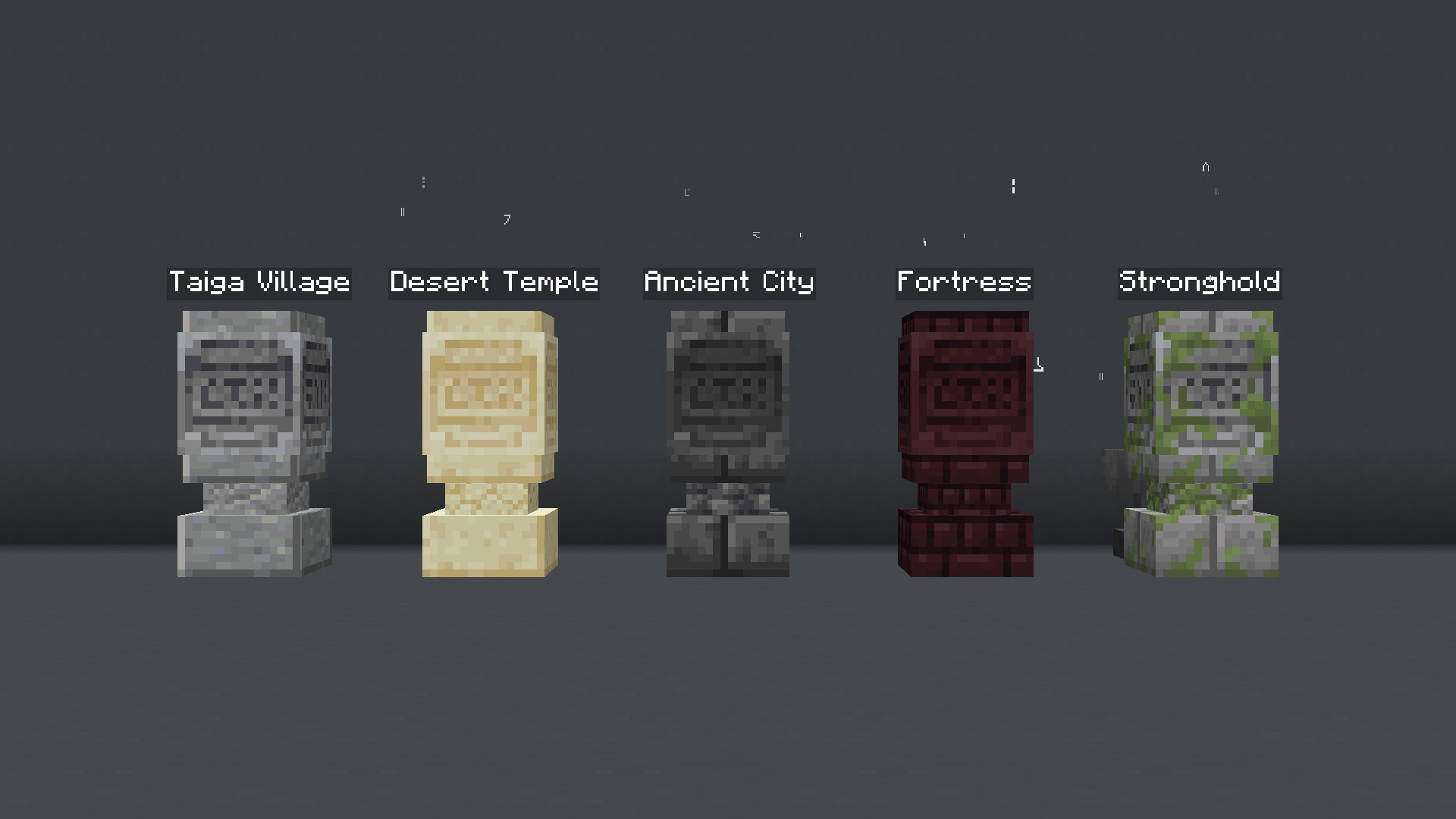
如果启用,传送石上方将出现浮动名称标签,使你更容易识别它们。你可以使用以下命令分别启用、禁用或获取设置的当前状态:
/function pk_waystones:settings/display_nameplates/true
/function pk_waystones:settings/display_nameplates/false
/function pk_waystones:settings/display_nameplates/get
游戏内名称标签渲染效果:
忽略附近怪物
如果启用,它会忽略传送石周围的怪物。如果禁用,当附近有怪物时,它将阻止玩家使用传送石。这与床的使用防止机制原理相同。请注意,此设置默认启用(即忽略怪物)。
你可以使用以下命令分别启用、禁用或获取设置的当前状态:
/function pk_waystones:settings/ignore_monsters/true
/function pk_waystones:settings/ignore_monsters/false
/function pk_waystones:settings/ignore_monsters/get
旧版纹理
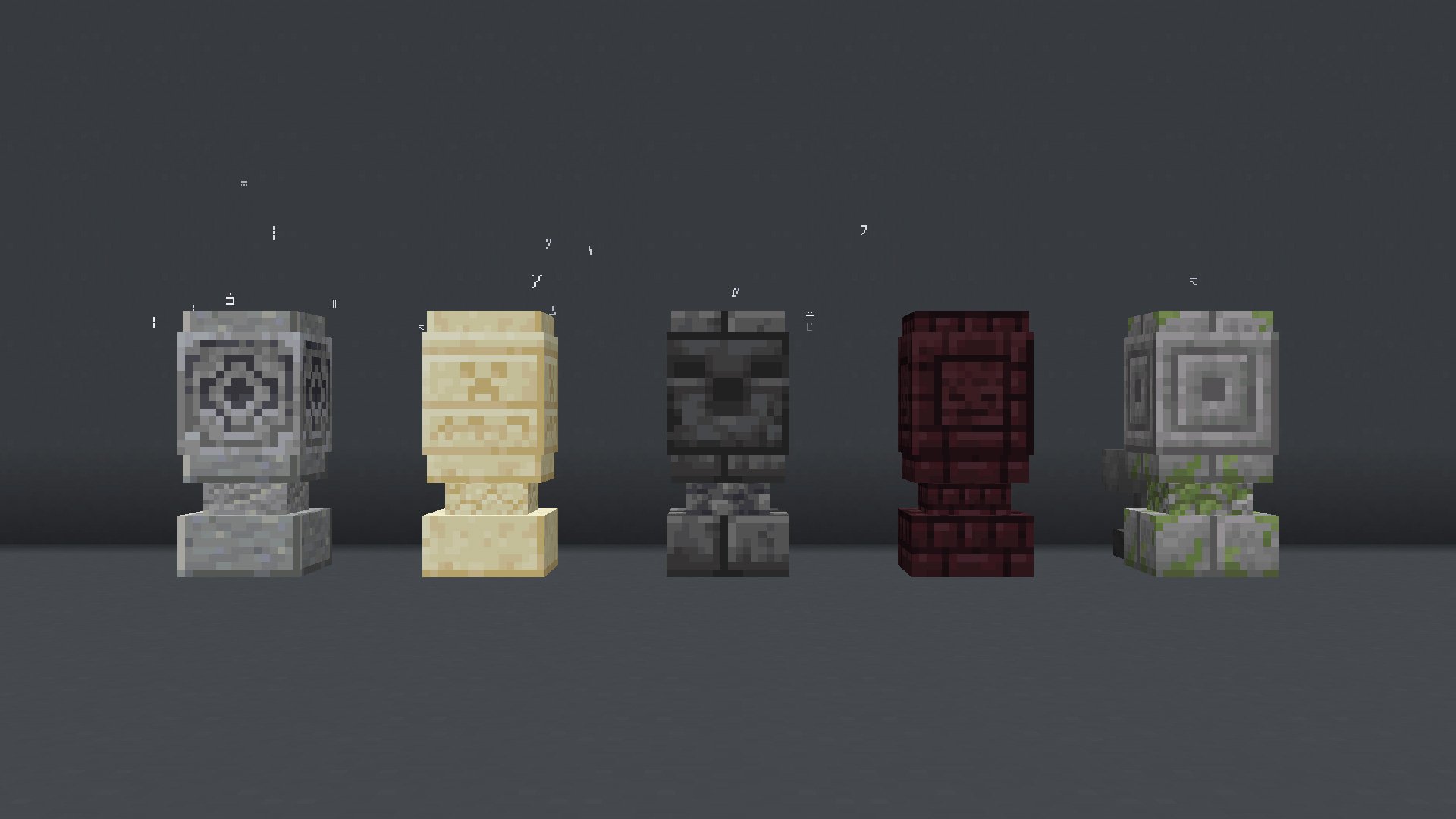
如果启用,数据包将使用普通的方块纹理作为传送石的纹理,而不是自定义纹理。
如果你使用的是高分辨率资源包,这可能很有用。你可以使用以下命令分别启用、禁用或获取设置的当前状态:
/function pk_waystones:settings/legacy_textures/true
/function pk_waystones:settings/legacy_textures/false
/function pk_waystones:settings/legacy_textures/get
游戏内纹理渲染效果:
默认可见性
此设置允许你更改放置传送石时的默认可见性。
最初,默认可见性模式为 "discoverable"(可发现)。你可以使用以下命令设置其他可见性,其中 visibility 可以是 "discoverable"(可发现)、"private"(私有)或 "public"(公开):
/function pk_waystones:settings/default_visibility/set {visibility:<visibility>}
示例 - 将默认传送石可见性设置为 "private"(私有)
/function pk_waystones:settings/default_visibility/set {visibility:"private"}
如果需要,你还可以使用以下命令获取当前默认可见性的信息:
/pk_waystones:settings/default_visibility/get
默认保护
此设置允许你更改放置传送石时的默认保护状态。
最初,默认保护模式为 "disabled"(禁用)。你可以使用以下命令更改它,其中 protection 值可以是 "disabled"(禁用)或 "enabled"(启用)。
要默认启用保护:
/function pk_waystones:settings/default_protection/set {protection:"enabled"}
若要将其重新禁用:
/function pk_waystones:settings/default_protection/set {protection:"disabled"}
如果需要,你也可以使用以下命令查询当前的默认保护状态:
/pk_waystones:settings/default_protection/get
限制每个玩家/服务器的传送石数量
你可以选择玩家最多可以拥有多少传送石。该限制是针对每个玩家的,也就是说,如果你将其设置为 5,那么每位玩家都可以放置 5 个传送石。可以使用以下命令进行设置,其中“count”用于指定所需的传送石数量:
/function pk_waystones:settings/limit_per_player/set {count:<count>}
_示例 - 允许每位玩家最多拥有 5 个传送石:
/function pk_waystones:settings/limit_per_player/set {count:5}
你也可以通过将 count 设置为 -1 或更小来禁用此设置,这意味着玩家可以随意放置任意数量的传送石:
/function pk_waystones:settings/limit_per_player/set {count:-1}
或者使用以下命令获取当前限制:
/function pk_waystones:settings/limit_per_player/get
此外,你还可以限制服务器上可存在的传送石总数。这与上述原理完全相同,但它是全局限制而非针对单个玩家。相应的设置、禁用或获取该数量的命令遵循相同的模式:
/function pk_waystones:settings/limit_per_server/set {count:<count>}
/function pk_waystones:settings/limit_per_server/set {count:-1}
/function pk_waystones:settings/limit_per_server/get
如果你想同时设置每个玩家的限制和服务器的全局限制,也可以将这两项设置结合使用。
设置两个传送石之间的最小距离
(自 V.3.6.2 起)
你可以设置玩家在放置传送石时,其拥有的另一个传送石(参见“每个玩家的距离限制”)或任何传送石(参见“服务器的距离限制”)之间必须保持的最小距离。
- 每个传送石之间的距离采用“曼哈顿距离”(Manhattan distance)方法计算。
- 拥有 "pk.waystones.manager" 标签的玩家不受此限制影响。
每个玩家的距离限制
你可以使用以下命令设置玩家拥有的两个传送石之间的最小距离,其中 <blocks> 应替换为实际的方块数量:
/function pk_waystones:settings/limit_per_range_player/set {distance:<blocks>}
_示例 - 允许玩家在每 200 个方块外放置一个新的传送石:
/function pk_waystones:settings/limit_per_range_player/set {distance:200}
你也可以通过将 distance 设置为 -1 或更小来禁用此设置:
/function pk_waystones:settings/limit_per_range_player/set {distance:-1}
或者使用以下命令获取当前限制:
/function pk_waystones:settings/limit_per_range_player/get
服务器的距离限制
此外,你还可以全局限制两个传送石之间的距离。这意味着如果在此范围内已经存在另一个传送石,无论玩家是否是该传送石的所有者,都无法再放置新的传送石。相应的设置、禁用或获取该距离的命令与“每个玩家的距离限制”中的命令遵循相同的模式:
/function pk_waystones:settings/limit_per_range_server/set {distance:<blocks>}
/function pk_waystones:settings/limit_per_range_server/set {distance:-1}
/function pk_waystones:settings/limit_per_range_server/get
在传送石 GUI 中隐藏坐标
如果启用,除非玩家拥有管理员角色,否则任何人都无法在 GUI 中看到传送石的位置。你可以使用以下命令分别启用、禁用或获取当前设置状态:
/function pk_waystones:settings/hide_coordinates/true
/function pk_waystones:settings/hide_coordinates/false
/function pk_waystones:settings/hide_coordinates/get
请注意,还有一个命令可供非 OP 玩家使用,允许他们仅对自己角色的传送石坐标进行隐藏。请参阅下方的“其他命令”部分。
在传送石 GUI 中优先列出公共传送石
如果启用,公共传送石将在传送石 GUI 中优先列出。默认情况下,公共传送石显示在已发现和个人传送石之后。你可以使用以下命令分别启用、禁用或获取当前设置状态:
/function pk_waystones:settings/list_public_waystones_first/true
/function pk_waystones:settings/list_public_waystones_first/false
/function pk_waystones:settings/list_public_waystones_first/get
掉落延迟(兼容 Worldguard 插件)
此设置允许你调整破坏传送石后,它开始掉落自身所需的最小延迟时间。如果你使用的是提供区域保护系统的插件,这将非常有用。
例如,在使用 WorldGuard 时,插件会存储并返还玩家尝试放置的最后一个物品。但如果玩家尝试放置传送石,它仍会在一个 tick 内存在,并在被插件移除时掉落自身。为了避免这种情况,你可以设置 2 个 tick 的掉落延迟。
默认情况下,不检查任何延迟。你可以使用以下命令设置延迟时间(以 tick 为单位):
/function pk_waystones:settings/lootable_delay/set {delay:<delay>}
_示例 - 设置 2 个 tick 的延迟:
/function pk_waystones:settings/lootable_delay/set {delay:2}
或者使用以下命令获取当前延迟:
/function pk_waystones:settings/lootable_delay/get
定时清除 GUI 物品(模组服务器的安全措施)
外部版本(如 Paper)有时会导致容器出现异常行为。
为了避免与此类服务器产生潜在的物品复制问题,你可以启用此设置,以清除玩家可能从传送石 GUI 中取出的物品。
你可以通过以下命令分别 启用、禁用 或 获取 该设置的当前状态:
/function pk_waystones:settings/tick_clear_gui_items/true
/function pk_waystones:settings/tick_clear_gui_items/false
/function pk_waystones:settings/tick_clear_gui_items/get
打开容器延迟 (Paper 兼容性)
此设置允许你调整在传送石被打开时触发“打开”事件前的最小延迟时间。该功能旨在绕过 Paper 自 26.1.2 build #17 版本以来的 issue #13839。
如果检测到 Paper 服务器,默认值设置为 2 tick。
你可以使用以下命令 设置 延迟时间(单位:tick):
/function pk_waystones:settings/open_container_delay/set {value:<value>}
示例 - 设置 2 tick 的延迟:
/function pk_waystones:settings/open_container_delay/set {value:2}
或者使用以下命令 获取 当前的延迟时间:
/function pk_waystones:settings/open_container_delay/get
权限:更改“可见性”属性
这些权限允许你限制玩家使用特定的可见性值。请注意,管理者不受此效果影响,始终能够更改任何传送石的任意属性。默认情况下,允许玩家将任何可见性设置应用于自己的传送石。
若要 允许 或 禁止 玩家在其传送石上设置 公开可见性,或者如果你想 获取 此权限的当前状态,可以分别使用以下命令:
/function pk_waystones:settings/permissions/change/visibility/public/true
/function pk_waystones:settings/permissions/change/visibility/public/false
/function pk_waystones:settings/permissions/change/visibility/public/get
针对 私有可见性 的操作同上:
/function pk_waystones:settings/permissions/change/visibility/private/true
/function pk_waystones:settings/permissions/change/visibility/private/false
/function pk_waystones:settings/permissions/change/visibility/private/get
再次重复上述操作,但针对 发现可见性:
/function pk_waystones:settings/permissions/change/visibility/discover/true
/function pk_waystones:settings/permissions/change/visibility/discover/false
/function pk_waystones:settings/permissions/change/visibility/discover/get
最后,你还可以一次性直接切换或获取所有基于可见性的权限:
/function pk_waystones:settings/permissions/change/visibility/all/true
/function pk_waystones:settings/permissions/change/visibility/all/false
/function pk_waystones:settings/permissions/change/visibility/all/get
权限:更改“保护”属性
此权限允许你限制玩家更改自己传送石的 保护 属性。请注意,管理者不受此效果影响,始终能够更改任何传送石的任意属性。默认情况下,允许玩家更改其传送石的保护设置。
若要 允许 或 禁止 玩家更改其传送石的 保护 属性,或者如果你想 获取 此权限的当前状态,可以分别使用以下命令:
/function pk_waystones:settings/permissions/change/protection/true
/function pk_waystones:settings/permissions/change/protection/false
/function pk_waystones:settings/permissions/change/protection/get
权限:更改“共享给”属性
此权限允许你限制玩家更改自己传送石的 共享给 属性。请注意,管理者不受此效果影响,始终能够更改任何传送石的任意属性。默认情况下,允许玩家更改其传送石的“共享给”列表。
若要 允许 或 禁止 玩家更改其传送石的 共享给 属性,或者如果你想 获取 此权限的当前状态,可以分别使用以下命令:
/function pk_waystones:settings/permissions/change/shared_with/true
/function pk_waystones:settings/permissions/change/shared_with/false
/function pk_waystones:settings/permissions/change/shared_with/get
权限:跨维度传送
如果禁用此权限,它将强制玩家在传送石 GUI 中仅显示与自身处于同一维度的传送石。如果你不希望玩家能够在不同的 Multiverse 世界之间传送,这将非常有用。
此权限默认启用,意味着玩家可以在任何维度间传送。
你可以通过以下命令分别 启用、禁用 或 获取 该权限的当前状态:
/function pk_waystones:settings/permissions/tp/in_other_dimensions/true
/function pk_waystones:settings/permissions/tp/in_other_dimensions/false
/function pk_waystones:settings/permissions/tp/in_other_dimensions/get
权限:战斗中传送
如果禁用此权限,它将防止玩家在过去 15 秒内受到生物实体(作为伤害来源)攻击后传送。如果你不希望玩家在 PvP 服务器上利用传送石逃离战斗,这将非常有用。
此权限默认启用,意味着玩家随时都可以进行传送。
你可以通过以下命令分别 启用、禁用 或 获取 该权限的当前状态:
/function pk_waystones:settings/permissions/tp/in_fight/true
/function pk_waystones:settings/permissions/tp/in_fight/false
/function pk_waystones:settings/permissions/tp/in_fight/get
? 其他指令
该数据包还提供了一些便捷的指令。其中一些指令操作员和普通玩家均可使用。
给自己一个传送石
如果你是服务器的操作员,或者在你的单人世界中开启了作弊功能,你可以使用以下命令给自己生成任意变体的传送石:
/function pk_waystones:cmd/give/waystone/andesite
/function pk_waystones:cmd/give/waystone/sand
/function pk_waystones:cmd/give/waystone/deepslate
/function pk_waystones:cmd/give/waystone/nether
/function pk_waystones:cmd/give/waystone/mossy
放置传送石
此指令允许你直接放置具有特定属性的传送石。
直接放置传送石对于数据包开发者来说可能很有用,例如他们希望在自己的结构中实现自然生成的传送石。
该函数需要一个包含传送石数据的 waystone 条目作为参数。
所有属性都可以省略,如果缺失,它们将自动获取默认值。但有两个特定的上下文你需要了解:
- 如果你没有指定
owner(拥有者),它将被视为“未认领”。未认领的传送石将自动归属于第一个使用它的玩家。
- 坐标将基于指令执行时的位置上下文进行定义。但是:如果你没有指定
location > dimension(维度),传送石将被注册在主世界(Overworld)中。这是由于我们无法动态检测指令是在哪个潜在的自定义维度中运行的,除非执行者是玩家。
此指令必须始终使用已加载的区域作为位置上下文。如果你想在一个硬编码的位置设置它,你可以强制加载相关的区块,然后在之后卸载它。
以下是几个指令示例:
在当前地点设置具有所有默认属性值的传送石:
/function pk_waystones:cmd/setblock/waystone {waystone:{}}
在当前地点设置一个未认领的深板岩传送石:
/function pk_waystones:cmd/setblock/waystone {waystone:{variant:"deepslate"}}
在末地 (0 80 0) 设置一个未认领、受保护且公开的传送石:
/execute in minecraft:the_end positioned 0 80 0 run forceload add ~ ~
/execute in minecraft:the_end positioned 0 80 0 run function pk_waystones:cmd/setblock/waystone {waystone:{location:{dimension:"minecraft:the_end"},protected:true,visibility:"public"}}
/execute in minecraft:the_end positioned 0 80 0 run forceload remove ~ ~
以下是 waystone 参数的数据结构:
waystone (compound)
├─ id (int): 传送石的 ID
├─ variant (string): 传送石的变体(普通、沙石、深板岩、下界...)
├─ name (text component): 传送石的名称
├─ owner (4 int array): 拥有者的 UUID
├─ location (compound): 传送石的位置。
│  └─ dimension (string): 维度 ID,默认为 "minecraft:overworld"。
├─ discovered_by (array): 与该传送石互动过的玩家列表
│  └─ (compound)
│     └─ uuid (4 int array): 玩家的 UUID
├─ shared_with (array): 共享该传送石的玩家列表
│  └─ (compound)
│     ├─ uuid (4 int array): 玩家的 UUID
│     └─ name (string): 如果玩家尚未在数据库中,则存储其名称
├─ protected (boolean): 传送石是否受保护(true)或不受保护(false)
├─ visibility (string): 可以是 "public"(公开)、"private"(私密)或 "discover"(可发现)
└─ render_item (compound):
   └─ id (string): 在传送石列表中渲染传送石的物品 ID
   └─ tag (compound) [1.20.4 或更低版本]: 物品的可选标签
   └─ components (compound) [1.20.5 或更高版本]: 物品的可选组件
重新排序列表中的传送石
此指令可用于通过提供 ID 列表作为参数来重新组织列表中的传送石顺序:
/function pk_waystones:cmd/database/waystones/reorder {ids:<ids>}
其中 <ids> 是一个按新期望顺序排列的 ID 列表。
你不必在新列表中添加所有传送石的 ID:缺失的 ID 将自动添加到列表末尾,保持它们之前的顺序(因此你不需要包含你玩家的私密和可发现的传送石)。例如,如果我当前有 ID 为 1-2-3-4-5-6-7-8 的传送石,我想让它们按 4-2-1-3-5-6-7-8 的顺序显示,我可以使用以下命令:
/function pk_waystones:cmd/database/waystones/reorder {ids:[4,2,1,3]}
请注意,普通玩家仍然会先看到他们的私密传送石,然后是已发现的传送石,最后是公开的传送石。拥有 pk.waystones.manager 标签的玩家将按照创建/重排序的顺序看到所有传送石。
你可以通过授予自己管理员角色(使用 /tag @s add pk.waystones.manager)并在传送石 GUI 中将鼠标悬停在传送石上来找到传送石的 ID。它们将显示在工具提示中。
任何玩家均可使用
在传送石列表中隐藏位置
它允许你从传送石 GUI 中隐藏传送石的坐标。如果你是一名在 PvP 服务器上游玩的视频制作者,并且不想泄露你的传送石位置,这将非常有用。
当然,此设置是针对每个玩家的。这意味着更改它只会应用于你自己(不会影响其他玩家)。
使用以下命令,如果值设置为 1,传送石的位置将被隐藏;如果设置为 2,传送石的位置将显示:
/trigger pk.waystones.trigger.hide_coordinates set 1
/trigger pk.waystones.trigger.hide_coordinates set 2
遗忘已发现或私密的传送石
它允许你忘记已发现的传送石或已注册到其上的私人传送石,这样该传送石将不再出现在列表中,直到你再次发现它或重新将其添加到“共享给”列表。
当你想要清理传送石列表时可以使用此功能。
/trigger pk.waystones.trigger.forget_waystone set <id>
其中 <id> 需要传入一个传送石的 ID。
例如,尝试忘记 ID 为 100 的传送石:
/trigger pk.waystones.trigger.forget_waystone set 100
你可以使用任意一个传送石打开 GUI,然后将鼠标悬停在想要忘记的传送石上,ID 会显示在工具提示中。如果你想忘记当前正在使用的传送石,其 ID 会显示在 GUI 顶部传送石名称之后。
故障排除
从数据库重建所有传送石
如果不小心损坏了传送石(例如使用了 kill @e 命令),你可以运行以下命令从数据库重建所有传送石:
/function pk_waystones:cmd/debug/recreate_all_waystones
该过程会在放置新传送石之前自动移除所有剩余的损坏传送石实体和方块。所有数据(ID、所有者、类型、属性等)都将保留。
完成可能需要一些时间,因此请确保收到提示过程成功结束的消息后,再与传送石进行交互或放置新的传送石。
强制解锁传送石
在使用 Paper、Spigot 等外部工具的服务器上,可能会发生不同步现象,导致方块无法正确更新其方块状态。如果你在没有人在实际使用时却收到“此传送石当前正被他人使用”的消息,你可以使用以下命令解锁已加载的传送石:
/function pk_waystones:cmd/debug/force_waystones_to_unlock
供其他数据包使用的特性
公共钩子
公共钩子是 函数标签,允许你在 Waystones 数据包中的特定事件发生前后运行你自己的函数,只需将它们添加到相应的标签中即可。
添加这些钩子是为了帮助人们在不修改原始代码的情况下引入自己的功能,从而可以安全地更新 Waystones 数据包,而无需每次安装新版本时都重新编辑以引入你的自定义功能。
公共钩子位于 data/pk_waystones/tags/function/public 中,并遵循 <event>_<after/before> 的命名模式。你必须按照相同的路径(包括 pk_waystones 命名空间)和名称在你的数据包中添加它们。
以下是列出的公共钩子:
gui_action_<after/before>:
在通过点击 Waystones GUI 中的物品执行操作之后/之前触发。
- 上下文:当前控制器(传送石标记实体),位于自身位置。
- 用户拥有
pk.current.player 标签。
gui_button_build_<after/before>:
在构建按钮(物品数据)以填充 Waystones GUI 之后/之前触发。
- 上下文:当前控制器(传送石标记实体),位于自身位置。
- 用户拥有
pk.current.player 标签。
waystone_close_<after/before>:
在玩家关闭 Waystones GUI 之后/之前触发。
- 上下文:当前控制器(传送石标记实体),位于自身位置。
- 用户拥有
pk.current.player 标签。
waystone_open_<after/before>:
在玩家打开 Waystones GUI 之后/之前触发。
- 上下文:打开传送石的用户(也拥有
pk.current.player 标签),位于对齐 XYZ 的传送石位置。
- 可以使用
@e[type=marker,tag=pk.waystones.waystone.controller,dx=0,limit=1] 找到已打开传送石的标记。
waystone_place_<after/before>:
在放置传送石之后/之前触发。
- 上下文:任意,位于对齐 XYZ 的传送石位置。
- 如果传送石由玩家放置,则上下文为该玩家。
- 在“after”钩子中,可以使用
@e[type=marker,tag=pk.waystones.waystone.controller,dx=0,limit=1] 找到所放置传送石的控制器。
waystone_remove_<after/before>:
在移除传送石之后/之前触发。
- 上下文:当前控制器(传送石标记实体),位于自身位置。
waystone_replace_<after/before>:
在替换传送石(使用“重建”功能)之后/之前触发。
? 从 V.2 版本更新
自 V.3.2.5 (MC 1.20.3) 和 V.3.3.2 (MC 1.20.5) 起,Waystones 数据包提供了将现有所有 V.2 传送石转换为 V.3 的过程。
为此,请按照以下步骤操作。我还建议你使用 V.2 创建世界备份,以防其他数据包 / 插件 / 模组意外破坏更新过程。
- 从世界的
/datapacks/ 文件夹中移除 Waystones V.2 数据包,不要使用卸载函数卸载 V.2 上游版本,因为你应保留其数据库。
- 如果需要,将你的世界升级到所需的 Minecraft 版本,如果尚未升级的话。
- 通过将 Waystones V.3 放置在
/datapacks/ 文件夹中,然后在游戏中使用 /reload 来安装它。
- 使用以下命令:
/function pk_waystones:cmd/database/update_from_v2 并等待更新过程结束。如果成功完成,你将收到消息“已成功从 Waystones (V.2) 更新所有 Waystones”。
注意:在 1.20.3 到 1.20.4 版本中,此过程 unfortunately 无法从传送石的所有者处解析所有者名称并将其设置到 V.3 数据库中。因此,你需要等待他们重新加入你的世界,才能在 GUI 的传送石工具提示中看到他们作为所有者。
在 1.20.5 或更高版本中,玩家名称将自动添加到 V.3 数据库中。
? 可选资源包
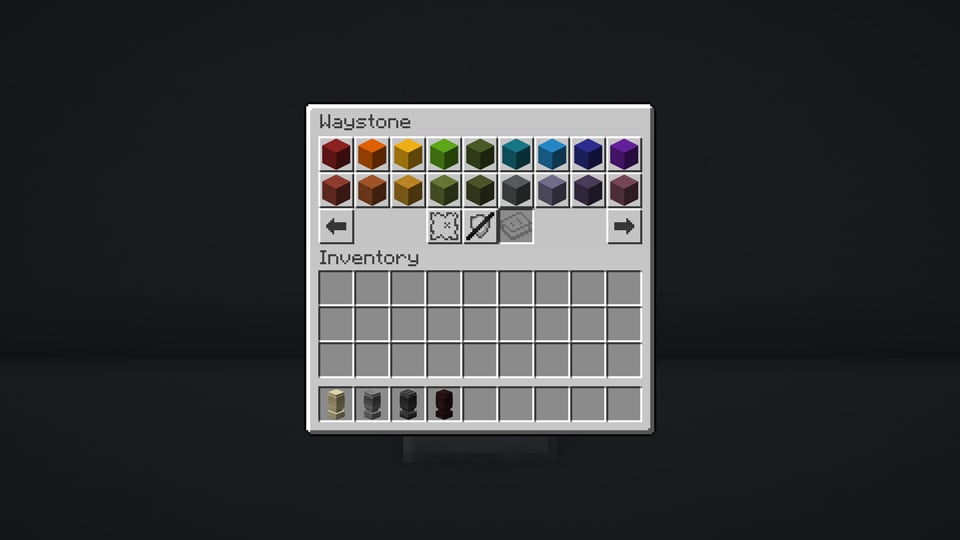
为了提升你的游戏体验,我们的图形艺术家贡献者 Lordphiphi 制作了一个提供 Waystones 物品和 GUI 模型的 资源包。你可以从这里下载:Waystones Resources (for Waystones V.3) - by Lordphiphi。
查看渲染效果
? 卸载
Waystones 自带自动卸载流程。运行该流程将执行以下操作:
- 移除你世界中所有维度已放置的所有传送石(Waystones)
- 移除与 Waystones 数据包相关的分数和存储数据
- 如果未安装其他 KawaMood 数据包,还会移除所有公共分数和存储数据
卸载过程可能需要几秒钟才能完成。请务必等待提示消息,确认可以安全地从世界文件夹中删除数据包后再进行操作。
启动卸载流程的命令如下:
/function pk_waystones:cmd/uninstall
❓ 常见问题解答
我需要安装资源包吗?
不需要,此数据包本身并不强制要求安装资源包。它提供了直观的用户界面,并使用玩家头颅来渲染自定义纹理。
不过,我们的图形艺术家贡献者 Lordphiphi 制作了一个提供 Waystones 物品和 GUI 模型的 资源包。你可以从这里下载:Waystones Resources (for Waystones V.3) - by Lordphiphi。
方块纹理显示为普通玩家头颅
首次使用新类型的传送石时,你需要连接互联网。用于创建其外观的玩家头颅纹理实际上是从存储在 Mojang 服务器上的(旧版或当前)玩家皮肤中加载并缓存在客户端的。
如果你不小心使用了首次使用时需要联网的内容,而现在看到的是普通玩家头颅而非预期的纹理,你仍然可以进入 .minecraft/assets/skins/ 文件夹,然后按日期对子文件夹进行排序,并删除一些最近的文件夹。完成后,如果你的游戏已经启动,你需要重启它以更新缓存内容。
⚠️ 1.20.2 版本特殊问题:有时玩家头颅会显示默认玩家皮肤(Steve 等),而不是其实际纹理,即使整个缓存文件夹已被清空。这实际上是游戏本身的 已知问题,取决于签名值可能导致纹理加载困难。此问题已在 1.20.3 版本中修复。
传送石显示“已使用”
如果玩家在关闭传送石时,其方块容器未能正确更新方块状态,传送石可能会保持锁定状态。此类问题有时会发生在修改版服务端如 Paper 或 Spigot 上。为了强制解锁传送石,有一个调试命令:
/function pk_waystones:cmd/debug/force_waystones_to_unlock
? 报告问题
如果你在使用此数据包时遇到问题,建议加入 Discord 服务器,并在专用的 #data-pack-issues 频道发帖描述你的问题。请别忘了提供所有必要信息,包括:
- 你正在使用的 Minecraft 版本。
- 你正在使用的涉及的数据包版本。
- 你是否在使用任何修改版服务端,如 Forge、Paper 或 Spigot。
- 如果是,列出你可能正在使用的、可能影响数据包运行的插件或模组。
- 你正在使用的其他数据包列表(如果有)。
- 对你问题的清晰描述以及复现方法。
- 如有必要,提供游戏中问题的视频或截图。
在执行上述操作之前,请先阅读上面的常见问题解答部分。你遇到的问题可能是常见的问题,其中可能已经提供了修复方法。
? 其他链接
感谢使用 Waystones!得知大家喜欢它让我很高兴。
如果你想支持其开发以及其他数据包的开发,你可以在我的其他社交网络上支持我:
KawaMood's Waystones
Avoid unnecessary long journeys!
Craft and place Waystones on your points of interest.
A survival-friendly and multiplayer-friendly way to quickly travel in your world!
?Introduction
What is Waystones?
KawaMood's Waystones is a data pack inspired by BlayTheNinth's famous Waystones mod.
Waystones allow you to travel quickly from one point to another in your world, and within any dimension (including custom ones). Unlike the mod, waystones do not appear naturally within the world, they require to be crafted.
How to craft and use waystone?
Waystones can be crafted using:
- 1x Lodestone
- 2x Amethyst Shards
- 1x Eye of Ender
- and 3x base blocks
Base blocks to use depend on the desired variant of waystone to get:
- Andesite for Andesite Waystone
- Sandstone for Sand Waystone
- Nether Bricks for Nether Waystone
- Mossy Stone Bricks for Mossy Waystone
- Cobbled Deepslate for Deepslate Waystone
- Copper Block for Copper Waystone
- Prismarine Bricks for Prismarine Waystone
- Tuff for Tuff Waystone
- Red Sandstone for Red Sand Waystone
- Quartz Block for Quartz Waystone
Before placing your waystone, it is recommended to rename it within an Anvil. This will allow you to retrieve your points correspondance more easily within the waystones list.
Waystones icons in the list depends on the block they have been placed on, so you can also chose identifiable ones. These icons also handle NBT (meaning you can place a waystone on a custom player head to have custom icons).
Right-clicking the top part of a waystone will open it. The GUI shows you the list of other waystones that are visible to you on the two first lines, and a toolbar to edit the waystones attributes or navigate within pages in the bottom line.
By left-clicking on a waystone from the list, you will be teleported to it. Note that you will also take with you your vehicle (horse, boat...) and the mobs you currently have on leash. So wasytones also allow you to transport mobs within several locations more fastly.
I recommend you to watch the featured video for better explanations and examples.
?Attributes
In the toolbar of the waystones GUI, you can see three buttons in the middle. If you're a waystone manager or the owner of the current waystone, these buttons will allow you to edit their attributes. Other players won't of course be able to edit its attributes.
Other buttons may appear on the bottom-left and bottom-right corners if you have placed many waystones in your world. They are the pagination buttons.
You can discover below the influence of each attributes.
Visibility
The first button concerns the waystone's visibility. There are three available values:
- If set on discoverable, other players won't see it until they interact with it at least once, meaning they need to discover the waystone's location first.
- If set on private, other player won't be able to see this waystone from the list. Only you (the owner), waystones managers, and players you share this waystones with (see "Shared With" below) will be able to see it.
If set on public, every players will be able to see it from the list.
Protection
The second button concerns the waystone's protection. There are two available values:
- By default, the protection is disabled. In this mode, the waystone can be destroyed by anyone, including natural events, like explosions from creepers or TNT.
- If enabled, only the owner of the waystone and waystones managers will be able to remove it.
Shared With
Finally, the third button concerns the waystone's "Shared With" list.
It allows you to set a list of players with whom to share this waystone if its visibility is set on private.
To do this, you need to place in the slot a Writable Book containing your friends' nicknames. Unfortunately, due to technical constraints from the game, you will need to write a single nickname per page in the book. But you can add as many players as you want.
Be careful, too, with case. For example, "kawamood" does not equal "KawaMood". Be also sure to not inadvertently add extra spaces or line break at the end or the beggining of the page.
Once you've made your list, you can place it in the slot, and the waystone will save it
You can remove or edit it at any time by clicking on it!
? Manager Role
The manager role allows you to bypass most of restrictive rules introduced by waystones mechanics or settings.
It also allows you to see and edit every waystones, even private ones that you don't own.
The role can be given or removed from any player using these commands respectively:
/tag <nickname> add pk.waystones.manager
/tag <nickname> remove pk.waystones.manager
Example - Granting the manager role to the player named "Bob"
/tag Bob add pk.waystones.manager
⚙️Settings
XP Consumption
If enabled, players will need to consume levels to travel from waystone to waystone. The cost can either be fixed, or calculated according to the distance between the used and targeted waystones. The setting can be enabled using the following command:
/function pk_waystones:settings/xp_consumption/set {value:<amount>, mode:<mode>}
This command use two parameters:
- mode waits for either "fixed", "manhattan" or "euclidean". Both last are method used to calculate the distance between waystones.
- "manhattan" relies on the game's grid, meaning if a waystone is located at 0, 64, 0 and the other at 1000, 64, 1000, the setting will consider both waystone are separated by 2000 blocks.
- "euclidean" refers to the distance in flight. Meaning if we took this same example above, the process will draw a vector between both waystones and calculate its length. The distance will then be around 1414 blocks.
- value depends on the mode.
- With the "fixed" mode, it waits for the amount of level the player would consume to teleport from a waystone to any other ones.
- With "euclidean" or "manhattan" mode, it waits as value the count of blocks you want the player to consume a level for in order to teleport. Meaning for example, if two waystones are separated by 5000 blocks, and I set a value of 1000, it will require 5 levels to teleport to it.
- In any case, if this value is set to 0 or a negative value, it will disable the setting.
Example - Make teleportation require 5 levels no matter the targeted waystone:
/function pk_waystones:settings/xp_consumption/set {mode:"fixed", value:5}
Example - Consume 1 level for 1000 blocks, with the euclidean calculation method:
/function pk_waystones:settings/xp_consumption/set {mode:"euclidean", value:1000}
Example - Disable the setting completely:
/function pk_waystones:settings/xp_consumption/set {mode:"euclidean", value:0}
If needed, you can also be informed of the current mode and value using the following command:
/function pk_waystones:settings/xp_consumption/get
Blacklisted Dimensions
This setting lets you manage dimensions from the blacklist. The blacklist handles vanilla dimensions, but it also works with custom dimensions from data packs or Multiverse worlds.
In a blacklisted dimension, only managers will be able to place waystones, regular players will not be able to.
You can add, remove dimensions to the blacklist or get the list of currently blacklisted dimensions using the following commands respectively:
/function pk_waystones:settings/blacklist_dimensions/add {dimension:<dimension_id>}
/function pk_waystones:settings/blacklist_dimensions/remove {dimension:<dimension_id>}
/function pk_waystones:settings/blacklist_dimensions/list
Example - Disallow waystones placement in the Nether
/function pk_waystones:settings/blacklist_dimensions/add {dimension:"minecraft:the_nether"}
? Note: in order to see the dimension id you're currently in, you can open the debug screen (F3), the dimension id is shown below the coordinates on the left side.
Display Waystones Nameplates
If enabled, floating nameplates will appear above waystones, allowing you to identify them more easily. You can enable, disable or get the current state of the setting using these following commands respectively:
/function pk_waystones:settings/display_nameplates/true
/function pk_waystones:settings/display_nameplates/false
/function pk_waystones:settings/display_nameplates/get
Render of nameplates in game:
Ignore Monsters Nearby
If enabled, it ignores monsters being around the waystones. If disabled, it prevents players to use a waystone if there are monsters nearby. It is the same principle as the beds use-prevention system. Note that this setting is enabled by default (monsters are ignored).
You can enable, disable or get the current state of the setting using these following commands respectively:
/function pk_waystones:settings/ignore_monsters/true
/function pk_waystones:settings/ignore_monsters/false
/function pk_waystones:settings/ignore_monsters/get
Legacy Textures
If enabled, the data pack will use regular blocks textures for waystones instead of the custom ones.
It can be useful if you're using high-resolution resources packs. You can enable, disable or get the current state of the setting using these following commands respectively:
/function pk_waystones:settings/legacy_textures/true
/function pk_waystones:settings/legacy_textures/false
/function pk_waystones:settings/legacy_textures/get
Render of textures in game:
Default visibility
This setting lets you change the default visibility of a waystone on placement.
Initially, the default visibility mode is "discoverable". You can set another visibility using the following command, where visibility can be either "discoverable", "private" or "public":
/function pk_waystones:settings/default_visibility/set {visibility:<visibility>}
Example - Set the default waystones visibility on "private"
/function pk_waystones:settings/default_visibility/set {visibility:"private"}
If needed, you can also be informed of the current default visibility using the following command:
/pk_waystones:settings/default_visibility/get
Default protection
This setting lets you change the default protection of a waystone on placement.
Initially, the default protection mode is "disabled". You can change it using the following command, where the protection value can be either "disabled" or "enabled".
To enabled the protection by default:
/function pk_waystones:settings/default_protection/set {protection:"enabled"}
Or to disable it back:
/function pk_waystones:settings/default_protection/set {protection:"disabled"}
If needed, you can also be informed of the current default protection using the following command:
/pk_waystones:settings/default_protection/get
Limit Waystones Amount Per Player/Server
You can chose how many waystones players can own at most. This amount is relative to each player, meaning if you set it to 5, every players will be able to place 5 waystones each. It can be done using the following command, where "count" waits for the desired amount of waystones:
/function pk_waystones:settings/limit_per_player/set {count:<count>}
_Example - Allow players to own a maximal amount of 5 waystones each:
/function pk_waystones:settings/limit_per_player/set {count:5}
You can also disable this setting using a count of -1 or less, meaning players will be able to place as many waystones as they want:
/function pk_waystones:settings/limit_per_player/set {count:-1}
Or get the current limit using the following command:
/function pk_waystones:settings/limit_per_player/get
Additionnally, you can also limit the amount of waystone your server can contain. This is the exact same principle as above, but instead of being a limit per player, it is a global limit. The commands follow the same scheme to set, disable or get this amount respectively:
/function pk_waystones:settings/limit_per_server/set {count:<count>}
/function pk_waystones:settings/limit_per_server/set {count:-1}
/function pk_waystones:settings/limit_per_server/get
You can also combine both settings if you want to set a limit per player but also a global limit on the server.
Set minimal distance between two Waystones
(As of V.3.6.2)
You can set a minimal distance players would be able to place a waystone from another one they own (see "limit range per player") or from any waystone (see "limit range per server").
- The distance between each waytone is calculated with the "manhattan" method.
- Players with the "pk.waystones.manager" tag ignore this limit.
Limit range per player
You can set a minimal distance between two waystones a player owns using the following command, where <blocks> should be replaced by the actual amount of blocks:
/function pk_waystones:settings/limit_per_range_player/set {distance:<blocks>}
_Example - Allow players to place a new waystone every 200 blocks:
/function pk_waystones:settings/limit_per_range_player/set {distance:200}
You can also disable this setting using a distance of -1 or less:
/function pk_waystones:settings/limit_per_range_player/set {distance:-1}
Or get the current limit using the following command:
/function pk_waystones:settings/limit_per_range_player/get
Limit range per server
Additionnally, you can also limit the distance between two waystones globaly. Meaning a player wouldn't be able to place a waystone if there is already another waystone in this range, no matter if they are the owner of this same waystone or not. The commands follow the same scheme as for the "limit range per player" to set, disable or get this distance respectively:
/function pk_waystones:settings/limit_per_range_server/set {distance:<blocks>}
/function pk_waystones:settings/limit_per_range_server/set {distance:-1}
/function pk_waystones:settings/limit_per_range_server/get
Hide coordinates in the waystones GUI
If enabled, no player will be able to see waystones location from the GUI, unless they have the manager role. You can enable, disable or get the current state of the setting using these following commands respectively:
/function pk_waystones:settings/hide_coordinates/true
/function pk_waystones:settings/hide_coordinates/false
/function pk_waystones:settings/hide_coordinates/get
Note that another command is usable by non-op players and allow them to hide coordinates of waystones for their own character only. Refer to the "Other commands" section below.
List public waystones first in the waystones GUI
If enabled, public waystones will be listed first in waystones GUI. By default, public waystones display after discovered and private waystones. You can enable, disable or get the current state of the setting using these following commands respectively:
/function pk_waystones:settings/list_public_waystones_first/true
/function pk_waystones:settings/list_public_waystones_first/false
/function pk_waystones:settings/list_public_waystones_first/get
Lootable Delay (Worldguard plugins compatiblity)
This setting allows you to adjust the minimal delay before a waystone can drop itself when broken. It is useful if you use a plugin that provides an area protection system.
For example with WorldGuard, the plugin will store and give back the last item the player tried to place. But if the player try to place a waystone, it will still exist for a single tick and drop itself while being removed by the plugin. In order to avoid that, you can set a lootable delay of 2 ticks.
By default, no delay is checked. You can set a delay (in ticks) with the following command:
/function pk_waystones:settings/lootable_delay/set {delay:<delay>}
Example - Set a delay of 2 ticks:
/function pk_waystones:settings/lootable_delay/set {delay:2}
Or get the current delay using the following command:
/function pk_waystones:settings/lootable_delay/get
Tick GUI items clear (modded servers safeguard)
External versions such as Paper sometimes involve weird behavior with containers.
In order to avoid potential items dupe issues with them, you can tick the system that clear items players may have managed to take from a waystone's GUI using this setting.
You can enable, disable or get the current state of this setting using these following commands respectively:
/function pk_waystones:settings/tick_clear_gui_items/true
/function pk_waystones:settings/tick_clear_gui_items/false
/function pk_waystones:settings/tick_clear_gui_items/get
Open Container Delay (Paper compatibility)
This setting allows you to adjust the minimal delay before a waystone trigger its "open" event when opened. This has been introduced to bypass issue #13839 on Paper since its 26.1.2 build #17 version.
By default, a value of 2 ticks is set if it detects a Paper server.
You can set a delay (in ticks) with the following command:
/function pk_waystones:settings/open_container_delay/set {value:<value>}
Example - Set a delay of 2 ticks:
/function pk_waystones:settings/open_container_delay/set {value:2}
Or get the current delay using the following command:
/function pk_waystones:settings/open_container_delay/get
Permission: Change "Visibility" Attribute
These permissions allows you to restrict players from using specific visibility values. Note that managers are immune to this effect and will always be able to change any attributes from any waystone. By default, players are allowed to set any visibility to their waystone.
In order to allow, disallow players to set the public visibility on their waystones, or if you want to get the current state of this permission, you can use the following commands respectively:
/function pk_waystones:settings/permissions/change/visibility/public/true
/function pk_waystones:settings/permissions/change/visibility/public/false
/function pk_waystones:settings/permissions/change/visibility/public/get
Same as above but for the private visibility:
/function pk_waystones:settings/permissions/change/visibility/private/true
/function pk_waystones:settings/permissions/change/visibility/private/false
/function pk_waystones:settings/permissions/change/visibility/private/get
Same as above again, but for the discover visibility:
/function pk_waystones:settings/permissions/change/visibility/discover/true
/function pk_waystones:settings/permissions/change/visibility/discover/false
/function pk_waystones:settings/permissions/change/visibility/discover/get
Finally you can also directly toggle or get all visibilily-based permissions at once:
/function pk_waystones:settings/permissions/change/visibility/all/true
/function pk_waystones:settings/permissions/change/visibility/all/false
/function pk_waystones:settings/permissions/change/visibility/all/get
Permission: Change "Protection" Attribute
This permission allows you to restrict players from changing the protection attribute of their own waystones. Note that managers are immune to this effect and will always be able to change any attributes from any waystone. By default, players are allowed to change the protection of their waystone.
In order to allow, disallow players to change their waystones protection attribute, or if you want to get the current state of this permission, you can use the following commands respectively:
/function pk_waystones:settings/permissions/change/protection/true
/function pk_waystones:settings/permissions/change/protection/false
/function pk_waystones:settings/permissions/change/protection/get
Permission: Change "Shared With" Attribute
This permission allows you to restrict players from changing the shared with attribute of their own waystones. Note that managers are immune to this effect and will always be able to change any attributes from any waystone. By default, players are allowed to change the "shared with" list of their waystones.
In order to allow, disallow players to change their waystones shared with attribute, or if you want to get the current state of this permission, you can use the following commands respectively:
/function pk_waystones:settings/permissions/change/shared_with/true
/function pk_waystones:settings/permissions/change/shared_with/false
/function pk_waystones:settings/permissions/change/shared_with/get
Permission: Tp In Other Dimensions
If disabled, this permission force players to only see waystones being in the same dimension as themselves from a waystone's GUI. It can be useful if you don't want players to be able to teleport between different Multiverse worlds.
This permission is enabled by default, meaning players can teleport in any dimensions.
You can enable, disable or get the current state of the permission using these following commands respectively:
/function pk_waystones:settings/permissions/tp/in_other_dimensions/true
/function pk_waystones:settings/permissions/tp/in_other_dimensions/false
/function pk_waystones:settings/permissions/tp/in_other_dimensions/get
Permission: Tp In Fight
If disabled, this permission prevents players to teleport if they took a damage from a living entity (as source) in the previous 15 seconds. It can be useful if you don't want players to escape a fight by using a waystone on PvP servers.
This permission is enabled by default, meaning players can teleport at any moment.
You can enable, disable or get the current state of the permission using these following commands respectively:
/function pk_waystones:settings/permissions/tp/in_fight/true
/function pk_waystones:settings/permissions/tp/in_fight/false
/function pk_waystones:settings/permissions/tp/in_fight/get
? Other Commands
The data pack also provides some handy commands. Some of them are usable by both operators and regular players.
Give yourself a waystone
If you are an operator of your server or if cheats are enabled in your single-player world, you can give yourself a waystone of any variant using these following commands:
/function pk_waystones:cmd/give/waystone/andesite
/function pk_waystones:cmd/give/waystone/sand
/function pk_waystones:cmd/give/waystone/deepslate
/function pk_waystones:cmd/give/waystone/nether
/function pk_waystones:cmd/give/waystone/mossy
Place a waystone
This command allows you to directly place a waystone with a specific set of attributes.
Placing a waystone directly can be useful for data packs developers who want for example to implement natural waystones generation within their own structures.
The function waits for a waystone entry containing the waystone's data.
All properties can be omitted, as they would simply get their default values if they are missing. But there are two particular contexts you need to know:
- If you don't specify an
owner, it will be considered as "unclaimed". Unclaimed waystones will automatically be owned by the first player who uses it.
- Coordinates will be defined from the context of location of the command. However: if you don't specify a
location > dimension, the waystone will be registered in the overworld. This is due to the fact we unfortunately can't dynamically detect in what potential custom dimension a command is ran if the executor isn't a player.
This command must always use an already loaded area as context of location. You can forceload the relative chunk upstream and unload it afterwards if you want to set it at a hard location.
Here are several examples of commands:
Set a waystone with all default properties values at the current location:
/function pk_waystones:cmd/setblock/waystone {waystone:{}}
Set a deepslate unclaimed waystone at the current location:
/function pk_waystones:cmd/setblock/waystone {waystone:{variant:"deepslate"}}
Set an unclaimed, protected and public waystone at 0 80 0 in the End:
/execute in minecraft:the_end positioned 0 80 0 run forceload add ~ ~
/execute in minecraft:the_end positioned 0 80 0 run function pk_waystones:cmd/setblock/waystone {waystone:{location:{dimension:"minecraft:the_end"},protected:true,visibility:"public"}}
/execute in minecraft:the_end positioned 0 80 0 run forceload remove ~ ~
And here is the data structure for the waystone parameter:
waystone (compound)
├─ id (int): The id of the Waystone
├─ variant (string): The variant of the Waystone (regular, sand, deepslate, nether...)
├─ name (text component): The name of the Waystone
├─ owner (4 int array): The UUID of the owner
├─ location (compound): Location of the Waystone.
│  └─ dimension (string): dimension id, "minecraft:overworld" by default.
├─ discovered_by (array): list of players having interacted with this Waystone
│  └─ (compound)
│     └─ uuid (4 int array): UUID of a player
├─ shared_with (array): list of players the waystone is shared with
│  └─ (compound)
│     ├─ uuid (4 int array): UUID of a player
│     └─ name (string): If the player isn't in the database yet, store its name instead
├─ protected (boolean): Weather the waystone is protected (true) or not (false)
├─ visibility (string): Can be "public", "private" or "discover"
└─ render_item (compound):
   └─ id (string): id of item to render the Waystone in the Waystones list
   └─ tag (compound) [1.20.4 or less]: optional tags of the item
   └─ components (compound) [1.20.5 or more]: optional components of the item
Reorder waystones in the list
This command can be used to reorganise the waystones in the list by providing a list of ids as parameter:
/function pk_waystones:cmd/database/waystones/reorder {ids:<ids>}
Where <ids> is a list of ids ordered in the new expected order.
You're not forced to add all waystones ids in the new list: missing ones will be automatically added at the end of the list, in the order they previously were (so you don't need to include private and discoverable waystones of your players).
For example if I currently have waystones with the ids 1-2-3-4-5-6-7-8, and I want to make them appear in the order 4-2-1-3-5-6-7-8, I can use this following command:
/function pk_waystones:cmd/database/waystones/reorder {ids:[4,2,1,3]}
Note that regular players will still see their private waystones first, then discovered waystones, then the public ones. Players with the pk.waystones.manager tag will see all waystones in the order they have been created/reorder.
You can find the ids of waystones by granting yourself the manager role (using /tag @s add pk.waystones.manager) and hovering them in a waystone's GUI. They will be displayed in their tooltip.
Usable by any player
Hide locations from the waystones list
It allows you to hide coordinates of waystones from waystones' GUI. It can be useful if you're a video maker who plays on a PvP server, and don't want to leak your waystones' location.
Of course, this setting is player-specific. Meaning by changing it, it will only apply for yourself (not for other players).
Using these following commands, if the value is set on 1, waystones' location will be hidden, if set on 2, waystones' location will show:
/trigger pk.waystones.trigger.hide_coordinates set 1
/trigger pk.waystones.trigger.hide_coordinates set 2
Forget a discovered or private waystone
It allows you to forget about a waystone you have discovered or a private one you have been registered on, so this same waystone won't appear in the list anymore, until you discover it you or you are registered back in the "shared with" list.
It can be used when you want to clean your waystones list.
/trigger pk.waystones.trigger.forget_waystone set <id>
Where <id> expects the id of a waystone.
For example, trying to forget about the waystone with id 100:
/trigger pk.waystones.trigger.forget_waystone set 100
You can see waytones id by using one to open the GUI, then hovering the waystone to forgot, the id will be shown in the tooltip. If you want to forget about the currently used waystone, its id is shown after the waystone name on the top of the GUI.
Troubleshooting
Recreate all waystones from the database
If ever waystones have been broken accidentally (using a kill @e command for example) you can run the following command to recreate all waystones from the database:
/function pk_waystones:cmd/debug/recreate_all_waystones
The process will automatically remove all remaining entities and blocks of broken waystones before placing fresh ones. All data (id, owner, type, attributes...) will be preserved.
It may take some time for it to complete, so be sure to get the message telling the process ended successfully before interacting with or placing a waystone.
Force waystones to unlock
On server that use external tools like Paper, Spigot... some desynch can happen, and block may not update their blockstates correctly. If ever you get the message "This waystone is currently used by someone else" when no-body is actually using it, you can unlock the loaded waystones using the following command:
/function pk_waystones:cmd/debug/force_waystones_to_unlock
Features for other data packs
Public hooks
Public hooks are function tags which allow you to run your own functions before or after a specific event happen from the waystones data pack by adding them in the corresponding tag.
They have been added to help people wanting to introduce their own features without altering the original code, so the waystones data pack can be safely updated without the need of editing it back to introduce your own features every time you install another version.
Public hooks can be found in data/pk_waystones/tags/function/public and follow a <event>_<after/before> name pattern. They must be added following these same paths (including the pk_waystone namespace) and names within your data pack.
Here are listed public hooks:
gui_action_<after/before>:
Triggers after/before an action is performed by clicking an item from a Waystones GUI.
- Context: Current controller (waystone marker entity), at itself.
- The user has the
pk.current.player tag.
gui_button_build_<after/before>:
Triggers after/before a button (item data) is built to populate the Waystones GUI.
- Context: Current controller (waystone marker entity), at itself.
- The user has the
pk.current.player tag.
waystone_close_<after/before>:
Triggers after/before a player closes a waystones GUI.
- Context: Current controller (waystone marker entity), at itself.
- The user has the
pk.current.player tag.
waystone_open_<after/before>:
Triggers after/before a player opens a waystones GUI.
- Context: The user who oppened the waystone (also have the
pk.current.player tag), at the waystone's location aligned xyz.
- The marker of the opened waystone can be found using
@e[type=marker,tag=pk.waystones.waystone.controller,dx=0,limit=1].
waystone_place_<after/before>:
Triggers after/before a waystone is placed.
- Context: Any, at the waystone's location aligned xyz.
- In the case the waystone is placed by a player, the context is this player.
- In the "after" hook, the controlle of the placed waystone can be found using
@e[type=marker,tag=pk.waystones.waystone.controller,dx=0,limit=1].
waystone_remove_<after/before>:
Triggers after/before a waystone is removed.
- Context: Current controller (waystone marker entity), at itself.
waystone_replace_<after/before>:
Triggers after/before a waystone is replaced (with the "recreating" feature).
- Context: Any, at the waystone's location aligned xyz.
? Update from V.2
Since V.3.2.5 (MC 1.20.3) and V.3.3.2 (MC 1.20.5), the data pack provides a process to convert all existing waystones from V.2 to V.3.
In order to do so, follow the steps written below. I would also advice you to create a backup of your world using V.2, in case another data pack / plugin / mod accidentally breaks the updating process.
- Remove the waystones V.2 data pack from the
/datapacks/ folder of your world, don't uninstall V.2 upstream with the uninstall function, as you should keep its database.
- Upgrade your world to the desired version of Minecraft if needed, if it isn't already done.
- Install Waystones V.3 by placing it in the
/datapacks/ forlder, then using /reload in game.
- Use this following command:
/function pk_waystones:cmd/database/update_from_v2 and wait for the updating process to end. If it managed to do so, you should get a message "Updated all Waystones from Waystones (V.2) successfully".
Note: On 1.20.3 to 1.20.4, this process can't unfortunatelly resolve owners name from the waystones owners to set them in the V.3 database. So you would need to wait for them to join back your world to see them as owner in the waystones tooltip from the GUI.
On 1.20.5 or more, players names will be automatically added to the V.3 database.
? Optional Resources Pack
In order to embellish your experience, a resources pack providing models for Waystones items and GUI has been made by our graphist-artist contributor, Lordphiphi. You can download it from here: Waystones Resources (for Waystones V.3) - by Lordphiphi.
See render
? Uninstall
Waystones comes with an automatic uninstallation process. Running it will:
- Remove all waystones that have been placed in your world, in every dimensions
- Remove all scores and storage specific to the Waystones data pack
- If there is no more KawaMood data packs installed, also remove all common scores and storages
The uninstalling process may take some seconds to complete. Be sure to wait for the message telling you that you can safely remove the data pack from your world's folder before doing it.
The command to start the uninstalling process is the following one:
/function pk_waystones:cmd/uninstall
❓ F.A.Q
Do I need to install a resources pack?
No, this data pack doesn't strictly require a resources pack. It provides a rather-intuitive GUI by itself, and use players heads to render custom textures.
However, a resources pack providing models for Waystones items and GUI has been made by our graphist-artist contributor, Lordphiphi. You can download it from here: Waystones Resources (for Waystones V.3) - by Lordphiphi.
The texture of the block shows regular player heads
You need to be connected to the internet the first time you use a new type of waystone. The textures of the player heads that are used to create their looks are indeed loaded and cached on the client-side, from (old or current) players skins that are stored on a Mojang server.
If you accidentally used a content that required to be online the first time you use it, and now see regular players heads instead of the expected texture, you can still go in the ".minecraft/assets/skins/" folder, then sort the sub-folders by date, and delete some recent folders. Once that is done, if your game was already started, you will need to restart it to update the cached content.
⚠️ Exceptional issue on 1.20.2: Players heads can sometimes show default player skins (Steve & co.) rather than its actual texture although the whole cache folder are cleared. This is actually an known issue from the game itself that struggle to load a texture depending on the signature's value. This issue has been fixed on 1.20.3.
Waystones show "already used"
Waystones can stay locked if their block container didn't update their blockstate correctly when players closed them. Such issues can happen sometimes, especially on modified versions such as Paper or Spigot. In order to force waystones to unlock, there is a debug command:
/function pk_waystones:cmd/debug/force_waystones_to_unlock
? Report an issue
If you encountered an issue with this data pack, preferably join the Discord server, and open a post in the dedicated #data-pack-issues channel to describe your problem. Please, don't forget to provide all necessary informations including:
- The Minecraft version you're using.
- The version of the concerned data pack you're using.
- If you're using any modified version like Forge, Paper or Spigot.
- If you do, the plugins or mods you're using that may alter the functioning of data packs.
- The list of other data packs you're using, if you have others.
- A clear description of your issue, and a way to reproduce it.
- If necessary, a video or a screenshot of the issue in game.
Before doing that, please read the F.A.Q. section just above. The issue you're facing may be a common one, and a way to fix it may already have been provided in it.
? Other links
Thank you for using Waystones! It makes me happy to know people are enjoying it.
If you want to support its development and the development of other data packs, you can support me on my other social networks:
- Planet Minecraft
- Or if you're in a generous mood, I accept donation on paypal or buy me a kawa (slang term for "coffee")!


 数据包

 数据包
 数据包

 数据包
 数据包

 数据包

评论 0
登录后参与评分
还没有评论,来抢沙发吧