
关于
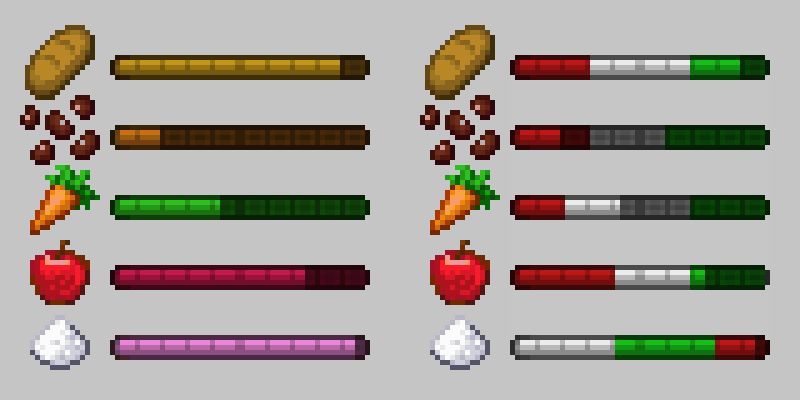
A Balanced Diet 是 Diet 模组的一个分支,旨在促进 Minecraft 中饮食食物组的创建与管理。Diet 自带默认配置,可生成五种经典的食物组(水果、谷物、蔬菜、蛋白质和糖分)。该模组具有高度可配置性;用户和整合包开发者可以定义自己的食物组、分类、饮食效果、通知等。
此分支的创建是为了增加更多的清晰度、平衡性以及生活质量(Quality of Life)功能。这些功能本可以作为 PR 提交给原版模组,但作者表示该模组可能不会再有针对 1.20.1 版本的后续更新。这些新功能几乎完全是可选且基于数据的,包括一个用于跨越指定阈值的通知系统、显示哪些阈值开始提供正面或负面效果的饮食条质量叠加层,以及每种食物的营养定义。
下载
特性
食物组

食物组是自定义的饮食组别,代表你吃过的食物类型。每个组的值在 0% 到 100% 之间,具体取决于玩家吃了多少该类别的食物。这些值会根据玩家食用的食物类型而增加,并且当玩家消耗饥饿值时,所有组都会逐渐衰减。
默认情况下,Diet 包含五种经典的食物组:Fruits(水果)、Grains(谷物)、Proteins(蛋白质)、Vegetables(蔬菜)和 Sugars(糖分)。营养值通常由标签决定。但是,如果在配置文件中启用,则可以按每种食物单独设置。
通过创建数据文件,用户和整合包开发者可以创建自己的自定义食物组。数据文件可以作为 datapack 的一部分加载,或者使用 KubeJS 或 Open Loader 等模组加载。可配置的选项包括:
- 名称
- 物品图标
- 十六进制颜色代码
- 排序
- 默认值
- 获取倍率
- 衰减速率倍率
- 是否有益
饮食效果

饮食效果是根据某些可配置的食物组值应用于玩家的自定义奖励或惩罚。这些效果在饮食套件(diet suites)中定义,饮食套件的创建方式与食物组相同,都是通过数据文件实现的。饮食套件列出了其使用的食物组以及随之产生的效果。
可能的效果包括任何已注册的生命药水效果(无论是原版还是模组添加),以及直接修改属性(例如,以任意值增加最大生命值)。这些效果的触发条件具有高度可配置性,包括检查特定值、仅检查组子集、为每个匹配测试累积应用效果等等。
质量视图
质量视图显示了食物组的“质量”,向玩家指示哪些阈值将提供正面或负面效果。使用客户端配置文件中的 qualityDisplayMode 选项,可以设置为悬停在组条上时显示、点击 Diet 屏幕角落的按钮时显示、两者兼有或都不显示(默认)。
可以使用 quality 字段为饮食套件中的任何效果定义质量值,该字段设置为包含十六进制颜色代码的字符串(例如 "#3FDF3F")。当质量视图可见时,该颜色会绘制在条目的相应区域上。
每食营养
如果在服务器配置中启用了 enableDataFoodValues 选项,则可以为每种食物单独设置营养值,而不是基于标签生成。Diet 将引用 diet/food_values 处的数据文件以获取每种食物的营养值,从而取代基于标签的值。
默认数据包已为约 20 个模组配置了数值。这些数据包文件中兼容模组的列表可以在这里查看。
通知
通知是一个可选系统,当玩家的食物组值跨越阈值时,会在聊天中提醒玩家。它们通过在饮食效果中添加 notification 对象来自定义于饮食套件内。可配置的选项包括:
- 通知 ID
- 消息(使用翻译键)
- 通知集(用于批量静音)
- 触发器(控制什么导致通知出现)
- 默认频率(通知将出现多少次)
always,每次满足触发条件时通知都会出现once,通知只会出现一次,然后将其自身设置为永不出现never,除非由测试命令触发,否则通知不会出现
如果通知的频率设置为 always,它将为玩家提供一个提示以将其静音。点击后,静音菜单将在聊天中打开,提供选项来静音此通知、同一集中的所有通知、同一食物组的所有通知或所有饮食通知。玩家还可以使用 /diet notifications 命令手动调整他们的通知设置,并且整个通知系统可以通过服务器配置文件中的 notificationsEnabled 选项禁用。
进一步阅读
详细信息请参阅 wiki,其中包含关于该模组功能的详细说明,包括 食物组、食物分类、单个食物的营养值 以及 饮食套装。您可以在我的整合包 Desolate Planet 的数据文件中找到大多数模组功能的实际运行示例,地址为 此处。
命令
Diet 注册了一些命令以帮助调试和服务器管理。
/dietget <player> <group>set <player> <group> <value>add <player> <group> <value>subtract <player> <group> <value>reset <player>suite <player> [<suite>]pause <player>resume <player>export <filter> <argument>notify <target> <notification_id>notifications listnotifications allnotifications group <group_id>notifications set <set_id>notifications message <message_id>notifications options <message_id>notifications reset
支持
请使用模组 GitHub 页面上的问题跟踪器报告所有错误、问题和功能请求。请勿在原模组的 GitHub 页面上针对仅存在于本分支的功能创建问题。
如果您愿意,我活跃于当前整合包 Desolate Planet 的 Discord 服务器中。欢迎在那里 @我,我会在有空时尽快回复。
许可证
所有源代码和资源均采用 LGPL 3.0 许可证。
捐赠
您可以向原模组的作者通过 Ko-fi 进行捐赠。
本项目广告收入的全部收益将捐赠给 GiveWell。
兼容性
标准的“五种食物组”标签系统支持许多模组,具体列表可参见原模组描述中的 此处。
自定义食物值系统支持较小一部分模组。这些模组的列表可在模组的 默认数据包 中找到。这些默认值假设水果和蔬菜的消耗速率降低,而糖类的消耗速率大幅增加。
如果您希望请求对该系统的额外支持,请提交 issue 或提交 pull request 以直接贡献。
About
A Balanced Diet is a fork of the Diet mod, which facilitates the creation and management of dietary food groups in Minecraft. Diet comes with a default configuration that creates five classical food groups (fruits, grains, vegetables, proteins, and sugars). The mod is highly configurable; users and modpack developers can define their own food groups, classifications, diet effects, notifications, etc.
This fork was created to add some additional clarity, balance, and quality of life features. These would have been made as a PR to the original mod, but the author stated the mod is not likely to have any further 1.20.1 updates. These new features are almost entirely optional and data-driven, and include a notification system for crossing specified thresholds, quality overlays to the diet bars that show what thresholds start providing positive or negative effects, and per-food nutrition definition.
Downloads
Features
Food Groups
Food groups are custom dietary groups that represent the types of food that you have eaten. Each group has a value ranging between 0% and 100% depending on how much of that particular category a player has eaten. These values increase depending on what types of food a player eats and every group gradually decays when the player uses up their hunger bar.
By default, Diet comes with five classical food groups: Fruits, Grains, Proteins, Vegetables, and Sugars. Nutrition values are typically determined by tags. However, if enabled in the config, they can be set per-food instead.
By creating data files, users and modpack developers can create their own custom food groups. Data files can be loaded as part of a datapack or using a mod like KubeJS or Open Loader. Configurable options include:
- Name
- Item Icon
- Hexcode Color
- Ordering
- Default Value
- Gain Multiplier
- Decay Multiplier
- Beneficial or not
Dietary Effects
Dietary effects are custom rewards or penalties applied to players based on certain, configurable food group values. These effects are defined in diet suites, which are created through data files in the same way as food groups. A diet suite lists the food groups it uses along with the effects that come from them.
Possible effects can include any registered potion effect, vanilla and modded, as well as modifying attributes directly (i.e. increasing maximum health by an arbitrary value). The conditions for these effects are highly configurable, including checking specific values, checking only subsets of groups, applying effects cumulatively for each matching test, and much more.
Quality View
The quality view shows the "quality" of a food group, which indicates to players what thresholds will provide positive or negative effects. Using the qualityDisplayMode option in the client config, it can be set to appear upon hovering over a group bar, by clicking a button in the corner of the Diet screen, both, or neither (the default).
Quality values can be defined for any effect in a diet suite using the quality field, which is set to a string containing a hex color code (ex: "#3FDF3F"). This color is drawn over that region of the bar whenever the quality view is visible.
Per-Food Nutrition
If the enableDataFoodValues option is enabled in the server config, nutrition values can be set per-food rather than generated based on tags. Diet will reference data files at diet/food_values to get food values on a per-food basis, which are used in place of the tag-based ones.
The default datapack has values configured for ~20 mods. The list of compatible mods in these data files can be viewed here.
Notifications
Notifications are an optional system that alerts players in chat when their food group values cross a threshold. They are customized from within a diet suite by adding a notification object to a diet effect. Configurable options include:
- Notification ID
- Message (uses translation keys)
- Notification Sets (used for bulk-muting)
- Trigger (controls what causes the notification to appear)
- Default Frequency (how many times the notification will appear)
always, notification will appear every time its trigger is metonce, notification will appear once and then set itself to nevernever, notification will not appear unless triggered by testing commands
If a notification's frequency is set to always, it will provide a prompt for the player to mute it. When clicked, the mute menu opens in chat with options to mute this notification, all notifications in the same set, all notifications for the same food group, or all diet notifications. Players can also adjust their notification settings manually using the /diet notifications commands and the entire notification system can be disabled with the notificationsEnabled option in the server config.
Further Reading
Please refer to the wiki for more detailed information about the mod's features, including food groups, food categorization, per-food nutrient values, and diet suites. Examples of most mod features in-action can be found here, in the data files of my modpack, Desolate Planet.
Commands
Diet registers a few commands to help aid debugging and server management.
/dietget <player> <group>set <player> <group> <value>add <player> <group> <value>subtract <player> <group> <value>reset <player>suite <player> [<suite>]pause <player>resume <player>export <filter> <argument>notify <target> <notification_id>notifications listnotifications allnotifications group <group_id>notifications set <set_id>notifications message <message_id>notifications options <message_id>notifications reset
Support
Please report all bugs, issues, and feature requests using the issue tracker on the mod's GitHub page. Please do not make issues on the original mod's GitHub page for features only present in this fork.
If preferred, I am active in the Discord server for my current modpack, Desolate Planet. Feel free to ping me there and I should respond when able.
License
All source code and assets are licensed under LGPL 3.0.
Donations
Donations to the original mod's author can be sent through Ko-fi.
All proceeds from the ad revenue on this project will be donated to GiveWell.
Compatibility
The standard "five food groups" tag system supports many mods, which can be viewed here, in the original mod's description.
A smaller subset of mods are supported by the custom food values system. A list of these mods can be found in the mod's default datapack. These default values assume a decreased drain rate for fruits and vegetables, and greatly increased drain rates for sugars.
If you would like to request additional support for this system, please open an issue or open a pull request to contribute directly.
下载 A Balanced Diet
需要联机服务器吗?
稳定流畅、一键部署,几分钟即可和朋友联机开服
最低仅需 8 元/月 即可畅快联机
下载 A Balanced Diet
需要联机服务器吗?
稳定流畅、一键部署,几分钟即可和朋友联机开服
最低仅需 8 元/月 即可畅快联机
下载 A Balanced Diet
需要联机服务器吗?
稳定流畅、一键部署,几分钟即可和朋友联机开服
最低仅需 8 元/月 即可畅快联机
下载 A Balanced Diet
需要联机服务器吗?
稳定流畅、一键部署,几分钟即可和朋友联机开服
最低仅需 8 元/月 即可畅快联机
下载 A Balanced Diet
需要联机服务器吗?
稳定流畅、一键部署,几分钟即可和朋友联机开服
最低仅需 8 元/月 即可畅快联机
下载 A Balanced Diet
需要联机服务器吗?
稳定流畅、一键部署,几分钟即可和朋友联机开服
最低仅需 8 元/月 即可畅快联机
下载 A Balanced Diet
需要联机服务器吗?
稳定流畅、一键部署,几分钟即可和朋友联机开服
最低仅需 8 元/月 即可畅快联机
下载 A Balanced Diet
需要联机服务器吗?
稳定流畅、一键部署,几分钟即可和朋友联机开服
最低仅需 8 元/月 即可畅快联机
本格式基于 Keep a Changelog,并且本项目遵循 语义化版本控制。
这是最新版本更新日志的副本。如需查看完整的版本历史记录,请前往 此处。
[3.1.0+1.20.1] - 2026.10.02
此更新完善了与 diet suite 切换相关的部分已实现功能,允许在饥饿值满时获得饮食值,并修复了在启用自定义食物值时多人游戏的同步问题。
Added(新增)
- Diet suites 现在可以在游戏中切换
/diet suite <player> <suite>将玩家切换到另一个 suite/diet suite <player>显示玩家当前的 suite- 两个 suite 中的食物组都保留其数值,而任何新组则从其
default_value开始 - 玩家的 suite 现在会与其其余 diet 数据一起保存,并在死亡和重载后持续存在
- 如果无法加载某个 suite,玩家将被移回默认 suite
DietApi方法getSuite、setSuite和getSuites现在可用,因此其他模组可以读取和更改玩家的 suite- 工具提示和食用过的食物仅适用于所选 suite 中的组
- 新增服务器配置选项:
defaultSuite允许将默认 suite 更改为builtin以外的内容requireHungerGain恢复以前的行为,即只有当食物也增加玩家饥饿值时,才会增加 diet 值
- 添加了西班牙语翻译,感谢 elbuda
Changed(更改)
- 即使食物不增加饥饿值,也可以增加 diet 值(这意味着金苹果和紫颂果等食物可以持续增加 diet 值)
- 在高糖分下,默认 diet suite 现在给予饥饿 III 而不是饥饿 IV
Fixed(修复)
- 修复了多人服务器上食物值的同步问题,客户端上的工具提示现在应显示正确的食物值。
- 修复了
food_values文件以任意顺序加载的问题,它们现在像原版标签一样加载- 首先,将所有数据包中文件的版本按照数据包的顺序合并
replace现在只会丢弃同一文件的较低优先级版本- 较高优先级的数据包中的值会覆盖较低优先级的值
- 出错的文件现在会更早被跳过,以避免可能覆盖其他文件
- 修复了某些食物具有错误的
food_values- Farmer's Delight 卷心菜
- Farmer's Delight 牛肉末
- 修复了无效状态效果出现错误消息的问题
关于这个资源的讨论、问题反馈与使用心得
还没有讨论,来发第一帖吧
你是这个资源的作者?登录后可认领此资源。
相似资源
 模组

让你能够在世界中的任何位置定位结构。
 模组

简单的原版生物群系更新,包含有趣的怪物、方块等更多内容!
 模组

为你的终界增添新生物群系、神秘仪式和全新生物
 模组

TerraFirmaCraft (TFC) 是一个全面转换模组,对生存模式进行了彻底的改造与重新设计。
 模组

更多生物群系,更多生物,更多工具,为炽热的维度
 模组
一堆修复
评论 0
登录后参与评分
还没有评论,来抢沙发吧