Absolute Cinema Camera
一款客户端侧的 Fabric 模组,将 Minecraft 变成电影。按下一个键即可将游戏进入电影模式:黑边滑入,HUD 消失,画面进行调色和柔化处理,摄像机要么平滑处理你的移动轨迹,要么完全脱离并为你拍摄场景。
专为角色扮演服务器打造——服务器端无需任何配置,其他玩家也不需要安装此模组。
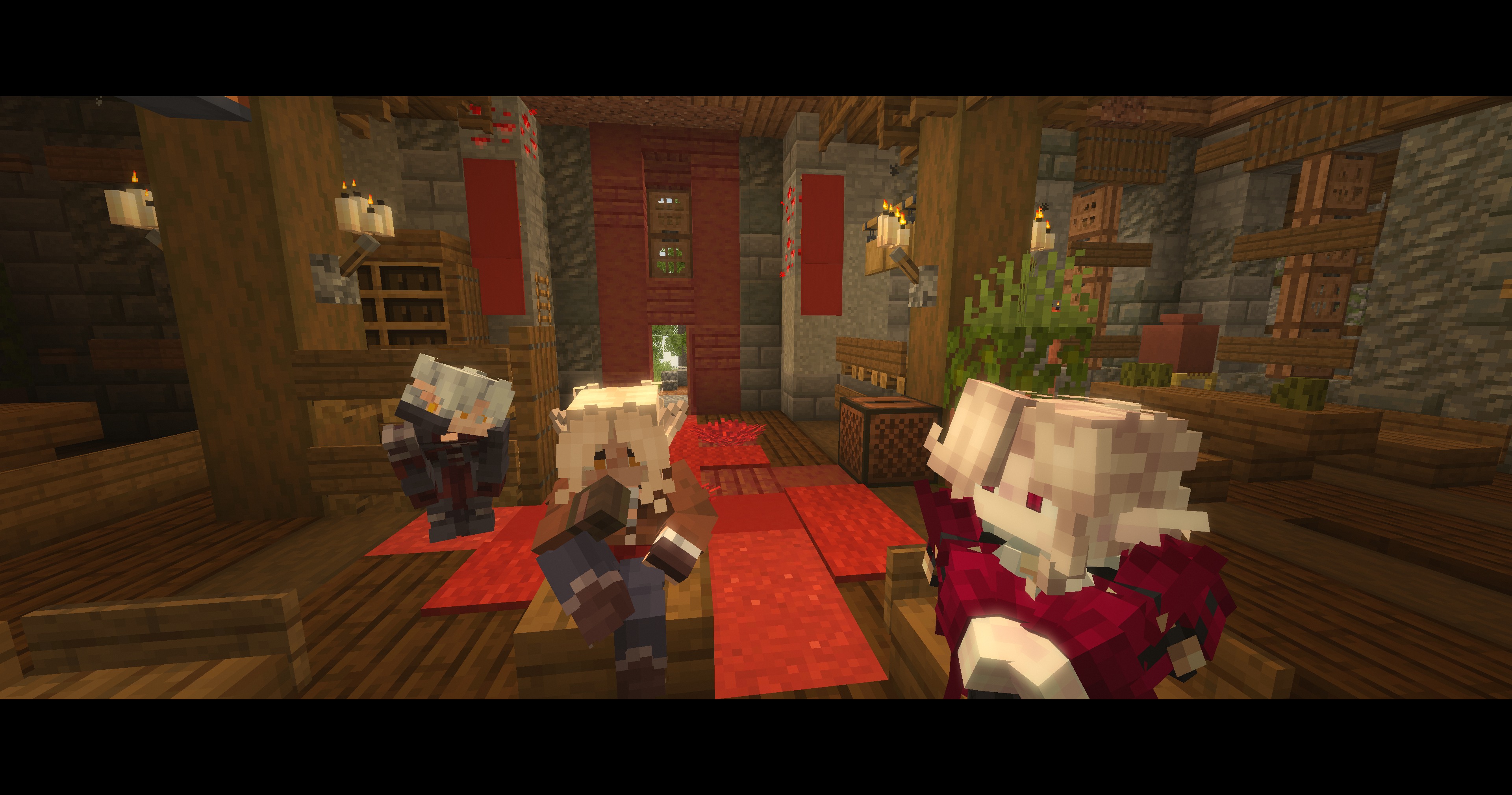
观看它拍摄一段对话——一个连续镜头,事后无任何剪辑。每一次镜头切换都是模组决定谁在发言。
功能介绍
宽银幕遮幅与 HUD。 顶部和底部出现 Cinemascope(宽银幕)遮幅,以可配置的淡入方式滑入。HUD、手持物品和手部模型均可隐藏——各自独立控制。聊天窗口默认保持可见,并被抬升至底部遮幅之外,因为在角色扮演服务器中,一半的场景发生在文本交流中;如果你想要一个完全干净的画面,也可以将其隐藏。准星无论如何都会消失——在导演模式下,摄像机并不在你的眼睛位置,所以它会位于画面中央指向虚空。F3 调试覆盖层故意保留可见状态,以便你在拍摄时仍能读取帧率。
色彩分级。 提供二十种预设风格,通过三路色彩校正器(Lift / Gamma / Gain)以及饱和度、对比度、辉光、胶片颗粒、色差、曝光闪烁、图像扭曲和重影效果实现。它们按照所呈现的风格类型排序,因此使用快捷键循环浏览这些预设时具有可预测性:
| 预设 |
风格 |
| 无分级 |
未经处理的画面,滤镜仍可使用 |
| 明亮 |
|
| 金色时刻 |
琥珀色低太阳,柔和对比度,每个表面都带有轻微雾气 |
| 贵族书房 |
烛光映照面部,温暖阴影,光线缓慢呼吸 |
| 盛大舞会 |
吊灯大厅:提亮的金色,空灵对比度,处处辉光 |
| 篝火旁 |
温暖的火光,深邃凉爽的阴影,轻柔颗粒感 |
| 深冬霜冻 |
苍白、寒冷且平淡,光线从雪地反射 |
| 失真 |
|
| 醉酒 |
房间摇摆,边缘分裂成第二个微弱的副本,灯光拖尾 |
| 发烧 |
病态的黄绿色覆盖在淤青般的阴影上,画面漂浮不定 |
| 彩色 LED |
|
| 浪漫 |
玫瑰色阴影,品红色高光,所有明亮物体都有辉光 |
| 嗜血 |
一切淹没在红色中——拔刀前的那一幕 |
| 附魔 |
青色光线中的紫色阴影,发光且边缘泛彩 |
| 黑暗 |
|
| 阴天早晨 |
寒冷、平淡,提亮的阴影呈乳白色 |
| 恶劣天气 |
冷灰蓝色,强烈对比度,万物湿润反光 |
| 月光 |
蓝色、昏暗、去饱和,宁静 |
| 阴谋 |
蓝绿色阴郁氛围,仅有一盏暖烛照亮面部 |
| 审讯 |
一盏刺眼的灯:漂白色彩,残酷对比度,黑暗角落 |
| 噩梦 |
病态的绿色-品红色,压暗,厚重颗粒感和晕影 |
| 风格化素材 |
|
| 回忆 |
柔和的棕褐色,提亮,边缘发光 |
| 老电影 |
划痕棕褐色,厚重颗粒,门框闪烁,硬晕影 |
| 黑白 |
完全去饱和,高光中带有一丝暖意 |
晕影和胶片颗粒是应用于所有预设的独立开关,整个分级效果有一个强度滑块。
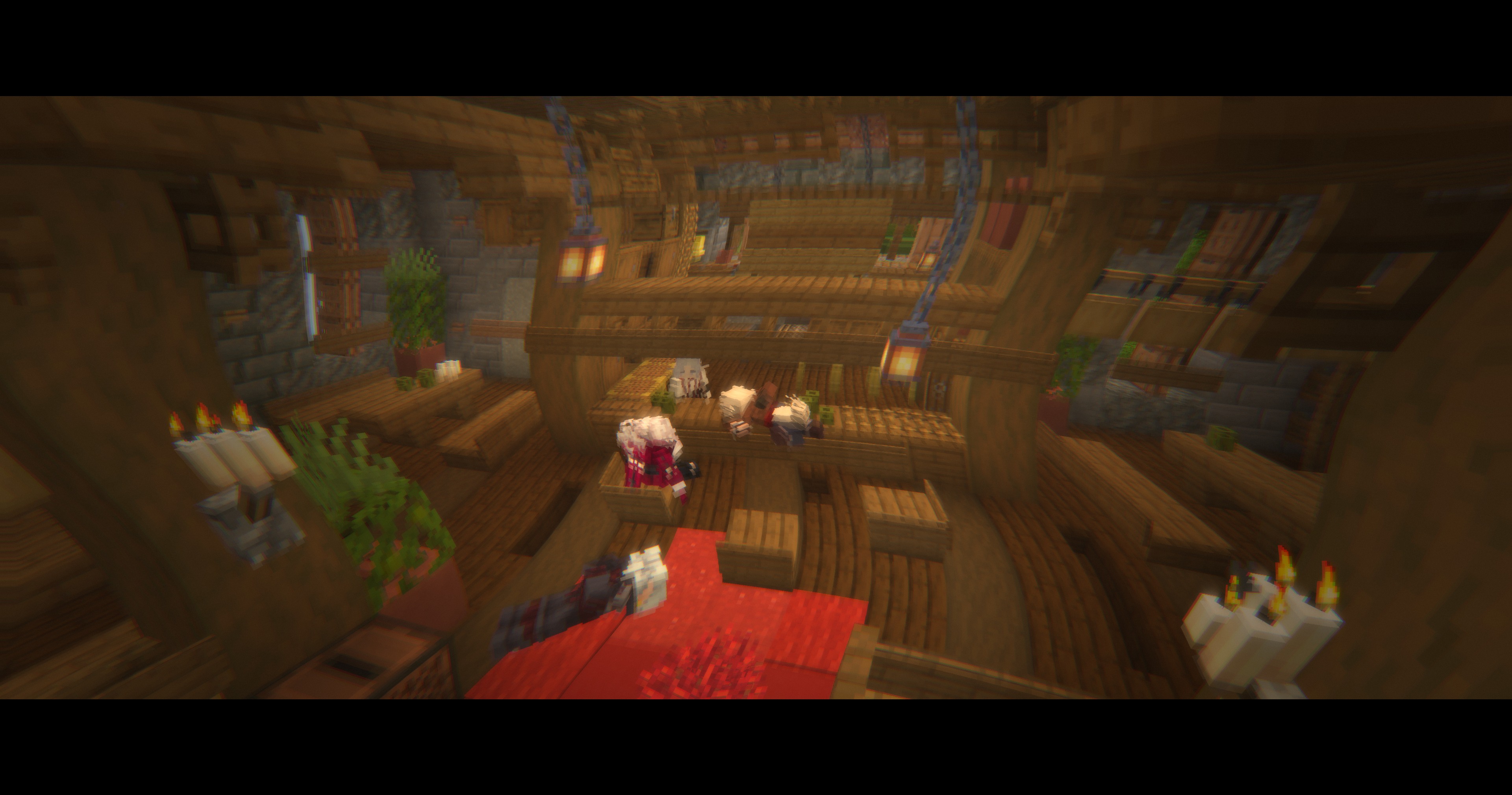
战斗中断。 受到伤害时会立即退出该模式,无淡出过程——这样当你在观看摄像机环绕时不会被人偷袭。可以关闭此功能。
景深效果。 真实的深度缓冲效果,而非屏幕空间伪像:每帧测量摄像机瞄准目标的距离,并对焦平滑地拉向该目标。前景默认保持清晰(模糊它会使你脚下的地面产生鬼影),如果需要也可以单独软化前景。它仅适用于背景确实适合柔和效果的预设——即使在启用滤镜的情况下,“明亮”和“风格化”风格在整个画面中仍保持清晰。
六种摄像机模式。
-
第一人称视角 —— 由你掌控。摄像机会跟随你的鼠标移动,并支持可配置的延迟;位置经过平滑处理,且完全关闭了行走时的画面晃动:原版会在每走一步时左右摇晃视角,而现实中的摄影机并不会这样做。
-
动态摄像机 —— 摄像机脱离控制并拍摄整个场景:包括你和场景半径内的所有玩家(也可以计入命名生物,默认关闭)。它会根据群体中心构图,保持足够容纳所有人的距离,并从轨道镜头、广角帧、跟踪移动、推拉镜头、摇臂和固定机位中选择。它绝不会靠近面部,也绝不会切换到群体后方——那是第三种模式的专属领域。
-
聚焦发言者 —— 在房间安静时提供相同的场景覆盖范围,但一旦 Simple Voice Chat 报告有人说话,摄像机就会切到其面部特写:从 1.35–2.3 格距离进行特写或推进,角度略微偏离其视线方向,以便看到脸部而不是后脑勺。有两个独立的计时器来决定何时切换回全景,因为对话和沉默是两种不同的状态:0.25 秒的停顿足以让另一个人接管画面,而如果房间仅仅是暂时安静,则会多保留上一位发言者一段时间。此外,单次发言也有最大时长限制,因此打开麦克风或按住说话键的人无法整晚独占摄像机。
-
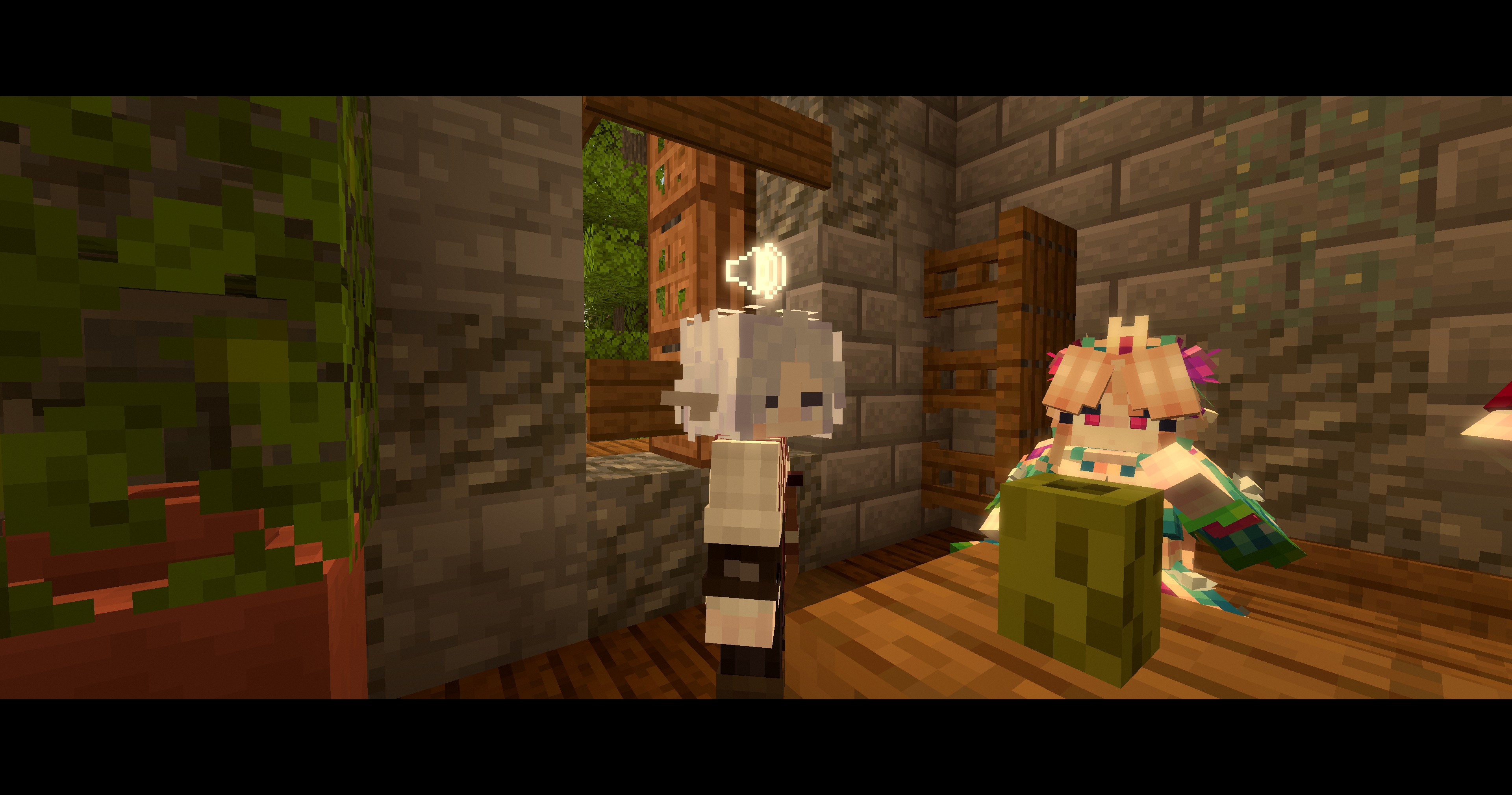
对话模式 —— 这是单操作员使用单台摄像机拍摄对话的方式:在总览镜头中保留所有人,当有人开始说话时切入该人,在其停止说话的瞬间切回总览。无论是两人对谈还是五人围桌,区别不大——不会因为某人不在当前的双人镜头中就被剪掉,这避免了严格的双人正反打镜头在此处造成的遗漏问题。谁被视为“发言者”来自 Simple Voice Chat 或聊天频道——详见下文。摄像机会保持在群体的一侧,绝不跨越人群,因为跨越会导致在剪辑之间每个人的屏幕位置互换,从而使场景难以阅读。这里的剪辑故意设置为瞬时切换——如果在相反角度之间平滑过渡,镜头会直接穿过人物身体。
来自同一场对话的三个连续帧,期间没有任何人按键:
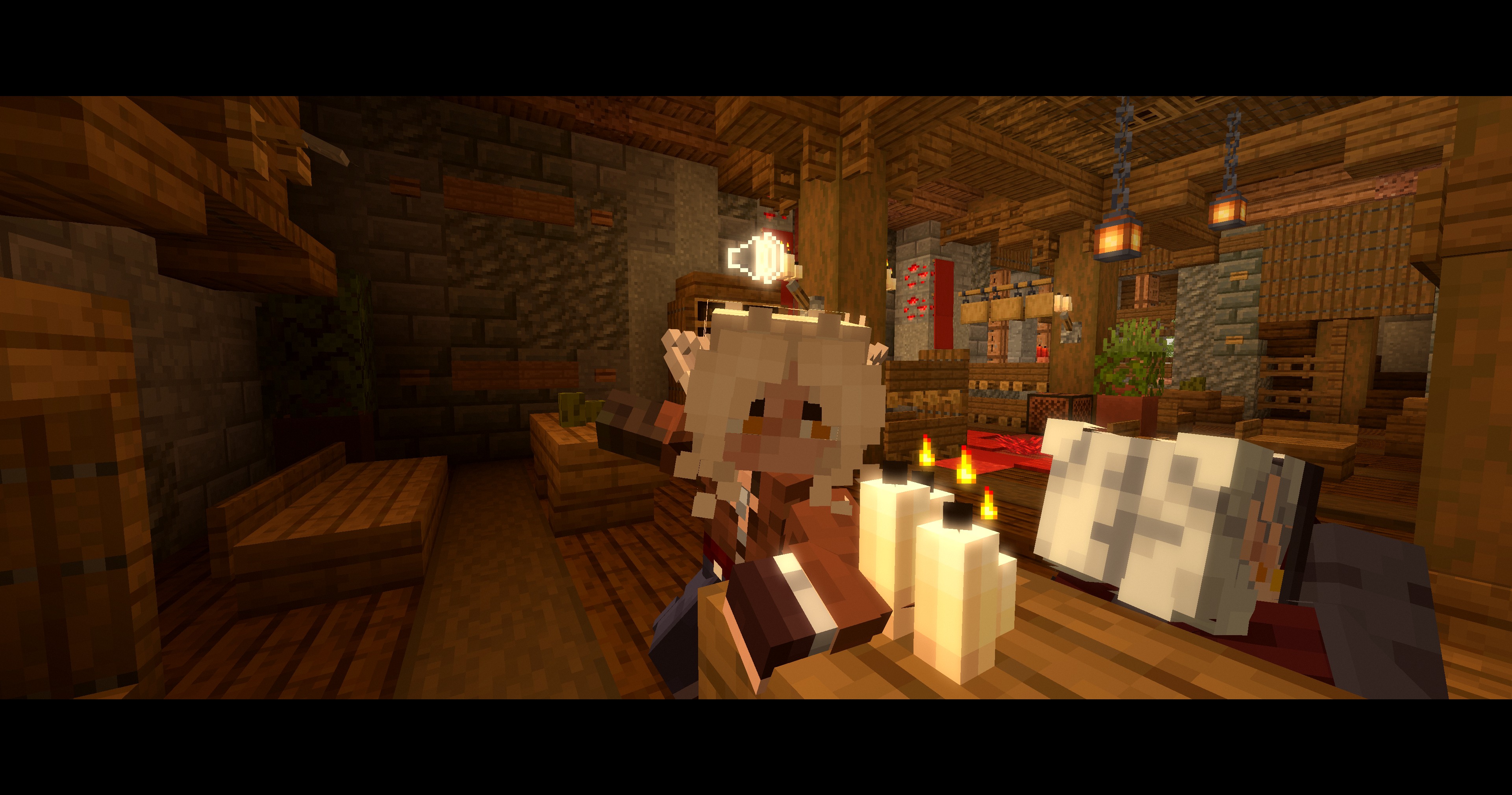
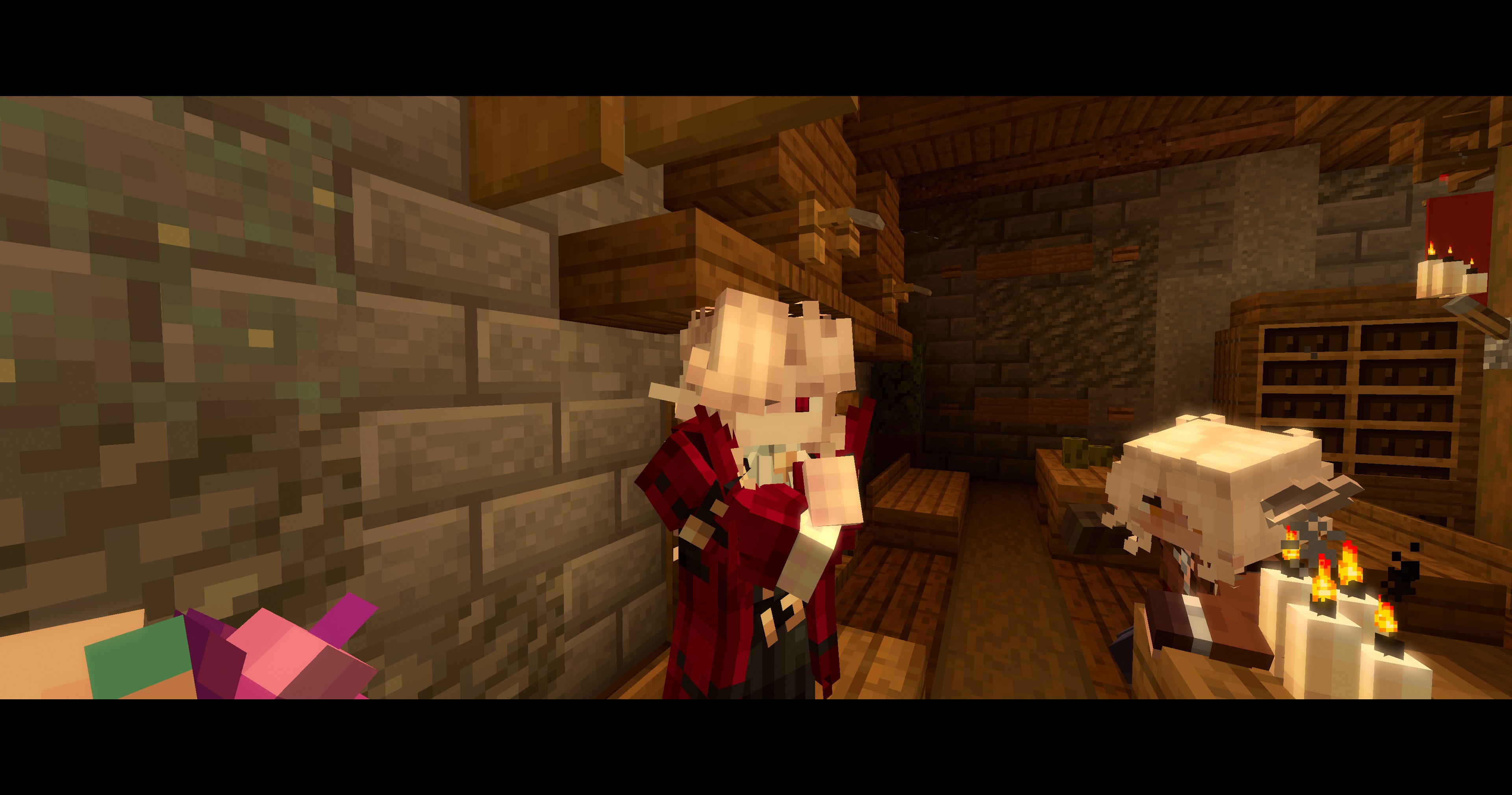
-
三脚架模式 —— 固定在放置位置,仅转动以保持场景在画面内。放下摄像机,走入画面,即可表演场景。适用于演讲、审判、表演以及长时间交谈等场景,避免持续环绕镜头带来的疲劳感。
-
侧跟轨道 —— 以固定角度沿场景侧面行进,保持同步速度。适用于步行、游行和骑行。大约每二十秒交换一次侧边,如果当前侧空间不足则立即切换。
镜头尊重房间结构:每秒多次发射八条射线测量场景周围的可用空间,并将镜头指向有足够空间的一侧;摄像机在近景平面的四个角会与墙壁碰撞检测;如果一个镜头被卡在几何体中,会从不同角度重新构图。在太小的房间中,如果旅行镜头无法施展,摄像机会切换为从天花板俯视的角度;如果墙壁将其挤压到正在拍摄的人群内部,它会爬出人群。
镜头也尊重人物。每一帧,摄像机都会根据实际视场检查每位参与者——包括黑边区域,因为遮罩会吃掉画面的顶部和底部——并精确后退缺失的部分,这样无论群体如何分布,都不会有人被排除在画面之外。每秒几条射线确认场景实际上可见且未被柱子遮挡;如果某个角度只能拍到空无一物的景象,则会被丢弃并切换到更好的角度。没有碰撞体积的告示牌、物品展示框和其他杂物无法从镜头前推开,因此任何最终位于镜头正前方的物体会简单地不被渲染。
文本演绎的角色扮演。 角色扮演服务器上的每个场景中,有一半内容是打字而非说话——/me、/do、一句台词——而只监听声音的摄像机会在那一半时间里拍错人。因此,一条消息也被视为一次发言,摄像机会切到写下该消息的人。
确定是谁写的消息不需要服务端插件。普通玩家聊天会在数据包中携带发送者信息。所有聊天插件重新格式化后的内容都会作为系统消息出现,没有任何作者标识——但服务器通常会使用原版的 show_entity 悬停效果装饰名称,即当你将鼠标悬停在某人的消息上时看到的提示框,而这种悬停效果本质上是一个实体类型和一个 UUID。因此,作者信息是从服务器原本就发送的装饰中提取出来的。
消息不被视为语音,因为它不是语音。语音是一个持续时间;消息是一个附带阅读时间的瞬间,因此画面会保持几秒加上该行文字的阅读时间(设有上限)。实时语音始终优先于文字输入。包含你列出的标记的内容——例如角色外交流符号 ((、全局频道前缀——都会被忽略,同样,距离过远无法进入镜头的人也会被忽略。
摄像机属于开启它的人。如果你走到离其他人十格远的地方,你就离开了场景,无论场景半径设置如何——因此摄像机会跟随你离开,而不是留在原地拍摄你不再参与其中的对话。这个距离是可配置的,并且可以关闭。
手动切换镜头。 角度可以随时通过按键更改,也可以完全关闭自动切换功能——此时画面会保持静止,直到你再次请求切换。仅在摄像机正在拍摄房间时生效:谁开始说话,镜头就会立刻切给谁,因为这类模式的核心就是让镜头跟随当前发言者,而没有任何按键比声音反应更快。如果画面卡在墙上,系统仍会自动重新构图,因为保持一个正确的画面是有意义的,但保持一个错误的画面则毫无价值。
摄像机故意忽略的一点是人们视线看向哪里。镜头的角度属于镜头本身:它在构图确定后即固定不变,只有当某人真正缓慢转身时,镜头才会随之移动。否则,屏幕上的人将能通过鼠标控制摄像机的朝向——这对所有观看者来说都是不合适的。
控制键
| 按键 |
操作 |
F7 |
切换电影模式 |
| 未绑定 |
打开设置界面 |
| 未绑定 |
下一个摄像机模式 |
| 未绑定 |
下一个色彩分级 |
| 未绑定 |
下一个场景配置 |
| 未绑定 |
在此处放置三脚架 |
F9 |
改变角度 |
所有按键均可在原版控制设置界面中的 Absolute Cinema Camera 部分进行重新绑定。
场景配置
场景配置是一个命名好的舞台布置方案——包括摄像机模式、色彩分级以及启用的滤镜——只需按一次键或执行一条命令即可切换。没有人希望在场景中途打开设置界面,而通过按键循环切换色彩分级则需要记住顺序。因此:一次性搭建好设备,将其保存为一个名称,每当出现相应类型的场景时调用即可。
/cinema scene                  列出所有配置,并标记当前激活的配置
/cinema scene set <name>       应用该配置
/cinema scene save <name>      将当前设置以该名称保存
/cinema scene delete <name>    删除该配置
默认附带五个示例配置:talks(对话覆盖,贵族书房)、ball(动态,盛大舞会,较宽视角)、tavern(发言人聚焦,篝火旁)、duel(动态,嗜血,较近视角)和 stage(三脚架,盛大舞会)。你可以自由重命名、修改或删除它们——场景配置只是配置文件中的一行记录。
仅存储与舞台布置相关的内容:模式、分级、滤镜开关、分级强度和镜头距离。偏好设置如平滑度、镜头时长和场景半径保持全局统一,因此场景配置绝不会与你的个人设置冲突。
命令
/cinema                       打开设置界面
/cinema on | off | toggle     切换电影模式
/cinema mode <mode>           first_person | dynamic | speaker_focus | dialogue | tripod | side_track
/cinema grade <grade>         任意预设 ID,支持 Tab 补全
/cinema scene ...             参见上方的场景配置说明
/cinema tripod                在你站立的位置放置三脚架
/cinema shot                  改变角度,效果等同于按键
构建
Gradle 8.14.3 配合 Loom 1.11.8,Java 21。执行 ./gradlew build 会在 build/libs 目录下生成 jar 包。执行 ./gradlew runClient 可直接启动开发客户端进入测试世界;传入参数 -Dabsolutecinema.debug=true(该任务已默认设置)可查看后处理模块和导演模块的操作日志。
设置
安装 Cloth Config 后,设置项会在 Mod Menu 中合并为一个可搜索的列表;请注意按下 Save changes(保存更改),因为 Cloth 在按下 Escape 时会丢弃未保存的编辑。如果没有安装 Cloth,模组将回退到其内置的设置界面,该界面会立即应用所有更改,且涵盖完全相同的设置选项。
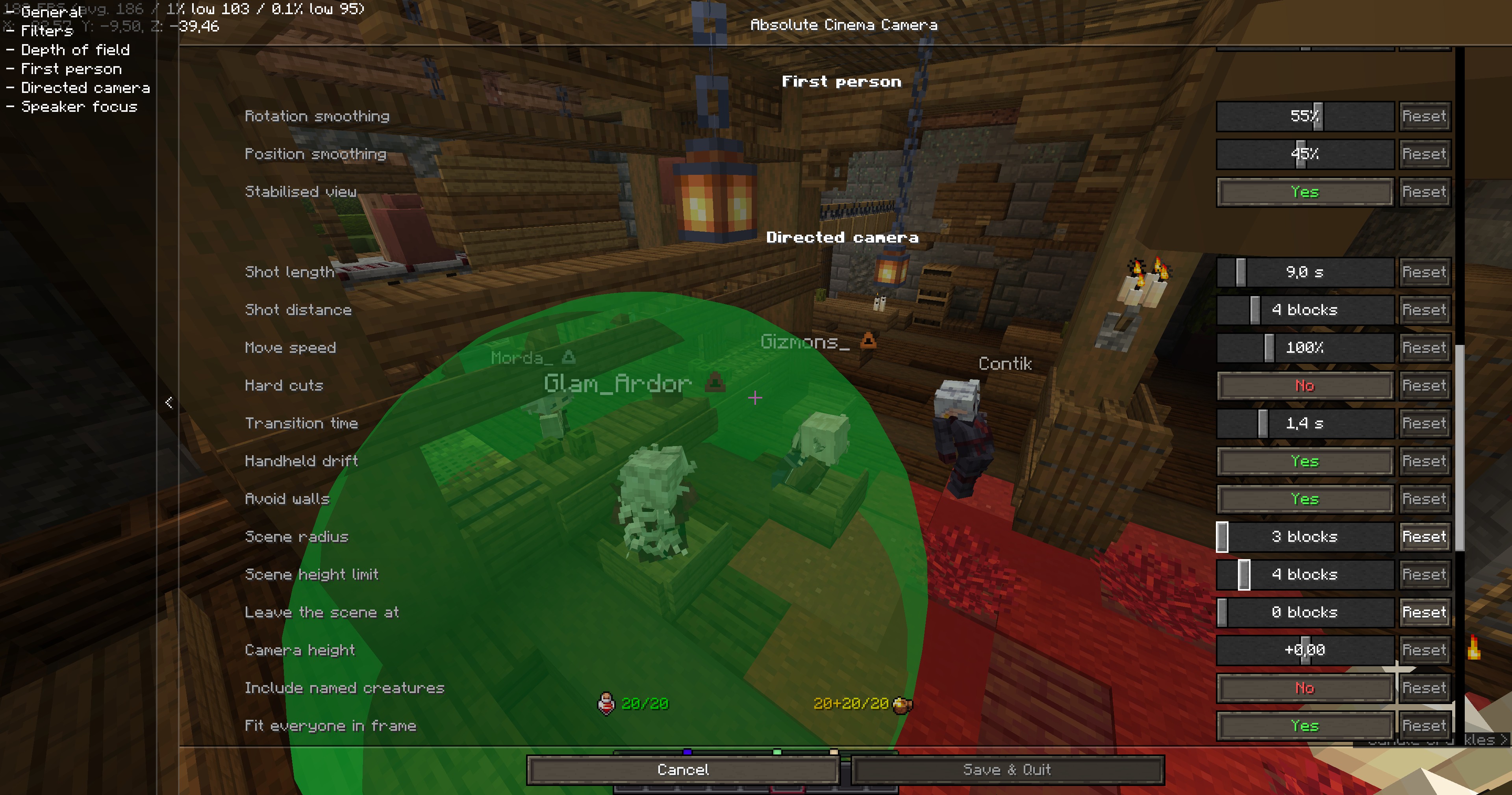
每项设置在界面打开期间即时生效,因此你可以通过观察画面来构图,而不是靠猜测、保存、关闭再重新进入。出于相同原因,该界面背后的背景保持清晰可见。此外,在调整场景半径时,实际检测的范围会以绿色绘制在玩家周围——这是一个被高度限制截断顶部和底部的球体——从而让你通过观察谁落在范围内来直观地设定半径。该范围在设置界面关闭后仍会保留几秒,足以让你转身查看。
依赖
- Minecraft 1.21.6 – 1.21.8,Fabric Loader 0.16+,Fabric API
- 可选:Cloth Config(更完善的设置界面),Mod Menu(设置按钮入口)
- 可选:Simple Voice Chat —— 发言人聚焦模式和对话模式用于识别实际发言者的工具。请像往常一样在服务端安装它;本模组仅监听你自己的客户端,此处无需任何服务端插件。即使没有安装,这两种模式仍可正常工作,只是无法跟随语音。
其他版本需要单独的构建:1.21–1.21.5 使用旧版着色器系统,而 1.21.9+ 又重构了渲染器。
鸣谢
感谢 Contik、Cmetanochkaa、Gizmons_ 和 Morda_ 对本模组的测试。
许可证
LGPL-3.0-or-later。详见 LICENSE。
Absolute Cinema Camera
A client-side Fabric mod that turns Minecraft into a film. One key puts the game into cinema
mode: black bars slide in, the HUD goes, the picture is graded and softened, and the camera
either smooths out your own movement or detaches entirely and shoots the scene for you.
Built for roleplay servers — nothing is required on the server side, and other players do not
need the mod.
Watch it film a conversation — one continuous take, nothing cut
afterwards. Every change of frame is the mod deciding who has the floor.
What it does
Letterbox and HUD. Cinemascope mattes at the top and bottom, sliding in over a configurable
fade. The HUD, the held item and the hand can all be hidden — each separately. The chat stays
visible by default and is lifted clear of the bottom matte, because on a roleplay server half the
scene happens in text; hide it too if you want a completely clean frame. The crosshair goes
regardless of what else you keep — in the directed modes the camera is nowhere near your eyes, so
it would sit in the middle of the picture pointing at nothing. The F3 debug overlay deliberately
stays visible so you can still read the framerate while filming.
Colour grading. Twenty looks, applied through a three-way colour corrector (lift / gamma /
gain) plus saturation, contrast, glow, grain, chromatic aberration, exposure flicker, image warp
and double vision. They are ordered by the kind of look they give, so cycling through them with
the key stays predictable:
| Preset |
Look |
| No grade |
Untouched picture, filters still available |
| Bright |
|
| Golden hour |
Amber low sun, soft contrast, light hazing off every surface |
| Noble study |
Candlelit gold on the faces, warm shadows, the light slowly breathing |
| Grand ball |
Chandeliered hall: lifted gold, airy contrast, glow everywhere |
| By the campfire |
Warm firelight, cool deep shadows, gentle grain |
| Deep frost |
Pale, cold and flat, light bouncing off snow |
| Distorted |
|
| Drunk |
The room sways, edges split into a second faint copy, lights smear |
| Fever |
Sickly yellow-green over bruised shadows, the picture swimming |
| Colour led |
|
| Romance |
Rose shadows, magenta highlights, a glow on everything bright |
| Bloodlust |
Everything drowns in red — the shot before someone draws a blade |
| Enchantment |
Violet shadows against cyan light, glowing and fringing |
| Dark |
|
| Overcast morning |
Cold, flat, milky lifted shadows |
| Foul weather |
Cold grey-blue, hard contrast, everything wet and glinting |
| Moonlight |
Blue, dim, desaturated, quiet |
| Conspiracy |
Blue-green gloom with one warm candle holding the faces |
| Interrogation |
One harsh lamp: bleached colour, brutal contrast, dark corners |
| Bad dream |
Sickly green-magenta, crushed, heavy grain and vignette |
| Stylised stock |
|
| Memory |
Soft sepia, lifted, glowing at the edges |
| Old film |
Scratched sepia, heavy grain, gate flicker, hard vignette |
| Black and white |
Full desaturation with a hint of warmth in the highlights |
Vignette and film grain are separate toggles that apply to every preset, and the whole grade has
a strength slider.
Combat interrupt. Taking damage drops the mode instantly, with no fade — so nobody can
ambush you while you are watching a camera orbit. It can be switched off.
Depth of field. A real depth-buffer effect, not a screen-space fake: the distance to what
the camera is aimed at is measured every frame and the focus is pulled smoothly towards it. The
foreground is left sharp by default (blurring it ghosts the ground at your feet), and can be
softened separately if you want it. It only applies to the presets a soft background actually
suits — the bright and stylised looks stay sharp across the whole frame even with the filter on.
Six camera modes.
-
First person — you keep control. The camera follows your mouse with a configurable lag, the
position is smoothed, and the walking sway is switched off entirely: vanilla rocks the view
from side to side on every step, and no camera on a real set does that.
-
Dynamic camera — the camera detaches and shoots the whole scene: you and every player within
the scene radius (named creatures can be counted in as well, off by default). It composes
around the group centre at a distance wide enough to hold everyone, and picks from orbits,
wide frames, tracking moves, dollies, cranes and locked-off frames. It never approaches a
face, and never swings behind the group — that is reserved for the third mode.
-
Focus on speaker — the same scene coverage while the room is quiet, but the moment
Simple Voice Chat reports someone talking, the
camera cuts to their face: a close-up or a push-in from 1.35–2.3 blocks, angled off their own
gaze so you see the face, not the back of the head. Two separate timings decide when it lets
go, because a conversation and a silence are different things: a quarter of a second's pause is
enough for somebody else to take the frame, while a room that has simply gone quiet holds the
last speaker a while longer. A turn also has a maximum length, so an open mic or a held talk
key cannot own the camera for the rest of the evening.
-
Dialogue — how one operator with one camera covers a conversation: hold everybody in a master
shot, cut in to whoever starts speaking, cut back out the moment they stop. Two people or a table
of five makes no difference — nobody is dropped from the film for not being in the pair, which is
what a strict two-person shot-reverse-shot did here. Who counts as the speaker comes from Simple
Voice Chat, or from the chat — see below. The camera keeps to one side of the group and never
crosses it, because crossing
makes everyone swap sides of the screen between cuts and the scene stops reading. Cuts here are
instant on purpose — gliding between opposite angles would fly straight through the people.
Three consecutive frames from one conversation, with nobody touching a key between them:
-
Tripod — locked off wherever you planted it, turning only to keep the scene in frame. Put the
camera down, walk into shot, play the scene. For speeches, trials, performances, and long talks
where constant orbits get tiring.
-
Side track — travels alongside the scene at a fixed angle, keeping pace. For walks,
processions and rides. It swaps sides every twenty seconds or so, and immediately if the current
side runs out of room.
Shots respect the room: eight rays measure the free space around the scene a few times a second
and shots are aimed at whichever side has room for them; the camera is clipped against walls
along all four corners of its near plane; a shot that stays jammed against geometry is recomposed
from a different angle. In a room too small for travelling shots the camera switches to looking
down from the ceiling, and if a wall ever squeezes it inside the people it is filming, it climbs
out of them.
Shots also respect the people. Every frame the camera checks each participant against its real
field of view — the letterbox included, since the mattes eat the top and bottom of the picture —
and backs off by exactly what is missing, so nobody is left outside the frame however the group
is spread out. A few rays a second confirm the scene is actually visible and not behind a pillar;
a shot of nothing is dropped for a better angle. Signs, item frames and other clutter with no
collision cannot be pushed away from the lens, so anything that ends up right in front of it is
simply not drawn.
Roleplay played out in text. Half of every scene on a roleplay server is typed rather than
spoken — a /me, a /do, a line of dialogue — and a camera that only listens for voices spends
that half filming the wrong person. So a message counts as a turn too, and the camera cuts to
whoever wrote it.
Finding out who wrote it takes no server-side plugin. Ordinary player chat carries the sender in
the packet. Everything a chat plugin has reformatted arrives as a system message with no author
attached anywhere — but servers habitually decorate the name with the vanilla show_entity
hover, the tooltip you get pointing at somebody's message, and that hover is by definition an
entity type and a UUID. The author is therefore read out of decoration the server was already
sending.
A message is not treated as speech, because it is not one. Speech is a duration; a message is an
instant with a reading time attached, so the frame is held for a couple of seconds plus however
long the line takes to read, capped. A live voice always outranks writing. Anything containing a
marker you have listed — an out-of-character ((, a global channel prefix — is ignored, and so is
anybody too far away to be in the shot.
The camera belongs to whoever switched it on. Walk ten blocks away from everybody else and you
have left the scene, whatever the scene radius says — so the camera leaves with you, rather than
staying behind to film a conversation you are no longer part of. The distance is configurable, and
can be switched off.
Cutting by hand. The angle can be changed on a key at any time, and the automatic change can
be switched off altogether — then a frame stands until you ask for another one. Only while the
camera is filming the room: whoever starts speaking still takes the frame at once, since being
told who has the floor is the point of those modes and no key is quicker than a voice. A shot
jammed against a wall is still recomposed without asking, because holding a frame is worth doing
and holding a broken one is not.
One thing the camera deliberately ignores is where people are looking. A shot's angle belongs to
the shot: it is fixed when the shot is composed and only follows someone who genuinely turns
around, slowly. Otherwise whoever was on screen would be steering the camera with their mouse —
for everybody watching.
Controls
| Key |
Action |
F7 |
Toggle cinema mode |
| unbound |
Open the settings screen |
| unbound |
Next camera mode |
| unbound |
Next colour grade |
| unbound |
Next scene profile |
| unbound |
Plant the tripod here |
F9 |
Change the angle |
All of them are rebindable in the vanilla controls screen, under Absolute Cinema Camera.
Scene profiles
A profile is a named staging setup — camera mode, colour grade and which filters are on — that
switches in one keypress or one command. Nobody wants to open a settings screen in the middle of a
scene, and cycling grades by key means remembering the order. So: set the rig up once, save it
under a name, call it whenever that kind of scene happens.
/cinema scene                  list the profiles, marking the active one
/cinema scene set <name>       apply it
/cinema scene save <name>      save the current setup under that name
/cinema scene delete <name>    remove it
Five come ready as examples: talks (dialogue coverage, noble study), ball (dynamic, grand
ball, wider framing), tavern (speaker focus, campfire), duel (dynamic, bloodlust, closer
framing) and stage (tripod, grand ball). Rename, rework or delete them freely — a profile is
just a line in the config.
Only what belongs to staging is stored: mode, grade, the filter toggles, grade strength and shot
distance. Preferences like smoothing, shot length and scene radius stay global, so profiles never
fight your personal settings.
Commands
/cinema                       open the settings
/cinema on | off | toggle     switch cinema mode
/cinema mode <mode>           first_person | dynamic | speaker_focus | dialogue | tripod | side_track
/cinema grade <grade>         any preset id, with tab completion
/cinema scene ...             see scene profiles above
/cinema tripod                plant the tripod where you are standing
/cinema shot                  change the angle, the same as the key
Building
Gradle 8.14.3 with Loom 1.11.8, Java 21. ./gradlew build produces the jar in build/libs.
./gradlew runClient starts a dev client straight into a test world; pass
-Dabsolutecinema.debug=true (already set for that task) to have the post processor and the
director log what they are doing.
Settings
With Cloth Config installed the settings open from
Mod Menu as one searchable list; remember to press Save
changes, since Cloth discards edits on Escape. Without Cloth the mod falls back to its own
built-in screen, which applies everything immediately and covers exactly the same settings.
Every setting takes effect while the screen is open, so a shot can be framed by looking at it
rather than by guessing, saving, closing and going back in. The background behind that screen is
left clear for the same reason. And while the scene radius is being changed, the shape it actually
tests is drawn around the player in green — a sphere of that radius, cut flat top and bottom by
the height limit — so it can be set by seeing who falls inside it. It stays up for a few seconds
after the settings close, which is long enough to turn round and look.
Requirements
- Minecraft 1.21.6 – 1.21.8, Fabric Loader 0.16+, Fabric API
- Optional: Cloth Config (fuller settings screen), Mod Menu (settings button)
- Optional: Simple Voice Chat — what the speaker
focus and dialogue modes use to know who is actually talking. Install it on the server as usual;
this mod only listens on your own client, and nothing here needs a server-side plugin. Both
modes still work without it, they just cannot follow a voice.
Other versions need a separate build: 1.21–1.21.5 use the old shader system, and 1.21.9+
reworked the renderer again.
Thanks
Thanks to Contik, Cmetanochkaa, Gizmons_ and Morda_ for testing the mod.
Licence
LGPL-3.0-or-later. See LICENSE.


 模组

 模组

 模组
 模组

 模组
 模组
评论 0
登录后参与评分
还没有评论,来抢沙发吧