
Accessorify
注意:Tool Pouch 是该模组的改进版本,适用于更新的 Minecraft 版本且不依赖 Accessories API。本模组将不再针对更新的 Minecraft 版本进行更新。
此模组允许你使用 Accessories 将部分原版物品作为饰品装备,从而增加新功能并节省背包空间。
你可以在配置菜单中选择哪些物品会被转化为饰品,以及其他一些配置选项,以便按需挑选。默认情况下,下列列出的所有物品都会被转化为饰品。
Fabric 和 NeoForge 版本均需要 Fzzy Config 和 Accessories 及其所有依赖项。若要让灯笼饰品在玩家周围发光,还需要安装动态光影模组,例如 LambDynamicLights。
在 Fabric 上,可以通过 ModMenu 访问配置菜单;在 NeoForge 上,则通过内置的“模组”菜单访问。
自 2.2.1 版本起,Accessorify 现已支持通过 Sinytra Connector 在 Forge(Minecraft 1.20.1)上运行。已在以下环境下的 Forge 47.4.8 中测试通过:
accessories-neoforge-1.0.0-beta.46+1.20.1accessorify-2.2.1+1.20.1cloth-config-11.1.136-forgeConnector-1.0.0-beta.46+1.20.1fabric-api-0.92.6+1.11.14+1.20.1fzzy_config-0.7.2+1.20.1+forgekotlinforforge-4.11.0-all
槽位模式
Accessorify 中的饰品可以根据你的需求,通过选择以下一种槽位模式以不同方式装备:
- 默认槽位模式:饰品将在默认的饰品槽位(披风、腰带、手腕等)中装备,随着槽位被占用,对应的复制槽位也会被创建。这是默认行为,在其他模组也使用相同饰品槽位的整合包中非常有用。
- 无复制的默认槽位模式:与默认槽位模式相同,但不会创建槽位复制品。如果你不需要额外的槽位但仍想使用默认饰品槽位,此模式很有用。
- 唯一槽位模式:该模组添加的每个饰品都会获得其唯一的专属槽位,而不是使用默认槽位(箭矢和潜影盒无论选择何种槽位模式都始终使用唯一槽位)。这对重度模组整合包和“类原版”整合包都有用,但会引入大量新槽位。
从左至右:默认槽位模式;无复制的默认槽位模式;唯一槽位模式
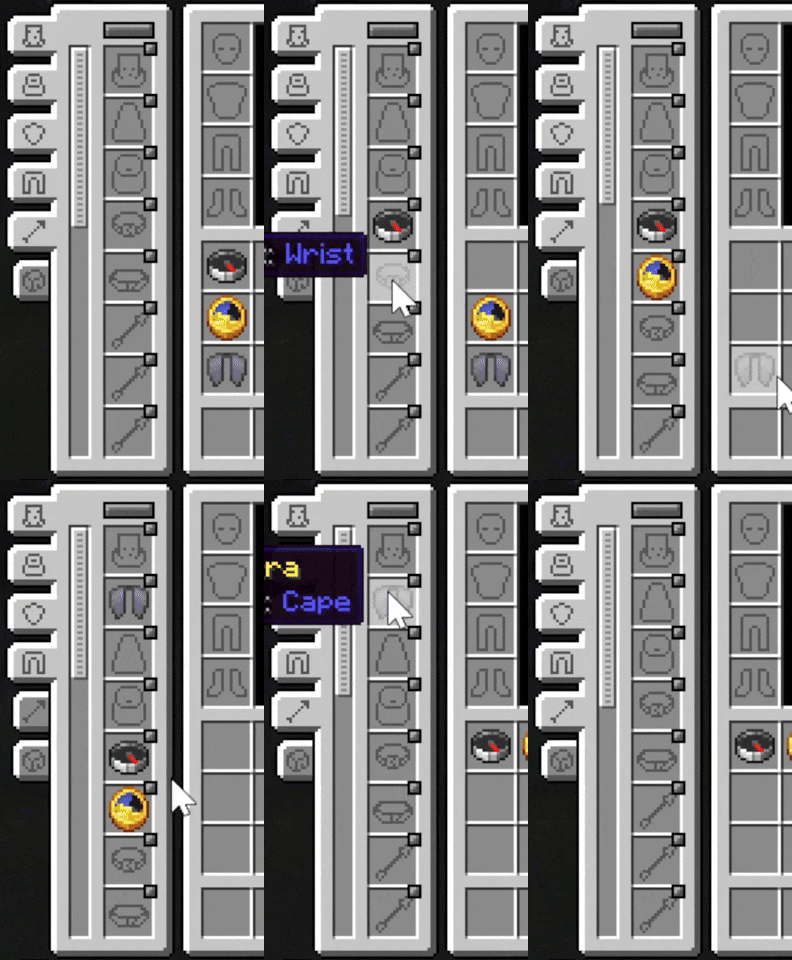
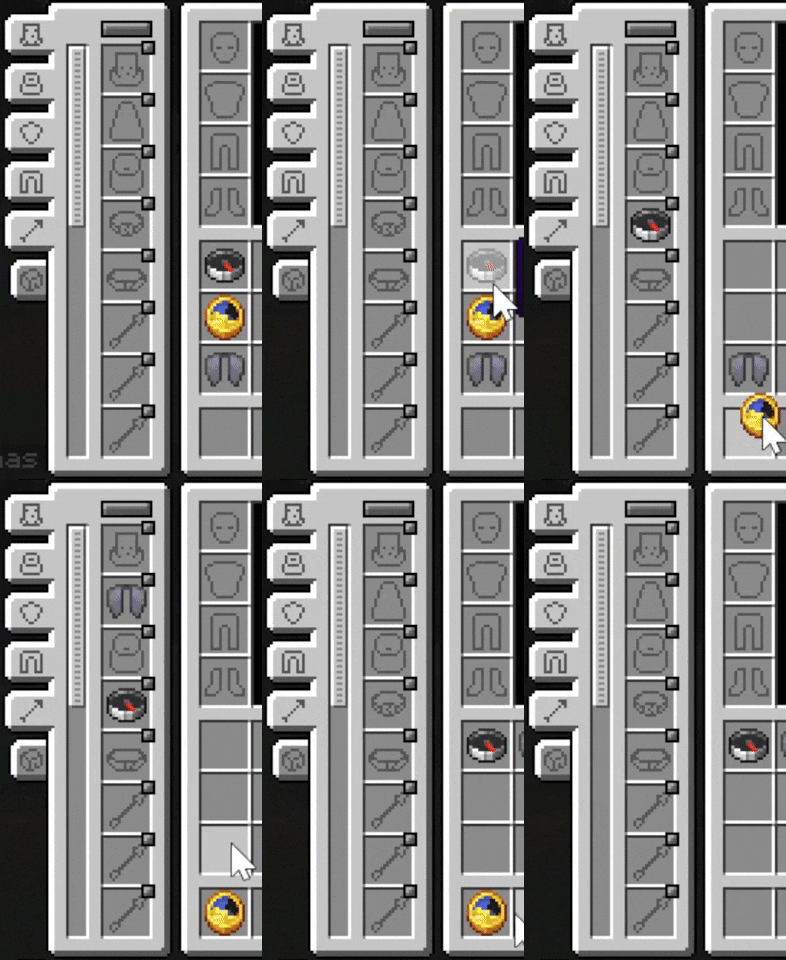
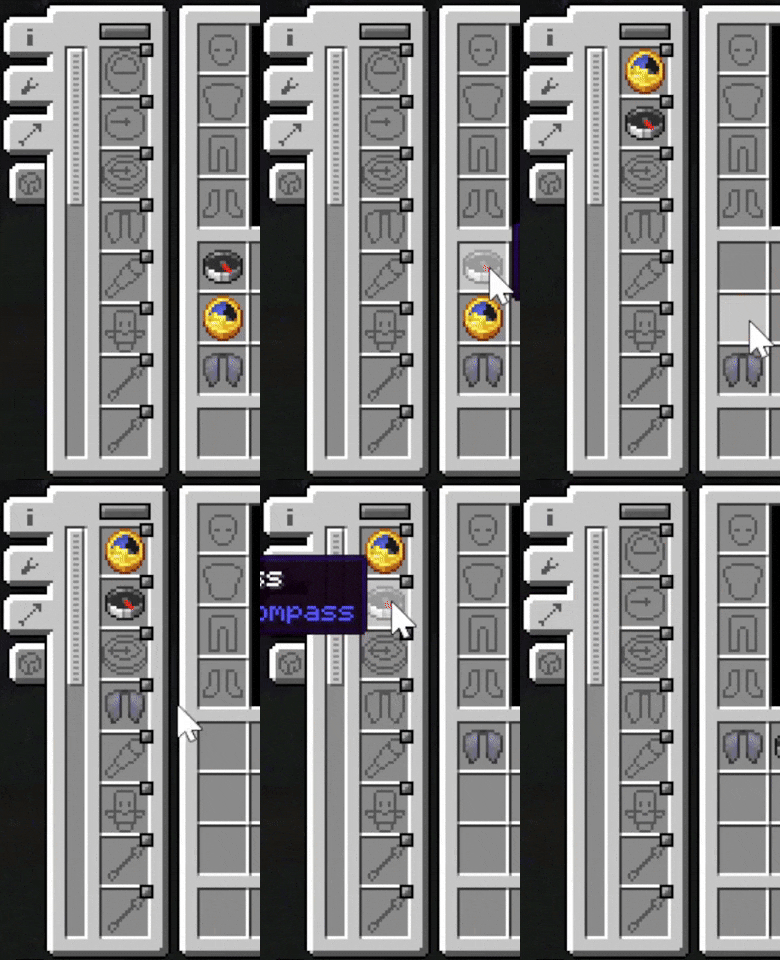
饰品列表
时钟、指南针、重生指南针
现在可以在手腕槽位装备,或在唯一槽位模式下在其各自的专属槽位中装备。
装备后,相关信息将显示在屏幕左上角:
- 指南针:坐标、朝向、生物群系
- 时钟:时间与日期、天气、月相、季节(如果安装了季节模组)
- 重生指南针:上次死亡的坐标
覆盖层的外观可在配置界面中进行广泛自定义,包括显示的信息、文字背景、阴影和颜色。
为了获得更精致且视觉效果更好的覆盖层,可以使用 Immersive Overlays。该模组将替换 Accessorify 的指南针和时钟覆盖层。
此外,还有一个选项可以在生存模式下隐藏由饰品显示的 F3 调试屏幕信息,使其成为此类信息的唯一来源。
鞘翅
现在可以在披风槽位装备,或在唯一槽位模式下在其专属的鞘翅槽位中装备。
没有额外功能,但可以腾出胸甲槽位,让你同时装备胸甲和鞘翅。
不死图腾
现在可以在护符槽位装备,或在唯一槽位模式下在其专属的图腾槽位中装备。
装备后,当你即将死亡时,图腾将被触发并消耗以拯救你,效果如同手持它一样。
望远镜
现在可以在腰带槽位装备,或在唯一槽位模式下在其专属的望远镜槽位中装备。
装备后,按住 C 键(默认按键绑定,可配置)即可使用望远镜放大视野。在放大状态下滚动鼠标滚轮可以调整缩放级别。
灯笼
现在可以在腰带槽位装备,或在唯一槽位模式下在其专属的灯笼槽位中装备。
装备后,灯笼会出现在玩家身上并发出与灯笼自身光照等级匹配的光线。需要安装动态光影模组才能使灯笼发光。
末影箱
现在可以在背部槽位装备,或在唯一槽位模式下在其专属的末影箱槽位中装备。
装备后,按 V 键(默认按键绑定,可配置)即可打开玩家的末影储物箱。
潜影盒
现在可以在潜影盒槽位装备,该槽位由本模组添加。
装备后,按住 X 键(默认按键绑定,可配置)会弹出潜影盒选择小部件。在小部件打开时滚动鼠标滚轮可选择要打开的潜影盒。按住潜行键可查看当前选中的潜影盒的工具提示。释放按键即可打开选中的潜影盒。选择状态会被保存,因此只需再次按下 X 键即可打开你之前打开过的潜影盒。如果已装备一个潜影盒,则会跳过小部件并直接打开它。默认情况下你有 3 个潜影盒槽位。如果需要更多(或更少),请遵循页面底部的说明。
箭矢
现在可以在由本模组添加的箭矢栏位中进行装备。如果模组将自定义箭矢添加到 minecraft:arrows 标签中,则支持模组添加的箭矢。
当手持远程武器时,按住 X 键会打开箭矢选择界面。在界面打开状态下滚动鼠标滚轮可选择该武器要使用的箭矢栏位。松开潜行键即可关闭界面。默认情况下你有 3 个箭矢栏位。如果需要更多(或更少)栏位,请按照页面底部的说明进行操作。
配置潜影盒与箭矢栏位数量
在游戏中打开 配件 配置文件(不是 Accessorify),向下滚动直到找到“栏位数量修饰符”并进行以下操作:
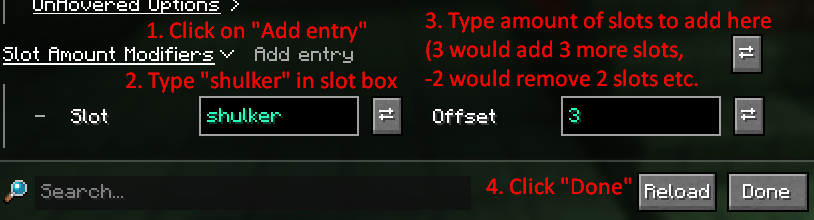
在栏位框中输入 arrow 即可以相同方式修改箭矢栏位的数量。
模组兼容性
- Additional Lanterns:由该模组添加的灯笼可装备在腰带/灯笼栏位,并在安装动态光影模组时发出光源
- Deeper and Darker:灵魂鞘翅可装备在披风/鞘翅栏位
- Friends and Foes:冻结图腾与幻象图腾可装备在饰品/图腾栏位
- Reinforced Shulker Boxes:强化潜影盒可装备在潜影盒栏位,并且可以像原版潜影盒一样打开
- Ars Elixirum:女巫图腾可装备在饰品/图腾栏位
- Serene Seasons 或 Fabric Seasons + Fabric Seasons Extras:日历可装备在饰品/日历栏位,并在信息叠加层中显示当前季节
- Notes:如果开启了“在生存模式下隐藏 F3 菜单中的游戏信息”,则用于向笔记添加坐标等信息的按钮将被禁用,除非你已装备指南针
Accessorify
NOTICE: Tool Pouch is an improved version of this mod that works on newer Minecraft versions and doesn't rely on Accessories API. This mod won't be updated for newer Minecraft versions.
This mod lets you equip some vanilla items as accessories using Accessories, adding new functionality and saving up inventory space.
You can choose which items will be turned into accessories in the configuration menu, among some other configuration options, if you want to pick and choose. By default, all of the items listed below are turned into accessories.
Both Fabric and NeoForge versions require Fzzy Config and Accessories and all of its dependencies. A dynamic lights mod such as LambDynamicLights is required for the lantern accessory to emit light around the player.
The configuration menu can be accessed using ModMenu on Fabric, and the built-in Mods menu on NeoForge.
Since version 2.2.1, Accessorify now works on Forge for Minecraft 1.20.1 using Sinytra Connector. Tested on Forge 47.4.8 with the following setup:
accessories-neoforge-1.0.0-beta.46+1.20.1accessorify-2.2.1+1.20.1cloth-config-11.1.136-forgeConnector-1.0.0-beta.46+1.20.1fabric-api-0.92.6+1.11.14+1.20.1fzzy_config-0.7.2+1.20.1+forgekotlinforforge-4.11.0-all
Slot modes
Accessories from Accessorify can be equipped in a few different ways depending on what you need by selecting one of the slot modes:
- Default slot mode: Accessories are equipped in the default accessory slots (cape, belt, wrist etc.), and copies of the occupied accessory slots will be created as they're populated. This is the default behavior, and is useful in modpacks where other mods use the same accessory slots.
- Default slot mode without copy: Same as default slot mode, but slot copies won't be created. Useful if you don't need the additional slots, but still want to use the default accessory slots.
- Unique slot mode: Each accessory added by the mod gets its own unique slot instead of using default slots (arrows and shulker boxes use unique slots regardless of selected slot mode). Useful for both heavily modded and "vanilla+" packs, but introduces a bunch of new slots.
From left to right: Default slot mode; Default slot mode without copy; Unique slot mode
The accessories
Clock, compass, recovery compass
Can now be equipped in the Wrist slot, or their respective slots in unique slot mode.
When equipped, relevant info will be shown in the top left corner of the screen:
- Compass: coordinates, heading, biome
- Clock: time and day, weather, moon phase, season (if a season mod is installed)
- Recovery compass: last death coordinates
Overlay appearance can be extensively configured in the configuration screen, such as which information to display, text background, shadow and color.
For a more refined and visually appealing overlay, Immersive Overlays can be used. Accessorify's compass and clock overlay will be replaced by this mod.
There is also an option to hide information shown by the accessories from the F3 debug screen in survival mode, so that they are the only sources of such information.
Elytra
Can now be equipped in the Cape slot, or the Elytra slot in unique slot mode.
There is no additional functionality, but it frees up the chest slot so you can equip both a chestplate and the Elytra at the same time.
Totem of Undying
Can now be equipped in the Charm slot, or the Totem slot in unique slot mode.
When equipped, the totem will be triggered and consumed to save you from death, as if you were holding it in your hands.
Spyglass
Can now be equipped in the Belt slot, or the Spyglass slot in unique slot mode.
When equipped, pressing and holding C (default keybind, configurable) uses the spyglass to zoom in. Using the scroll wheel while zooming in with the spyglass changes the zoom level.
Lantern
Can now be equipped in the Belt slot, or the Lantern slot in unique slot mode.
When equipped, the lantern will show up on the player and emit light matching the lantern's light level. A dynamic lights mod needs to be installed for the lantern to emit light.
Ender chest
Can now be equipped in the Back slot, or the Ender Chest slot in unique slot mode.
When equipped, pressing V (default keybind, configurable) opens the player's ender storage.
Shulker boxes
Can now be equipped in the Shulker slot, which is added by this mod.
When equipped, holding X (default keybind, configurable) brings up a shulker box selection widget. Scrolling with the mouse wheel while the widget is open selects which shulker box to open. Holding the sneak key shows the tooltip of the currently selected shulker box. Releasing the keybind opens the selected shulker box. The selection is saved, so opening the shulker box you previously opened only requires pressing X. Having one shulker box equipped skips the widget and immediately opens it. By default you have 3 shulker slots. If you want more (or less), follow the instructions near the bottom of the page.
Arrows
Can now be equipped in the Arrow slot, which is added by this mod. Modded arrows are supported if the mod adds them to the minecraft:arrows tag.
When holding a ranged weapon, holding X brings up an arrow selection widget. Scrolling with the mouse wheel while the widget is open selects the arrow slot to be used by the weapon. Releasing the sneak key closes the widget. By default you have 3 arrow slots. If you want more (or less), follow the instructions near the bottom of the page.
Configuring shulker box and arrow slot amounts
Open the Accessories config (NOT Accessorify) in-game, scroll down until you see "Slot Amount Modifiers" and do the following:
Type arrow in the slot box instead to modify the amount of arrow slots in the same manner.
Mod compatibility
- Additional Lanterns: Lanterns added by the mod equippable in Belt/Lantern slot and emit light with a dynamic lights mod installed
- Deeper and Darker: Soul Elytra equippable in Cape/Elytra slot
- Friends and Foes: Totem of Freezing and Totem of Illusion equippable in Charm/Totem slot
- Reinforced Shulker Boxes: Reinforced shulkers equippable in Shulker slot and can be opened like vanilla shulkers
- Ars Elixirum: Witch Totems equippable in Charm/Totem slot
- Serene Seasons or Fabric Seasons + Fabric Seasons Extras: Calendar equippable in the Charm/Calendar slot and shows the current season in the info overlay
- Notes: If "Hide gameplay info from F3 menu in survival" is on, the buttons used to add info such as coordinates to notes will be disabled unless you have a compass equipped

下载 Accessorify
需要联机服务器吗?
稳定流畅、一键部署,几分钟即可和朋友联机开服
最低仅需 8 元/月 即可畅快联机
下载 Accessorify
需要联机服务器吗?
稳定流畅、一键部署,几分钟即可和朋友联机开服
最低仅需 8 元/月 即可畅快联机
下载 Accessorify
需要联机服务器吗?
稳定流畅、一键部署,几分钟即可和朋友联机开服
最低仅需 8 元/月 即可畅快联机
下载 Accessorify
需要联机服务器吗?
稳定流畅、一键部署,几分钟即可和朋友联机开服
最低仅需 8 元/月 即可畅快联机
下载 Accessorify
需要联机服务器吗?
稳定流畅、一键部署,几分钟即可和朋友联机开服
最低仅需 8 元/月 即可畅快联机
下载 Accessorify
需要联机服务器吗?
稳定流畅、一键部署,几分钟即可和朋友联机开服
最低仅需 8 元/月 即可畅快联机
下载 Accessorify
需要联机服务器吗?
稳定流畅、一键部署,几分钟即可和朋友联机开服
最低仅需 8 元/月 即可畅快联机
下载 Accessorify
需要联机服务器吗?
稳定流畅、一键部署,几分钟即可和朋友联机开服
最低仅需 8 元/月 即可畅快联机
下载 Accessorify
需要联机服务器吗?
稳定流畅、一键部署,几分钟即可和朋友联机开服
最低仅需 8 元/月 即可畅快联机
下载 Accessorify
需要联机服务器吗?
稳定流畅、一键部署,几分钟即可和朋友联机开服
最低仅需 8 元/月 即可畅快联机
请先阅读 2.4.0-beta.1 的更新日志
这些更改适用于 Minecraft 1.21.1 及以下版本:
- 原版灯笼现在无需重新加载资源包即可在玩家身上正确显示。
- 添加了客户端选项“模组灯笼变通方案”。启用后,会在首次加载世界时强制重新加载资源包,以确保装备由模组添加的灯笼时能正确显示在玩家身上。默认禁用,仅当你希望佩戴模组添加的灯笼时才需要开启。
此更改适用于所有 Fabric 版本:
- 新增对 Spyglass Astronomy 的支持。使用配件栏中的望远镜时,现在可以使用该模组的功能。
关于这个资源的讨论、问题反馈与使用心得
还没有讨论,来发第一帖吧
你是这个资源的作者?登录后可认领此资源。
相似资源
 模组

可定制的鞘翅模组,支持装饰纹饰、旗帜图案等更多功能!
 模组

让你能够在世界中的任何位置定位结构。
 模组
一堆修复
 模组

TerraFirmaCraft (TFC) 是一个全面转换模组,对生存模式进行了彻底的改造与重新设计。
 模组

所有本应存在的事物
 模组

为 Cobblemon 添加 Mega 进化、Z 招式、太晶化、超极巨化/超巨大化、究极爆击与融合!
评论 0
登录后参与评分
还没有评论,来抢沙发吧