AchieveToDo
Minecraft,但世界偷走了你的能力。通过完成 BlazeandCave 的进度来逐一夺回它们!
关于
本项目保留了原版手感——没有超模的功能——但彻底颠倒了进程系统。你不再开局拥有所有能力,而是必须通过完成进度来赚取它们。探索不同的路径,深入地牢,并为你解锁的每一个基础资源而庆祝。
本模组旨在展示 BlazeandCave's Advancements Pack,整合了超过 1000 个任务,既是挑战也是教程。无论你是新手还是老手,被锁定的机制都会迫使你以全新且极具挑战性的方式重新发现 Minecraft。
ATD Modpack
你也可以在 ATD modpack 中体验此模组。该整合包已预装 BaC 以及各种提升进度体验的 QoL 模组,例如大窗口、搜索功能以及详细的判定条件信息。
视频
通过 @calebbb 的视频,体验此模组独特的氛围和涌现式玩法!
如何游玩?
在游戏早期,你会注意到屏幕上有一个记分板,显示你已完成的进度:

默认情况下,游戏开始时你已经解锁了 1 项进度(这作为一个小小的起步优势)。随着你获得更多进度,这个计数器会上升——这样你就能随时知道自己距离解锁下一个能力还有多远!
在这个世界中,每种能力都会随着进度的完成而逐步解锁。你可以在进度界面中的 AchieveToDo 标签页查看所有能力:
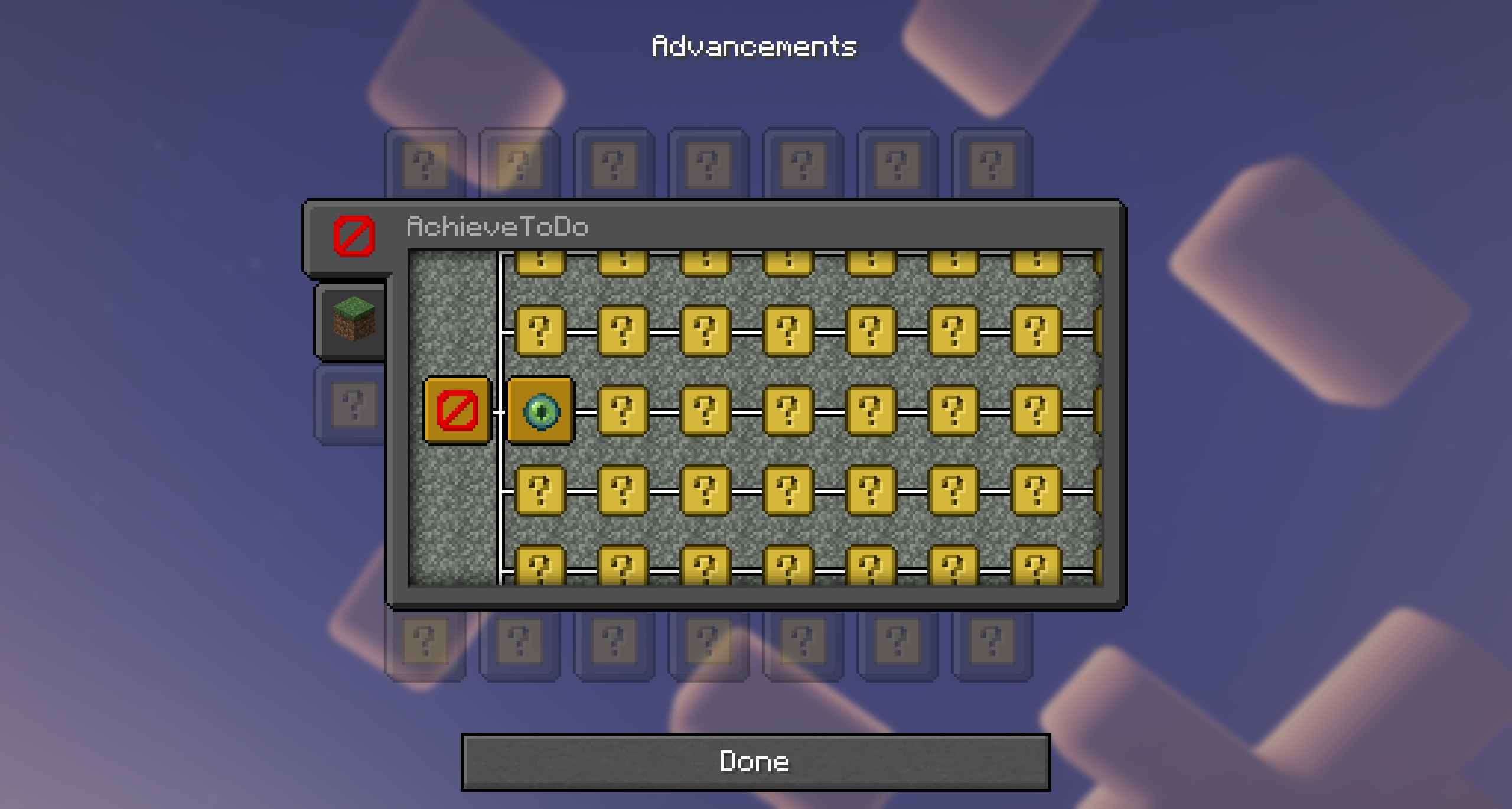
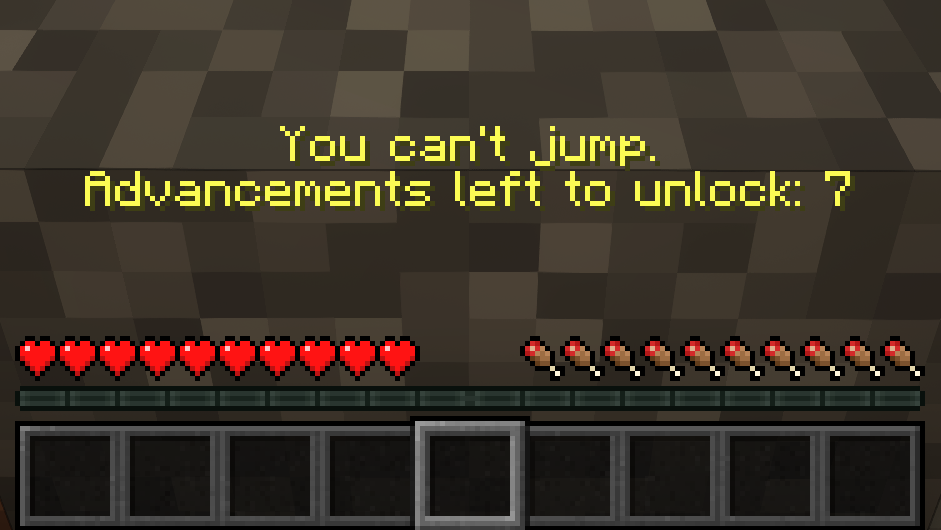
起初,你只会看到许多神秘图标。核心理念是:你不会知道哪些能力被锁定,直到你尝试使用它们。例如,如果你尝试跳跃,你会立刻发现跳跃受到了限制:
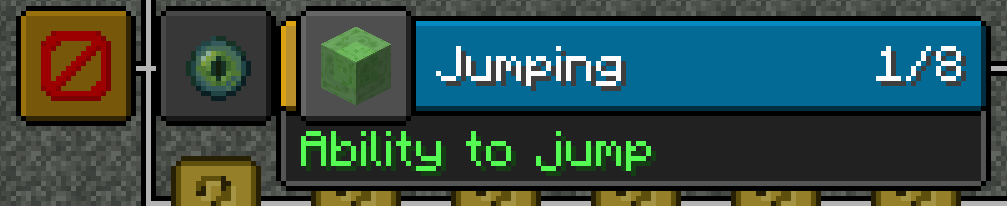
从那一刻起,“跳跃”能力会在 AchieveToDo 标签页中显示出来,这样你就可以追踪需要完成多少进度才能解锁它:
一旦完成了所需的 7 项进度,将会弹出一条通知,自豪地宣告你获得了新的跳跃能力:

这套系统同样适用于广泛的游戏元素——从打开物品栏或破坏方块等基本操作,到使用特定物品、与村民交易、前往不同维度,甚至与建筑内的物体互动。每一个新解锁的特性都像是你整体旅程中的一个迷你成就!
世界创建
在创建世界之前,别忘了检查模组设置标签页:
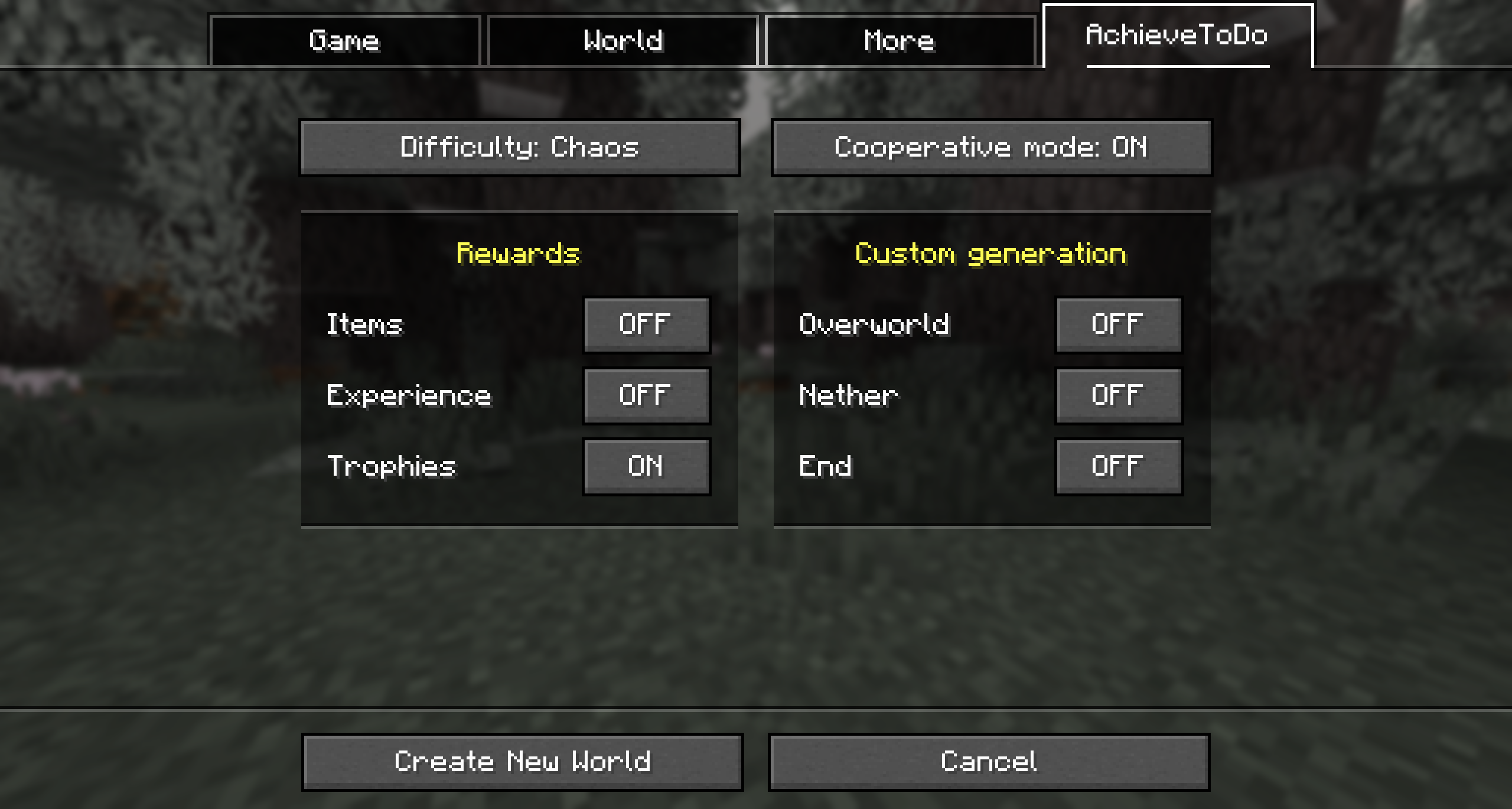
难度模式
简单 (Easy) — 类似于普通模式,但解锁速度更快。所有基础能力开局即解锁。
普通 (Normal) — 推荐模式。 类似于困难模式,但解锁速度更快以保持持续的参与感。仅视野这一项基础能力默认可用。
困难 (Hard) — 更具 RPG 风格的旅程,侧重于基于核心 AchieveToDo 机制的进度系统。解锁遵循所有 BlazeandCaves 进度,且第一项进度必须盲选获得。
混沌 (Chaos) — 能力会根据世界种子随机打乱,确保每次游玩都充满不可预测性。
自定义配置
这使得创建各种自定义挑战或特殊游戏规则变得容易——比如让玩家开局就拥有强大能力,或者完全移除某些机制。
- 使用内置模式启动。首先,使用现有的 AchieveToDo 难度模式之一启动 Minecraft(例如 easy、normal、hard 或 chaos)。这将生成相应的配置文件到你的
config/achievetodo 文件夹中(例如 normal.toml)。
- 定位并复制配置文件。进入 Minecraft 目录下的
config/achievetodo,找到与你刚刚启动的难度匹配的文件(例如 normal.toml)——将其复制并重命名为一个独特的名称,如 custom.toml。
- 编辑自定义配置。打开
custom.toml(或你命名的文件),找到 [abilities] 部分,其中每一行决定了解锁特定能力所需的进度数量:
- 0(或完全省略该行)意味着该能力默认解锁。
- -1 意味着该能力永久锁定且无法解锁。
- 任何正数设定了能力变为可用前所需的进度数量。
- 使用你的自定义设置。在创建新世界时,查找 AchieveToDo 难度切换选项,选择你的自定义难度(以其新文件名命名)。
服务端设置
-
创建单人世界。在世界创建菜单中,启用你计划在服务端使用的所有设置(例如极限模式、Terralith、合作模式、奖励等)。查看每种难度的描述(easy、normal、hard、chaos)以了解它们对游戏玩法的影响。
-
检查数据包。一旦生成了单人世界,打开它并运行 /datapack list 命令。记下哪些数据包处于激活状态,包括任何外部数据包(如 bacap.zip)和 AchieveToDo 的内置覆盖文件(例如 achievetodo:bacap_override)。
-
复制设置。将单人世界中的外部 .zip 数据包上传至服务器的 datapacks 文件夹,按照 /datapack list 命令显示的顺序启用它们,并确保以相同顺序启用相应的 AchieveToDo 覆盖数据包(例如 achievetodo:bacap_override)。
-
配置服务器。在服务器的 server.properties 文件中,创建 achievetodo-configName 参数。将此参数设置为创建单人世界时选择的难度名称(easy、normal、hard 或 chaos)。
-
自定义配置(可选)。除了使用内置的难度模式外,您还可以指定自定义配置文件的名字作为 achievetodo-configName 参数的值。
已知问题
Logo!
这是我个人在 Adobe Illustrator 中绘制的 Logo 的 PNG 版本。欢迎在任何地方使用 :)

致谢
-
_Skrepka — 我创作 AchieveToDo 的最初灵感来源,感谢那些充满创意的 Minecraft 挑战视频(例如“如何在不完成 X 的情况下通关 Minecraft?”)。
-
Lolotrack — 让我接触到了 BlazeandCave 的进度包。
-
Cavinator1 — BlazeandCave 的进度包 的创作者。没有它,AchieveToDo 将无法实现。
-
Stardust Labs — 提供了跨越所有三个维度的出色世界生成功能。
AchieveToDo
Minecraft, but the world has stolen your abilities. Reclaim them one by one by completing BlazeandCave's advancements!
About
This project keeps the vanilla feel—no overpowered features—but flips progression on its head. Instead of starting with every ability, you must earn them through advancements. Explore alternate paths, delve into dungeons, and celebrate every basic resource you manage to unlock.
Built to showcase BlazeandCave's Advancements Pack, the mod integrates over 1000 tasks that serve as both a challenge and a tutorial. Whether you’re a newcomer or a veteran, the locked mechanics will force you to rediscover Minecraft in a completely new, demanding way.
ATD Modpack
You can also play this mod in ATD modpack. It already has BaC and various advancement-QoL mods installed, such as a large window, search, and detailed information about the criteria.
Video
Experience the unique vibe and emergent gameplay of this mod through @calebbb's video!
How to play?
Early on, you’ll notice a scoreboard on your screen showing your completed advancements:
By default, you start the game with 1 advancement already unlocked (this acts as a little boost). As you earn more advancements, this counter goes up—so you’ll always know how close you are to unlocking the next ability!
In this world, every ability gradually unlocks as you complete advancements. You’ll find all abiliies on the AchieveToDo tab in your advancements screen:
At first, you’ll see mostly mystery icons. The core idea is that you won’t know which abilities are locked until you try them. For instance, if you attempt to jump right after spawning, you’ll discover that jumping is restricted:
From that moment on, the “Jumping” ability is revealed in AchieveToDo tab, so you can track how many advancements you need to earn in order to unlock it:
Once you’ve completed the required 7 advancements, a notification will pop up, proudly announcing your new power to jump:
This same system applies to a wide range of gameplay elements—from basic actions like opening your inventory or breaking blocks, to using specific items, trading with villagers, traveling to different dimensions, or even interaction with objects within structures. Each newly unlocked feature feels like its own mini-achievement in your overall journey!
World Creation
Don't forget to check the mod settings tab before creating a world:
Difficulty Modes
Easy — Similar to Normal but with even quicker unlocks. All basic abilities are unlocked from the start.
Normal — The recommended mode. Similar to Hard but with faster unlocks to keep you constantly engaged. Only vision is available by default among the basic abilities.
Hard — A more RPG-like journey, centering advancements over core AchieveToDo mechanics. Unlocks follow all BlazeandCaves advancements, and the first advancement must be obtained blindly.
Chaos — Abilities get randomly shuffled based on the world seed, ensuring every run becomes an unpredictable.
Custom Configuration
This makes it easy to create all kinds of custom challenges or special gameplay rules—like giving players powerful abilities from the start or removing entire mechanics altogether.
- Launch with a Built-In Mode. First, start Minecraft with one of the existing AchieveToDo difficulty modes (e.g., easy, normal, hard, or chaos). This will generate the corresponding configuration file in your
config/achievetodo folder (for example, normal.toml).
- Locate and Copy the Config File. Go to
config/achievetodo in your Minecraft directory, find the file that matches the difficulty you just launched (e.g., normal.toml)—copy and rename it to something unique like custom.toml.
- Edit the Custom Config. Open
custom.toml (or whatever you named your file), look for the [abilities] section, where each line determines how many advancements are required to unlock a specific ability:
- 0 (or omitting the line entirely) means the ability is unlocked by default.
- -1 means the ability is permanently locked and cannot be unlocked.
- Any positive number sets the required number of advancements before the ability becomes available.
- Use Your Custom Settings. When creating a new world, look for the AchieveToDo difficulty switch and select your custom difficulty option (named after your new file).
Server-side setup
-
Create a Single-Player World. In the world creation menu, enable all the settings you plan to use on your server (e.g., hardcore mode, Terralith, co-op, rewards, etc.). Review each difficulty’s description (easy, normal, hard, chaos) to understand how it affects gameplay.
-
Check Data Packs. Once the single-player world has been generated, open it and run the /datapack list command. Take note of which data packs are active, including any external packs (like bacap.zip) and AchieveToDo’s built-in overrides (e.g., achievetodo:bacap_override).
-
Replicate the Setup. Upload the same external .zip data packs from your single-player world to your server’s datapacks folder, enable them in the same order shown by the /datapack list command and make sure to also enable the corresponding AchieveToDo override packs (e.g., achievetodo:bacap_override) in the same order.
-
Configure the Server. In your server’s server.properties file, create the achievetodo-configName parameter. Set this parameter to the difficulty name you selected when creating the single-player world (easy, normal, hard, or chaos).
-
Custom Configuration (Optional). Instead of using one of the built-in difficulty modes, you can specify the name of a custom configuration file as the value for the achievetodo-configName parameter.
Known issues
-
The C2ME mod is not supported and may be unstable with AchieveToDo. This is because AchieveToDo tracks structure generation to determine their sizes, but does not currently support multithreading.
-
The "Goat Simulator" advancement is buggy in vanilla Minecraft, use MC-264204 Fix to solve it.
Logo!
This is a PNG version of a logo I personally drew in Adobe Illustrator. Feel free to use it anywhere :)
Acknowledgments
-
_Skrepka — My original inspiration for AchieveToDo, thanks to the creative Minecraft challenge videos (e.g., "How to complete Minecraft without X?").
-
Lolotrack — For introducing me to BlazeandCave's Advancement Pack.
-
Cavinator1 — Creator of BlazeandCave's Advancements Pack. AchieveToDo wouldn't be possible without it.
-
Stardust Labs — For providing the amazing world generation features across all three dimensions.


 模组
 模组

 模组
 模组

 模组

 模组

评论 0
登录后参与评分
还没有评论,来抢沙发吧