
AcryliCraft
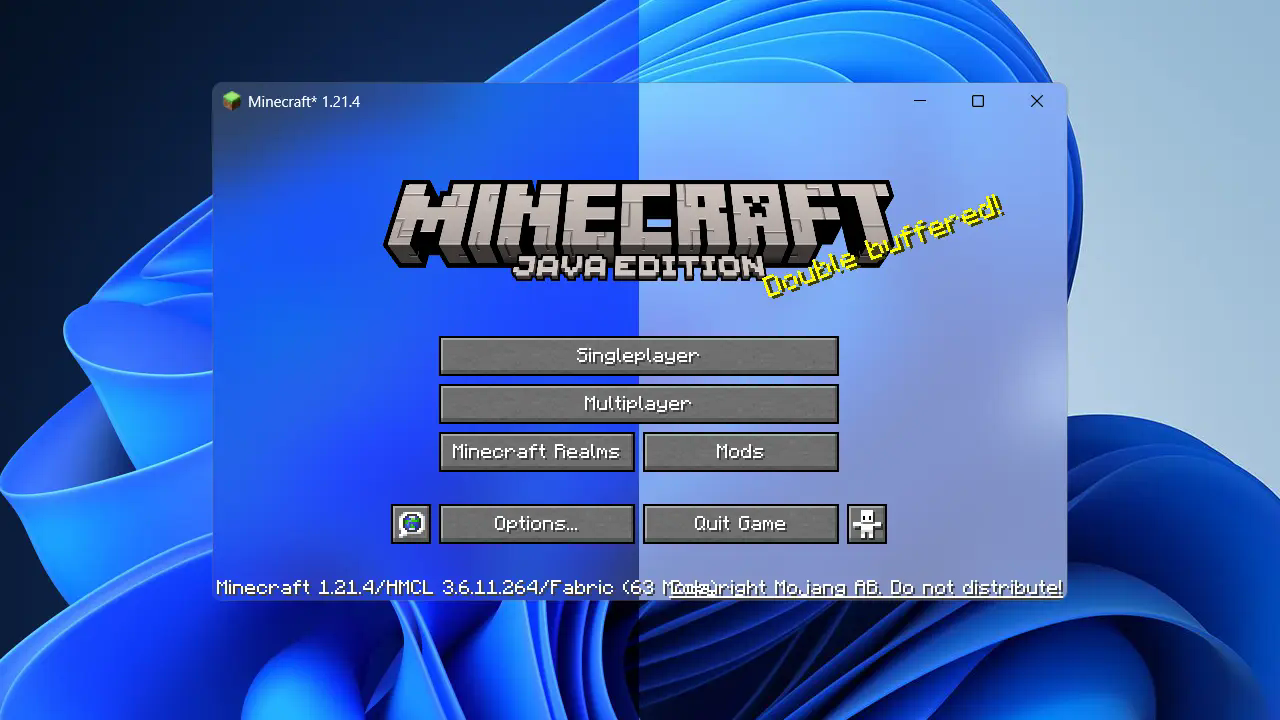
将 Fluent Design 材质应用于 Minecraft 窗口。
系统要求
Fluent Design 材质、深色模式以及边框自定义功能仅适用于 Windows 11 版本 22H2(操作系统内部版本 22621)或更高版本。不过,你仍然可以在其他操作系统上使用此模组以获得透明的游戏窗口背景,然后使用其他工具(例如 GNOME 的 Blur My Shell)进行进一步的自定义。
模组依赖
Acrylic 依赖于 YetAnotherConfigLib 作为其配置库。此外,如果你使用的是 Fabric,还需要在 mods 文件夹中放入 Mod Menu 才能访问模组配置。
重要提示! 对于 Forge/NeoForge 1.20 及更高版本,为了使半透明游戏窗口正确初始化,还必须禁用 FML 启动画面。这可以通过将 .minecraft\config\fml.toml 中的 earlyWindowControl 设置为 false 来实现。请注意,这可能会导致某些利用高级 OpenGL 功能的渲染模组出现故障,因此请自行承担风险。
已知问题
部分 NVIDIA 显卡无法正确渲染 Minecraft 窗口(或任何其他 GLFW 窗口)的半透明效果,在这种情况下,窗口背景会显示为黑色。这可能是其驱动程序的问题,很遗憾我无法在此端解决此问题。如果你恰好在一台机器上安装了另一张显卡,切换到该显卡应该可以解决问题。
对于 Minecraft 26.2+,在使用 Linux 上的 Vulkan 后端时存在已知的窗口透明度问题。这是由于 Minecraft 默认针对 GLFW 使用 X11(Wayland 下为 XWayland)。该模组通过在可用时强制启用 Wayland 初始化提示来解决此问题,目前看来修复有效。尽管如此,这并不是对所有人都保证有效的修复方案。如果遇到任何问题,欢迎在 Github 页面 报告。
致谢
本模组受其他一些开源项目的启发。以下是这些项目的列表:
- Mica: Minecraft Mod / Enable Mica, Acrylic on Windows 11 21H2 22000 or later.
- jSystemThemeDetector: Java library for detecting that the (desktop) operating system uses dark UI theme or not
AcryliCraft
Apply Fluent Design materials to Minecraft window.
System Requirement
Fluent design materials, dark mode and border customization are exclusive to Windows 11 Version 22H2 (OS build 22621) or above. However, you can still utilize this mod on other operating systems to get the window background transparent, and then use other tools(e.g. Blur My Shell for GNOME) for further customizations.
Mod Dependencies
Acrylic depends on YetAnotherConfigLib as its configuration library. Additionally, you will need Mod Menu placed in your mods folder to access mod config if using Fabric.
IMPORTANT! For Forge/NeoForge 1.20 and above, it is also necessary to disable FML splash screen for the translucent game window to be properly initialized. This can be done by setting earlyWindowControl in .minecraft\config\fml.toml to false. Note that this MIGHT lead to malfunction for some rendering mods which leverages advanced OpenGL features, so proceed at your own risk.
Known Issues
Some NVIDIA graphics cards don't render translucency properly for Minecraft's window (or any other GLFW window), in which case the window background would appear black. This is likely an issue with their drivers and is unfortunately not solveable on my end. Switching to another graphics card should make it work, if you happen to have one installed on your machine.
For Minecraft 26.2+, there is a known issue with window transparency when using Vulkan backend on Linux. This is due to Minecraft defaulting to X11(and XWayland for Wayland) for GLFW. The mod solves this issue by forcing Wayland initialization hint when it is available, and this fix seems to work so far. That said, it is not a guaranteed fix for everyone. If you encounter any problem, feel free to report it on the Github page.
Credits
This mod was inspired by some other open source projects. Here's a list of them:
- Mica: Minecraft Mod / Enable Mica, Acrylic on Windows 11 21H2 22000 or later.
- jSystemThemeDetector: Java library for detecting that the (desktop) operating system uses dark UI theme or not

下载 AcryliCraft
下载 AcryliCraft
下载 AcryliCraft
下载 AcryliCraft
下载 AcryliCraft
下载 AcryliCraft
下载 AcryliCraft
下载 AcryliCraft
下载 AcryliCraft
需要联机服务器吗?
稳定流畅、一键部署,几分钟即可和朋友联机开服
最低仅需 8 元/月 即可畅快联机
下载 AcryliCraft
暂无更新日志
关于这个资源的讨论、问题反馈与使用心得
还没有讨论,来发第一帖吧
你是这个资源的作者?登录后可认领此资源。
相似资源
 模组

可定制的鞘翅模组,支持装饰纹饰、旗帜图案等更多功能!
 模组

显示你正在注视的方块的信息。(适用于 Minecraft 1.16+ 的 Hwyla/Waila 分支)
 模组
在游戏画面角落显示附近世界地形、玩家、生物和实体的地图。可创建路径点,帮助你找到标记过的位置。
 模组

查看物品与配方
 模组
使用 JavaScript 编辑配方、添加自定义物品、编写世界事件!
 模组
AE2:一款流行的自动化与存储模组
评论 0
登录后参与评分
还没有评论,来抢沙发吧