请阅读此部分。
到目前为止,这个项目是数千小时无休止的研究、试验和错误的结果,其唯一目标就是尽可能消除 Minecraft 中的孤独感。
如果你喜欢我的作品,请考虑捐赠,以便我能安心继续在这个项目上工作,并且真正向我的父母证明我的工作是有意义的。(同时也无需再向妈妈要零花钱)。
请记住,我永远不会放弃这个项目。
请我喝杯咖啡
Paypal
模组当前阶段
由于这个月我的大学新学期开始了,我将面临巨大的压力,因为我需要学习总共 11 门科目(机器学习、线性代数、物理、网络安全等等 lol)。不过别担心,我不会停止在这个项目上的工作,只是更新速度会变慢一些。
如果到时候你们选择离开或放弃这个项目,也是可以理解的,我不会介意。:))
衷心感谢大家一直以来的支持。我从未想过我们能走到今天这一步。
最新更新:2025 年 8 月 21 日 凌晨 04:08 IST(印度标准时间)
请耐心等待更新。由于我是该项目唯一的开发者,处理所有问题/添加新功能确实需要花费时间。
Changelog v1.0.5.2-release+1.21.1
重要提示:此前提出的第二部分功能将在下一个补丁中添加,此次新更新标志着对 1.20.6 及以下版本的支持结束。
感谢 AI Player 现已更新至 1.21.1 版本。
这次 AI Player 的小更新将模组升级到了 1.21.1 版本,并带来了其他自定义 API 提供商的支持。
自定义 OpenAI 兼容提供商支持
此功能允许您使用与 OpenAI API 标准兼容的其他 AI 提供商,例如 OpenRouter、TogetherAI、Perplexity 等。
使用方法
1. 启用自定义提供商模式
在启动游戏时设置系统属性(JVM 参数):
-Daiplayer.llmMode=custom
2. 配置 API 设置
- 首先,删除 config 文件夹中现有的 settings.json5(暂时将任何 API 密钥保存到其他地方)
- 打开游戏内 API 密钥配置屏幕 (
/configMan),然后点击 API Keys 按钮。
- 设置以下字段:
- Custom API URL:您的提供商的基础 URL(例如
https://openrouter.ai/api/v1)
- Custom API Key:您提供商的 API 密钥
- 点击保存。如果您没有立即看到模型列表,请点击“刷新模型”按钮一两次。
- 如果您仍然看不到模型列表,请关闭配置管理器,再次输入
/configMan,您应该能看到可用的模型列表。
- ollama 仍然需要在后台保持打开状态,因为使用的是嵌入模型,但我将在下一个迷你补丁中完全分离这一点,通过从提供商添加嵌入 API 端点,并将
nomic-embed-text 升级为 embedddinggemma 模型。
3. 选择模型
系统将自动从提供商的 /models 端点获取可用模型,并在模型选择界面中显示它们。
支持的提供商
任何实现 OpenAI API 标准的提供商都应该可以工作。一些示例:
- OpenRouter:
https://openrouter.ai/api/v1
- TogetherAI:
https://api.together.xyz/v1
- Perplexity:
https://api.perplexity.ai/
- Groq:
https://api.groq.com/openai/v1
- Local LM Studio:
http://localhost:1234/v1
API 兼容性
自定义提供商实现使用以下 OpenAI API 端点:
GET /models - 用于获取可用模型POST /chat/completions - 用于发送聊天完成请求
您的提供商必须支持这些端点,并具有与 OpenAI API 相同的请求/响应格式。
故障排除
- “选择了自定义提供商但未配置 API URL”:确保您已设置 Custom API URL 字段
- “配置中未设置自定义 API 密钥!”:确保您已设置 Custom API Key 字段
- 空模型列表:检查您的 API 密钥是否有效且 URL 是否正确
- 连接错误:验证提供商 URL 是否可访问并支持 OpenAI API 格式
Changelog v1.0.5.1-release+1.20.6-bugfix-2
Changelog v1.0.5.1-release+1.20.6
我意识到之前公告中承诺的许多功能在一个更新中实现过于雄心勃勃。为了保持开发顺畅,此发布是两部分更新的第一部分。
此更新专注于核心系统重写和更好的 AI 决策能力,为下一波功能奠定基础。
由于代码库更改,我无法独自迁移,因此已放弃对 1.20.6 以下版本的支持。但其他人可以自由移植到更低版本。
即将到来的第二部分将以 1.20.6 的最终更新作为该版本的最后一个更新,并直接升级到 1.21.6,因此未来版本将继续进行。
1.0.5.1 新增内容
重构 NLP 系统
- 完全重新设计的自然语言处理 (NLP) — 不再有*“我无法理解你。”*
- 这是我过去一个月一直在设计和严格测试的全新实验性系统。
- 结果令人鼓舞,但尚未达到我个人标准——期待在未来更新中进一步改进。
重写后的 RAG 与数据库系统(含网页搜索)
- 集成了数据库和网页搜索功能的全新检索增强生成(RAG)系统。
- AI 现在能够提供关于 Minecraft 的准确事实信息,大幅减少幻觉现象。
- 支持的搜索提供商:
- Gemini API
- Serper API
- Brave Search API(开发中,将在下一个补丁中推送)
元决策层
- 新增了任务链系统:
- 你给出一个高级指令 → 机器人自动将其分解为更小的任务 → 逐步执行。
当前支持的任务:
- 前往指定位置
- 前往指定位置并挖掘资源
- 检测附近的方块与实体
- 报告统计数据(生命值、氧气值、饥饿值等)
API 集成
AI Player 现在支持多种大语言模型(LLM)提供商(可通过 API 密钥在配置文件中设置):
- OpenAI
- Anthropic Claude
- Google Gemini
- xAI Grok
网页搜索工具
如果你选择将 Gemini Search 作为 LLM 的网页搜索工具,它将自动使用你在 settings.json5 文件中设置为 LLM 提供商时所使用的 API 密钥。
对于 的搜索服务,请从 serper.dev 获取一个 API 密钥,然后进入游戏内的 config 文件夹,打开 ai_search_config.json 并将密钥填入其中:

(注:由于 API 密钥成本较高,除了 Gemini API 外,我本人未能测试其他所有服务,但相关集成已准备就绪。)
Bug修复
- 修复了 JVM 参数未被读取的 bug。
- 移除了 owo-lib。AI-Player 现在使用内置的配置系统。
- 修复了 API 密钥保存问题。
- 新增了一个启动器检测系统。由于 Modrinth 启动器因自身的变量路径系统产生冲突,导致 QTable 无法加载。现支持:Vanilla MC Launcher, Modrinth App, MultiMC, Prism Launcher, Curseforge launcher, ATLauncher,以及默认情况下不受支持的未知启动器(假设它们遵循原版 MC 启动器的路径方案)。
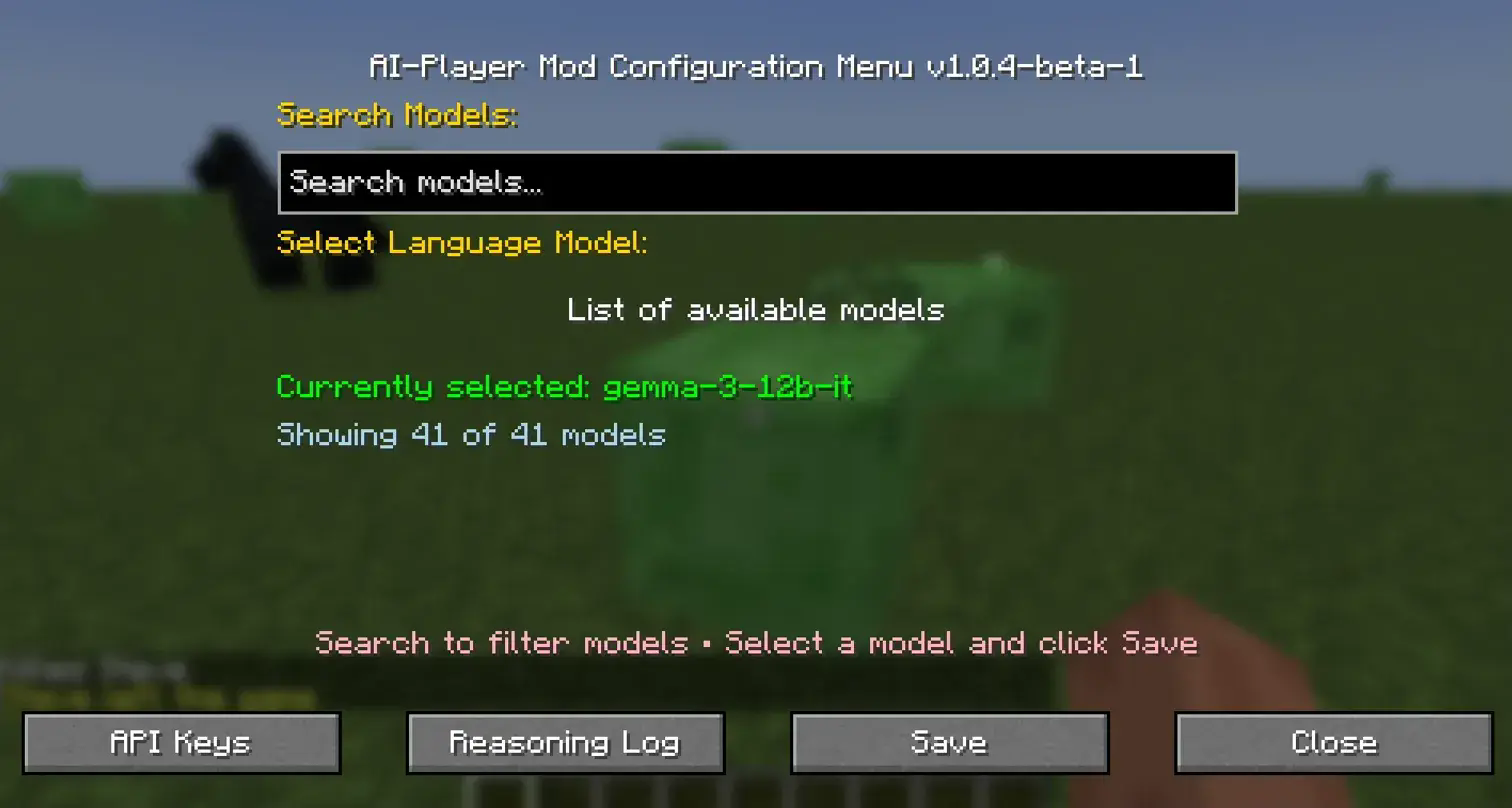
- 重构了配置管理器 UI,采用响应式界面,并为拥有大量模型的提供商(如 gemini)添加了搜索选项。
开发笔记
- 虽然这次更新表面上看起来不大,但设计系统、编写代码和调试工作耗费了大量时间。
- 此外,我接下了更多的自由职业合同,需要专注于我的毕业设计项目。
- 更新仍将继续——只是速度会慢一些。
Part 2 即将推出
以下是下一个补丁的计划内容:
-
战斗与生存增强
- 机器人使用武器(包括远程武器)来抵御怪物。
- 反射模块升级。
- 更自然的世界交互(例如在夜间睡觉)。
-
改进的路径追踪器
-
自主目标分配系统
- 机器人像真实玩家一样为自己分配目标。
- 将主动与玩家对话并自主移动。
-
情绪系统 (设计阶段)
-
Player2 集成
- 这是呼声最高的功能——将是第二次更新中的首个主要特性。
即将到来的更改(部分可能在第二个补丁中呈现)。
- 改用深度 Q 学习(Deep-Q learning)替代传统的 Q 学习(TLDR:使用神经网络替代表格)
- 为机器人创建自定义移动代码,以实现精确移动,取代 Carpet 的服务端移动代码。
- 实现人类意识级别的推理???(或许有一定程度的实现)(可能性很大)
本版本存在的 Bug:
模组描述
在两周的单人 Minecraft 游玩阶段中是否感到过孤独?好吧,这个模组旨在解决这种孤独感,不仅服务于这一特定用例,而且希望在未来也能用于多人服务器游玩。
最棒的部分是什么?你可以根据电脑配置运行完全离线的语言模型。
请注意,这不是某种商业化的 AI 产品。这个项目只是为解决许多 Minecraft 玩家曾面临且仍在面临的问题而提供的解决方案。
这个模组做什么?
到目前为止,该模组通过 Carpet 模组添加了一个可生成的第二玩家(或机器人),你可以通过 Ollama 在其 PC 上完全离线地使用大型语言模型与其交谈,并且目前我已为该机器人集成了强化学习,使其能够在“反射动作”的背景下与环境互动和学习。
基于目标的学习将在未来的更新中尽快添加。
该模组还依赖 owo-lib 模组进行配置处理。
该模组依赖于 Carpet 模组的内部代码,请给模组的仓库点赞: (给予应有的认可)
该模组还依赖于 ollama4j 项目。
安装要求
需要最新版本的 Fabric API。
需要依赖部分中指定的 Carpet 模组版本。
模组示例视频(截至版本 1.0.5.1)
模组示例视频(截至版本 1.0.3-alpha-1)
更新日志视频(截至当前版本 1.0.3-alpha-2)
better and faster reflex actions, reduced training time.
environmental reaction
YouTube 教程即将推出
安装与设置指南
第 1 步:安装 Java 21
本项目需要 Java 21 才能运行。
-
从 BellSoft JDK 21 LTS 下载 Java 21。
-
Windows 用户:点击 Download MSI 并完成安装。
-
Linux 用户:通过包管理器安装,例如:
sudo apt install openjdk-21-jdk
第 2 步:安装 Ollama
访问
根据您的操作系统进行下载。
安装完成后,在桌面上运行 ollama。这将启动 ollama 服务器。
您可以在系统托盘区访问它。

第 3 步:配置 Ollama 模型
打开您的 命令行(CMD/Terminal)并运行:
ollama pull nomic-embed-text   # 嵌入模型(必需)
ollama pull qwen3:8b           # 首选语言模型(测试中使用)
对于之前的用户:
ollama rm gemma2               # 如果已安装则删除旧模型
ollama rm llama2               # 如果已安装则删除旧模型
ollama rm llama3.2             # 如果已安装则删除旧模型
如果您之前运行过该模组,请删除旧的配置文件:
.minecraft/config/settings.json5
✅ 确保在游戏启动前 Ollama 服务器正在运行。
第 4 步:下载依赖项
确保所有必需的依赖项(包括 Carpet 模组)均已安装。
第 5 步:JVM 参数设置
在启动游戏之前,您必须提供以下 JVM 参数:
-Daiplayer.llmMode=<provider>
示例:
-
本地 Ollama(默认):
-Daiplayer.llmMode=ollama
-
OpenAI:
-Daiplayer.llmMode=openai
-
Anthropic Claude:
-Daiplayer.llmMode=claude
-
Google Gemini:
-Daiplayer.llmMode=gemini
-
xAI Grok:
-Daiplayer.llmMode=grok
第 6 步:配置 API 密钥
在 Config Manager 中,现在有一个专门用于输入所有支持提供商 API 密钥的部分。
- 对于本地模型,您可以选择首选的 Ollama LLM。
- 对于托管提供商,请相应地输入您的 API 密钥。
⚠️ 注意: 由于 嵌入模型 (nomic-embed-text) 是本地且必需的,因此 Ollama 必须始终处于运行状态。
第 7 步:启动游戏
- 启动 Minecraft。
- 在进入世界之前(如果是单人模式),当世界加载屏幕达到 100% 时,可能会因为游戏中加载了 NLP 模型而出现一些卡顿(也可能不会)。
- 在进入世界之前,请等待直到看到包含此类文件的结构中的所有文件夹:
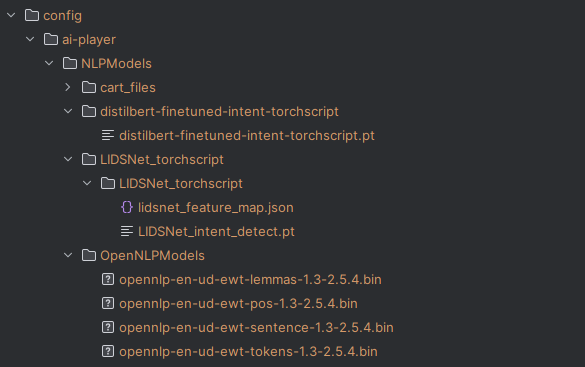
- 这些文件仅用于一次性下载,因此仅在首次使用此版本时需要。
- 进入游戏后,如果在 JVM 参数中使用了除 ollama 以外的其他提供商,请使用 config manager 选择所需的 LLM/提供商并设置其 API 密钥。
- 键入以下命令以生成您的机器人:
/bot spawn <yourBotName> <training|play>
training → 以 训练模式 生成机器人(不连接到 LLM)。play → 具有完整 AI 功能的正常模式。
重要说明
- 最好为此模组创建一个 单独的整合包,因为每当您玩游戏时,Ollama 都必须在后台运行。
- Ollama 本身使用的内存极少,因此不应显著影响性能。
Web Search Tool
如果您选择 Gemini Search 作为 LLM 的 Web Search Tool,它将自动使用您在 settings.json5 文件中设置为 LLM 提供商的 API 密钥。
对于 搜索,请从 serper.dev 获取一个 api 密钥,然后导航到游戏中的 config 文件夹,打开 ai_search_config.json 并放入密钥:
游戏内指令
主要指令:
/bot
使用示例:
/bot spawn Steve training
更新的语法由 Mr. Álvaro Carvalho 提供。
由于该模组依赖于 Carpet,您也可以使用 Carpet 的指令生成机器人。
如果您处于离线模式游玩,建议使用模组内置的生成指令。
重要
另外请记住,如果您使用此模组,最好为其创建一个独立的整合包,因为每次启动游戏本身时,都需要在后台运行 ollama 服务器。Ollama 服务器本身并不消耗太多内存,所以您应该没问题。
游戏内操作
主要指令
/bot
子指令:
自上一个版本以来,许多指令都已更改。请查看最新版本的变化日志。
使用示例:
/bot spawn Steve training
上述指令语法的变更归功于 Mr. Álvaro Carvalho
是的,由于此模组依赖于 carpet 模组,您也可以使用 carpet 模组的指令生成机器人并尝试此模组。但是,如果您碰巧处于离线模式游玩,那么我建议使用模组内置的生成指令。
Read this section please.
This project so far is the result of thousands of hours of endless reasearch, trials and errors, and just the simple goal of eliminating loneliness from minecraft as much as possible.
If you liked my work, please consider donating so that I can continue to work on this project in peace and can actually prove to my parents that my work is making a difference. (Also not having to ask for pocket money from mom).
Just know that I won't ever give up on this project.
Buy me a coffee
Paypal
Current stage of the mod
Since the new semester in my college has started this month, I am gonna be under really heavy pressure, since I have to study 11 subjects in total (Machine learning, Linear Algebra, Physics, CyberSecurity, and a lot more lol). Don't worry though I won't stop working on this project, it's just that the updates will be quite slower.
It's understandable if y'all leave by then or give up on this project, so, I won't mind. :))
Thank you all from the core of my heart for the support so far. I never imagined we would come this far.
Latest Update: 21/8/2025 at 04:08 AM IST (Indian Standard Time)
Please have patience while waiting for updates. Since I am the only guy working on this project, it does take me time to address all the issues/add in new features.
Changelog v1.0.5.2-release+1.21.1
Important: Earlier proposed second part features will be added in the next patch and this new update marks the end of support for 1.20.6 and below.
Thanks to AI Player has now been updated to version 1.21.1
This minor update of AI player updates the mod to version 1.21.1 and also brings support for other custom API providers.
Custom OpenAI-Compatible Provider Support
This feature allows you to use alternative AI providers that are compatible with the OpenAI API standard, such as OpenRouter, TogetherAI, Perplexity, and others.
How to Use
1. Enable Custom Provider Mode
Set the system property(JVM argument) when launching the game:
-Daiplayer.llmMode=custom
2. Configure API Settings
- Firstly, delete the existing settings.json5 in the config folder (save any api keys elsewhere for the meantime)
- Open the in-game API Keys configuration screen (
/configMan) and then click the API Keys button.
- Set the following fields:
- Custom API URL: The base URL of your provider (e.g.,
https://openrouter.ai/api/v1)
- Custom API Key: Your API key for the provider
- Hit save. In case you don't see the list of models immediately hit the "Refresh Models" button once or twice.
- If you still don't see the list of models, close the config manager, type
/configMan again and you should see the list of models available.
- ollama is still required to be open in the background because of the embedding model being used, but I will separate this entirely in the next mini patch, by adding an embedding api endpoint from the providers, and also upgrading to the
embedddinggemma model from nomic-embed-text
3. Select a Model
The system will automatically fetch available models from your provider's /models endpoint and display them in the model selection interface.
Supported Providers
Any provider that implements the OpenAI API standard should work. Some examples:
- OpenRouter:
https://openrouter.ai/api/v1
- TogetherAI:
https://api.together.xyz/v1
- Perplexity:
https://api.perplexity.ai/
- Groq:
https://api.groq.com/openai/v1
- Local LM Studio:
http://localhost:1234/v1
API Compatibility
The custom provider implementation uses the following OpenAI API endpoints:
GET /models - For fetching available modelsPOST /chat/completions - For sending chat completion requests
Your provider must support these endpoints with the same request/response format as OpenAI's API.
Troubleshooting
- "Custom provider selected but no API URL configured": Make sure you've set the Custom API URL field
- "Custom API key not set in config!": Make sure you've set the Custom API Key field
- Empty model list: Check that your API key is valid and the URL is correct
- Connection errors: Verify that the provider URL is accessible and supports the OpenAI API format
Changelog v1.0.5.1-release+1.20.6-bugfix-2
- Fixed a lot of bugs that got overlooked in the previous testing phase.
Changelog v1.0.5.1-release+1.20.6
I realized that many of the commitments made in the previous announcement were too ambitious to implement in a single update. To keep development smooth, this release is the first part of a two-part update.
This update focuses on core system rewrites and better AI decision-making, laying the foundation for the next wave of features.
Also support for versions below 1.20.6 has been dropped due to codebase changes that I simply can't handle migrating by myself. However others are free to port to lower versions.
Upcoming second part will have the update in 1.20.6 as the final update for 1.20.6 and also will have a new update to directly 1.21.6 where hence the future versions will continue onwards.
What's New in 1.0.5.1
Revamped NLP System
- Fully redesigned Natural Language Processing (NLP) — no more "I couldn’t understand you."
- This is a new and experimental system I’ve been designing and rigorously testing over the last month.
- Results are promising, but not yet up to my personal standards — expect further refinements in future updates.
Rewritten RAG & Database System (with Web Search)
- New Retrieval-Augmented Generation (RAG) system integrated with a database and web search.
- The AI now provides accurate factual information about Minecraft, drastically reducing hallucinations.
- Supported search providers:
- Gemini API
- Serper API
- Brave Search API (in development, will push this to the next patch instead)
Meta-Decision Layer
- Added a task chaining system:
- You give a high-level instruction → the bot automatically breaks it into smaller tasks → executes step by step.
Current Supported Tasks:
- Go to a location
- Go to a location and mine resources
- Detect nearby blocks & entities
- Report stats (health, oxygen, hunger, etc.)
API Integrations
AI Player now supports multiple LLM providers (configurable via API keys):
- OpenAI
- Anthropic Claude
- Google Gemini
- xAI Grok
Web Search Tool
If you select the Gemini Search as the web search tool for the LLM, it will use the API key you have set as your LLM provider in the settings.json5 file automatically.
For search, get an api key from serper.dev and then navigate to the config folder in game, open the ai_search_config.json and put the key:
(Note: I couldn’t test all of these myself except the Gemini API since API keys are costly, but the integrations are ready.)
Bugfixes
- Fixed bug where JVM arguments were not being read.
- Removed owo-lib. AI-Player now uses an in-house config system.
- Fixed API keys saving issues.
- Added a new Launcher Detection System. Since Modrinth launcher was conflicting by it's own variables path system so the QTable was not being loaded. Supports: Vanilla MC Launcher, Modrinth App, MultiMC, Prism Launcher, Curseforge launcher, ATLauncher, and even unknown launchers which would be unsupported by default, assuming they follow the vanilla mc launcher's path schemes.
- Revamped the Config Manager UI with a responsive UI along with a search option for providers with a lot of models (like gemini).
Development Notes
- While this update may look small on the surface, designing the systems, writing the code, and debugging took a huge amount of time.
- On top of this, I’ve picked up more freelance contracts and need to focus on my final-year project.
- Updates will continue — just at a slower pace.
Coming Soon in Part 2
Here’s what’s planned for the next patch:
-
Combat & Survival Enhancements
- Bot uses weapons (including ranged) to fend off mobs.
- Reflex module upgrades.
- More natural world interactions (e.g., sleeping at night).
-
Improved Path Tracer
- Smarter navigation through water and complex terrain.
-
Self-Goal Assignment System
- Bot assigns itself goals like a real player.
- Will initiate conversations with players and move autonomously.
-
Mood System (design phase)
- Adds emotional context and varied behavior.
-
Player2 Integration
- Highly requested — this will be the first major feature of the second update.
Upcoming changes (some of them might be seen in the second patch).
- Switch to Deep-Q learning instead of traditonal q-learning (TLDR: use a neural network instead of a table)
- Create custom movement code for the bot for precise movement instead of carpet's server sided movement code.
- Implement human consciousness level reasoning??? (to some degree maybe) (BIG MAYBE)
Current bugs in this version :
- Found a few more bugs, bugfix will be released tomorrow.
Mod description
Ever felt lonely while playing minecraft alone during that two-week phase? Well, this mod aims to solve that problem of loneliness, not just catering to this particular use case, but even (hopefully in the future) to play in multiplayer servers as well.
And the best part? You can run completely offline language models based on your computer's specifications.
Please note that this is not some sort of a commercialised AI product. This project is just a solution to a problem many Minecraft players have faced and do continue to face.
What does this mod do?
This mod so far adds in a second spawnable player(or bot) via the carpet mod, and you can talk to it through a large language model via ollama completely offline on your pc and so far I have integrated reinforcement learning for the bot to interact and learn from it's environment in the context of "reflex actions".
Goal based learning will be added soon in upcoming updates.
This mod also relies on the owo-lib mod for configuration handling.
This mod relies on the internal code of the Carpet mod, please star the repository of the mod: (Giving credit where it's due)
This mod also relies on the ollama4j project.
Installation Requirements
Requires Fabric api latest version.
Requires Carpet mod version as stated in the dependency section
Sample video of the mod (as of version 1.0.5.1)
Sample video of the mod (as of the version 1.0.3-alpha-1)
Changelog video (as of the current version 1.0.3-alpha-2)
better and faster reflex actions, reduced training time.
environmental reaction
Youtube tutorial soon
Installation & Setup Guide
Step 1: Install Java 21
This project requires Java 21 to run.
-
Download Java 21 from BellSoft JDK 21 LTS.
-
On Windows: click Download MSI and complete installation.
-
On Linux: install via your package manager, e.g.
sudo apt install openjdk-21-jdk
Step 2: Install Ollama
Go to
Download based on your operating system.
After installation, run ollama from your desktop. This will launch the ollama server.
This can be accessed in your system tray
Step 3: Configure Ollama Models
Open your command line (CMD/Terminal) and run:
ollama pull nomic-embed-text   # Embedding model (required)
ollama pull qwen3:8b           # Preferred language model (used in testing)
For previous users:
ollama rm gemma2               # Remove old model if installed
ollama rm llama2               # Remove old model if installed
ollama rm llama3.2             # Remove old model if installed
If you’ve run the mod before, delete old config:
.minecraft/config/settings.json5
✅ Make sure the Ollama server is running before starting the game.
Step 4: Download Dependencies
Ensure that all required dependencies (including Carpet mod) are installed.
Step 5: JVM Argument Setup
Before launching the game, you must provide the following JVM argument:
-Daiplayer.llmMode=<provider>
Examples:
-
Local Ollama (default):
-Daiplayer.llmMode=ollama
-
OpenAI:
-Daiplayer.llmMode=openai
-
Anthropic Claude:
-Daiplayer.llmMode=claude
-
Google Gemini:
-Daiplayer.llmMode=gemini
-
xAI Grok:
-Daiplayer.llmMode=grok
Step 6: Configure API Keys
Inside the Config Manager, there is now a dedicated section for entering API keys for all supported providers.
- For local models, you can select your preferred Ollama LLM.
- For hosted providers, enter your API keys accordingly.
⚠️ Note: Ollama must always be running since the embedding model (nomic-embed-text) is local and required.
Step 7: Launch the Game
- Start Minecraft.
- Before loading up a world (if you are on singleplayer) once the world loading screen reaches 100% it might lag a bit (or not) due to an NLP model being loaded in game
- Before loading up a world, please wait till you see all the folders in a structure with files like this:
- These files are for a one-time download only, so it's only for the first time on using this version.
- Once in the game, if you used a different provider other than ollama in the JVM argument, use the config manager to select your desired LLM/provider and set their API keys.
- Type the following command to spawn your bot:
/bot spawn <yourBotName> <training|play>
training → Spawns bot in training mode (does not connect to LLM).play → Normal mode with full AI features.
Important Notes
- It’s best to create a separate modpack for this mod, since Ollama must run in the background whenever you play.
- Ollama itself uses minimal memory, so it shouldn’t affect performance significantly.
Web Search Tool
If you select the Gemini Search as the web search tool for the LLM, it will use the API key you have set as your LLM provider in the settings.json5 file automatically.
For search, get an api key from serper.dev and then navigate to the config folder in game, open the ai_search_config.json and put the key:
In-Game Commands
Main Command:
/bot
Example Usage:
/bot spawn Steve training
The updated syntax comes courtesy of Mr. Álvaro Carvalho.
Since the mod depends on Carpet, you can also spawn bots using Carpet’s commands.
If you’re playing in offline mode, it’s recommended to use the mod’s built-in spawn command instead.
Important
Also remember that if you are using this mod, it's best to create a modpack for it's own as it will require you to run ollama server in the background every time you launch the game itself. Ollama server itself doesn't consume much memory so you should be fine.
Within the game
Main command
/bot
Sub commands:
A lot of the commands have been changed since the last version. Please check changelog of the latest version.
Example Usage:
/bot spawn Steve training
The above command syntax changes credits go to Mr. Álvaro Carvalho
And yes since this mod relies on carpet mod, you can spawn a bot using carpet mod's commands too and try the mod. But if you happen to be playing in offline mode, then I recommend using the mod's in built spawn command.


 模组

 模组
 模组
 模组

 模组
 模组

评论 0
登录后参与评分
还没有评论,来抢沙发吧