
~~~ 全球更新即将推出!?~~~
前言
这个模组的灵感来源于我在制作地图时的经历。我喜欢旅行,因此这张地图以铁路及其连接的城市为主题。随着时间推移,地图不断扩展,出现了大量道路交叉口,这就需要设置路标。使用旗帜的方案并不理想,因为我觉得它看起来不够真实,此外,由于制作旗帜时的限制,并非所有字母都能呈现美观的效果,而且每面旗帜之间还存在一层间隙。因此,我决定创建新的方块,每个方块代表一个字母,并选择了我所处地区路标常见的标准蓝色作为背景色。这是我首个基于 Fabric API 开发的模组。请多多包涵?
功能
最初,该模组添加了带有字母/符号的方块,通过将这些方块相邻放置,你可以为建筑物、标志牌等设计名称……原则上,满足你的一切创意需求!然而,现在每个符号都拥有独立的完整 3D 模型方块,其形状与该符号的形状相符。
目前,已实现以下符号(前提是字母表中通用的字母位于拉丁字母标签页中):

使用思路
在我看来,我创建这个小模组最重要的理念是制作路标。以下截图展示了使用拉丁字母制作路标的示例:
0.7.0 版本之前

0.7.0 版本
 该模组还提供了构建任何复杂度指示牌的机会:
简单的距离指示牌、箭头指示牌、环形道路指示牌等等!
 另一种制作路标的方式,但使用的是俄语:
0.7.0 版本之前

0.7.0 版本
 第一个用途的另一个想法是指向城市距离的指针。截图展示了这种标牌在白俄罗斯语中的示例:
0.7.0 版本之前

0.7.0 版本
 该模组还允许设计标准的方向指示牌,如有需要可标注距离。截图展示了这种标牌在乌克兰语中的示例:
0.7.0 版本之前

0.7.0 版本
 字母方块最简单的道路应用是地名指向牌:
0.7.0 版本
 但你也可以使用新方块——删除线方块来制作指向城镇终点的指示牌:
0.7.0 版本
 还可以建造河流名称的指示牌——该模组中还包含带有俄语、白俄罗斯语、乌克兰语以及英语河流缩写符号的方块:
 不一定非要使用这些方块来建造路标。当你只想为你的商店制作招牌,或者只是给你的城市房屋编号时,它们同样适用。毕竟,你所需要的仅仅是放置带有字母的方块,拼出单词即可!
1.0 版本
除了常规的标志牌外,你还可以建造任何使用字母的雕塑:

使用方法 - > 1.19 (v1.0)
值得一提的是,自 1.0 版本起,方块上的所有字母都拥有独立的 3D 模型!
 要获得每个符号方块,需要在石匠工作台切割白色混凝土:

每个符号方块既可以单独放置,也可以放置在任意其他方块上:

值得注意的是,字母方块可以发光!为此,你需要手持萤石粉点击该方块。此外,你可以使用任何斧头移除发光效果:

尽管符号方块由白色混凝土制成,但可以使用任何染料将其染成不同颜色:

有趣的事实。如果你用栅栏围绕混凝土粉末浇水,可以得到白色的钢筋混凝土。 但不幸的是,你无法给这种混凝土上色?:

此外,你也可以将符号与钢筋混凝土结合,方法是将任意符号方块放置在其上方,随后被覆盖的钢筋混凝土会转变为标志方块:

如果不小心将符号方块附着在被覆盖的钢筋混凝土上,需要使用任何锄头来移除该符号方块:

使用方法 - > 1.18 (v.0.7.0)
值得一提的是,自 0.7.0 版本起,方块上的所有字母都拥有 3D 模型!
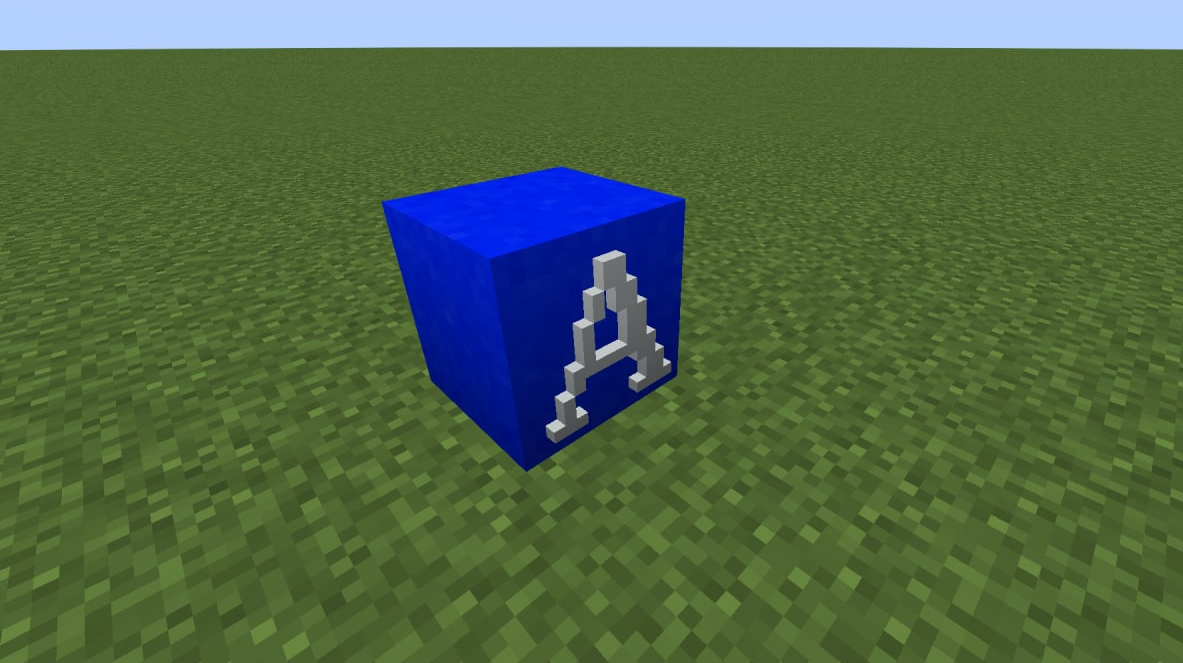
目前,要创建每个方块,首先需要创建一个基础方块——钢筋混凝土。但要创建这个方块,你需要先制作带有栅栏的白色混凝土粉末方块。这是通往字母方块创建之路的第一步。
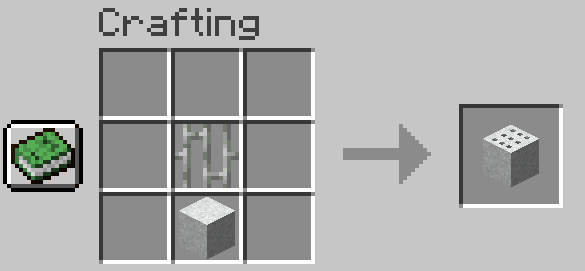
一个有趣的事实是,当该方块被破坏后,会掉落普通的白色混凝土粉末,而钢筋则保留在原位。
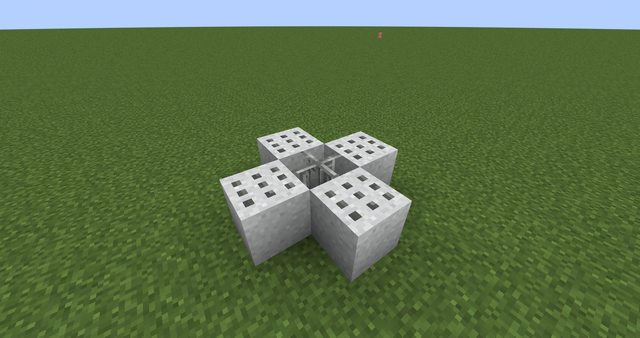
要从带有钢筋的混凝土粉末方块中获取钢筋混凝土,需要合成一台染色机:
0.7.0 版本之前
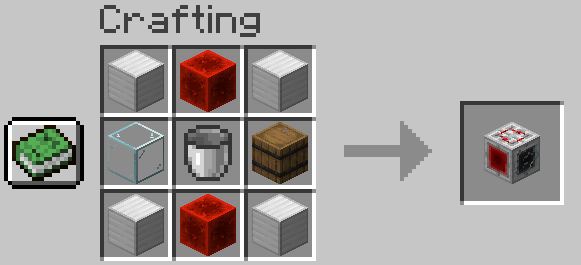
0.7.0 版本
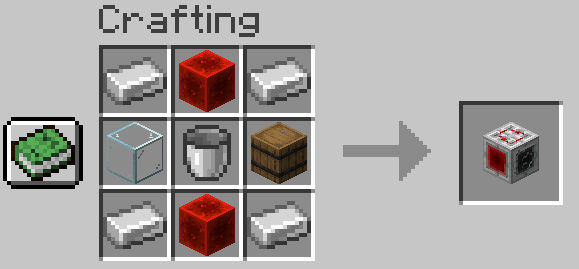
这台机器在输入端接受一桶水、任意一块混凝土粉末和一种染料,输出端则会得到与染料颜色相同的混凝土。该机器的运作也可以通过红石信号控制:如果信号为激活状态,机器将停止工作并停止收集水。

根据内部水箱中的水量,机器的外观会发生变化:

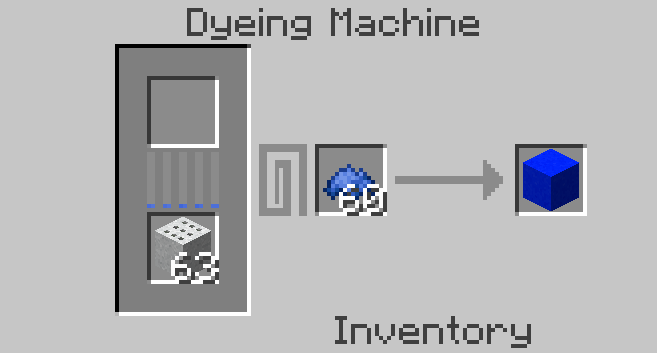
我们还需要获取蓝色的钢筋混凝土,因此使用染色机,将带有钢筋的混凝土粉末和蓝色染料放入其中:
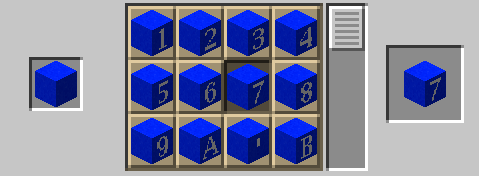
获得钢筋混凝土方块后,必须将其放入切石机中,以获得任意变体的字母方块:
就这样!但这并不是 0.7.0 版本中所有可用的方块!在新的“技术方块”标签页中,还有:铁栅栏、铁门、删除线方块,你可以利用它们创建更逼真的路标。例如,铁栅栏:
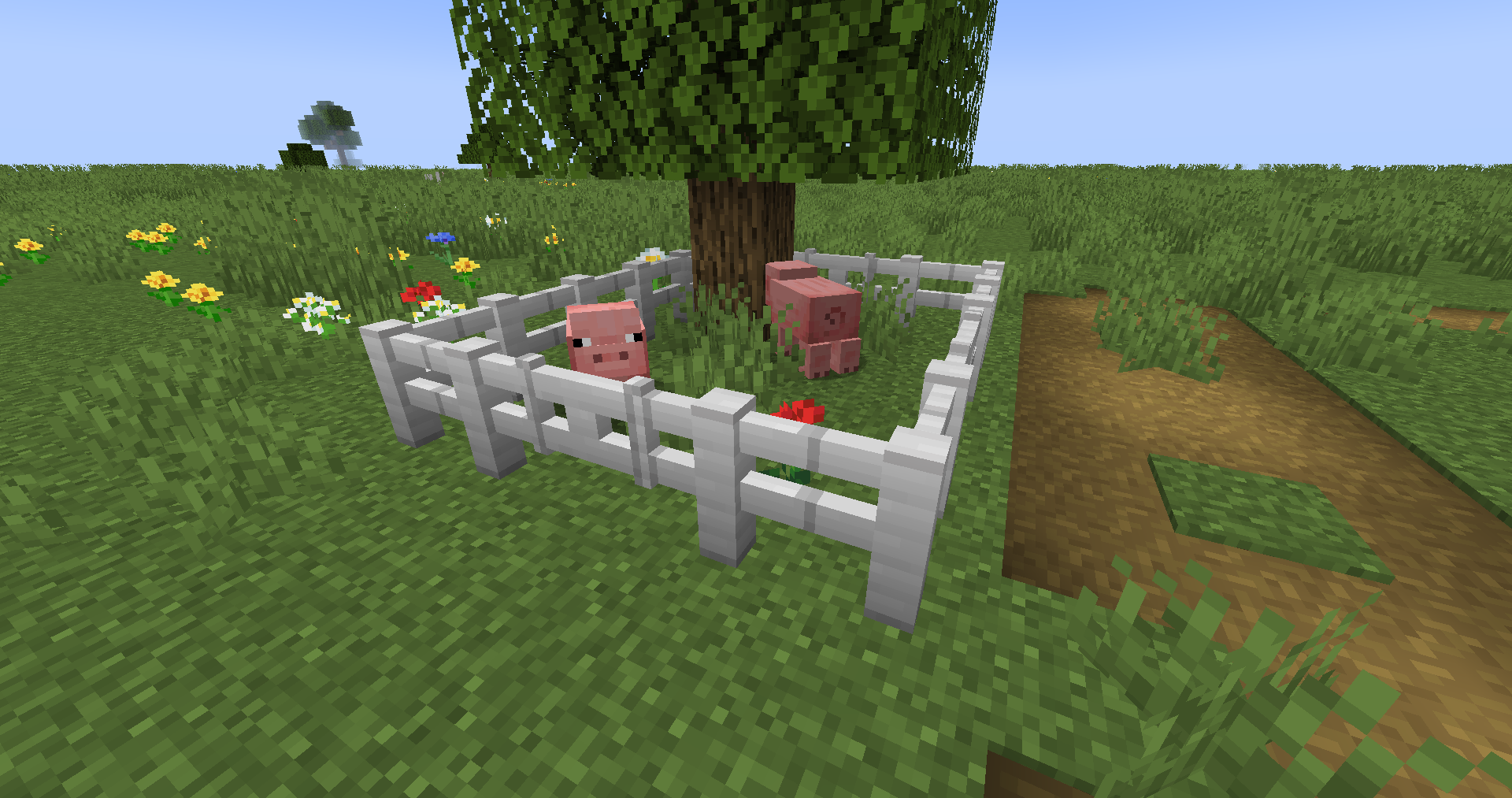
除了建造铁栏圈外,它还可以用作路标杆。铁栅栏的合成配方如下:
1.20.4 版本之前
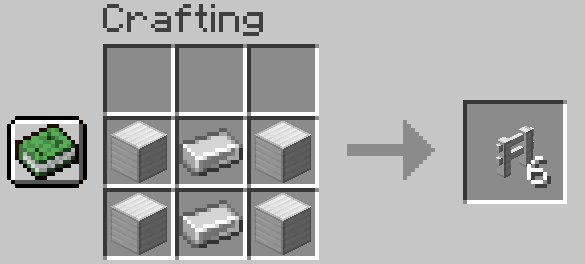
1.20.4 版本

也可以合成铁门:
1.20.4 版本之前
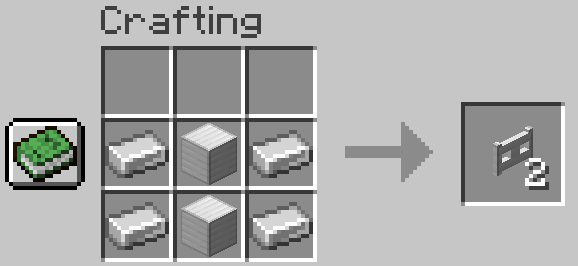
1.20.4 版本

此外,要合成删除线方块,你需要以下物品:
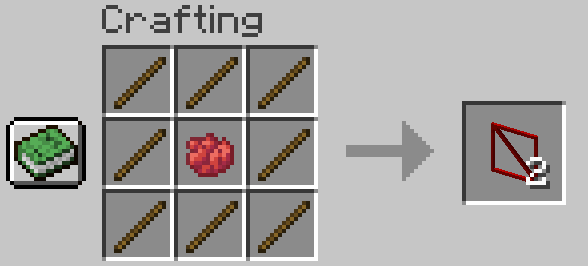
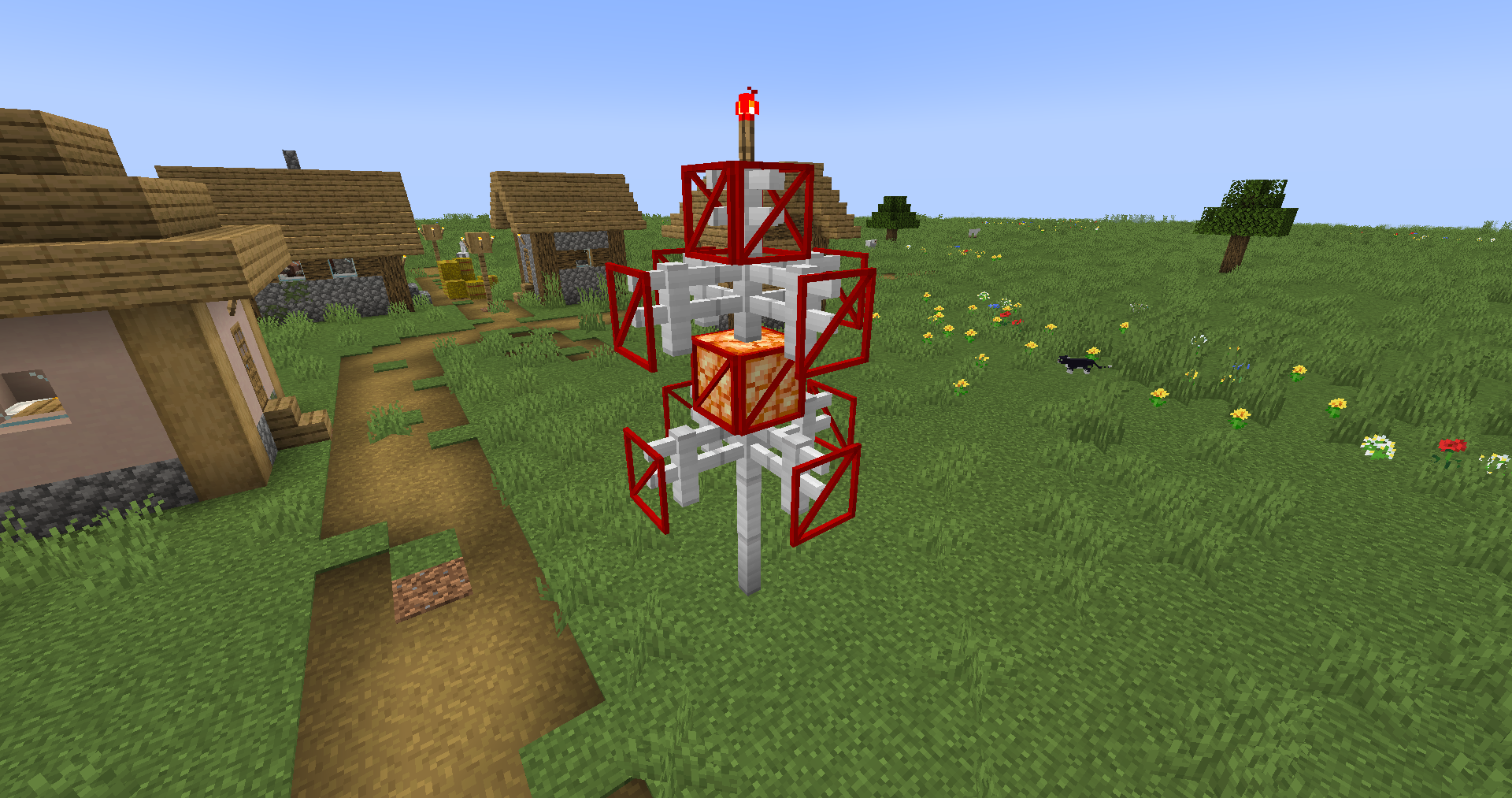
除了创建划掉的字母外,这个方块还有其他用途,例如建造这种奇特的结构:
使用方法 - 1.18(0.7.0 版本之前)
目前,要创建每个方块,你首先需要创建一个基础方块——钢筋混凝土。以下是该方块的合成配方。值得注意的是,未来计划更改基础方块的合成方式和外观。
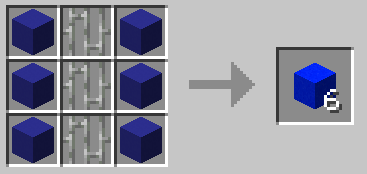
获得钢筋混凝土方块后,必须将其放入切石机中,以获得任意变体的字母方块:
就是这样!未来计划添加一个特殊方块,以创造更具真实感的字母方块。
需要注意的是,所有方块均使用 16x16 的标准分辨率纹理,以避免标准方块与模组方块之间出现明显的差异。
有问题或建议?
如果你有任何建议(例如支持新语言)、想法或发现的 bug,请给我发邮件至 ortodontalio@gmail.com,我会尽快回复你,并很高兴收到你的邮件。请勿发送垃圾邮件或侮辱性言论,否则将被封禁。
~~~ A global update is coming soon! ?~~~
Preface
The idea of the mod came to me when I was building a map. I like traveling, so the map was connected to the railway and the cities that this road connected. Over time, the map grew, and a large number of road interchanges appeared, for which road signs were required. The idea with banners was not ideal for me, because I thought it didn't look very realistic, besides, not all the letters would have turned out beautifully (due to restrictions when creating banners), and there was a layer between each banner. Therefore, I decided to create new blocks, each block is a letter, and I chose the standard blue as the background, inherent in road signs in my region. It is my first mod written using the Fabric library. Please do not judge strictly?
Features
Initially, the mod adds blocks on which letters/symbols are drawn, so that by putting these blocks next to each other, you can design names for buildings, signs... In principle, for everything that the soul desires! However, now each symbol is a full-fledged block with its own 3D model, in accordance with the shape of this symbol.
At the moment, the following symbols are implemented (provided that the common letters for the alphabets are in the tab with the Latin alphabet):
Usage Ideas
In my opinion, the most important idea with which I created this small modification is the creation of road signs. The following screenshot shows an example of creating a road sign using the Latin alphabet:
Before 0.7.0
0.7.0
The mod also provides an opportunity to build absolutely any signpost, of any complexity:
a simple distance signpost, an arrow signpost, a signpost with a circle road and much more!
Another option for creating a road sign, but using the Russian language:
Before 0.7.0
0.7.0
Another idea for the first point is pointers of distances to cities. The screenshot shows an example of such a sign in the Byelorussian language:
Before 0.7.0
0.7.0
The mod also allows to design standard direction signs, indicating the distance if desired. The screenshot shows an example of such a sign in Ukrainian:
Before 0.7.0
0.7.0
The simplest road application of letter blocks is pointers of names of settlements:
0.7.0
But you can make a pointer to the end of settlements using a new block - strikethrough block!
0.7.0
There is also the possibility of building signs with the names of rivers - a block with the abbreviation of the river in Russian, Belarusian, Ukrainian, as well as English is also present in this mod:
It is not necessary to use blocks only for the construction of road signs. They can be used even when you just want to make a sign for your store or just number a house in your city. After all, all that is required of you is to put blocks with letters, forming words!
1.0
In addition to the usual signs, you can build absolutely any sculptures where letters are used:
How to use - > 1.19 (v1.0)
It is worth saying that all the letters on the blocks since 1.0 have a separate 3D model!
In order to get each block-symbol, it is necessary to cut the white concrete in a stone cutter:
Each block-symbol can be placed either separately or on any blocks:
Yes, it's worth noting that letter blocks can emit light! To do this, you need to click on the block, holding a glowstone dust in your hand. Also, you can remove the highlighting with any axe:
Despite the fact that the blocks-symbols are made of white concrete, they can be repainted in different colors using any dye:
Interesting fact. If you pour water around concrete powder with bars, you can get white ferroconcrete. But you won't be able to paint such concrete, unfortunately?:
Also, you can combine symbols with ferroconcrete by putting any block-symbol to it, after which the cropped ferroconcrete turns into a sign-block:
To remove the block-symbol attached to the cropped ferroconcrete by mistake, it is necessary to use any hoe:
How to use - > 1.18 (v.0.7.0)
It is worth saying that all the letters on the blocks since 0.7.0 have a 3D model!
So far, to create each block, you first need to create a basic one - ferroconcrete. But to create this block, you need to create a block of white concrete powder with bars. This is the first step on the way to creating letter blocks.
An interesting fact is that after the destruction of the block, ordinary white concrete powder falls out, and bars remain in place of the block.
To get ferroconcrete from a block of concrete powder with bars, it is necessary to craft a dyeing machine:
Before 0.7.0
0.7.0
This machine accepts a bucket of water, any block of concrete powder and a dye at the entrance, and concrete of the color of the dye is obtained at the output. The working of this machine can also be controlled by a redstone: if the signal is active, the machine stops working, as well as collecting water.
Depending on the amount of water in the internal tank, the appearance of the machine changes:
We also need to get blue ferroconcrete, so we use a dyeing machine, putting concrete powder with bars and blue dye in it:
When a ferroconcrete block is received, it must be put into a stone cutter to get any variant of the letters blocks:
That's it! But these are not all available blocks in 0.7.0! In the new tab "Technical blocks", there are also: iron fence, iron gates, strikethrough block, which you can use to create more realistic road signs. For example, iron fence:
In addition to the construction of iron pens, it can be used for road sign posts. Fence crafting is next:
Before 1.20.4
1.20.4
It is also possible to craft an iron gate:
Before 1.20.4
1.20.4
Also, to craft a strikethrough block, you must have the following items:
In addition to creating crossed-out letters, this block can have other uses, for example, the construction of strange structures like this:
How to use - 1.18 (before 0.7.0)
So far, to create each block, you first need to create a basic one - ferroconcrete. Below is the crafting of this block. It is worth noting that the crafting and appearance of the base block are planned to be changed in the future.
When a ferroconcrete block is received, it must be put into a stone cutter to get any variant of the letters blocks:
That's it! In the future, it is planned to add a special block to create letter blocks for greater realism.
It is worth noting that all blocks use 16x16 standard resolution textures to avoid an obvious difference between standard blocks and blocks from the mod.
Do you have a question or proposal?
If you have any suggestions (for example, support for new languages), ideas, and also bugs found, please send me an email - ortodontalio@gmail.com, I will try to answer you as soon as possible, and I will be glad to receive your emails. Please do not write spam or insults, otherwise you will be blocked.

下载 AlPhAE's Letters
下载 AlPhAE's Letters
下载 AlPhAE's Letters
下载 AlPhAE's Letters
下载 AlPhAE's Letters
需要联机服务器吗?
稳定流畅、一键部署,几分钟即可和朋友联机开服
最低仅需 8 元/月 即可畅快联机
下载 AlPhAE's Letters
下载 AlPhAE's Letters
下载 AlPhAE's Letters
下载 AlPhAE's Letters
新增与修改
- 修复了染色机的若干问题;
- 对染色机进行了一些小范围的视觉调整;
- 更改了铁栅栏和铁门的合成配方。
已修复
- 解决了水桶可被用作熔炉燃料的问题。
关于这个资源的讨论、问题反馈与使用心得
还没有讨论,来发第一帖吧
你是这个资源的作者?登录后可认领此资源。
相似资源
 模组

可定制的鞘翅模组,支持装饰纹饰、旗帜图案等更多功能!
 模组

显示你正在注视的方块的信息。(适用于 Minecraft 1.16+ 的 Hwyla/Waila 分支)
 模组
在游戏画面角落显示附近世界地形、玩家、生物和实体的地图。可创建路径点,帮助你找到标记过的位置。
 模组
使用 JavaScript 编辑配方、添加自定义物品、编写世界事件!
 模组

查看物品与配方
 模组
AE2:一款流行的自动化与存储模组
评论 0
登录后参与评分
还没有评论,来抢沙发吧