
我在 Vazkii 的原始环境音效模组基础上开发了本模组,因为我非常喜爱他的作品,但觉得其中缺少了一些内容。由于他将源代码公开在 GitHub 上,我出于乐趣以及为了完善一个为 Minecraft 添加音乐的模组所必需的功能,向本模组中添加了一些新特性。详见下方的新增方块、工具合成配方以及如何配置和使用本模组。
请提供需要翻译的英文内容。
注意:本模组并非 Ambience 模组的附加组件,而是完整的 Ambience 模组并加入了额外功能。因此你无需在游戏里安装原版 Ambience 模组;由于本模组会向游戏添加方块和物品,你必须同时在客户端和服务端安装它!
本模组包含原版模组中的所有事件,你可以在此处阅读相关说明,以及下方列出的新事件,这些事件可以添加到 ambience.properties 文件中:
- area.[区域名称]
- area.[区域名称].[红石信号强度 0-15]
- event.attacked
- event.advancement
- event.bossEnderDragon
- event.bossWither
- event.falling
- event.flyingelytra
- event.lava
- event.gameover
- event.paused
- event.connecting
- event.disconnected
- event.oceanMonument
- event.loadingWorld
- event.ranch
- event.fortress
- event.stronghold
- event.mansion
- event.oceanmonument
- event.mineshaft
- event.deserttemple
- event.endcity
- event.igloo
- event.jungletemple
- event.oceanruin
- event.pillageroutpost
- event.shipwreck
- event.swamphut
- event.dripwaterincave (在湖洞内有滴水时生效)
- event.riding.[entityname]
- effect.[potionname] (例如:effect.nightVision=visionbeyondreach)
- mob.[mobname] (例如:mob.wroughtnaut=Boss3)
按维度触发的事件:
- dimension.[DimensionID] (为自定义维度全局设置背景音乐)
- dimension.[DimensionID].[Event] (例如:dimension.-11325.sleeping=sleeping)
- effect.[potionname].[DimensionID] (例如:effect.nightVision.-1=visionbeyondreach)
好的,只要给我音乐包:
(将其解压至你 Minecraft 安装目录的根文件夹中)
我的个人音乐包
配置说明请参阅 wiki
要向选定区域添加声音,首先你需要 Soundnizer 工具:
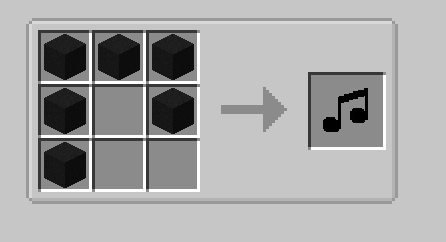
使用 Soundnizer 工具,你可以用鼠标左键点击手中的工具以及一个方块,再右键点击另一个方块来形成一个矩形区域:
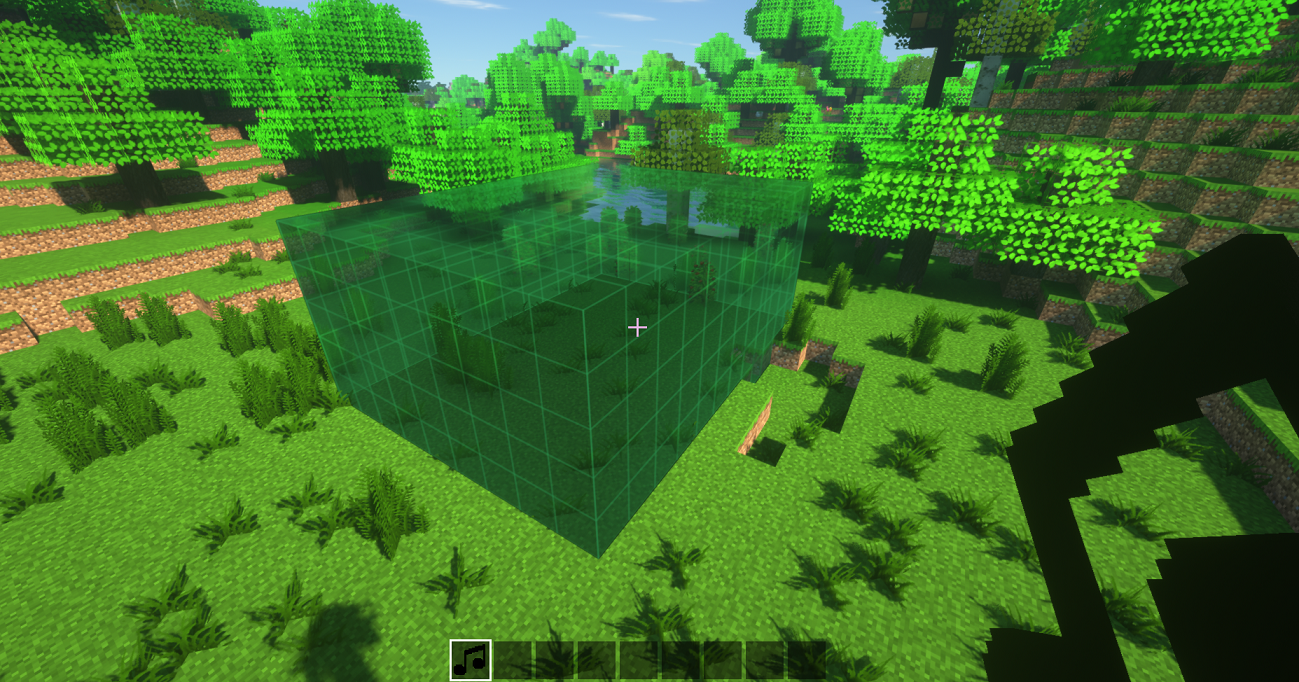
之后进入该区域,看向天空或远离所有其他方块,然后再次右键点击以打开创建界面:

所创建区域的名称必须与你在 ambience.properties 文件中创建的区域的名称一致
例如:如果在配置中你创建了 area.Shop=shop,那么 GUI 中的名称将是:Shop.
要编辑区域,只需手持 Soundnizer 工具在空中右键点击以打开 GUI
要清除选择,请按 Shift+右键点击
共有六种方块:
歌曲切换器:

此方块会根据红石信号强度改变区域内播放的歌曲。使用方法很简单:使用 Soundnizer 工具创建一个区域,将歌曲切换器放置在该区域内的任意位置,并向其提供红石信号以对该区域供电,从而播放不同的歌曲。因此,你可以通过在配置文件中设置区域的红石信号来最多设定 15 首不同的歌曲在该区域播放,如下所示:
area.Course.15=course
area.Course.14=race_start
area.Course.13=race_running
area.Course.12=race_over
注:非常适合用于制作带有主题音乐的迷你游戏 ?
警报器:
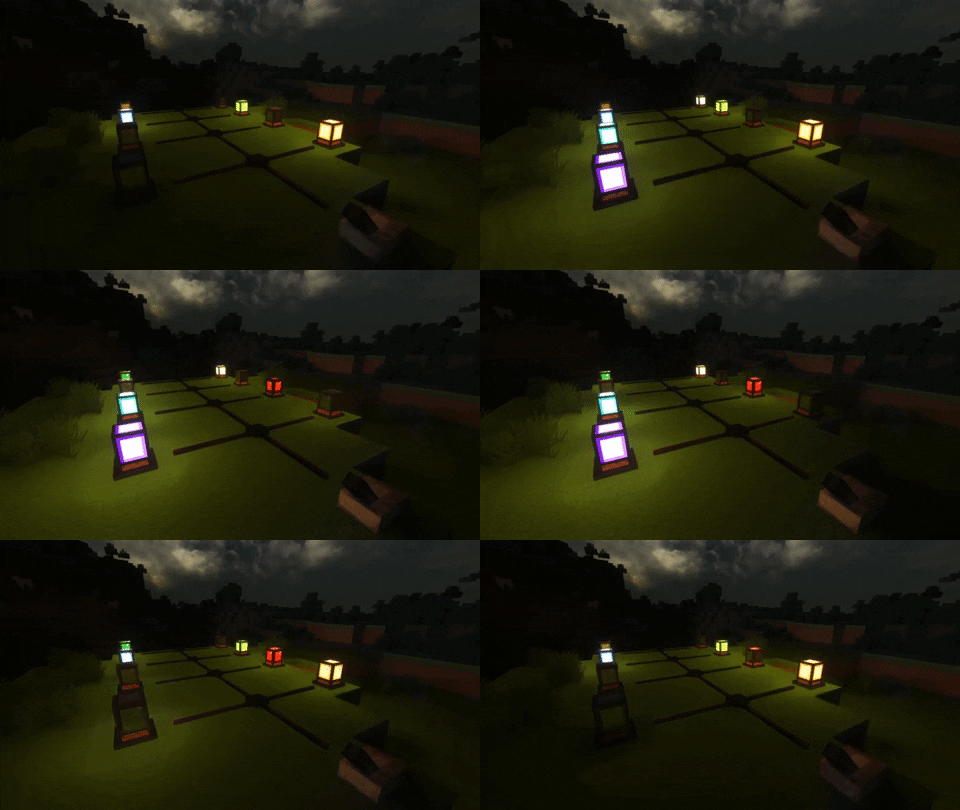
这是一个警报器,你可以配置任意声音在其上播放,开启时还会闪烁灯光。它还能与 SEUS PTGI 光影配合使用,你只需在光影包内的 block.properties 文件中编辑下面这行代码,将其中显示 “block.50=minecraft:torch” 的部分进行修改即可:
block.50=minecraft:torch ambience:alarm_lit_white ambience:alarm_lit_red ambience:alarm_lit_orange ambience:alarm_lit_yellow ambience:alarm_lit_lime ambience:alarm_lit_green ambience:alarm_lit_cyan ambience:alarm_lit_lightblue ambience:alarm_lit_blue ambience:alarm_lit_purple ambience:alarm_lit_magenta ambience:alarm_lit_pink ambience:alarm_lit_brown
扬声器
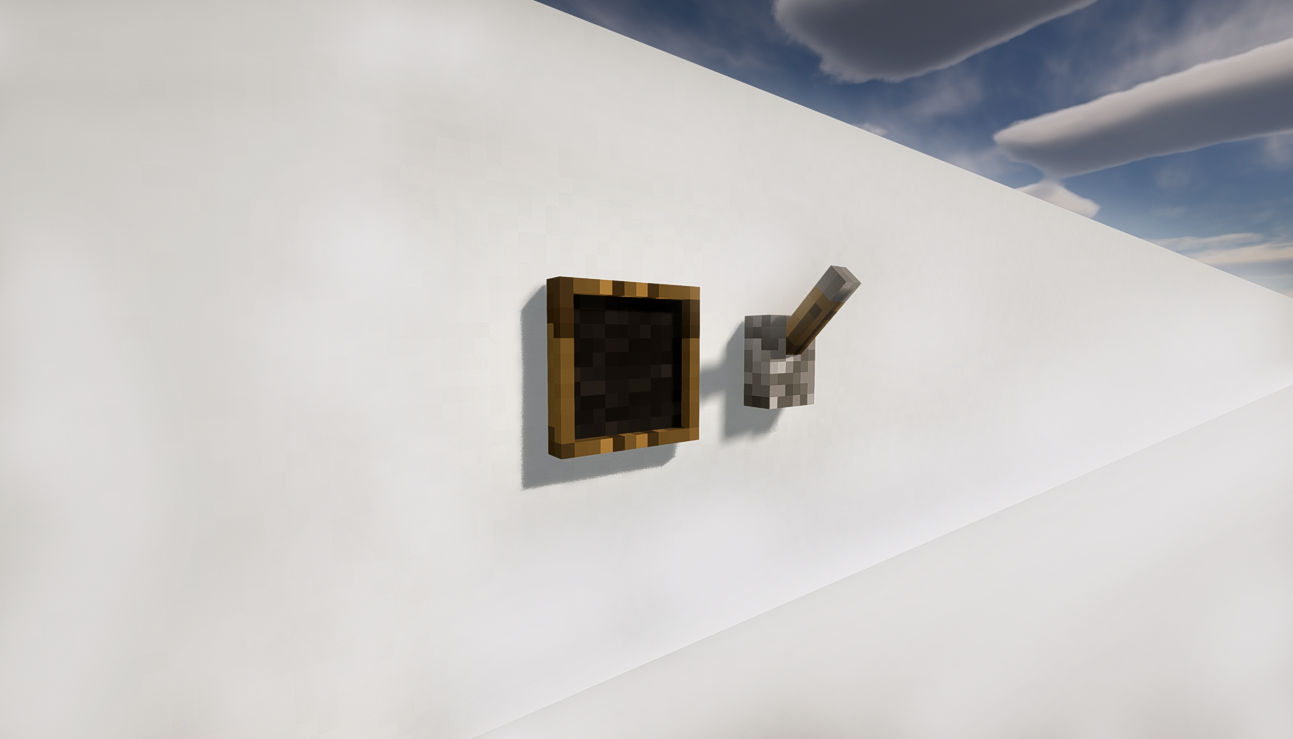
一个播放由你定义的声块的方块。要定义声音,请在手持 Soundnizer 工具时右键点击它;要播放声音,请使用红石信号激活扬声器。
如何向扬声器添加声音:
你需要将声音作为资源包添加到 Minecraft 文件夹中,并编辑 sounds.json 以添加你的声音。在游戏内,你必须前往“资源包”界面,并将 AmbienceSounds 作为一个资源包添加,就像添加普通材质包一样。
以下是一个包含几个示例声音的基础资源包:
Ambience Resource Pack
❗注意:必须解压后才能生效(已包含在上述我的个人音乐包中)。
奥卡利那笛

传说称,这把奥卡利那笛是由一位伟大的英雄遗落在世界上的。如果演奏得当,它能产生强大的效果。它无法合成,只能在宝箱中找到。
目前有 7 首已知的可演奏曲目(演奏曲目的按键配置可在 ambience.properties 中进行设置):
ocarina.sunssong
ocarina.songofstorms
ocarina.bolerooffire
ocarina.horsesong
ocarina.serenadeofwater
ocarina.preludeoflight
ocarina.minuetofforest
神之号角

号角是一件非常强大的物品,能让敌人的心中充满恐惧,并鼓舞战场上的盟友。
电影式转场
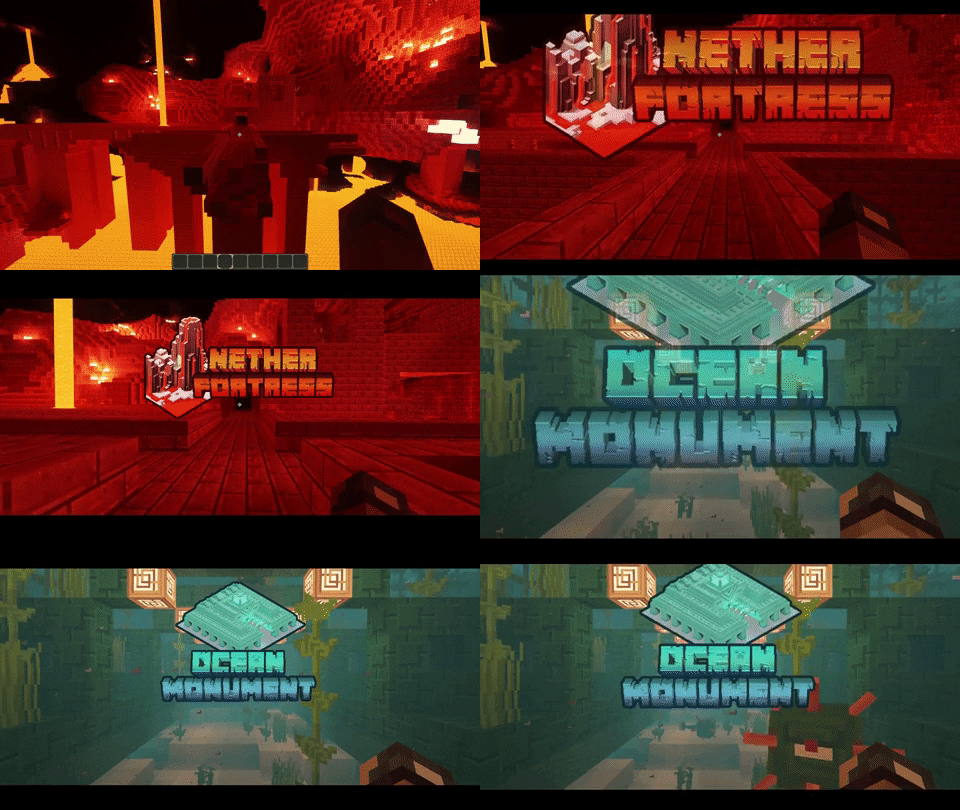
你可以创建图片,以便在进入某个结构或自定义区域时显示。为此,你需要将图片放入 AmbienceSounds.zip 资源包的 "assets\ambience\textures\transitions" 文件夹中,且文件名必须与结构名称或 createdarea 的名称完全一致(全部小写)。
注意:本模组与 mineTunes 不兼容,因为它们都使用需要访问音频系统的相同库。
原版模组来自 Vazkii:
I have created this mod on top of the original Ambience mod from Vazkii because I really loved his mod but I felt that some things were missing in his mod and as he made the source code available on github I have added things to this mod just for fun and things that I found necessary for a mod that adds music to Minecraft, see below the extra blocks and the tool recipes and how to configure and use it.
Obs: This mod isn't an addon for the Ambience mod this is the entire Ambience mod with extra features, so you don't need to have the original Ambience mod in your game, and as this mod adds blocks and items to the game you have to install it in the CLIENT and SERVER sides!
This mod have all the events from original mod where you can read here and the new events below that you can add in the ambience.properties file:
- area.[areaname]
- area.[areaname].[redstonepower 0-15]
- event.attacked
- event.advancement
- event.bossEnderDragon
- event.bossWither
- event.falling
- event.flyingelytra
- event.lava
- event.gameover
- event.paused
- event.connecting
- event.disconnected
- event.oceanMonument
- event.loadingWorld
- event.ranch
- event.fortress
- event.stronghold
- event.mansion
- event.oceanmonument
- event.mineshaft
- event.deserttemple
- event.endcity
- event.igloo
- event.jungletemple
- event.oceanruin
- event.pillageroutpost
- event.shipwreck
- event.swamphut
- event.dripwaterincave (works when there is dripping water inside lake caves)
- event.riding.[entityname]
- effect.[potionname] (ex: effect.nightVision=visionbeyondreach)
- mob.[mobname] ( ex.: mob.wroughtnaut=Boss3)
Per dimension events:
- dimension.[DimensionID] ( set a music to play globally in a custom dimension )
- dimension.[DimensionID].[Event] ( ex.: dimension.-11325.sleeping=sleeping )
- effect.[potionname].[DimensionID] (ex: effect.nightVision.-1=visionbeyondreach)
Ok, Just give me the music pack:
(extract it in the root folder of you minecraft installation)
My personal music pack
For the Configurations see the wiki
To add a sound to a selected area first you need the Soundnizer tool:
With the Soundnizer tool you can select an area by left-clicking with the tool in your and in a block and right-clicking in another block to form a rectangular shape:
After that enter inside the area look to the sky or get away of all other blocks and right click again to open the Creation Gui:
The name of the created area must be equal the name of the area that you have created in the ambience.properties file
Example: if in the configs you created a area.Shop=shop the name in the GUI will be: Shop.
To edif an area you have to just right click in the air with the Soundnizer tool in your hand to open the GUI
To clear the selection press Shift+Right-click
There are six blocks:
The Song Switcher:
This block changes the song being played in a region depending on the redstone signal strength, to make it work it's simple, create an region with the Soundnizer tool put the song switch anywhere inside that region and put some redstone signal to it to power the region with energy for it to play the different songs, so you can setup up to 15 diferent songs to be played in the region by setting the area redstone signal in the config file like that:
area.Course.15=course
area.Course.14=race_start
area.Course.13=race_running
area.Course.12=race_over
obs.: it's perfect for creating mini-games with themed musics ?
The Alarm:
It's an Alarm that you can configure any sounds to be played on it and it blinks light when turned on, also it works with SEUS PTGI shader, you have only to edit the line of code bellow where it says "block.50=minecraft:torch" in the block.properties inside the shaderpack:
block.50=minecraft:torch ambience:alarm_lit_white ambience:alarm_lit_red ambience:alarm_lit_orange ambience:alarm_lit_yellow ambience:alarm_lit_lime ambience:alarm_lit_green ambience:alarm_lit_cyan ambience:alarm_lit_lightblue ambience:alarm_lit_blue ambience:alarm_lit_purple ambience:alarm_lit_magenta ambience:alarm_lit_pink ambience:alarm_lit_brown
The speaker
A block that plays a sound defined by you, to define a sound rightclick on it with the Soundnizer tool in your hand and to play it activate the speaker use a redstone signal.
How To add sounds to the Speaker:
You have to add the sounds as a resource pack in the minecraft folder, and edit the sounds.json to add your sound, and inside the game you have to go to ResourcePacks and add the AmbienceSounds as a resource as you would do with a normal texture pack
Here are the basic resource pack with a few sounds added as an example:
Ambience Resource Pack
❗Note: You must extract it for it to work and is already included in the My personal music pack above)
The Ocarina
The legend says that this ocarina was left forgotten on this world by a great hero and if played correctly it do powerful things, it can't be crafted only found in chests.
There are 7 know songs that you can play (the buttons for playing the songs can be configurated in the ambience.properties:
ocarina.sunssong
ocarina.songofstorms
ocarina.bolerooffire
ocarina.horsesong
ocarina.serenadeofwater
ocarina.preludeoflight
ocarina.minuetofforest
The Horn from the Gods
The horn is a very powerful item that causes fear in the hearts of your enemies and encourages your allies in the battle field.
Cinematic Transitions
You can create images to show up when you enter a structure or a custom created region, to do so you must put an image inside the AmbienceSounds.zip resource pack inside the "assets\ambience\textures\transitions" and the file name must be the same name of the structure or the createdarea all in lowercase.
NOTE: This mod is incompatible with mineTunes, as they both use the same library that requires access to the audio system.
Original mod from Vazkii:

 模组
 模组

 模组

 模组

 模组

 模组
评论 0
登录后参与评分
还没有评论,来抢沙发吧