Ancient Night Sky
关于
这是一个简单的模组,它将 rd-132211 和 rd-132328 版本中的天空颜色更改为非常深的蓝色。此模组与我的另一个模组 Ancient Planks 兼容。启用或禁用此模组不会破坏或损坏你的存档。
安装(Java Agent)
此模组以 jar 文件形式分发,可以通过向游戏的 Java 参数添加 -javaagent:path/to/mod.jar,或者将代理添加到 Prism Launcher 的版本中来安装。
Prism Launcher
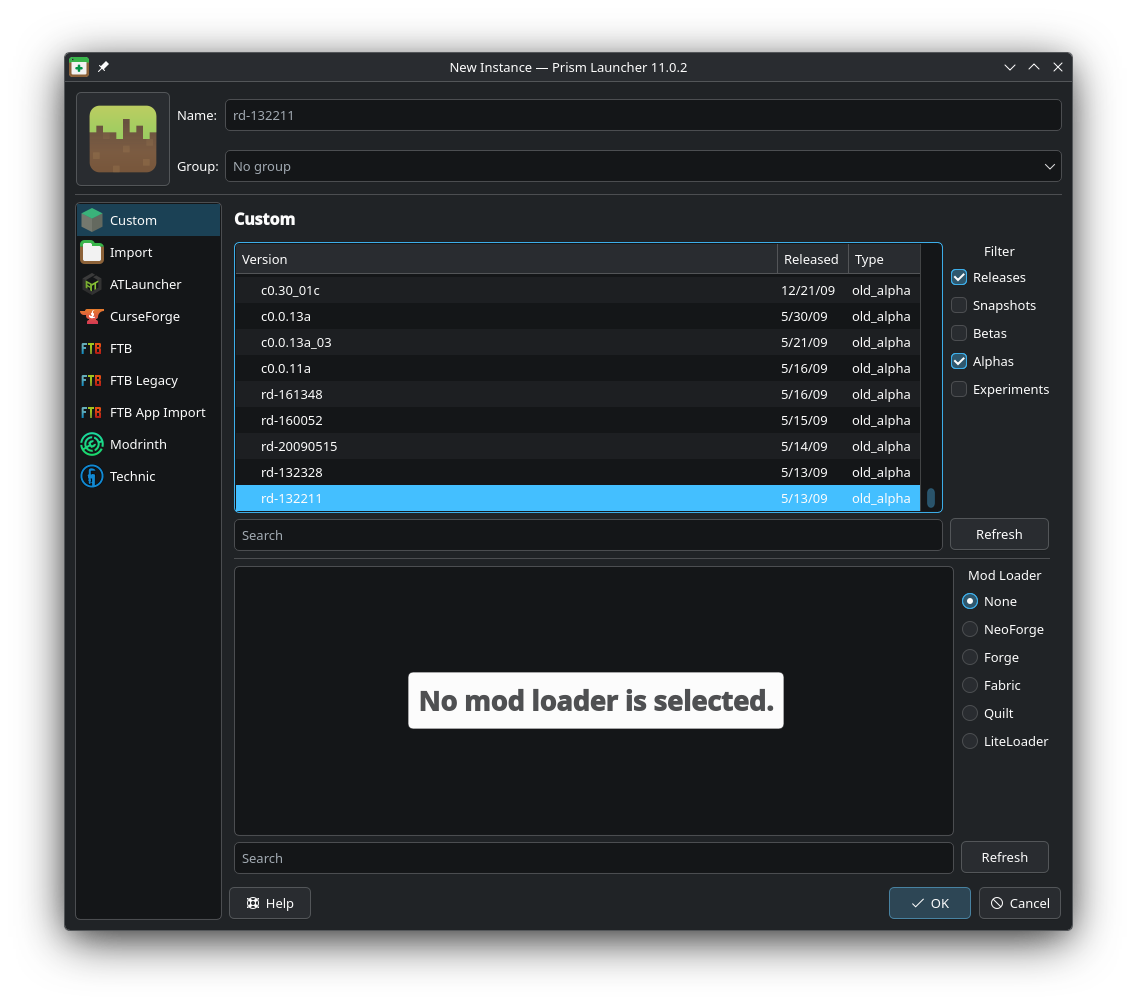 创建一个新实例。勾选 Alphas 复选框,并一直向下滚动以选择版本 rd-132211(或其他兼容版本)。实例创建完成后,右键点击它并按下编辑按钮。
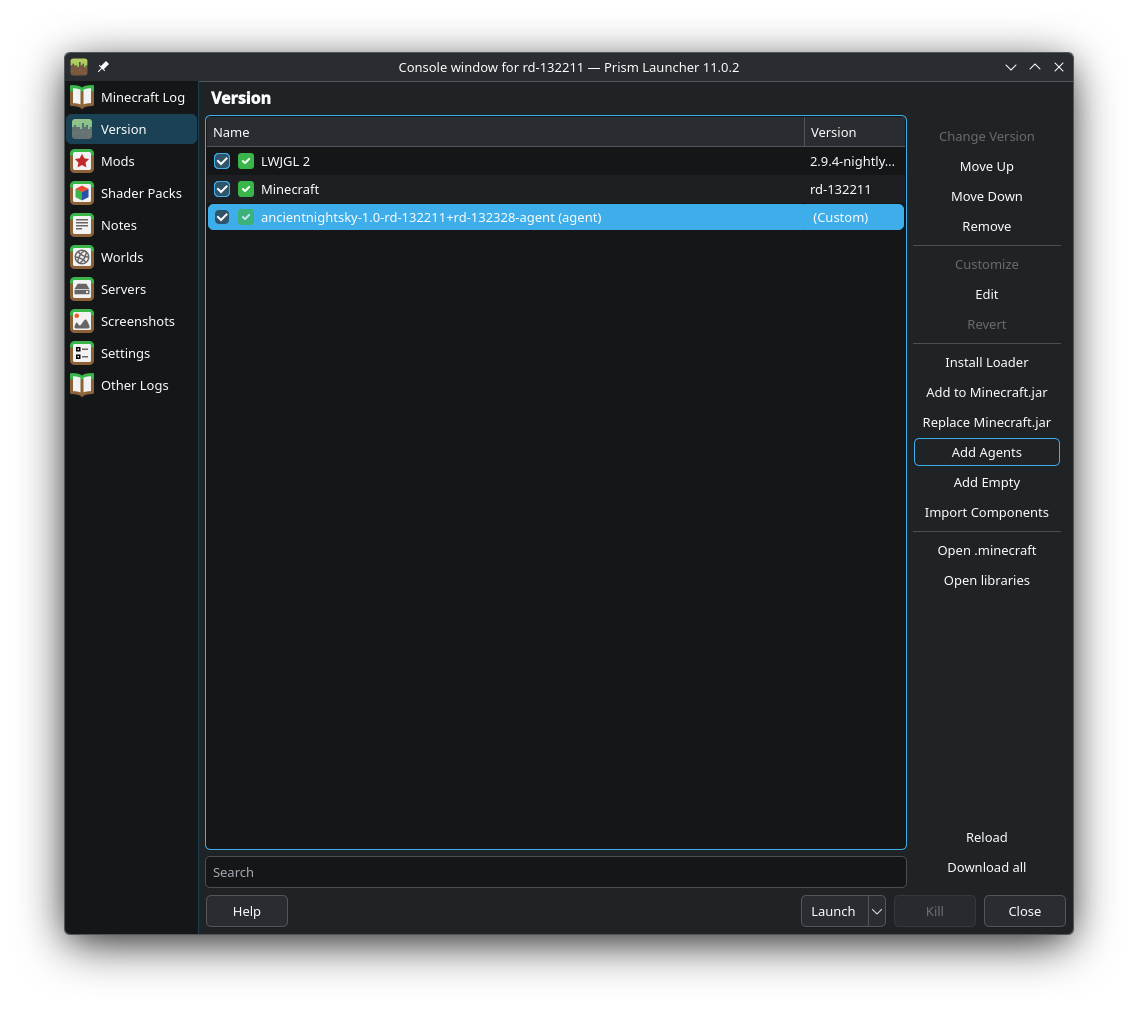 在左侧选择“版本”选项卡。在右侧点击“添加代理”,然后选择已下载的模组。Ancient Night Sky 模组应出现在版本列表中,按下启动按钮即可在启用该模组的情况下启动游戏。
官方启动器
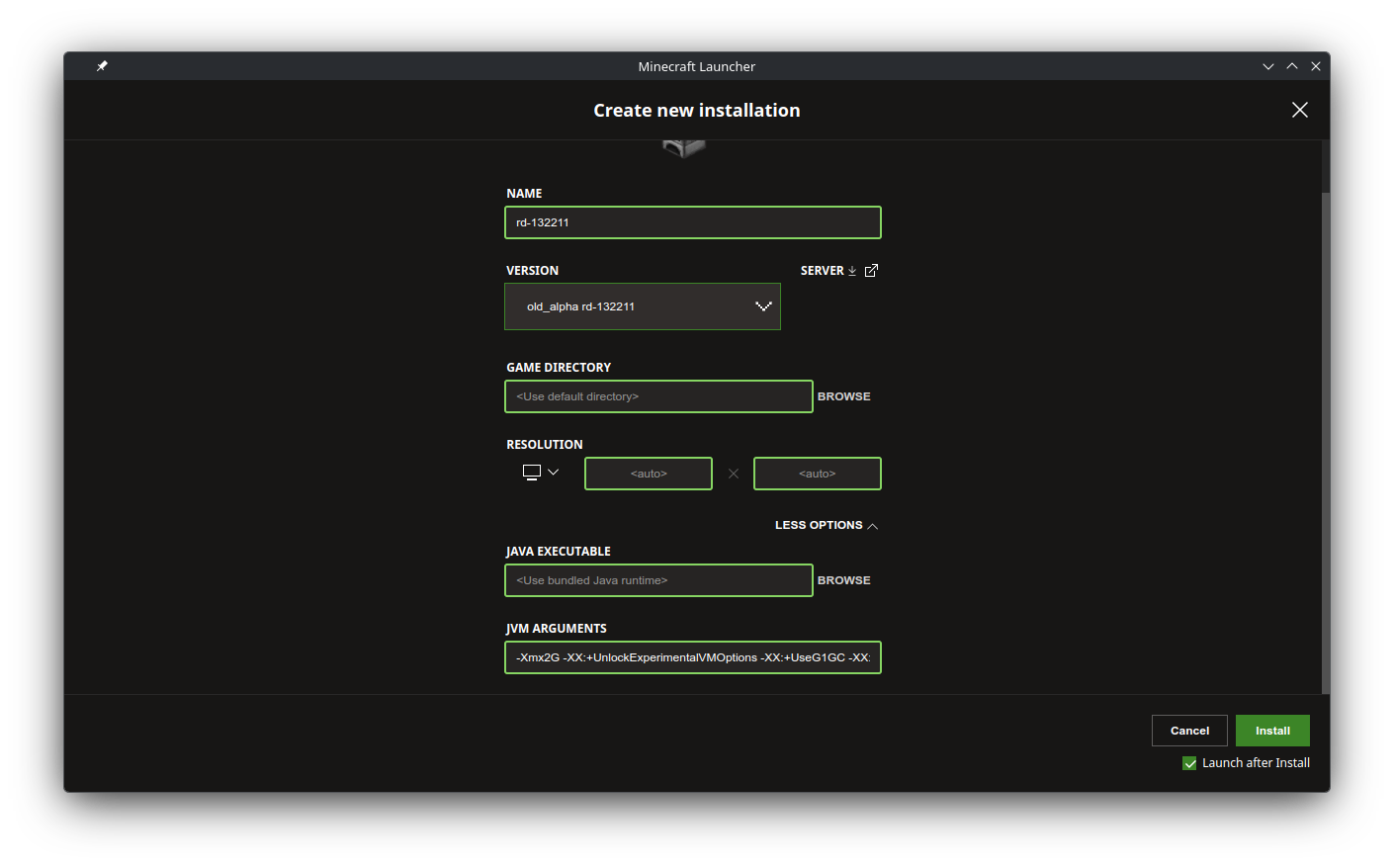 创建一个新的安装配置。确保在启动器设置中启用了“显示 Minecraft:Java Edition 的历史版本”,并一直向下滚动以选择版本 rd-132211(或其他兼容版本)。
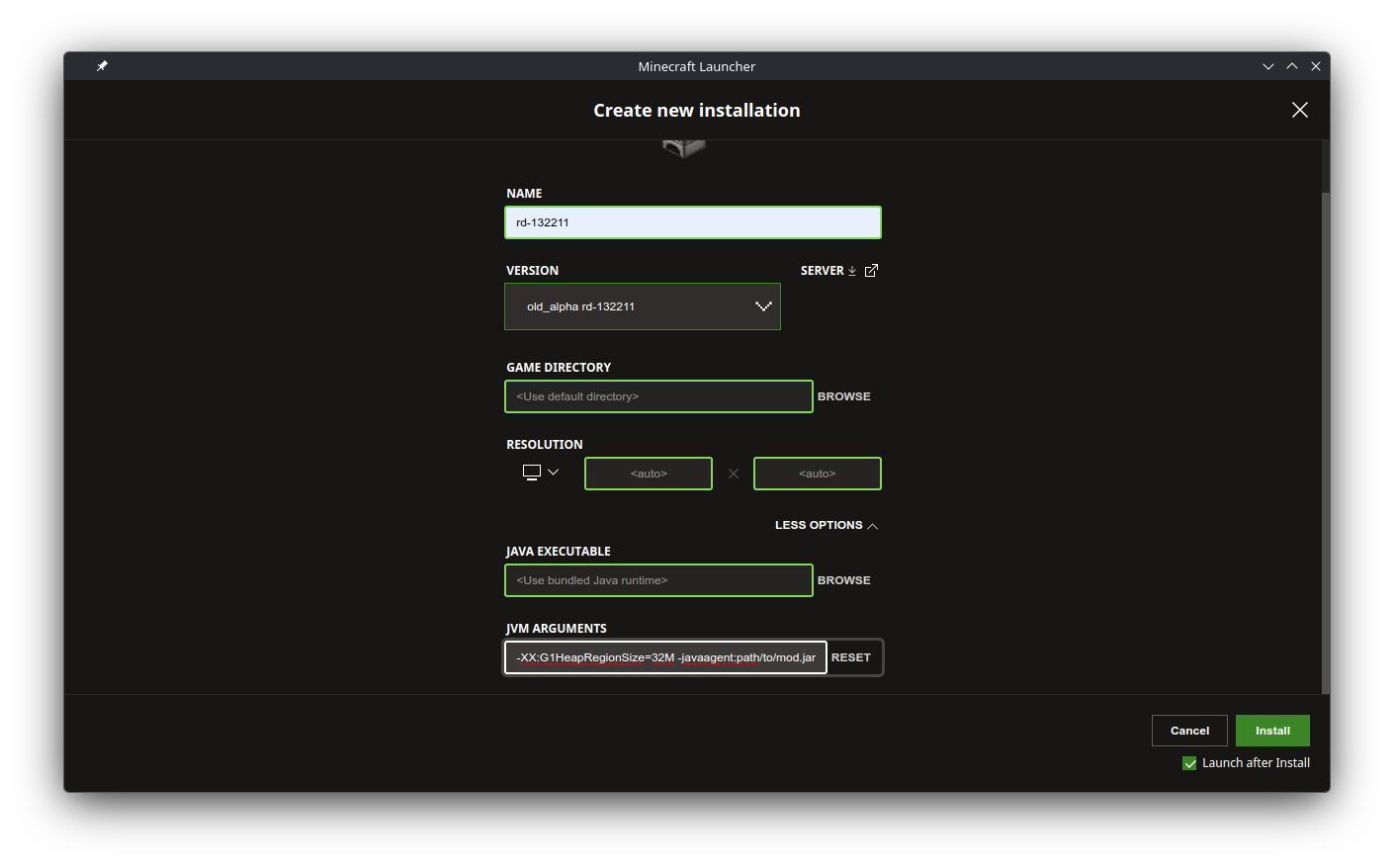 在更多选项下,在 JVM 参数末尾添加
-javaagent:path/to/mod.jar。请确保将 "path/to/mod.jar" 替换为你电脑上模组的实际路径。
安装(旧版 Jar Mod)
此模组以 zip 文件形式分发,可以作为 jar mod 进行安装。此模组不需要安装任何模组加载器。本安装指南仅适用于 Prism Launcher 和 MultiMC。不建议使用官方 Minecraft 启动器。
创建一个新实例。勾选 Alphas 复选框,并一直向下滚动以选择版本 rd-132211(或其他兼容版本)。实例创建完成后,右键点击它并按下编辑按钮。
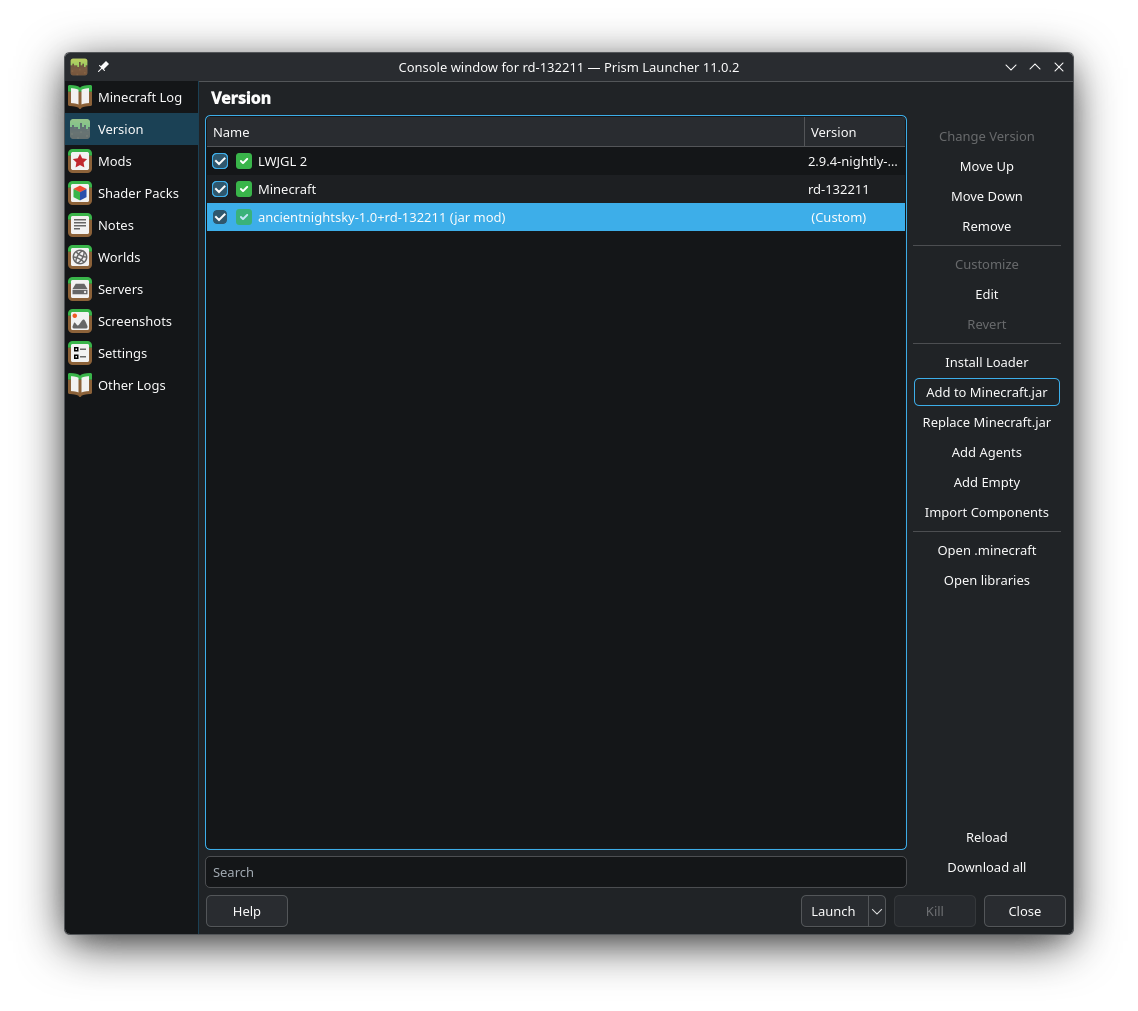 在左侧选择“版本”选项卡。在右侧点击“添加到 Minecraft.jar”,然后选择已下载的模组。Ancient Night Sky 模组应出现在版本列表中,按下启动按钮即可在启用该模组的情况下启动游戏。
Ancient Night Sky
About
This is a simple mod that changes the color of the sky to a very dark blue in version rd-132211 and rd-132328. This mod is compatible with my other mod Ancient Planks. Enabling or disabling this mod will NOT break or corrupt your levels.
Installation (Java Agent)
This mod is distributed as a jar file, and it can be installed by adding "-javaagent:path/to/mod.jar" to the game's java arguments, or by adding the agent to the version in the Prism Launcher.
Prism Launcher
Create a new instance. Tick the Alphas box, and scroll all the way down to select version rd-132211 (or another compatible version). After the instance is created, right click it and press Edit.
Select the Version tab on the left. Click Add Agents on the right, and then select the downloaded mod. The Ancient Night Sky mod should appear in the versions list, and pressing launch will start the game with the mod enabled.
Official Launcher
Create a new installation. Ensure Show historical versions of Minecraft: Java Edition in the Launcher is enabled in the launcher settings, and scroll all the way down to select version rd-132211 (or another compatible version).
Under MORE OPTIONS add "-javaagent:path/to/mod.jar" to the end of the JVM ARGUMENTS. Ensure you replace "path/to/mod.jar" with the actual path to the mod on your computer.
Installation (Old Jar Mod)
This mod is distributed as a zip file, and it can be installed as a jar mod. This mod does not require any mod loader to be installed. This installation guide is only for the Prism Launcher and MultiMC. The Official Minecraft Launcher is not recommended.
Create a new instance. Tick the Alphas box, and scroll all the way down to select version rd-132211 (or another compatible version). After the instance is created, right click it and press Edit.
Select the Version tab on the left. Click Add to Minecraft.jar on the right, and then select the downloaded mod. The Ancient Night Sky mod should appear in the versions list, and pressing launch will start the game with the mod enabled.


 模组

 模组

 模组

 模组

 模组

 模组

评论 0
登录后参与评分
还没有评论,来抢沙发吧