
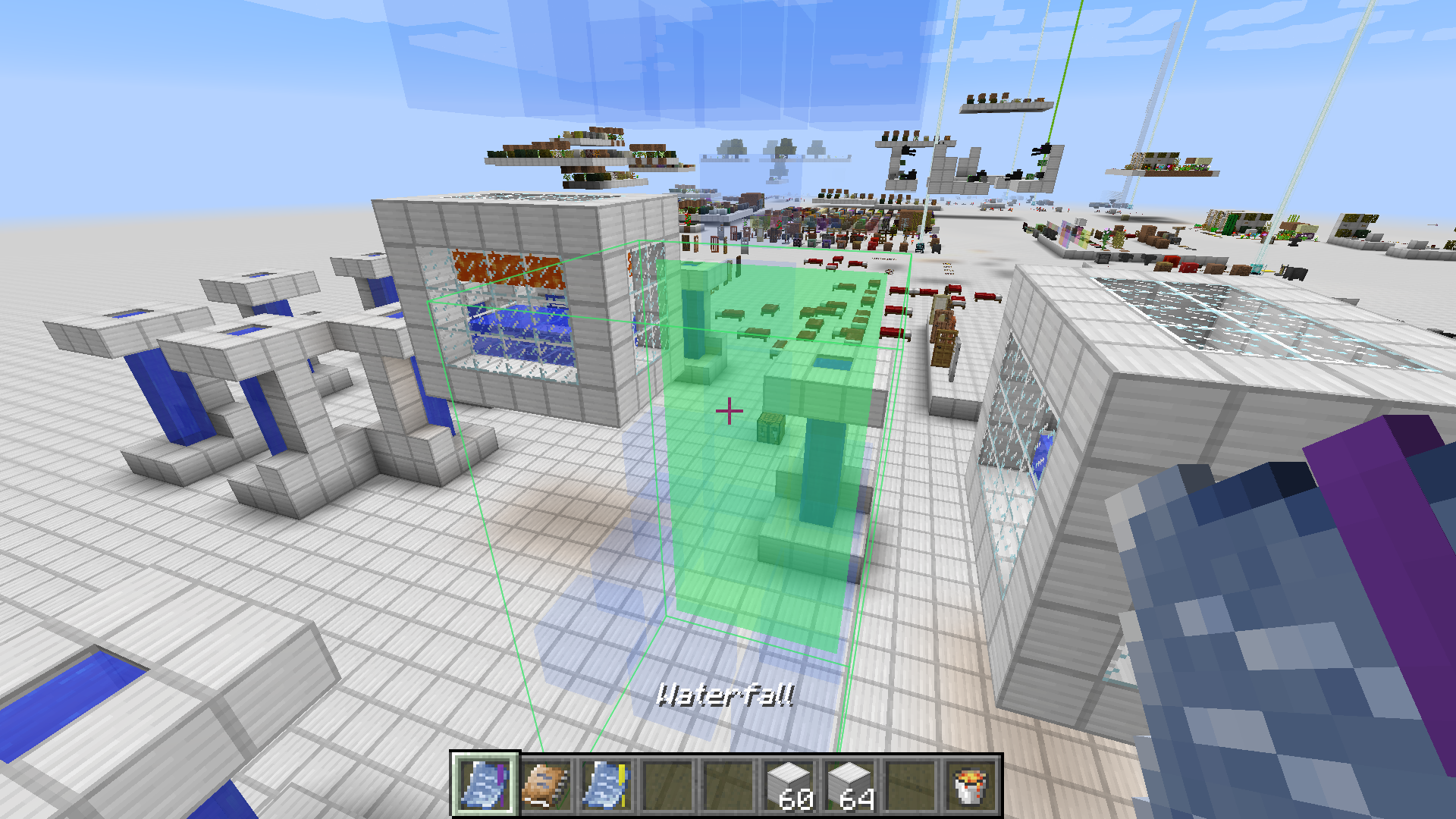
Architect 是一个模组,提供了一套小巧的工具集,让构建重复结构变得轻松自如。它允许玩家使用一个简单但强大的选择系统在世界中创建结构的 蓝图(模式):右键点击单个方块可将其包含在 草图 中;按住 Shift 并右键点击以开始选择范围,再次右键点击以完成选择并将其纳入,或再次按住 Shift 并右键点击以移除该选择。
当选择满意后,按住右键稍超过一秒(类似于吃东西的操作),即可将 草图 转换为 蓝图。随后,蓝图可用于在你喜欢的任何位置放置保存的模式。放置操作遵循基于蓝图边界粒度的网格(以便轻松实现重复放置)。此外,按 G 键可以切换放置网格,以实现自由定位。
在潜行状态下滚动鼠标滚轮可以微调位置——在网格吸附模式下,这会根据玩家当前注视的轴向移动放置点;否则,它将调整拾取距离。按 R 键旋转蓝图。最后,按 P 键可以切换仅放置完整蓝图或允许部分放置。当然,所有按键绑定均可在 Minecraft 的控制设置窗口中重新绑定。
用于构建已放置蓝图的物料将从玩家的物品栏中提取。为避免快速耗尽材料,可以使用 物品提供者。该物品可以绑定到世界中的某个库存(例如箱子)。只要绑定的提供者存在于玩家的物品栏中,系统会先从绑定的库存中提取材料,然后再从玩家的物品栏中提取。不过,其作用范围有限。它的孪生物品 流体提供者 则专门用于处理流体的相同功能。
以下是一段简短演示视频,展示了基本控制、模组的主要功能,以及在视频后半部分介绍了一些配置方法。
Architect is a mod that provides a small toolset to make building repetitive structures a breeze. It allows creating Blueprints (patterns) of structures in the world using a simple but powerful selection system: single blocks can be toggled to be included in a Sketch by right-clicking them, ranges can be added/removed by sneak-right-clicking to start a selection and then finish it by right-clicking again to include the selection, or sneak-right-clicking again to remove the selection.
Once a selection is satisfactory, a Sketch can be converted into a Blueprint by holding right-click for a little over one second (think eating food). Blueprints can then be used to place the saved pattern in the world wherever you like. Placement follows a grid of the granularity of the blueprint's bounds (to easily allow placing a blueprint in a repeating fashion). Alternatively, the placement grid can be toggled by pressing G for free positioning.
The position can be fine-tuned by scrolling the mouse-wheel while sneaking - this shifts the placement along the axis the player is currently looking along when in grid-snapping mode, otherwise it adjusts the picking distance. Rotate blueprints by pressing R. Finally, by pressing P one can toggle whether to only place complete blueprints or whether to allow partial placement. All keybinds can be rebound in the Minecraft controls window of course.
Materials for construction of a placed blueprint will be extracted from the player's inventory. To avoid running out of materials quickly, an Item Provider may be used. This item can be bound to an inventory in the world (such as chests). As long as a bound provider is in the player's inventory, materials will be pulled from the bound inventory before pulling from the player's inventory. There is a range limit, however. Its twin item, the Fluid Provider fulfills the same job just for fluids.
Here's a quick demonstration video showing the basic controls, what the mod is about, and in the second half a bit of info on how to configure it.
下载 Architect
需要联机服务器吗?
稳定流畅、一键部署,几分钟即可和朋友联机开服
最低仅需 8 元/月 即可畅快联机
下载 Architect
需要联机服务器吗?
稳定流畅、一键部署,几分钟即可和朋友联机开服
最低仅需 8 元/月 即可畅快联机
下载 Architect
需要联机服务器吗?
稳定流畅、一键部署,几分钟即可和朋友联机开服
最低仅需 8 元/月 即可畅快联机
下载 Architect
下载 Architect
下载 Architect
需要联机服务器吗?
稳定流畅、一键部署,几分钟即可和朋友联机开服
最低仅需 8 元/月 即可畅快联机
下载 Architect
需要联机服务器吗?
稳定流畅、一键部署,几分钟即可和朋友联机开服
最低仅需 8 元/月 即可畅快联机
下载 Architect
需要联机服务器吗?
稳定流畅、一键部署,几分钟即可和朋友联机开服
最低仅需 8 元/月 即可畅快联机
下载 Architect
需要联机服务器吗?
稳定流畅、一键部署,几分钟即可和朋友联机开服
最低仅需 8 元/月 即可畅快联机
下载 Architect
需要联机服务器吗?
稳定流畅、一键部署,几分钟即可和朋友联机开服
最低仅需 8 元/月 即可畅快联机
- 在消耗提示中添加了能量/疲劳成本。
- 修复了在“仅在资源充足时放置”模式下忽略创造模式标志的问题。
- 修复了不足能量提示信息重复显示两次的问题。
- 进行了少量内部清理工作。
关于这个资源的讨论、问题反馈与使用心得
还没有讨论,来发第一帖吧
你是这个资源的作者?登录后可认领此资源。
相似资源
 模组

可定制的鞘翅模组,支持装饰纹饰、旗帜图案等更多功能!
 模组

让你能够在世界中的任何位置定位结构。
 模组

所有本应存在的事物
 模组

为 Cobblemon 添加 Mega 进化、Z 招式、太晶化、超极巨化/超巨大化、究极爆击与融合!
 模组

重做了铁砧,支持存储物品、更公平的修复成本,并且不再令人沮丧的修复惩罚。
 模组

基于 GTCEu 1.12.2 的现代 GregTech
评论 0
登录后参与评分
还没有评论,来抢沙发吧