Arkif 的悬浮滑板模组
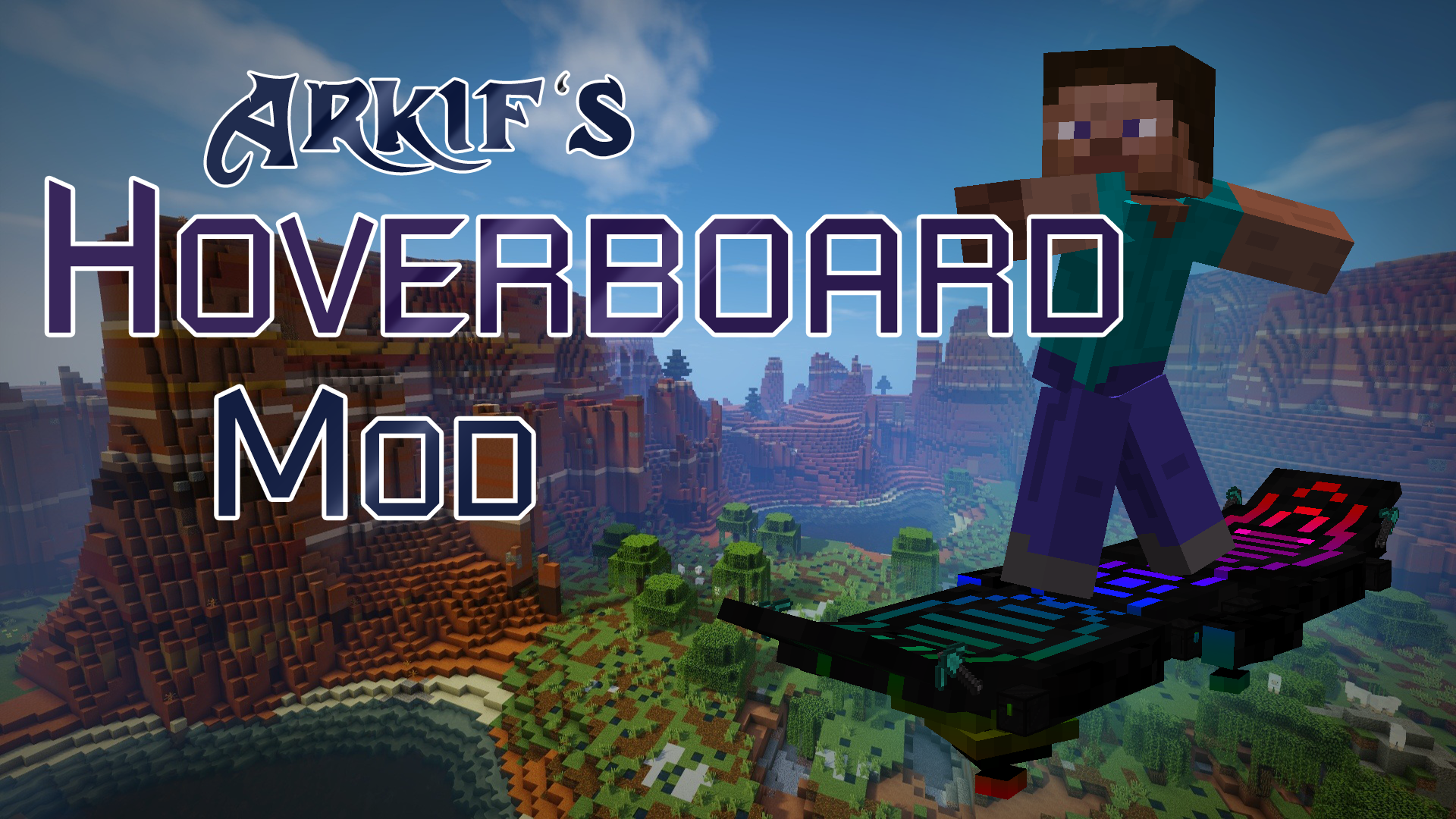
欢迎来到“Arkif 的悬浮滑板模组”!本模组为游戏增添了未来风格的悬浮滑板,以及多种用于制作它们的升级部件和机器。建议使用该模组的最新版本。
本模组支持 1.12.2 和 1.7.10 版本。
快速概览
Arkif 的悬浮滑板模组依赖红石燃料(RF)来驱动机器和悬浮滑板。RF 可通过太阳能板产生,并使用可充电电池进行传输。本模组旨在与其他模组兼容,允许您将管道/电缆连接到机器上,从而传输物品或 RF。如果没有其他模组提供此功能,您也可以使用漏斗。
悬浮滑板允许玩家在空中快速移动并携带物品。它可以升级以实现更快的速度、发射导弹、自动采矿、提供护盾、增加存储空间、在洞穴中提供照明等。悬浮滑板会过热且对水和岩浆较为脆弱,但可以通过升级来管理和减少这些问题。
悬浮滑板执行的每项任务都会消耗一些 RF 并产生一些热量。悬浮滑板具有一个效率值,会根据温度进行调整。正确管理热量可以提高效率,降低 RF 消耗和热量输出。
更多信息请参阅下方的“详细信息”部分。
包含对 Not Enough Items / Just Enough Items 的合成表支持。
安装方法 (1.12.2)
安装本模组与安装标准 Minecraft 模组相同,但需要 Render Player API 2019 和 Redstone Flux API。
1). 下载并安装适用于 1.12.2 的 Minecraft Forge ()(基于 Forge 版本 14.23.5.2847 构建)。
2). 下载适用于 1.12.2 的 Render Player API 2019 ()。
3). 下载适用于 1.12.2 的 Redstone Flux API ()。
4). 下载本模组,确保您拥有 jar 文件。
5). 将下载的 3 个 jar 文件拖入您的 Minecraft 安装目录中的 mods 文件夹。(在 Windows 搜索中输入“%APPDATA%”后可找到“.minecraft”文件夹。您可能需要至少运行一次 Forge 才能看到该文件夹,或者手动创建它)。
安装方法 (1.7.10)
安装本模组与安装标准 Minecraft 模组相同,但需要 Divisor 制作的 Render Player API。
1). 下载并安装适用于 1.7.10 的 Minecraft Forge ()(针对 Forge 版本 10.13.4.1558 构建)。
2). 下载适用于 1.7.10 的 Render Player API(版本 0.4)()。
3). 下载并解压本模组,确保您拥有 jar 文件。
4). 将 jar 文件和 Render Player API 文件拖入您的 Minecraft 安装目录中的 mods 文件夹。(在 Windows 搜索中输入“%APPDATA%”后可找到“.minecraft”文件夹。您可能需要至少运行一次 Forge 才能看到该文件夹,或者手动创建它)。
详细信息
碳纤维方块
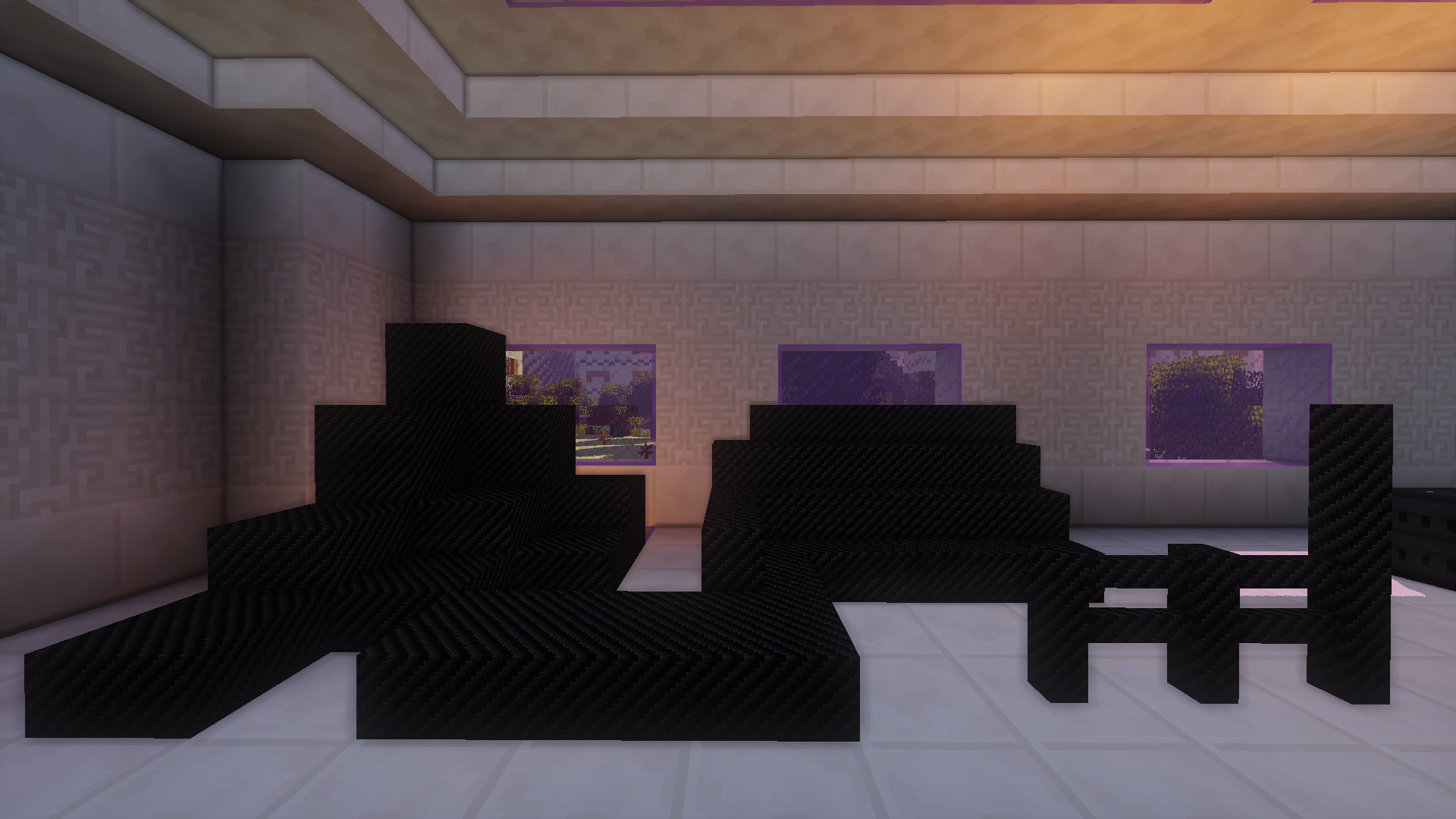
本模组在大多数配方中使用碳纤维,并包含几个用于装饰目的的方块。其中包括碳纤维方块、台阶、 slab(半砖)和栅栏。上述所有方块的制作都力求简便,希望它们能有助于建造未来风格的掩体等。
悬浮滑板制造台
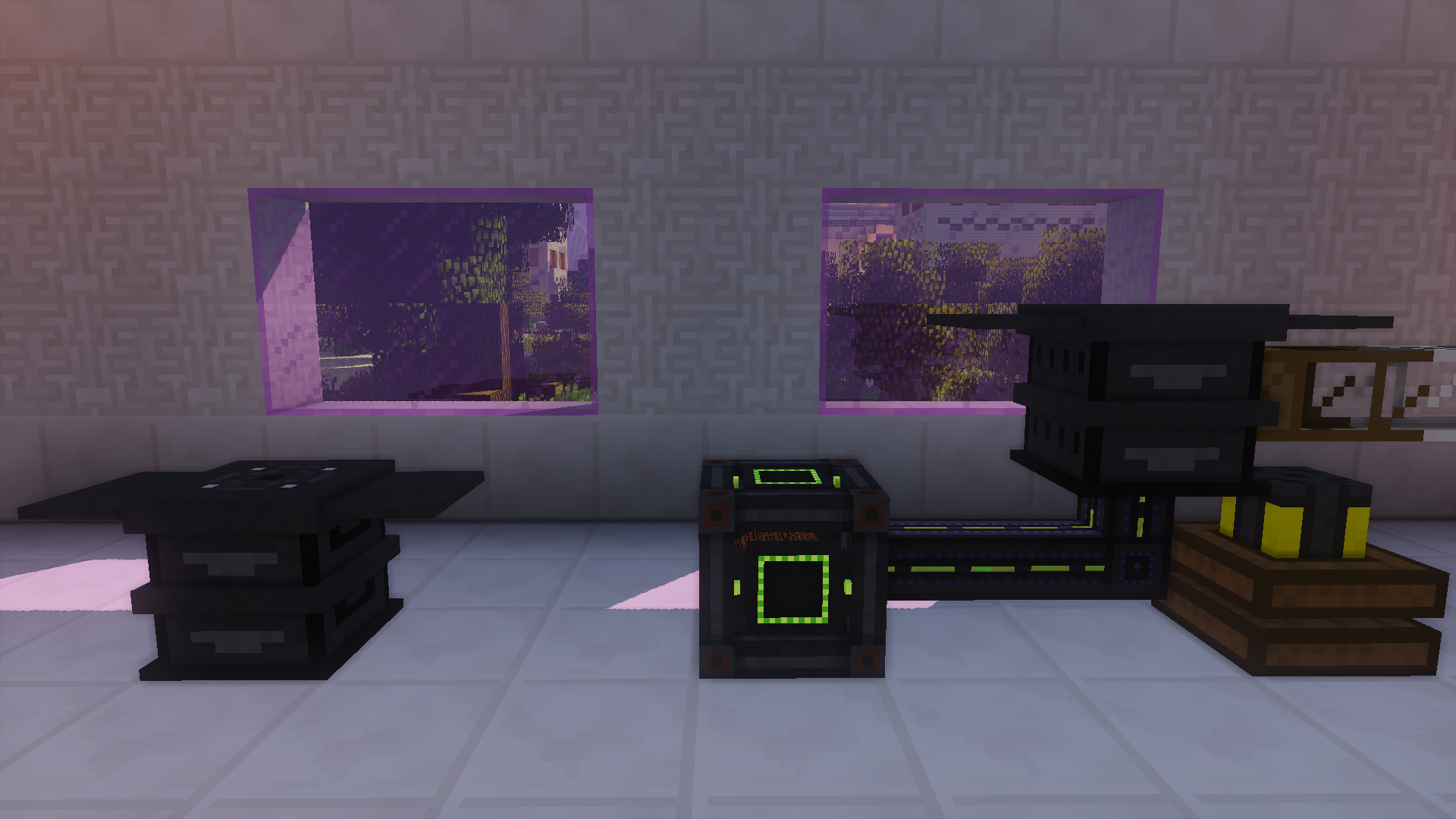
悬浮板制造器完全符合你的预期——它允许你制作悬浮板。该方块提供制作悬浮板及其组件所需的 4x4 合成网格。悬浮板制造器还可用于制作升级组件,以及所有包含碳纤维(自身除外)的合成配方。制作时,制造器需要消耗 48 RF/T,每个配方都有固定的制作时间。
上图右侧的悬浮板制造器显示了你可以连接电源的面。输出槽可以从侧面提取物品,电力则可以通过方块底部输入。
悬浮板装载器 / 卸载器
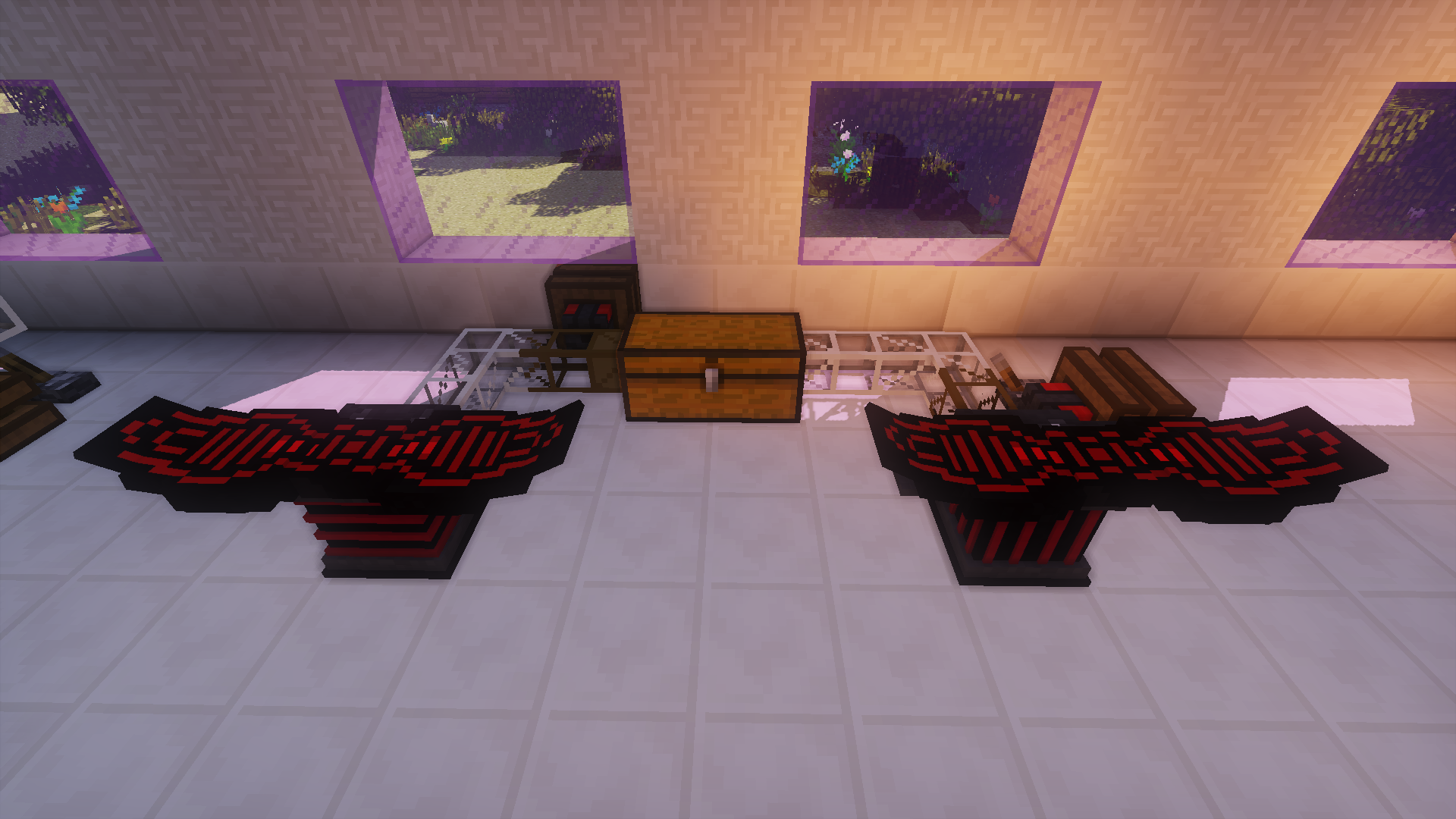
悬浮板装载器允许将方块内的物品传输到悬浮板上。悬浮板必须直接位于装载器上方才能正常工作。当装载器的颜色与悬浮板的颜色匹配时即表示已连接。卸载器功能相同,但会将物品从悬浮板中取出。这些方块不需要 RF 能源,但会记录方块的拥有者。这可以防止它们干扰设有私人站的悬浮板。这些方块旨在与能够向其传输或从中传输物品的模组(如图片所示的 BuildCraft)配合使用。
悬浮板充电器
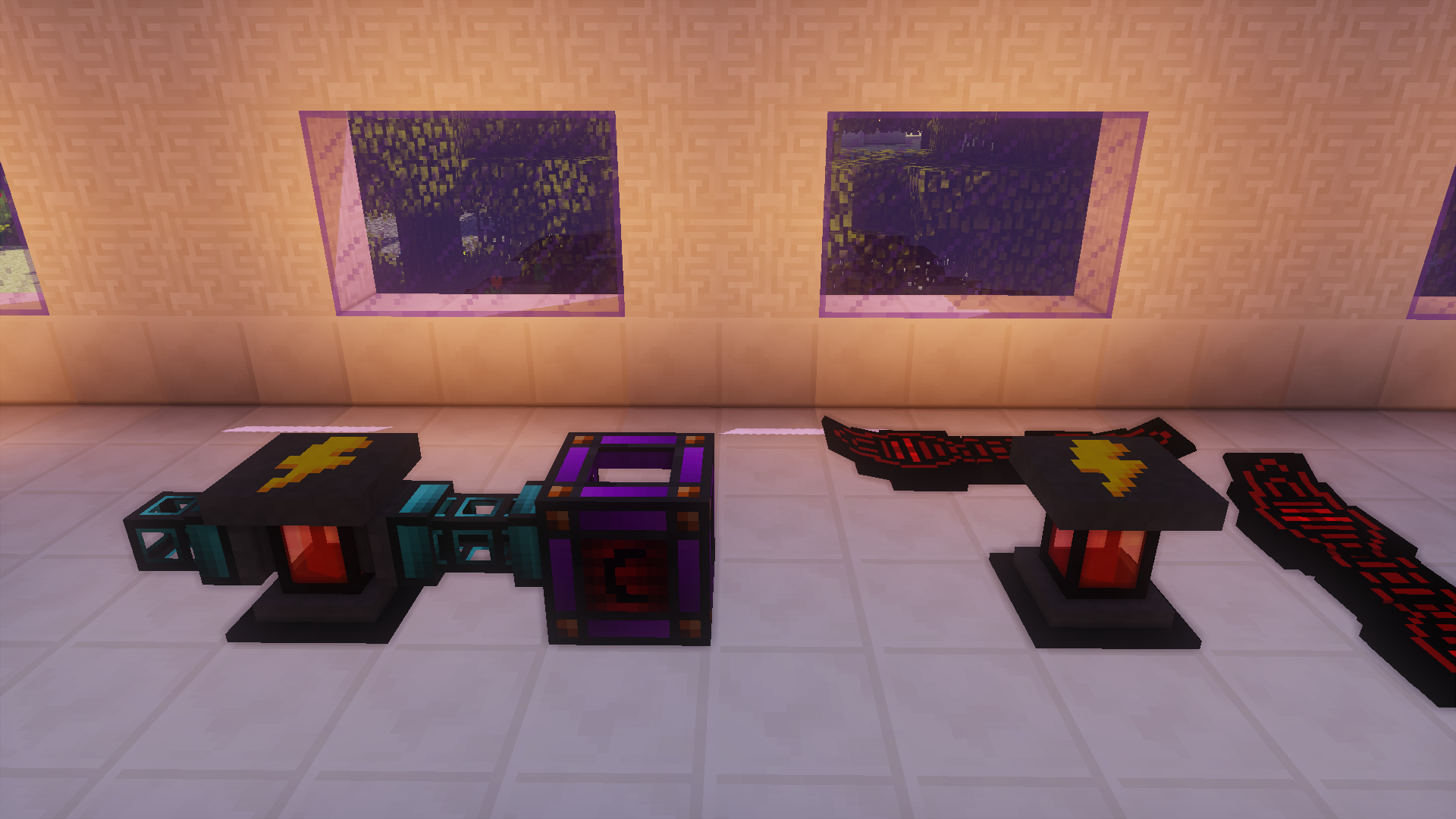
悬浮板充电器允许对周围悬浮板中的 RF 进行操作。该方块可以在半径 4 的范围内搜索悬浮板,并可以向其提供或抽取 RF。要使此功能生效,悬浮板不得设有私人站,或者你必须是该方块和悬浮板的共同拥有者。拥有者的名字会显示在 GUI 的右上角。点击 GUI 内的按钮以更改能量传输的方向。如图所示,该方块可以从除顶部以外的所有面进行能量交互。
熔融纺丝机
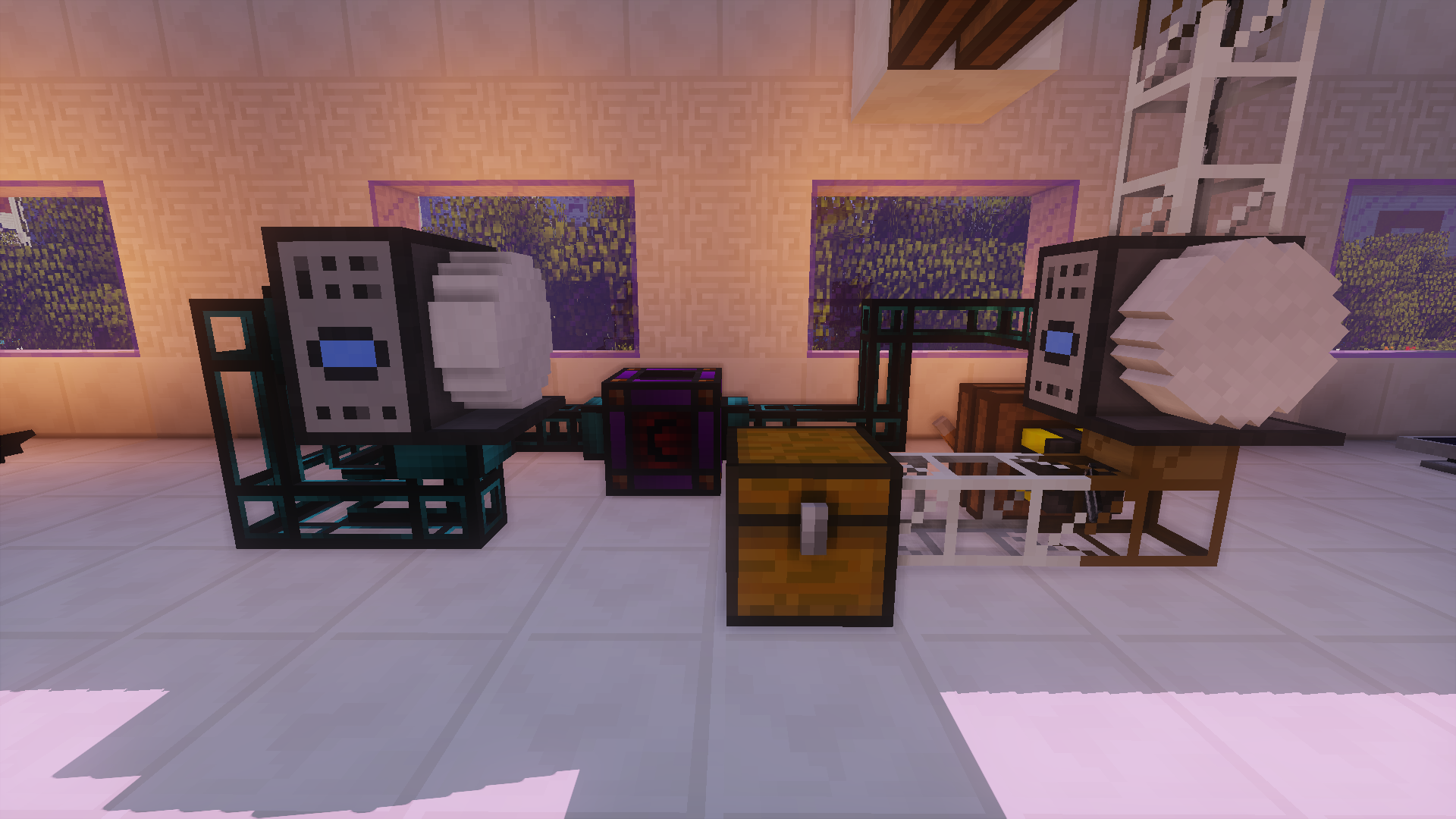
熔融纺丝机是一种用于制作碳纤维的机器。它需要 64 RF/T,完成一个周期需要 200 tick。当物品被转化时还会获得经验值。如果你有任何更多的配方创意,请在下方留言。这台机器可以从背面或底部接收电力,物品可以从顶部注入并从底部提取。
太阳能板
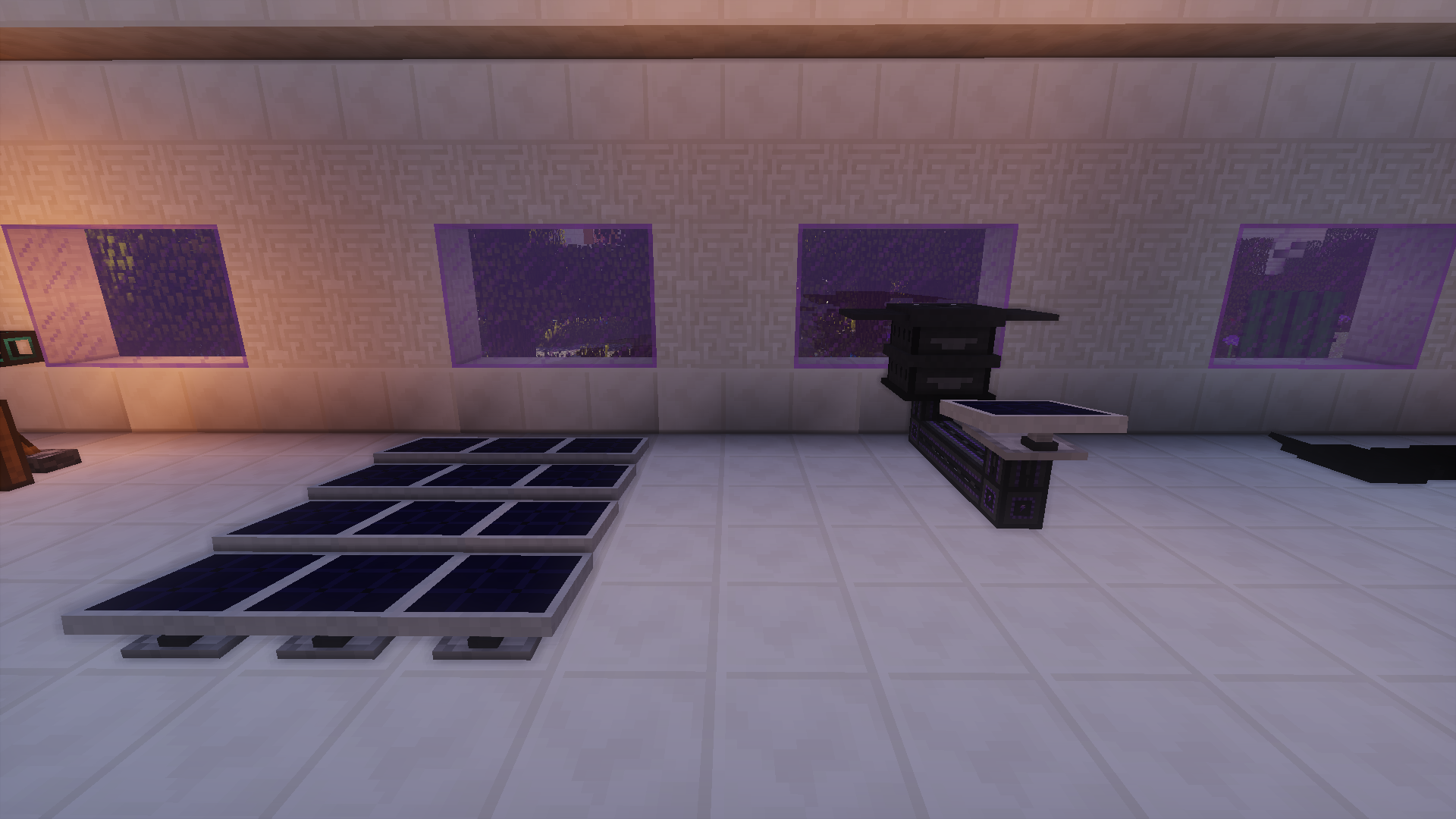
太阳能板是本模组的能源来源。太阳能板在白天产生 RF,并会自动朝向太阳。产生的 RF 数量取决于一天中的时间,中午最多,清晨和傍晚最少。雨天或雷暴天气也会减少输出。可以将可充能物品放入其中开始充电。如果连接有电缆,该方块会从底部输出电力。
悬浮板
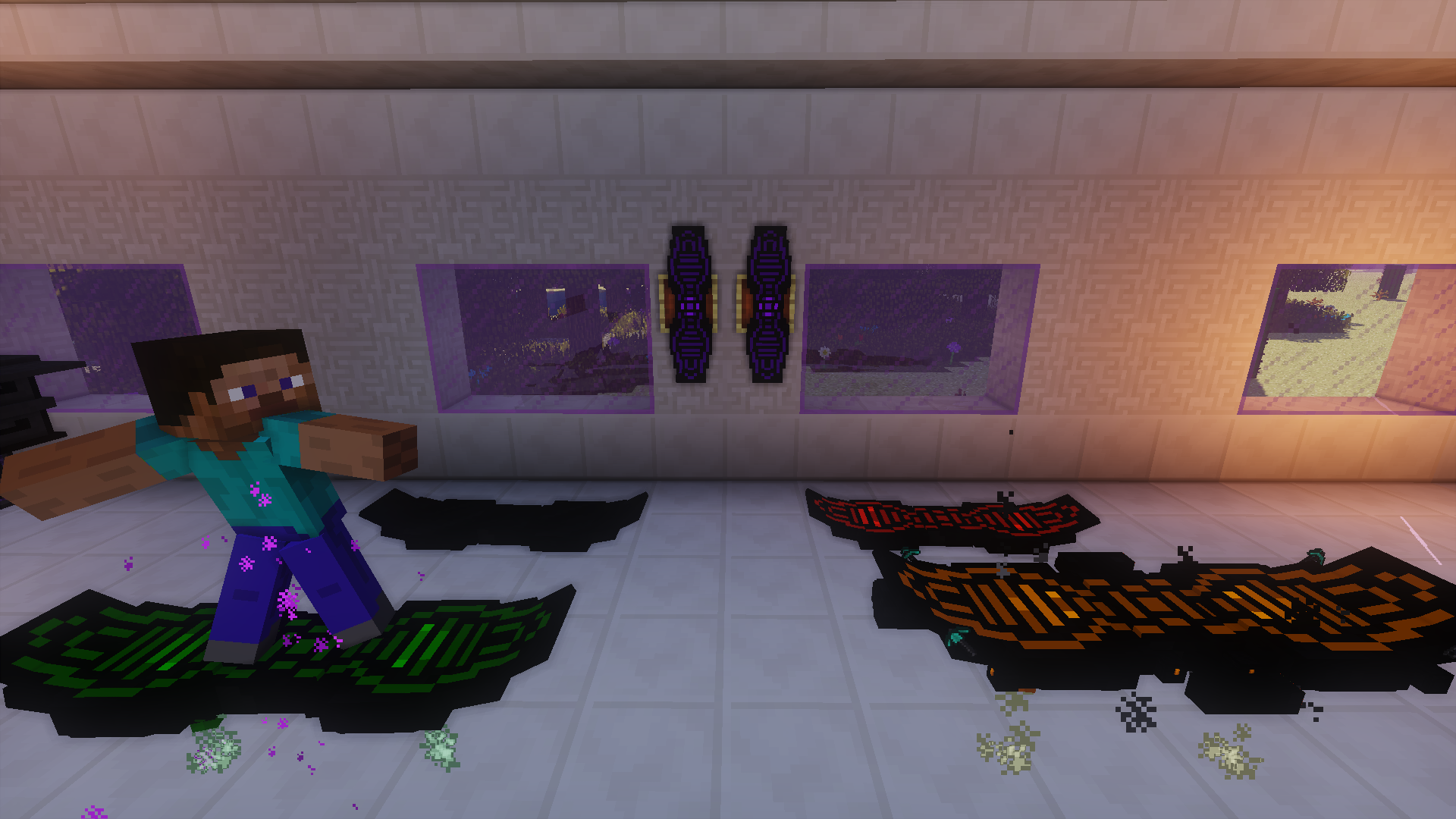
(左后方为未通电的悬浮板,右后方为已通电的悬浮板,左前方为完全升级的悬浮板)
悬浮板拥有 30 颗心的生命值,最多可存储 1,048,576 RF、50,000 热量和 25 个物品(+1 个动力物品)。一旦悬浮板被合成,下一个放置它的玩家将成为拥有者。拥有者对悬浮板拥有完全控制权,可以驾驶和使用它,且拥有者身份不可更改。
未通电时,悬浮板将完全无法使用——甚至连灯光都不亮。如果悬浮板过热,侧面的散热口会打开以降温,此时它将无法飞行。过热时大部分功能将消失,直到温度降至最大温度的一半后才会恢复。
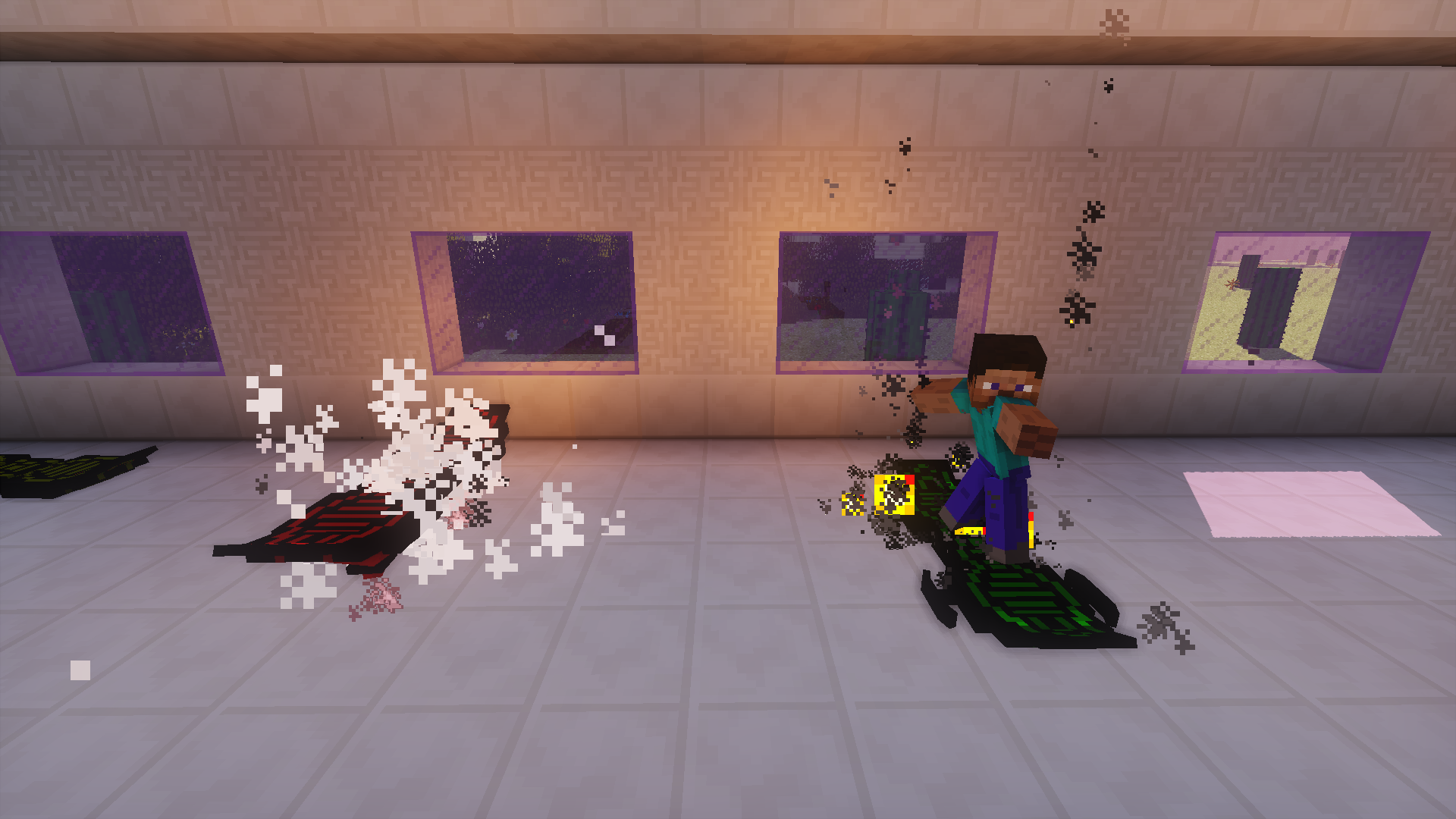
随着温度升高,悬浮板会显示增加的热量粒子;生命值低时会显示烟雾粒子。悬浮板的飞行高度不能超过 Y 级 256,且不会自动回复生命值。
要驾驶悬浮板,请使用 W、A、S、D 键移动,类似于控制玩家角色。跳跃键使悬浮板上升,潜行键使其下降。如果需要,可以在配置文件中或在游戏内的按键设置中更改这些控制方式。
为悬浮板供电,请将能量兼容的物品(如电池)放入 GUI 的能量槽中,或在物品形态下对悬浮板进行充电。点击“Info…”按钮将在第一页显示大部分悬浮板属性,第二页将显示已安装的升级模块。“Options…”按钮会显示一个复选框列表,用于开启或关闭各项功能。
大多数功能在对应升级模块安装前将无法使用。“Hover Mode”(悬停模式)选项可使悬浮板在未被骑乘时保持通电并悬浮在空中。请注意,这将消耗能量并产生少量热量,同时阻止悬浮板散热。Particles(粒子效果)选项仅针对所选悬浮板禁用粒子效果。
“Owner Options”(所有者选项)部分包含三个与访问权限相关的设置。“Private Storage”(私有存储)选项在未勾选时允许其他玩家访问悬浮板的储物空间。取消勾选“Private Pilot”(私有驾驶)后,其他玩家可以驾驶该悬浮板。取消勾选“Private Stations”(私有站点)后,充电器、加载器和卸载机等机器即使不属于同一所有者,也可以对该悬浮板进行操作。
主要物品
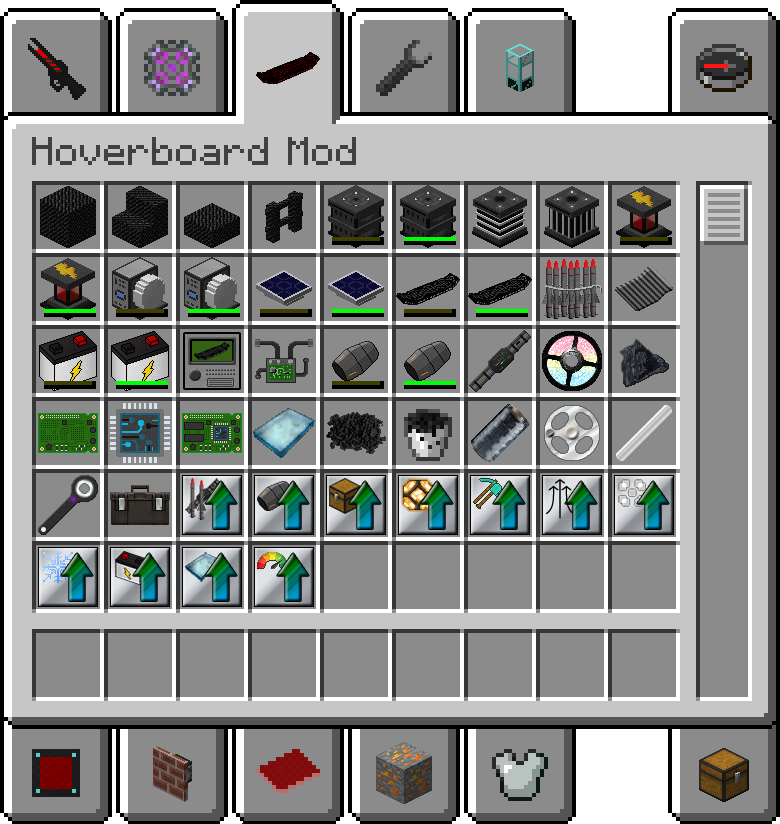
扳手
扳手在悬浮板制造台中制作,可用于拾取悬浮板。作为所有者右键点击悬浮板可将其掉落为物品形态。随后你可以使用该物品重新放置悬浮板,它会保留背包内的物品及其他属性。维修悬浮板时也需使用扳手。扳手耐久为 256 次,每次交互消耗 1 点耐久。
维修套件
维修套件是修复悬浮板的唯一方式。使用时可恢复 10 点生命值(5 颗心)。用户背包中必须持有悬浮板扳手才能执行维修操作。维修套件有 48 次使用次数,维修完成后会生成绿色粒子效果。
升级模块
火箭发射器
此升级模块使悬浮板能够发射多枚火箭。可在悬浮板选项菜单中调整发射数量。默认发射键为“R”,但可在按键设置中更改。最多可同时发射 8 枚火箭。装填时间取决于待发火箭数量(待发射数量越少,装填越快)。默认配置中火箭不会破坏地形。
此升级模块会在 HUD 左上角显示导弹图标,颜色表示悬浮板剩余的火箭数量。通过将“Bundle of Rockets”(火箭束)物品放入悬浮板 GUI 中的新插槽来添加火箭。
推进器
推进器升级模块会在悬浮板背部增加一个额外推进器,并略微增强其他推进器的性能。这使得悬浮板移动速度大幅提升,包括上升和下降。默认情况下,按下“F”键可使悬浮板达到最高速度。这将产生大量热量并消耗能量,但能让悬浮板以极快速度移动。与火箭类似,此功能使用后需要冷却时间才能再次使用。
储物
储物升级模块在悬浮板两侧添加了小型碳纤维箱子。这极大地增加了悬浮板的存储空间。使用悬浮板 GUI 顶部的箭头可在不同页面间切换。
洞穴照明
此升级模块会以消耗部分能量为代价照亮周围洞穴。要使此功能生效,必须有驾驶员且无法看到天空。此升级模块会在行驶过程中平滑地提供光源,以便驾驶员看清前方路况。由于可能会导致严重卡顿,其平滑程度可在配置文件中调整。
采矿
采矿升级模块在悬浮板角落组合了铲子和镐子。激活此模式并在被骑乘时,悬浮板会自动开采周围的方块。每开采一个方块都会消耗能量,并正常掉落方块。它仅能开采石头、矿石、泥土、草方块等特定方块。当没有驾驶员时,此升级模块的选项将自动停用,以防止意外开采。
收集物品
此升级为悬浮板添加了自动吸入物品至玩家背包的功能。如果玩家背包已满,则物品会被存入悬浮板的存储空间中。
护盾
护盾升级解锁了护盾激活选项。启用后,护盾会消耗能量并产生热量,但能为悬浮板和驾驶员提供保护。它会将靠近悬浮板的生物推开,并尝试反射箭矢和火球等慢速投射物。此升级消耗大量能量,因此请在不需要时将其关闭。
冷却
当悬浮板热量达到 30,000 时,冷却升级将大幅降低其产生的热量。悬浮板在约 30k 热量下运行效率最佳,因此该升级不会影响这一状态。即使安装了此升级,悬浮板仍可能过热,但发生的频率会低得多。
能源容量
此升级使悬浮板的 RF(红石流体)存储量提升至标准值的八倍,即 8,388,608。同时增加了单次可为悬浮板充入的 RF 量。
水生
此升级由气凝胶制成,目前只能在地牢中找到。气凝胶较为常见,获取难度不大。安装此升级后,悬浮板可在水下使用,且不会因水而受损。
效率
顾名思义,效率升级提升了悬浮板的整体效率,使其总体消耗的 RF 大幅减少。
配置
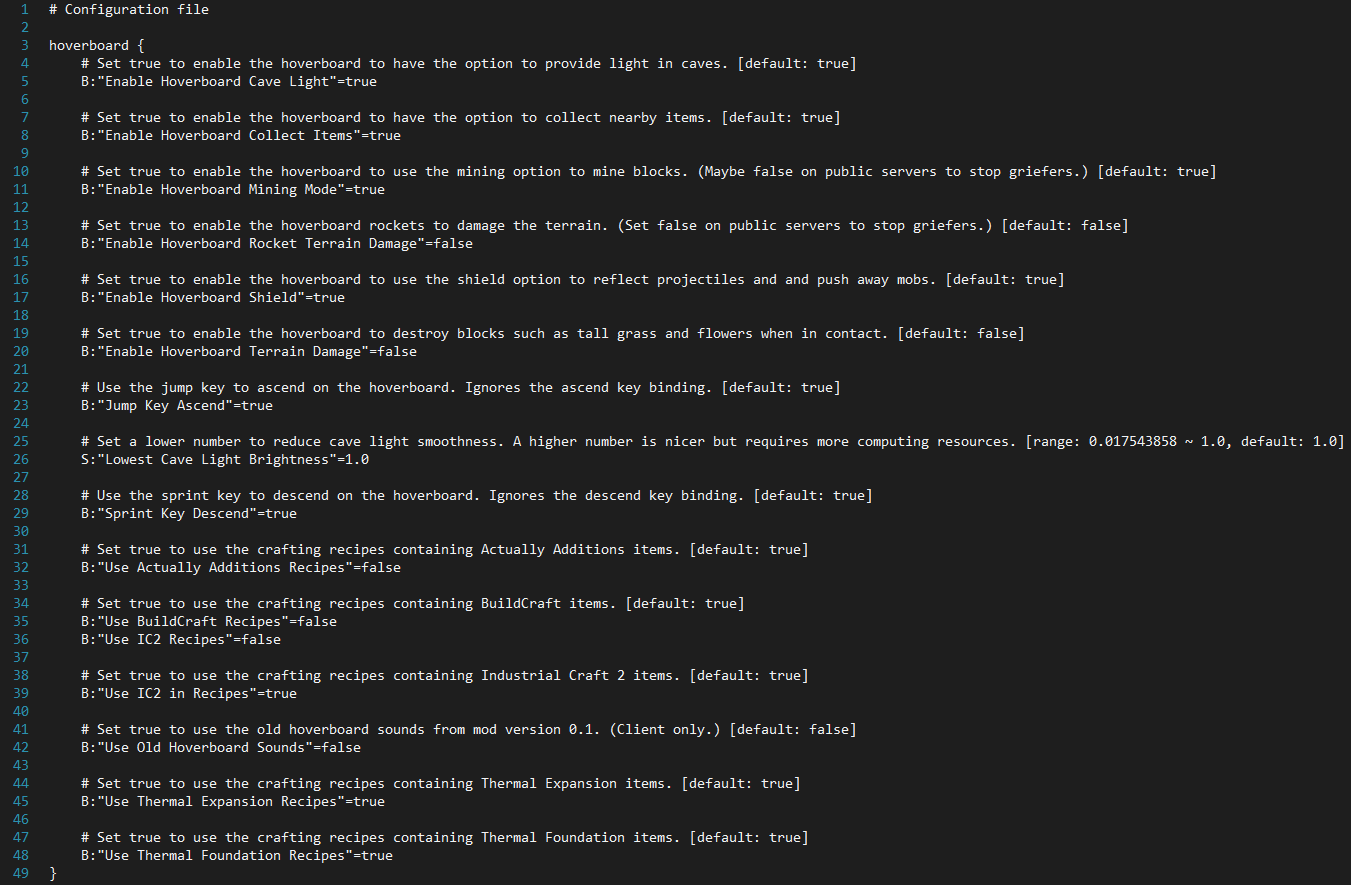
配置文件允许你调整模组的设置。这包括禁用部分悬浮板选项以及与其它模组整合的合成配方。
模组评测
Discord
欢迎在下方 Discord 中留下你的建议与反馈。如果你在使用该模组时遇到任何问题,也可以在此寻求帮助。
Arkif’s Hoverboard Mod
Welcome to ‘Arkif’s Hoverboard Mod’! This mod adds futuristic hoverboards to the game as well as multiple upgrades and machines to craft them. It is recommended to use the latest version of the mod.
This mod is available for both 1.12.2 and 1.7.10.
Quick Overview
Arkif’s Hoverboard Mod relies on Redstone Flux (RF) to power the machines and Hoverboards. RF can be generated via solar panels and transferred using rechargeable batteries. The mod has been made to be compatible with other mods, allowing you to connect pipes / cables to machines which allows the transfer of items or RF. You may also use hoppers if no other mod to do this is present.
The hoverboard allows the player to travel in the air quickly and carry items. It can be upgraded to move faster, shoot missiles, auto mine, provide a shield, have increased storage, provide light in caves and many more. The hoverboard can overheat and is weak to water and lava, but this can be managed and reduced using upgrades.
Each task the hoverboard performs will consume some RF and produce some heat. The hoverboard has an efficiency value which adjusts based on the temperature. Managing the heat correctly will provide increased efficiency, reducing RF consumption and heat output.
More information can be read below in the ‘Detailed Information’ section.
Recipe support for Not Enough Items / Just Enough Items is included.
Installation 1.12.2
Installing this mod is the same as installing a standard Minecraft mod but requires the Render Player API 2019 and the Redstone Flux API.
1). Download and install Minecraft forge for 1.12.2 () (built on forge version 14.23.5.2847).
2). Download the Render Player API 2019 for 1.12.2 ().
3). Download the Redstone Flux API for 1.12.2 ().
4). Download this mod, so that you have the jar file.
5). Drag the 3 downloaded jar files into the mods folder of your Minecraft installation. (The mods folder can be found in ‘.minecraft’ after typing ‘%APPDATA%’ in Windows search. You may need to run forge at least once for it to appear or make the folder manually).
Installation 1.7.10
Installing this mod is the same as installing a standard Minecraft mod but requires the Render Player API by Divisor.
1). Download and install Minecraft forge for 1.7.10 () (built for forge version 10.13.4.1558).
2). Download the Render Player API for 1.7.10 (version 0.4) ().
3). Download and extract this mod, so that you have the jar file.
4). Drag the jar file and the Render Player API file into the mods folder of your Minecraft installation. (The mods folder can be found in ‘.minecraft’ after typing ‘%APPDATA%’ in Windows search. You may need to run forge at least once for it to appear or make the folder manually).
Detailed Information
Carbon Fibre Blocks
This mod uses carbon fibre for most of the recipes, and includes a few blocks for decoration purposes. These include carbon fibre blocks, stairs, slabs and fences. All of the above have been made easy to make and hopefully they will be useful to create futuristic bunkers etc.
Hoverboard Builder
The hoverboard builder does exactly what you’d expect - it allows you to create the hoverboard. This provides the 4x4 crafting grid required to make the hoverboard and its components. The hoverboard builder can also be used to make the upgrades, and all recipes that include carbon fibre (apart from itself). To craft, the builder requires 48 RF/T and each recipe has a set amount of time to craft.
The hoverboard builder on the right of the above image shows which sides you can connect power sources to. The output slot can be extracted from the sides and power can be pushed in through the bottom of the block.
Hoverboard Loader / Unloader
The hoverboard loader allows items inside the block to be transported to the hoverboard. The hoverboard must be directly above the loader for it to work. This is shown when the loader's colour and the hoverboard's colour matches. The unloader functions the same but will take items out of the hoverboard. These blocks do not require RF, but stores the owner of the block. This prevents them from interfering with hoverboard that have private stations. These blocks are intended to be used with mods that can transport items from and to them, such as BuildCraft as shown in the picture.
Hoverboard Charger
The hoverboard charger allows manipulation of the RF in surrounding hoverboards. This block can search for hoverboards within a radius of 4 and can give or take RF. The hoverboards must not have private stations for this to work, or you must be the owner of both the block and hoverboard. The owner has their name displayed in the top right of the GUI. Click the buttons inside the GUI to change the direction of the power transfer. This block can interact with power transfer from all sides apart from the top, shown above.
Melt Spinner
The melt spinner is a machine used in the creation of carbon fibre. It requires 64 RF/T and takes 200 ticks to complete a cycle. Experience is also rewarded when an item is converted. If you have any more ideas for recipes, drop a comment below. This machine can receive power from the back or the bottom, and items can be pumped into the top and extracted from the bottom.
Solar Panel
The solar panel is the source of power from this mod. The solar panel produces RF during the day and will automatically point towards the sun. The amount of RF generated depends on the time of day, with the most being at midday and least in the mornings / evenings. Output is also reduced during rain or thunderstorms. A chargeable item may be placed inside to begin charging. This block will output power to the bottom if a cable is connected.
Hoverboard
(Unpowered Hoverbaord at back left, powered at the back right, fully upgrades at front left)
The hoverboard has 30 hearts of health, can store up to 1048576 RF, 50000 heat and 25 items (+1 power item). Once the hoverboard has been crafted, the next player to place it will become the owner. The owner has full control over the hoverboard, allowing them to pilot and access it and cannot be changed.
When unpowered the hoverboard will be completely useless – not even the lights work. If the hoverboard overheats, the vents on the sides will open to cool down and it will not be able to fly. Most of the functionality will disappear when overheated, and will come back once cooled down to half the max temperature.
The hoverboard will display increased heat particles as it reaches higher temperatures and smoke particles when low on health. The hoverboard cannot fly higher than Y-level 256 and will not automatically regenerate health.
To fly the hoverboard, use the W, A, S, D keys to move around similar to controlling the player. The jump key ascends the hoverboard and the sneak key will cause it to descend. These controls can be changed in the config and in game key settings if desired.
To power the hoverboard, place an energy compatible item (such as a battery) into the energy slot of the GUI or charge the hoverboard in item form. Clicking the “Info…” button will display most of the hoverboard stats on page one and the second page will display the upgrades installed. The “Options…” button displays a list of checkboxes that can turn on or off features.
Most of these features will be inaccessible until the corresponding upgrades have been installed. The “Hover Mode” option will enable the hoverboard to stay powered and remain in the air when not being ridden. Keep in mind this will consume power and generate a small amount of heat, and also prevent the hoverboard from cooling down. The particles option will disable particles for the selected hoverboard only.
The “Owner Options” section includes three options to do with accessing the hoverboard. The “Private Storage” option allows you to open the hoverboard’s storage to be accessed by other players when unchecked. Unchecking “Private Pilot” will enable other players to pilot the hoverboard. Unchecking the “Private Stations” option will enable machines such as the charger, loader and unloader to interfere with the hoverboard even if the owners are different.
Main Items
Wrench
The wrench is constructed in the hoverboard builder and can allow the hoverboards to be picked up. Right clicking the hoverboard as the owner will drop the hoverboard into item form. You can then use the item to place the hoverboard again, and it will keep the items inside the inventory and its other stats. The wrench is also required when repairing the hoverboard. It has 256 uses before breaking, and each interaction will consume one.
Repair Kit
The repair kit is the only way to repair the hoverboard. It will restore 10 health (5 hearts) when used on a hoverboard. The user must also have a hoverboard wrench in their inventory to perform the repair. The repair kit has 48 uses, and will spawn green particles once the repair is done.
Upgrades
Rocket Launchers
This upgrade will allow the hoverboard to shoot a number of rockets. This can be changed in the hoverboard options menu. The default key is ‘R’ to fire, but can be changed in the key settings. A maximum of 8 rockets can be shot at once. The reload time is based on the number of rockets to shoot (less to shoot means quicker reload). The rockets wont damage terrain as its turned off in the config by default.
This upgrade will display the missile icon in the top left of the HUD, and the colour shows how many rockets the hoverboard has. The rockets can be added by placing the “Bundle of Rockets” item into the new slot in the hoverboard GUI.
Thruster
The thruster upgrade will add an additional thruster to the back of the hoverboard, as well as slightly boosting the other thruster. This makes the hoverboard move much faster, including ascending and descending. This upgrade allows the hoverboard to reach full speed by pressing the ‘F’ key by default. This is will generate lots of heat and consume power, but will move the hoverboard very fast. Like the rockets, this has a cool down before it can be used again.
Storage
The storage upgrade adds small carbon fibre chest to the sides of the hoverboard. This greatly increases the amount of storage space in the hoverboard. Use the arrows in the top of the hoverboard GUI to switch between pages.
Cave Lighting
This upgrade will illuminate caves at the cost of some power. The hoverboard must have a pilot for this to work and not be able to see the sky. This upgrade will make the hoverboard smoothly provide light while travelling to allow the pilot to see where they are going. The smoothness of this can be changed in the config as it may cause a lot of lag.
Mining
The mining upgrade will add a combination of a spade and pickaxe to the corners of the hoverboard. With this mode activated and while being ridden, the hoverboard will begin to mine blocks around it. This will consume power for every block it mines, and it will drop the block as normal. It will only mine blocks such as stone, ores, dirt, grass etc. The option for this upgrade will deactivate when no pilot is active to prevent unwanted mining.
Collect Items
This upgrade adds an option to allow the hoverboard to suck up items into the player’s inventory. If the player’s inventory is full then the items will go into the hoverboard storage instead.
Shield
The shield upgrade unlocks the shield option to be activated. Upon doing so, the shield will consume power and produce heat but provides protection for the hoverboard and pilot. It will push away mobs in a small proximity of the hoverboard, and attempt to reflect slow moving projectiles such as arrows and fireballs. This upgrade consumes a fair amount of power, so remember to turn it off when not in use.
Cooling
The cooling upgrade will greatly decrease the heat produced by the hoverboard once it reaches 30000 heat. The hoverboard works efficiently at around 30k heat, therefore this upgrade will not affect that. The hoverboard can still overheat with this upgrade, but will happen much less frequently.
Energy Capacity
This upgrade will allow the hoverboard to store eight times the standard amount of RF at 8388608. It also increases the amount of RF the hoverboard can be given at once.
Aquatic
This upgrade is made from aerogel, which can currently only be found in dungeons. It is quite common so shouldn’t be too difficult. This upgrade allows the hoverboard to be used underwater and will not take any damage from water.
Efficiency
The efficiency upgrade does as you’d expect – it increases the overall efficiency of the hoverboard. This upgrade will allow the hoverboard to consume a lot less RF overall.
Config
The config file allows you to adjust the settings of the mod. This includes disabling some of the hoverboard options as well as crafting recipes integrated with other mods.
Mod Reviews
Discord
Feel free to leave your suggestions and feedback in the Discord below. You may also ask for help if you have any issues with the mod.


 模组

 模组

 模组
 模组
 模组

 模组

评论 0
登录后参与评分
还没有评论,来抢沙发吧