
官网 - 请务必访问官网,获取您可能需要的所有信息。
JSON / 数据包构建器 - 只需配置物品,下载数据包并将其放入 datapacks 文件夹即可。或者使用它来构建 JSON 文件并下载,以添加到现有的数据包中。这使得为该模组创建配置变得非常简单。
为 Minecraft 带来一个深度且可高度自定义的共鸣系统。
Artifactory 引入了一个高度可配置的物品绑定机制,允许玩家与他们的武器、盔甲和装备建立强大的联系,这被称为“共鸣”(Attuning)。随着你与物品羁绊的增长,独特而有趣的加成也会随之提升。它能无缝融入任何整合包,并让你在面对有限的共鸣槽位时,对使用哪些装备做出有趣的选择。
本模组扩展了 Minecraft 的终局玩法,即打造完美武器或盔甲的过程。虽然这需要消耗一定的经验值、时间以及一些稀有材料,但你所创造出的物品将成为传奇。
本模组可以直接使用,但其真正的威力来自于其自定义功能,旨在为整合包制作者提供工具,以提供强大的升级路径并对物品施加限制,从而构建平衡的物品经济体系。
概览
- 完全由数据包驱动的共鸣系统,几乎所有内容均可配置。使其适应你的服务器或整合包需求。
- 与武器、盔甲和其他物品建立并深化羁绊,以获得独特的增益,如 不毁性 (Unbreakable)、属性提升以及死后仍保留在身上的 灵魂绑定 (Soulbound) 物品。
- 包含默认的 vanilla 数据包(创建世界时必须启用),你可以无需任何配置即可安装并开始游玩。
- 保护你的共鸣物品免于消失和被环境破坏。
- 只有与物品建立羁绊的玩家才能使用它,该物品完全效忠于他们。持有属于其他玩家的已绑定物品会导致糟糕的事情发生。
- 可以施加限制,例如要求物品必须先进行共鸣才能以任何方式使用。
- 支持 Curios 兼容。
- 应与其他所有模组兼容。
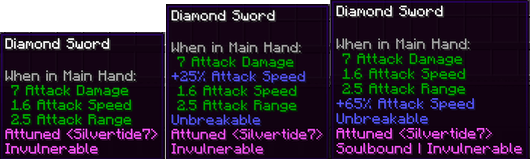
打造一些只有你能使用的强大且有趣的物品。以下是钻石剑的默认数据包共鸣等级:
等级 1:添加 无敌 (Invulnerable)(不会消失且不受环境影响)以及共鸣羁绊带来的所有好处。
等级 2:增加 25% 的攻击速度并赋予 不毁性 (Unbreakable)。
等级 3:再增加 40% 的攻击速度,并使其成为 灵魂绑定 (Soulbound),这样如果你死亡,它将伴随你穿过死亡,并在你重生时出现在你的身上。
等级 1 等级 2 等级 3
虽然本模组针对 1.20.1 版本且功能已完整,但其中部分功能仅适用于 1.21.1,近期不会向后移植。

入门指南
注意:有关配置物品以支持共鸣的信息,请参阅下方的数据包部分。本指南中的所有数值均基于包含的默认 vanilla 数据包。
一旦物品被配置为可共鸣,它将显示如下:
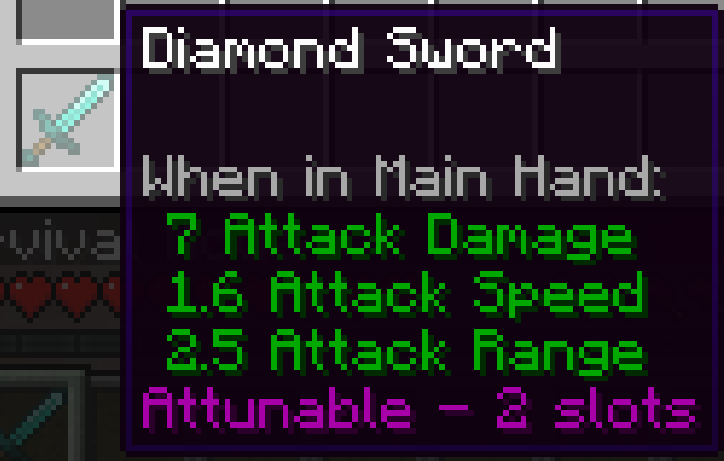
这表明该物品已准备好进行共鸣,当你这样做时会占用 2 个共鸣槽位。如果物品有几率可共鸣,则会显示“可共鸣 (40%)”,表示它有 40% 的成功几率。你可以通过尝试将其放入共鸣核心来识别这一点,系统将随后判定它是否可共鸣。这是一次性检查,如果被判定为不可共鸣,它将表现得像普通物品一样。
如果物品被配置为使用前必须共鸣,则会显示“可共鸣 (Required)”。这使得物品在未共鸣前无法以任何方式使用,包括挖掘方块、攻击敌人或使用物品(如拉弓或抛掷钓竿)。
要开始共鸣过程,让我们制作共鸣核心。默认配方为:
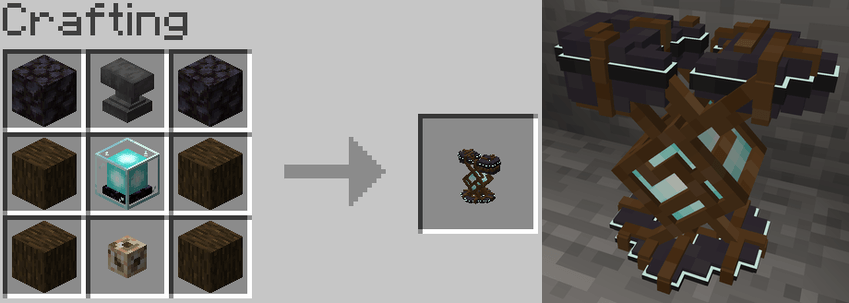
拥有共鸣核心后,你可以将可共鸣的物品放入中心槽位。完成后,你将看到一些有用的信息。
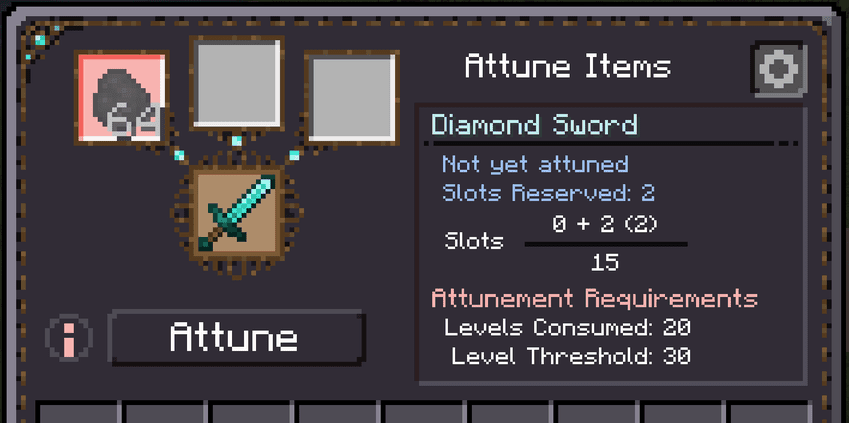
- 共鸣等级:当前的共鸣等级或“尚未共鸣”
- 预留槽位:该物品共鸣后占用的槽位数量。
- 玩家共鸣槽位信息。悬停以查看更多详情。
- 等级消耗:调谐过程所消耗的等级数。
- 等级阈值:开始调谐过程所需的等级数。这些等级不会被消耗。
- 所需物品:用于调谐的物品。
- 红色信息图标:悬停其上可查看无法开始调谐过程的详细信息。
如果您满足要求,则可以开始调谐过程。完成后,它将消耗任何所需的等级和/或物品,然后将该物品与您绑定。首次绑定时,该物品将占用其所需的槽位数量。如果可用槽位不足,您将无法绑定该物品。
如果无法开始调谐过程,请将鼠标悬停在“Attune”按钮左侧的红色信息图标上。
查看/管理调谐
您可以在“Manage Attunements”(管理调谐)界面中查看和管理当前的调谐状态。可以通过在 Attunement Nexus 中点击右上角的齿轮图标打开,或者按下指定的热键(默认为 'o')打开。
在使用上述钻石剑达到最高调谐等级后,界面如下所示:
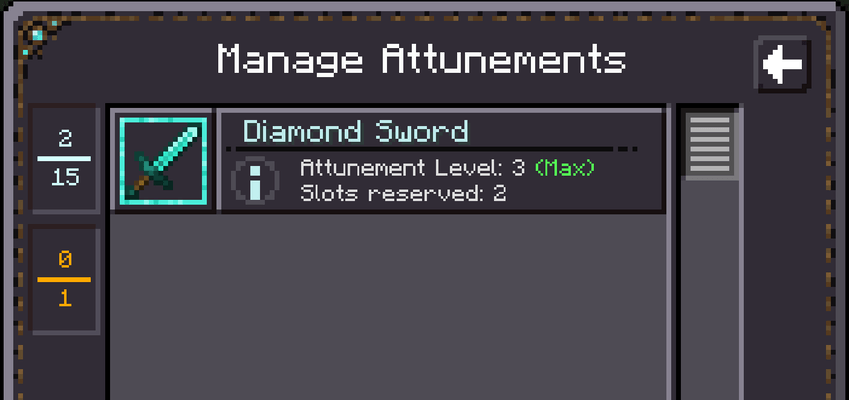 如果您想了解每个调谐等级为物品增加了哪些详情,请将鼠标悬停在蓝色的 (i) 图标上以获取更多信息:

解除调谐
要解除物品的调谐,请将鼠标悬停在物品卡片上,右侧会出现一个红色的 X。点击它并确认提示即可解除调谐。
这将移除您在调谐过程中获得的所有增益效果,但会保留物品上的其他属性,如附魔或其他模组添加的修改。现在该物品可以被其他人调谐,并且您将获得回该物品占用的调谐槽位。此操作不可逆。
系统概览
调谐系统
Artifactory 增加了一个新属性:调谐槽位。当物品配置为可调谐时,您可以指定该物品在被调谐后占用多少个调谐槽位。这包括不占用任何槽位,以便在不影响槽位限制的情况下自由调谐。如果您没有足够的空余槽位来调谐某件物品,则该物品无法被调谐,直到腾出一些位置为止。腾出位置的方法可以是解除对其他物品的调谐,或者寻找增加该属性的方法。调谐过程还可能要求提供物品或经验等级,这些将在调谐完成时被消耗。
强化系统
对物品进行调谐可以提供有趣且强大的增益效果。随着您与物品羁绊的加深,这些增益效果也会随之增强。
当您首次调谐某件物品时,该物品将占用其配置的调谐槽位数量,并且您将获得与该物品一级调谐对应的所有增益效果。如果配置了更多等级,您可以提升该羁绊以获得那些等级配置的增益效果。目前这些增益效果包括:
Artifactory 修改项:
- 无敌 (Invulnerable):该物品不再会被环境效果(如岩浆或仙人掌)破坏。掉落在地上时也永远不会消失。
- 永不损坏 (Unbreakable):如果物品具有耐久度,它将变得永不损坏。
- 灵魂绑定 (Soulbound):当您死亡时,该物品会跟随您一起通过死亡。
属性修改项:
您可以指定任何属性(包括其他模组的属性)在达到特定调谐等级时添加到物品上。结合上述基本修改项,这将使您能够创造出真正强大的物品,随着等级提升而变强。
限制系统
可调谐物品可以配置为必须经过调谐才能以任何方式使用,或者它可以像平常一样使用,而调谐仅提供额外的增益效果。如果必须在调谐后才能使用,则该物品在被调谐之前无法造成伤害、破坏方块,也无法进行任何操作(例如尝试拉弓)。
已被调谐的物品不能被其他玩家以任何方式使用,它只效忠于其所有者。此外,您还可以添加效果:当玩家手持不属于他们的已调谐物品时,将会受到这些效果的影响。例如缓慢 III、中毒 I 和/或凋零 100,由您决定。
数据包配置
让我们更改默认数据包中钻石剑的调谐配置。首先创建一个新的数据包,并创建一个新文件 data/minecraft/artifactory/diamond_sword.json,然后添加以下内容:
{
  "slots_used": 4,
  "attunement_levels": [
    {
      "modifications": [
        "invulnerable",
        "unbreakable",
        "attribute/minecraft:generic.attack_damage/addition/5/mainhand"
      ],
      "requirements": {
        "items": ["minecraft:diamond_sword", "minecraft:diamond#10", "minecraft:nether_star"]
      }
    },
    {
      "modifications": [
        "soulbound",
        "attribute/minecraft:generic.attack_speed/multiply_base/.5/mainhand",
"attribute/minecraft:generic.attack_damage/addition/7/mainhand"
],
"requirements": {
"xpLevelsConsumed": 45,
"xpLevelThreshold": 55,
"items": ["minecraft:dragon_egg"]
}
}
],
"use_without_attunement": false,
  "chance": 0.4,
"replace": true
}
此文件描述了钻石剑的附魔配置。让我们逐一查看每个键。
"slots_used"
半可选 - 默认为 -1
当对物品进行附魔时,它占用多少个附魔槽位。在此示例中,钻石剑将占用你的 4 个附魔槽位来进行附魔。如果省略此项,则该物品的附魔配置将被清除,该物品将不再可附魔。这是你覆盖并移除来自其他数据包(datapack)附魔信息的方法。
"use_without_attunement"
可选 - 默认为 true
如果物品在未附魔的情况下仍可使用。false 意味着在附魔之前,该物品不会造成伤害、无法破坏方块,且不能像拉弓射击那样使用。 true 意味着即使未附魔,物品仍可正常使用。附魔只会提供额外的增益。
"chance"
可选 - 默认为 1.0
未设置为 1.0(默认值)的附魔现在具有成为可附魔状态的概率,这将在你第一次将物品放入附魔核心(Attunement Nexus)时确定。如果你设置 `"chance": 0.4`,则物品只有 40% 的几率可被附魔。当你尝试首次将物品放入附魔核心时,系统将判定其是否可附魔。这是一次性检查,如果失败,该物品将永远无法被附魔。
"apply_to_items"
可选 - 默认为空列表
这是一个字符串列表,用于指定应用附魔配置的物品。如果此列表存在且包含物品,则附魔配置将应用于所有这些物品。这是一种向多个物品添加配置的更快方法。如果此列表中有物品,则 JSON 文件的名称将被忽略,可以命名为任意内容。要使用此功能,你可以将其添加到任何有效的配置 JSON 中。假设我们有一个名为 iron_armors.json 的铁盔甲配置。在配置末尾,你会添加以下内容:
"apply_to_items": [
  "minecraft:iron_boots",
  "minecraft:iron_chestplate",
  "minecraft:iron_leggings",
  "minecraft:iron_helmet"
]
此列表中的所有物品(如果是有效的)都将添加该配置。确保将任何属性设置为 armor、hand、body 或不太理想的 any ,如果物品位于不同的槽位,否则当装备多种类型的盔甲时,属性将无法正确应用。这些通用类型仅在 1.21 及更高版本中可用,因为 Minecraft 在那时才添加了它们。这将限制此功能在 1.20.1 中的可用性,你通常只能分组同类物品,例如头盔。目前也不支持标签(tags)。再次强调,如果你添加了此项,它将忽略 JSON 文件的名称,而仅将此配置添加到来自此列表的物品上。
"replace"
可选 - 默认为 false
当前配置是否应替换任何现有配置。如果你尝试为三叉戟创建一个新的 JSON 文件,它可能会与我模组中已创建的配置发生冲突。为了告诉系统使用哪一个,你需要将 "replace" 设置为 "true",以便系统知道使用这个配置。作为整合包制作者,你可以最好将所有配置都加上此项,以确保使用的是你的配置。如果出于某些原因你使用的模组已经在其配置中包含了 "replace": "true",那么你需要确保你的数据包(datapack)在该模组之后加载,系统将采用最后读取到的带有 "replace" 的配置。
"attunement_levels"
可选 - 默认为单个附魔等级。该附魔等级的经验等级消耗和阈值使用服务器配置的值,附魔后将授予三种基本修改:无敌(invulnerable)、不可破坏(unbreakable)和灵魂绑定(soulbound)。默认情况下不包含任何属性。
这是定义每个附魔等级外观的地方。这是按顺序进行的,因此第一个对象适用于附魔等级 1,第二个适用于附魔等级 2,依此类推。目前它仅由两个键组成,"modifications" 和 "requirements"。"requirements" 允许你覆盖服务器配置要求,以便单独自定义每个附魔等级,以及添加物品要求。"modifications" 是你放置物品附魔时所发生的所有修改的地方。
-"modifications"
可选 - 默认为应用无敌、不可破坏和灵魂绑定。
有三种基本修改:invulnerable、unbreakable 和 soulbound。
还有属性修改,它们在物品达到指定的附魔等级时赋予物品属性。它们的格式如下
"attribute/modid:attributename/operation/value/equipmentslot"。
operation 可以是以下三个值之一:addition、multiply_base、multiply_total。
equipmentslot 可以是以下九个值之一:mainhand、offhand、hand、feet、legs, chest、head, body, armor, any。
注意:1.20.1 版本不包含 hand、body、armor、any 这些类型。它们是在 Minecraft 1.21.1 中添加的。
operation 和 equipment slot 的值属于原版 Minecraft 的结构,如果您有相关问题,建议在那里进一步研究。这决定了属性如何应用到现有属性上,以及物品必须穿戴在哪个槽位才能使属性生效。请确保将装备槽位与您正在配置的物品类型相匹配。如果您正在配置头盔,请确保使用 head,否则佩戴时属性将不会生效。
需要注意的是,每当您将一个已调谐的物品放入调谐枢纽(attunement nexus)时,它会同步对该物品的修改。因此,如果对数据包进行了更改,您只需将物品放入调谐枢纽,它就会更新为最新的更改。
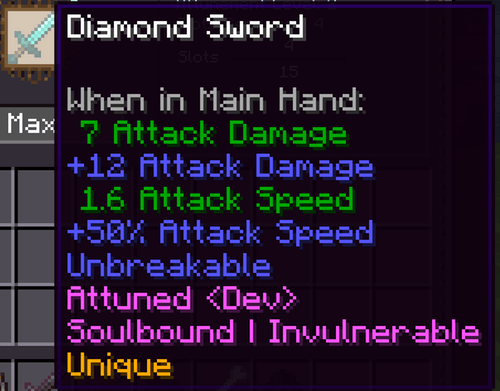
在上述一级调谐示例 JSON 中,我们有 "attribute/minecraft:generic.attack_damage/addition/5/mainhand"。我们指定了一个 attribute 修改,即增加 attack damage 值为 5,并告知仅在物品处于 mainhand 时应用。由于我们正在配置一把钻石剑,当您达到一级调谐并在主手使用时,它将增加 5 点伤害。您还可以在二级调谐块中看到它再次指定了相同的属性,但值为 7。当您达到二级调谐时,您将拥有总共 12 点额外攻击伤害,其中 5 点来自一级调谐,7 点来自二级调谐。此外,在二级调谐时还会提供基础攻击速度 50% 的加成。
-"requirements"
可选 - 如果留空,则使用服务器配置文件中的值
这允许您覆盖特定级别的配置值,包括启动调谐过程所需的级别数以及调谐时消耗的级别数。
--"xpLevelsConsumed":完成调谐过程所消耗的等级数。
--"xpLevelThreshold":启动该过程前所需的等级数。
--"items":需要哪些物品来进行调谐(如果有的话)。它只会取数组中的前 3 个物品。格式为 "modid:item_name#numberOfItems"。物品数量是可选的,如果省略则默认为 1。例如,如果您希望某个调谐级别需要一颗下界之星和 64 颗钻石,您可以写 "items": ["minecraft:nether_star", "minecraft:diamond#64"]。
我们可以看到两个调谐级别都需要物品,且二级调谐用新值覆盖了 XP 服务器配置值,这些新值仅在与该级别进行调谐时适用。这使您可以在更细粒度的层面上指定要求。
综上所述,在达到二级调谐后,该物品将变为不可破坏、无敌、灵魂绑定,并提供额外的 6 点攻击伤害,且仅限您本人使用,其他人无法使用。以下是二级调谐时的效果:
现在让我们看看一个可调谐物品可能拥有的最简单的配置及其含义。
{ "slots_used": "1", "replace": true }
如果我们将其用于我们的钻石剑,默认情况下它将创建一个单级调谐,该调谐需要服务器配置的 XP 等级和 XP 阈值才能进行调谐。它将占用 1 个调谐槽位,即使您尚未对其进行调谐,也可以像普通钻石剑一样使用,因此调谐是可选的。当您对它进行调谐时,您不会获得任何属性加成,但会获得与已调谐物品相关的好处,例如防止其他玩家使用它。然而,这就是该物品所能达到的调谐极限,默认情况下不会添加任何属性。这可以与 use_without_attunement:false 结合使用,使得物品必须经过调谐才能使用,但除了基础保护外不提供其他增强功能。
在最后一个示例中,我们将从另一个数据包中的物品移除共鸣配置。本模组提供的默认数据包使大约 30 种物品变得可共鸣,例如钻石剑。如果你希望这些物品不可共鸣,你需要在自己的数据包中覆盖它们(或者在世界创建时根本不包含该数据包,这是默认设置,你必须添加它)。若要移除三叉戟的共鸣能力,请将此 JSON 文件放入你的数据包的 data/minecraft/artifactory/trident.json 路径下:
{ "replace": "true }
“replace” 告诉系统使用此配置而非基础配置,而包含其他任何信息则告诉系统关闭此共鸣功能。如果你想使用此数据包配置替代另一个配置,应始终使用 replace。如果在加载数据包数据时发现多个 JSON 文件都包含 "replace": true,系统将使用最后加载的那个。
你可以非常容易地创建共鸣护甲或武器,并为这些物品应用相关属性,例如为护甲部件提供额外护甲值,或为剑提供攻击伤害,反之亦然,这取决于你。如果你使用像 apothic attributes 这样的库(我强烈推荐),它将为你提供大量有趣的新属性,以便应用于物品。
共鸣覆盖
自版本 1.21.1-2.0.0 起(预计短期内不会向后移植),你现在可以按物品堆栈(itemstack)为基础定义共鸣。这允许你将单个物品堆栈设置为可共鸣,并拥有其独特的层级和增强效果,仅适用于该堆栈。这也将覆盖该物品类型的任何数据包配置。
这可以通过在创建物品时定义数据组件来实现,无论是通过 /give 命令、进度表(advancements)、配方、战利品表,还是像 kubejs 这样的其他模组。有许多方法可以向物品添加数据组件。默认数据包不包含新道具(mace)的任何共鸣配置,因此让我们创建一个可共鸣的道具物品堆栈。在游戏中运行以下命令:
/give @p minecraft:mace[artifactory:attunement_override={use_without_attunement:false,chance:0.5, slots_used:5, attunement_levels:[{requirements: {items:["minecraft:diamond#64"]},modifications:[invulnerable, unbreakable, soulbound]}]}]
此命令生成一个实现了数据组件 attunement_override 的道具。运行命令后,你现在拥有一个有 50% 几率可共鸣的道具,如果共鸣它将占用 5 个槽位,需要 64 颗钻石,并在共鸣后赋予其无敌、不可破坏和灵魂绑定特性。这个物品堆栈是独一无二的,是唯一包含此共鸣配置的实例。如果 minecraft 的道具已经通过数据包配置了共鸣配置,这将覆盖该配置,并遵循命令中指定的配置。这将允许你创建与其他物品行为不同的一次性物品。
Curios
如果你安装了 Curios,将添加一个新槽位:共鸣物品槽。只有你已共鸣的物品才能放置在此处,且放置在此槽位不会提供任何属性加成。它可以用于存储你不正在使用的共鸣物品,以便快速切换。如果物品具有 灵魂绑定 特性,它也会在死亡后保留在此槽位中。
如果你想配置默认设置,则需要使用数据包进行覆盖。如果你想更改可用槽位的数量(默认为 1),则需要覆盖文件 data/artifactory/curios/slots/attuned_item.json:
{
  "replace": true,
  "order": 1999,
  "size": 1,
  "render_toggle": false,
  "icon": "artifactory:slot/artifactory_slot"
}
你可以更改其中任意参数,但 size 是你想要修改以增加更多槽位的参数。
用途
以下是我将在我的整合包中使用的一些用例示例:
- 创建一个有趣的与武器建立羁绊的系统,并在获得酷炫、完全自定义的好处时增强这种羁绊!
- 限制过于强大的物品。许多模组添加了非常有趣但过于强大的物品。当玩家积累了太多此类物品时,这种现象尤为明显,使得 Minecraft 的战斗、探索或旅行因拥有多个模组的终局物品而变得毫无挑战性。此时你不妨直接玩创造模式。我想要一个系统来允许这些终局/追逐物品存在,但增加它们的获取难度,从而让玩家必须决定在任何给定时间使用哪些物品。物品越强大,共鸣所需的槽位可能越多,迫使你选择拥有更多个体但强度较低的物品,还是少数更强大的物品。这与 Simply Swords 中的神话武器配合极佳。
- 使较旧等级/强度较低的物品更具吸引力。现在,与其为了钻石剑而丢弃铁剑,你可以对铁剑进行共鸣,并在与之建立羁绊的过程中获得特殊好处。随着你提升与之的共鸣等级,它可能会获得更多伤害和攻击速度,同时变得不可破坏和灵魂绑定。再附上一些附魔,你就能创造一个非常强大的物品!钻石剑也可能可共鸣,但在不同等级获得不同的好处,或者根本不可共鸣。这将创造一个有趣的物品经济体系,赋予不同等级物品价值,并为整合包制作者提供更多平衡选项。
可能的未来扩展
- 除了灵魂绑定 / 无敌 / 不可破坏之外,增加更多独特的修改效果。
- 效果修改 - 当穿戴或手持该物品时,指定的效果将应用于玩家。
- 为物品的调谐和强化添加更多独特的要求。例如:穿戴/使用该物品时的击杀数、击败特定Boss、完成特定壮举、持有该物品一定时长等。
欢迎留下任何评论、问题或建议!如果遇到任何问题,我更倾向于在 GitHub 仓库中创建 Issue 并提供尽可能多的信息,但在这里提问也是可以的。Artifactory Issues
常见问题 (FAQ)
问:你会将其移植到 Fabric 吗?
答:我不会将其移植到 Fabric,但任何人都可以这样做!对于 Forge,目前我只支持 1.20.1,并且我将从 1.21 开始将此模组移植到 NeoForge。此后我将专注于 NeoForge,我没有精力去维护太多不同版本的模组。
问:你会向后移植到较旧的 Minecraft 版本吗?
答:除非有大量需求,否则我只会在 1.20.1 及更高版本上进行开发。
问:我可以在我的服务器或整合包中使用它吗?
答:当然可以!
已弃用的功能
在 1.21.1 版本中,从 2.0.0 版本起移除了“唯一物品”(Unique Items)功能。
“唯一物品”是限制物品的另一种方式,但限制更为严格。无论有多少开放的调谐槽位,玩家总共只能调谐一定数量的唯一物品(数量可在服务器设置中配置)。此外,在多人游戏中,一个唯一物品只能被一名玩家调谐,其他任何人都不能调谐。如果玩家调谐了“千真之剑”(Sword of 1000 Truths),且该物品被配置为唯一物品,那么在该世界中,只有这名玩家能够调谐该类型的物品,即使另一名玩家找到了另一把“千真之剑”。只要前一名玩家保持着该调谐状态,其他玩家将无法进行调谐,直到他们解除调谐。在单人服务器中,这允许你进一步限制终局物品;而在多人服务器中,这将创造有趣的物品经济体系,并造就那些因持有特定物品而闻名的玩家。(强烈建议配合 Simply Swords 使用,因为其神话武器众多且相当强大/酷炫,非常适合作为此功能的对象。)
Website - Make sure to check out the website to get all of the information you could need.
JSON / Datapack Builder - Just configure the items, download the datapack, and drop it into the datapacks folder. Or use it to build jsons and download them to add to existing datapacks. Makes creating configurations for the mod very easy.
Bring a deep and customizable attunement system to Minecraft.
Artifactory introduces a highly configurable item bonding mechanic letting players forge powerful connections with their weapons, armor, and gear, called Attuning. As you grow your bond with the items the unique and fun bonuses will grow with you. It fits seemlessly into any modpack and creates interesting choices on which gear to use your limited attunement slots on.
This mod extends the end game in minecraft of crafting the perfect weapon or armor. It costs a bit of experience, time, and some rarer materials, but the items you will create will be legendary.
This mod can be used as is but its true power comes from its customization and built for modpack makers to have tools to offer powerful upgrade paths and add restrictions to items to create a balanced item economy.
Overview
- Entirely data-driven attunement system where almost everything possible is configurable. Make it fit your server or modpacks needs.
- Create and grow bonds with weapons, armor, and other items to gain unique benefits like Unbreakable, attribute increases, and Soulbound items that persist through death.
- Default vanilla datapack included (you must enable it when creating the world), you can install and play without any configurations.
- Protect your attuned items from despawning and being destroyed by the environment.
- Only the player who is bonded to the item can use it, it's allegiance is entirely to them. Holding an item that is bonded to another player causes bad things to happen.
- Impose restrictions like requiring an item be attuned to before it can be used in any way.
- Curios compatability.
- Should be compatible with all other mods.
Create some fun and powerful items that only you can wield. Below are the default datapack attunement levels for the Diamond Sword.
Level 1: Adds Invulnerable (won't despawn and can't be hurt by environmental effects) as well as the benefits of the attunement bond.
Level 2: Adds 25% attack speed and Unbreakable.
Level 3: Adds 40% more attack speed and makes it Soulbound, so if you die it will travel with you through death and respawn with you on your body.
Level 1 Level 2 Level 3
While this mod is for 1.20.1 and is feature complete, some of the features here are for 1.21.1 only and will not be backported in the near future
Getting Started
Note: For information on configuring items to be attuneable see the datapack section below. All values in this guide uses the default vanilla datapack included.
Once an item is configured to be attuneable it will look like this:
This shows that this item is ready to be attuned and it will reserve 2 attunement slots when you do so. If an item has a chance of being attunable then it will say "Attunable (40%)" if it had a 40% chance to be successful. You can identify it by attempting to place it into the Attunement Nexus, which will then determine if it is attunable or not. This is a one time check and if it is determined not to be attunable then it will behave as a normal item.
If the item was configured for the attunement to be required before use then it would say "Attunable (Required)".This makes the item unusable in any way until it is attuned including breaking blocks, hitting enemies, or using the item like drawing a bow or casting a fishing rod.
To get started with the attunement process lets build the Attunement Nexus. The default recipe is:
Once you have an Attunement Nexus you can place an attunable item into the center slot. After doing so you will see some helpful information.
- Attunement Level: Current level of attunement or "Not yet attuned"
- Slots Reserved: Number of slots this item reserves when attuned.
- Players Attunement Slot information. Hover over it for more details.
- Level Cost: Number of levels consumed by the attunement process.
- Level Threshold: Number of levels required to start the attunement process. These are not consumed.
- Items Required: Items required to attune
- Red Information Icon: Hover over it for more details on why you can't start the attunement process.
If you meet the requirements then you can start the attunement process. After it completes it will consume any required levels and / or items and then bond the item to you. The first time you bond the item it will reserve the number of slots the item requires. If you don't have enough slots available you won't be able to bond the item.
If you can't start the attunement process hover over the red information icon to the left side of the Attune button.
Viewing / Managing Attunements
You can view and manage your current attunements in the Manage Attunements screen. This can be opened from the Attunement Nexus by pressing the cog wheel in the top right, or from pressing the assigned hotkey (default 'o').
After attuning to the max level with the diamond sword above it will look like this:
If you want details about what each level of the attunement added to the item then hover over the blue (i) icon to get more information:
Breaking Attunements
To break an attunement with an item hover over the item card and there will be a red X on the right side. Press this and confirm the prompt to break the attunement.
This will remove all benefits from the item you gained while attuning it but will keep all other stats on the item like enchantments or modifications from other mods. The item can now be attuned to someone and you gain back the attunement slots the item reserved. This cannot be reversed.
System Overviews
Attunement System
Artifactory adds a new attribute: attunement slots. When an item is configured to be attuneable you can specify how many attunement slots that item reserves once it is attuned. This can include reserving no slots so it can be freely attuned without affecting your slot limit. If you do not have the necessary number of open slots to attune an item then the item cannot be attuned until some spots are cleared up, which can be done by breaking attunements to other items or finding a way to increase that attribute. The attunement process can also require items or experience levels to attune which will be consumed when the attunement completes.
Enhancement System
Attuning an item offers fun and powerful benefits. As you grow your bond these benefits will grow as well.
When you attune an item for the first time you the item will reserve the number of attunement slots it was configured to and you will gain any of the benefits for a level one attunement with that item. If more levels are configured then you can ascend that bond to gain whatever benefits are configured for those levels. Currently those benefits can be:
Artifactory Modifications:
- Invulnerable: The item can no longer be destroyed by environmental effects, like lava or a cactus. It will also never despawn when dropped onto the ground.
- Unbreakable: If the item has a durability it will become unbreakable.
- Soulbound: When you die the item will travel with you through death.
Attribute Modifications:
You can specify any attribute (including other mod attributes) to be added to the item when reaching an attunement level. These, combined with the basic modifications above, will allow you to create truly powerful items as you level them up.
Restriction System
An attuneable item can be configured such that it MUST be attuned before it can be used in any way, or it can be usable as normal and attuning it just offer further benefits. If it must be attuned before it can be used then that item cannot do damage, break blocks, or be used in any way like trying to draw a bow, until it is attuned to you.
Items that are attuned cannot be used by other players in any capacity, it only shows allegiance to its owner. Further you may add effects that are applied to players when they are holding an attuned item that does not belong to them. Say slowness 3, poison 1, and / or wither 100, it's up to you.
Datapack Configuration
Let's change the default datapack's Diamond Sword attunement configuration. First create a new datapack and create a new file data/minecraft/artifactory/diamond_sword.json and add these contents:
{
  "slots_used": 4,
  "attunement_levels": [
    {
      "modifications": [
        "invulnerable",
        "unbreakable",
        "attribute/minecraft:generic.attack_damage/addition/5/mainhand"
      ],
      "requirements": {
        "items": ["minecraft:diamond_sword", "minecraft:diamond#10", "minecraft:nether_star"]
      }
    },
    {
      "modifications": [
        "soulbound",
        "attribute/minecraft:generic.attack_speed/multiply_base/.5/mainhand",
        "attribute/minecraft:generic.attack_damage/addition/7/mainhand"
      ],
      "requirements": {
        "xpLevelsConsumed": 45,
        "xpLevelThreshold": 55,
        "items": ["minecraft:dragon_egg"]
      }
    }
  ],
  "use_without_attunement": false,
  "chance": 0.4,
  "replace": true
}
This file describes the attunement configuration for the diamond sword. Lets go through each key.
"slots_used"
Semi-Optional - defaults to -1
How many attunement slots it takes up when attuning the item. In this example a diamond sword will take 4 of your attunement slots to attune to. If you leave this off then it will void the attunement configuration for this item and the item will no longer be attuneable. This is how you can overwrite and remove attunement information from another datapack.
"use_without_attunement"
Optional - defaults to true
If the item is usable without attuning to it first. false means the item will do no damage, break blocks, and cannot be used like when trying to draw a bow and fire it, until it is attuned. true means that the item is still usable as normal even when it isn't attuned. Attuning to it will just offer further benefits.
"chance"
Optional - defaults to 1.0
Attunements that are not set to 1.0 (the default) now have a chance of being attunable, which will be determined the first time you put the item into the Attunement Nexus. If you set `"chance": 0.4` then the item only has a 40% chance of being attunable. When you try to place the item into the Attunement Nexus for the first time it will be determined if it is attunable or not. This is a one time check and if it fails that item will never be attunable.
"apply_to_items"
Optional - defaults to an empty list
This is a list of strings of items to apply the attunement configuration to. If this list exists and has items in it then it will apply the attunement configuration to all of the items. This is a faster way to add configurations to multiple items. If this list has items in it then the name of the json is ignored, and can be named anything. To use this you can add it to any valid configuration json. Lets say we had a configuration setup for iron armors called iron_armors.json. At the end of the configuration you would add this:
"apply_to_items": [
  "minecraft:iron_boots",
  "minecraft:iron_chestplate",
  "minecraft:iron_leggings",
  "minecraft:iron_helmet"
]
All of the items in this list (if they are valid) would have the configuration added to them. Make sure to set any attributes to armor, hand, body, or less ideally any if there are items in different slots or the attributes wont be applied correctly when they are equipped if you have multiple armor types. These generic types are only available in 1.21 and higher though, that is when Minecraft added them. This will limit the functionality of this feature in 1.20.1, you will generally only be able to group like items, like helmets. At this time it also does not support tags. Again, if you add this it will ignore the name of the json file and instead only add the configurations to the items from this list.
"replace"
Optional - defaults to false
If the current configuration should replace any existing configurations. If you try to create a new json file for a trident it will conflict with the one I already created in my mod. In order to tell it which one to use you will want to set "replace" to "true" so it knows to use this one. As a modpack maker you may as well add this to all of your configs to make sure they are the ones used. If for some reason you are using a mod that already has configs that include "replace": "true" in them you will then need to make sure your datapack loads AFTER theirs, it will take the most recently looked at config with "replace".
"attunement_levels"
Optional - defaults to a single level of attunement. That attunement level's experience level cost and threshold use the server configs values and when attuned it grants the 3 basic modifications: invulnerable, unbreakable, and soulbound. No attributes are included by default.
This is where you define what each level of attunement looks like. This is done in order, so the first object will be what applies for attunement level 1, the second for attunement level 2, and so on. For now it just consists of 2 keys, "modifications" and "requirements". "requirements" allows you to overwrite the server config requirements so you can customize each attunement level individually, as well as add item requirements. "modifications" is where you put all of the modifications to the item that happen when it is attuned.
-"modifications"
Optional - Defaults to applying invulnerable, unbreakable, and soulbound.
There are 3 basic modifications: invulnerable, unbreakable, and soulbound.
There are also attribute modifications which grant the item the attributes when they achieve the specified level of attunement. They are of the format
"attribute/modid:attributename/operation/value/equipmentslot".
operation can be 3 values: addition, multiply_base, multiply_total.
equipmentslot can be one of 9 values: mainhand, offhand, hand, feet, legs, chest, head, body, armor, any.
NOTE: 1.20.1 does not contain the types hand, body, armor, any. These were added in minecraft 1.21.1
The operation and equipment slot values are vanilla minecraft constructs, so I would research those further there if you have questions. This is how the attribute is applied to the existing attribute and which slot the item must be worn in order for the attribute to take effect. Make sure you match up the equipment slot with the type of item you are dealing with. If you are configuring a helmet make sure to use head or the attributes will not apply when you put it on.
It should be noted that anytime you put an attuned item into the attunement nexus it syncs the modifications to the item, so if changes have been made to the datapack then all you need to do is put your item into the attunement nexus and it will update it with the changes.
In the example JSON above for attunement level one we have "attribute/minecraft:generic.attack_damage/addition/5/mainhand". We are specifying an attribute modification, a minecraft attribute increase to attack damage of 5, and telling it to apply only when item is in the mainhand. Since we are configuring a Diamond Sword this will add 5 damage once you have reached level 1 attunement with it and you're using it in your mainhand. You can also see in the level 2 attunement block it specifies the same attribute again but with a value of 7. When you reach level 2 attunement you will have a total of 12 additional attack damage, 5 from the level 1 attunement and 7 from the level 2 attunement. It also gives a 50% attack speed boost to the base attack speed at level 2.
-"requirements"
Optional - If left blank it will use the server config values
This allows you to overwrite the config values for a specific level of how many levels are required to start the attunement process and how many are consumed upon the attunement.
--"xpLevelsConsumed": How many levels are consumed to complete the attunement process
--"xpLevelThreshold": How many levels are required before the process can be started.
--"items": What items, if any, are required to attune. It will only take the first 3 items in the array. These take the form "modid:item_name#numberOfItems". The number of items is optional and defaults to 1 if left off. So if you wanted an attunement level to require a nether star and 64 diamonds you would put "items": ["minecraft:nether_star", "minecraft:diamond#64"].
We see both attunement levels require items and the level 2 attunement overwrites the xp server config values with new values that only apply when trying to attune to that level. This lets you specify requirements on a more granular level.
All said and done after you reach level 2 attunement the item will be unbreakable, invulnerable, soulbound, and grant 6 additional attack damage, as well as only being usable by you and no one else. Here is what that would look like at attunement level 2:
Now lets look at the simplest config possibly an attuneable item can have and what it means.
{ "slots_used": "1", "replace": true }
If we used this for our diamond sword instead by default it would create a single attunement level that requires the server configs xp levels and xp threshold to attune to. It would take up 1 attunement slot and is usable as a normal diamond sword even if you haven't attuned to it, so attuning is optional. When you attune to it you don't gain any stats, but you do gain the benefits that come along with an attuned item, like protection from other players from using it. That is as far as that item can be attuned however, and no attributes are added by default. This could be combined with use_without_attunement:false to make it so an item has to be attuned to in order to use it, but offers no other enhancements aside from the base protections.
In the final example we will remove an attunement configuration from an item from another datapack. The default datapack provided by this mod makes about 30 items attuneable, like the diamond sword. If you want to make it so these items aren't attuneable you need to overwrite them in your own datapack (or don't include the datapack at all when the world is created, which is the default, you have to add it). To remove the ability for tridents to be attuned place this json file in your datapack at data/minecraft/artifactory/trident.json:
{ "replace": "true }
The replace tells it to use this configuration instead of the base one, and including no other information tells it to turn off this attunement. You should always use replace if you want this datapack configuration used instead of the other one. If while loading the datapack data there are more than one JSON files with "replace": true then it will use the last one loaded.
You can create attuned armor or weapons very easily and apply relevant attributes to those items, like extra armor for armor pieces or attack damage for swords, or vice versa, it's up to you. If you use a library like apothic attributes, which I highly recommend, it will give you a bunch of fun new attributes to apply to items as well.
Attunement Overrides
As of 1.21.1-2.0.0 (it will not be backported for the foreseeable future) you can now define an attunement on an itemstack by itemstack basis. This allows you to make a single itemstack attunable with its own levels and enhancements that is unique only to that stack. This will override any datapack configurations for that item type as well.
This can be done by defining a datacomponent when you create the item, either with /give, advancements, recipes, loot tables, or other mods like kubejs. There are many ways to add Data Components to items. The default datapack does not include any attunement configurations for the new mace item, so lets create a mace itemstack that is attunable. Run this command in game
/give @p minecraft:mace[artifactory:attunement_override={use_without_attunement:false,chance:0.5, slots_used:5, attunement_levels:[{requirements: {items:["minecraft:diamond#64"]},modifications:[invulnerable, unbreakable, soulbound]}]}]
This command spawns in a mace with a data component implemented, the attunement_override. After running the command you now have a mace that has a 50% chance of being attunable, takes up 5 slots if you attune it, requires 64 diamonds, and gives it invulnerable, unbreakable, and soulbound once attuned. This itemstack is unique and is the only one to contain this attunement configuration. If the minecraft mace already had attunement configurations configured via the datapack, this would override that as well and this would follow the configuration specified in the command. This will allow you to create one off items that behave differently from other items.
Curios
If you have Curios installed then a new slot will be added, the Attuned Item slot. Only items you are attuned to can be placed here and no attributes will be awarded from placing in the slot. It can be used to store attuned items you are not using so you can quickly swap them. If the item is Soulbound it will also stay in this slot on death.
If you want to configure the default settings then you need to overwrite them using a datapack. If you want to change the number of slots available (default is 1) then you would overwrite the file data/artifactory/curios/slots/attuned_item.json:
{
  "replace": true,
  "order": 1999,
  "size": 1,
  "render_toggle": false,
  "icon": "artifactory:slot/artifactory_slot"
}
Change any of these that you'd like but size is the one you want to change to add more slots.
Uses
Here are some examples of use cases that I will be using this for in my modpack.
- Create a fun system of bonding to a weapon and growing that bond while gaining cool, entirely customizable, benefits!
- Limit items that are too powerful. Many mods add items that are very fun but too powerful. This becomes especially noticeable when a player amasses too many of these items and the combat, exploration, or travel of minecraft becomes trivial from having multiple mod's end game items. You might as well play creative at that point. I wanted a system to allow these endgame/chase items to exist but make them harder to obtain and so players would have to make a choice on which of these items they could use at any given time. The more powerful the item the more attunement slots it may take in order to attune, making you choose between having more individual but lower power items, are a few more powerful ones. This pairs great with the mythic weapons from Simply Swords.
- Make older tier / less powerful items more desirable. Now instead of getting rid of your iron sword in favor of a diamond one you could attune the iron sword and gain special benefits as you bond with it. As you increase the attunement levels with it it could gain more damage and attack speed, along with it becoming unbreakable and soulbound. Throw on some enchantments and you could create a very powerful item! Diamond swords may also be attuneable but gain different benefits at different levels, or may not be attuneable at all. This creates an interesting item economy, gives value to different tiers of items, and gives more balancing options to modpack makers.
Possible Future Expansions
- More Unique modifications alongside Soulbound / Invulnerable / Unbreakable.
- Effect modifications - When wearing or holding the item the specified effects will be applied to the player.
- Add more unique requirements to attune and strengthen the attunement on an item. Things like number of kills while wearing / using the item, killing certain bosses, performing certain feats, having it on you for a length of time, etc.
Please leave any comments, questions, suggestions if you'd like! If you have issues I would prefer creating an issue on the github repo with as much information as possible, but a question on here is fine too. Artifactory Issues
FAQ
Q: Will you make this for Fabric?
A: I will not be porting to Fabric, but anyone is welcome to do so! For Forge I will only be supporting 1.20.1 for now, and I will be porting this to NeoForge going forward on 1.21. From there I will stay on NeoForge, I don't have the time to manage too many different versions of this.
Q: Will you backport this to older Minecraft version?
A: Unless it sees a lot of interest I will only be developing on 1.20.1 and forward.
Q: Can I use this on my server or modpack?
A: Of course!
Deprecated Features
On 1.21.1 as of version 2.0.0 unique items were removed.
Unique items are another way to restrict items, but much more severely. A player can only attune a certain amount of unique items total (configured in server settings) regardless of any open attunement slots. Further, in a multiplayer setting, a unique item can only be attuned by ONE player, and NO others. If a player attunes to Sword of 1000 Truths and that item is configured to be unique, they are the only player who can attune to that item type in that world, even if another player finds another Sword of 1000 Truths. While they have that attunement in place no other player will be allowed to attune it until they break the attunement. On a single player server this allows you to further limit end game items, and on a multiplayer server it will create an interesting item economy as well as players who are known for being the weilder of a specific item. (I strongly suggest Simply Swords for this as their mythic weapons, of which there are plenty and they're pretty broken / awesome, would be a good target.)


 模组

 模组

 模组
 模组

 模组
 模组
评论 0
登录后参与评分
还没有评论,来抢沙发吧