
一款可配置的宇宙天文模组,添加了逼真的夜空,包含现实生活中的恒星、行星等更多内容。此模组适合那些希望在玩 Minecraft 时探索星空的玩家。
功能摘要
- 现实生活中的恒星与星座
- 星系与星云
- 行星、卫星、小行星和彗星
- 流星与流星雨
- 可缩放的高倍望远镜(单筒望远镜),可用作天文望远镜
- 真实/季节性的太阳和月亮位置
- 罕见的天文事件(如日食/月食,以及更多)
- 完全自定义,支持自定义太阳系
如果您只对简单地替换星空而不需要模组的其他功能感兴趣,请查看 Astrocraft: Lite(Fabric 和 Neoforge 版本)。
现实生活中的恒星与星座
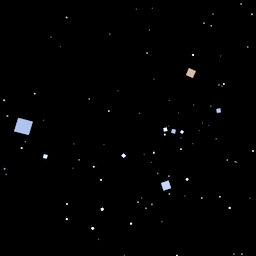
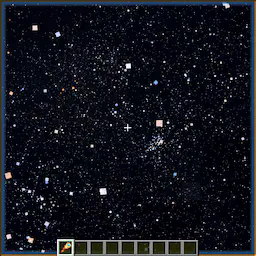
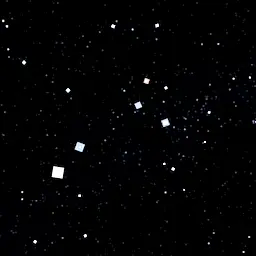
Astrocraft 用现实生活中的恒星取代了 Minecraft 随机生成的星星。恒星具有不同的视星等和颜色,例如参宿四或大角星这样明亮的红色恒星,或者像参宿四那样偏蓝色的恒星。
大多数恒星非常暗淡,您需要使用高倍望远镜才能看到它们。在无月的夜晚放大观察银河,您可以看到成千上万颗微小的星星。
随着夜晚的推移,星星会围绕北方天空中的一个点旋转,该点由北极星和小北斗七星标记。
星系、星团与星云
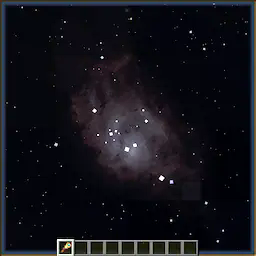
Astrocraft 还添加了不同类型的深空天体,包括:
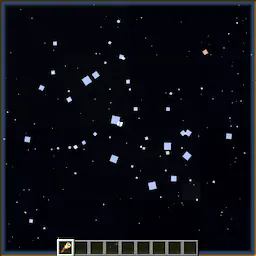
- 疏散星团和球状星团,如昴星团(M45)。
- 星云,如猎户座大星云(M42)或环状星云(M57)
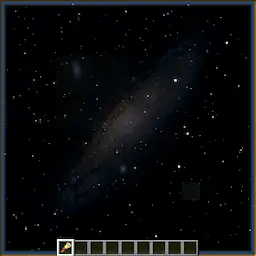
- 星系,如仙女座星系(M31)或涡旋星系(M51)
- 微妙的银河天穹背景
对于这些天体,您需要黑暗的天空和高海拔地区才能清晰观测。
流星与流星雨
偶尔,您可以看到天空中划过一道道光迹。大多数流星属于流星雨,它们似乎从天空中的某个特定点辐射出来。例如,英仙座流星雨发生在夏季,其辐射点位于英仙座或仙后座附近。某些流星雨可能会产生流星暴。
可缩放的高倍望远镜
使用鼠标的滚轮进行缩放,放大倍数最高可达 500 倍。高倍望远镜的作用类似于天文望远镜,它让您能够看清原本过于暗淡的天体。
它在高海拔地区(如山顶)效果最佳,且需要在天空完全黑暗、未被月光照亮时使用。
行星与太阳系
Astrocraft 默认添加了所有行星以及许多其他太阳系天体。行星看起来类似于明亮的恒星,但通常色彩鲜艳以突出显示。与恒星不同,这些天体会随着日期的推移而在真实的开普勒轨道上移动。这些行星在天空中的位置是根据它们的轨道参数(完全可配置)计算得出的,同时也考虑了地球自身的轨道。行星的视星等(亮度)也会变化,在冲日时最亮。
将视野拉近到行星时,它看起来不再像一颗恒星,而更像原版 Minecraft 中的月亮。行星拥有不同的纹理,木星有条纹,金星则大多没有特征。内行星(金星和水星)也会根据太阳的方向显示出类似月相的相位变化。
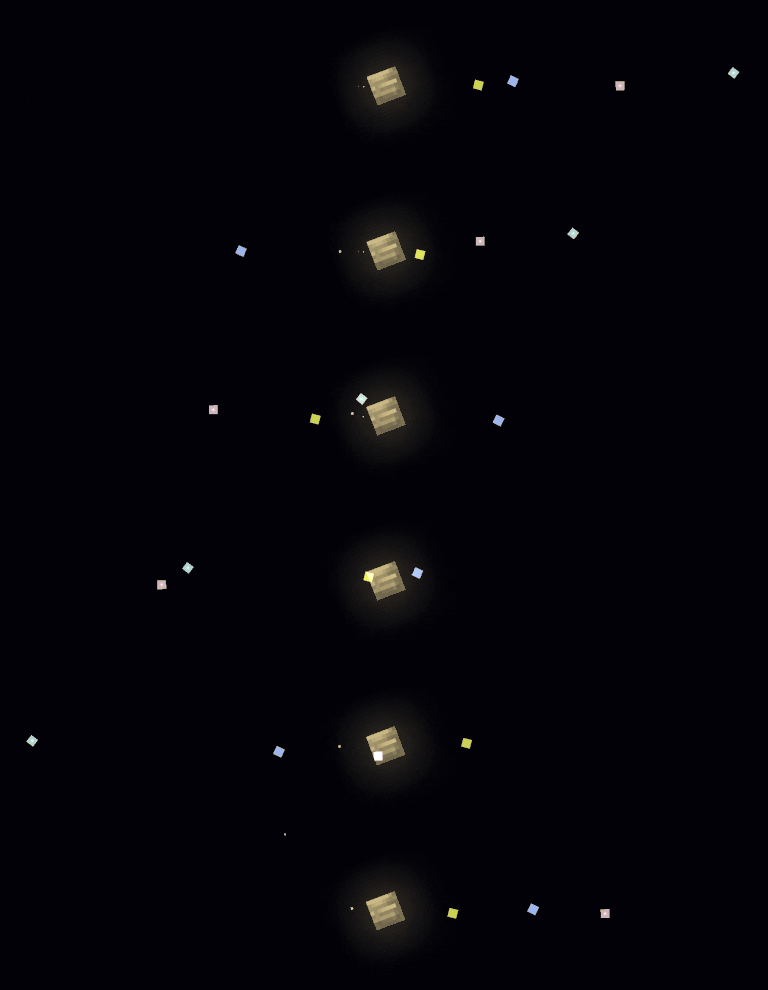
一些行星被卫星环绕,例如:木星及其伽利略卫星。卫星的轨道周期通常较短,这意味着您可以在一个夜晚内看到它们的移动。
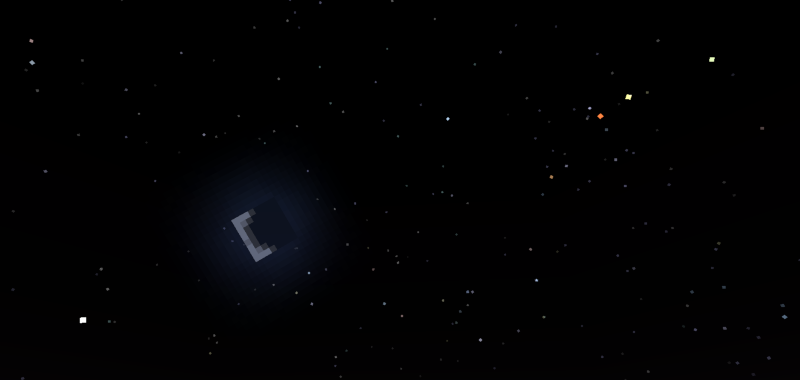
下表列出了主要行星(除地球外),并描述了它们在游戏中的外观:
| 行星 | 亮度 | 游戏内颜色 | 备注 |
|---|---|---|---|
| 水星 | 暗淡 - 明亮 | 白色 | 始终位于太阳约 25° 范围内 |
| 金星 | 非常明亮 | 白色 | 始终位于太阳 45° 范围内,非常明亮 |
| 火星 | 暗淡 - 明亮 | 红色 | 冲日时明亮,否则暗淡 |
| 木星 | 明亮 | 黄色 | 使用高倍望远镜可见四颗明亮的卫星 |
| 土星 | 暗淡 | 绿色 | 拥有足够放大后可见的环 |
| 天王星 | 非常暗淡 | 青色 | 通常需要高倍望远镜才能观看 |
| 海王星 | 非常暗淡 | 蓝色 | 难以观测,即使使用高倍望远镜 |
| 冥王星 | 非常暗淡 | 粉灰色 | 如同非常暗淡的小行星,与卡戎组成双星系统 |
还有超过 100 颗小行星(或矮行星),通常围绕太阳在 asteroid belt(小行星带)附近运行。它们看起来像暗淡的星星,通常需要借助 spyglass(望远镜)才能看到。随后的观察可能会显示它们在恒星背景中缓慢移动。
彗星拥有可见的尾巴,并且在靠近太阳时有时会变得非常明亮。它们具有高偏心率的轨道。
逼真的/季节性太阳和月亮
全年中,太阳相对于恒星移动,穿越黄道星座。这决定了在特定时间可以看到哪些恒星。
与原版 Minecraft 不同,在原版中太阳、月亮和星星都从头顶经过,现在它们会根据配置中设置的纬度(默认为北纬 30°)发生倾斜。此外,太阳的角度也会随季节变化而改变。这导致昼夜长短发生变化:夏季白天更长,冬季夜晚更长。将配置中的纬度设置为 90° 或 -90° 可以模拟极昼/极夜现象。
如果你安装了 serene seasons 或 fabric seasons,Astrocraft 会自动同步它们的季节周期。
月亮
这个模组增加了月光,在满月期间照亮夜晚,但可能会使天空中的某些物体过于耀眼。在新月期间,或者当月亮处于地平线以下时,夜晚会非常黑暗,但这最适合天文观测。
原版 MC 的月亮无论处于什么相位,都永久固定在太阳的对面。在 Astrocraft 中,月亮的运动独立于太阳。因此,它经常在白天仍然悬挂在空中。
日食和月食
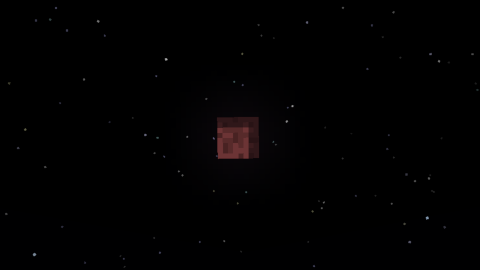
一种罕见的天文事件——月食,发生在满月与月亮穿越黄道平面重合时。阴影笼罩月亮,使其变红并变暗,月光仅黯淡几分钟。
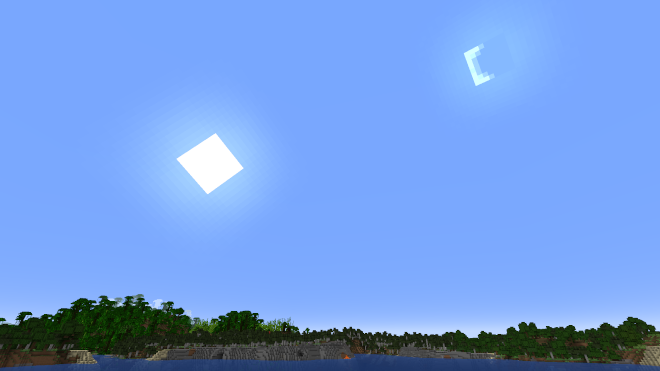
在新月期间,月亮可以部分或完全遮挡太阳,完全阻挡阳光。这会导致天空变暗,星星出现,就像夜晚一样。其他天体如水星和金星也可以“掩食”太阳,它们看起来像小的太阳黑子。
自定义设置
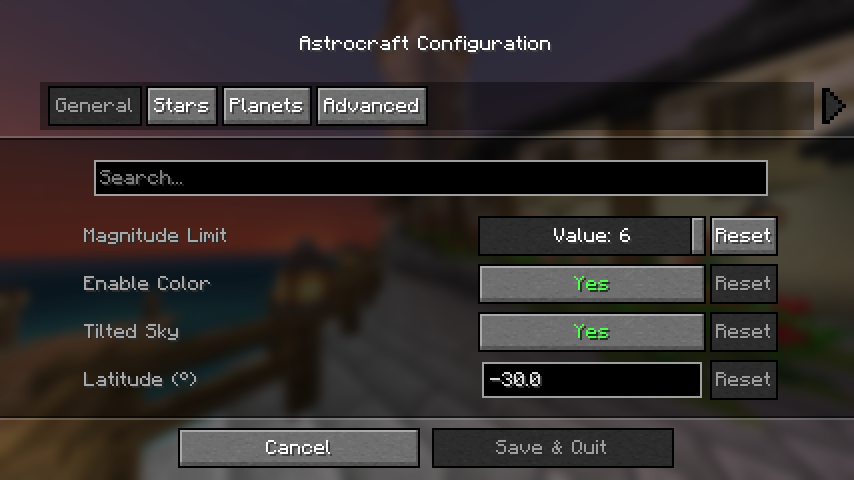
如果你安装了 mod menu,你可以打开配置菜单;否则请编辑位于 "config/astrocraft.json" 的配置文件。
在这里你可以关闭恒星或行星、禁用恒星颜色、添加你自己的恒星等等。主要影响性能的主选项是 “Magnitude Limit”(星等限制),如果需要可以降低此值。
多人游戏兼容性
安装了 Astrocraft 的多人世界中的其他玩家将会看到你相同的恒星和行星。但是,如果你更改了某些设置(例如 “year length” [年长度] 或行星轨道),情况可能并非如此。如果你正在与朋友一起观赏夜空,请注意这一点。
星座
Astrocraft 可以通过在天空中绘制连线来帮助你识别星座。启用 “Overlays” [覆盖层] 类别下的 “Show Constellations” [显示星座] 选项。它将向你展示每个星座由哪些恒星组成。
行星
在菜单的 “Planet” [行星] 类别中,你会找到该模组添加的所有行星列表。在这里你可以编辑任何行星(包括地球)的外观和轨道。每个行星都有一个卫星列表,这些卫星可以像行星一样进行编辑。你也可以在配置文件中添加新的行星和卫星。
地球并不是你唯一可以观测太阳系的行星。将 “Observing Location” [观测位置] 设置为任何行星、卫星、小行星,甚至是附近的恒星。这将影响天空中恒星和其他行星的位置。它还允许你近距离观察邻近的天体(例如从欧罗巴木卫二上看木星)。
兼容性
- BadOptimizations: 可以通过在 BadOptimizations 配置文件 "config/badoptimizations.txt" 中将 "enable_sky_angle_caching_in_worldrenderer" 设置为 "false" 来解决。
- AdditionZ: 禁用 “North Star” [北极星]。
- 光影可能会出现视觉问题
- fabricSkyboxes
如果你想用于 forge 或 neoforge,请使用 Sinytra Connector。
如果更新后模组出现问题,请尝试重置配置中的所有设置,或删除配置文件。不要报告光影问题。
A configurable astronomy mod that adds a realistic night sky with real life stars, planets and much more. This mod is for those who want to explore the stars while playing minecraft.
Summary of Features
- Real life stars and constellations
- Galaxies and Nebulae
- Planets, moons, asteroids and comets
- Shooting Stars and Meteor Showers
- Zoomable spyglass, usable as a telescope
- Realistic / Seasonal sun and moon positions
- Rare astronomical events (Eclipses, and more)
- Fully Customizable, custom solar systems supported
If you are only interested in simply replacing the stars and none of the mod's other features, check out Astrocraft: Lite (Fabric and Neoforge).
Real Life Stars and Constellations
Astrocraft replaces Minecraft's randomly generated stars, with those from real life. Stars come in a range of magnitudes and colors, with bright red stars like Betelgeuse or Arcturus, or more blueish stars like Rigel.
Most stars are so dim, you need a spylass to see them. Zooming in on the Milky Way on a moonless night, you can see thousands of little stars.
As the night progresses, stars revolve around a point in the north sky, marked by Polaris and the Little Dipper.
Galaxies, Clusters and Nebulae
Astrocraft also adds different types of deepsky objects, including:
- Open and Globular Clusters, like the Pleiades (M45).
- Nebulae like the Orion Nebula (M42), or Ring Nebula (M57)
- Galaxies like Andromeda (M31) or Whirlpool (M51)
- A subtle Milky Way skybox
For these objects, you need dark skies and high altitude to see well.
Shooting Stars and Meteor Showers
Occasionally, you can see streaks of light across the sky. Most meteors belong to a meteor shower, where they radiate from a specific point in the sky. The perseids for example, occur in summer, and radiate from around Perseus or Cassiopeia. Some meteor showers can produce Meteor Storms.
Zoomable Spyglass
Use your mouse's scroll wheel, to zoom in or out, up to 500x magnification. The spyglass works like a telescope, it lets you see objects that are otherwise too dim.
It works best at high altitudes such as on a mountain top, and when the sky is fully dark, not lit by the moon.
Planets and the Solar System
Astrocraft by default, adds every planet, along with many other solar system objects. Planets appear similar to bright stars, but often vividly colored to stand out. Unlike stars, these objects move as the days go by, in realistic keplerian orbits. Positions of these planets in the sky are calculated from their orbital parameters (fully configurable), while also taking into account earth's own orbit. Planets also vary in magnitude (brightness), being brightest at opposition.
Zooming in to a planet, it starts to looks less like a star, and more like the vanilla MC moon. Planets have different textures, Jupiter having bands, Venus being mostly featureless. Inferior planets (Venus and Mercury), also show phases like the moon, based on the direction of the sun.
Some planets are orbited by moons, for example: Jupiter and the Galilean moons. Moons often have short orbital periods, meaning you can see them move over a single night.
Below is a table of the major planets (except Earth), with descriptions of their ingame appearances:
| Planet | Brightness | In-game Color | Notes |
|---|---|---|---|
| Mercury | Dim - Bright | White | Always within ~25° of the sun |
| Venus | Very Bright | White | Always within 45° of the sun, very bright |
| Mars | Dim - Bright | Red | Bright when in opposition, otherwise dim |
| Jupiter | Bright | Yellow | Four bright moons visible using a spyglass |
| Saturn | Dim | Green | Has rings that are visible with enough zoom |
| Uranus | Very Dim | Cyan | Usually requires a spyglass to view |
| Neptune | Very Dim | Blue | Difficult to view, even with a spyglass |
| Pluto | Very Dim | Pink Gray | Like a very dim asteroid, binary with Charon |
There are also over 100 asteroids (or dwarf planets), usually orbiting the sun around the asteroid belt. These appear like dim stars, usually requiring a spyglass to see. Subsequent observations may show them slowly moving through the star background.
Comets, which have visible tails and sometimes become very bright as they approach the sun. They have high eccentricity orbits.
Realistic / Seasonal Sun and Moon
Throughout the year, the sun moves relative to the stars, traveling through the zodiac. This determines which stars can be seen at a given time.
Unlike in vanilla minecraft, where the sun, moon and stars all pass overhead, they will now be tilted by the latitude set in the configuration (30°N by default). Additionally, the sun's angle also changes seasonally throughout the year. This causes the day and night to change in length, longer days in summer, longer nights in winter. Setting latitude to 90° or -90° in the configuration will simulate polar day / night.
If you have either serene seasons or fabric seasons installed, Astrocraft automatically syncs to their season cycles.
The Moon
This mod adds moonlight, which lights up the night during a full moon, however may outshine certain objects in the sky. At a new moon, or when the moon is down, the night can be very dark, but it is best for astronomy.
The vanilla MC moon, regardless of phase, is permanently fixed opposite the sun. In Astrocraft, the moon moves independently of the sun. As a result, it is often still up during the day.
Eclipses
A rare astronomical event, the Lunar Eclipse, occurs when a full moon coincides with the moon crossing the ecliptic. A shadow engulfs the moon and turns it red and dark, dimming moonlight for only a few minutes.
During a new moon, the moon can partially or fully cover the sun, completely blocking out the sunlight. This causes the sky to go dark and stars to come out, just like the night. Other astronomical objects, such as Mercury and Venus can also eclipse the sun, they look like small sunspots.
Customization
If you have mod menu installed you can open the configuration menu, otherwise edit the config file at: "config/astrocraft.json".
Here you can toggle stars or planets off, disable star color, add your own stars and much more. The main option affecting performance is "Magnitude Limit", reduce this if you need to.
Multiplayer Compatibility
Other players on multiplayer worlds with Astrocraft installed will see the same stars and planets as you. However, this won't be the case if you change certain settings, such as "year length" or planets' orbits. Keep this in mind, if you are viewing the night sky with friends.
Constellations
Astrocraft can help you see constellations in the stars by drawing them in the sky. Enable the "Show Constellations" option under the "Overlays" category. It will now show you which stars make up each constellation.
Planets
In the "Planet" category of the menu, you will find a list of all the planets added by the mod. Here you can edit the appearance and orbit of any planet, including earth. Each planet has a list of moons, these can be edited the same way as any planet. You can also add new planets and moons in the config.
Earth is not the only planet you can observe the solar system from, Set "Observing Location" to any planet, moon, asteroid, or even nearby stars. This affects the position of the stars and other planets in the sky. It also allows you to get a close up view of nearby celestial bodies (like Jupiter from Europa).
Compatibility
- BadOptimizations: This can be fixed by setting "enable_sky_angle_caching_in_worldrenderer" to "false" in the BadOptimizations config file at "config/badoptimizations.txt".
- AdditionZ: Disable "North Star".
- Shaders may have visual issues
- fabricSkyboxes
Use Sinytra Connector if you want to use with forge or neoforge.
If the mod breaks after updating, try resetting everything in the config, or delete the config file. Don't report shader issues.

下载 Astrocraft: Realistic Night Skies
需要联机服务器吗?
稳定流畅、一键部署,几分钟即可和朋友联机开服
最低仅需 8 元/月 即可畅快联机
下载 Astrocraft: Realistic Night Skies
需要联机服务器吗?
稳定流畅、一键部署,几分钟即可和朋友联机开服
最低仅需 8 元/月 即可畅快联机
下载 Astrocraft: Realistic Night Skies
需要联机服务器吗?
稳定流畅、一键部署,几分钟即可和朋友联机开服
最低仅需 8 元/月 即可畅快联机
下载 Astrocraft: Realistic Night Skies
需要联机服务器吗?
稳定流畅、一键部署,几分钟即可和朋友联机开服
最低仅需 8 元/月 即可畅快联机
下载 Astrocraft: Realistic Night Skies
需要联机服务器吗?
稳定流畅、一键部署,几分钟即可和朋友联机开服
最低仅需 8 元/月 即可畅快联机
下载 Astrocraft: Realistic Night Skies
需要联机服务器吗?
稳定流畅、一键部署,几分钟即可和朋友联机开服
最低仅需 8 元/月 即可畅快联机
下载 Astrocraft: Realistic Night Skies
需要联机服务器吗?
稳定流畅、一键部署,几分钟即可和朋友联机开服
最低仅需 8 元/月 即可畅快联机
下载 Astrocraft: Realistic Night Skies
需要联机服务器吗?
稳定流畅、一键部署,几分钟即可和朋友联机开服
最低仅需 8 元/月 即可畅快联机
下载 Astrocraft: Realistic Night Skies
需要联机服务器吗?
稳定流畅、一键部署,几分钟即可和朋友联机开服
最低仅需 8 元/月 即可畅快联机
下载 Astrocraft: Realistic Night Skies
需要联机服务器吗?
稳定流畅、一键部署,几分钟即可和朋友联机开服
最低仅需 8 元/月 即可畅快联机
### 月食阴影
月食的阴影逐渐笼罩月球。此前,月球只会变暗并变为红色。
![阴影掠过月球]()
### 季节模组兼容性
如果安装了 Serene Seasons 或 Fabric Seasons,Astrocraft 将同步其配置,使季节保持一致。
### 太阳黑子
太阳表面的太阳黑子更小,且以群组形式生成。
### 覆盖层
- 黄道星座的颜色与其他星座不同。
- 添加了银河赤道、方位角 / 黄道网格。
### 其他内容
- 使用单筒望远镜放大时,鼠标灵敏度降低。
- 提供轴倾斜 / 斜率角度选项。
- 可以关闭月光效果。
- 可以使用资源包添加星云或星系等天体。同时添加了大量球状星团。
- 采用更紧凑的方式存储星星数据,减小了模组的文件大小。
### Bug 修复
- 移除了在“实时模式”中始终卡住的彗星。
- 修复了月食几乎不会发生的问题。
- 修复了光照不受降雨影响的问题。
关于这个资源的讨论、问题反馈与使用心得
还没有讨论,来发第一帖吧
你是这个资源的作者?登录后可认领此资源。
相似资源
 模组

可定制的鞘翅模组,支持装饰纹饰、旗帜图案等更多功能!
 模组

显示你正在注视的方块的信息。(适用于 Minecraft 1.16+ 的 Hwyla/Waila 分支)
 模组
使用 JavaScript 编辑配方、添加自定义物品、编写世界事件!
 模组

查看物品与配方
 模组
在游戏画面角落显示附近世界地形、玩家、生物和实体的地图。可创建路径点,帮助你找到标记过的位置。
 模组
AE2:一款流行的自动化与存储模组
评论 0
登录后参与评分
还没有评论,来抢沙发吧