
?️ 此描述可能与您正在使用的模组版本不符。 如果您有问题或需要帮助,请在我 Discord 服务器的 #support 频道中提问 (我的 Discord 服务器链接)。




关于
Basic Storage 为希望在不使用升级系统或复杂 GUI 的情况下进行批量存储的玩家,提供了简单且符合原版风格的木箱。
- 每个木箱可存储最多 10 亿个同一种类的物品
- 可直接从方块存取物品
- 通过木箱站和木箱连接器构建木箱网络
- 移动满载的木箱而不会丢失其中的物品
- 与漏斗、漏斗矿车及常见存储类模组兼容
演示视频
木箱
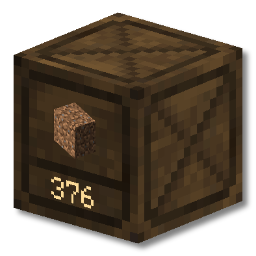
Basic Storage 添加了一个新方块:木箱。它可以容纳最多 10 亿个同一种类的物品。您可以通过以下方式快速存入和取出物品:
- 直接与木箱交互(无需 GUI)
- 右键单击插入一个物品
- Shift + 右键单击从您的背包中插入所有匹配的物品
- 左键单击取出一个物品
- Shift + 左键单击取出一组物品
- 使用漏斗/漏斗矿车
- 使用第三方模组(例如 AE2、RS、Tom's Storage、Copper Pipes)
木箱站
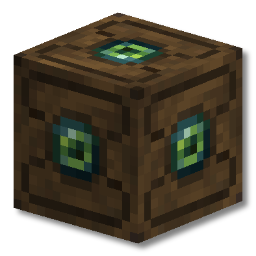
木箱站作为木箱网络的快速插入枢纽。
任何直接连接到木箱站或通过木箱连接器或其他木箱连接的木箱都属于同一个网络。
与木箱站的交互方式类似于木箱:
- 右键单击将您手中持有的整组物品插入到兼容的木箱中
- Shift + 右键单击将您背包中与网络中的木箱匹配的所有物品插入。
使用场景
想象一下,您有一面用于存放石材、泥土、沙砾和原矿石等材料的木箱墙。
您刚刚结束了一次采矿之旅,背包里装满了这些物品。
只需在木箱站上 Shift + 右键单击,您的背包就会迅速清空,所有物品都会被放置在正确的位置!
合成配方
虽然制作木箱所需的资源在游戏一开始就能获得,但木箱站的合成稍难一些。这是为了鼓励玩家在游戏早期根据需要随意使用木箱,并在游戏后期根据需要扩展他们的存储系统规模。

运输木箱
木箱非常适合保持存储的整洁和易访问性,但如果您需要移动这些存储该怎么办?
动态物品模型
木箱可以用斧头轻松破坏。当您破坏一个装有物品的木箱并拾起它后,您会发现它的外观有所不同。

装有物品的木箱会在其物品模型本身以及木箱的工具提示中显示其所包含的物品。木箱中的物品数量也可以在工具提示中找到。

常见问题
该模组有哪些依赖项?
Basic Storage 没有额外的依赖项。
是否有 NeoForge/Fabric/Quilt 版本?
目前有 Fabric 版本。 NeoForge 版本正在计划中。Quilt 版本可能可以运行,但未明确支持。
您能将模组移植到 Minecraft 1.X.X 吗?
很抱歉,我没有时间将 Basic Storage 移植到更早的版本。 不过,该模组将支持 Minecraft 的每个新版本。
我发现了一个错误 / 我的游戏崩溃了
如果您在使用 Basic Storage 时遇到任何问题,欢迎在 GitHub 仓库的 Issue Tracker 上提交问题报告。 错误报告非常有帮助,能够助力 Basic Storage 变得更好。
致谢
Basic Storage 的存在离不开前人的辛勤工作与创意。在此,我要特别感谢 JABBA、Storage Drawers 以及 Extended Drawers 背后才华横溢的开发者和艺术家们,同时也感谢所有在此之前开发的桶/抽屉类模组。
?️ This description may not reflect the version of the mod you’re using. If you have questions or need help, ask in the #support channel on my Discord server.
About
Basic Storage adds simple, vanilla-friendly crates for players who want bulk storage without an upgrade system or a complicated GUI.
- Store up to 1 billion items of a single type in each crate
- Deposit and withdraw directly from the block
- Build crate networks with the Crate Station and Crate Connectors
- Move full crates without losing their contents
- Works with hoppers, hopper carts and common storage mods
Demonstration Video
Crate
Basic Storage adds a new block, the Crate. It can hold up to 1 billion items of a single type. Items can be quickly deposited and withdrawn by:
- directly interacting with crates (no GUI)
- Right Click inserts one item
- Shift Right Click inserts all matching items from your inventory
- Left Click takes out one item
- Shift Left Click takes out a single stack of items
- using hoppers/hopper carts
- using third party mods (e.g. AE2, RS, Tom's Storage, Copper Pipes)
Crate Station
The crate station functions as a quick-insert hub for a network of crates.
Any crates connected directly to the crate station or via crate connectors or other crates are part of the same network.
Interacting with the crate station is similar to crates:
- Right Click inserts the entire stack of what you're holding into a compatible crate
- Shift Right Click inserts all items from your inventory which match crates in the network.
Use Case
Imagine you have a crate wall for materials such as stone, dirt, gravel and raw ore.
You've just been on a mining trip and your inventory is full of these items.
Simply shift right click on the Crate Station and your inventory will be freed up super quick, with
every item in the right place!
Recipes
While resources to make crates are available at the very start of the game, a crate station is slightly harder. This is to encourage players to use crates however they see fit in the early game, and then adapt their storage systems to work on a larger scale later in the game if they wish.
Transporting Crates
Crates are fantastic for keeping your storage organized and accessible, but what if you need to move that storage?
Dynamic Item Models
Crates can easily be broken with an axe. Once you've broken a crate with items in and picked it up you'll notice that it looks different.
Crates with items in them will show the item it contains on both the item model itself, and in the crate's tooltip. The number of items in the crate can be found in the tooltip too.
Frequently Asked Questions
What are the mod's dependencies?
Basic Storage has no extra dependencies.
Is there a NeoForge/Fabric/quilt version?
There is currently a Fabric version. NeoForge is planned. Quilt may work, but is not explicitly supported.
Can you backport the mod to Minecraft 1.X.X?
Unfortunately I don't have the time to backport Basic Storage to earlier versions. The mod will however support each new major version of Minecraft.
I found a bug / my game crashed
If you find any problems with Basic Storage, please feel encouraged to create an issue on the GitHub repository issue tracker. Bug reports are incredibly helpful, and help make Basic Storage the best it can be.
Acknowledgements
Basic Storage wouldn't exist without the hard work and creativity of those that came before it. I'd like to give special thanks to the talented developers and artists behind JABBA, Storage Drawers and Extended Drawers, as well as every other barrel/drawer mod that came before them.

下载 Basic Storage
需要联机服务器吗?
稳定流畅、一键部署,几分钟即可和朋友联机开服
最低仅需 8 元/月 即可畅快联机
下载 Basic Storage
下载 Basic Storage
下载 Basic Storage
下载 Basic Storage
下载 Basic Storage
下载 Basic Storage
下载 Basic Storage
下载 Basic Storage
下载 Basic Storage
重要提示:
⚠️ 更新前请备份你的世界!通常情况下一切都会正常运行,但面对重大版本更新时,务必备份你的世界以防万一。
☀️ 新功能
- 已更新至 26.1.x | 感谢 cputnam 协助移植模组!
?️ 修复
- 为拥有旧版容器网络的老世界添加了两种迁移方案,这应该能解决与容器网络相关的一些主要痛点
- 容器网络现按维度存储,并遵循规范的命名空间维度目录结构来保存 .dat 文件
- 修复了向网络中添加新容器时,容器站读取显示出现的微小同步错误
- 新的网络 .dat 文件现在包含顶层格式、network_uuid 和维度信息,便于调试和防止出错
- 修复了一些较小的边缘情况网络问题
现有世界迁移信息
简而言之: 你可以直接加载旧世界并游玩,容器网络会自动自我修复。如果遇到问题,请继续阅读以下内容:
- 旧版网络会随着时间推移在区块加载的过程中自动更新为正确的格式和数据(模组会每 25 秒检查一次世界中是否存在旧的 .dat 文件,并相应地检查一定数量的网络),但你也可以手动触发此过程:
/basicstorage migrate info- 显示距离你位置最近的 3 个旧版网络的坐标。移动到那里或使用 "/basicstorage migrate run" 即可更新网络,前提是这些区块处于加载状态/basicstorage migrate run- 这会手动触发每 25 秒自动运行的迁移行为,但以小规模批次尝试执行文件中列出的所有网络。如果你的网络似乎没有更新,请靠近它并运行此命令。 以上都不是完美的解决方案,一些旧的容器网络可能已过时/无效/无法修复。 如果是这种情况,请从 "/basicstorage migrate info" 中查看网络的 UUID,并在 world/data/basicstorage/networks 目录中删除该文件。你还会在 world/data/basicstorage/legacy_migrated_network_copies 中找到已迁移网络的存档副本。 完成上述操作后,破坏并替换方块以构建一个新的网络。
重要注意事项: 旧的网络数据没有定义维度,因此 "/basicstorage migrate info" 给出的坐标可能指向任何维度。如果你在当前的维度中找不到来自此模组的方块,请在删除数据文件之前先尝试其他维度。
关于这个资源的讨论、问题反馈与使用心得
还没有讨论,来发第一帖吧
你是这个资源的作者?登录后可认领此资源。
相似资源
 模组

一个用于收集生物掉落物的多区块模组。
 模组

显示你正在注视的方块的信息。(适用于 Minecraft 1.16+ 的 Hwyla/Waila 分支)
 模组

查看物品与配方
 模组

可定制的鞘翅模组,支持装饰纹饰、旗帜图案等更多功能!
 模组
在游戏画面角落显示附近世界地形、玩家、生物和实体的地图。可创建路径点,帮助你找到标记过的位置。
 模组
使用 JavaScript 编辑配方、添加自定义物品、编写世界事件!
评论 0
登录后参与评分
还没有评论,来抢沙发吧