


这是 Beautified Chat 模组的服务端版本。它具有高度可配置性,允许用户在全服务器范围内自定义聊天输入样式。当前查看的这个模组变体只需将其放入服务器模组列表中即可生效。它将为所有连接的玩家修改聊天显示,而无需在客户端安装该模组。此外,还包含时间戳功能,以便了解消息的发送时间。
3.0 版本新增了创建等级(ranks)并根据这些等级设置名称颜色的功能!
客户端版本也可用,名为 Beautified Chat [Client]。
客户端和服务端模组互兼容,服务端优先。
在原版 Minecraft 中,所有聊天的格式为:
<用户名> 消息内容
该模组默认将其更改为:
时间戳 | 用户名: 消息内容
默认颜色可在示例图片中看到。通过配置文件可以轻松更改格式和颜色代码。如果不需要时间戳,只需在 chatMessageFormat 配置选项中移除它即可。
默认时间戳格式为 24 小时制。如果需要 AM/PM 格式,只需在 timestampFormat 配置选项中输入 "hh:mm a" 而不是默认的 "HH:mm"。如果您的服务器托管在其他时区,可以在 timestampTimeZone 配置选项中进行设置。
其他模组赋予玩家的名字和颜色会被保留,例如 FTB Ranks 的等级颜色和队伍颜色。消息中的链接和物品悬停提示也能正常工作。其他玩家的名字默认带有自己的颜色,因此您的名字会脱颖而出。该模组与 Chat Heads 兼容,也与 Discord Integration 等 Discord 模组兼容。命令回复也会被赋予颜色,默认为深绿色。


所有可用的配置选项:
显示剧透
showRankTitles 默认 true
是否在用户名前显示通过 /bcs rank 创建的排名头衔。
useRankColours 默认 true
是否使用在 /bcs rank 中设置的排名颜色作为优先的用户名颜色。
chatMessageFormat 默认 "%timestamp% | %username%: %chatmessage%"
变量说明:%timestamp% = timestampFormat 中设置的时间戳。%username% = 发送消息的玩家的用户名。%chatmessage% = 消息本身。
timestampFormat 默认 "HH:mm"
格式示例时间:晚上9点过5秒。*=默认值。*(HH:mm) = 21:00, (HH:mm:ss) = 21:00:05, (hh:mm a) = 晚上9:00
timestampTimeZone 默认 ""
时间戳的时区,例如 'Europe/London' 或 'GMT+0'。留空则使用服务器时区。
rankTitleFormat 默认 "[%rank] "
当 showRankTitles 启用时,置于 %username% 之前的排名格式。
chatTimestampColour 默认 8,最小值 0,最大值 15
聊天消息中时间戳的颜色。可选值为:0: 黑色, 1: 深蓝色, 2: 深绿色, 3: 深青色, 4: 深红色, 5: 深紫色, 6: 金色, 7: 灰色, 8: 暗灰色, 9: 蓝色, 10: 绿色, 11: 青色, 12: 红色, 13: 浅紫色, 14: 黄色, 15: 白色。
chatUsernameColour 默认 2,最小值 0,最大值 15
聊天消息中你自己用户名的颜色。可选值为:0: 黑色, 1: 深蓝色, 2: 深绿色, 3: 深青色, 4: 深红色, 5: 深紫色, 6: 金色, 7: 灰色, 8: 暗灰色, 9: 蓝色, 10: 绿色, 11: 青色, 12: 红色, 13: 浅紫色, 14: 黄色, 15: 白色。
chatOtherUsernameColour 默认 3,最小值 0,最大值 15
聊天消息中其他玩家用户名的颜色。自己的用户名使用 chatUsernameColour。可选值为:0: 黑色, 1: 深蓝色, 2: 深绿色, 3: 深青色, 4: 深红色, 5: 深紫色, 6: 金色, 7: 灰色, 8: 暗灰色, 9: 蓝色, 10: 绿色, 11: 青色, 12: 红色, 13: 浅紫色, 14: 黄色, 15: 白色。
chatMessageColour 默认 15,最小值 0,最大值 15
聊天消息内容的颜色。
chatOtherSymbolsColour 默认 7,最小值 0,最大值 15
chatMessageFormat 中除变量外的其他符号的颜色。
overwriteOtherModColours 默认 false
是否将其他模组或团队赋予用户名和消息的颜色替换为在此处设置的顏色。
sendAsPlayerChat 默认 true
是否以玩家聊天形式而非系统消息形式发送消息,以便 Chat Heads 等模组能够识别发送者。
formatCommandFeedback 默认 true
是否让命令回复采用 commandFeedbackColour 中设置的颜色。
commandFeedbackColour 默认 2,最小值 0,最大值 15
命令回复的颜色。原本已有颜色的部分保持不变。可选值为:0: 黑色, 1: 深蓝色, 2: 深绿色, 3: 深青色, 4: 深红色, 5: 深紫色, 6: 金色, 7: 灰色, 8: 暗灰色, 9: 蓝色, 10: 绿色, 11: 青色, 12: 红色, 13: 浅紫色, 14: 黄色, 15: 白色。

使用 /bcs(别名:/beautifiedchatserver)。需要作弊权限。
/bcs usage - 显示所有命令及其简短描述。
/bcs rank create <rank-name> <colour> - 创建或更新具有指定聊天颜色的排名。
/bcs rank remove <rank-name> - 删除一个排名。
/bcs rank list - 列出所有排名及其颜色。
/bcs player add <player-name> <rank-name> - 为玩家分配一个排名。
/bcs player remove <player-name> <rank-name> - 移除玩家的某个排名。
/bcs player list - 列出所有已分配排名的玩家。

默认格式 ("%timestamp% | %username%: %chatmessage%"):
您还可以添加排名,并根据排名选择颜色: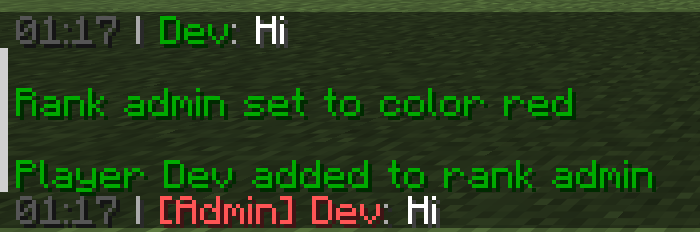
名称会保留其所属团队的颜色,或其他模组赋予的颜色。命令回复也会获得一种颜色:
使用 /bcs 查看所有可用命令: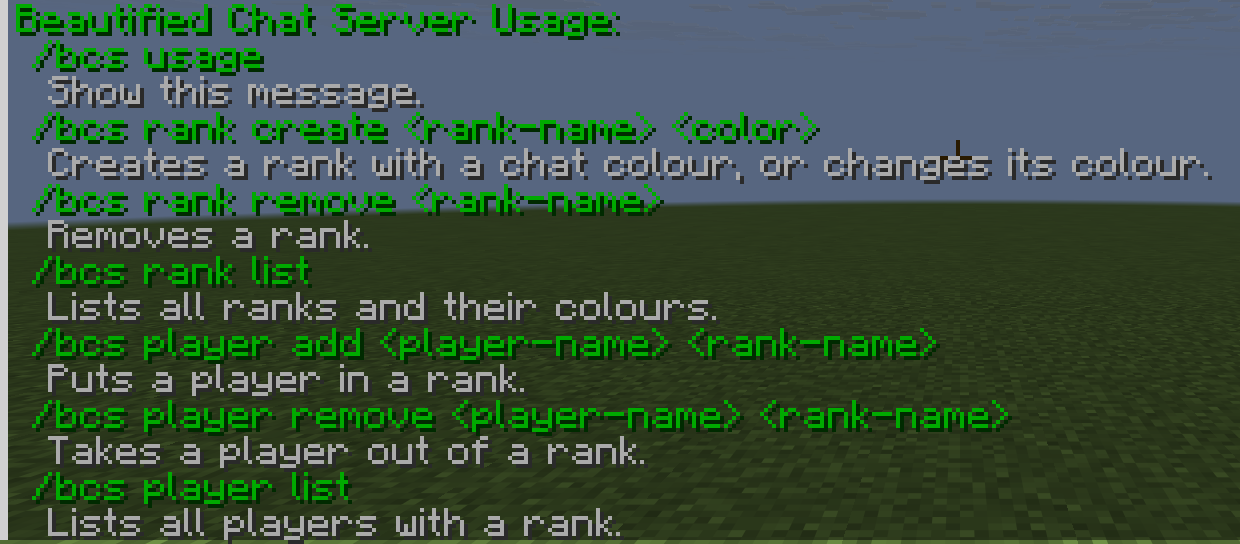

只要下载仍托管在 CurseForge 或 Modrinth 生态内,您可以自由将此模组用于任何整合包。
Serilum.com 提供了所有可用模组的概览及更多信息。
如有问题、想法、建议或其他内容,请访问 Github 仓库。谢谢!
This is the server variant of the Beautified Chat mod. It is highly configurable and allows users to change the chat input server-wide. The mod variant you're currently looking at just needs the mod in the server mod list. It will make changes to the chat for all connected players without the need to have it on their clients. There is also a timestamp feature to know when messages were sent.
Version 3.0 adds the ability to create ranks, and set name colours based on those ranks!
The client version is also available and is called Beautified Chat [Client].
Both the client and server mod are compatible with each other, server-side takes priority.
In default Minecraft, all chat is in the format:
<Username> Message
The mod by default changes this to:
Timestamp | Username: Message
The default colours can be seen below in the example image. Both the format and the colour codes can be changed with ease via the config. If you don't want the timestamp, just remove it in the chatMessageFormat config option.
The default timestamp format is 24-hours. If you want AM/PM, just input in the timestampFormat config option "hh:mm a" instead of the default "HH:mm". If your server is hosted in another time zone, it can be set in the timestampTimeZone config option.
Names and colours that other mods give players are kept, such as ranks from FTB Ranks and team colours. Links and item hovers inside messages keep working as well. Other players' names have their own colour by default, so your own name stands out. The mod is compatible with Chat Heads, and with Discord mods like Discord Integration. Command replies are given a colour too, dark green by default.
All available config options:
Show Spoiler
showRankTitles default true
Whether the rank titles, created in /bcs rank, should be shown before the username.
useRankColours default true
Whether rank colours, set in /bcs rank, should be used as the priority username colour.
chatMessageFormat default "%timestamp% | %username%: %chatmessage%"
Variables: %timestamp% = timestamp set in timestampFormat. %username% = the username of the player who sent the message. %chatmessage% = the message itself.
timestampFormat default "HH:mm"
Example time in formats: 5 seconds past 9 o' clock in the evening. *=Default. *(HH:mm) = 21:00, (HH:mm:ss) = 21:00:05, (hh:mm a) = 9:00 PM
timestampTimeZone default ""
The time zone of the timestamp, like 'Europe/London' or 'GMT+0'. Leave empty to use the server's time zone.
rankTitleFormat default "[%rank] "
The rank format prefixed before %username% when showRankTitles is enabled.
chatTimestampColour default 8, min 0, max 15
The colour of the timestamp in the chat message. The possible values are; 0: black, 1: dark_blue, 2: dark_green, 3: dark_aqua, 4: dark_red, 5: dark_purple, 6: gold, 7: gray, 8: dark_gray, 9: blue, 10: green, 11: aqua, 12: red, 13: light_purple, 14: yellow, 15: white.
chatUsernameColour default 2, min 0, max 15
The colour of your own username in the chat message. The possible values are; 0: black, 1: dark_blue, 2: dark_green, 3: dark_aqua, 4: dark_red, 5: dark_purple, 6: gold, 7: gray, 8: dark_gray, 9: blue, 10: green, 11: aqua, 12: red, 13: light_purple, 14: yellow, 15: white.
chatOtherUsernameColour default 3, min 0, max 15
The colour of other players' usernames in the chat message. chatUsernameColour is used for your own. The possible values are; 0: black, 1: dark_blue, 2: dark_green, 3: dark_aqua, 4: dark_red, 5: dark_purple, 6: gold, 7: gray, 8: dark_gray, 9: blue, 10: green, 11: aqua, 12: red, 13: light_purple, 14: yellow, 15: white.
chatMessageColour default 15, min 0, max 15
The colour of the chat message.
chatOtherSymbolsColour default 7, min 0, max 15
The colour of the other symbols from chatMessageFormat. So everything except the variables.
overwriteOtherModColours default false
Whether colours that other mods or teams give the username and message are replaced by the colours set here.
sendAsPlayerChat default true
Whether messages are sent as player chat instead of system messages, so mods like Chat Heads can see who sent them.
formatCommandFeedback default true
Whether the replies of commands get the colour set in commandFeedbackColour.
commandFeedbackColour default 2, min 0, max 15
The colour of command replies. Parts that already have a colour keep it. The possible values are; 0: black, 1: dark_blue, 2: dark_green, 3: dark_aqua, 4: dark_red, 5: dark_purple, 6: gold, 7: gray, 8: dark_gray, 9: blue, 10: green, 11: aqua, 12: red, 13: light_purple, 14: yellow, 15: white.
Use /bcs (alias: /beautifiedchatserver). Needs cheat-access.
/bcs usage - Show all commands with a short description.
/bcs rank create <rank-name> <colour> - Create or update a rank with the given chat colour.
/bcs rank remove <rank-name> - Delete a rank.
/bcs rank list - List all ranks and their colors.
/bcs player add <player-name> <rank-name> - Assign a rank to a player.
/bcs player remove <player-name> <rank-name> - Remove a rank from a player.
/bcs player list - List all players with assigned ranks.
The default format ("%timestamp% | %username%: %chatmessage%"):
You can also add ranks, and choose colours based on those:
Names keep the colour of their team, or the one other mods give them. Command replies get a colour as well:
Use /bcs to see all available commands:
You may freely use this mod in any modpack, as long as the download remains hosted within the CurseForge or Modrinth ecosystem.
Serilum.com contains an overview and more information on all mods available.
For issues, ideas, suggestions or anything else there is the Github repo. Thanks!

下载 Beautified Chat [Server]
需要联机服务器吗?
稳定流畅、一键部署,几分钟即可和朋友联机开服
最低仅需 8 元/月 即可畅快联机
下载 Beautified Chat [Server]
需要联机服务器吗?
稳定流畅、一键部署,几分钟即可和朋友联机开服
最低仅需 8 元/月 即可畅快联机
下载 Beautified Chat [Server]
需要联机服务器吗?
稳定流畅、一键部署,几分钟即可和朋友联机开服
最低仅需 8 元/月 即可畅快联机
下载 Beautified Chat [Server]
需要联机服务器吗?
稳定流畅、一键部署,几分钟即可和朋友联机开服
最低仅需 8 元/月 即可畅快联机
下载 Beautified Chat [Server]
需要联机服务器吗?
稳定流畅、一键部署,几分钟即可和朋友联机开服
最低仅需 8 元/月 即可畅快联机
下载 Beautified Chat [Server]
需要联机服务器吗?
稳定流畅、一键部署,几分钟即可和朋友联机开服
最低仅需 8 元/月 即可畅快联机
下载 Beautified Chat [Server]
需要联机服务器吗?
稳定流畅、一键部署,几分钟即可和朋友联机开服
最低仅需 8 元/月 即可畅快联机
下载 Beautified Chat [Server]
需要联机服务器吗?
稳定流畅、一键部署,几分钟即可和朋友联机开服
最低仅需 8 元/月 即可畅快联机
下载 Beautified Chat [Server]
需要联机服务器吗?
稳定流畅、一键部署,几分钟即可和朋友联机开服
最低仅需 8 元/月 即可畅快联机
下载 Beautified Chat [Server]
需要联机服务器吗?
稳定流畅、一键部署,几分钟即可和朋友联机开服
最低仅需 8 元/月 即可畅快联机

- 大量改进与错误修复!
- 修复了聊天消息中链接、物品悬停提示以及其他模组的颜色被移除的问题。
- 修复了来自其他模组(如 FTB Ranks)的名称更改和颜色无法在聊天中显示的问题。
- 修复了与 Discord -> Chat 类模组的兼容性问题。
- 修复了 Chat Heads 不显示玩家头像的问题。
- 聊天消息会以原版格式记录到服务器控制台中。
- 改进了 /bcs 命令的消息提示,并添加了 /bcs 用法说明。
- 新增了 'chatOtherUsernameColour'、'overwriteOtherModColours'、'timestampTimeZone'、'sendAsPlayerChat'、'formatCommandFeedback' 和 'commandFeedbackColour' 配置选项。默认情况下,其他玩家的名称显示为深青色。

包含先前版本详细信息的完整更新日志可在我的网站上查看:
>
- 将最新更改移植回 Minecraft 版本 26.1.2,该版本现已重新获得积极支持。
包含先前版本详细信息的完整更新日志可在我的网站上找到:
>
将模组的 Java 包名更改为 com.serilum.*。
更新了 mods.toml 和 fabric.mod.json 文件中的模组信息。
无功能性变更。
包含先前版本详细信息的完整更新日志可在我的网站上找到:
>
关于这个资源的讨论、问题反馈与使用心得
还没有讨论,来发第一帖吧
你是这个资源的作者?登录后可认领此资源。
相似资源
 模组

Minecraft 中的表情符号
 模组
? 主菜单上的闪屏文本将在可配置的延迟后持续变化。
 模组
恢复所有账户的游戏聊天访问权限
 模组

使聊天消息以平滑的动画效果显示。
 模组

Music Maker 为游戏添加了乐谱、乐器以及其他设备,用于创作和演奏音乐。
 模组

一个完整经济模组:玩家余额、动态定价商店、玩家市场、买入订单、货币物品以及网页仪表盘。
评论 0
登录后参与评分
还没有评论,来抢沙发吧