
Music Maker 模组为游戏添加了乐谱、乐器以及其他设备,用于创作和演奏音乐。请查看下方的视频以了解其运作方式。
Music Maker 专为在多人游戏中高效且正常运行而设计。你可以与朋友一起演奏音乐,无需担心服务器延迟会像音符盒作品那样破坏节奏。
将你最喜欢的音乐带入 Minecraft,或创作你自己的杰作。释放你的心灵,成为你渴望成为的音乐家吧!
如果你对制作画作也感兴趣,可以查看 Joy of Painting,或者看看我的其他模组:
关于 Forge/Neoforge(1.21 版本之后)的说明:
从 Minecraft 1.21 开始,每个主要版本都将支持 Fabric,而只有特定版本会支持 Neoforge。对于其他版本,你可以尝试使用 Sinytra connector 和 Forgified fabric api 通过 Neoforge 加载 Fabric 文件。其他 Forge 版本将不再获得支持。
Glissando 更新 (1.21.1-1.1.0+ & 1.20.1-1.2.0+)
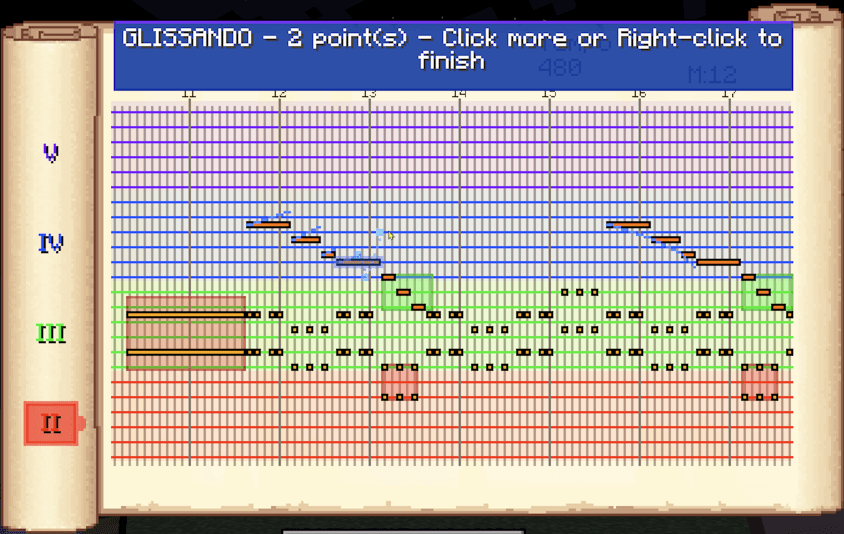
此更新新增的功能包括:
- Glissando(滑音)允许你在音符中添加渐变的音高变化曲线(在乐谱 GUI 中点击 G 激活滑音模式)
- Crescendo/Decrescendo(渐强/渐弱)允许你在音符区域添加渐变的音量变化(在乐谱 GUI 中按住 Shift 并拖拽)
- 三种新乐器
- 一些用户体验改进(QoL),例如更好的帮助界面
感谢 Miguel Ventura 的贡献。
The Huge Update (1.16.5-2.0+)

这次更新几乎改进了模组的所有方面!以下是变更的快速概览:
- 重做了乐谱 GUI。现在它是一个水平滚动的乐谱。
- 你现在可以创建非常长的乐谱。上限长度足以容纳基本上任何一首乐曲的单张乐谱。
- 音符长度是可自定义的!你可以拖动鼠标来设置每个音符的长度。
- 多个音符可以放在同一个节拍上,不同长度的音符可以以任何可能的方式重叠!
- 八度数量翻倍。因此,我们从 4 个八度增加到了8 个八度。请注意,并非每种乐器都适合所有八度。
- 乐谱现在有了音量设置。
- 每个单独的音符也有可设置的音量。
- 提供了更精细的速度选项,上限达到 3000 BPM!
- 4 种新乐器:红石吉他、贝斯吉他、双簧管和法国号
- 高级乐器演奏 GUI:你现在可以同时按下多个音符,并且松开按键会停止该音符。
- 支持在乐器 GUI 中使用MIDI 设备输入!只需连接你的设备并按正常方式右键点击乐器即可。
- 在 1.17.1-2.2 版本中,你也可以在乐谱 GUI 中使用 MIDI 设备!你甚至可以用它进行录制!
- 1.17.1-2.2 中的新录制按钮允许你使用键盘或 MIDI 设备实时录制音乐。
- 在乐谱 GUI 中中键点击音符可以让你查看其现实生活中的记谱法名称并进行编辑。
- 在乐谱 GUI 中可自定义小节线,作为视觉辅助。
- 在乐谱 GUI 中支持CTRL+Z 撤销。
- 乐谱 GUI 中有一个帮助按钮,解释了控件和键盘快捷键。
- 乐谱的存储和网络处理现在更加智能,无论乐曲长度如何,都比以前消耗更少的资源。
- 加载旧世界时将自动更新所有旧的乐谱到新格式。这是不可逆的,所以如果你可能需要在该模组的旧版本中游玩,请备份你的世界。
- 旧版复制的音乐仍然可以在新版本中粘贴(但反之不行)。
- 旧版导出的乐谱文件可以在新版本中导入(但反之不行)。
注意:如果从旧版本更新,我建议在更新之前备份你的世界(或者至少只是乐谱),以防更新过程中出现问题。
功能(在大更新之前)
- 允许你创作音乐的乐谱
- 声音遵循十二平均律,每八度 12 个音符,共 4 个八度,总计 48 个音符
- 11 种不同的速度设置,从 60 BPM 到 1200 BPM
- 使用鼠标或键盘编写音乐,随你喜好
- 便捷的键盘功能,如空格键、删除键和退格键
- 支持选择、复制和粘贴乐谱。CTRL + A(全选)、CTRL + C(复制)和 CTRL + V(粘贴)快捷键均可使用。
- 支持在不同工作表之间以及 Minecraft 外部进行复制。您可以将它们复制到文本文件中进行备份,或粘贴到另一个世界/服务器中。
- 在快捷栏中最多放置 5 张乐谱,以便在编辑时同时查看和预览多层音乐。相邻的乐谱可以通过出现的一个按钮轻松禁用。
- 在主手持有乐器时,可在副手预览乐谱。您还可以为每张乐谱锁定乐器,即使副手物品发生变化,也仅使用该乐器进行预览。这可用于标记该乐谱应使用的乐器,对于预览相邻乐谱也非常有用。
- 包含 13 种可制作的乐器和 1 种可在特定宝藏中找到的乐器。
- 单独使用乐器会播放随机音符。
- 在主手持有一张乐谱且副手持有乐器时,使用该乐器会将乐谱播放到世界中。
- 音乐盒需要放入一张乐谱和一个乐器。当接收到从关闭变为开启的红石信号时,音乐盒开始播放(如果已在播放则停止)。
- 音乐盒在播放结束时,会向其右侧面发送一个持续一秒的红石脉冲。这可用于串联歌曲或激活机械装置的一部分。
-  >节拍器在红石信号开启时会提供稳定的滴答声。可以通过右键点击或使用音乐书来设置节拍器的滴答速率。
- 在节拍器滴答四次后,所有附近持有正确节奏的音乐书和乐器的玩家将开始同步演奏。利用这一点,您可以与乐队成员一起合奏歌曲。
- 键盘用法如下所示:

将 MIDI 文件转换为音乐书
如果您有想要在游戏中的 MIDI 文件,可以使用此在线工具进行转换:
鸣谢
感谢 LuchadorMickey 提供了大部分图形素材。
感谢 inuyasha01 提供了中文翻译。
感谢 Greyberet 提供了西班牙语翻译。
感谢 Ste B 提供了意大利语翻译。
感谢 whiteevilbro 提供了俄语翻译。
感谢 Szpieg2000 提供了波兰语翻译。
感谢 SamKMadden 提供了日语、瑞典语和冰岛语翻译。
感谢 FoxMcloud5655 将更改移植回 1.16 版本。
感谢 Miguel Ventura 提交了包含滑音、渐强、三种新乐器和一些生活质量改进的 PR。
社区
现在有一个 Discord 服务器,您可以在那里与世界分享您的创作!
Music Maker adds music sheets, instruments and other devices to the game for creating and playing music. Check the video below to see how it works.
Music Maker is designed to work efficiently and properly in multiplayer. You can play music with friends without worrying about server lag ruining the rhythm like with note block creations.
Bring your favourite music to Minecraft or create your own masterpiece. Set free your heart and become the musician you aspire to be!
If you are interested in making paintings as well, check Joy of Painting, or check my other mods:
Note about Forge/Neoforge after 1.21:
Starting with Minecraft 1.21, every major version will have Fabric support, and only certain versions will have Neoforge support. For other versions, you can try the Fabric file using Neoforge with Sinytra connector and Forgified fabric api. The other Forge won't be supported.
Glissando Update (1.21.1-1.1.0+ & 1.20.1-1.2.0+)
New features added in this update are:
- Glissando lets you add gradual pitch change curves to notes (activate glissando mode by clicking G in the sheet GUI)
- Crescendo/Decrescendo lets you add gradual volume change to note regions (shift-drag on the sheet GUI)
- Three new instruments
- Some QoL changes, such as better help UI
Thanks to contributions by Miguel Ventura.
The Huge Update (1.16.5-2.0+)
This update improves basically everything about the mod! Here is a quick look through the changes:
- Overhauled the music sheet GUI. Now it is a horizontal, scrolling sheet.
- You can now create MUCH longer music sheets. The upper limit is long enough to fit basically any music in a single sheet.
- Note length is customizable! You can drag the mouse to set the length of each note.
- Multiple notes can be put at the same beat, and notes of different lengths can overlap in any way possible!
- TWICE the number of octaves. So, we are up from 4 to 8 octaves. Note that not every instrument is suitable for every octave.
- Music sheets have a volume setting now.
- Each individual note also has a volume that can be set.
- Much more granular Tempo options, with an upper limit of 3000 BPM!
- 4 new instruments: Redstone Guitar, Bass Guitar, Oboe and French Horn
- Advanced instrument playing GUI: You can now press multiple notes together, and releasing a key stops the note.
- Support for MIDI device input in the instrument GUI! Just connect your device and right click an instrument as normal.
- With 1.17.1-2.2, you can also use your MIDI device in the music sheet GUI as well! You can even record with it!
- The new record button in 1.17.1-2.2 allows you to record music in real time with your keyboard or a MIDI device.
- Middle clicking a note in the sheet GUI lets you view its real life notation name and edit it.
- Customizable measure lines in the music sheet GUI, for visual aid.
- CTRL+Z to undo in the sheet GUI.
- A help button in the sheet GUI that explains the controls and keyboard shortcuts.
- Storage and network for the music sheets are handled more smartly now, consuming less resources than before, regardless of the length of a music.
- Loading an old world will automatically update all old music sheets to the new format on load. This is irreversible, so backup your world if you might want to play in an older version of the mod.
- Old copied musics can still be pasted in the new version (but not vice versa).
- Old exported sheet files can be imported in the new version (but not vice versa).
Note: If updating from an older version, I suggest you backup your world (or at least just the music sheets) before updating, in case there is a problem with the update process.
Features (before the huge update)
- Music sheets that let you create music
- Sounds follow the chromatic scale with 12 notes per octave and 4 octaves for a total of 48 notes
- 11 different tempo settings from 60 BPM to 1200 BPM
- Writing music with the mouse or the keyboard, whichever you find comfortable
- Convenient keyboard functionality such as space, delete, backspace
- Selecting, copying and pasting notes. CTRL + A, CTRL + C, CTRL + V shortcuts work.
- Copying between different sheets and even outside Minecraft. You can copy them to a text file to back up or paste in another world/server.
- Putting up to 5 sheets in the hotbar to see and preview multiple layers of music at the same time when editing. Neighboring sheets can easily be disabled with a button that appears.
- Previewing sheets with an instrument in the off hand. You can also lock the instrument per sheet to only preview with that instrument even when your off hand item changes. This can be used to mark which instrument a sheet is supposed to be played with and is also useful with neighboring sheets previews.
- 13 craftable instruments and 1 instrument that can be found in certain treasures.
- Using an instrument by itself plays a random note.
- Using an instrument while holding a sheet with your offhand plays the sheet to the world.
- Music boxes take in a sheet and an instrument. They start (or stop if playing already) playing when they take in a redstone signal that goes from off to on.
- Music boxes also send a one second redstone pulse to their right face when they finish playing. This can be used to chain songs or activate piece of a contraption.
- Metronomes supply a steady ticking when the redstone signal is on. The ticking rate can be set with a right click or using a music sheet on the metronome.
- After four tickings of a metronome, all nearby players that hold a music sheet with the correct tempo and an instrument will start playing synchronously. Use this to play songs together with your band.
- Keyboard usage is as shown:
Converting MIDI Files into Music Sheets
If you have MIDI files you want to play in game, you can convert them with this online tool:
Credits
Credits to LuchadorMickey for most of the graphics.
Credits to inuyasha01 for the Chinese translation.
Credits to Greyberet for the Spanish translation.
Credits to Ste B for the Italian translation.
Credits to whiteevilbro for the Russian translation.
Credits to Szpieg2000 for the Polish translation.
Credits to SamKMadden for the Japanese, Swedish and Icelandic translations.
Credits to FoxMcloud5655 for back-porting changes to 1.16.
Credits to Miguel Ventura for the PR that includes Glissando, Crescendo, three new instruments and some QoL changes.
Community
There is a Discord server now, where you can share your creations with the world!
下载 Music Maker
下载 Music Maker
下载 Music Maker
下载 Music Maker
下载 Music Maker
下载 Music Maker
下载 Music Maker
下载 Music Maker
下载 Music Maker
下载 Music Maker
滑音、渐强,三种新乐器,可堆叠的乐谱表以及 GUI 改进,移植回 Fabric 1.20.1
关于这个资源的讨论、问题反馈与使用心得
还没有讨论,来发第一帖吧
你是这个资源的作者?登录后可认领此资源。
相似资源
 模组

可定制的鞘翅模组,支持装饰纹饰、旗帜图案等更多功能!
 模组

适用于 MC 1.18+ 的 Effekseer 加载器
 模组

新增 50+ 个独特生物群系,为你的世界增添新树木、花卉等更多元素!
 模组

基于 GTCEu 1.12.2 的现代 GregTech
 模组

让你能够在世界中的任何位置定位结构。
 模组

添加睡袋和吊床,分别用于便携性和昼夜转换,同时不会设置新的出生点。共有16种颜色可选!
评论 0
登录后参与评分
还没有评论,来抢沙发吧