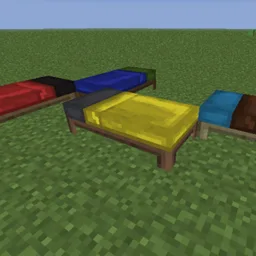
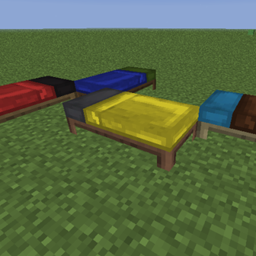
为你的世界添加超过 3000 种不同的床组合(这还只是使用原版木板的情况,如果你在游戏中加入其他模组,数量还会更多!),以及能够连接在其他方块侧面的地毯!
木制床(及框架)
(此前称为彩色床)
那么,关于框架。这是一个新概念。自 1.8 版本以来,我们进行了相当大的改动:木制床被拆分为框架和床上用品。
你问为什么?床上用品允许你将床品染成任何你想要的颜色,而框架可以用任何你想要的方块制作。是的,即使是那些闪闪发光的彩虹色方块(很快就可以——我们正在让彩虹床品变得更有趣)现在也可以使用。
没错,你没看错。请查看下方了解染色机制是如何工作的,但这里有一个简要总结:
- 滴管和染料瓶,用于进行染色操作。
- 一条毯子和一张床单。(床上用品 - 染色以改变床的颜色)
- 一个抽屉物品,可以塞到床下用来存放你的物品。
- 一个框架,用来放置所有这些好东西。
你需要制作一个木制框架来开始(石制框架也是如此),然后右键点击染色的床上用品到床上,即可制作出彩色的床。抽屉的工作原理相同,并且在移除时会保留其物品栏。(这是移动床的好方法。)如果你破坏框架,你会收回这些物品,不用担心。
JEI 中显示的配方使用的是橡木,但实际上那只是一个占位符。框架注册表对可以使用哪些材料制作木制和石制框架拥有最终决定权,这完全取决于你。无论你白名单了哪些方块(使用 "/bedcraftbeyond frames check [type] [x] [y] [z]" 检查游戏中的某个方块是否是某种类型的有效材料),都可以用它来制作。
关于框架注册表(技术细节)
有效的框架类型由 config 文件夹中的一个文件控制,此外还支持完整的 Ore Dictionary(矿物词典)。你可以指定要添加哪些框架,以及要拉黑哪些——是否曾经遇到过因为启用了矿物词典而导致所有东西都乱套的木板?嗯,我们现在已经解决了这个小问题。
此外,服务器管理员只需在世界中查看一个方块并输入框架修改命令,就可以愉快地修改所有内容:
bedcraftbeyond frames [command]
- add [type] [x] [y] [z] [all/meta] - 将给定方块添加到列表中,属于 frameType 类别。(木材、石头等)
- remove [type] [x] [y] [z] [all/meta] - 与上述相同,但从列表中移除它(加入黑名单)。
- check [type] [x, y, z] - 检查给定方块是否在 [type] 的白名单中。如果你想在不制作任何东西的情况下查看方块是否有效,这非常有用!
- list [type] - 输出给定类型的所有有效框架材料的列表。
- save [type] - 将当前白名单保存到 ./config/bedcraftbeyond/frames/{type}.json。在获得你想要的列表后保存很有用。
滴管与染料瓶
滴管是你获取确切所需颜色的便捷方法。你在手中按住 Shift 键右键点击它,就会打开一个 GUI,通过滑动几个滑块(或者如果你喜欢的话输入代码)来设置颜色。一旦获得了你想要的颜色,只需关闭 GUI,它就会同步到服务器。在合成配方中使用滴管(红色、绿色和蓝色染料各一个,一瓶水,中间放滴管),你就可以开始让世界更加丰富多彩了!
地毯:
地毯类似于原版的地毯,它们是一个高度为羊毛方块 1/16 的方块。主要区别在于,地毯会沿着方块的侧面流动,连接到上方相邻方块上的地毯,并且可以在任何可能的方向上覆盖在半砖和楼梯方块上(对于 1.8.9 版本暂时禁用了向上连接到下一个方块的功能,很快将会修复!)。请注意,当它们放置在半砖和楼梯顶部时,它们的边界框会悬浮在上方方块空间内,并且无论颜色如何,它们都会与其他地毯连接。

合成配方:
你也可以使用任何支持矿物词典的染料单独更改地毯的颜色。
已知问题:
有时模组会添加你不想要的东西。你可以通过编辑 config/bedcraftbeyond/frames/whatever.json 下的框架文件来拉黑和白名单某些内容,其中 {whatever} 就是……随便你想叫什么就叫什么。文件名不重要。
请参阅以下文件以获取这些文件的文档:
Add over 3000 different combinations of beds to your world (and that's just with Vanilla Planks, even MORE when you add other mods to your game!), along with rugs that connect up the sides of other blocks!
Wooden Beds (and Frames)
(Previously known as Colored Beds)
So, frames. There's a new concept. We made a pretty major change since 1.8: Wooden beds are split up into frames and linens.
Why, you ask? The linens let you dye your bed fabrics to ANY color you want, and the frames can be made out of any block you want. Yes, even the sparkly rainbow ones (soon, anyway- we're making the rainbow bed fabrics a bit more interesting) can be used now.
Yup, you read that right. Look below on how the dying mechanic works, but here's a summary of what to expect:
- An eyedropper and dye bottles, for dying shenanigans.
- A blanket item and a sheet item. (Linens - dyed to color the beds)
- A drawer item, to tuck under that bed to store your stuff.
- A frame, to put all these nice things on.
You craft a wooden frame to get started (and the stone frames too), and right click the dyed linens onto the bed to make a colored one. The drawer works the same way, too, and holds its inventory when you remove it. (Makes for a nice way to move beds around.) You'll get these items back if you break the frame, don't worry.
The recipes in JEI show oak wood, but in reality, that's a placeholder. The frame registry has final say on what can be used to craft wood and stone frames, and that's completely up to you. Whatever you have white-listed (check with "/bedcraftbeyond frames check [type] [x] [y] [z]" to see if a block in-world is a valid material for a type) is what you can craft with.
About the Frame Registry (Tech Details)
The valid frame types are controlled by a file in the config folder, and in addition, there's full ore dictionary support too. You can specify what frames to add, and what to blacklist-- ever have a wood plank that just messes everything up, since it's ore-dictionary enabled? Yeah. We got rid of that little problem now.
In addition, server operators can happily modify everything in-game, just by looking at a block in world and typing out the frame modification commands:
bedcraftbeyond frames [command]
- add [type] [x] [y] [z] [all/meta] - Add a given block to the list, under frameType. (Wood, stone, etc)
- remove [type] [x] [y] [z] [all/meta] - Same as above, but removes it from the list (blacklists).
- check [type] [x, y, z] - Checks if the given block is whitelisted for [type]. Super handy if you want to see if a block is valid without crafting anything!
- list [type] - Spits out a list with all the valid frame materials for a given type.
- save [type] - Saves the current whitelist to ./config/bedcraftbeyond/frames/{type}.json. Useful for saving your list after getting it exactly the way you want it.
The Eyedropper and Dye Bottles
The eyedropper is your one-stop method to grab exactly the color you're looking for. You shift-click it in your hand and it will open a gui to slide around a few bars (or enter in codes, if that's your style) to set a color. Once you have the color you're looking for, just close the gui and it'll sync to the server. Use the eyedropper in a shaped recipe (a red, green, and blue dye, a water bottle, and the eyedropper in the middle) and you're off to making the world more colorful!
Rugs:
Rugs are like Vanilla carpets, in which they are a block that are 1/16th the height of a Wool block. The main difference being that Rugs will flow over the sides of blocks to connect to Rugs on the next block up, as well as flow over Slabs and Stair blocks in any possible orientation for either block (connecting up to the next block disabled for now for 1.8.9, will be fixed soon!). Please note their bounding box is hovering in the block space above when they are placed on top of half slabs and stairs, and they will connect to other Rugs regardless of color.
Recipe:
You can also change the color of rugs individually with any oredictionary-enabled dye.
Known Issues:
Sometimes mods add stuff that you don't want. You can blacklist and whitelist stuff by editing frame files under config/bedcraftbeyond/frames/whatever.json, where {whatever} is, well. Whatever you want. The filename doesn't matter.
Please see the following files for documentation on these files:
Documentation on Frame File Format
Example Frame File (Vanilla, Biomes O Plenty, and Forestry support)
下载 Bed Craft and Beyond
需要联机服务器吗?
稳定流畅、一键部署,几分钟即可和朋友联机开服
最低仅需 8 元/月 即可畅快联机
下载 Bed Craft and Beyond
需要联机服务器吗?
稳定流畅、一键部署,几分钟即可和朋友联机开服
最低仅需 8 元/月 即可畅快联机
下载 Bed Craft and Beyond
需要联机服务器吗?
稳定流畅、一键部署,几分钟即可和朋友联机开服
最低仅需 8 元/月 即可畅快联机
下载 Bed Craft and Beyond
需要联机服务器吗?
稳定流畅、一键部署,几分钟即可和朋友联机开服
最低仅需 8 元/月 即可畅快联机
下载 Bed Craft and Beyond
需要联机服务器吗?
稳定流畅、一键部署,几分钟即可和朋友联机开服
最低仅需 8 元/月 即可畅快联机
下载 Bed Craft and Beyond
需要联机服务器吗?
稳定流畅、一键部署,几分钟即可和朋友联机开服
最低仅需 8 元/月 即可畅快联机
下载 Bed Craft and Beyond
需要联机服务器吗?
稳定流畅、一键部署,几分钟即可和朋友联机开服
最低仅需 8 元/月 即可畅快联机
下载 Bed Craft and Beyond
需要联机服务器吗?
稳定流畅、一键部署,几分钟即可和朋友联机开服
最低仅需 8 元/月 即可畅快联机
下载 Bed Craft and Beyond
需要联机服务器吗?
稳定流畅、一键部署,几分钟即可和朋友联机开服
最低仅需 8 元/月 即可畅快联机
下载 Bed Craft and Beyond
需要联机服务器吗?
稳定流畅、一键部署,几分钟即可和朋友联机开服
最低仅需 8 元/月 即可畅快联机
显然我在制作 1.9 相关内容之前忘了上传这个。
已修复:当 TESR(临时实体渲染器)渲染其认为的空气方块时,床不会发生异常。 这将修复诸如破坏方块导致游戏崩溃、死亡并在重生时因相同错误导致游戏崩溃等问题。
已修复:GUI 使用语言文件作为标题。
新增:手提箱!本质上是一个带有精美 3D 模型的物品箱子/储物袋
新增:开发中的彩虹床
关于这个资源的讨论、问题反馈与使用心得
还没有讨论,来发第一帖吧
你是这个资源的作者?登录后可认领此资源。
相似资源
 模组

可定制的鞘翅模组,支持装饰纹饰、旗帜图案等更多功能!
 模组
AE2:一款流行的自动化与存储模组
 模组

适用于 MC 1.18+ 的 Effekseer 加载器
 模组

新增 50+ 个独特生物群系,为你的世界增添新树木、花卉等更多元素!
 模组

基于 GTCEu 1.12.2 的现代 GregTech
 模组

添加睡袋和吊床,分别用于便携性和昼夜转换,同时不会设置新的出生点。共有16种颜色可选!
评论 0
登录后参与评分
还没有评论,来抢沙发吧