

Better Player Model
Better Player Model 是一款强大的 Fabric 模组,专为动画自定义玩家模型设计,具备高性能渲染、本地浏览以及无缝的多玩家同步功能。
主要特性
- 通用模型支持: 轻松加载任何
.ysm或 Blockbench.json模型。 - 基岩级动画: 完整支持 MoLang,实现流畅、复杂且可脚本化的动画效果。
- 游戏内浏览器: 直接在菜单中管理你的模型、分类和纹理。
- 无缝同步: 作为客户端模组运行,但在服务端也安装该模组时,可实现完整的多玩家同步。
多人游戏
- 仅客户端: 在任何服务器上,你仍然可以看到自己的模型并浏览你的资源库。
- 完全同步: 当服务器也运行该模组或插件时,所有玩家都能看到你的自定义动画和模型!
兼容性与设置
- 格式: 支持
.json(Blockbench) 和.ysm(加密)。 - 位置: 将你的模型放置在
config/better_player_model/custom目录中。 - 性能: 完全兼容 Sodium、Iris 以及其他优化模组。
依赖项
在哪里找到模型?
寻找高质量的玩家模型?你可以从 Yes-steve-model 社区存储库中浏览并下载数百个由社区制作的模型: 在此处下载模型
对于服务器管理员
你可以在 Versions 标签页下方找到我们官方的 Paper/Purpur 插件,无需服务端模组即可同步模型!
演示
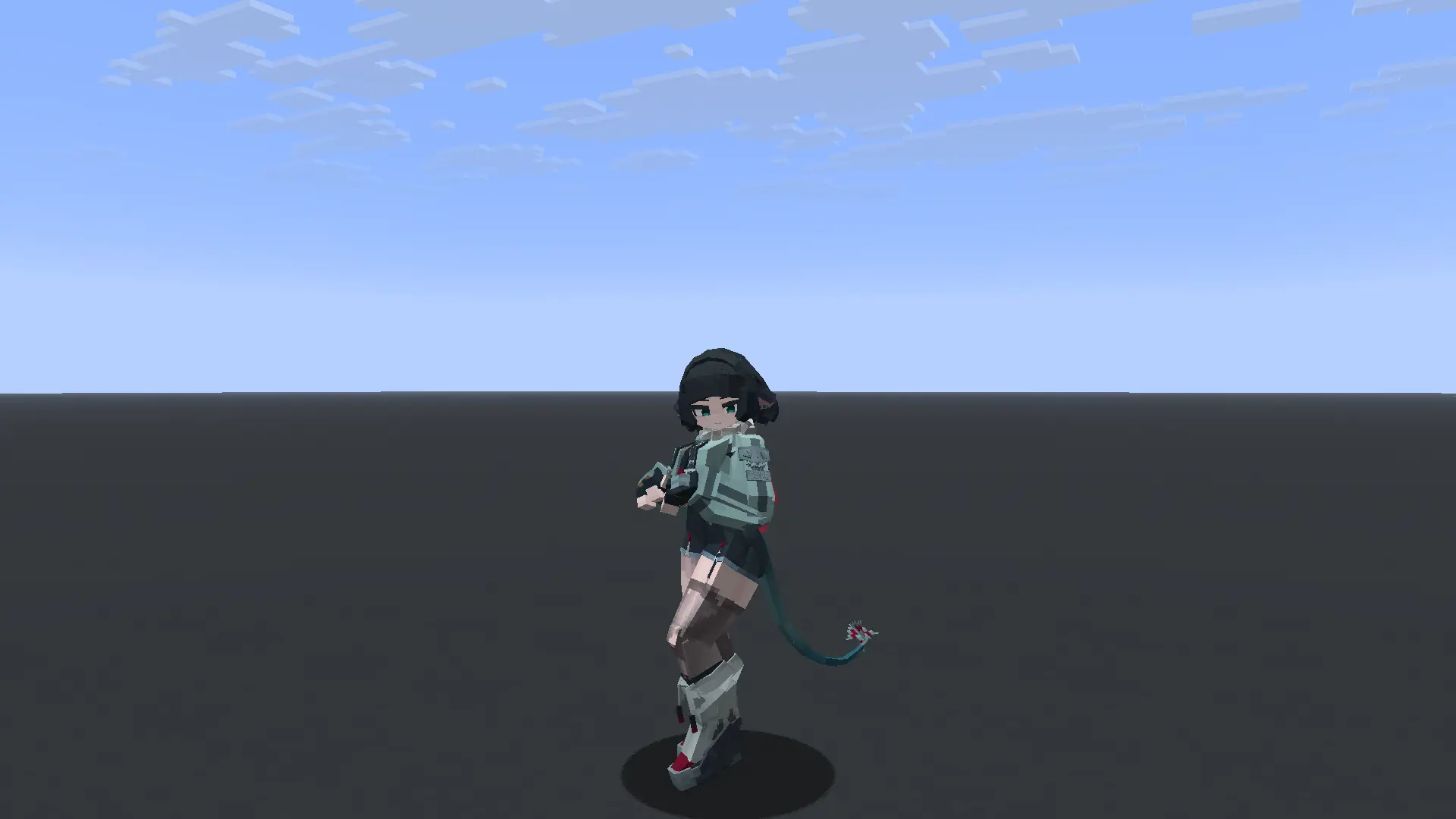
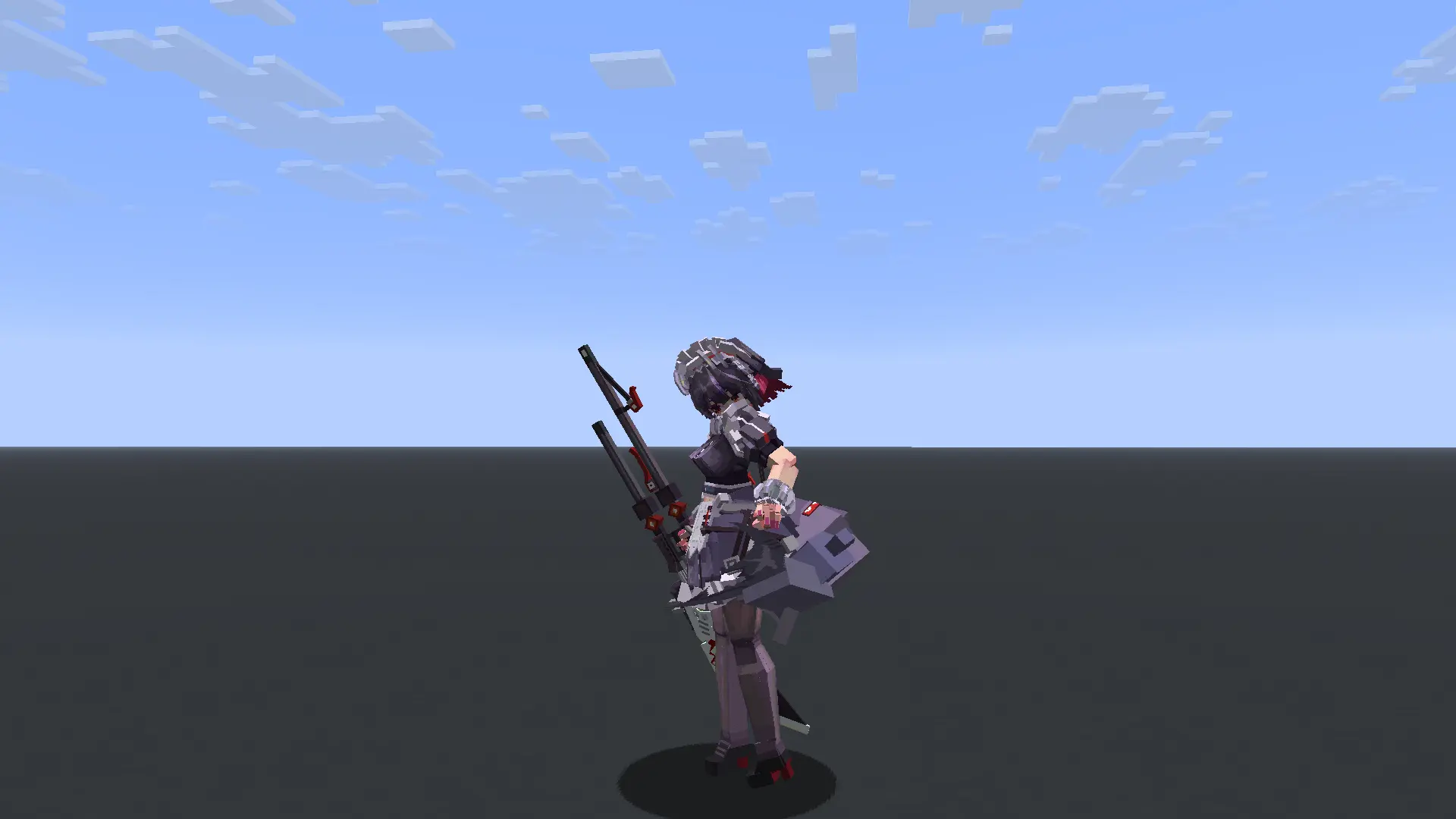
联系方式
访问我们的官方 Discord 服务器以获取模组资讯。抢先预览即将到来的更新、建议新功能、报告错误,并与开发者和社区交流。
致谢
本项目建立在以下团队和个人令人难以置信的工作基础之上:
- OpenYSM & YSMParser (模型解析管道)
- Fox-model-loader by Micaftic (基础架构)
- Yes Steve Model by Elfmcys (原始概念)
网络故障排除指南:模型同步超时与断连
如果拥有较慢或不稳定互联网连接(如 Wi-Fi、移动数据或 Starlink 等卫星链路)的玩家在加入服务器或进行模型同步时持续断开连接,本指南解释了如何修复此问题。
为什么会发生这种情况?
- 带宽饱和(Bufferbloat): 当玩家加入时,服务器会传输缺失的自定义玩家模型。如果服务器尝试推送数据的速度超过玩家连接的下载速度,玩家路由器或操作系统的网络缓冲区将会溢出。
- 延迟的 Ping/保活数据包:
由于连接饱和,关键的游戏数据包(如验证玩家是否仍在线的 Minecraft
KeepAlive数据包)会被排在模型文件之后排队。如果客户端无法在 15–30 秒内响应这些数据包,服务器就会判定超时并将其踢出。 - 大型模型文件: 如果你的服务器托管了许多模型,或者某些模型特别大(例如每个几兆字节),初始下载大小可能会很大(数兆到数十兆字节),从而延长关键的同步窗口。
解决方案 1:在服务端配置带宽限制(推荐)
版本 1.0.6 引入了每玩家带宽限制器,以防止连接饱和。你可以限制模型分块发送的速度。
- 打开服务器的配置目录:
config/better_player_model-server.toml。 - 找到
[server_scheduler]类别并配置限制:
将[server_scheduler] # 跨所有活跃玩家分发模型的全局带宽限制(单位为 Mbps) # 默认值:100 BandwidthLimit = 25 # 单个玩家的带宽限制(单位为 Mbps) # 这可以防止慢速连接被淹没。 # 默认值:5(推荐:3 到 10) PlayerBandwidthLimit = 5PlayerBandwidthLimit设置为 5 Mbps(约 625 KB/s)可以让模型平稳下载而不会使链路饱和,为游戏和 KeepAlive 流量留出充足空间。
解决方案 2:增加网络连接超时时间
默认情况下,如果 Minecraft 在 30 秒内未收到网络响应,它会踢出玩家。你可以将此读取超时时间增加到 120 秒。
对于专用服务器:
在你的服务器启动脚本或命令行中添加以下 Java 系统属性:
-Dnet.minecraft.network.readTimeout=120
对于客户端(在 Prism Launcher 或其他启动器选项中):
- 打开 Minecraft 实例的启动器设置。
- 在 Java -> Java Arguments 下,添加:
-Dnet.minecraft.network.readTimeout=120
解决方案 3:使用扩展超时的模组
或者,你可以安装以下任一服务端和客户端模组来自动处理超时问题:
- Connectivity
- Timeouts
内置模型与资产致谢
本模组默认内置了 “Wine Fox” (酒狐) 模型,以提供开箱即用的高质量体验。
- 模型名称: Wine Fox (酒狐)
- 许可证: CC BY-NC-SA 4.0
- 原作者:
- 完美冻结 (模型与核心)
- 星屑海螺 (动画)
- 哥斯拉 / 映素团队 (修改)
- 白帆小喵, 蓝玫瑰, 墨染逝羽, Maks怜悯, 浅陌菌, 祸御神, 羊毛 (纹理、UI、音效及特定添加内容)
非常感谢这些创作者为模型做出的卓越贡献!如果您希望将此模型用于其他用途,请务必遵守原始的 CC BY-NC-SA 4.0 许可协议。
许可证
本作品基于 MIT 许可协议授权。所有原始许可协议和版权声明均予以保留。 MIT 许可证
Better Player Model
Better Player Model is a powerful Fabric mod designed for animated custom player models, featuring high-performance rendering, local browsing, and seamless multiplayer synchronization.
Key Features
- Universal Model Support: Load any
.ysmor Blockbench.jsonmodels with ease. - Bedrock-Grade Animations: Full MoLang support for fluid, complex, and scripted animations.
- In-Game Browser: Manage your models, categories, and textures directly from the menu.
- Seamless Sync: Works as a client-side mod, but offers full multiplayer synchronization when installed on the server.
Multiplayer
- Client-only: You can still see your own models and browse your library on any server.
- Full Sync: When the server also runs the mod or plugin, every player will see your custom animations and models!
Compatibility & Setup
- Format: Supports
.json(Blockbench) and.ysm(Encrypted). - Location: Place your models in
config/better_player_model/custom. - Performance: Fully compatible with Sodium, Iris, and other optimization mods.
Dependencies
Where to find models?
Looking for high-quality player models? You can browse and download hundreds of community-made models from the Yes-steve-model community repository: Download Models Here
For Server Admins
You can find our official Paper/Purpur plugin to sync models without server-side mods right under the Versions tab!
Demonstration
Contacts
Visit our Official Discord Server for the mod. Get sneak peeks of upcoming updates, suggest new features, report bugs, and chat with the developer and the community.
Credits
This project is built upon the incredible work of the following teams and individuals:
- OpenYSM & YSMParser (Model parsing pipeline)
- Fox-model-loader by Micaftic (Base architecture)
- Yes Steve Model by Elfmcys (Original concepts)
Network Troubleshooting Guide: Model Sync Timeouts and Disconnections
If players with slower or unstable internet connections (such as Wi-Fi, mobile data, or satellite links like Starlink) are consistently disconnected while joining your server or during model synchronization, this guide explains how to fix the issue.
Why Is This Happening?
- Bandwidth Saturation (Bufferbloat): When a player joins, the server transfers missing custom player models. If the server tries to push this data faster than the player's connection can download it, the network buffers on the player's router or operating system overflow.
- Delayed Ping/Keep-Alive Packets:
Because the connection is saturated, critical game packets (like Minecraft's
KeepAlivepackets which verify the player is still connected) are queued behind the model files. If the client cannot respond to these packets within 15–30 seconds, the server times them out and kicks them. - Large Model Files: If your server hosts many models, or if some models are particularly large (e.g., several megabytes each), the initial download size might be substantial (tens of megabytes), lengthening the critical sync window.
Solution 1: Configure Bandwidth Limits on the Server (Recommended)
Version 1.0.6 introduces a per-player bandwidth limiter to prevent connection saturation. You can restrict the speed at which model chunks are sent.
- Open your server's config directory:
config/better_player_model-server.toml. - Locate the
[server_scheduler]category and configure the limits:
Setting[server_scheduler] # Global bandwidth limit for model distribution across all active players (in Mbps) # Default: 100 BandwidthLimit = 25 # Bandwidth limit per individual player (in Mbps) # This prevents slow connections from getting overwhelmed. # Default: 5 (Recommended: 3 to 10) PlayerBandwidthLimit = 5PlayerBandwidthLimitto 5 Mbps (~625 KB/s) allows models to download steadily without saturating the link, leaving plenty of room for gameplay and Keep-Alive traffic.
Solution 2: Increase Network Connection Timeouts
By default, Minecraft kicks a player if it doesn't receive network responses within 30 seconds. You can increase this read timeout to 120 seconds.
For Dedicated Servers:
Add the following Java system property to your server's startup script or command line:
-Dnet.minecraft.network.readTimeout=120
For Clients (in Prism Launcher or other launch options):
- Open your launcher's settings for the Minecraft instance.
- Under Java -> Java Arguments, add:
-Dnet.minecraft.network.readTimeout=120
Solution 3: Use Timeout-Extension Mods
Alternatively, you can install one of the following server-side and client-side mods to handle timeouts automatically:
- Connectivity
- Timeouts
Built-in Models & Assets Credits
This mod includes the "Wine Fox" (酒狐) model built-in by default to provide a high-quality out-of-the-box experience.
- Model Name: Wine Fox (酒狐)
- License: CC BY-NC-SA 4.0
- Original Authors:
- 完美冻结 (Model & Core)
- 星屑海螺 (Animations)
- 哥斯拉 / 映素团队 (Modifications)
- 白帆小喵, 蓝玫瑰, 墨染逝羽, Maks怜悯, 浅陌菌, 祸御神, 羊毛 (Textures, UI, Sound, and specific additions)
Huge thanks to these creators for their incredible work on the model! If you wish to use this model elsewhere, please ensure you respect the original CC BY-NC-SA 4.0 license.
License
Licensed under MIT. All original licenses and copyright notices are preserved. MIT License

下载 Better Player Model
下载 Better Player Model
下载 Better Player Model
下载 Better Player Model
下载 Better Player Model
下载 Better Player Model
下载 Better Player Model
下载 Better Player Model
下载 Better Player Model
需要联机服务器吗?
稳定流畅、一键部署,几分钟即可和朋友联机开服
最低仅需 8 元/月 即可畅快联机
下载 Better Player Model
修复: 如果玩家选择除默认 Minecraft 模型之外的任何模型,然后离开并重新加入服务器或世界,他的角色会完全消失。
动画出现错误,并且在多个自定义模型之间切换后选择默认 Minecraft 模型的问题中,离开并重新加入服务器或世界会导致所有玩家的模型重置为默认 Minecraft 模型。
这些问题仅存在于 26.2 版本中。
更新日志
1.0.3
- 通过规范化模型 ID 并在目录扫描期间忽略重复条目,稳定了服务器模型目录。
- 重新加载现在会原子性地替换目录,并在扫描完成后重新同步在线玩家。
- 改进了模型上传验证、重复 ID 拒绝机制,以及清理不完整或超时的上传会话。
- 在目录交付、模型传输、重连和模型选择更改后,增加了有界的模型状态重新同步。
- 验证请求的纹理 ID,当客户端请求不可用的纹理时,回退到有效的模型纹理。
- 提高了与 YSM 存档和原始 format-32 m
关于这个资源的讨论、问题反馈与使用心得
还没有讨论,来发第一帖吧
你是这个资源的作者?登录后可认领此资源。
相似资源
 模组

一个用于收集生物掉落物的多区块模组。
 模组

可定制的鞘翅模组,支持装饰纹饰、旗帜图案等更多功能!
 模组

显示你正在注视的方块的信息。(适用于 Minecraft 1.16+ 的 Hwyla/Waila 分支)
 模组

查看物品与配方
 模组
在游戏画面角落显示附近世界地形、玩家、生物和实体的地图。可创建路径点,帮助你找到标记过的位置。
 模组
使用 JavaScript 编辑配方、添加自定义物品、编写世界事件!
评论 0
登录后参与评分
还没有评论,来抢沙发吧